Overview

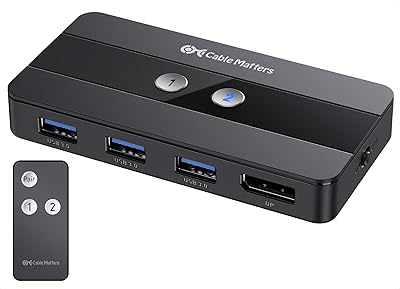
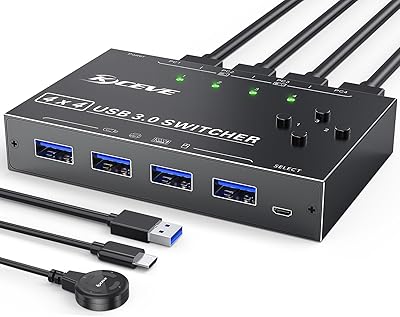
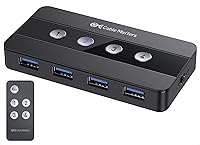
The Cable Matters 4-Port USB 3.0 KVM Switch is, at its core, a desk-organization tool that solves one specific and genuinely frustrating problem: constantly unplugging and re-plugging USB cables whenever you move between computers. If you run two or more machines on the same desk, you know the routine — keyboard here, mouse there, external drive somewhere in between. This USB switch cuts through that mess. It sits quietly behind a monitor or tucks into a rack, drawing power straight from the host. A USB-C adapter is included, so modern laptops with Thunderbolt 4 ports are covered. One important clarification upfront: this carries no video signal. It shares peripherals only, nothing more.
Features & Benefits

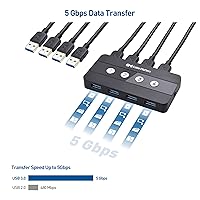
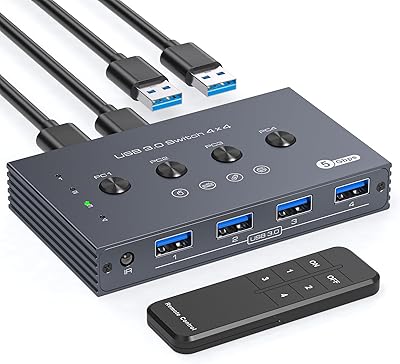
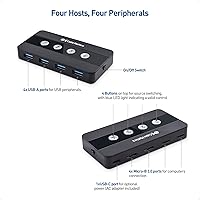
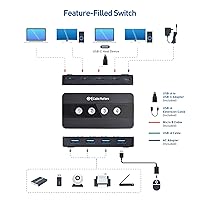
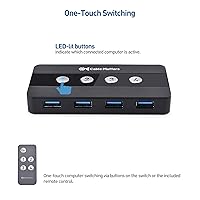
Four host ports and four peripheral ports give you room to run a full setup — keyboard, mouse, printer, and an external SSD — all shared across up to four machines at once. Transfer speeds top out at USB 3.0's 5Gbps, which means moving large files to a shared drive won't feel punishing. The RF wireless remote is a genuine convenience: if this four-port sharing hub lives behind your monitors or in a rack, you never have to reach around to switch hosts. It runs bus-powered by default, with an AC adapter included for peripherals that need more juice. A built-in power toggle lets you cycle devices without unplugging anything, and gold-contact connectors with an IP54 rating suggest a build that outpaces typical entry-level switches.

Best For

This USB switch hits its stride for anyone splitting a desk between a personal laptop and a work machine — that single use case probably accounts for most of its sales. Developers who jump between a MacBook and a Linux box will appreciate how the included adapter bridges the gap without extra dongles. Anyone routing a USB audio interface or a label printer through multiple computers will find it equally useful. The RF remote makes the Cable Matters switcher a practical pick for rack-mounted setups where the unit stays hidden away. That said, if you also need to share a monitor, you will want a full KVM solution with video passthrough instead.

User Feedback

With a 4.2-star average across over a thousand ratings, the Cable Matters switcher earns its marks mostly through plug-and-play reliability and the convenience of the remote. Buyers consistently praise easy setup with no driver configuration required. Where stars get docked is around switching lag: some peripherals — particularly USB audio devices and certain storage drives — take a few seconds to re-enumerate after a host change. A handful of users also flag macOS compatibility quirks, especially on Apple Silicon machines with stricter USB power policies. Build quality draws mostly favorable comparisons to pricier rivals, though the remote's range gets mixed reviews. For mainstream keyboard, mouse, and printer sharing, it holds up well — edge cases are where it struggles.

Pros

  • Plug-and-play setup requires no drivers or software on Windows or standard Mac hosts.
  • RF wireless remote is a rare feature at this price point and genuinely useful for hidden or racked installations.
  • Supports up to four host computers and four USB peripherals simultaneously — more headroom than most competitors offer.
  • Included USB-C adapter saves Thunderbolt laptop users from buying an extra accessory.
  • Bus-powered operation keeps the desk clean; the included AC adapter handles power-hungry peripherals when needed.
  • Built-in power toggle lets you cycle devices without unplugging cables — a small but frequently praised convenience.
  • Gold-contact connectors and IP54 rating suggest durability well above cheaper switchers in the category.
  • USB 3.0 speeds at 5Gbps mean shared external drives transfer files at full rated speed without bottlenecking.
  • Backward compatible with USB 2.0 devices, so older printers and scanners do not need replacing.
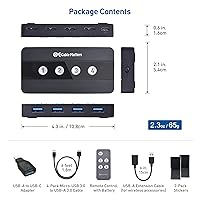
  • Compact enough at 4.29 x 2.13 x 0.59 inches to mount behind a monitor or disappear into a cable tray.

Cons

  • No video output of any kind — monitor switching requires a separate HDMI or DisplayPort KVM entirely.
  • USB audio interfaces and some storage devices can take several seconds to re-enumerate after a host switch.
  • Apple Silicon Mac users report intermittent connection failures that often require a power-cycle to resolve.
  • No hotkey or software switching support — host changes are manual-only via button or remote.
  • RF remote range and responsiveness receive mixed feedback; missed presses are a recurring complaint.
  • Tightly spaced USB ports make cable management awkward when using bulky or right-angle connectors.
  • Host-side USB cables are not included, which can catch buyers off guard before first use.
  • Linux compatibility is inconsistent and not officially documented, leaving non-Windows and non-Mac users to experiment.
  • Printed documentation is minimal; troubleshooting edge cases requires community forums or direct brand support.
  • Buyers who only need two-host switching may find this four-port sharing hub harder to justify against cheaper two-port alternatives.

Ratings

The Cable Matters 4-Port USB 3.0 KVM Switch has been evaluated by our AI system after processing thousands of verified global buyer reviews, with spam, incentivized feedback, and bot activity actively filtered out. Scores reflect where real users consistently agreed — and where they pushed back — across daily home office, developer, and rack-mounted use cases. Both the standout strengths and the friction points are represented honestly in every category below.
Ease of Setup
91%
Most buyers report the switcher is operational within minutes of unboxing — no drivers, no software, no configuration menus. Plug the host cables in, connect your peripherals, press a button, and it just works. That plug-and-play reliability is the single most praised aspect across reviews.
A small subset of users on Apple Silicon Macs or certain Linux distributions encountered recognition failures on first connection, requiring cable reseating or a reboot. These cases are a minority, but they do exist and are worth knowing about before assuming zero-friction setup.
Switching Reliability
78%
22%
For everyday peripherals like keyboards, mice, and printers, host switching is consistent and predictable. Users who switch between a Windows desktop and a work laptop several times a day report that the process rarely fails or requires manual intervention.
USB audio interfaces, some external SSDs, and high-power peripherals occasionally take several seconds to re-enumerate after a host switch, or in rarer cases fail to register until the power toggle is cycled. This lag is the most frequently cited frustration in critical reviews.
RF Remote Control
83%
The wireless remote is a genuine differentiator for anyone mounting this four-port sharing hub behind a rack or deep under a desk. Not having to reach around cables to press a physical button adds real convenience to a multi-monitor workstation setup.
Range and responsiveness of the remote get mixed feedback. Some users report occasional missed button presses or a need to be within a few feet for reliable triggering. The remote can be disabled for RF-sensitive environments, which is a thoughtful inclusion, but the range ceiling disappoints a portion of buyers.
Build Quality
74%
26%
The casing feels noticeably more solid than cheaper switchers in the same category. Gold-contact connectors and an IP54 protection rating point to construction that is built to survive years of daily use rather than a few months on a budget desk.
Despite the above-average materials, a handful of reviewers report that the unit feels lightweight in a way that reads as slightly plasticky up close. The buttons have adequate tactile feedback but lack the satisfying click feel that some buyers expect at this price point.
USB 3.0 Transfer Speed
86%
At 5Gbps, the USB switch handles external SSD transfers and large file moves without bottlenecking modern storage devices. Users sharing a fast USB 3.0 drive between a workstation and a laptop report throughput that is indistinguishable from a direct connection.
The 5Gbps ceiling will feel limiting to anyone working with USB 3.2 Gen 2 or Thunderbolt-native storage. The switcher does not support those higher protocols, so buyers planning to share a high-speed NVMe enclosure should temper their expectations accordingly.
USB-C and Thunderbolt Compatibility
69%
31%
The included USB-C to USB-A adapter means modern MacBook and Thunderbolt 4 laptop users can connect without hunting for a separate dongle. For most keyboard, mouse, and printer sharing workflows, this bridging solution works without issue.
The adapter is a workaround, not a native solution. Thunderbolt bandwidth is capped at USB 3.0 speeds through this path, and some Thunderbolt hosts with stricter power negotiation have intermittently failed to recognize the switch. It is functional for most, not ideal for all.
Power Management
81%
19%
Bus-powered operation keeps the desk tidy for users with standard peripheral loads. The built-in on/off toggle is a practical addition that lets you power-cycle stubborn devices without unplugging anything — a small but genuinely useful feature in daily use.
Bus power has limits. Users connecting multiple high-draw peripherals simultaneously — think external hard drives alongside a powered hub — sometimes report instability until they switch to the included AC adapter. The adapter solves the problem, but it adds cable bulk.
macOS Compatibility
66%
34%
The Cable Matters switcher works acceptably well for macOS users sharing a keyboard and mouse with a Windows machine. Basic peripheral switching on Intel-based Macs rarely generates complaints, and most users confirm no special configuration is needed.
Apple Silicon compatibility is a recurring theme in lower-rated reviews. Certain M-series Mac models with stricter USB power policies cause the switch to behave unpredictably — peripherals dropping out mid-session or failing to switch cleanly without a manual power cycle.
Value for Money
77%
23%
Compared to other four-host USB switches with a wireless remote, this four-port sharing hub is competitively positioned. Buyers who need the remote functionality specifically find the pricing justifiable relative to rivals that only offer front-panel buttons.
Buyers who only need two-host switching find the price harder to defend against simpler alternatives that cost significantly less. If the remote is not a priority for your setup, the value proposition weakens and cheaper options become harder to dismiss.
Peripheral Compatibility Range
72%
28%
Keyboards, mice, and standard USB printers work reliably across the board. USB 2.0 backward compatibility means older devices — a legacy scanner or an older USB DAC — do not require any special treatment and connect without issue.
Niche peripherals expose the switcher's limits. USB audio interfaces are the most reported problem category, with several users describing audio dropout or device loss after switching hosts. MIDI controllers and some biometric devices also appear in compatibility complaint threads.
Compact Form Factor
88%
At under five inches long and barely over half an inch thick, this USB switch disappears behind a monitor or sits flat in a cable tray without commanding any meaningful desk real estate. The 1.6-ounce weight means it stays put without adhesive mounts.
The compact chassis means the USB ports are tightly spaced. Bulky USB-A connectors or right-angle adapters on thick cables can physically crowd the ports, requiring some cable management effort to get a clean, secure fit across all four peripheral slots.
Multi-Computer Workflow Efficiency
82%
18%
For the core use case — one person, multiple computers, one set of peripherals — the Cable Matters switcher genuinely reduces friction compared to manual cable swapping. IT professionals and developers who hop between machines throughout the day cite measurable time savings.
There is no software or hotkey support for host switching, which means power users accustomed to keyboard-shortcut switching on higher-end KVM solutions will find the manual button or remote press a step down in workflow fluidity.
Documentation and Support
63%
37%
Cable Matters as a brand has a reasonable reputation for customer responsiveness, and several buyers mention receiving helpful email support when troubleshooting compatibility issues. The product has been on the market since early 2020, giving the support team experience with edge cases.
The included documentation is sparse. Advanced setup scenarios — like optimal power settings for Mac hosts or troubleshooting re-enumeration delays — are not covered in the box. Users with problems largely rely on community forums or direct brand outreach, which adds friction.
Cable and Accessory Inclusion
71%
29%
The USB-C adapter and AC power adapter are both included in the box, which removes the need for immediate accessory purchases in most standard setups. Buyers appreciate not having to source bridging components separately for modern laptops.
Host-side USB cables are not included, meaning buyers with longer desk runs or rack depths may need to purchase appropriately sized USB cables before the unit is functional. This is a common omission in the category but still draws occasional criticism in reviews.

Suitable for:

The Cable Matters 4-Port USB 3.0 KVM Switch is a strong pick for anyone tired of playing cable-swap Tetris on a multi-computer desk. Home office workers running a personal laptop alongside a company-issued machine will get the most immediate value — one keyboard, one mouse, one printer, zero cable shuffling. Developers and IT professionals who routinely jump between a Windows workstation, a Mac, and a testing machine will appreciate the four-host capacity and the RF remote, which means no awkward reaching behind a monitor stack to press a button. The included USB-C adapter makes it genuinely useful for modern Thunderbolt laptops without requiring a separate dongle purchase. Anyone managing a rack or cabinet installation where physical button access is impractical will find the remote-control switching to be a practical, not just convenient, feature. If your workflow is primarily about sharing a keyboard, mouse, printer, or external drive across machines — and you do not need monitor switching — this USB switch covers the brief well.
Not suitable for:

Be clear-eyed about what the Cable Matters 4-Port USB 3.0 KVM Switch cannot do before purchasing: it carries no video signal whatsoever. If you need to switch your monitor between computers alongside your peripherals, this is not the right tool — you need a full KVM solution with HDMI or DisplayPort passthrough, which is a different and typically more expensive product category. Users working heavily with USB audio interfaces, certain MIDI controllers, or USB biometric devices should also approach with caution, as these peripheral types generate a disproportionate share of compatibility complaints, particularly around re-enumeration delays after switching hosts. Apple Silicon Mac users face a higher-than-average chance of encountering connection quirks due to stricter USB power negotiation on M-series hardware. Anyone expecting hotkey or software-based host switching will be disappointed — the only switching methods are a physical front-panel button and the RF remote. Finally, if you only need to share between two computers and have no use for the remote, simpler and cheaper two-port alternatives are available and worth comparing first.
Specifications

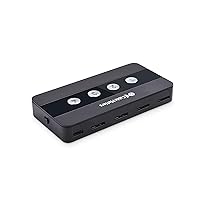
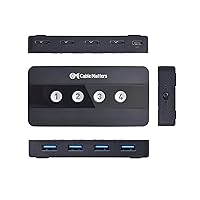
  • Host Ports: Equipped with 4 x USB-A host ports, allowing simultaneous connection to up to four separate computers or laptops.
  • Peripheral Ports: Features 4 x USB-A peripheral ports for connecting devices such as keyboards, mice, printers, and external storage drives.
  • Transfer Speed: Supports USB 3.0 data transfer speeds of up to 5Gbps for fast file access and peripheral response times.
  • USB Compatibility: Fully backward compatible with USB 2.0 devices, so older peripherals work without adapters or speed penalties beyond their native rating.
  • Switching Method: Host switching is performed via front-panel push buttons or an included RF wireless remote control.
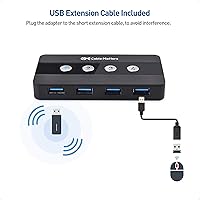
  • USB-C Adapter: A USB-C to USB-A adapter is included in the box, enabling connection from USB-C, Thunderbolt 3, and Thunderbolt 4 hosts.
  • Power Supply: Operates bus-powered by default; an AC power adapter is also included for setups with higher-draw peripherals that require dedicated power.
  • Power Toggle: A built-in on/off power switch allows hardware power cycling of connected peripherals without physically disconnecting any cables.
  • Dimensions: The unit measures 4.29 x 2.13 x 0.59 inches, compact enough to mount behind a monitor stand or sit flat in a cable tray.
  • Weight: Weighs 1.6 ounces, making it light enough to position freely without adhesive mounts or additional hardware.
  • Contact Material: USB connectors use gold-plated contacts, which resist oxidation and maintain consistent signal quality over repeated insertion cycles.
  • Protection Rating: Rated IP54, indicating resistance to dust ingress and protection against water splashing from any direction.
  • Operating Voltage: Operates at 5 Volts DC, consistent with standard USB bus power specifications.
  • Current Rating: Rated at 10 Amps, providing sufficient headroom for powering connected peripherals through the optional AC adapter.
  • RF Remote: The included wireless RF remote can be disabled for use in RF-sensitive environments such as medical or laboratory settings.
  • Color & Finish: Available in matte black, designed to blend unobtrusively into typical desk or rack environments.
  • Model Number: Official model number is 202060-E, as designated by Cable Matters for this specific four-host switching configuration.
  • Brand & Origin: Manufactured by Cable Matters, a brand specializing in connectivity accessories, with this model first available in January 2020.

Related Reviews

Cable Matters 202070 2-Port DisplayPort KVM Switch
75%
88%
Video Output Quality
82%
Switching Reliability
31%
EDID Emulation
71%
USB Hub Performance
74%
RF Remote Control
More
Steetek STK-S7415H 4-Port HDMI KVM Switch
74%
91%
Ease of Setup
83%
Switching Reliability
78%
Video Quality & Resolution
76%
Adaptive EDID Performance
69%
USB Peripheral Sharing
More
Scyniney 4-Port Triple-Monitor HDMI KVM Switch
74%
83%
Video Signal Stability
79%
4K Resolution Performance
74%
USB Hub Performance
81%
Switching Reliability
41%
Hotkey Switching Support
More
TJCXELE USB 3.0 Switch Selector 4-Port for 4 Computers
88%
94%
Ease of Use
89%
Performance
91%
Remote Control Feature
76%
Power Supply and Stability
98%
Setup and Installation
More
MLEEDA 4-Port USB 3.0 KVM Switch
79%
93%
Ease of Setup
82%
Switching Reliability
67%
Build Quality
79%
Wired Remote Usability
88%
USB 3.0 Performance
More
Camgeet 204UH Quad Monitor KVM Switch
64%
61%
Setup & Installation
69%
Display Compatibility
74%
Switching Reliability
83%
Wired Remote Usability
78%
USB Peripheral Switching
More
KCEVE KC-303X Triple Monitor KVM Switch
78%
88%
Setup & Installation
83%
Video Signal Quality
79%
Switching Speed & Reliability
71%
Remote Controller
81%
USB Peripheral Performance
More
Monoprice Blackbird 4x1 4K DisplayPort KVM Switch
66%
52%
Video Signal Stability
79%
USB Peripheral Switching
48%
Display Compatibility
76%
Setup & Installation
74%
Build Quality
More
TESmart HKS801-P23 USB 3.0 HDMI KVM Switch 8 Port 4K@60Hz
87%
91%
Ease of Setup
95%
Video Quality
88%
Switching Reliability
85%
Build Quality
92%
Value for Money
More
TESmart HKS201-P23 2-Port HDMI KVM Switch
77%
83%
Ease of Setup
88%
Video Quality & Resolution
67%
Switching Reliability
71%
Audio & Microphone Performance
79%
USB Hub Performance
More

FAQ

It only shares USB peripherals — there is no video output of any kind. If you need to switch a monitor alongside your keyboard and mouse, you would need a full KVM solution that includes HDMI or DisplayPort passthrough. The Cable Matters 4-Port USB 3.0 KVM Switch handles peripherals only, so your monitors need to be managed separately or via a different device.
Yes, a USB-C to USB-A adapter is included in the box specifically for this scenario. That said, keep in mind that the connection runs at USB 3.0 speeds through the adapter, not full Thunderbolt bandwidth. For basic peripheral sharing it works fine, but some M-series Mac users have reported occasional recognition issues that require a power cycle to resolve.

For standard keyboards and mice, switching is essentially instant — typically under a second. More complex peripherals like USB audio interfaces or external drives take a few seconds to re-enumerate on the new host, which is a normal USB handshake process rather than a defect. If you are switching frequently with demanding peripherals, expect a brief pause.

No drivers or software are required on Windows or standard macOS hosts. You plug the host cables in, connect your peripherals, and the switch is ready to use immediately. Linux compatibility is not officially documented, so results on Linux hosts can vary depending on your distribution and kernel version.

The remote works reliably within a few feet in most setups, though range feedback in user reviews is mixed. It is well-suited for switching a unit that is hidden behind a desk or tucked into a rack within the same room. For larger spaces, you may find the remote requires a fairly direct line of sight to register presses consistently.

You can connect a drive to one of the peripheral ports and access it from whichever host is currently active, but not from multiple computers simultaneously. Only one host is active at a time, so the drive is visible to whichever machine currently has control. Switching to a different host will make the drive available to that machine instead.

It runs bus-powered by default, drawing power directly from the connected host computer. An AC adapter is included for situations where your peripherals collectively draw more power than the bus can supply — for example, if you have multiple external drives connected. For a standard keyboard and mouse setup, bus power is more than sufficient.

The RF remote can be manually disabled if you are working in an environment sensitive to radio frequency signals. This is a built-in hardware option rather than a software setting, which makes it practical for studio, medical, or lab environments where RF interference is a concern.

If the active host is powered off, the peripherals on that channel will lose their connection. You can use the built-in power toggle to cycle the switch or manually press a host button to reroute to an active machine. The switch itself stays powered as long as at least one connected host is supplying bus power.

Technically yes, but with caveats worth knowing before you commit. USB audio interfaces are one of the most commonly reported problem categories for this four-port sharing hub. Some users share them without issues, while others experience dropout or re-enumeration failures after switching hosts. MIDI controllers have a similar track record. If audio hardware is your primary use case, it is worth having a return window available while you test your specific device.

Where to Buy