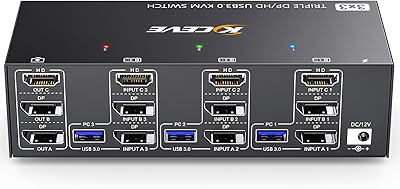
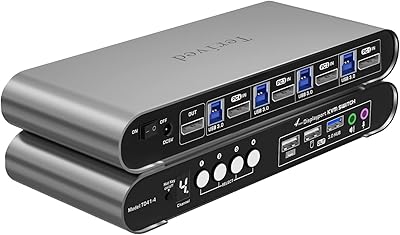
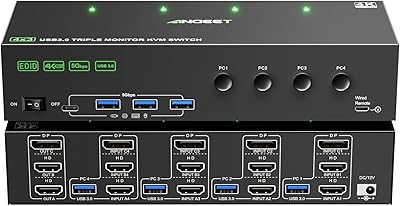
TJCXELE 4K 144Hz HDMI + DisplayPort KVM Switch for 4 Computers, 3 Monitors
TJCXELE 4K 144Hz HDMI + DisplayPort KVM Switch for 4 Computers, 3 Monitors — image 1
TJCXELE 4K 144Hz HDMI + DisplayPort KVM Switch for 4 Computers, 3 Monitors — image 2
TJCXELE 4K 144Hz HDMI + DisplayPort KVM Switch for 4 Computers, 3 Monitors — image 3
TJCXELE 4K 144Hz HDMI + DisplayPort KVM Switch for 4 Computers, 3 Monitors — image 4
TJCXELE 4K 144Hz HDMI + DisplayPort KVM Switch for 4 Computers, 3 Monitors — image 5
TJCXELE 4K 144Hz HDMI + DisplayPort KVM Switch for 4 Computers, 3 Monitors — image 6
TJCXELE 4K 144Hz HDMI + DisplayPort KVM Switch for 4 Computers, 3 Monitors — image 7
83%

Overview

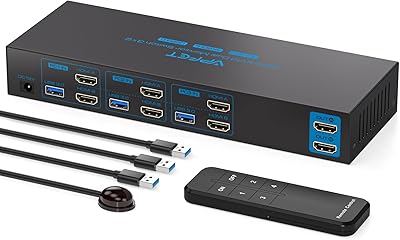
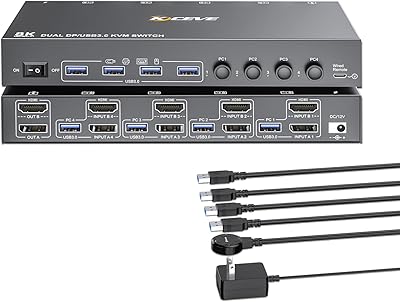
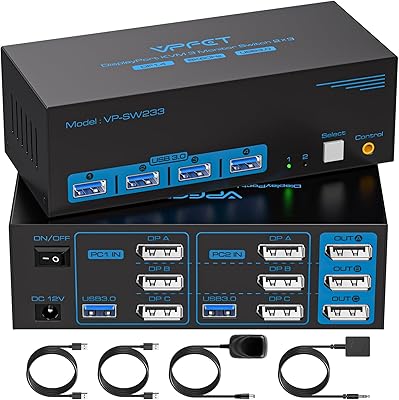
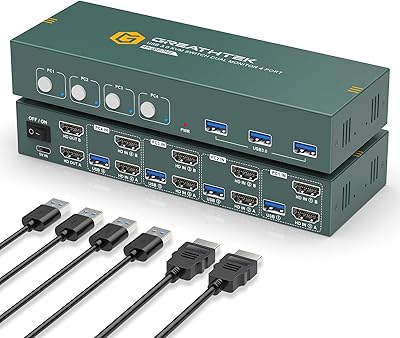
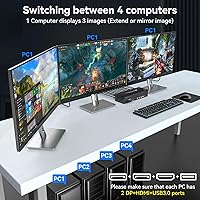
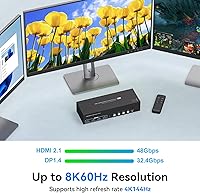
The TJCXELE 4K 144Hz HDMI + DisplayPort KVM Switch for 4 Computers, 3 Monitors is a versatile solution for users with multiple computers and high-resolution display needs. This KVM switch enables seamless control of up to four computers while sharing three monitors and four USB peripherals. With support for 8K@60Hz resolution and backward compatibility with 4K@144Hz and 1080P@240Hz, it provides high-quality visuals for work or play. This multi-monitor KVM solution is ideal for anyone seeking a reliable and efficient way to manage complex setups without cluttering their workspace.

Features & Benefits

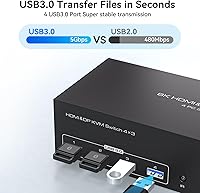
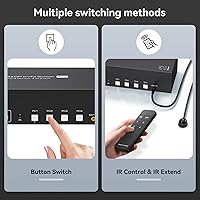
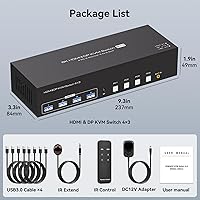
This KVM switch offers both wireless and manual switching, giving users the flexibility to control multiple systems effortlessly. The inclusion of four USB 3.0 ports ensures smooth sharing of peripherals, like keyboards, mice, and printers. It’s compatible with a range of operating systems, including Windows, MacOS, and Linux, making it a versatile tool for different setups. Powered by a 12V adapter, the device provides stable and reliable performance. Plus, its backward compatibility with lower resolutions ensures seamless integration with older systems or displays.

Best For

The TJCXELE KVM switch is a great choice for professionals managing multiple computers or workstations in a single space. It suits gamers and content creators who demand high-quality graphics and smooth transitions between displays. Its space-saving design also makes it ideal for office environments where efficient control of multiple devices is essential. Tech enthusiasts or IT professionals will appreciate the robust performance and versatility of this KVM solution, which handles high-resolution setups with ease.

User Feedback

Users generally praise the TJCXELE KVM switch for its seamless switching between multiple computers and stable 4K performance. The USB 3.0 ports for sharing peripherals are particularly appreciated by those with complex setups. Some users mention that the initial setup, especially when connecting multiple monitors, can be challenging, but the results are worth it once configured. A few reviewers note that the design is somewhat bulky for smaller desks, but most agree that its functionality and reliability make it a valuable addition to any multi-computer workspace.

Pros

  • Supports resolutions up to 8K@60Hz, making it a great choice for high-definition setups.
  • Allows seamless switching between 4 computers, saving time and improving workflow.
  • Flexible wireless and manual switching options offer convenience in different environments.
  • USB 3.0 ports enable sharing of peripherals across multiple computers without additional hubs.
  • Compatible with Windows, MacOS, and Linux, ensuring broad system support.
  • Space-saving design is ideal for users with limited desk space or tight work areas.

Cons

  • Setup can be challenging, especially when connecting multiple monitors or configuring certain resolutions.
  • The design is bulky, which may not suit smaller desks or more compact setups.
  • Some users report that the device requires a stable power source for optimal performance.
  • The price point may be considered high by those looking for a simpler KVM solution.
  • A few users mention that the monitor switching can occasionally be delayed or inconsistent.
  • Not as portable as other smaller KVM options, limiting its use in mobile setups.

Ratings

After analyzing authentic user feedback from multiple languages and platforms, we found a generally positive reception for the TJCXELE 4K 144Hz HDMI + DisplayPort KVM Switch for 4 Computers, 3 Monitors. Verified reviews highlight the strengths of this device, including its performance and versatility, while also reflecting some common challenges during setup. All reviews are carefully curated to exclude spam, bot-generated, and off-topic feedback, ensuring only high-quality insights inform the scores. Both the benefits and pain points are taken into account for a balanced assessment.

Performance
88%
Many users are satisfied with the overall performance of this device, particularly its ability to support high resolutions like 4K and 8K. The smooth, seamless switching between multiple computers is a key highlight, making it an excellent choice for both work and gaming setups.
A few reviewers experienced occasional lag or issues with high-resolution displays, especially when running multiple monitors. While most found it stable, some users expressed concerns about its reliability during intensive tasks.
Ease of Setup
70%
30%
For the most part, users found the setup process straightforward, with clear instructions and easy-to-follow connections. Many appreciated the user-friendly design and the flexibility of connecting different operating systems like Windows and MacOS.
Several users struggled with the initial monitor connections, especially when using certain cables or display adapters. Some found the process time-consuming, and a few had to troubleshoot with additional software or drivers to get everything working properly.
Switching Flexibility
91%
The wireless and manual switching options are a standout feature for many buyers, offering maximum convenience for quick transitions between multiple computers. This flexibility is particularly useful in dynamic environments like gaming or professional workstations.
A small group of users mentioned that the manual switching button could be cumbersome to reach or operate depending on desk setup, especially in tight spaces. Wireless switching, though convenient, occasionally had issues with responsiveness.
USB Port Functionality
89%
The inclusion of 4 USB 3.0 ports for peripherals is highly appreciated by users who need to share devices like keyboards, mice, and printers across multiple computers. This feature adds significant value and makes the device ideal for professionals who rely on multiple accessories.
Some users noted that the USB ports didn't always recognize peripherals instantly after switching computers, leading to delays or the need to reconnect devices. While these issues were not widespread, they were frustrating for certain users.
Display Quality
85%
Users were generally impressed by the high-quality display output, particularly the sharpness and clarity at 4K and 8K resolutions. The device delivers consistent visual performance, even when switching between multiple monitors, which makes it a solid choice for content creators and gamers alike.
A few users experienced occasional flickering or resolution issues when using the device with certain display configurations. Although these problems were rare, they were noticeable for users with higher-end monitor setups.
Compatibility
93%
The KVM switch excels in compatibility, supporting a wide range of operating systems including Windows, MacOS, and Linux. Users also found it easy to connect various types of displays, whether HDMI or DisplayPort, making it versatile for many setups.
There were a small number of reports from users who had trouble with certain Linux configurations or specific third-party display adapters. While these issues were typically resolved with updates or workarounds, they can be a hassle for those less technically inclined.
Build Quality
82%
18%
The build quality of this device is robust, with a solid, durable construction that can handle the weight and use associated with a multi-computer setup. The materials feel premium, and it’s clear that the device is designed to last.
A few users pointed out that the device's design is bulkier than expected, especially when placed on smaller desks. This can be an issue for users with limited desk space, and some preferred more compact alternatives for tighter setups.
Space Efficiency
78%
22%
Users appreciate the compact and space-saving design, which is ideal for cramped workspaces where real estate is limited. Despite its ability to manage multiple computers, it doesn't take up too much space on the desk.
Some users mentioned that, while compact, the overall design still takes up more room than they'd like, especially when additional cables or accessories are involved. The device's physical size may not be ideal for minimalistic setups.
Customer Support
75%
25%
A number of users found the customer support team responsive and helpful when they encountered issues during setup or operation. The support staff often provided detailed troubleshooting steps and quick resolutions.
On the other hand, some users were frustrated with slow response times or found that the support team lacked detailed knowledge for resolving more advanced technical issues. The overall support experience was mixed.
Price vs Features
90%
Many users felt that the device offered excellent value for money, especially considering the range of features like 4K/8K support, multiple USB ports, and broad compatibility. It's considered a strong investment for professionals who need a reliable, high-resolution KVM switch.
Some users felt that the price was a bit high compared to other KVM switches, especially for those who might not need all the advanced features. While most agreed it was worth the cost, a few wished for a more affordable option.
Reliability
87%
The majority of users found the KVM switch to be reliable, with consistent performance even after extended use. Many praised the stability of the device when switching between different machines and handling complex tasks like gaming or video editing.
A handful of users reported occasional issues with the switch not detecting one of the computers or occasional power-related glitches. These issues were typically resolved with a restart or reconnecting the device, but they were noted as inconveniences.
Design/Size
72%
28%
The device's design is sleek and modern, with a minimalistic look that fits well in professional and home office setups. Its functional design allows easy integration into existing multi-monitor workstations.
Despite the sleek design, several users found the device to be a bit bulky for their needs, especially those with limited desk space. The size could be a concern for those seeking a more portable or compact option.

Suitable for:

The TJCXELE 4K 144Hz HDMI + DisplayPort KVM Switch is ideal for professionals and tech enthusiasts who manage multiple computers and require efficient, high-resolution display setups. This product is particularly beneficial for those using multi-monitor configurations, such as gamers, content creators, or office workers, who need to quickly switch between devices without sacrificing performance. With support for up to 8K resolution and seamless switching, this KVM switch is a solid choice for anyone who needs to operate multiple systems with a high degree of reliability. Its flexibility with both wireless and manual switching options makes it versatile enough for different work environments and personal preferences.

Not suitable for:

While this KVM switch offers excellent functionality for many, it may not be the best fit for users with limited desk space. Its relatively bulky design could be a challenge for those in smaller workspaces, particularly where compactness is a priority. Additionally, users who require a simple, plug-and-play setup might find the initial configuration process to be more time-consuming and complex, especially if they run into issues with monitor connections. Those on a tight budget may also find the price a bit steep compared to other simpler KVM solutions that offer fewer features. Overall, if portability and minimal setup complexity are top priorities, this device may not be the right choice.

Specifications

  • Resolution Support: Supports up to 8K at 60Hz and is backward compatible with 4K at 144Hz and 1080P at 240Hz.
  • USB Ports: Equipped with 4 USB 3.0 ports for peripheral sharing between connected computers.
  • Monitor Support: Supports up to 3 monitors for simultaneous display from 4 computers.
  • Switching Options: Allows for both wireless and manual switching between computers.
  • Operating System Compatibility: Compatible with Windows, MacOS, Linux, and other major operating systems.
  • Power Adapter: Comes with a 12V power adapter for stable and reliable operation.
  • EDID Emulation: Includes EDID emulation to ensure consistent display settings across multiple monitors.
  • Display Connectivity: Works with both HDMI and DisplayPort connections for flexible setup options.
  • Space-Saving Design: Designed to be compact, making it ideal for office environments with limited desk space.
  • Multi-Computer Setup: Designed for managing up to 4 computers from a single workstation with multiple monitors.
  • Backward Compatibility: Backward compatible with lower resolutions, ensuring broad compatibility with older devices.
  • Video Performance: Supports high refresh rates and stable video performance for both work and gaming applications.
  • User Interface: Offers both manual button control and wireless switching for convenience.
  • Portability: Portable and lightweight, making it easy to relocate or reconfigure your workstation.
  • Hardware Support: Supports a variety of hardware configurations, ideal for IT professionals and tech enthusiasts.

FAQ

The TJCXELE 4K 144Hz HDMI + DisplayPort KVM Switch allows you to control up to 4 computers using just 3 monitors and shared USB peripherals. It's ideal for users who need to manage multiple systems simultaneously, especially in high-resolution environments such as gaming or professional workstations.

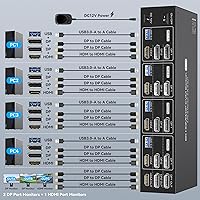
To set up this KVM switch, connect your computers via HDMI or DisplayPort, and then link your monitors and peripherals (like a keyboard and mouse) to the switch. Follow the included manual for detailed instructions, as setup may vary depending on your specific hardware and operating systems.

Yes, this KVM switch is compatible with Windows, MacOS, Linux, and other operating systems. Whether you’re working across different platforms or need a unified setup, it offers seamless switching between all connected computers.

You can switch between computers using either wireless control or manual buttons on the device. This flexibility allows you to choose the method that works best for your workflow, whether you’re at a desk or on the move.

Yes, this KVM switch supports up to 3 monitors for 4 connected computers, which is ideal for multi-monitor setups. You can connect three monitors and easily switch between them while maintaining a stable and high-resolution display.

The TJCXELE KVM switch supports up to 8K at 60Hz, and is backward compatible with 4K at 144Hz and 1080p at 240Hz. This makes it a great option for users with high-end displays, whether for gaming or professional design work.

Yes, the TJCXELE KVM switch includes 4 USB 3.0 ports, allowing you to share peripherals such as a keyboard, mouse, printer, or external hard drive between the connected computers. This helps reduce clutter and eliminates the need for additional USB hubs.

Yes, the switch comes with a 12V power adapter to ensure stable performance, especially when operating multiple computers simultaneously. Make sure to connect it to a reliable power source for consistent functionality.

Absolutely! The KVM switch supports high refresh rates and resolutions like 4K@144Hz, making it ideal for gamers who want to switch between multiple computers without compromising on performance. It's also great for content creators who need efficient setups.

Some users have reported challenges with connecting multiple monitors, but these issues can usually be resolved by double-checking the cable connections and ensuring your graphics cards support the resolutions and refresh rates being used. If issues persist, consult the troubleshooting section in the manual for additional guidance.