Overview

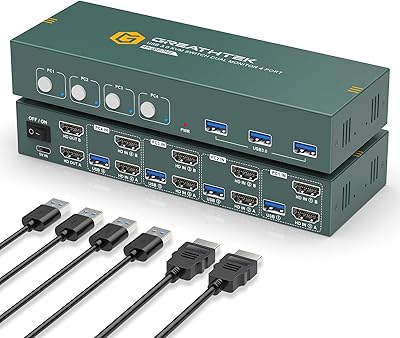
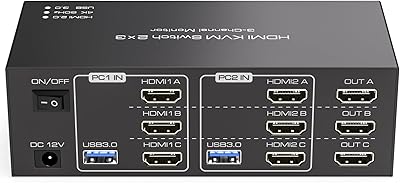
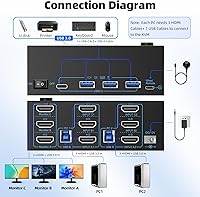
The DXchip KVM8203 Triple Monitor HDMI KVM Switch addresses a specific and frustrating problem: running two computers across three monitors without a tangle of cables to swap every time you change machines. DXchip is a relatively newer name in the mid-range KVM space, but this model arrives with a solid out-of-box package — USB 3.0 cables, a wired remote, and a power adapter all included. One thing to know upfront: this is an all-HDMI design, with no DisplayPort option whatsoever. That is a deliberate trade-off, not an oversight. Critically, each connected PC must have three native HDMI outputs, so check your graphics card specifications carefully before ordering.
Features & Benefits

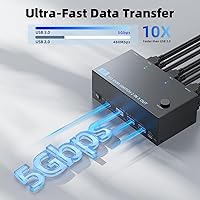
The resolution support is genuinely impressive for this price tier — capable of driving displays at 4K with a 120Hz refresh rate, or reaching 8K at 60Hz when your full hardware chain supports it. That last part matters: your GPU, monitors, and cables all need to be HDMI 2.1 compliant, and keeping cables under 1.5 meters is strongly recommended to avoid flickering. The four USB 3.0 ports move data fast enough to make transferring files from an SSD or camera feel effortless. An external power supply keeps hungry USB devices like external hard drives stable, while the wired remote means you never have to reach past your monitors to switch machines. No drivers, no setup — plug in and go.

Best For

This dual-PC switcher makes the most sense for people already committed to an all-HDMI monitor setup. If you are a home office professional juggling a work laptop and a personal desktop, or a gamer running a dedicated streaming PC alongside a gaming rig, the convenience of sharing three screens and a full peripheral set without touching a single cable is genuinely useful. Creative workers doing heavy rendering or video editing will appreciate having that multi-screen real estate accessible from both machines. What it is not suited for: anyone whose monitors or GPUs rely on DisplayPort. If even one display in your setup is DP-only, look elsewhere.

User Feedback

Buyers running this KVM switch at 4K with a high refresh rate generally report clean, stable output — that appears to be the sweet spot for real-world use. Switching speed draws mixed reactions; most find it acceptably quick, though some note a brief black-screen pause between machines. USB device recognition is largely reliable for standard keyboards and mice, but occasional hiccups with more complex USB hubs have been flagged by a handful of users. Build quality earns consistent praise — the metal chassis feels solid. The most common concern is cable length sensitivity at very high resolutions, where exceeding the recommended cable length causes intermittent flickering for some users.

Pros

  • Solid metal chassis feels durable and holds its position on a desk without sliding around.
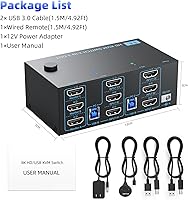
  • All necessary cables and the wired remote are included in the box — no extra purchases needed to get started.
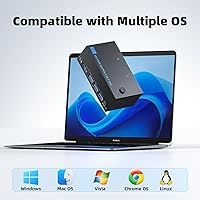
  • Plug-and-play setup works across Windows, macOS, Linux, and Chrome OS without installing any drivers.
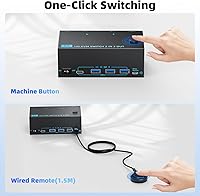
  • The wired remote keeps switching convenient from the desk surface without reaching past monitors.
  • Four fast USB ports allow a full peripheral set to be shared between two machines simultaneously.
  • External power supply keeps external hard drives and other demanding USB devices running stably.
  • Dedicated reset button resolves most connectivity hiccups in seconds without unplugging anything.
  • This dual-PC switcher performs reliably at 4K with high refresh rates when the full cable chain is HDMI 2.1 compliant.
  • The twelve-month warranty and stated rapid support response provide a reasonable safety net for a mid-range device.

Cons

  • Each connected PC must have three native HDMI outputs — a requirement many buyers overlook until after purchase.
  • Switching between computers produces a brief black-screen pause that disrupts fast-paced or time-sensitive workflows.
  • Signal flickering at maximum resolution settings is a recurring issue when cables exceed the recommended length.
  • Complex USB devices and multi-port hubs do not always reinitialize correctly after a machine switch.
  • No DisplayPort support whatsoever makes this a non-starter for a large share of modern monitor and GPU configurations.
  • The wired remote cable is short enough to limit placement options on wider or unconventional desk setups.
  • Port labeling shows wear over months of daily cable insertion and removal.
  • Reaching the top-end resolution ceiling requires every component in the chain to support HDMI 2.1 — a condition many existing setups do not meet.
  • DXchip lacks the long-term support track record of established KVM brands, which matters if issues arise after the warranty period.
  • Users with niche Linux distributions occasionally report USB device quirks that require manual troubleshooting after switching.

Ratings

The DXchip KVM8203 Triple Monitor HDMI KVM Switch has been evaluated by our AI system after analyzing verified purchase reviews from buyers worldwide, with spam, bot-submitted, and incentivized feedback actively filtered out before scoring. The ratings below reflect the full spectrum of real user experiences — from the standout strengths that genuinely impress buyers to the friction points that caused frustration. Nothing has been smoothed over to flatter the product.
Video Signal Quality
83%
Buyers running dual PCs at 4K with high refresh rates report clean, stable output with no noticeable color banding or compression artifacts. For home office users pushing detailed spreadsheets and creative professionals previewing high-res renders across three screens, the picture quality consistently meets expectations.
Signal reliability becomes more finicky as you push toward the maximum resolution ceiling. Several users report intermittent flickering or brief black screens at the highest settings, particularly when using cables longer than the recommended length — something that catches people off guard in larger desk setups.
Switching Speed
71%
29%
For most users doing standard productivity work — swapping between a work laptop and a personal desktop — the switching experience is fast enough to not disrupt workflow. The wired remote makes the transition convenient without hunting for a button on the box itself.
A noticeable black-screen pause during switching frustrates users who expected instantaneous transitions, particularly gamers. It is not a dealbreaker for office use, but anyone coming from a premium KVM expecting near-instant switching will feel the difference here.
USB Peripheral Reliability
74%
26%
Keyboards and mice reconnect reliably after switching in the vast majority of reported setups. The four USB ports give enough room to keep a full peripheral setup — keyboard, mouse, headset, and one storage device — all connected simultaneously without a separate hub.
More complex USB devices — multi-port hubs, certain wireless receivers, and some gaming peripherals with onboard memory — occasionally fail to initialize cleanly after a switch. Users running specialized input devices should test early to avoid surprises in daily use.
Build Quality
88%
The metal chassis is a genuine differentiator at this price point — it feels substantially more solid than the plastic-bodied alternatives in the same category. Users frequently comment that it sits firmly on a desk without sliding and does not feel like it will crack under normal use.
While the shell is metal, a few users noticed the port labeling can wear with repeated cable insertion and removal over months of daily use. The overall finish is functional rather than refined, which is a fair expectation for a mid-range device.
Cable & Accessory Inclusion
86%
Including USB 3.0 cables, a wired remote, and a power adapter in the box is genuinely appreciated — most competing products at this tier require separate purchases. Buyers setting up a new dual-PC workspace can get fully operational without an additional parts order.
The included cables, while functional, are on the shorter side for some desk configurations. Users with towers positioned away from their monitors found themselves needing longer replacements, which partially offsets the convenience of the bundled package.
Resolution & Refresh Rate Ceiling
77%
23%
The HDMI 2.1 specification unlocks 4K at 120Hz — a meaningful capability for high-refresh gaming monitors and color-accurate professional displays. Users who have confirmed their full hardware chain is HDMI 2.1 compliant report that this ceiling is legitimate and not just a marketing figure.
Reaching the advertised top-end resolution requires every link in the chain — GPU outputs, cables, and monitor inputs — to be HDMI 2.1. Many buyers underestimate this and experience limited performance because one component in their setup does not meet the requirement.
USB Data Transfer Speed
81%
19%
Transferring large files from an SSD or high-speed memory card through the USB ports is noticeably quick compared to older USB 2.0 KVM switches. Creative professionals moving project files between machines throughout the day benefit meaningfully from this throughput.
A small number of users report that USB transfer speeds drop below the rated ceiling when multiple high-bandwidth devices are active simultaneously. It is an edge case, but power users running two storage devices and a USB audio interface at once may occasionally hit that ceiling.
Power Stability
84%
The dedicated external power supply — rather than relying solely on bus power — makes a real difference for users running external hard drives through the switch. Drives spin up reliably and stay connected without the power drop-offs that plague bus-powered switches under load.
Having yet another power brick to manage is a minor but genuine annoyance for desk setups already crowded with cables. A few users in apartment or small office environments noted this added to outlet congestion at an already packed surge protector.
Ease of Setup
89%
Plug-and-play operation across all major operating systems means most users are up and running within minutes of unboxing. The absence of any driver installation requirement removes a common pain point, especially for Mac and Linux users who frequently encounter compatibility headaches with other KVM brands.
The requirement that each PC must have three dedicated HDMI outputs trips up buyers who did not read the fine print carefully. A small but vocal group of reviewers report frustration after receiving the unit and discovering their GPU only has one or two HDMI ports.
Remote Control Usability
76%
24%
Having a wired remote to keep on the desk surface solves the problem of reaching past monitors to tap a button on the switch box itself. For users who have mounted the KVM under a desk or behind a monitor stand, this addition is genuinely practical.
The wired remote is a basic single-button design with limited feedback. Users accustomed to smart remotes or software-based switching found it underwhelming, and the cable length on the remote itself limits placement flexibility in wider desk configurations.
OS & Platform Compatibility
87%
Cross-platform operation is solid — Windows, macOS, Linux, and Chrome OS users all report reliable recognition without configuration steps. This makes it particularly useful in mixed-OS households or offices where one machine runs Windows and another runs macOS.
A small number of users running less common Linux distributions report occasional USB device quirks after switching, though video output remains stable. These are edge cases, but anyone on a niche OS build should factor in some testing time post-setup.
Troubleshooting & Reset Function
79%
21%
The dedicated hardware reset button is a thoughtful addition that most users only appreciate after they need it. When a display goes blank or a USB device stops responding, pressing reset restores functionality in seconds without requiring a full cable disconnect and reconnect cycle.
Some users report needing to use the reset button more frequently than expected in the first few weeks of use, suggesting an initial break-in period or sensitivity to certain hardware configurations. It resolves issues quickly, but ideally it would not be needed as often.
DisplayPort Absence
52%
48%
For users whose entire monitor and GPU setup is already built around HDMI — which describes a large portion of the consumer market — the all-HDMI approach means no adapters, no signal conversion, and no added latency. It is a clean, direct signal path.
The complete absence of DisplayPort support is a hard stop for a meaningful segment of buyers. Professional monitors, high-end gaming displays, and many mid-range GPUs favor or exclusively offer DisplayPort, making this switch irrelevant for mixed-connection setups regardless of its other merits.
Value for Money
82%
18%
Against the backdrop of triple-monitor KVM switches that cost substantially more, this dual-PC switcher delivers the core functionality — three screens, USB sharing, high-resolution output — at a price point that feels fair for what you get. The included accessories strengthen the value case further.
Buyers who encounter signal issues at higher resolutions or USB recognition hiccups with premium peripherals may feel the savings come at a reliability cost. When factoring in potential cable upgrades or compatibility troubleshooting time, the true cost of ownership can edge upward.
Warranty & After-Sales Support
73%
27%
A twelve-month warranty with a stated 24-hour response commitment gives buyers a reasonable safety net, and several users report positive experiences getting replacement units or technical guidance without excessive back-and-forth communication.
Being a newer brand, DXchip does not have the long-term support track record of established KVM manufacturers. Users who encountered issues after the warranty window report limited options, and the support infrastructure for a newer entrant naturally lacks the depth of a veteran brand.

Suitable for:

The DXchip KVM8203 Triple Monitor HDMI KVM Switch was built for a specific type of power user, and it genuinely delivers for them: anyone running two computers that each have three dedicated HDMI outputs and who wants all three monitors shared between both machines without touching a single cable. Home office professionals who split their day between a work-issued laptop and a personal desktop will find the one-touch switching genuinely liberating — no more crawling behind a desk to swap HDMI cables mid-afternoon. Gamers running a dedicated gaming rig alongside a separate streaming or capture PC are another natural fit, particularly those whose entire monitor lineup is already HDMI-based. Creative professionals in design or video work benefit from keeping a full three-screen layout instantly accessible from either workstation. The cross-platform compatibility also makes it practical for mixed-OS households where one machine runs Windows and another runs macOS or Linux.
Not suitable for:

The DXchip KVM8203 Triple Monitor HDMI KVM Switch is a hard pass for anyone whose setup includes even a single DisplayPort monitor or a GPU that routes its primary outputs through DisplayPort — there is no adapter workaround that reliably solves this at high refresh rates. Buyers whose graphics cards only have one or two HDMI ports will also hit a wall immediately, since the switch requires three physical HDMI connections from each computer. Users expecting the near-instant, zero-black-screen switching of premium enterprise-grade KVM hardware will find the brief transition delay genuinely irritating in fast-paced workflows. Anyone running a complex USB ecosystem — multi-port hubs, specialized audio interfaces, or peripherals with onboard memory — should be prepared to test carefully, as USB re-initialization after switching is not always clean. Finally, if long-term brand support and an established warranty track record are priorities, a newer entrant like DXchip may not inspire the same confidence as veteran KVM manufacturers with years of documented after-sales service.
Specifications

  • Brand & Model: Manufactured by DXchip under the model designation KVM8203.
  • Video Interface: Uses HDMI 2.1 exclusively for all video connections; no DisplayPort or VGA ports are present.
  • Max Resolution: Supports up to 8K at 60Hz or 4K at 120Hz, provided all connected hardware and cables are HDMI 2.1 compliant.
  • Monitor Ports: Provides three HDMI 2.1 output ports, one for each connected monitor.
  • Computer Ports: Accepts two computers, each requiring three dedicated HDMI connections to the switch for a total of six HDMI input ports.
  • USB Ports: Equipped with four USB 3.0 ports capable of data transfer up to 5Gbps for sharing peripherals between both computers.
  • Power Supply: Requires an external 12V/1A DC power adapter, which is included in the box, to ensure stable operation under load.
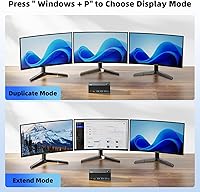
  • Control Methods: Can be operated via a front-panel push button or the included wired remote control for desk-level switching convenience.
  • OS Compatibility: Compatible with Windows, macOS, Linux, and Chrome OS without requiring any driver installation.
  • Chassis Material: The outer enclosure is constructed from metal, providing durability and resistance to flex during daily use.
  • Dimensions: Measures 5.91 inches long by 3.94 inches wide by 1.97 inches tall.
  • Weight: Weighs approximately 1.5 pounds, making it stable on a desk without being cumbersome to reposition.
  • Included Accessories: Ships with USB 3.0 cables, a wired remote control, and a power cable, covering the essential connections needed for initial setup.
  • USB Standard: All four USB ports are backward compatible with USB 2.0 and USB 1.1 devices in addition to full-speed USB 3.0 hardware.
  • Reset Function: Features a dedicated hardware reset button that restores connectivity without requiring cables to be physically disconnected.
  • Warranty: Covered by a 12-month manufacturer warranty with technical support available via direct contact within a stated 24-hour response window.

Related Reviews

TESmart HKS403-P23 4-Port Triple Monitor KVM Switch
69%
78%
Display Performance
72%
EDID Emulation Reliability
74%
Switching Speed & Reliability
58%
USB Hub Performance
69%
Network Sharing
More
DXchip 8K Dual Monitor KVM Switch
85%
88%
Performance
91%
Ease of Use
94%
Visual Quality (Resolution & Clarity)
87%
USB Transfer Speed
83%
Build Quality
More
UGREEN 2-Computer HDMI KVM Switch
72%
84%
Ease of Setup
78%
Video Quality
71%
Switching Reliability
88%
Desktop Controller
69%
USB Peripheral Sharing
More
SUIDEK SJW-KM202B Dual Monitor KVM Switch
73%
83%
Ease of Setup
71%
Switching Reliability
79%
Display Quality
91%
Desktop Controller Usability
77%
USB Peripheral Sharing
More
NAWEN HDMI KVM Switch 4 Computers 1 Monitor
86%
89%
Performance
93%
Resolution Support (8K/4K)
91%
Ease of Setup
85%
USB 3.0 Performance
87%
Switching Reliability
More
KCEVE 2-Monitor 4-Computer KVM Switch
81%
91%
Ease of Setup
83%
Switching Reliability
86%
Dual-Monitor Configuration
82%
USB 3.0 Performance
88%
Wired Remote Control
More
CMSTEDCD SW330 Dual Monitor KVM Switch
77%
91%
EDID & Window Layout Preservation
88%
4K Display Quality
84%
Switching Speed & Responsiveness
79%
USB 3.0 Peripheral Sharing
61%
Setup & Initial Configuration
More
EVATEK 4K@60Hz HDMI KVM Switch for 4 Computers & 2 Monitors
83%
89%
Performance
93%
Ease of Setup
91%
Resolution Quality (4K@60Hz)
87%
USB 3.0 Port Functionality
85%
Switching Speed
More
Camgeet KVM Switch 3 Monitors 3 Computers HDMI+2 DisplayPort
88%
95%
Display Resolution Support
93%
Multi-Computer Switching
89%
USB Connectivity
82%
Setup and Installation
91%
Compatibility Across OS
More
TJCXELE HDMI KVM Switch 3 Monitors 2 Computers 4K@60Hz
85%
85%
Overall Performance
92%
Visual Quality (4K@60Hz)
75%
Ease of Setup
88%
USB Port Functionality (Data Transfer)
90%
Compatibility with Operating Systems
More

FAQ

Each connected PC genuinely needs three physical HDMI outputs — one per monitor. Adapters from DisplayPort or USB-C to HDMI can work in some cases, but signal reliability at high resolutions is not guaranteed through conversion. If your GPU only has one or two HDMI ports, this switch will not function as intended for a triple-monitor setup.

You can realistically achieve 4K at 120Hz, but only if your graphics card outputs, your monitors, and the cables you use are all HDMI 2.1 compliant. If any single component in that chain is an older HDMI version, the signal will fall back to a lower spec. Use cables no longer than about 1.5 meters for best results at the higher end of the resolution range.

There is a brief black-screen pause — typically a couple of seconds — while the displays re-sync to the newly active computer. For office work and general productivity, most users adapt to this quickly. If you need truly instant switching, this is a mid-range device and will not match the response of higher-end enterprise KVM hardware.

Yes, cross-platform use is one of this switch's genuine strengths. It operates without any drivers on Windows, macOS, Linux, and Chrome OS, so mixed-OS dual-PC setups work without any configuration hassle.

All four USB ports switch along with the video outputs when you change active computers. Standard keyboards and mice reconnect reliably for most users. If you use a complex USB hub or certain specialized peripherals, test early — a small number of users report that less common devices occasionally need a moment or two to reinitialize after a switch.

The remote works well for standard desk setups where the switch is positioned behind or beside the monitors. Users with wider desks or unconventional layouts have noted the remote cable can feel restrictive, so if your desk is particularly large, factor that in before assuming you can place the remote wherever you like.

The DXchip KVM8203 Triple Monitor HDMI KVM Switch includes USB 3.0 cables, a wired remote, and a power adapter. You will still need HDMI cables to connect the switch to your monitors and computers — those are not included, which is standard for KVM switches in this category.

Yes, and the external power supply is specifically what makes this practical. Bus-powered KVM switches often struggle to deliver enough current to spin up external hard drives reliably, but the dedicated 12V adapter here provides stable power so drives stay connected without unexpected disconnects.

Press the dedicated reset button on the unit — that is exactly what it is there for. It reinitializes the connections without requiring you to unplug and replug cables. If the issue persists, check that your HDMI cables are within the recommended length and that all cable connections are fully seated at both ends.

For gamers running two separate rigs — say a gaming PC and a streaming or capture machine — this dual-PC switcher works well as long as you are not expecting to switch mid-session with zero interruption. The brief sync delay is noticeable but tolerable if switching is something you do between sessions rather than during active gameplay. At 4K and high refresh rates with a properly matched hardware chain, the video quality is genuinely solid for the price.