Overview

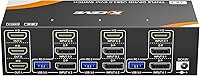
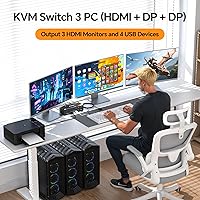
The KCEVE KC-303X Triple Monitor KVM Switch tackles one of the more frustrating problems in multi-PC setups: running three computers through three monitors without a cable nightmare to manage. It accepts one HDMI and two DisplayPort connections from each machine, then routes everything out to three HDMI monitors simultaneously. No driver installation is required — plug it in and it works. The box includes a wired remote controller and a DC power adapter, so you are not hunting for accessories on day one. For the price, replacing a tangle of manual cable swaps with a dedicated switching box makes practical sense.
Features & Benefits

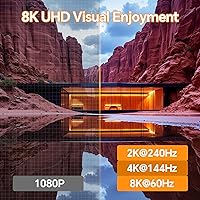
Where this triple-monitor KVM switch stands out is in its resolution headroom. Driving three displays at up to 4K@144Hz — or pushing all the way to 8K@60Hz — puts it well ahead of cheaper alternatives that cap at 4K@60Hz. One point buyers often miss: all three monitors reflect whichever machine is currently active; they do not show independent sources. Four USB 3.0 ports handle peripherals at up to 5Gbps, comfortably covering a keyboard, mouse, and still leaving room for a printer or external drive. Compliance with DisplayPort 1.4, HDMI 2.1, and HDCP 2.3 means the hardware holds up well if you eventually upgrade your displays.

Best For

This three-PC display switch fits a specific kind of user. If you bounce between a personal rig and a work laptop each morning, or run a development machine alongside a dedicated testing box, consolidating three monitors under one switch cuts clutter significantly. Creative professionals handling video editing on one machine and rendering on another get the most from the triple-display layout. Shared workstations in monitoring rooms or small business desks will also find it practical. Just keep in mind: this is not a solution for viewing different computers across separate monitors simultaneously — all three screens always show the same active machine.

User Feedback

Owners of the KCEVE switch consistently praise how much simpler setup feels compared to manually swapping cables, and the remote controller gets particular credit for letting users switch computers without leaning across their desk. On the downside, a handful of buyers have encountered display flickering at very high resolutions, and the fix — using certified 8K-rated cables rather than generic ones — is not obvious from the packaging. The remote cable length at roughly 1.5 meters works for most desks but feels limiting if the unit is tucked far back. USB peripheral handoff is generally quick, though a few users note a brief pause during switching. Heat buildup over extended use has rarely been raised as a concern.

Pros

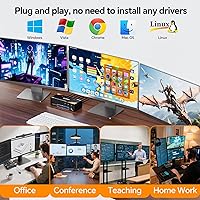
  • Plug-and-play setup works without installing any drivers, even across mixed operating systems.
  • Supports high-refresh-rate 4K output, giving gamers and creative professionals genuine display headroom.
  • Four USB 3.0 ports let you share a keyboard, mouse, and two additional peripherals across all connected machines.
  • The included wired remote means you can switch computers without leaning over a crowded desk.
  • All three monitors activate together, giving you a consistent full-width workspace the moment you switch hosts.
  • Cable wear and port fatigue are essentially eliminated once everything runs permanently through the switch.
  • Broad compatibility covers most Windows generations, common Linux distros, and Chrome OS out of the box.
  • The compact chassis takes up minimal desk real estate for the amount of connectivity it manages.
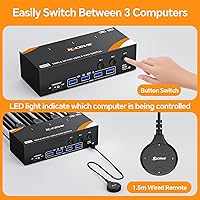
  • LED indicators make it immediately obvious which computer is currently active, avoiding accidental input on the wrong machine.
  • The 12-month support policy provides a reasonable safety net against early hardware failures.

Cons

  • High-bandwidth cables for 8K or 4K@144Hz performance are not included and must be purchased separately.
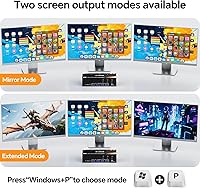
  • All three monitors always mirror the active computer — independent sources per screen are not possible.
  • The wired remote cable measures roughly 1.5 meters, which limits placement flexibility on larger desks.
  • USB peripheral re-recognition during host switching introduces a brief but noticeable pause for connected devices.
  • Apple Silicon Mac compatibility is uncertain and should be verified before purchase rather than assumed.
  • Display outputs are HDMI only, requiring adapters for users whose monitors lack HDMI inputs.
  • No video cables of any kind are included in the box, adding to the real-world setup cost.
  • Long-term durability data is limited given the product is relatively new to market.
  • Users with complex USB device trees plugged through the KVM ports may encounter occasional drop-outs when switching.
  • Prominent guidance on cable quality requirements is missing from packaging, leading to avoidable troubleshooting for new buyers.

Ratings

The ratings below for the KCEVE KC-303X Triple Monitor KVM Switch were generated by AI after systematically analyzing verified purchase reviews from buyers worldwide, with spam, bot-submitted, and incentivized feedback actively filtered out. Scores reflect the honest distribution of real user experiences — strengths are credited where earned, and recurring pain points are not glossed over. The result is a transparent, balanced snapshot of how this three-PC display switch performs across the categories that actually matter to buyers.
Setup & Installation
88%
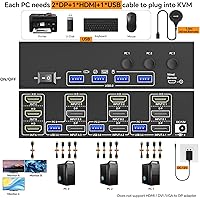
Most users describe the initial setup as refreshingly straightforward — connect one HDMI and two DisplayPort cables per computer, plug in the power adapter, and the monitors come to life without touching a driver or configuration utility. For people who dread multi-device installs, this plug-and-play experience sets a strong first impression.
A small but vocal group ran into display flickering during setup that was ultimately traced to substandard cables rather than the unit itself. The requirement for certified high-bandwidth cables is buried in documentation, and buyers using older cables in their existing setup may waste time troubleshooting before identifying the real cause.
Video Signal Quality
83%
At standard 4K@60Hz, the picture across all three monitors is clean and consistent, which satisfies the large majority of users who are not pushing cutting-edge refresh rates. Users doing color-sensitive work like photo editing reported accurate, stable output without noticeable signal degradation during extended sessions.
Achieving the top-end 8K or 4K@144Hz performance requires cables that the switch does not include, and not every buyer realizes this before purchasing. A subset of users report intermittent black screen moments at higher refresh rates, which disrupts workflows until the cable issue is properly diagnosed and resolved.
Switching Speed & Reliability
79%
21%
Switching between computers via the front button or the wired remote is generally quick enough that it does not interrupt a working rhythm — most users describe it as a brief, clean handoff. The LED indicator that shows which host is active is a small but appreciated detail that eliminates guesswork during the switch.
A noticeable pause occurs during USB peripheral re-recognition, particularly for users with several devices daisy-chained through the four ports. Occasionally the switch does not correctly register the new host on the first attempt, requiring a second button press — not a dealbreaker, but it adds minor friction in time-sensitive moments.
Remote Controller
71%
29%
The included wired remote means you do not have to reach across a crowded desk to switch machines, which is genuinely convenient for setups where the KVM unit is mounted or tucked away. The button action is tactile and the build quality is serviceable for everyday desk use.
The 1.5-meter cable length works for compact desks but falls short for larger workstations or standing desk configurations where the unit sits at the far end. A few buyers also noted that the remote feels slightly budget in hand compared to the main unit, which makes sense at this price point but is still a noticeable contrast.
USB Peripheral Performance
81%
19%
Four USB 3.0 ports handling transfers at up to 5Gbps is genuinely useful for users who share an external SSD or a high-resolution scanner between machines. Keyboard and mouse recognition is consistent, and most buyers report no dropped inputs or erratic cursor behavior after the switch.
Some users with USB hubs plugged into the KVM ports experience occasional device drop-outs during host switching, suggesting the port management logic has limits when the connected device tree is complex. Printer and scanner re-recognition after a switch can take a few extra seconds compared to direct connections.
Build Quality & Durability
74%
26%
The chassis feels solid enough for a device that sits on a desk and rarely moves. At under a pound, it is light without feeling hollow, and the port connectors seat firmly without play or wobble that would suggest early wear.
The plastic housing does not inspire confidence over a multi-year horizon, and long-term reliability data is limited given the product is relatively new to market. A handful of early buyers flagged minor cosmetic scuffs arriving out of the box, pointing to packaging that could be more protective during shipping.
Heat Management
84%
Under typical eight-hour office workloads the unit stays warm to the touch but never hot, which aligns with the low rate of heat-related complaints in user feedback. Passive cooling through the chassis design appears adequate for the power levels involved.
No active cooling is present, and a small number of users in warmer climates or enclosed desk hutches report that the unit gets noticeably warm during long continuous sessions. Whether this affects long-term component reliability remains an open question given the product age.
OS & Device Compatibility
76%
24%
Windows users across multiple generations and Linux users on mainstream distributions report consistently normal operation, and the driver-free design means there is no compatibility gap when switching between different operating systems on the three connected machines.
macOS compatibility is functional but comes with caveats — Apple Silicon Macs in particular can behave unexpectedly with third-party KVM switches, and this unit is no exception. Users should verify their specific Mac model and OS version before assuming full support, as the broad compatibility claim is most reliable for Windows environments.
Cable Management Impact
86%
Replacing what would otherwise be a rotating mess of manually swapped cables with a single tidy switching box is the aspect users praise most enthusiastically. Desks that previously looked chaotic with duplicate cables for each monitor report a dramatic improvement in organization after installing this three-PC display switch.
While the switch itself reduces active cable swapping, the initial installation actually adds cables to the desk since each computer requires three video cables running to the unit. Buyers should plan cable routing before committing to a final desk layout.
Value for Money
78%
22%
Given that this category of hardware — triple-monitor, three-computer switching with high refresh rate support — typically commands significantly higher prices, the positioning feels reasonable. For users who genuinely need the full capability, the hardware delivers solid performance relative to what it costs.
Budget-conscious buyers who only need basic 4K@60Hz may find comparable two-monitor or simpler KVM options at lower price points that cover their needs. The value calculation depends heavily on actually using the triple-monitor and high-refresh-rate features — buyers who do not will feel they are paying for headroom they never use.
Port & Connector Design
73%
27%
Having all input and output ports laid out clearly on the rear panel makes initial cabling intuitive, and the connector groupings make it visually obvious which ports belong to which computer.
The output ports are all HDMI, meaning users with DisplayPort monitors need active adapters — a detail that catches some buyers off guard. The port labeling is present but small enough that good desk lighting is helpful during setup.
Included Accessories
69%
31%
Bundling a wired remote and a DC power adapter in the box avoids the common frustration of discovering missing essentials after unboxing. The three USB cables included cover basic connectivity for all connected computers out of the gate.
No video cables of any kind are included, which is standard practice but still adds to the real-world purchase cost. Given that high-quality cables are effectively mandatory for top-end performance, a note calling this out more prominently would save new buyers considerable troubleshooting time.
Documentation & Support
67%
33%
The manual covers the fundamental wiring configuration clearly enough for most users to complete setup without visiting any external resources. The 12-month support policy provides a reasonable safety net for hardware failures in the first year.
Critical guidance around cable quality requirements for 8K performance is not prominent enough in the included materials, which contributes to the most common post-purchase frustration. Users who encounter issues and reach out to support describe response times as variable, with some reporting helpful resolutions and others finding the experience slow.

Suitable for:

The KCEVE KC-303X Triple Monitor KVM Switch is built for people who live across multiple computers and cannot afford to waste time swapping cables or squinting at a single small display. If you run a personal gaming rig alongside a work laptop, or maintain a dedicated development machine next to a test box, this three-PC display switch collapses what would otherwise be a cluttered cable rotation into a single button press. Home office professionals who frequently bounce between employer-issued hardware and their own setup will find it particularly practical, especially when paired with a triple-monitor arrangement they have already invested in. Creative professionals — video editors, 3D artists, or developers managing multiple build environments — benefit from the high-refresh-rate output that keeps their workflow display-accurate across all three screens. Small businesses with shared monitoring stations or control rooms where one desk serves multiple systems are also a natural fit. For anyone who has physically worn out a port from years of hot-swapping cables, consolidating everything through a dedicated switch pays off in hardware longevity alone.
Not suitable for:

Buyers expecting to view different computers on separate monitors simultaneously will be immediately disappointed — the KCEVE KC-303X Triple Monitor KVM Switch routes all three displays to whichever single computer is currently active, and that is simply how this category of hardware works. If your monitors have only DisplayPort outputs and no HDMI inputs, budget for active adapters before purchasing, since all three display outputs from the switch are HDMI only. Mac users, particularly those on Apple Silicon machines, should research compatibility carefully before committing, as the broad OS support claim holds most reliably for Windows environments and mainstream Linux distributions. Users chasing the absolute top-end resolution and refresh rate performance should know upfront that the cables included in the box will not get them there — achieving 8K or high-refresh 4K requires separately sourced, high-bandwidth certified cables, which adds to the real cost. If your desk setup involves only two computers or a single monitor, this switch is more hardware than you need, and a simpler, less expensive unit would cover the use case without the overhead.
Specifications

  • Model Number: The unit is officially designated as the KC-303X within KCEVE's product lineup.
  • Computers Supported: The switch connects up to three host computers simultaneously, all sharing one set of monitors and peripherals.
  • Monitors Supported: Three monitors can be connected to the output side, all displaying the active computer's signal at the same time.
  • Video Inputs: Each computer connects via one HDMI port and two DisplayPort ports, requiring three video cables per host machine.
  • Video Outputs: All three monitor outputs are HDMI, meaning monitors must have HDMI inputs or require an active adapter.
  • Max Resolution: The switch supports up to 8K@60Hz across all three output ports when used with appropriate high-bandwidth cables.
  • Refresh Rate: High refresh operation is supported at 4K@144Hz and 2K@165Hz, suitable for gaming and motion-sensitive professional work.
  • Display Standards: The hardware is compliant with DisplayPort 1.4 and HDMI 2.1, with HDCP 2.3 content protection support included.
  • USB Ports: Four USB 3.0 ports are available on the switch, shared across all connected computers at transfer speeds up to 5Gbps.
  • Switching Method: Host computers can be selected using either the front-panel button on the unit or the included 1.5-meter wired remote controller.
  • Status Indicator: An LED light on the unit displays which of the three host computers is currently active.
  • Power Supply: The switch requires a DC 12V power adapter, which is included in the retail packaging.
  • Dimensions: The chassis measures 6.1 x 2.6 x 1.7 inches, keeping the footprint compact on a standard desk.
  • Weight: The unit weighs approximately 13.4 ounces (0.84 lb), making it light enough to reposition without tools.
  • Driver Requirement: No drivers or software installation are required; the switch operates as a plug-and-play device on all supported systems.
  • OS Compatibility: Supported operating systems include Windows 7 through 11, macOS, Linux, Chrome OS, Unix, and Ubuntu.
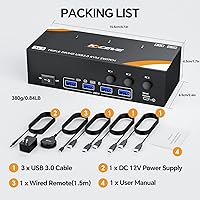
  • In the Box: Package contents include the KVM switch unit, three USB cables, one wired remote controller, one DC 12V power adapter, and a user manual.
  • Warranty: KCEVE provides 12 months of after-sale support coverage from the date of purchase.

Related Reviews
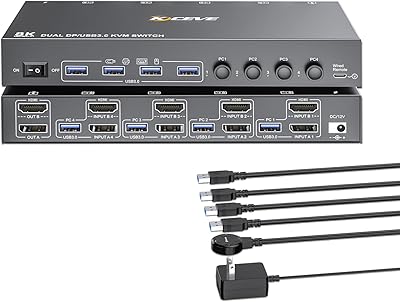
KCEVE 2-Monitor 4-Computer KVM Switch
81%
91%
Ease of Setup
83%
Switching Reliability
86%
Dual-Monitor Configuration
82%
USB 3.0 Performance
88%
Wired Remote Control
More
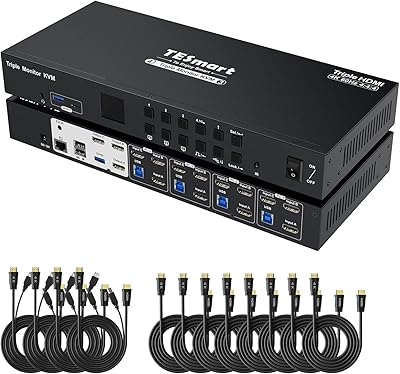
TESmart HKS403-P23 4-Port Triple Monitor KVM Switch
69%
78%
Display Performance
72%
EDID Emulation Reliability
74%
Switching Speed & Reliability
58%
USB Hub Performance
69%
Network Sharing
More
DXchip 8K Dual Monitor KVM Switch
85%
88%
Performance
91%
Ease of Use
94%
Visual Quality (Resolution & Clarity)
87%
USB Transfer Speed
83%
Build Quality
More
MLEEDA 8K Dual Monitor KVM Switch
86%
92%
Visual Performance
88%
Ease of Setup
85%
Build Quality
90%
USB Connectivity
75%
Switching Reliability
More
ANGEET KVM Switch 3 Monitors 4 Computers
87%
90%
Performance Stability
93%
Ease of Setup
85%
Display Quality
88%
Compatibility with Multiple OS
91%
Switching Convenience (Wired Remote)
More
MLEEDA 202CH Dual Monitor KVM Switch
75%
91%
Ease of Setup
84%
Dual 4K Display Performance
47%
Mac M1/M2 Compatibility
88%
USB-C Power Delivery (80W Charging)
72%
Switching Speed & Reliability
More
Viagkiki 2-Computer 1-Monitor KVM Switch
73%
91%
Ease of Setup
76%
Switching Reliability
68%
Video Quality & Resolution
61%
Build Quality & Durability
83%
Value for Money
More
Camgeet 204UH Quad Monitor KVM Switch
64%
61%
Setup & Installation
69%
Display Compatibility
74%
Switching Reliability
83%
Wired Remote Usability
78%
USB Peripheral Switching
More
MLEEDA Displayport KVM Switch 2 Computers 1 Monitor
84%
88%
Performance
92%
Ease of Setup
90%
Resolution Support
85%
USB Port Functionality
82%
Build Quality
More
AV Access iDock C10 KVM Docking Station
77%
93%
Build Quality
88%
Video Performance
81%
KVM Switching
89%
EDID Emulation
84%
Ethernet Reliability
More

FAQ

No, they do not. The switch handles each output port independently in terms of the signal it sends, so you can mix monitor brands, sizes, and resolutions. That said, all three will always display the same active computer — they are not showing different sources simultaneously.

Almost always, the culprit is the cable rather than the switch itself. Hitting the top resolution and refresh rate targets on this three-PC display switch requires certified high-bandwidth cables — the generic cables most people have in a drawer will not cut it at 8K or 4K@144Hz. Swap in cables rated for those specifications and the problem typically disappears.

Unfortunately, no. This is a common point of confusion with KVM switches in general. When you switch to a computer, all three monitors reflect that one machine — you cannot split the outputs to show computer one on monitor one and computer two on monitor two simultaneously. If that is your goal, you would need a different type of solution entirely.

It can work with Macs, but with caveats. Intel-based Macs tend to behave more reliably, while Apple Silicon machines can be finicky with third-party KVM switches due to how macOS handles external display detection. Test it carefully if you are using an M-series Mac, and keep the return window in mind while evaluating.

The four USB 3.0 ports are designed primarily for input devices and data peripherals like keyboards, mice, external drives, and scanners. USB audio devices can sometimes work, but audio over USB through a KVM switch is not always reliable across brands, so it is worth testing before fully committing your audio setup to it.

The handoff is quick enough for practical daily use — most users describe it as a second or two at most. The slight delay comes from USB peripherals re-registering with the new host, which is normal behavior. If you are switching frequently throughout the day it becomes background noise fairly quickly.

The included wired remote uses a standard cable, and while KCEVE does not officially sell an extension, a USB extension cable may work depending on how the remote is wired. A more practical workaround for large desks is positioning the main unit closer to your seating area so the 1.5-meter cable reaches comfortably.

You will need three video cables per computer — one HDMI and two DisplayPort — which are not included in the box. Three USB cables are included. For anyone planning to run at high refresh rates or 8K resolution, investing in quality cables rated for those specs before setup will save significant troubleshooting time.

Yes, mainstream Linux distributions work well with it given the plug-and-play design — there are no drivers to hunt down or compile. Niche or older distributions that do not natively support modern USB and display standards may behave inconsistently, but for Ubuntu, Debian, Fedora, and similar popular distros, users generally report normal operation.

The switch requires the DC 12V power adapter to function, so it does need to be powered during use. Leaving it on continuously is the typical setup since it draws very little power at idle and the monitors will simply show no signal when all connected computers are off or sleeping.