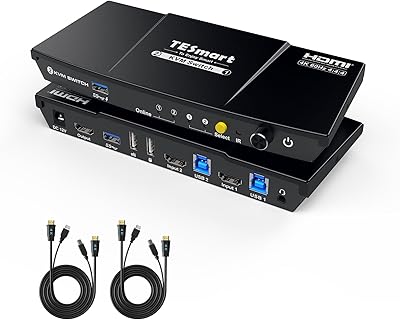
TESmart HKS402-P23 Dual Monitor KVM Switch
Overview
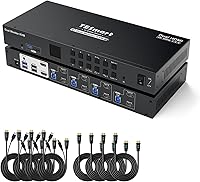
The TESmart HKS402-P23 Dual Monitor KVM Switch is built for power users who need to control four separate computers from a single desk without ever touching a cable. One keyboard, one mouse, two monitors — all four machines accessible at a button press. TESmart has focused on KVM hardware for years, and this unit sits at the premium end of their lineup, priced accordingly. It is not aimed at someone switching between a gaming PC and a home laptop; this is desk infrastructure for developers, sysadmins, and creative professionals. That said, expect a real setup process and some compatibility nuances before everything runs smoothly.
Features & Benefits
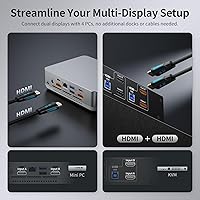
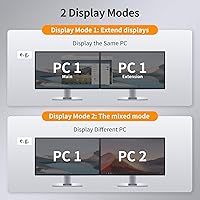
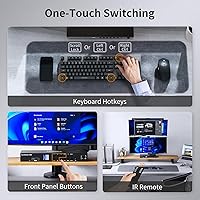
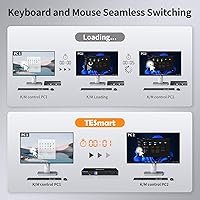
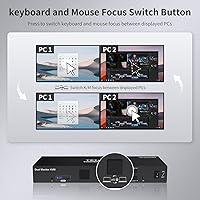
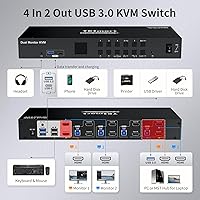
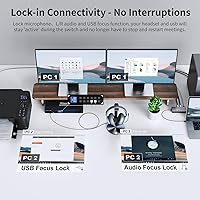
What separates this dual-monitor KVM switch from cheaper alternatives is that each connected PC gets a true extended desktop — not a mirrored clone — across both outputs simultaneously. The built-in EDID emulators are a particularly practical touch: your monitors retain their resolution and layout settings every time you switch inputs, so you are not manually reconfiguring displays mid-workflow. The front USB 3.0 ports handle data transfers up to 5Gbps, which makes sharing an external SSD or a webcam between machines genuinely useful. Audio and microphone jacks mean a single headset covers all four machines. Switching can be done via front-panel button, hotkey, or RS-232, and the whole unit runs driver-free across Windows, macOS, and major Linux distributions.
Best For
The TESmart 4-port KVM earns its place on a desk primarily for professionals with genuine multi-machine workflows. Developers and sysadmins who maintain separate work and test environments will appreciate having physical control over four machines without rearranging cables. Designers or video editors running a main workstation alongside a render node benefit from the full 4K extended screen real estate on both displays. Home lab users running bare-metal servers or Raspberry Pi setups will find the broad OS support covers them without any extra configuration. Remote workers juggling a personal laptop and a corporate machine are also well-served here. If you only switch between two machines occasionally, this is probably more switch than you need.
User Feedback
Community reception of this 4K KVM switch is mixed but informative. The EDID emulator draws consistent praise — users who previously had to reset their display layouts after every switch call it one of the most genuinely useful features in this category, and USB 3.0 sharing for webcams and external drives also receives good marks. The friction points are real, though. HDMI handshake delays on switching are a recurring complaint, and many users trace the issue directly to cable quality rather than the unit itself, so budgeting for solid cables is worth it. Setup documentation gets flagged as thin, particularly for mixed OS environments. The unit runs warm under sustained load, though no thermal failures have been reported. It rewards patient setup but frustrates those expecting plug-and-play.
Pros
- Per-port EDID emulators keep your monitor layouts intact every time you switch — no more manual resolution resets.
- True extended desktop across both outputs means each connected PC gets a full dual-screen workspace, not a mirror.
- USB 3.0 sharing at up to 5Gbps makes transferring files between machines via a shared external drive genuinely practical.
- Three switching methods — button, hotkey, and RS-232 — give power users flexibility that most consumer KVMs skip entirely.
- Wired analog audio and microphone passthrough means one headset covers all four machines without re-plugging.
- Driver-free operation across Windows, macOS, and major Linux distributions including Raspberry Pi OS removes a common setup headache.
- The 4-port KVM supports HDR10 and Dolby Vision, covering users with HDR-capable monitors without extra configuration.
- Front-panel USB-C port adds a modern charging option alongside the three USB-A ports for everyday peripheral needs.
- The enclosure is solid and desk-stable, with tactile front buttons that hold up well under repeated daily use.
Cons
- HDMI handshake delays of two to four seconds on switching are a persistent complaint and disrupt fast-paced workflows.
- The bundled HDMI cables are functional but not premium — and cable quality directly affects handshake reliability.
- Setup documentation is thin for mixed OS environments, leaving users to hunt for answers in third-party forums.
- Bluetooth keyboards and mice are completely unsupported, which is an increasing limitation as wireless peripherals become standard.
- The unit runs noticeably warm during extended use, which makes some users uncomfortable even without a confirmed failure history.
- High-polling-rate gaming mice and keyboards occasionally show stuttering or missed inputs immediately after switching.
- The power brick is bulkier than expected and awkward to route cleanly in a managed cable setup.
- macOS machines sometimes default to incorrect resolutions after waking from sleep, requiring a manual correction on the OS side.
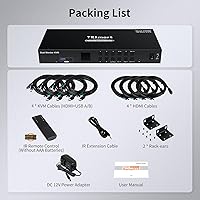
- At this price point, a 3.4 out of 5 aggregate rating signals that too many buyers hit avoidable friction before things worked properly.
Ratings
The TESmart HKS402-P23 Dual Monitor KVM Switch scores below are generated by AI after analyzing verified buyer reviews from global sources, with spam, bot-submitted, and incentivized feedback actively filtered out. This 4-port dual-monitor KVM sits in a competitive professional niche, and the scores honestly reflect both where this dual-monitor KVM switch earns its price tag and where real users have run into friction. Strengths and pain points are weighted equally so you get a clear picture before committing.
Display Signal Stability
EDID Emulation Effectiveness
USB 3.0 Hub Performance
Switching Reliability
Audio and Microphone Passthrough
Build Quality and Hardware Feel
Setup and Initial Configuration
Keyboard and Mouse Compatibility
4K Resolution and HDR Support
OS and Platform Compatibility
Cable Management and Included Accessories
Value for Money
Hotkey and Control Flexibility
Suitable for:
The TESmart HKS402-P23 Dual Monitor KVM Switch is purpose-built for professionals who run multiple computers as a core part of their daily workflow, not as an occasional convenience. Software developers who maintain separate build, test, and production environments will immediately appreciate being able to flip between machines without touching a single cable or rearranging their desk. Sysadmins managing a mix of Linux servers and Windows workstations benefit from the broad OS support and the RS-232 control option, which integrates into scripted automation routines that simpler KVMs cannot match. Video editors and designers who need a true extended 4K desktop — not a mirrored clone — across a primary workstation and a secondary render machine will find this 4-port KVM handles that workload credibly. Remote workers juggling a personal laptop and a corporate-issued machine are also well-served here, since the audio and microphone passthrough means a single wired headset covers every video call across both machines. If you have already owned a basic 2-port KVM and outgrown it, this unit represents a genuine step up in both port count and feature depth.
Not suitable for:
The TESmart HKS402-P23 Dual Monitor KVM Switch is genuinely the wrong tool for buyers with simpler needs or lower tolerance for setup friction. If you only switch between two computers occasionally and just want something that works out of the box without reading documentation, there are far less expensive and less complex options available. Users who rely on Bluetooth peripherals — wireless keyboards, mice, or headsets — will hit an immediate wall, as Bluetooth passthrough is not supported and there is no workaround within the unit itself. Anyone expecting 4K at refresh rates above 60Hz, whether for high-frame-rate creative work or gaming, will be capped by the hardware and should look elsewhere. The mixed-OS setup experience also carries a real caveat: if your four machines span Windows, macOS, and Linux simultaneously, budget extra time for troubleshooting that the included documentation does not fully cover. At this price tier, buyers expecting a plug-and-play experience from the first connection may find the reality frustrating, and that frustration is clearly reflected in the aggregate user rating.
Specifications
- Model Number: The official model identifier for this unit is HKS402-P23, manufactured by TESmart.
- Computer Inputs: The switch accepts connections from up to 4 computers, each via a dedicated HDMI input port.
- Monitor Outputs: Two HDMI output ports drive dual monitors simultaneously, supporting true extended desktop mode per connected PC.
- Max Resolution: Each output supports up to 3840x2160 (4K) at 60Hz, with 3440x1440 at 100Hz also supported for ultrawide displays.
- HDR Support: The unit supports HDR10, Dolby Vision, and is HDCP 2.2 compliant for protected content playback.
- EDID Emulation: Dedicated EDID emulators are built into each of the four input ports to preserve monitor configuration data across all connected computers.
- USB Ports: Four USB 3.0 ports are provided: three Type-A and one Type-C, shared across all connected computers via the hub.
- USB Transfer Speed: USB 3.0 data transfer rates reach up to 5Gbps, enabling fast file sharing via external drives or other high-speed peripherals.
- Front USB Charging: The front-panel USB ports support device charging at up to 7.5W, suitable for phones and small accessories.
- Audio Connectivity: Analog 3.5mm audio output and microphone input jacks are included, routing a single wired headset across all four computers.
- Switching Methods: Users can switch inputs via a physical front-panel button, keyboard hotkey combinations, or RS-232 serial commands for scripted environments.
- Supported OS: Compatible operating systems include Windows, macOS, Debian, Ubuntu, Fedora, Raspberry Pi OS, and other standard Linux distributions, with no drivers required.
- Keyboard and Mouse: The unit supports wired and wireless USB dongle-based keyboards and mice, including mechanical and multimedia variants, but does not support Bluetooth devices.
- Dimensions: The enclosure measures 12.01 x 5.91 x 1.73 inches (approximately 305 x 150 x 44mm), designed for horizontal desk or rack-adjacent placement.
- Weight: The unit weighs 3.79 pounds (approximately 1.72kg), giving it a solid, stable footprint on a desk surface.
- Power Supply: The switch operates on 12V DC at 3 amps, supplied via the included external power adapter.
- 3D Support: The unit supports 3D video signal passthrough in addition to standard 2D content at all supported resolutions.
- Peripheral Sharing: USB peripherals including printers, scanners, webcams, and external storage devices can be shared across all four connected computers through the integrated hub.
Related Reviews
TESmart HKS403-P23 4-Port Triple Monitor KVM Switch
MLEEDA 8K Dual Monitor KVM Switch
DXchip KVM202U 8K Dual Monitor KVM Switch
AV Access 4KSW21-DM Dual Monitor KVM Switch
AV Access iDock C10 KVM Docking Station
Minisopuru MK808M-US Dual Monitor KVM Switch Docking Station
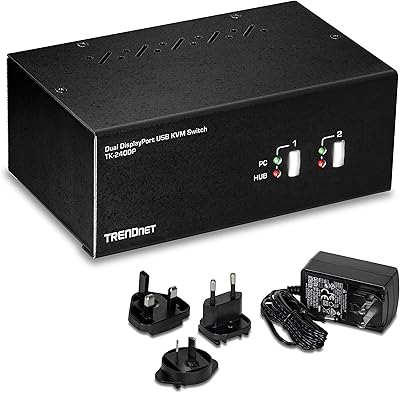
TRENDnet TK-240DP Dual Monitor DisplayPort KVM Switch

TRENDnet TK-440DP 4-Port Dual Monitor DisplayPort KVM Switch
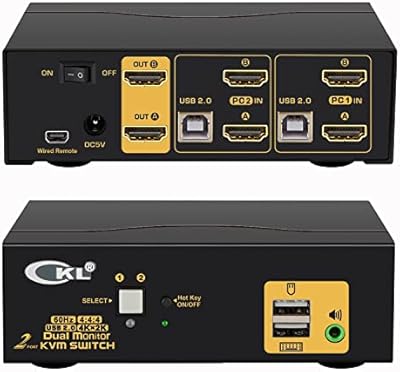
CKL 922HUA-1A Dual Monitor HDMI KVM Switch