Overview

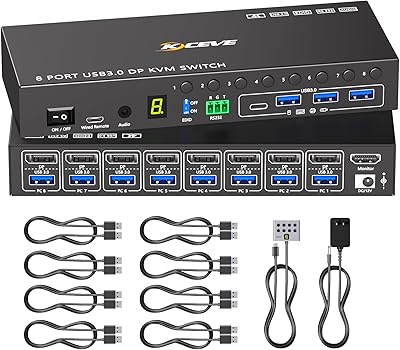
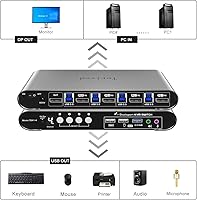
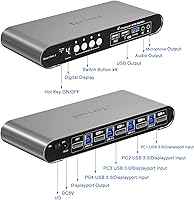
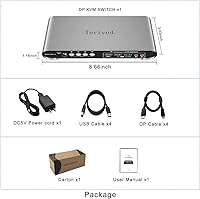
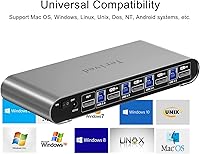
The Terived 4-Port DisplayPort KVM Switch sits in a corner of the market that most budget KVM options can't reach — built for people running two, three, or four machines off a single high-refresh DisplayPort monitor. The aluminum alloy shell immediately sets it apart from the plastic-bodied alternatives you'll find at similar prices; it feels solid and looks the part on a professional desk. Terived includes a full cable set in the box, which cuts down the usual scramble for compatible DP cables. A small digital display panel on the front shows the active channel at a glance, a simple addition that turns out to be genuinely useful in daily use.

Features & Benefits

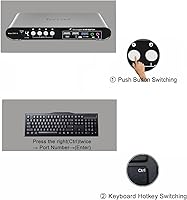
The headline spec is 4K at 144Hz over DisplayPort — and this 4-port KVM delivers it without forcing you to drop to a lower refresh rate when switching inputs, which has been a pain point with older or cheaper units. Hotkey switching works by pressing the right CTRL key twice, followed by a channel number and Enter, keeping your hands on the keyboard. An auto-scan mode lets you cycle through connected machines automatically, with intervals adjustable from 1 to 999 seconds. The shared USB 3.0 hub and 3.5mm audio port mean one keyboard, mouse, speaker, and microphone setup covers all four PCs. HDR10 and RGB 4:4:4 round things out for color-sensitive work across platforms including Windows, Linux, and macOS.

Best For

This DisplayPort KVM switch makes the most sense for people who genuinely need multiple computers on one desk without compromise. Developers toggling between a Linux server and a Windows workstation, sysadmins needing quick access across machines, and gamers keeping a gaming rig alongside a work PC will all find it practical. It's also a strong pick for creative professionals where consistent color output — HDR10 and 4:4:4 — matters across sessions. If you're coming from an HDMI KVM and feel capped at 60Hz, this is the natural upgrade path. Home office users who want a cleaner desk setup with shared audio and a single cable run to the monitor will appreciate what the Terived switch brings.

User Feedback

Buyers who follow the setup instructions — specifically using the bundled cables for all connections — generally report a smooth, driver-free experience out of the box. The aluminum build earns consistent praise; people notice the difference compared to flimsy plastic rivals. That said, two recurring criticisms stand out. The hotkey sequence takes some getting used to: right CTRL twice, then a number and Enter is not intuitive if you're new to KVM switches. Audio is also a known friction point — you must manually select USB Audio Device as your sound output, and skipping that step means no sound at all. A handful of buyers found the bundled cables adequate but eventually swapped to longer third-party cables for larger desk setups.

Pros

  • Holds a true 4K at 144Hz signal across all four inputs without downgrading refresh rate on switch
  • Aluminum alloy shell feels substantially more durable than plastic-bodied rivals at comparable prices
  • Full cable set included in the box means you can set everything up without a separate accessory order
  • Digital channel display on the front panel makes it easy to confirm the active input at a glance
  • Hotkey switching keeps both hands on the keyboard, no need to reach across the desk
  • Auto-scan mode with a 1 to 999 second adjustable interval is genuinely useful for monitoring multiple machines
  • USB 3.0 hub and shared 3.5mm audio port eliminate the need for per-machine peripherals
  • Works across Windows, Linux, and macOS without installing any drivers
  • HDR10 and RGB 4:4:4 support make it a practical choice for color-sensitive professional workflows
  • Ranked among the top KVM switches in its category, reflecting consistent buyer satisfaction

Cons

  • Hotkey sequence — right CTRL twice, then a number, then Enter — is not intuitive and trips up new users
  • Audio requires manually selecting USB Audio Device as system output; easy to miss and frustrating when silent
  • Bundled cables may be too short for larger or more spread-out desk setups, pushing buyers toward third-party replacements
  • No support for HDMI or USB-C inputs, so it is only useful if all connected machines have DisplayPort outputs
  • 8K at 30Hz is listed as a feature but is rarely useful in practice; do not buy this expecting a capable 8K workflow
  • Signal handshake delays when switching inputs have been noted by some users, adding a brief wait between computers
  • Four-port capacity means it offers no upgrade path if you ever need a fifth machine on the same setup
  • Setup process is specific enough that skipping the manual — especially the cable requirement — leads to avoidable frustration

Ratings

Our AI-generated scores for the Terived 4-Port DisplayPort KVM Switch were produced by analyzing verified global buyer reviews, with spam, bot activity, and incentivized feedback actively filtered out before scoring. Each category reflects the honest distribution of real user experiences — strengths and frustrations weighted equally — so you get a transparent picture of where this switch genuinely performs and where it falls short.

Build Quality
88%
The aluminum alloy shell earns consistent praise from buyers who have previously owned plastic KVM switches. Users describe it as feeling solid and professional on a desk, with no flexing or rattling even when cables are pulled at odd angles during daily use.
A small number of reviewers noted that the rubber feet can shift over time on smooth desk surfaces, and the front panel button has a slightly mushy feel that does not inspire the same confidence as the housing itself.
Video Performance
91%
Buyers running high-refresh gaming setups and color-critical creative workstations consistently confirm that 4K at 144Hz holds stable across all four inputs when using the included cables. HDR10 and RGB 4:4:4 output are noted as genuine differentiators, particularly by users who moved here from HDMI-based alternatives.
A recurring minority complaint involves brief signal dropout or black-screen handshake delays when switching inputs, lasting one to three seconds. While this is typical for KVM switches at high resolutions, it catches some buyers off guard if they expected an instant cut.
Ease of Setup
67%
33%
Buyers who read the included instructions first and used the bundled cables throughout report a straightforward, driver-free setup experience across Windows, Linux, and macOS. The plug-and-play nature is genuinely appreciated once the correct cable routing is understood.
Setup has a higher-than-average failure rate on first attempt because the requirement to use provided cables is easy to overlook, and the audio USB device selection step is not obvious. Users who skipped either step frequently assumed the unit was defective before troubleshooting revealed the real cause.
Hotkey Switching
72%
28%
Once the hotkey sequence is memorized — right CTRL twice, then a channel number, then Enter — daily switching feels fast and hands-free. Power users who do this dozens of times per day describe it as genuinely faster than reaching for a physical button on a competing unit.
The multi-step sequence is not intuitive for new KVM users, and there is no way to remap it to a simpler or single-key shortcut. Buyers accustomed to one-button KVM switching report a meaningful adjustment period before the sequence becomes second nature.
Audio Performance
58%
42%
Once the USB Audio Device output is correctly selected in the operating system, shared audio and microphone function reliably across all four inputs. Users in voice-call-heavy workflows appreciate that they do not need a separate headset for each machine.
The mandatory manual audio device selection step is the single most-complained-about aspect of this switch. On macOS especially, the system occasionally resets the default audio output after restarts, forcing the user to reselect the virtual USB device — a friction point that never fully goes away.
USB Hub Utility
74%
26%
The USB 3.0 shared port is fast enough for external SSDs and flash drives, and buyers who use it for a single shared storage device appreciate not having to replug it between machines. It meaningfully extends the switch beyond a pure display-switching role.
There is only one shared USB hub port, which limits its practical use compared to switches offering a full hub with multiple downstream ports. Users transferring files while switching inputs also note that the storage device disconnects from the previous machine mid-transfer, which has caused data integrity concerns for a small number of reviewers.
Auto-Scan Mode
79%
21%
Sysadmins and IT professionals monitoring multiple machines find the adjustable 1 to 999 second scan interval genuinely useful for passive oversight without touching a keyboard. The ability to set very short or very long dwell times makes it flexible for different monitoring scenarios.
Auto-scan is purely a monitoring tool and not practical for active work, since the inputs cycle regardless of user activity. A few buyers also noted that enabling it by accident during normal use — before understanding the hotkey — caused momentary confusion about why the display kept switching on its own.
Cable Set Value
76%
24%
Including a full cable set is a meaningful convenience that most competing units skip. Buyers who have scrambled for compatible DisplayPort cables at launch day appreciate starting with a verified working set, and several reviewers specifically called out the inclusion as a deciding purchase factor.
The bundled cables are functional but not generous in length, and users with larger desk setups or tower cases placed away from the monitor frequently found them too short. This leads many buyers to eventually replace them with longer third-party cables, reducing the long-term value of the inclusion.
OS Compatibility
86%
Cross-platform operation without any driver installation is a genuine strength, and buyers using mixed environments — a Windows workstation alongside a Linux development machine and a Mac — confirm it works across all three without any configuration per platform.
macOS users occasionally encounter the audio output reset issue more frequently than Windows users, and a small number of Linux users on non-mainstream distributions reported that the USB hub was not recognized consistently, requiring a manual re-plug to initialize.
Digital Display Panel
83%
The front-facing channel number display is a small detail that buyers consistently mention in positive terms. In a multi-monitor or dim home office environment, being able to glance down and instantly confirm which computer is active saves more time than it might seem.
The display is limited to showing the active channel number and nothing else — there is no signal status, resolution readout, or input label customization. Buyers who hoped to rename channels or get richer feedback from the display panel will find it more basic than expected.
Physical Switching
77%
23%
The front panel button works reliably for users who prefer a tactile switch over memorizing hotkey sequences, and it is responsive without any noticeable lag. Buyers who share the setup with less tech-savvy household members appreciate having a simple one-press fallback option.
The button has a softer actuation feel that some users find unsatisfying, and its position on the front face — rather than the top — makes it slightly awkward to press if the unit is tucked under a monitor stand or pushed to the back of a desk.
Value for Money
81%
19%
Relative to other DisplayPort KVM switches that support 4K at 144Hz with a full cable set included, this 4-port KVM sits at a competitive price point. Buyers who compared it to higher-priced alternatives with similar specs frequently concluded it offered better dollar-per-feature value.
Buyers who run into the audio or USB peripheral setup issues and spend significant time troubleshooting feel the value equation shifts. If the learning curve results in hours of frustration, the price starts to feel less justified compared to switches with simpler plug-and-play audio handling.
Switching Speed
71%
29%
For standard desktop and productivity use, the transition between computers is fast enough that it does not interrupt workflow. Users switching to check a second machine and returning to their primary workstation describe the round-trip as acceptably quick.
The brief black-screen handshake period — while the monitor renegotiates the signal with the newly active computer — is longer than what some buyers expected, particularly at 4K and 144Hz. Gamers who switch mid-session and want an instant display cut may find the delay more disruptive than casual users would.
Multi-Platform Stability
78%
22%
Buyers using the switch in genuinely mixed-OS environments day in and day out report stable, consistent performance once the initial setup is complete. The no-driver approach means there is nothing to update or reinstall when OS versions change.
A subset of users on macOS Sonoma and certain Linux kernels have reported occasional peripheral dropout — where the keyboard or mouse briefly stops responding after switching — that requires unplugging and replugging the USB cable to resolve. It is not universal but appears often enough to flag.

Suitable for:

The Terived 4-Port DisplayPort KVM Switch is purpose-built for anyone running multiple computers off a single DisplayPort monitor and unwilling to trade away resolution or refresh rate to do it. Developers and sysadmins who jump between a Linux server, a Windows workstation, and maybe a test machine will find the hotkey switching and USB hub combination genuinely time-saving throughout the day. Gamers who keep a dedicated gaming rig alongside a work or streaming PC are well-served here — 4K at 144Hz holds up across inputs, which is not something you can count on from cheaper HDMI-based alternatives. Creative professionals who care about color accuracy will appreciate the HDR10 and RGB 4:4:4 support, which keeps output consistent whether they are color-grading, illustrating, or proofing. Home office users who want one clean desk setup — single monitor, one keyboard, one mouse, shared speakers — rather than a tangle of cables per machine will get real day-to-day value from this 4-port KVM.

Not suitable for:

The Terived 4-Port DisplayPort KVM Switch is not the right fit for every buyer, and it is worth being direct about where it falls short. If your monitor uses HDMI, USB-C, or any connection other than DisplayPort, this unit simply will not work — there is no adapter workaround that preserves high refresh rates. Casual users who want a truly plug-and-play experience with zero learning curve may find the initial setup fussy: you must use the included cables, and audio requires manually switching your system output to USB Audio Device, otherwise you will get silence and wonder what went wrong. Anyone who needs to connect laptops that lack a full-size DisplayPort output — common on ultrabooks — will likely run into compatibility issues. If you only have two machines to manage, there are simpler and less expensive two-port options that do not require learning a multi-step hotkey sequence. And buyers who need HDCP 2.2 compliance for protected 4K content streaming should verify compatibility carefully before committing.

Specifications

  • Input Ports: The switch accepts four DisplayPort source inputs, allowing up to four computers to be connected simultaneously.
  • Output Port: A single DisplayPort output connects to the monitor, carrying the signal from whichever computer is currently selected.
  • Max Resolution: Supports up to 4K at 144Hz for everyday high-refresh use, and up to 8K at 30Hz for static or low-motion content.
  • Color Format: Outputs RGB 4:4:4 full chroma, preserving accurate color representation without subsampling artifacts.
  • HDR Support: HDR10 is supported, enabling compatible monitors to display a wider dynamic range when the source machine outputs HDR content.
  • DisplayPort Version: Built on the DisplayPort 1.2 standard, ensuring broad compatibility with modern GPUs and monitors.
  • Switching Methods: Three switching methods are available: a physical front-panel button, a keyboard hotkey sequence, and an automatic timed scan mode.
  • Auto-Scan Interval: The auto-scan interval is fully adjustable between 1 and 999 seconds, set via the keyboard hotkey menu.
  • USB Hub: One shared USB 3.0 hub port is provided on the unit, allowing a peripheral such as a flash drive to be accessed from whichever computer is active.
  • Audio: A single 3.5mm combined audio and microphone port is shared across all inputs, routed to the active computer when switched.
  • Shell Material: The enclosure is constructed from aluminum alloy, providing corrosion resistance and greater impact durability compared to plastic housings.
  • Front Display: A small digital panel on the front face shows the currently active channel number, readable even in low-light environments.
  • OS Compatibility: Compatible with Windows 11, 10, 7, Vista, XP, and 2000, as well as Linux distributions and macOS, with no drivers required.
  • Operating Voltage: The unit operates at 5 volts DC, typically powered via the USB connections from the host computers.
  • Dimensions: The package measures approximately 10.87 x 6.61 x 3.5 inches, making it a reasonably compact unit for desk placement.
  • Weight: The switch weighs 3.62 pounds, reflecting the solid aluminum construction rather than a lightweight plastic build.
  • In-Box Cables: A complete cable set is included in the package, covering the DisplayPort and USB connections needed for all four computer inputs and the monitor output.
  • Hot Plug: Hot plug and play is supported, so computers can be connected or disconnected without powering down the switch.
  • HDCP Support: HDCP is supported on the output, which is relevant for playback of certain protected content through compatible applications.
  • BSR Ranking: Currently ranked #123 in the KVM Switches category on Amazon, reflecting consistent and sustained buyer interest.

Related Reviews

DiamondTiger KS304DL 4-Port DisplayPort KVM Switch
74%
88%
Ease of Setup
92%
Video Quality
74%
Switching Reliability
63%
Build Quality
86%
Value for Money
More
AILVLVNG 8K@60Hz DisplayPort KVM Switch 4-Port

85%
95%
Resolution and Video Quality
91%
Ease of Use and Switching
85%
Compatibility with Devices
88%
Build Quality and Durability
87%
USB Ports and Peripheral Sharing
More
Tripp Lite B004-DPUA4-K 4-Port DisplayPort KVM Switch
87%
89%
Performance
91%
Ease of Use
88%
USB 3.0 Performance
92%
Video Resolution Quality
85%
Build Quality
More
TRENDnet TK-440DP 4-Port Dual Monitor DisplayPort KVM Switch
85%
92%
Video Quality
85%
Ease of Use
90%
Compatibility
88%
Build Quality
87%
USB Hub Functionality
More
StarTech SV231DPDDUA2 Dual-Monitor DisplayPort KVM Switch
68%
83%
Video Output Quality
78%
Dual-Monitor Switching
54%
Compatibility
58%
Hotkey Switching Reliability
74%
USB Hub Performance
More
KAGO 4-Port VGA KVM Switch
84%
92%
Value for Money
96%
Ease of Setup
85%
Performance
78%
Build Quality
87%
Display Quality
More
MLEEDA 8-Port DisplayPort KVM Switch
86%
88%
Performance
85%
Video Quality (4K Support)
90%
USB 3.0 Data Transfer
92%
Ease of Installation
80%
Switching Modes (Panel/Remote/RS232)
More
UGREEN 8K DisplayPort KVM Switch
75%
88%
Display Performance
84%
Switching Reliability
81%
USB Port Utility
86%
Setup & Installation
58%
Power Requirements
More
DGODRT KS204V 4-Port VGA KVM Switch
83%
86%
Switching Reliability
89%
Desktop Controller Convenience
91%
Value for Money
78%
Cable Quality & Included Accessories
73%
USB Peripheral Compatibility
More
IOGEAR 2-Port USB DisplayPort KVM Switch
85%
88%
Ease of Use
92%
Display Quality
85%
Build Quality
89%
Compatibility with Mac and Windows
91%
Setup Process
More
StarTech SV431HDU3A2 4-Port HDMI KVM Switch
73%
74%
Switching Reliability
69%
Video Quality
66%
USB 3.0 Hub Performance
71%
Audio Switching
83%
Setup & Installation
More

FAQ

Terived strongly recommends using the included cables for all computer and monitor connections, and buyers who ignored this step have reported signal issues and non-functional peripherals. If your desk setup makes the bundled cables too short, you can try high-quality third-party DisplayPort 1.4 cables, but start with the included ones first to confirm everything works correctly before swapping.

This is almost always caused by not connecting the USB cables from the front KVM ports to each computer. The switch has dedicated USB ports on the front specifically for keyboard and mouse passthrough — those four USB cables in the box need to run from the switch to each computer, not just the DisplayPort cables. Once those are plugged in, the peripherals should work immediately without any driver installation.

Audio through the Terived 4-Port DisplayPort KVM Switch requires one extra manual step that catches a lot of people off guard. You need to go into your operating system sound settings and select USB Audio Device as your output — the switch creates a virtual audio device that your system does not automatically prioritize. Once you make that change and plug your speakers or headphones into the 3.5mm port on the switch, audio works normally.

It depends on your laptop. If your laptop has a USB-C port with DisplayPort Alt Mode, a passive USB-C to full-size DisplayPort cable should work for the video signal, but you would still need to connect the USB cable separately for keyboard and mouse. Mini DisplayPort to DisplayPort adapters are generally compatible as well. That said, results can vary by laptop model, so it is worth checking your specific hardware specs before assuming it will work out of the box.

When set up correctly with the provided cables and a compatible GPU and monitor, the switch does maintain 4K at 144Hz across all four inputs. That said, a small number of users have noted occasional signal handshake delays right after switching — the monitor may go black for a second or two before the new input is recognized. This is common behavior for KVM switches at high refresh rates and is not unique to this unit.

Press the right CTRL key twice, then press the number of the computer you want (1, 2, 3, or 4), and then press Enter. It takes a little practice to build the muscle memory, but once you have it down it is faster than reaching for the physical button. Just make sure you are using the right CTRL key specifically — the left one does not trigger the hotkey sequence.

Auto-scan cycles through all connected computers automatically at a set interval, displaying each one on your monitor in turn. To enable it, press right CTRL twice, then S, then Enter. The default interval is 10 seconds, but you can customize it by pressing right CTRL twice, then S, then a number (representing seconds), then Enter. Press the same combination again to turn it off. It is mostly useful for monitoring multiple machines rather than actively working on them.

Yes, the shared hub port is USB 3.0, so it can handle fast storage devices like external SSDs or flash drives at reasonable speeds. Keep in mind it is a shared port that passes to whichever computer is currently active, so if you switch inputs your connected storage will disconnect from the previous machine and reconnect to the new one, which is something to be aware of if you are in the middle of a file transfer.

It works with macOS as well as Windows and most Linux distributions, all without needing to install any drivers. The hotkey sequence functions the same way across operating systems. The one thing macOS users occasionally note is that audio device selection needs to be done through System Settings after each session, since macOS sometimes resets the default output device on its own.

Yes, the aluminum alloy shell adds meaningful weight compared to plastic KVM switches — the unit comes in at just over 3.5 pounds, which is noticeable if you pick it up expecting something lighter. For desk use this is not really a problem, and most buyers actually view it as a sign of build quality rather than a drawback. Just factor it in if you were planning to mount it vertically or attach it to a monitor arm with a tray.