Overview

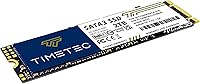
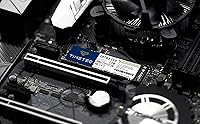
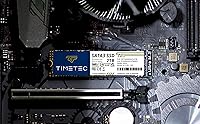
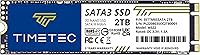
The Timetec JM600 2TB M.2 2280 SATA SSD is a straightforward, high-capacity storage upgrade aimed squarely at everyday users who want more space without paying a premium. Timetec isn't a name most people recognize from the shelf, but the brand has quietly built a solid reputation in the value memory and storage space. One thing worth clarifying upfront: this is an M.2 SATA drive, not NVMe. That distinction matters — the physical slot looks identical to an NVMe slot, but SATA tops out well below what PCIe-based drives can achieve. For most people breathing new life into an old laptop or adding a roomy second drive to a desktop, that tradeoff is completely fine.
Features & Benefits

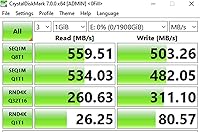
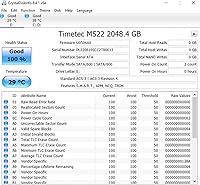
On paper, the specs for this 2TB SATA drive are competitive for its class. Sequential read speeds hit up to 550MB/s with writes reaching 500MB/s — respectable numbers that feel snappy in real daily use. The drive uses 3D QLC NAND flash, which packs more storage into a smaller physical footprint but can slow down during large, sustained writes once the SLC cache fills. Think of the cache as a fast buffer: it handles burst activity well, but copying a massive video library in one shot may reveal some throttling. Beyond raw speed, the JM600 supports TRIM, S.M.A.R.T. monitoring, ECC error correction, and Wear-Leveling to help extend the drive's useful life. A three-year warranty with free tech support rounds things out.

Best For

This Timetec M.2 SSD makes the most sense for a specific type of buyer. If your laptop has an M.2 slot but only supports SATA — common in machines from the mid-2010s — this drive is a strong fit for a big storage boost. It's equally useful as a secondary desktop drive where you want plenty of room for photos, videos, or archived files and raw throughput isn't the priority. Linux users get explicit support from kernel 2.6.33 onward, which is a refreshingly clear commitment that many budget drives skip over. What it's less suited for: heavy content creation, large file transfers, or anyone who needs consistent write speeds under sustained load. For web browsing, documents, and everyday media storage, it covers everything you need.

User Feedback

Among the roughly 2,300 ratings, this 2TB SATA drive holds a 4.6 out of 5 — a genuinely strong score for a value-tier product. Most buyers highlight two things: easy installation and a noticeable improvement over whatever spinning hard drive it replaced. The drop-in upgrade experience seems to go smoothly for the vast majority. On the flip side, a handful of reviewers have noted speed dips during large sustained writes, which lines up with how QLC NAND behaves once the cache is exhausted — not a flaw unique to this drive, but worth knowing. A small number raised questions about long-term durability under heavy daily use. The warranty and support process gets consistently positive marks, which matters more than people expect when something eventually goes wrong.

Pros

  • 2TB of storage capacity at a value price makes this one of the more accessible high-capacity M.2 SATA options available.
  • Sequential read speeds up to 550MB/s deliver a night-and-day improvement over any mechanical hard drive.
  • The M.2 2280 form factor fits a wide range of laptops and desktops, making compatibility straightforward.
  • Backward compatibility with SATA II and SATA I means it works in older systems that lack full SATA III support.
  • Built-in health features like S.M.A.R.T., ECC, TRIM, and Wear-Leveling help protect data and extend drive longevity.
  • A 4.6-star average across roughly 2,300 ratings is a credible indicator of consistent buyer satisfaction.
  • Installation is plug-and-play for most users, with no additional drivers or software required.
  • The three-year limited warranty with free technical support is a meaningful safety net for a budget-tier drive.
  • Explicit Linux support from kernel 2.6.33 onward removes a compatibility headache that other budget drives ignore.
  • The 1,500,000-hour MTBF rating reflects solid reliability engineering for everyday, light-to-moderate workloads.

Cons

  • QLC NAND write speeds can drop significantly once the SLC cache is full during large, sustained file transfers.
  • This 2TB SATA drive cannot match the throughput of NVMe alternatives — not ideal if your slot supports PCIe.
  • Long-term endurance under heavy daily write cycles is a real concern with QLC flash compared to TLC or MLC.
  • Timetec has limited brand recognition, which may make some buyers hesitant despite the decent rating history.
  • No screws, brackets, or cables are included, so first-time builders may need to source mounting hardware separately.
  • SLC caching benefits are temporary; workloads that regularly exceed the cache size will expose the QLC speed floor.
  • Not a good fit for NAS enclosures or workstation environments that demand consistent enterprise-grade write endurance.
  • Buyers with NVMe-capable slots may feel they left performance on the table by choosing a SATA-limited drive.

Ratings

Our AI rating engine analyzed thousands of verified global reviews for the Timetec JM600 2TB M.2 2280 SATA SSD, actively filtering out incentivized, bot-generated, and low-quality submissions to surface what real buyers actually experienced. The scores below reflect a balanced synthesis of genuine praise and recurring frustrations — nothing is glossed over. Whether this 2TB SATA drive earns a place in your build or sends you looking elsewhere depends heavily on how your use case lines up with its real-world strengths.

Value for Money
91%
Buyers consistently flag this as one of the most accessible ways to get 2TB of SSD storage into an older laptop or budget desktop without breaking the bank. For users coming from a spinning hard drive, the performance-per-dollar ratio feels genuinely hard to argue with at this capacity tier.
A small number of reviewers noted that if your system supports NVMe, spending only a little more elsewhere gets you meaningfully faster storage — making the value equation feel slightly less clear-cut for those buyers specifically.
Read Speed Performance
83%
Sequential read speeds hitting close to the 550MB/s ceiling translate into noticeably snappy boot times, fast application launches, and fluid file browsing in everyday use. Users upgrading from HDDs consistently describe the difference as dramatic, especially on older laptops.
Buyers who compared this drive to NVMe options in the same system were underwhelmed — SATA III is a hard ceiling, and anyone moving from a modern PCIe drive will likely feel the gap. The read performance is strong for SATA, but it is not a fair contest against faster interfaces.
Sustained Write Speed
61%
39%
For short, everyday write tasks — saving files, downloading software, installing games — the SLC cache does its job and the drive feels responsive. Most casual users never push writes hard enough to notice any inconsistency during normal daily routines.
Once the SLC cache fills, write speeds drop notably, and users copying large batches of video files or doing big backups in one go have reported the slowdown firsthand. This is a known characteristic of QLC NAND and not unique to this drive, but it is a real constraint worth understanding before buying.
Installation Ease
93%
Installation gets glowing mentions across hundreds of reviews — buyers with no prior hardware experience describe confidently swapping out their old drive in under 15 minutes. The M.2 2280 form factor fits most slots without any adapter, and the drive is recognized immediately by Windows and Linux alike.
A handful of first-time builders were caught off guard by the absence of a mounting screw in the package, requiring a quick trip to a hardware store or an online order for a single M2 screw. It is a minor friction point, but one that shows up often enough to be worth flagging.
Long-Term Reliability
69%
31%
The 1,500,000-hour MTBF rating and the suite of health management features — ECC, Wear-Leveling, TRIM, and Garbage Collection — suggest Timetec has put genuine engineering thought into extending drive longevity for everyday workloads. Users who have owned the drive for one to two years report no issues under light to moderate use.
QLC NAND inherently has lower write endurance compared to TLC or MLC alternatives, and a cluster of users with heavier daily write habits have raised questions about how the drive will hold up at the three-to-five year mark. The warranty covers three years, but long-term durability data on this specific drive is still limited.
Compatibility Range
87%
Support for Windows 7 through Windows 11 plus Linux from kernel 2.6.33 onward makes this one of the more broadly compatible value drives available, particularly for Linux users who often have to verify compatibility manually. Backward compatibility with SATA II and SATA I adds further flexibility for older hardware.
The drive will not function in M.2 slots wired exclusively for NVMe or PCIe, which has tripped up a small number of buyers who did not verify their slot type beforehand. Checking your motherboard or laptop specs is essential — the physical connector looks identical regardless of protocol.
Brand Reputation
72%
28%
Timetec has built a quiet but genuine track record in the value memory and storage segment, and a 4.6-star average across over 2,300 ratings lends real credibility to a brand that most buyers have never heard of before. Repeat purchasers do appear in the review pool, which is a reasonable trust signal.
The brand lacks the name recognition of established players, and some buyers admitted they were hesitant at first. For buyers who prioritize brand pedigree as a proxy for quality assurance, the JM600 may require a bit more research confidence before committing.
Warranty & Support
84%
Three years of warranty coverage paired with free technical support is a meaningful commitment for a budget drive, and multiple reviewers highlighted the support team as genuinely responsive when they reached out. The warranty process appears to be handled without excessive friction based on user accounts.
A small subset of users had to follow up more than once to get resolution, suggesting support consistency is not perfectly uniform. Warranty processes also require proof of purchase, which caught a few buyers off guard if they had misplaced their order details.
Capacity Practicality
94%
Two terabytes in an M.2 form factor is genuinely spacious for the vast majority of home users — photo libraries, game installs, document archives, and an OS can all coexist comfortably without any storage anxiety. Buyers using this as a secondary drive in a desktop noted it essentially solved their storage problem in one purchase.
A small number of power users noted that even 2TB fills up faster than expected when dealing with 4K video or large virtual machine images, but this reflects use-case mismatch rather than a product flaw. For those users, a larger or faster drive category is simply more appropriate.
Physical Build Quality
78%
22%
The drive is lightweight and compact as expected for the M.2 2280 format, and buyers who handled it noted it feels solid and appropriately constructed for an internal component. Nothing about the physical unit has drawn significant complaints across the review pool.
As an internal drive, tactile quality is largely irrelevant once installed — but the lack of any included accessories or even a basic installation guide left a few less experienced buyers wanting a more complete unboxing experience for what is not a completely trivial hardware upgrade.
Boot & OS Performance
88%
Users who installed Windows or Linux directly onto the JM600 report fast, consistent boot times that hold steady even after months of use. The improvement over a mechanical hard drive as a primary OS disk is one of the most praised aspects across the entire review set.
A few users noticed that boot performance on very old SATA I or SATA II systems, while improved over HDDs, does not reach the same responsiveness as on a full SATA III system. That is a platform limitation, not a drive flaw, but it does affect the experience for some buyers.
Thermal Management
76%
24%
Under typical workloads, the drive runs cool and has not generated meaningful heat-related complaints from the review pool. In laptops where thermal headroom is tight, this is a quiet but meaningful advantage compared to some competing drives.
During prolonged, intensive write sessions that exhaust the SLC cache, the drive can run warmer than at idle — though no reviewers reported thermal throttling as a primary issue. In passively cooled ultrabooks with restricted airflow, sustained workloads may be worth monitoring.
Linux Compatibility
89%
Explicit support for Linux kernel 2.6.33 and later is a refreshingly concrete commitment that many budget drives skip entirely. Linux users in the review pool consistently confirmed the drive works out of the box across Ubuntu, Fedora, Debian, and Arch-based distributions without any manual driver configuration.
No official Timetec management or diagnostic software exists for Linux, so users who want deeper S.M.A.R.T. monitoring beyond what standard tools like smartmontools provide may find the native reporting less polished than on Windows-managed systems.

Suitable for:

The Timetec JM600 2TB M.2 2280 SATA SSD is a strong pick for anyone dealing with a mid-range or older laptop that has an M.2 slot but only supports SATA — a common situation with machines from the 2014–2019 era that manufacturers never equipped with NVMe support. If your current drive is a spinning hard disk and your system qualifies, the speed improvement will feel dramatic for everyday tasks like booting, launching apps, and loading files. It also makes a lot of sense as a spacious secondary drive inside a desktop, especially for storing photos, home videos, or a large media library where access speed matters less than raw capacity. Linux users will appreciate that the drive explicitly supports kernel 2.6.33 and later, removing any guesswork around compatibility. Budget-conscious builders who prioritize storage space over peak throughput will find this 2TB SATA drive hits a practical sweet spot for the money.

Not suitable for:

Anyone who needs consistent, high-speed sustained write performance should look elsewhere before committing to the JM600. Like most QLC-based drives, this one leans on an SLC cache to deliver its advertised write speeds, and once that cache is exhausted during large transfers — think copying hundreds of gigabytes at once — write speeds can drop noticeably. That makes it a poor fit for video editors, photographers batch-processing RAW files, or anyone regularly moving massive datasets. If your laptop or motherboard has an NVMe-capable M.2 slot and you want the fastest possible storage, spending a little more on a PCIe NVMe drive is a smarter long-term investment than the Timetec JM600 2TB M.2 2280 SATA SSD. Power users running heavy virtualization, frequent large backups, or intensive read-write cycles daily may also find QLC NAND endurance a lingering concern over a multi-year ownership window.

Specifications

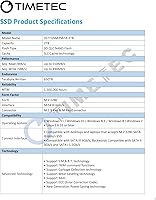
  • Capacity: The drive offers 2TB of usable flash storage, suitable for operating systems, applications, and large media libraries.
  • Form Factor: It uses the M.2 2280 form factor, meaning the card is 22mm wide and 80mm long — the most common M.2 size found in modern laptops and desktops.
  • Interface: The drive connects via SATA III at 6Gb/s and is backward compatible with SATA II at 3Gb/s and SATA I at 1.5Gb/s.
  • Sequential Read: Sequential read speed reaches up to 550MB/s under optimal conditions, consistent with the SATA III interface ceiling.
  • Sequential Write: Sequential write speed reaches up to 500MB/s during cached burst activity, though sustained writes may be lower once the SLC cache is exhausted.
  • NAND Type: The drive uses 3D QLC (Quad-Level Cell) NAND flash with an SLC (Single-Level Cell) write cache layer to boost burst performance.
  • MTBF: Timetec rates this drive at a mean time before failure of 1,500,000 hours under standard operating conditions.
  • Supported OS: Compatible operating systems include Windows 7 through Windows 11 and Linux kernel 2.6.33 or later.
  • Health Features: The drive supports S.M.A.R.T. monitoring, TRIM command, ECC (Error Correction Code), Wear-Leveling, and Garbage Collection for ongoing data integrity and longevity.
  • RAID Support: The JM600 supports RAID configurations, making it usable in multi-drive setups where compatible controllers are present.
  • Warranty: Timetec provides a three-year limited warranty along with free technical support for the duration of the coverage period.
  • Weight: The packaged drive weighs approximately 0.704 ounces, making it negligible in terms of added weight to a laptop build.
  • Package Size: The retail package measures 5.24 x 3.74 x 0.63 inches; no mounting screws, cables, or brackets are included in the box.
  • Compatible Devices: Designed for desktops and laptops that have an M.2 2280 SATA slot; it will not function in M.2 slots that are wired exclusively for NVMe.
  • BSR Ranking: At the time of writing, this drive holds a top-40 position in the Internal Solid State Drives category on Amazon, reflecting strong sales volume.

Related Reviews
ORICO Y20M 2TB M.2 SATA SSD
81%
88%
Value for Money
83%
Compatibility Clarity
79%
Read & Write Speed
91%
Installation Experience
74%
Long-term Reliability
More
KingSpec NT 2TB M.2 2280 SATA SSD
74%
88%
Value for Money
74%
Read & Write Speed
61%
Compatibility
86%
Installation Experience
63%
Long-term Reliability
More
Timetec 1TB M.2 2280 Internal SSD
77%
91%
Value for Money
78%
Read/Write Performance
89%
Boot & Load Times
88%
Installation Ease
73%
Reliability & Longevity
More
Timetec 512GB M.2 2280 SATA SSD
80%
93%
Value for Money
81%
Read Speed Performance
67%
Write Speed & Cache Behavior
91%
Installation Ease
78%
Long-term Reliability
More
ORICO Y20M 1TB M.2 SATA SSD
80%
71%
Compatibility Clarity
78%
Read/Write Performance
91%
Installation Ease
83%
Value for Money
74%
Drive Longevity & Health Features
More
Fikwot FN203 2TB M.2 SATA SSD
88%
88%
Sequential Read Speed
84%
Sequential Write Speed
90%
Durability
87%
Data Integrity/Error Correction
95%
Ease of Installation
More
ORICO Y20M 512GB M.2 SATA SSD
78%
61%
Compatibility Clarity
78%
Read/Write Performance
88%
Installation Experience
84%
Value for Money
74%
Long-Term Reliability
More
Ediloca EN206 2TB M.2 SATA SSD
74%
88%
Value for Money
71%
Read & Write Speed
93%
Installation Ease
82%
Compatibility
61%
Long-Term Reliability
More
Kingston NV3 2TB NVMe SSD
82%
88%
Read Speed Performance
71%
Write Speed Consistency
63%
Thermal Management
86%
Value for Money
94%
Installation Ease
More
ORICO Y20M 4TB M.2 SATA SSD
76%
94%
Storage Capacity
46%
Compatibility Clarity
71%
Read & Write Speed
88%
Installation Experience
73%
Value for Money
More

FAQ

The physical slot can look identical, so you need to check your laptop's manual or manufacturer spec sheet. An easy way is to look up your laptop model on the manufacturer's support page and search for the storage interface type. If it says M.2 SATA or M.2 SATA III, this drive will work. If it only lists M.2 PCIe or NVMe, it will not.

Yes. The JM600 is backward compatible with SATA II at 3Gb/s and SATA I at 1.5Gb/s. You will not hit the full 550MB/s read speed on a SATA II system, but it will still be significantly faster than a mechanical hard drive.

SLC caching is essentially a fast temporary buffer the drive uses to accelerate writes. For everyday tasks like saving documents, installing apps, or downloading files, you will never notice any slowdown. The cache only becomes a bottleneck when you are copying very large amounts of data in a single operation — think hundreds of gigabytes at once. For most home users, this is a non-issue.

It is a reasonable choice for a boot drive on a SATA-limited system. Boot times and application loading will feel fast and responsive. Just make sure your system actually supports M.2 SATA — if it supports NVMe, spending a bit more on an NVMe drive would give you noticeably better all-round performance.

No software is included in the box. However, free tools like Macrium Reflect or Clonezilla work well for cloning your existing drive to this one. Timetec also offers free technical support if you run into any issues during the process.

Yes, it is explicitly supported on Linux kernel 2.6.33 and later, which covers virtually every modern Linux distribution. No special drivers are needed — it shows up as a standard SATA block device and works right out of the box.

For typical everyday workloads — web browsing, documents, media consumption, and light gaming — this drive should last well beyond its three-year warranty window. QLC NAND does have a lower write endurance than TLC or MLC NAND, so if you are constantly writing large files day after day, you may see more wear over time. For most home and office users, longevity is not a practical concern.

The package contains only the bare drive. No screws, mounting brackets, or cables are included. Most laptops come with the M.2 mounting screw already in place, but if yours does not, you will need a small M2 screw, which is inexpensive and widely available.

Yes, as long as the enclosure explicitly supports M.2 SATA drives. Some M.2 enclosures are NVMe-only, so double-check the product listing before buying. In a compatible SATA enclosure, this 2TB SATA drive makes a solid high-capacity portable storage option.

Timetec offers a three-year limited warranty with free technical support. Based on user feedback, the warranty and support process tends to go smoothly. You would contact Timetec directly, and they handle replacements or support from there. Keep your proof of purchase handy, as it is typically required to initiate a claim.