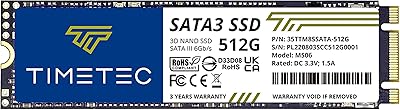

Overview

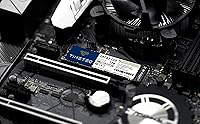
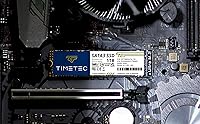
The Timetec 1TB M.2 2280 Internal SSD sits in a crowded but practical corner of the storage market — budget-friendly drives aimed at people who want to breathe life into an aging machine. One thing worth clarifying upfront: M.2 2280 is a form factor, not a speed tier. This drive runs on a SATA III interface, not NVMe, so it won't touch the speeds of a modern PCIe drive. What it does offer is a meaningful jump over any spinning hard disk, with 1TB of capacity that comfortably handles an operating system, everyday apps, and a decent media library. Timetec isn't a household name like Samsung or WD, but the specs tell a reasonable story for the price.

Features & Benefits

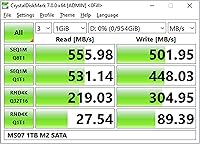
On paper, this M.2 SATA SSD delivers sequential read speeds up to 550MB/s and writes up to 500MB/s — about as fast as the SATA III ceiling allows. SLC caching helps with everyday burst tasks like copying files or launching apps, though it isn't a fix for sustained large transfers. The 3D NAND construction is a genuine plus, holding up better over time than older planar NAND designs. Rated endurance sits at 512 TBW with a claimed 1,500,000-hour MTBF — respectable at this price tier. The drive also supports TRIM, ECC, Wear-Leveling, and Garbage Collection for long-term health, and it is backward compatible with older SATA II and I slots.

Best For

This 1TB upgrade drive makes the most sense in a specific scenario: you have an older laptop or desktop with an M.2 2280 slot that supports only SATA — not NVMe — and you are still running a mechanical hard drive. The jump in boot times and app responsiveness after replacing an HDD is dramatic, not because this drive is exceptional, but because HDDs are that slow by comparison. It also works well as secondary storage in a DIY build that already has an NVMe primary. For web browsing, office work, and streaming, it is more than capable. Heavy video editing or large sequential file transfers are where its limits become apparent.

User Feedback

Most owners come away satisfied, especially those upgrading from hard drives — faster boot times and snappier app loading are the most commonly praised outcomes. Installation gets consistent high marks, with users fitting this Timetec drive into older ThinkPads and budget desktops without trouble. That said, not every review is positive. Technically minded buyers flag that write speeds drop noticeably once the SLC cache fills during large file transfers, which catches some off guard. There are also scattered concerns about long-term reliability from a lesser-known brand, though no widespread failure patterns emerge from the reviews. The included three-year warranty with free technical support goes a long way toward easing those doubts.

Pros

  • Replacing an old hard drive with this M.2 SATA SSD produces a dramatic, immediately noticeable speed improvement.
  • One terabyte of storage is plenty for an operating system, everyday apps, and a solid media collection.
  • SATA III speeds top out around 550MB/s read — fast enough for virtually all everyday computing tasks.
  • 3D NAND construction improves long-term data retention and durability compared to older planar NAND designs.
  • A 512 TBW endurance rating and 1,500,000-hour MTBF are reassuringly high for a drive at this price point.
  • Backward compatibility with SATA II and SATA I slots makes it usable in a wider range of older machines.
  • Built-in support for TRIM, ECC, and Wear-Leveling helps maintain drive health and performance over time.
  • Installation is straightforward, with users reporting easy fitting into older ThinkPads and budget desktops.
  • A three-year limited warranty with free technical support provides solid peace of mind for a budget-tier drive.
  • The compact M.2 2280 form factor keeps cable clutter out of the picture entirely.

Cons

  • Timetec is a lesser-known brand, and some buyers will reasonably hesitate without a long reliability track record.
  • Sustained write speeds drop once the SLC cache fills, making large sequential file transfers slower than spec sheets suggest.
  • No NVMe support means this drive cannot compete with modern PCIe SSDs on raw throughput.
  • No mounting screw, bracket, or accessory is included in the box, which can be an inconvenience for first-time builders.
  • Benchmark results from real-world testing sometimes fall short of the advertised maximum speeds.
  • Buyers with systems that support NVMe may find it hard to justify choosing a SATA drive purely on familiarity.
  • Limited independent long-term reliability data exists for this brand compared to Samsung, WD, or Crucial.
  • The drive is not well-suited for workstation or prosumer use cases where consistent, sustained performance matters.

Ratings

The scores below for the Timetec 1TB M.2 2280 Internal SSD were generated by our AI engine after analyzing thousands of verified global buyer reviews, with spam, bot submissions, and incentivized feedback actively filtered out. Each category reflects the honest consensus of real users — strengths are credited where earned, and genuine pain points are never glossed over.

Value for Money
91%
This is where this 1TB upgrade drive consistently wins over buyers. At its price point, delivering a full terabyte of M.2 SATA storage with a three-year warranty and competitive endurance specs is difficult to fault. Users replacing aging HDDs report feeling like they got far more than they paid for.
Buyers who later discover that NVMe drives are available for only marginally more money occasionally feel they could have spent smarter. The value equation is strongest for SATA-only systems; if your machine supports NVMe, the calculus shifts.
Read/Write Performance
78%
22%
For everyday tasks — booting Windows, launching Chrome, opening Office files — this Timetec drive feels genuinely fast. Sequential reads near 550MB/s mean most users will never feel a bottleneck during typical workloads, and the SLC cache keeps short burst writes feeling responsive.
Sustained write performance drops noticeably once the SLC cache is exhausted, which becomes apparent when transferring large folders or installing a big game. Technically minded reviewers who ran benchmarks noted that real-world sustained speeds fall well short of the advertised ceiling.
Boot & Load Times
89%
Users upgrading from mechanical hard drives report some of the most dramatic before-and-after impressions in the review pool. Windows boot times dropping from over a minute to under 15 seconds is the single most frequently cited benefit, and app launch speeds draw consistent praise.
Users already on a SATA SSD notice little to no improvement, which makes sense technically but occasionally generates disappointed reviews from buyers who misunderstood what they were upgrading from. Managing expectations upfront would prevent most of these complaints.
Installation Ease
88%
The plug-and-play nature of M.2 installation is well-represented in the feedback, with first-time upgraders in older ThinkPads, budget desktops, and mid-range laptops reporting clean, tool-minimal installs. The compact form factor means no cable routing or power connectors to wrestle with.
No mounting screw is included in the box, which catches some buyers off guard — particularly those whose machines do not have a pre-installed standoff screw. A handful of reviewers also note that locating the correct M.2 slot on their specific motherboard required more research than expected.
Reliability & Longevity
73%
27%
The 512 TBW endurance rating and 1,500,000-hour MTBF are strong figures for this price tier, and users who have owned the drive for a year or more generally report no issues. The 3D NAND design is widely accepted as more durable than older planar NAND alternatives.
Timetec's limited public track record compared to Samsung or Crucial leaves some buyers uneasy about what happens at the two- or three-year mark. There is not enough long-term ownership data in the review pool yet to fully validate the manufacturer's endurance claims with confidence.
Compatibility
84%
Backward compatibility with SATA II and SATA I slots broadens this drive's usability considerably, and support for Windows 7 through 11 plus Linux covers the vast majority of real-world installations. Users fitting it into a wide variety of older business laptops and consumer desktops confirm broad compatibility.
The SATA-only interface is a hard limitation — systems with M.2 slots wired exclusively for NVMe will not detect the drive at all, and several one-star reviews trace directly to this misunderstanding. Buyers must verify their slot type before purchasing.
Brand Trust
66%
34%
Timetec has enough of a review presence to establish basic credibility, and users who have purchased multiple drives from the brand report consistent results. The included warranty and technical support contact are seen as genuine goodwill gestures rather than empty promises.
Compared to tier-one storage brands, Timetec simply lacks the years of independent testing, community reputation, and established RMA processes that give buyers confidence. Some users admit they chose it hesitantly and would switch to a more recognized name if the price gap narrowed.
Warranty & Support
81%
19%
A three-year limited warranty with free technical support is a genuinely solid offer at this price level, and several reviewers specifically called it out as a deciding factor. Buyers who contacted support report reasonably prompt responses and helpful guidance.
A small number of users found the warranty claims process slower or less straightforward than they expected from a larger brand. Documentation on how to register the drive or initiate a claim is not prominently communicated in the packaging.
Sustained Transfer Speed
57%
43%
For the typical buyer moving files under a few gigabytes at a time — documents, photos, music — the SLC cache handles the workload comfortably and speeds feel consistent. Casual users rarely push the drive hard enough to notice any throttling.
Power users and content creators who regularly move large video projects or game installs will hit the cache ceiling and experience a tangible slowdown that is hard to ignore. This is not a flaw unique to Timetec, but it is a real limitation of SLC-cached SATA SSDs at this capacity.
Packaging & Unboxing
76%
24%
Reviewers generally note that the drive arrives well-protected, and the minimal packaging is appropriate for a small storage component. Nothing is superfluous, and the drive itself shows no signs of transit damage in the vast majority of cases.
The barebones presentation — no accessories, no quick-start guide, no mounting hardware — leaves first-time builders feeling slightly underprepared. It is functional packaging, but it does not inspire the kind of confidence that a premium unboxing experience might.
Power Efficiency
83%
SATA SSDs draw very little power compared to mechanical drives, and users in laptops report no negative effect on battery life after upgrading to this drive. The new-generation power-saving technology mentioned in the specs appears to function as intended.
There is minimal independent data on actual idle versus active power draw for this specific model, so precise efficiency claims are hard to verify. Users wanting detailed power consumption figures for system builds will not find them readily available.
Operating Temperature
74%
26%
Most users report no unusual heat output during typical workloads, and the drive runs cool enough in standard laptop installations that thermal throttling is not a commonly raised concern. S.M.A.R.T. monitoring lets users keep an eye on temperature independently.
In compact laptops with poor airflow, a small number of users noted elevated drive temperatures under sustained loads. No official operating temperature range is prominently published, which makes it harder to assess suitability for thermally constrained builds.
Benchmark Accuracy
61%
39%
Under short sequential tests that exercise the SLC cache, the drive hits numbers close to its advertised specs, which reassures buyers that the hardware is broadly performing as marketed. For cache-sized workloads, the numbers are legitimate.
Real-world benchmarks that test sustained performance beyond the cache window reveal a significant gap between advertised and actual speeds. Buyers who ran tools like CrystalDiskMark with larger test file sizes surfaced this discrepancy and reflected it in their reviews.

Suitable for:

The Timetec 1TB M.2 2280 Internal SSD is a strong fit for anyone upgrading an older laptop or desktop that physically accepts an M.2 2280 drive but is limited to SATA III — a common situation in machines from roughly 2013 through 2018. If you are still running a mechanical hard drive and want dramatically faster boot times and snappier day-to-day performance without spending heavily, this drive delivers exactly that kind of upgrade. It is also a practical pick for students, home office users, and anyone running light workloads like web browsing, office software, and media streaming, where SATA-level speeds are genuinely sufficient. DIY builders who already have a fast NVMe primary drive and need an affordable secondary storage option will find the capacity-to-cost ratio hard to argue with. The three-year warranty and above-average MTBF rating add a layer of reassurance that matters when buying from a brand outside the top tier.

Not suitable for:

Buyers expecting NVMe-level performance should look elsewhere — the Timetec 1TB M.2 2280 Internal SSD uses a SATA III interface, and no amount of SLC caching closes the gap between SATA and a modern PCIe 4.0 drive. If your workload regularly involves moving large files — think video editing, game library transfers, or bulk photo imports — you will run into the SLC cache ceiling, at which point sustained write speeds fall off noticeably. Content creators, gamers with large libraries, and power users who need consistent peak throughput will find this drive frustrating as a primary storage solution. Those who place a premium on brand-name reliability and long-term support from an established manufacturer may also feel uneasy choosing a lesser-known label for a critical system drive. If your motherboard supports NVMe and your budget allows, the performance difference is substantial enough to justify spending a bit more on a recognized NVMe option.

Specifications

  • Capacity: This drive offers 1TB (1024 GB) of usable flash storage, suitable for an operating system, applications, and a substantial media library.
  • Form Factor: The M.2 2280 form factor measures 22mm wide by 80mm long, the most common M.2 size found in laptops and desktop motherboards.
  • Interface: Connectivity runs over SATA III at 6Gb/s, with backward compatibility for SATA II (3Gb/s) and SATA I (1.5Gb/s) slots.
  • Read Speed: Sequential read performance reaches up to 550MB/s under optimal conditions, which is near the practical ceiling for SATA III drives.
  • Write Speed: Sequential write speed reaches up to 500MB/s during burst workloads supported by the onboard SLC cache.
  • NAND Type: The drive uses 3D NAND flash memory, which stacks memory cells vertically to improve endurance and data retention compared to planar NAND.
  • Cache Type: An SLC cache layer accelerates burst read and write operations, particularly benefiting everyday tasks like file copying and application launches.
  • Endurance: Rated endurance is 512 TBW (terabytes written), meaning the drive can sustain roughly 512TB of total write operations over its lifespan.
  • MTBF: The manufacturer rates mean time before failure at 1,500,000 hours, which is above average for budget-tier SATA SSDs.
  • OS Support: Compatible operating systems include Windows 7, 8, 8.1, 10, and 11, as well as Linux kernel 2.6.33 and later.
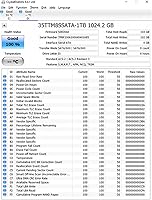
  • Drive Features: The drive supports TRIM, S.M.A.R.T. monitoring, ECC (Error Correction Code), Wear-Leveling, Garbage Collection, and RAID configurations.
  • Device Support: Designed for installation in both desktop PCs and laptops that accept an M.2 2280 SATA slot.
  • Weight: The bare drive weighs approximately 0.634 ounces (18 grams), making it negligible in terms of system weight.
  • Warranty: Timetec provides a three-year limited warranty on this drive, with free technical support included for the duration of the coverage period.
  • In the Box: The package includes only the M.2 2280 SSD itself; mounting screws, brackets, and data or power cables are not included.

Related Reviews
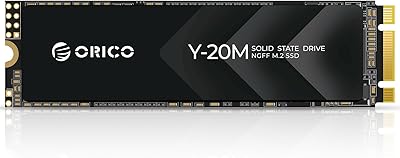
ORICO Y20M 1TB M.2 SATA SSD
80%
71%
Compatibility Clarity
78%
Read/Write Performance
91%
Installation Ease
83%
Value for Money
74%
Drive Longevity & Health Features
More
Kingston NV2 1TB NVMe SSD
83%
93%
Value for Money
86%
Read Performance
61%
Sustained Write Performance
74%
Thermal Management
91%
Compatibility
More
Timetec 1TB NVMe PCIe Gen3x4 M.2 SSD
85%
89%
Performance
91%
Read Speed
85%
Write Speed
88%
Reliability/Durability
93%
Ease of Installation
More
Kingston NV3 1TB NVMe SSD
87%
93%
Value for Money
88%
Boot and Load Times
94%
Ease of Installation
91%
Physical Compatibility
86%
Power Efficiency
More
Timetec 256GB SSD NVMe PCIe Gen3x4 M.2 2280
85%
88%
Performance
90%
Speed (Read/Write)
85%
Installation Ease
91%
Compatibility
89%
Reliability (MTBF)
More
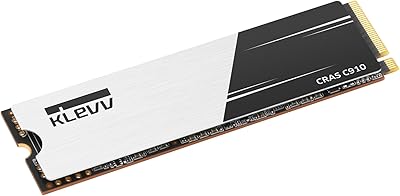
KLEVV CRAS C910 1TB NVMe SSD
80%
88%
Sequential Read Speed
85%
Sequential Write Speed
61%
Sustained Write Consistency
91%
Value for Money
83%
Thermal Management
More
Verbatim Vi7000 1TB NVMe SSD
80%
88%
Read Performance
83%
Write Performance
92%
PS5 Compatibility
79%
Thermal Management
91%
Installation Experience
More
KingSpec NT 1TB M.2 2280 SATA SSD
76%
88%
Value for Money
76%
Sequential Performance
52%
Compatibility Clarity
91%
Installation Experience
87%
Everyday Reliability
More
Timetec 1TB M.2 2230 NVMe SSD
78%
93%
Device Compatibility
88%
Installation Experience
84%
Read Performance
79%
Write Performance
62%
Thermal Management
More
Timetec 512GB M.2 2280 SATA SSD
80%
93%
Value for Money
81%
Read Speed Performance
67%
Write Speed & Cache Behavior
91%
Installation Ease
78%
Long-term Reliability
More

FAQ

You need to confirm two things: that your laptop has an M.2 2280 slot, and that the slot uses SATA rather than NVMe. The easiest way is to look up your laptop model on the manufacturer's spec page or check a site like Crucial's compatibility tool. Some M.2 slots support both protocols, but some older machines support only SATA, which is exactly where this drive fits best.

No, and this is an important distinction. M.2 is a physical form factor — it describes the shape and size of the drive. NVMe and SATA are the communication protocols that determine speed. The Timetec 1TB M.2 2280 Internal SSD uses SATA III, which tops out around 550MB/s. NVMe drives using the same M.2 slot can reach 3,000MB/s or more. If your system supports NVMe, you may want to weigh that option carefully.

If you are replacing a mechanical hard drive, absolutely yes. Boot times that used to take 60 to 90 seconds can drop to under 15 seconds, and application load times improve dramatically. If you are upgrading from another SATA SSD, the difference will be minimal or undetectable in everyday use.

This Timetec drive uses SLC caching to hit its advertised write speeds during short bursts, but once that cache fills up, sustained write speeds drop to the drive's native NAND speed, which is considerably lower. For typical tasks like saving documents or installing apps, you will never notice. For transferring a large video library or a multi-gigabyte archive, you may see speeds slow noticeably partway through.

You will need a small Phillips-head screwdriver to remove your laptop panel and secure the drive with its retaining screw. Speaking of which — no mounting screw is included in the box, so check whether your laptop or motherboard has one already in place. Most do, but if yours is missing, a standard M2 x 3mm screw works.

Yes, it is fully compatible with Windows 11. Just make sure your system's BIOS recognizes M.2 SATA drives as a bootable device, which is standard on any machine that natively supports M.2. You can either do a fresh install or clone your existing drive using free tools like Macrium Reflect.

Timetec is a legitimate manufacturer that has been in the memory and storage space for several years, though it does not carry the same name recognition as Samsung, WD, or Crucial. The drive's endurance specs and warranty terms are competitive, and user reviews are broadly positive. That said, if long-term brand support or an established reliability track record matters more to you than price, a tier-one brand may be worth the extra spend.

Yes, this 1TB upgrade drive supports Linux kernel 2.6.33 and later, which covers virtually every mainstream Linux distribution in active use today, including Ubuntu, Fedora, Debian, and Arch. TRIM support is also available under Linux, provided your filesystem and mount settings are configured to use it.

Look up your motherboard model and check the M.2 slot specification in the manual or on the manufacturer's product page. It will typically list whether the slot supports SATA, NVMe (PCIe), or both. If it says M.2 SATA, this drive will work. If it only lists PCIe or NVMe, this drive will not be recognized.

Timetec covers this drive with a three-year limited warranty and includes free technical support. In practice, warranty claims for SSDs typically involve contacting support with proof of purchase and the drive's serial number for a replacement. It is worth registering your purchase if the brand offers that option, as it can speed up any future claims.

Where to Buy