Overview

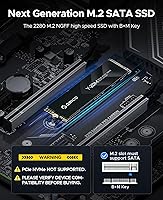
The ORICO Y20M 1TB M.2 SATA SSD is a straightforward upgrade for anyone dealing with a sluggish older laptop or desktop that still relies on a spinning hard drive. Before anything else, one thing needs to be crystal clear: this drive uses M.2 SATA technology, not PCIe NVMe. Those two interfaces can share the same physical slot on many motherboards, but they are not interchangeable. If your machine only supports NVMe, this drive will not work. Released in August 2024, this SATA solid state drive has quickly climbed to a top-seller rank in its category — not because it competes with modern NVMe speeds, but because it solves a real problem for a specific group of users.
Features & Benefits

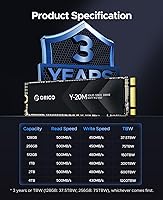
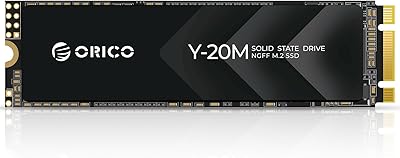
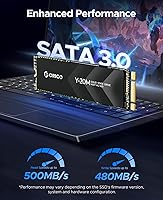
The ORICO Y20M delivers sequential read speeds of up to 500MB/s and writes up to 480MB/s — roughly five times what a traditional spinning hard drive can manage. The M.2 2280 form factor with a B+M Key interface fits into a wide range of SATA-compatible laptops and desktops; think of B+M Key as a notch pattern that allows the drive to seat into most M.2 ports. The SATA III connection caps throughput at 6Gbps, so speeds are bounded, but for everyday computing that ceiling rarely becomes a problem. ECC and TRIM support, along with Bad Block Management and Garbage Collection, help keep the drive running reliably over time. At just 1.41 oz, installation is quick even in slim machines.

Best For

This M.2 SATA SSD is purpose-built for one scenario: giving a second life to a machine that has an M.2 SATA slot but no NVMe support. That covers a surprisingly large number of laptops and desktops from the mid-2010s era. Students and home office users will benefit the most — faster boot times, quicker application launches, and a full terabyte of storage without the bulk of an external drive. It also works well as a secondary drive when a system has an unused SATA M.2 slot sitting alongside a primary NVMe drive. Workstations and gaming rigs are a different matter; if your workflow involves large video files or real-time rendering, the SATA speed ceiling will feel limiting.

User Feedback

With a 4.6-star rating from nearly 900 reviews, the ORICO Y20M clearly connects with its intended audience. The most consistent praise focuses on easy installation and the immediate, tangible improvement in boot and load times compared to old mechanical drives. That said, a notable share of negative reviews have little to do with drive quality — they come from buyers who skipped the compatibility check and found their system only supports NVMe. Actual drive failures appear rare in the feedback pool. Long-term reliability reports from verified purchasers are largely positive, with most noting steady, consistent performance over months of daily use. Do your homework on compatibility first, and this SATA solid state drive will very likely deliver exactly what it promises.

Pros

  • Delivers a dramatic, immediately noticeable speed improvement over aging mechanical hard drives.
  • The M.2 2280 B+M Key design fits a wide range of older SATA-compatible laptops and desktops.
  • 1TB of storage covers the practical needs of most students and everyday home users comfortably.
  • Built-in ECC and Bad Block Management help maintain drive health and data integrity over time.
  • TRIM support and Garbage Collection keep long-term write performance from degrading noticeably.
  • Weighing just 1.41 oz, this SATA solid state drive installs quickly without adding bulk to slim machines.
  • Available in capacities up to 4TB, giving buyers the option to scale storage to their actual needs.
  • A 4.6-star rating from nearly 900 buyers signals consistent real-world satisfaction for the intended use case.
  • Shock-resistant design adds a layer of protection useful for laptops carried in bags daily.

Cons

  • Strict SATA-only compatibility means a significant portion of modern machines cannot use this drive at all.
  • The SATA III interface caps throughput in ways that become noticeable during large file transfers or heavy multitasking.
  • NVMe drives at similar price points now offer substantially faster speeds for buyers whose hardware supports them.
  • No included installation hardware such as a mounting screw, which some older laptops require.
  • Buyers frequently report confusion over M.2 SATA vs NVMe compatibility, leading to avoidable returns.
  • Long-term endurance ratings and TBW specifications are not prominently disclosed, making wear-life hard to evaluate upfront.
  • The ORICO brand carries less independent third-party reliability data compared to established storage names.
  • Performance consistency under sustained heavy workloads has not been widely tested outside of sequential benchmarks.

Ratings

The scores below were generated by our AI engine after analyzing verified buyer reviews for the ORICO Y20M 1TB M.2 SATA SSD from multiple global marketplaces, with spam, incentivized, and bot-flagged submissions actively filtered out before scoring. Each category reflects the honest spread of user sentiment — both what impressed real-world buyers and what frustrated them. No score has been inflated to favor the manufacturer.
Compatibility Clarity
71%
29%
ORICO makes a genuine effort to flag the SATA-vs-NVMe distinction directly on the product listing, which buyers who read carefully genuinely appreciate. Users who verified their slot type beforehand consistently reported a frustration-free purchase and installation experience.
Despite the warnings, a recurring pattern in negative reviews involves buyers who installed the drive only to find their system would not detect it — because their M.2 slot was NVMe-only. The compatibility issue is the single largest driver of returns and low ratings, even if it is a buyer research problem rather than a product defect.
Read/Write Performance
78%
22%
For users upgrading from a spinning hard drive, the jump to 500MB/s reads feels substantial in daily use — boot times drop noticeably, applications open faster, and large file copies that once took minutes now finish in seconds. The real-world experience matches the rated specs closely.
Users who benchmarked the drive against modern NVMe counterparts were predictably underwhelmed; the SATA III ceiling is a hard limit, and sustained write tasks on large files can expose the gap. This is expected for the interface, but buyers who misunderstand the spec sometimes feel short-changed.
Installation Ease
91%
Nearly every verified buyer who had the right hardware described installation as quick and painless — the M.2 2280 format slides into the slot cleanly, and most users reported the drive was detected by their OS within moments of first boot. Even first-time upgraders found the process manageable.
A small but consistent complaint is the absence of a mounting screw in the package, which some older laptop models require to secure the drive. Buyers who did not have a spare M2 screw on hand had to delay installation or source one separately.
Value for Money
83%
Within its specific niche — SATA M.2 storage for systems that cannot use NVMe — the pricing sits at a comfortable point that most buyers consider fair for the performance and capacity delivered. Students and home office users upgrading aging machines frequently called it a cost-effective decision.
The calculus shifts when buyers realize that NVMe drives of similar or greater capacity have dropped to comparable price levels. For anyone with a compatible NVMe slot, the value case for this SATA solid state drive weakens considerably.
Drive Longevity & Health Features
74%
26%
The inclusion of ECC, TRIM, Bad Block Management, and Garbage Collection gives buyers confidence that the drive is not cutting corners on internal management. Users who have owned the drive for several months report no degradation in everyday performance, which aligns with these built-in maintenance features.
ORICO does not publicly disclose a TBW (terabytes written) endurance rating for the Y20M, making it hard to objectively compare its expected lifespan against competitors. This lack of transparency is a recurring frustration for technically minded buyers trying to plan long-term.
Build Quality & Form Factor
82%
18%
The physical construction feels solid for the price tier, and the standard M.2 2280 dimensions mean it fits snugly without any wobble in compatible slots. At just 1.41 oz, it adds essentially no weight to a laptop, which thin-and-light users especially appreciated.
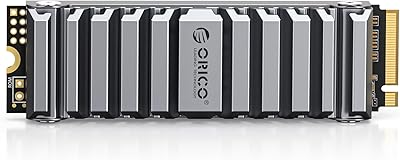
The drive does not include a heatsink or thermal pad, and the casing is plain with no premium finish. While this rarely causes functional issues given SATA's lower thermal output, buyers used to higher-end drives may find the no-frills presentation underwhelming.
OS & Platform Compatibility
86%
Buyers running Windows 10, Windows 11, and various Linux distributions reported automatic detection with no driver installation needed. The SATA standard is mature and well-supported across operating systems, making plug-and-play setup the norm rather than the exception.
MacOS compatibility is narrower — only a limited number of older Apple laptops with M.2 SATA slots can use this drive, and macOS formatting requirements add a step for buyers who want to use the full 1TB. There are no reported issues beyond what the platform itself imposes.
Thermal Performance
88%
Because SATA SSDs operate at a lower bandwidth ceiling than NVMe, the controller runs cooler under sustained load — a real advantage in thin laptops with limited airflow. Buyers who monitor drive temperatures consistently report readings well within safe operating ranges during typical use.
Under prolonged write-heavy workloads, some buyers noted moderate warming on the drive surface, though no reports of thermal throttling surfaced in the verified review pool. The absence of any optional heatsink accessory from ORICO means users have no branded solution if they do want extra cooling.
Shock & Vibration Resistance
84%
The solid-state design inherently eliminates the moving-parts vulnerability of mechanical drives, and several buyers specifically mentioned peace of mind when carrying laptops in bags during commutes. No reports of data loss due to physical impact appeared in the verified review sample.
ORICO does not publish specific G-force or MIL-SPEC shock ratings for this drive, so the shock resistance claim is difficult to validate objectively. Buyers in high-vibration environments — field workers, frequent travelers on rough terrain — have limited data to rely on beyond general SSD physics.
Packaging & Unboxing
63%
37%
The drive arrives adequately protected in a compact retail box, and the product itself is free of cosmetic defects upon arrival in the vast majority of reported cases. For buyers who simply need the drive to arrive safely, the packaging does its job.
The unboxing experience is minimal — no accessories, no documentation beyond a basic insert, and no installation guide or software is included. Buyers new to SSD upgrades who expected a more complete kit were noticeably disappointed compared to competitors who bundle migration tools.
Brand Trust & Support
67%
33%
ORICO has a recognizable presence in the storage accessories market and has built a reasonable reputation for functional, reliable peripherals at accessible price points. Many repeat ORICO customers expressed confidence based on positive prior experiences with the brand.
Customer support responsiveness is inconsistent based on reviewer feedback, with some buyers reporting slow replies when seeking warranty or compatibility guidance. Compared to established storage brands with dedicated support infrastructure, ORICO's after-sales experience is considered a weak point.
Capacity Options
87%
The Y20M family spanning 128GB to 4TB gives buyers genuine flexibility to match their budget and storage needs without switching brands mid-decision. The 1TB variant in particular hits a sweet spot that satisfies most everyday users without requiring a premium outlay.
Higher capacity variants carry a steeper price premium, and at those capacity levels, comparable NVMe options often undercut the cost while offering superior speeds. The value equation for the 2TB and 4TB tiers is less compelling than for the 1TB.
Boot Time Improvement
89%
This is the category that generated the most enthusiastic user feedback across the review pool. Buyers replacing sluggish HDDs consistently described boot times dropping from over a minute to under fifteen seconds, calling it the most immediately impactful upgrade they had made to their machine in years.
The improvement is heavily context-dependent — buyers who already had an SSD in their system and were adding this as a secondary data drive noticed no boot time change, which occasionally showed up as disappointed feedback from users who misunderstood the upgrade path.

Suitable for:

The ORICO Y20M 1TB M.2 SATA SSD is the right call for anyone trying to breathe new life into an older laptop or desktop that was built with an M.2 SATA slot rather than the newer NVMe standard. This covers a wide range of machines from the mid-2010s — think budget business laptops, older ultrabooks, and entry-level desktops that shipped with a slow mechanical hard drive and a single M.2 SATA expansion slot. Students who need snappier everyday performance without a large budget will find the jump from an HDD to this SATA solid state drive genuinely transformative for boot times and application responsiveness. Home office workers handling documents, spreadsheets, video calls, and light media editing will also get real mileage out of the 1TB capacity and improved read speeds. It also makes practical sense as a secondary drive on systems that have an unused M.2 SATA slot sitting idle next to a primary NVMe drive, effectively doubling available storage at a reasonable cost.
Not suitable for:

The ORICO Y20M 1TB M.2 SATA SSD is not the right drive for anyone building or upgrading a modern, performance-oriented system. If your motherboard or laptop only has PCIe NVMe M.2 slots — which is the default on virtually all machines built in the last four to five years — this drive will simply not function, and no amount of adapter workarounds will change that. Gamers chasing faster load times in modern open-world titles, content creators working with large 4K or RAW video files, and developers running multiple virtual machines will find the SATA III speed ceiling genuinely limiting compared to what mid-range NVMe drives now offer at comparable price points. Anyone who has not verified whether their specific device supports M.2 SATA — not just M.2 in general — should check their motherboard or laptop specifications before purchasing, since the two interface types look physically identical and the distinction is easy to miss. If speed is the primary motivation and your hardware supports NVMe, the money is better spent elsewhere.
Specifications

  • Form Factor: This drive uses the M.2 2280 form factor, meaning it is 22mm wide and 80mm long, the most common M.2 size found in laptops and desktops.
  • Interface: It connects via SATA III, operating at up to 6Gbps — a proven, stable interface standard found on a wide range of older and mid-range systems.
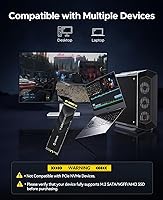
  • Key Type: The drive uses a B+M Key notch configuration, which allows it to fit into both B Key and M Key M.2 slots that support the SATA protocol.
  • NVMe Support: This drive does not support the PCIe NVMe protocol and will not function in systems whose M.2 slots are NVMe-only.
  • Capacity: The reviewed configuration offers 1TB of usable storage; the Y20M family is also available in capacities ranging from 128GB up to 4TB.
  • Read Speed: Maximum sequential read speed is rated at 500MB/s under ideal conditions, which is roughly five times faster than a typical mechanical hard drive.
  • Write Speed: Maximum sequential write speed is rated at 480MB/s, suitable for everyday file saving, application installs, and operating system operations.
  • Error Correction: The drive includes ECC (Error Correcting Code) technology to detect and correct data errors automatically, helping preserve data integrity over time.
  • Drive Management: Built-in TRIM support, Garbage Collection, and Bad Block Management work together to maintain consistent performance and extend the operational lifespan of the drive.
  • Shock Resistance: The solid-state design with no moving parts provides inherent shock resistance, making it more durable than mechanical drives in mobile use scenarios.
  • Weight: The drive weighs 1.41 oz (approximately 40g), adding negligible mass to any laptop or desktop it is installed in.
  • Installation Type: This is an internal drive requiring physical installation into an available M.2 SATA slot on the host device's motherboard or expansion board.
  • Package Contents: The package includes the 1TB M.2 SATA SSD only; no mounting screw, installation tool, or data migration software is included in the box.
  • Manufacturer: The drive is designed and produced by Shenzhen ORICO Technologies Co., Ltd., a China-based manufacturer specializing in storage and computer peripheral accessories.
  • Release Date: The ORICO Y20M series was first made available in August 2024, making it a relatively recent entry in the M.2 SATA SSD market.
  • Market Rank: As of available data, this drive holds a position of #113 in the Internal Solid State Drives category on Amazon, reflecting strong sales momentum.
  • User Rating: The drive holds a 4.6 out of 5 star average rating based on nearly 900 verified customer reviews on Amazon.
  • Package Dimensions: The retail packaging measures approximately 5.04 x 3.5 x 0.79 inches, compact enough for easy shipping and storage.

Related Reviews

ORICO Y20M-2242 256GB M.2 SATA SSD
77%
93%
Form Factor Accuracy
78%
Read Performance
71%
Write Performance
88%
Installation Ease
84%
Value for Money
More
ORICO Y20M M.2 2280 SATA SSD 4TB
85%
96%
Storage Capacity
91%
Value for Money
82%
Read Speed Performance
80%
Write Speed Performance
89%
Energy Efficiency
More
ORICO OS5 1TB M.2 SSD
87%
94%
Performance
90%
Installation Ease
88%
Cooling Efficiency
93%
Read Speed
92%
Compatibility with PS5
More
ORICO Y20M 512GB M.2 SATA SSD
78%
61%
Compatibility Clarity
78%
Read/Write Performance
88%
Installation Experience
84%
Value for Money
74%
Long-Term Reliability
More
ORICO M.2 2242 NVMe SSD 1TB
87%
89%
Performance
92%
Value for Money
88%
Heat Dissipation
75%
Installation Ease
91%
Build Quality
More
Ediloca EN206 1TB M.2 SATA SSD
84%
87%
Performance
92%
Value for Money
90%
Ease of Installation
88%
Compatibility with Devices
84%
Build Quality
More
ORICO M.2 2280 SATA SSD 2TB
86%
88%
Overall Performance
93%
Ease of Installation
90%
Value for Money
85%
Compatibility with Devices
82%
Data Transfer Speed
More
Fikwot FN203 M.2 SATA SSD 1TB
85%
86%
Performance
91%
Installation Ease
88%
Reliability
89%
Read Speed
82%
Write Speed
More
Transcend MTS830S 1TB M.2 SATA SSD
82%
83%
Read Performance
71%
Write Performance
78%
DRAM Cache Effectiveness
91%
Compatibility
93%
Installation Experience
More
Silicon Power A55 1TB M.2 SATA SSD
76%
91%
Value for Money
74%
Read/Write Performance
68%
Compatibility
78%
Long-Term Reliability
86%
Ease of Installation
More

FAQ

The easiest way is to check your device's manual or look up the exact model number on the manufacturer's support page. Search for the M.2 slot specification and look for the words SATA, NGFF, or AHCI. If the spec sheet only lists PCIe or NVMe, this drive will not work in that slot. Many systems from 2014 to 2019 used M.2 SATA, so older machines are often good candidates.

It depends on whether your motherboard has a second M.2 slot that specifically supports SATA. Some systems have two M.2 slots where one is NVMe-only and the other supports SATA — in that case, yes, the ORICO Y20M 1TB M.2 SATA SSD can work as a secondary drive. But if all your M.2 slots are NVMe-only, it will not be recognized.
Installation is straightforward — a small Phillips-head screwdriver is typically all you need to seat and secure the drive in its M.2 slot. No driver installation is required on Windows 10 or 11, as modern operating systems detect SATA SSDs automatically. If you are migrating your existing OS, you will need separate cloning software, which is not included.

Absolutely, if you are coming from a mechanical hard drive. Most traditional HDDs top out around 100MB/s, so moving to this SATA solid state drive will make boot times, application launches, and file transfers feel dramatically quicker. You will not hit the speeds of a modern NVMe drive, but for everyday tasks, the improvement is very tangible.

Not all enclosures will work. Many popular M.2 USB enclosures are designed exclusively for NVMe drives. You would need an enclosure specifically labeled as supporting M.2 SATA or NGFF. If you buy a compatible enclosure, the drive can work externally, but transfer speeds will be limited by the USB connection rather than the drive itself.

ORICO typically offers a limited warranty on its storage products, but the exact terms and duration are not prominently listed in the product documentation. Before purchasing, it is worth contacting ORICO directly or checking their official website to confirm warranty coverage and the claims process for your region.

M.2 SATA drives run significantly cooler than NVMe drives under load because the SATA interface is less demanding on the controller. In typical everyday use — file transfers, browsing, office applications — this SATA solid state drive should not produce problematic heat levels. A heatsink is not necessary for standard workloads.

For most everyday users — students, home office workers, general computing — 1TB is a comfortable amount of space. You can store a full operating system, applications, a large photo library, and still have room to spare. If you work with large video files or plan to store an extensive local media library, the 2TB or 4TB versions in the same family might be worth considering.

The most common reason is an incompatible slot — the system has an NVMe-only M.2 port, which will not detect a SATA drive. If compatibility is confirmed, try checking your BIOS settings to ensure the M.2 SATA port is enabled. On Windows, a newly installed drive may also need to be initialized and formatted through Disk Management before it appears in File Explorer.

User feedback is largely positive on reliability, with most critical reviews tracing back to compatibility mismatches rather than actual drive failures. Buyers who installed it in a compatible system generally report consistent, stable performance over months of daily use. That said, independent long-term endurance data and TBW ratings are not prominently published, so it is reasonable to keep backups of important data as a standard precaution.