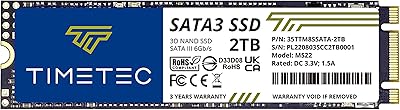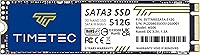
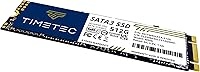
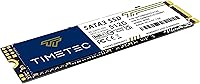

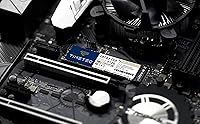
Overview

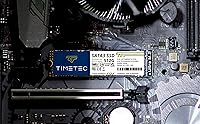
The Timetec 512GB M.2 2280 SATA SSD is a straightforward, affordable storage upgrade aimed at everyday PC users who want faster boot times without spending a lot. One thing worth clarifying upfront: this is a SATA III drive, not NVMe, so if you're expecting blazing PCIe speeds, reset those expectations now. What you get instead is a reliable, well-priced 512GB drive in the compact M.2 2280 form factor — plenty of room for an OS, apps, and a solid chunk of personal files. Timetec isn't a household name like Samsung or Western Digital, but with a 4.6-star rating from over 2,300 buyers and a top-40 rank in its category, it's clearly earning trust.

Features & Benefits

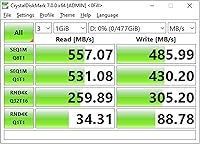
On paper, the specs hold up well for a SATA drive. Sequential read speeds reach up to 550MB/s with writes topping out at 500MB/s — not groundbreaking by today's standards, but more than enough to make a system feel genuinely responsive. The 3D NAND flash combined with SLC caching helps with burst tasks like loading apps or transferring files quickly, though sustained heavy writes can cause speeds to taper off once the cache fills. Endurance is rated at 256TBW with a 1,500,000-hour MTBF, which is reassuring for a drive at this price. It also supports TRIM, ECC, and Wear-Leveling, and stays backward compatible with older SATA I and II systems.

Best For

This M.2 SATA SSD is a natural fit for anyone pulling an aging laptop or desktop out of hard drive purgatory. If your machine boots in two minutes and struggles to open Chrome, dropping this drive in will make a noticeable difference. It's also a smart pick for secondary storage builds or small form factor systems where an M.2 2280 SATA slot is all you've got — no NVMe option available. Students and casual users will find 512GB perfectly adequate for school files, media, and everyday software. Just don't expect it to shine in write-heavy workloads like video editing or large file transfers — that's simply not what this budget storage upgrade is built for.

User Feedback

Buyers consistently highlight easy installation and the dramatic improvement in boot times as the standout wins — many report going from a sluggish two-minute startup to under 20 seconds. Real-world speeds generally track close to what's advertised, which earns this Timetec drive points for honesty. The criticism that does surface involves sustained write performance: under prolonged heavy loads, some users notice a slowdown once the SLC cache is exhausted. A few buyers also flagged compatibility questions with specific older laptops before purchasing, so verifying your slot type beforehand is worth the effort. Long-term owners past the one-year mark tend to report no reliability issues, and the three-year warranty adds a reasonable safety net.

Pros

  • Boot times on older systems drop dramatically — many buyers report going from two minutes to under 20 seconds.
  • Real-world read speeds consistently track close to the advertised 550MB/s figure.
  • The M.2 2280 form factor fits a wide range of laptops and compact desktop builds.
  • Backward compatibility with SATA I and II slots makes this Timetec drive useful for genuinely old hardware.
  • 3D NAND with SLC caching handles everyday burst tasks like app launches and file opens with ease.
  • A three-year warranty with free technical support is a generous safety net at this price point.
  • Installation is simple enough for first-timers — no special tools or technical knowledge required.
  • Drive health features like TRIM, ECC, and Wear-Leveling help maintain performance and longevity over time.
  • Long-term owners past the one-year mark frequently report no reliability issues.
  • 512GB hits a practical sweet spot — enough for an OS, core apps, and a decent library of files.

Cons

  • Sustained write speeds can dip once the SLC cache fills, making heavy workloads noticeably slower.
  • Timetec is a lesser-known brand, which may give cautious buyers pause compared to Samsung or Crucial.
  • SATA III interface puts a hard ceiling on speeds that no firmware update will ever overcome.
  • No NVMe option exists in this product line for users whose system supports faster PCIe slots.
  • Some buyers have reported confusion around M.2 slot compatibility before purchasing — verification is necessary.
  • The drive ships without mounting screws or brackets, which can be an inconvenience for desktop installs.
  • 256TBW endurance is acceptable but sits on the lower end compared to pricier drives in the same capacity range.
  • Limited brand recognition means community support forums and third-party compatibility guides are sparse.

Ratings

Our AI scoring model analyzed thousands of verified global purchases of the Timetec 512GB M.2 2280 SATA SSD, actively filtering out incentivized, duplicate, and bot-generated reviews to surface what real buyers actually experienced. The scores below reflect both the genuine strengths that keep this drive ranked in the top 40 of its category and the honest pain points that matter depending on your use case.

Value for Money
93%
Buyers consistently describe this as one of the most cost-effective ways to breathe new life into an aging laptop or desktop. For the price, getting a 512GB SATA SSD with a three-year warranty feels like a genuinely fair deal, and most users feel they got more than they paid for.
A small number of buyers noted that spending slightly more gets you into entry-level NVMe territory, which makes the value calculation less obvious for anyone whose system actually supports PCIe. The price-to-performance edge weakens if you overlook that comparison.
Read Speed Performance
81%
19%
Real-world read speeds in benchmark tests and daily use align closely with the advertised 550MB/s figure, which is uncommon for budget drives where specs can be aspirational. Users loading Windows, launching browsers, or opening large documents notice a clean, immediate improvement over any mechanical hard drive.
It is a SATA ceiling, full stop — and buyers who expected NVMe-comparable speeds felt the gap acutely when comparing results side by side. For read-heavy workloads like database access or large asset loading, the interface limit becomes the bottleneck regardless of the NAND quality.
Write Speed & Cache Behavior
67%
33%
For everyday writing tasks — saving documents, installing apps, downloading files — the SLC cache keeps performance feeling snappy and consistent. Burst write speeds during typical use rarely expose any weakness, and most home users never push past the cache threshold in normal sessions.
Sustained sequential writes above roughly 20–30GB in a single session cause speeds to drop noticeably once the SLC cache is exhausted, falling back to raw NAND speeds. Users transferring large video libraries or doing back-to-back large file copies reported frustrating slowdowns that felt inconsistent with the advertised figures.
Installation Ease
91%
First-time upgraders repeatedly highlight how painless the physical installation is — slide in, secure the screw, done. The M.2 2280 standard is familiar enough that countless tutorial videos exist, and buyers with no prior hardware experience report completing the swap in under 15 minutes.
The drive ships without a mounting screw or bracket, which caught several desktop builders off guard. While most laptops include a pre-installed standoff screw, desktop motherboards often do not, and needing a separate M.2 screw kit for a budget drive feels like an unnecessary friction point.
Long-term Reliability
78%
22%
Owners using this Timetec drive for over a year consistently report stable, issue-free operation with no degradation in perceived speed or unexpected failures. The combination of ECC, Wear-Leveling, and a 256TBW endurance rating gives everyday users a reasonable confidence buffer for typical workloads over multiple years.
The brand's shorter track record compared to established names like Samsung or Crucial means there is limited long-term independent data beyond two to three years of real-world use. A subset of cautious buyers remains hesitant to rely on it as their sole storage drive for irreplaceable data without a backup plan.
Compatibility
74%
26%
Backward compatibility with SATA II and SATA I slots is a genuine plus for users upgrading machines from 2010 or earlier. Most mid-range laptops and desktops from the past decade with an M.2 2280 SATA slot accept this drive without any driver installation or BIOS changes.
Confusion around SATA versus NVMe M.2 slots led to a notable cluster of frustrated returns from buyers whose systems only supported PCIe. The drive is also not compatible with older systems using only 2.5-inch SATA bays, which requires careful homework before purchasing.
Boot Time Improvement
88%
The transformation from a spinning hard drive to this M.2 SATA SSD on boot times is one of the most praised outcomes in user reviews, with many reporting drops from 90–120 seconds down to 15–20 seconds on Windows 10 and 11. For users who tolerated slow startups for years, this single improvement justifies the purchase on its own.
Boot time gains are heavily dependent on the age and condition of the rest of the system — a CPU-bottlenecked machine from 2012 will still feel sluggish even after the drive upgrade. A few buyers expected a broader system speed jump and were mildly disappointed when only storage-bound tasks improved.
Build & Form Factor
83%
The drive feels solid and well-constructed for its weight class, and the standard M.2 2280 dimensions mean it fits snugly without any adapter needed in compatible slots. Its near-negligible weight of under one ounce makes it ideal for thin laptops where every gram matters.
There is no visible heat spreader or thermal pad, which is typical for SATA drives but occasionally drew comments from users in warm or poorly ventilated enclosures. Under sustained loads in tight laptop chassis, a small number of users observed thermal throttling behavior.
OS & Software Compatibility
87%
Support for the full Windows 7 through 11 range covers nearly every PC still in active use, and Linux compatibility from kernel 2.6.33 onward makes this a practical choice for open-source users as well. TRIM works correctly across all major tested operating systems, helping maintain drive health over time.
There is no bundled cloning or management software included, leaving buyers to source third-party tools on their own for migration. While free options exist, less technical users occasionally expressed frustration at having to figure out the cloning process without any guided assistance from the manufacturer.
Brand Trust & Support
69%
31%
The three-year warranty with free technical support is a stronger commitment than many competing drives at this price tier offer, and buyers who did contact support generally described the experience as helpful and responsive. The volume of positive ratings across thousands of verified purchases adds meaningful credibility to the brand.
Timetec lacks the brand recognition and independent third-party testing documentation that established names benefit from, which creates an unease for buyers making a first purchase. Community resources, forums, and long-term reliability studies specific to this drive are sparse compared to mainstream alternatives.
Drive Health Management
82%
18%
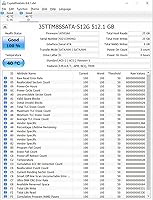
Support for S.M.A.R.T. monitoring means users can track drive health with free tools like CrystalDiskInfo and catch any early warning signs before a failure occurs. Garbage Collection and Wear-Leveling work passively in the background, keeping the drive performing consistently without any user intervention.
Timetec does not provide proprietary monitoring software, so users rely entirely on generic third-party tools to access S.M.A.R.T. data. For less technical buyers, the absence of a simple manufacturer app for health checking is a minor but real usability gap.
Packaging & Unboxing
61%
39%
The packaging is minimal and functional — the drive arrives protected and undamaged in the vast majority of reported cases. For a budget storage upgrade, buyers are generally unbothered by simple retail packaging and focus entirely on what is inside.
Multiple reviewers noted the absence of a mounting screw, thermal pad, or even a basic quick-start guide in the box, which feels underequipped for a product marketed to first-time installers. A short setup instruction sheet would meaningfully reduce confusion for novice buyers.

Suitable for:

The Timetec 512GB M.2 2280 SATA SSD is a strong match for anyone upgrading an older laptop or desktop that still runs a spinning hard drive — the performance difference will feel immediate and significant. Students on a tight budget who need a dependable OS drive for schoolwork, browsing, and everyday software will find 512GB more than adequate without overspending. It also works well as a secondary storage drive in a desktop build where the primary NVMe slot is already occupied. Systems with M.2 2280 slots limited to SATA — common in budget and mid-range laptops from the mid-2010s — will slot this drive right in without any fuss. If your priority is a reliable, no-nonsense speed boost at a sensible price, this M.2 SATA SSD delivers exactly what it promises.

Not suitable for:

Buyers expecting NVMe-level performance should look elsewhere — the Timetec 512GB M.2 2280 SATA SSD uses a SATA III interface, which caps speeds well below what modern PCIe drives offer, and no amount of SLC caching changes that ceiling. Content creators, video editors, or anyone regularly moving large files will likely hit the limits of sustained write performance, as the cache can exhaust under heavy continuous loads and speeds will drop noticeably. If your workflow involves frequent large transfers, rendering, or running virtual machines, this budget storage upgrade simply is not built for that kind of punishment. Users who already own a mid-range or premium NVMe SSD will also find zero reason to consider this drive as an upgrade. Finally, anyone whose system only supports 2.5-inch SATA or a different M.2 key type should verify compatibility carefully before purchasing.

Specifications

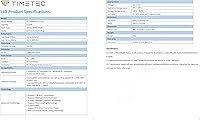
  • Capacity: The drive offers 512GB of flash storage, suitable for an operating system, core applications, and a substantial personal file library.
  • Form Factor: It uses the M.2 2280 form factor, meaning the card is 22mm wide and 80mm long — the most common M.2 size found in laptops and desktops.
  • Interface: Connectivity runs over SATA III at 6Gb/s, with backward compatibility for SATA II (3Gb/s) and SATA I (1.5Gb/s) slots.
  • Sequential Read: Maximum sequential read speed reaches up to 550MB/s under optimal conditions.
  • Sequential Write: Maximum sequential write speed reaches up to 500MB/s, aided by SLC cache during burst operations.
  • Flash Type: The drive uses 3D NAND flash memory paired with SLC caching technology to improve burst performance and extend cell longevity.
  • Endurance: Total write endurance is rated at 256TBW (terabytes written), which covers typical home and office workloads for several years.
  • MTBF: Mean time before failure is rated at 1,500,000 hours, reflecting the manufacturer's confidence in long-term operational reliability.
  • Drive Features: The drive supports TRIM, S.M.A.R.T. monitoring, ECC (Error Correction Code), Wear-Leveling, Garbage Collection, and RAID configurations.
  • OS Support: Compatible with Windows 7, 8, 8.1, 10, and 11, as well as Linux kernel 2.6.33 and later versions.
  • Weight: The packaged unit weighs 0.704 ounces, making it negligible in terms of impact on overall system or laptop weight.
  • Package Dimensions: The retail packaging measures 4.09 x 3.78 x 0.67 inches; the bare drive itself is significantly smaller at standard M.2 2280 dimensions.
  • Included Contents: The package includes only the M.2 SSD itself; mounting screws, brackets, and data cables are not included.
  • Warranty: Timetec provides a three-year limited warranty along with free technical support for the duration of the coverage period.
  • Compatible Devices: Designed for installation in desktops and laptops that accept an M.2 2280 SATA slot; not compatible with M.2 NVMe-only slots.
  • Drive Type: This is an internal solid-state drive intended for permanent installation inside a PC or laptop, not for use as external portable storage.

Related Reviews
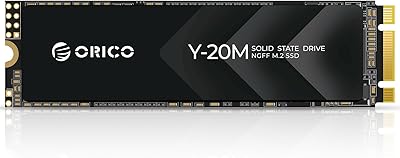
ORICO Y20M 512GB M.2 SATA SSD
78%
61%
Compatibility Clarity
78%
Read/Write Performance
88%
Installation Experience
84%
Value for Money
74%
Long-Term Reliability
More
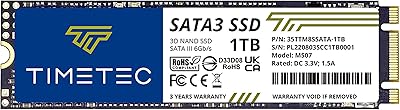
Timetec 1TB SSD 3D NAND SATA III M.2 2280
85%
92%
Value for Money
87%
Performance
90%
Ease of Installation
88%
Durability
91%
Compatibility
More
Timetec 2TB SSD 3D NAND QLC SATA III M.2 2280
88%
88%
Performance
91%
Read Speed
84%
Write Speed
87%
Reliability & Durability
90%
Installation Ease
More
ORICO M.2 2280 SATA SSD 2TB
86%
88%
Overall Performance
93%
Ease of Installation
90%
Value for Money
85%
Compatibility with Devices
82%
Data Transfer Speed
More
ORICO Y20M 1TB M.2 SATA SSD
80%
71%
Compatibility Clarity
78%
Read/Write Performance
91%
Installation Ease
83%
Value for Money
74%
Drive Longevity & Health Features
More
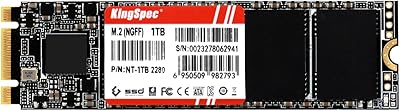
KingSpec NT Series 512GB M.2 SATA SSD
84%
88%
Performance
91%
Installation Ease
85%
Reliability
92%
Value for Money
80%
Compatibility with Non-Mac Systems
More
Transcend MTS830S 512GB M.2 SSD
79%
82%
Real-World Speed
88%
Value for Money
79%
Compatibility
91%
Installation Experience
89%
Boot & Load Times
More
ORICO Y20M M.2 2280 SATA SSD 4TB
85%
96%
Storage Capacity
91%
Value for Money
82%
Read Speed Performance
80%
Write Speed Performance
89%
Energy Efficiency
More
KingSpec NT Series 2TB M.2 2280 SATA SSD
79%
91%
Value for Money
88%
Performance (Speed)
72%
Compatibility
85%
Build Quality
84%
Installation Ease
More
KingSpec NT Series 1TB M.2 2280 SATA SSD
80%
87%
Performance
92%
Installation Ease
88%
Value for Money
85%
Speed (Read/Write)
75%
Compatibility
More

FAQ

It is a SATA drive, not NVMe. The M.2 form factor can carry either interface, which is a common source of confusion. This Timetec drive uses the SATA III protocol, so its speeds are capped at around 550MB/s read — fast compared to a hard drive, but slower than a PCIe NVMe drive. Before buying, check your laptop or motherboard manual to confirm your M.2 slot supports SATA; some newer systems only accept NVMe.

It will fit most M.2 2280 SATA-compatible slots found in laptops from roughly 2014 onward. That said, some budget or ultra-thin laptops use shorter M.2 sizes like 2242, and some modern systems only support NVMe over M.2. Check your laptop's spec sheet or service manual to confirm the slot length and supported interface before ordering.

The difference versus a mechanical hard drive is very noticeable in everyday use — boot times typically drop from over a minute to 15–20 seconds, and apps open much more quickly. For tasks like web browsing, document editing, and general multitasking, the system will feel significantly more responsive. Heavy file transfers or large sequential writes may show some slowdown once the SLC cache fills, but for typical daily use, the improvement is real and immediate.

Yes, the Timetec 512GB M.2 2280 SATA SSD works well as a primary Windows 11 drive. Windows 11 officially requires at least 64GB, so 512GB gives you plenty of room for the OS, updates, and a good selection of applications. Just make sure your system's M.2 slot supports SATA before installing.

When the cache is exhausted, the drive falls back to writing directly to the 3D NAND, which is slower. In practice, you may notice transfer speeds drop noticeably during very large continuous writes — think copying a 50GB+ video library in one go. For typical home use this rarely comes up, but if you regularly move large amounts of data, it is worth being aware of.

Timetec is a legitimate storage manufacturer that has built a solid reputation in the value-tier memory and SSD market. They are not as established as Samsung or Crucial, but over 2,300 Amazon ratings averaging 4.6 stars suggests buyers are genuinely satisfied. The three-year warranty with free technical support also shows the company stands behind its products.

No cloning software is bundled in the box. However, free tools like Macrium Reflect or Clonezilla work well for migrating your existing Windows installation to this M.2 SATA SSD without having to reinstall from scratch. You will also need an M.2 USB enclosure to connect the new drive externally during the cloning process.

Timetec offers a three-year limited warranty with free technical support. If you experience a failure within that window, you would contact their support team directly to initiate a claim. As with most drive warranties, normal wear and user-caused damage are typically excluded, but manufacturing defects are covered.

Absolutely — that is one of the best use cases for this drive. If your desktop already has a fast NVMe drive as the primary boot disk, adding this as a secondary storage drive for games, media, or backups is a cost-effective way to expand capacity without paying NVMe prices for data that does not need that speed.

Linux is fully supported. The drive is compatible with Linux kernel version 2.6.33 and later, which covers virtually every mainstream Linux distribution in active use today, including Ubuntu, Fedora, Debian, and Arch-based systems. TRIM support is also available under Linux, which helps maintain long-term drive health.