Overview

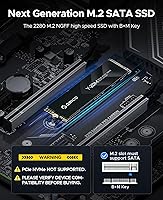
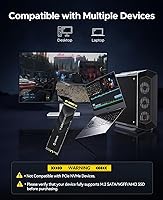
The ORICO Y20M 4TB M.2 SATA SSD is a high-capacity internal drive aimed squarely at users who need bulk storage but are working with older systems that only support SATA — not the newer NVMe standard. That distinction matters enormously. If your laptop or desktop has an M.2 slot, it may still only accept SATA-based drives (sometimes labeled NGFF or AHCI), not PCIe NVMe ones — and these are not interchangeable. ORICO, a Shenzhen-based brand known for storage accessories and enclosures, launched this drive in late 2024, making it a relatively fresh entry in a niche but genuine market segment.

Features & Benefits

At the spec level, this SATA SSD performs about as fast as the SATA interface will allow — sequential reads hit 500MB/s and writes reach 430MB/s, roughly five times faster than a traditional spinning hard drive. That speed ceiling is a SATA reality, not a product shortcoming. The real headline is the 4TB capacity in a compact M.2 2280 form factor, which remains genuinely uncommon at this size. Under the hood, ECC error correction, TRIM, Garbage Collection, and Bad Block Management help protect data integrity and extend the drive's working life. For laptop users, low power draw and a shock-resistant build make daily portability more practical.

Best For

This M.2 SATA drive fits a specific but real group of buyers. If you own a laptop or desktop with a confirmed M.2 SATA slot — sometimes labeled NGFF or AHCI — and you have exhausted smaller-capacity options, 4TB in a single module is a meaningful upgrade. It also suits creative professionals and students who archive large photo or video libraries and need volume over raw speed. System builders reviving older machines without PCIe NVMe support will find it among the very few viable options at this capacity. The essential step: verify your slot type before ordering. This is not the right choice for speed-critical workloads.

User Feedback

With a 4.6-star average from over 800 ratings in under six months, the ORICO Y20M is tracking well for a new product. Buyers consistently highlight the easy installation and reliable detection on compatible systems, with the 4TB capacity cited as the primary reason for purchase. The most common complaints, however, stem from a compatibility mismatch: a notable share of low ratings come from users who installed this on NVMe-only slots, where it will not work. That is a buyer research failure, but it is worth knowing. On long-term reliability, the drive is simply too young for meaningful endurance conclusions — something worth revisiting in a year.

Pros

  • 4TB in the M.2 2280 form factor is genuinely rare and solves a real problem for SATA-limited systems.
  • Sequential read speeds of 500MB/s make it dramatically faster than any traditional spinning hard drive.
  • ECC error correction, TRIM, and Bad Block Management help protect data and maintain performance over time.
  • Low power consumption is a practical advantage for laptop users who care about battery life.
  • The shock-resistant build adds a layer of durability that matters for portable or mobile setups.
  • Installation is straightforward — most compatible users report the drive is detected immediately with no extra configuration.
  • Backward compatibility with SATA II slots means it works even on very old hardware, just at reduced speed.
  • A 4.6-star average from over 800 ratings is a strong early signal of buyer satisfaction for a product this new.
  • Consolidating storage into a single internal module keeps your build clean and eliminates the need for extra cables or enclosures.

Cons

  • Compatibility confusion is rampant — buyers who skip the spec check and have NVMe-only slots end up with a non-functional drive.
  • SATA speeds top out well below modern NVMe drives, making this a poor choice for speed-sensitive workflows.
  • The product launched in late 2024, so there is no long-term reliability or endurance data from real users yet.
  • Pricing at the 4TB SATA tier is not cheap, and some buyers may find NVMe alternatives competitive depending on their system.
  • The B+M Key requirement narrows compatible devices considerably — not every M.2 slot will accept this drive.
  • There is no included mounting screw or bracket in most reports, which can be a minor inconvenience during installation.
  • Real-world sustained write speeds under heavy load may fall short of the advertised peak figures, as is common in SATA drives.
  • With no official TBW (terabytes written) endurance rating publicly listed, estimating the drive's lifespan under heavy use is difficult.

Ratings

The scores below for the ORICO Y20M 4TB M.2 SATA SSD were generated by AI after analyzing verified buyer reviews from global markets, with spam, bot-submitted, and incentivized feedback actively filtered out. Each category reflects the honest consensus of real users — compatible buyers who got exactly what they expected, and others who ran into friction. Both the strengths and the genuine pain points are weighted transparently in every score.

Storage Capacity
94%
Four terabytes inside a single M.2 2280 module is the kind of spec that stops people mid-scroll. Reviewers upgrading from 512GB or 1TB drives consistently describe it as a transformative amount of headroom — enough for full photo libraries, large video archives, and years of project files without ever juggling drives again.
The only real gripe in this category is that 4TB is the ceiling — ORICO does not currently offer a higher-capacity variant in this form factor, so buyers with truly extreme storage needs have nowhere left to go within this product line.
Compatibility Clarity
46%
54%
ORICO does prominently flag the SATA-only limitation on the product page, and buyers who read the listing carefully appreciated the upfront warning. For users who already knew they had an M.2 SATA slot, the purchasing experience was described as straightforward and confidence-inspiring.
Despite the warnings, a meaningful portion of low-star reviews come from buyers who installed this in NVMe-only slots and got nothing — no detection, no error, just silence. The compatibility gap is the single biggest source of returns and frustration, and no amount of bold text fully closes that gap for less technical shoppers.
Read & Write Speed
71%
29%
Within the SATA ceiling, the drive performs well. Users coming from spinning hard drives report noticeably faster boot times, quicker application loads, and smooth large-file transfers. For archival or bulk storage use, 500MB/s reads are genuinely practical and rarely a bottleneck.
Buyers who benchmarked the drive noted that sustained write speeds under heavy consecutive loads can dip noticeably below the advertised 430MB/s peak, which is expected behavior for SATA drives with dynamic caching but still caught some users off guard. Anyone expecting NVMe-comparable throughput will be disappointed.
Installation Experience
88%
The majority of compatible users described installation as quick and painless — insert the drive, secure it, and the system detects it immediately. Several reviewers noted it showed up in Windows Disk Management and macOS Disk Utility on first boot without any driver installation required.
A recurring minor complaint is the absence of a mounting screw in the package, which some motherboards and laptop frames require to hold the drive in place. It is a small omission, but it sent a handful of users scrambling for a spare M2 screw before they could finish the build.
Value for Money
73%
27%
At this capacity in the M.2 SATA format, options are genuinely scarce, and buyers who had been hunting for a 4TB SATA M.2 drive found the pricing competitive relative to the near-absence of comparable alternatives. For the right buyer in the right system, the cost-per-terabyte math holds up reasonably well.
Buyers comparing this against NVMe drives at similar or lower price points — where speeds are dramatically higher — feel the value proposition is harder to justify unless their system leaves them with no NVMe option. The price sits at a tier where the limited-speed SATA interface becomes a tougher sell for newer users.
Build Quality
82%
18%
The drive feels solid for its weight class, and users report no flexing, PCB warping, or contact issues after installation. The shock-resistant design is noted as a genuine plus for laptop users who move their machines regularly, giving some confidence that the drive can handle incidental bumps.
As a budget-to-mid-tier brand, ORICO does not publish detailed component sourcing or flash chip specifications, which leaves some technically minded buyers uncertain about the underlying hardware quality relative to better-documented competitors like Samsung or Crucial.
Power Efficiency
86%
Laptop users specifically called out the low power draw as a meaningful benefit, particularly in older machines where every watt matters. Several noted their system ran cooler and quieter after switching from a 2.5-inch spinning drive to this M.2 SATA module.
There are no independently verified idle or load power figures published for this specific drive, so while the low-power claim is credible for the SATA SSD category in general, buyers cannot confirm exact numbers for their specific thermal or battery calculations.
Long-Term Reliability
58%
42%
The longevity features on paper — ECC, TRIM, Bad Block Management, and Garbage Collection — are all standard tools that genuinely help extend a drive's useful life. Users who have used ORICO storage products in the past generally reported positive experiences with the brand's durability over time.
The drive launched in late 2024, which means there is simply no multi-year endurance data from real-world users yet. No TBW (terabytes written) rating is publicly listed, making it hard to project how the drive holds up under sustained heavy write workloads over two or three years.
Detection & Recognition
84%
On systems with confirmed M.2 SATA support, the drive is detected reliably and quickly. Users across a range of laptops and desktop boards — including some fairly old machines — confirmed immediate recognition without needing BIOS updates or manual configuration changes.
The detection experience collapses entirely on NVMe-only slots, which skews the perception of this category in the overall review pool. That failure mode has nothing to do with the drive itself, but it shows up in the ratings regardless and is worth separating from legitimate detection issues.
Thermal Performance
79%
21%
Because SATA SSDs operate at lower speeds than NVMe drives, they also generate less heat during sustained transfers. Several users noted the drive remained cool to the touch even during longer file-copy sessions, which is relevant in compact laptop enclosures with limited airflow.
No official operating temperature range or throttling threshold is documented for this drive, and there is no heatspreader included. In very tight chassis with poor airflow, sustained workloads could theoretically cause thermal throttling, though no reviewers specifically reported this as an observed problem.
Packaging & Unboxing
76%
24%
The packaging is compact and appropriately protective for a small form factor drive. Buyers generally found the drive arrived without damage, and the presentation is clean enough to not feel budget-tier despite the relatively simple box design.
The package does not include any accessories — no screwdriver, no mounting screw, no installation guide beyond a basic insert. For first-time upgraders who are not already stocked with M2 hardware, this creates a minor but avoidable friction point before they can complete the install.
Brand Credibility
74%
26%
ORICO has an established catalog of storage accessories, docking stations, and enclosures, giving buyers some baseline confidence that this is not a fly-by-night product. The brand's Amazon presence is active and responsive to customer questions, which reviewers noted positively.
ORICO sits in the second tier of storage brands, below names like Samsung, Western Digital, or Seagate in terms of industry reputation and independent benchmark coverage. Buyers who prioritize brand heritage and long-term support infrastructure may find that gap uncomfortable at this price level.
OS & Platform Compatibility
81%
19%
Reviewers confirmed successful use across Windows 10, Windows 11, and Linux environments without needing additional drivers. The AHCI-based SATA protocol is one of the most universally recognized storage interfaces, which keeps the software compatibility story clean and simple.
macOS compatibility is more nuanced — while the drive can be used as secondary storage in compatible Mac hardware, Apple silicon Macs and many recent Intel MacBook models do not support M.2 SATA internally, limiting this to a narrow set of older Mac hardware configurations.

Suitable for:

The ORICO Y20M 4TB M.2 SATA SSD is built for a specific kind of buyer: someone with an older laptop or desktop that has an M.2 slot but only supports the SATA protocol — sometimes labeled NGFF or AHCI in your device specs — rather than the faster PCIe NVMe standard. If you have confirmed that your system fits that description and you are running out of internal storage, this drive is one of the very few options that delivers 4TB in the compact M.2 2280 form factor. It is a strong fit for students and creative professionals who accumulate large photo, video, or project archives and need raw volume without paying NVMe-tier pricing at this capacity. System builders breathing new life into aging machines will also find it a practical choice when NVMe slots are simply not available. Anyone looking to consolidate multiple internal or external drives into a single, tidy internal solution will appreciate what this SATA SSD brings to the table.

Not suitable for:

If your laptop or desktop has a modern M.2 slot that uses PCIe NVMe technology — which is the case for most machines built in the last four or five years — the ORICO Y20M 4TB M.2 SATA SSD will not work, and this is the single most important caveat to understand before purchasing. NVMe and SATA M.2 drives look nearly identical physically, but they speak entirely different languages electronically; plugging this into an NVMe-only slot will result in a drive that is simply not detected. Beyond compatibility, buyers who need high transfer speeds for tasks like video editing from the drive, large database work, or fast OS boot times on a modern system should look at NVMe alternatives, which can be four to six times faster. This drive is also a relatively new product, meaning long-term reliability data from real-world users is not yet available, which may give pause to anyone prioritizing proven endurance. Finally, if your system does not have an M.2 slot at all — only traditional 2.5-inch SATA bays — this drive will not physically fit without an adapter.

Specifications

  • Form Factor: The drive uses the M.2 2280 form factor, meaning it is 22mm wide and 80mm long, the most common M.2 size found in laptops and desktops.
  • Interface: It connects via SATA III at 6Gbps, the standard bandwidth ceiling for all SATA-based solid state drives.
  • Key Type: The drive features a B+M Key notch configuration, which physically fits both B-keyed and M-keyed M.2 slots, though it only operates in SATA mode.
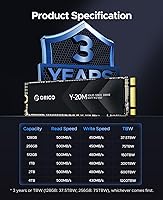
  • Capacity: Storage capacity is 4TB, one of the largest available in the M.2 2280 SATA form factor on the consumer market.
  • Read Speed: Maximum sequential read speed is rated at 500MB/s under ideal conditions.
  • Write Speed: Maximum sequential write speed is rated at 430MB/s under ideal conditions.
  • Protocol: This drive uses the AHCI protocol over SATA and is strictly incompatible with PCIe NVMe motherboard slots or NVMe enclosures.
  • Error Correction: ECC (Error Correcting Code) technology is built in to detect and correct data errors before they affect stored files.
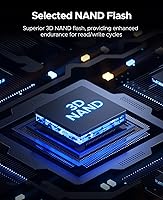
  • Endurance Tech: The drive includes TRIM support, Garbage Collection, and Bad Block Management to maintain consistent performance and extend operational lifespan.
  • Power Draw: The drive is designed for low power consumption, making it practical for battery-dependent devices such as laptops and ultrabooks.
  • Shock Resistance: The solid state design with no moving parts provides inherent shock resistance, and ORICO rates it as shock-resistant for mobile use.
  • Item Weight: The drive weighs 2.88 ounces, keeping it light enough to have no meaningful impact on a laptop or system build.
  • Package Dimensions: The retail package measures 4.96 x 3.54 x 0.75 inches, a compact box suitable for standard shipping and storage.
  • Manufacturer: The drive is manufactured by Shenzhen ORICO Technologies Co., Ltd., a Chinese company with a broad catalog of storage and connectivity accessories.
  • Launch Date: This product was first made available in November 2024, making it a recent addition to ORICO's internal storage lineup.
  • Compatibility: Compatible with laptops and desktops that have an M.2 SATA (NGFF or AHCI) interface; it will not function in PCIe NVMe-only slots.
  • Included Contents: The package includes the 4TB M.2 SATA SSD itself; no additional mounting hardware or accessories are officially listed as included.
  • Drive Type: This is a solid state drive with no moving mechanical parts, which contributes to its quiet operation and resistance to physical shock.

Related Reviews
ORICO Y20M-2242 256GB M.2 SATA SSD
77%
93%
Form Factor Accuracy
78%
Read Performance
71%
Write Performance
88%
Installation Ease
84%
Value for Money
More
ORICO IG740PRO 4TB M.2 NVMe SSD
79%
91%
Sequential Read Performance
88%
Endurance & Longevity
84%
Thermal Management
79%
Value for Money
74%
PS5 Compatibility
More
ORICO TCM2 M.2 NVMe SSD Enclosure
78%
83%
Transfer Speed
61%
Thermal Management
74%
Build Quality
91%
Ease of Installation
86%
Cable Bundle Quality
More
ORICO Y20M 1TB M.2 SATA SSD
80%
71%
Compatibility Clarity
78%
Read/Write Performance
91%
Installation Ease
83%
Value for Money
74%
Drive Longevity & Health Features
More
ORICO Y20M 512GB M.2 SATA SSD
78%
61%
Compatibility Clarity
78%
Read/Write Performance
88%
Installation Experience
84%
Value for Money
74%
Long-Term Reliability
More
ORICO Y20M 2TB M.2 SATA SSD
81%
88%
Value for Money
83%
Compatibility Clarity
79%
Read & Write Speed
91%
Installation Experience
74%
Long-term Reliability
More
S SHARKSPEED 4TB M.2 2242 SATA SSD
84%
92%
Performance
89%
Value for Money
90%
Reliability
86%
Durability
91%
Speed
More
KingSpec NT 4TB M.2 2280 SATA SSD
73%
93%
Storage Capacity
71%
Read & Write Speed
58%
Compatibility
84%
Value for Money
88%
Installation Ease
More
Transcend MTS830S 4TB M.2 SATA SSD
81%
94%
Storage Capacity
83%
Read Speed Performance
67%
Write Speed & Sustained Throughput
88%
Reliability & Longevity
91%
Compatibility & Fit
More
dockteck DH0002 M.2 NVMe/SATA SSD Enclosure
84%
88%
Transfer Speed (NVMe)
76%
SATA Drive Performance
83%
Build Quality
93%
Ease of Setup
79%
Thermal Management
More

FAQ

You need to check whether your M.2 slot supports SATA mode, sometimes listed as NGFF or AHCI in your device's manual or spec sheet. The safest way is to look up your exact laptop model or motherboard model online and find out which M.2 protocols it supports. Many modern machines only support NVMe, in which case this drive will not be detected at all. If your documentation lists M.2 SATA or NGFF, you are good to go.

Not necessarily. Having an NVMe drive installed means your current slot is NVMe-capable, but that does not confirm it also supports SATA. Many newer systems only support NVMe on their M.2 slots, so swapping in a SATA drive simply will not work. Check your motherboard or laptop specs explicitly for SATA M.2 support before purchasing.

Yes, provided your system supports booting from an M.2 SATA drive, which most SATA-compatible systems do. You would need to install your operating system onto it just as you would any other internal drive, and then set it as the primary boot device in your BIOS or UEFI settings.

For the vast majority of everyday tasks — booting an OS, loading applications, transferring files, storing photos and videos — 500MB/s is more than adequate. It is dramatically faster than a traditional hard drive. Where it falls short is compared to modern NVMe drives, which can hit 3,500MB/s or more, so if you are doing heavy sequential workloads like 4K video editing directly from the drive, SATA has a real ceiling.

Nothing damaging will happen to your system — the drive simply will not be recognized. The computer will boot normally, and the drive just will not appear. That said, the physical B+M Key notch means it can be inserted into some NVMe slots, so the absence of detection is your signal that the slot is NVMe-only and incompatible with this SATA drive.

ORICO typically offers a limited warranty on their storage products, but the specific terms for this drive are not explicitly detailed in the product listing. It is worth checking ORICO's official support channels or contacting the seller before purchasing if warranty coverage is important to your decision.

The main advantage of this internal M.2 SATA drive over an external SSD is that it stays inside your machine — no cable, no desk clutter, and no risk of accidentally disconnecting it. It also draws power from your system directly. External drives are more portable and flexible across multiple machines, but for a permanent high-capacity storage upgrade on a single device, internal is generally the cleaner solution.

Actually, the opposite is more likely. Because this is a solid state drive with low power draw and no spinning platters, it consumes less energy than a traditional hard drive would. Compared to most other M.2 SATA drives, the power profile here is specifically noted as low consumption, which is a minor but real benefit for portable use.

Only if your desktop motherboard has a second M.2 slot that supports SATA mode. Many mid-range and higher-end boards have multiple M.2 slots, and sometimes one is NVMe-only while another supports SATA. Check your motherboard manual carefully — each slot often has its own protocol rules listed, and they are not always identical.

It is a fair question. The drive launched in late 2024, so there simply has not been enough time for long-term endurance data to accumulate from real users. The early ratings are strong, and the drive includes standard longevity features like ECC, TRIM, and Bad Block Management. But if proven multi-year reliability is a top priority, that data does not yet exist for this specific model, and that is worth factoring into your decision.