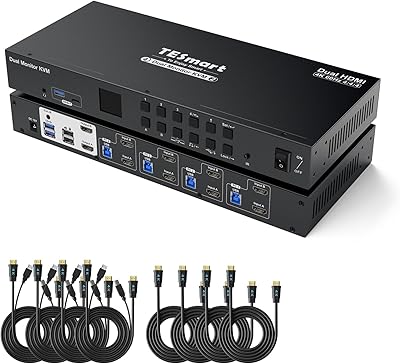
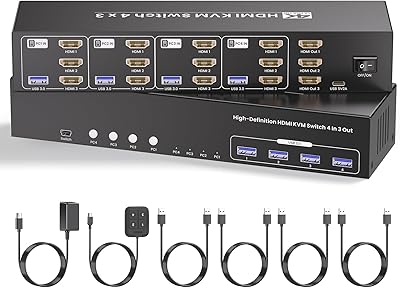
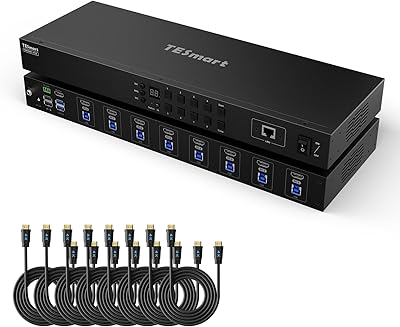
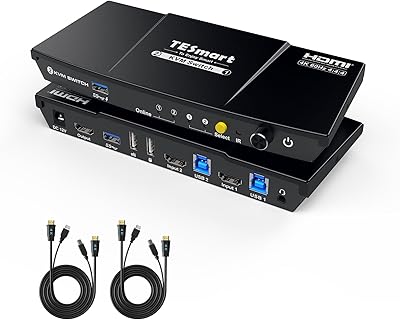
Overview

The TESmart HKS403-P23 4-Port Triple Monitor KVM Switch is built for the kind of workstation setup most peripherals simply can't handle — four computers, three monitors, one keyboard, one mouse, all working together. At this price tier, buyers aren't experimenting; they need something that actually holds up in a demanding, multi-machine environment. Think day traders watching multiple feeds, developers toggling between a work laptop and a personal rig, or IT professionals managing several systems without the chaos of duplicate desks. This review weighs what it does well against where it falls short, because at this investment level, the details matter.
Features & Benefits

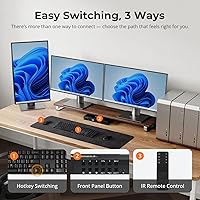
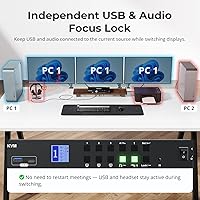
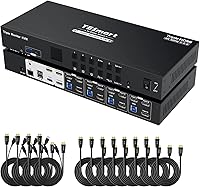
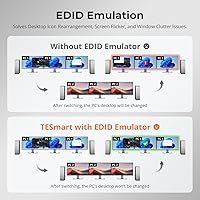
The standout capability here is the triple 4K HDMI output — each connected computer gets three display connections, supporting 3840×2160 at 60Hz with high-refresh options for demanding workflows. What sets this multi-PC display hub apart from cheaper alternatives is the EDID emulation baked into every input port. Without it, monitors forget their settings the moment you switch sources, forcing repeated recalibration of resolution and scaling. The built-in Ethernet sharing is a genuine convenience — all four machines stay on the same network through a single cable. Audio routing runs independently, so your headset stays active mid-switch without dropping a live call. Three control methods — buttons, IR remote, and hotkeys — give you options based on your workflow.

Best For

This triple-monitor KVM switch makes the most sense for professionals who genuinely operate multiple computers every day — not as an occasional convenience, but as a core part of how they work. Day traders monitoring live data across three screens and developers keeping a work laptop alongside a personal desktop are the obvious fit. One critical caveat for laptop users: if your machine doesn't natively output three video signals, you'll need a compatible MST dock for the triple-display setup to function correctly. Those running rack-mount environments or structured cable setups will appreciate the included rack-ears and the complete cable kit, which genuinely saves time on initial configuration.

User Feedback

The TESmart four-port switch carries a 3.2 out of 5 rating on Amazon, and that number deserves a straight look. Buyers who praise it consistently mention the solid build quality, reliable hotkey switching once the setup is dialed in, and the convenience of receiving all necessary cables in the box. The criticism, though, is consistent: some users run into display detection failures, and the USB hub can struggle when multiple high-bandwidth devices run at once. A recurring thread traces to specific laptop GPU configurations or third-party docking stations that conflict with the switch. The pattern suggests that compatible hardware pairings lead to good outcomes, while improvised or mismatched setups tend to drive most of the negative reviews.

Pros

  • Supports true triple 4K HDMI output across all four connected computers without external splitters.
  • Per-port EDID emulation keeps monitor layouts and resolution settings intact every time you switch.
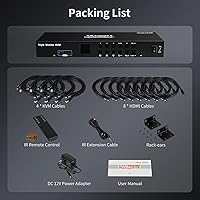
  • All necessary cables are included in the box, covering every computer connection from day one.
  • Audio and microphone routing operates independently, so live calls stay active mid-switch.
  • Three control methods — hotkeys, IR remote, and front buttons — suit different desk setups and workflows.
  • Solid metal chassis feels appropriately premium and holds up well in rack-mount installations.
  • Built-in Ethernet sharing eliminates the need for a separate network switch on multi-machine desks.
  • Auto-scan mode cycles through all inputs automatically, which is genuinely useful for monitoring scenarios.
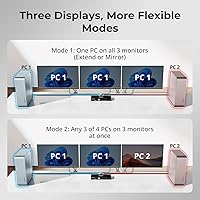
  • Display modes — extended, duplicate, or independent per source — offer real flexibility for different tasks.

Cons

  • Included HDMI cables often fall short at 4K resolutions, requiring buyers to source better ones separately.
  • USB hub bandwidth degrades noticeably when multiple high-demand peripherals are connected at once.
  • 100Mbps Ethernet ceiling is a meaningful bottleneck for users doing large transfers across connected machines.
  • Laptop compatibility requires a specific MST dock — a hard requirement that is easy to miss before buying.
  • Some users report display detection failures that appear linked to monitor firmware or cable quality, not user error.
  • Hotkey combinations are fixed and cannot be customized, which limits efficiency for advanced users.
  • Firmware issues at launch affected early reliability, and the update process is not straightforward.
  • The unit runs warm under sustained load, which can be a concern in enclosed rack installations.
  • A 3.2 out of 5 average rating signals that a meaningful portion of buyers had setup or reliability problems.

Ratings

The TESmart HKS403-P23 4-Port Triple Monitor KVM Switch scores below reflect AI-synthesized analysis drawn from verified buyer reviews across global markets, with spam, bot-generated, and incentivized submissions actively filtered out. This switch attracts a technically demanding audience — power users who notice every dropped frame and misconfigured display — so the ratings capture both what genuinely impresses and what consistently frustrates. Strengths and pain points are weighted equally; nothing is glossed over.
Display Performance
78%
22%
Users running demanding workstations report that 4K at 60Hz holds up reliably once the setup is properly configured. The ability to run extended, duplicate, or fully independent displays across all four inputs is a capability most competing switches simply don't offer at this level.
A portion of buyers report that achieving stable output at the highest resolutions requires premium-grade HDMI cables beyond what's included. Some also note that refresh rate consistency can dip when all four ports are actively in use simultaneously.
EDID Emulation Reliability
72%
28%
The per-port EDID emulators are the feature most praised by users who've been burned by cheaper switches. Developers and traders switching between machines multiple times daily note that their monitor layouts, scaling, and resolution preferences stay intact across switches.
The emulation isn't fully bulletproof — a subset of users, particularly those using high-refresh monitors or unusual resolution combinations, still encounter occasional resets. The issue appears tied to specific monitor firmware versions rather than a universal flaw.
Switching Speed & Reliability
74%
26%
Hotkey switching is fast enough for professional use, and the IR remote adds genuine convenience for users who switch sources frequently throughout the workday without wanting to reach for the front panel every time.
Some users report that switching between certain input combinations introduces a brief black screen longer than expected. Reliability also appears to vary based on the connected hardware — desktop-to-desktop switches tend to be more consistent than laptop-involved configurations.
USB Hub Performance
58%
42%
Three USB 3.0 ports cover the basics well for peripheral sharing — a keyboard, mouse, and occasional external drive work without issue. The charging capability on two of the ports is a practical bonus for keeping a phone or tablet topped up at the desk.
Under heavier loads, such as simultaneously running a webcam, external SSD, and USB audio interface, users report bandwidth throttling and occasional device disconnects. The USB 1.1 legacy ports are essentially irrelevant for modern workflows and feel like a spec-sheet artifact.
Network Sharing
69%
31%
Having all four computers share a single Ethernet connection without a separate switch or splitter is a legitimate convenience, especially in tight rack setups or desks where cable count matters. The 100Mbps throughput handles standard office traffic without complaint.
100Mbps is the ceiling, and for users doing large file transfers or running servers across multiple machines, it creates a real bottleneck. Buyers expecting gigabit performance based on the premium price point come away disappointed by this limitation.
Audio & Microphone Routing
76%
24%
The independent audio routing is one of the more underappreciated features — users on frequent video calls appreciate that their headset stays active during input switches, avoiding the awkward drop and reconnect that cheaper KVM switches force on you.
A few users note that microphone input levels shift slightly after switching sources, requiring manual adjustment. It's not a dealbreaker, but in a live meeting context it's noticeable enough to be mentioned repeatedly across user reviews.
Build Quality & Hardware Design
82%
18%
The chassis is solid metal construction with a weight and rigidity that matches the premium positioning. Front panel buttons have a satisfying click response, and the rack-ear mounting system is properly engineered rather than an afterthought.
The unit runs noticeably warm under sustained multi-port load. While no users report thermal failures, the heat output makes some buyers hesitant to install it in tightly enclosed rack spaces without additional ventilation.
Cable Management & Included Cables
71%
29%
Arriving with a full cable kit — twelve HDMI cables and four USB cables covering all connected computers — is genuinely appreciated. Most competitors at this price leave buyers sourcing their own cables, which adds cost and delays setup.
The included HDMI cables work at standard resolutions but several users found them unreliable at 4K, leading to signal issues until they substituted higher-spec cables. For a switch marketed around 4K output, the bundled cable quality doesn't match the promise.
Laptop Compatibility
53%
47%
When paired correctly with a compatible MST docking station that outputs three independent video signals, the switch works as intended for laptop users. This setup is attractive for developers or IT staff who split time between a laptop and desktop machines.
This is one of the most complained-about areas. Many laptop users don't realize an MST-capable dock is a hard requirement until after purchase. GPU driver conflicts and docking station incompatibilities generate a disproportionate share of the negative reviews.
Control Options & Usability
81%
19%
Three control methods — front buttons, IR remote, and keyboard hotkeys — cover different workflow preferences well. The auto-scan mode for cycling through inputs is useful for monitoring or testing scenarios where constant manual switching would be disruptive.
The hotkey combination requires a bit of memorization and isn't customizable, which frustrates power users who want faster or more personalized shortcuts. The IR remote works well in line-of-sight but loses reliability at angles common in rack installations.
Setup & Initial Configuration
61%
39%
Users with prior KVM experience and compatible hardware generally get up and running within an hour. The included manual is more thorough than average for this product category, and the physical port labeling is clear.
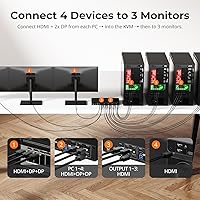
First-time KVM buyers consistently report a steep learning curve, particularly around display mode configuration and understanding which display modes require specific cable arrangements. The triple-monitor requirement of three video outputs per computer catches many buyers off guard.
Value for Money
59%
41%
For users whose setup matches the hardware requirements precisely — four desktop machines with native triple HDMI output — the feature set at this price is hard to replicate with separate components. The all-in-one nature does justify a premium for the right buyer.
At this price point, the USB hub limitations, 100Mbps Ethernet ceiling, and compatibility issues feel like genuine shortfalls rather than acceptable trade-offs. Buyers spending this much expect a more polished out-of-box experience than the mixed reviews suggest they receive.
Firmware & Long-Term Reliability
55%
45%
Users who have run the switch for over a year without issues do exist, and several note that a firmware update resolved early instability problems. TESmart has shown willingness to push updates when bugs are reported at scale.
The firmware situation cuts both ways — the fact that updates are necessary to fix core reliability issues suggests the product shipped before it was fully stable. Some buyers report that firmware update processes are cumbersome and poorly documented.
Rack Mount Integration
79%
21%
The included rack-ears are properly sized and attach without modification, which is a meaningful convenience for IT professionals building out structured server or workstation racks. The 1U form factor fits standard rack configurations cleanly.
The power adapter cable is relatively short, which creates routing challenges in deeper rack installations. A few users also note that the unit's ventilation design assumes open-air placement rather than enclosed rack shelving.

Suitable for:

The TESmart HKS403-P23 4-Port Triple Monitor KVM Switch is built for professionals who operate multiple computers as a core part of their daily workflow — not as an occasional convenience. Day traders monitoring live market data across three screens, developers toggling between a work-issued laptop and a personal desktop, and IT administrators managing several machines from a single desk will find the feature set directly aligned with their needs. The per-port EDID emulation alone makes it worthwhile for anyone who has wasted time repeatedly recalibrating monitor layouts after switching inputs on cheaper hardware. Users in structured rack-mount environments will appreciate the included rack-ears and the clean single-cable network sharing, which meaningfully reduces physical clutter. If your setup involves four desktop computers each with three dedicated video outputs, this multi-PC display hub is one of the few products that handles that specific configuration without requiring a patchwork of adapters and secondary switches.
Not suitable for:

The TESmart HKS403-P23 4-Port Triple Monitor KVM Switch is a poor fit for casual users or anyone whose hardware doesn't meet the specific requirements this switch demands. Laptop users are the most likely to run into trouble — unless your laptop is paired with an MST-capable docking station that outputs three independent video signals, the triple-monitor functionality simply will not work as expected, and that requirement is easy to overlook before purchase. Users hoping to push high-bandwidth USB peripherals — external SSDs, high-resolution webcams, and USB audio interfaces running simultaneously — will likely hit the limits of the USB hub faster than the spec sheet implies. The 100Mbps Ethernet ceiling is a genuine constraint for anyone doing large file transfers or running networked services across machines; it's not a gigabit switch, and at this price that gap stings. Buyers new to KVM hardware in general should also be cautious — the setup process and display mode configuration carry a learning curve that has frustrated many first-time users who expected a more plug-and-play experience.
Specifications

  • Connected PCs: Supports up to 4 computers connected simultaneously, each requiring three HDMI video outputs.
  • Display Outputs: Each computer input provides 3 HDMI ports, enabling a true triple-monitor setup per source.
  • Max Resolution: Supports up to 3840×2160 (4K) at 60Hz across all three monitors for each connected computer.
  • High Refresh Mode: Runs at 2560×1440 at 144Hz and 1080p at 240Hz for users prioritizing refresh rate over resolution.
  • Video Standards: Compatible with 3D, HDR, HDCP, and Dolby Vision for broad display format support.
  • EDID Emulation: One dedicated EDID emulator per input port retains monitor configuration data when switching between sources.
  • USB Ports: Includes 3 USB 3.0 ports (2 with charging support) and 2 USB 1.1 ports for legacy peripherals.
  • USB Transfer Speed: USB 3.0 ports support data transfer rates up to 5Gbps for compatible storage and peripheral devices.
  • Network Sharing: Built-in 100Mbps Ethernet switch allows all four connected computers to share a single network cable.
  • Audio: Independent left/right audio output and microphone routing operate separately from video switching.
  • Control Methods: Three switching methods are supported: front panel buttons, IR remote control, and keyboard hotkeys.
  • Display Modes: Each source can be configured for extended display, duplicate display, or fully independent per-monitor output.
  • Rack Mount: Two rack-ears are included in the box, allowing standard 1U rack installation without additional hardware.
  • Dimensions: The unit measures 13.78 × 5.91 × 1.77 inches, sized for rack integration or open desk placement.
  • Weight: The switch weighs 2.98 pounds, reflecting a solid metal chassis construction.
  • Power Supply: Operates on 12V DC power via the included AC adapter; no USB bus power option is available.
  • Included Cables: Package includes 4 USB-B to USB-A cables and 12 HDMI cables covering all computer connections.
  • IR Remote: An IR remote control and an IR extension cable are both included for flexible placement and operation.
  • Model Number: The official manufacturer model number is HKS403-P23, produced by TESmart.
  • First Available: This product was first listed for sale in July 2022 and remains an active SKU in TESmart's lineup.

Related Reviews

TESmart HKS402-P23 Dual Monitor KVM Switch
74%
72%
Display Signal Stability
88%
EDID Emulation Effectiveness
83%
USB 3.0 Hub Performance
69%
Switching Reliability
74%
Audio and Microphone Passthrough
More
TRENDnet TK-440DP 4-Port Dual Monitor DisplayPort KVM Switch
85%
92%
Video Quality
85%
Ease of Use
90%
Compatibility
88%
Build Quality
87%
USB Hub Functionality
More
Scyniney 4-Port Triple-Monitor HDMI KVM Switch
74%
83%
Video Signal Stability
79%
4K Resolution Performance
74%
USB Hub Performance
81%
Switching Reliability
41%
Hotkey Switching Support
More
TESmart HKS801-P23 USB 3.0 HDMI KVM Switch 8 Port 4K@60Hz
87%
91%
Ease of Setup
95%
Video Quality
88%
Switching Reliability
85%
Build Quality
92%
Value for Money
More
TESmart HKS201-P23 2-Port HDMI KVM Switch
77%
83%
Ease of Setup
88%
Video Quality & Resolution
67%
Switching Reliability
71%
Audio & Microphone Performance
79%
USB Hub Performance
More
DiamondTiger KS304DL 4-Port DisplayPort KVM Switch
74%
88%
Ease of Setup
92%
Video Quality
74%
Switching Reliability
63%
Build Quality
86%
Value for Money
More
KAGO 4-Port VGA KVM Switch
84%
92%
Value for Money
96%
Ease of Setup
85%
Performance
78%
Build Quality
87%
Display Quality
More
DGODRT KS604H 4-Port HDMI KVM Switch
80%
91%
Ease of Setup
74%
Switching Reliability
78%
Video Quality
79%
USB Peripheral Sharing
84%
Wired Remote Control
More
MT-VIKI 460KL 4-Port VGA KVM Switch
80%
91%
Value for Money
93%
Ease of Setup
84%
Switching Reliability
78%
Build Quality
76%
Video Output Quality
More
ANXQQ ANQ-8401B 4-Port HDMI KVM Switch
77%
91%
Ease of Setup
88%
Display Switching Reliability
86%
EDID Performance
67%
USB Device Recognition
61%
8K Resolution Capability
More

FAQ

Yes, and this is the single most important compatibility check before buying. Each computer connected to this switch needs to output three independent HDMI video signals. Most laptops don't have three physical HDMI ports, so you'll need a docking station that supports MST (Multi-Stream Transport) and provides three separate display outputs. Not all docks do this, so verify your dock's specs carefully before assuming it will work.

That's exactly what the EDID emulators are designed to prevent. Each input port on the TESmart HKS403-P23 4-Port Triple Monitor KVM Switch stores your monitor's display information independently, so when you switch back to a source, your computer still sees the correct screen configuration. That said, a small number of users with unusual resolution setups or certain monitor firmware versions have reported occasional resets, so it's not a universal guarantee.

Yes, that's the advertised capability and most users with compatible hardware confirm it works. Each of the three monitor connections per source supports up to 3840×2160 at 60Hz. If you're seeing issues at 4K, the first thing to check is cable quality — the included HDMI cables have been flagged by some users as inconsistent at maximum resolution, and swapping to higher-spec cables often resolves it.

The three USB 3.0 ports support transfer speeds up to 5Gbps, which is sufficient for an external drive in everyday use. The caveat is that the total bandwidth is shared across all connected devices. If you're running a webcam, an external SSD, and a USB audio interface simultaneously, you may notice performance drops. For single-device use, like transferring files from one drive, it performs well.

Audio and microphone routing are handled independently from the video switch, so your headset stays connected to the audio source you choose even if you switch the video to a different computer. That said, a few users have noted minor microphone level shifts after switching, which can require a quick adjustment. For the most part, the call audio stays intact.

You can switch inputs using the front panel buttons, the included IR remote, or keyboard hotkeys. The hotkey combinations are fixed and cannot be reprogrammed, which some power users find limiting. The IR remote works well in direct line of sight but can be unreliable at steep angles, which matters if the switch is installed inside a rack enclosure.

Yes, the built-in Ethernet switch shares a single network cable across all four connected computers simultaneously. The connection runs at 100Mbps, which covers standard browsing, video calls, and light file work without issue. If any of your machines regularly handles large file transfers or serves data to other devices, that 100Mbps ceiling will become a noticeable constraint.

The switch is hardware-based and doesn't require drivers for core KVM functionality, so it works with Windows, macOS, and most Linux distributions. The hotkey switching works with standard USB keyboards regardless of OS. The IR remote and front panel buttons are OS-agnostic. Some USB peripheral sharing edge cases may behave differently across operating systems, but the core display and switching functions are broadly compatible.

The box includes four USB-B to USB-A cables and twelve HDMI cables, which covers the full connection set for all four computers across all three monitors. For most users at standard resolutions, the included cables are sufficient. If you're running 4K on all three monitors, it's worth having a few high-quality HDMI 2.0 cables on hand, as the bundled ones have received mixed feedback at maximum resolution.

That rating reflects a real split in buyer experience. Users whose hardware setup matches the requirements precisely — particularly those using desktop computers with three native HDMI outputs — tend to report solid, reliable performance. The bulk of negative reviews trace back to laptop compatibility issues, mismatched MST docks, or USB hub overloading. If you've verified your hardware is fully compatible before buying, your odds of a smooth experience are considerably better than the average rating suggests.