Overview

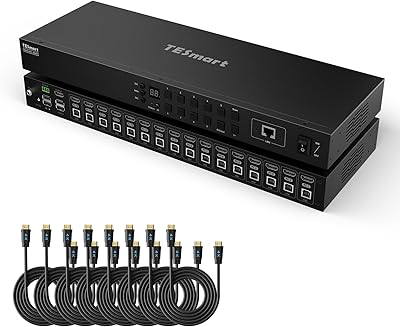
The TESmart HKS801-P23 8-Port Rackmount HDMI KVM Switch is built for IT professionals who need a serious, rack-integrated solution for managing multiple servers or workstations from a single console. This isn't a desktop switcher dressed up in a metal shell — the 1U rackmount chassis, proper rack ears, and 8.15-pound build communicate clearly that it belongs in a server room or lab. You get 4K@60Hz 4:4:4 output, which matters if you're running high-resolution displays for detailed system monitoring. What really separates this from consumer alternatives is the sheer range of control options available, which we'll get to below. If you're running a home office with two PCs, this is overkill. For everything else, it warrants a close look.
Features & Benefits

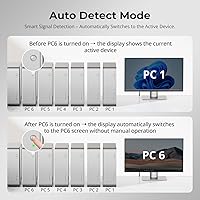
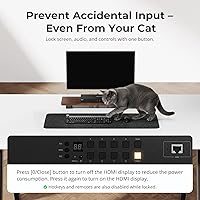
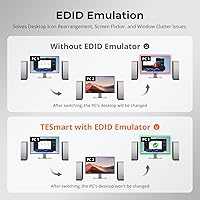
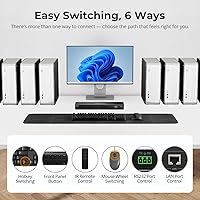
What stands out most about this enterprise KVM unit is how many ways you can actually switch between machines. Seven switching methods — front panel buttons, IR remote, keyboard hotkeys, mouse wheel, RS232 serial, LAN/IP commands, and auto-scan — is a lot, and it reflects a professional use case where flexibility genuinely matters. The EDID emulation on every input port is quietly one of the most practical inclusions here: without it, connected PCs tend to reset their display settings each time you switch away, causing resolution drops and layout shifts. The USB 3.0 hub ports mean a shared external drive or scanner stays accessible across all machines. Eight KVM cables are included, which reduces day-one setup friction considerably.

Best For

The TESmart 8-port switch hits its stride in small server rooms, development labs, or any environment where four to eight machines need to share a single monitor and peripheral set. IT administrators who already have rack infrastructure will appreciate how cleanly it integrates — the included rack ears and 1U profile mean no improvised mounting. It also suits developers running parallel test environments or broadcast technicians who can't afford signal degradation on a 4K display. Worth noting: you don't need to populate all eight ports to get value here. Running three or four machines with room to expand later is a perfectly valid deployment. Organizations wanting remote KVM management without a dedicated IP KVM appliance will find the LAN port especially useful.

User Feedback

The 4.0-star average for this rackmount KVM switch is respectable, though the relatively low review count means individual comments carry more weight than usual. On the positive side, buyers consistently praise the solid metal construction and the day-to-day reliability of hotkey switching. The IP control feature divides opinion — users with networking backgrounds find it manageable, but those less familiar with command-based interfaces describe a steep learning curve. A few buyers flag USB re-enumeration delays when toggling between machines, which can disrupt workflows that depend on quick peripheral handoffs. One small but real annoyance: no batteries included for the IR remote, which catches some first-time users off guard right out of the box.

Pros

  • EDID emulation on every input port prevents frustrating resolution resets when toggling between connected machines.
  • Seven distinct switching methods give IT professionals multiple fallback options if one control method is unavailable.
  • The 1U rackmount form factor integrates cleanly into existing rack infrastructure with no improvised mounting required.
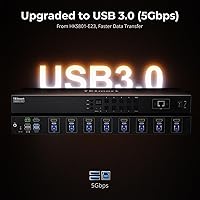
  • USB 3.0 hub ports let shared peripherals like external drives remain accessible across all connected machines.
  • Auto-scan mode allows unattended cycling through active ports, which is genuinely useful for server monitoring scenarios.
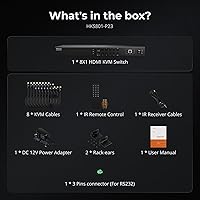
  • Eight KVM cables are included in the box, reducing day-one setup costs and accessory sourcing.
  • LAN and RS232 ports enable remote management without requiring a separate dedicated IP KVM device.
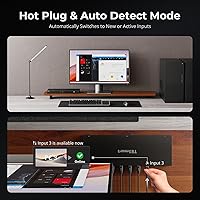
  • Hot-swap support means you can add or remove connected machines without powering down the switch.
  • Supports 4K@60Hz 4:4:4, 2K@144Hz, and 1080P@240Hz, covering a wide range of professional display requirements.
  • The metal chassis and rack-ear construction feel purpose-built for demanding environments, not repurposed consumer hardware.

Cons

  • IP control setup has a notable learning curve and is not beginner-friendly without prior networking knowledge.
  • The IR remote ships without batteries, which is a small but avoidable unboxing frustration.
  • USB re-enumeration delays when switching ports can disrupt workflows that depend on instant peripheral handoffs.
  • At 8.15 pounds and 17-plus inches wide, this unit is impractical for anyone without an actual rack.
  • The review pool is still relatively thin for this ASIN, making it harder to assess long-term reliability with confidence.
  • Hotkey switching behavior may vary across operating systems, and OS-specific quirks are not well documented.
  • All eight ports being HDMI-only means no flexibility for machines with DisplayPort or older VGA outputs.
  • The 5ft included cables may be too short depending on rack depth and machine placement in larger setups.

Ratings

Our AI-generated scores for the TESmart HKS801-P23 8-Port Rackmount HDMI KVM Switch were produced by analyzing verified global user reviews, with spam, bot activity, and incentivized feedback actively filtered out before scoring. The ratings reflect a genuine cross-section of real-world deployment experiences — from small server rooms to development labs — and do not shy away from the friction points buyers consistently raise alongside the strengths.
Build Quality
88%
Users who rack-mount this enterprise KVM unit consistently highlight the solid metal chassis as a standout trait — it feels purpose-built rather than assembled to a price point. The rack ears are sturdy and align correctly with standard 19-inch rails, which matters when the switch is expected to stay bolted in place for years.
A handful of buyers note that the front panel buttons feel slightly plasticky relative to the overall chassis quality, which creates a minor disconnect in perceived finish. For a unit at this price tier, tighter consistency between the metal body and control surface materials would be expected.
Video Performance
91%
The 4K@60Hz 4:4:4 output is clean and consistent across connected machines, which AV professionals and developers running high-resolution displays particularly appreciate. Buyers note that color accuracy and sharpness hold up well even during extended sessions, with no reported signal degradation over time.
A small number of users report occasional signal handshake delays when switching between certain machines, particularly when mixing different GPU vendors in the same setup. This is not a widespread issue but worth noting for environments with heterogeneous hardware configurations.
EDID Emulation
93%
This is one of the most praised features in real-world feedback — users running multi-machine workflows report that window layouts and display resolutions stay exactly where they left them when they switch back to a machine. In active development environments where desktop state matters, this alone justifies a significant portion of the investment.
A few technically advanced users note that EDID profiles cannot be manually customized, which limits fine-grained control for niche display configurations. For the vast majority of deployments this is a non-issue, but it surfaces occasionally in professional AV contexts with unusual resolution requirements.
Switching Reliability
82%
18%
Hotkey and front panel switching work reliably for most users across Windows and Linux environments, with peripheral handoffs completing quickly enough for day-to-day IT administration tasks. The breadth of seven available switching methods means users always have a fallback if one method behaves unexpectedly.
Some users report inconsistent hotkey behavior on macOS, requiring workarounds or fallback to front panel switching in mixed-OS environments. USB re-enumeration delays of one to two seconds are noted by users who switch frequently, which can interrupt workflows that depend on near-instant peripheral response.
IP & RS232 Control
71%
29%
For IT administrators already comfortable with network management, the LAN port and RS232 serial interface open up meaningful automation and remote access possibilities without requiring a separate IP KVM appliance. Users who integrated this enterprise KVM unit into existing data center scripts report it performs reliably once configured.
The setup process for IP control is not guided, and buyers without networking experience consistently describe it as unintuitive and poorly documented. This feature generates more negative commentary than any other aspect of the switch, largely from buyers who purchased expecting a straightforward setup.
USB Hub Functionality
79%
21%
The two USB 3.0 ports allow shared peripherals like external drives or barcode scanners to remain accessible across all connected machines, which is genuinely useful in warehouse or lab environments. Users note transfer speeds on the USB 3.0 ports are consistent and do not appear throttled by the KVM circuitry.
Only two USB 3.0 ports are available for shared devices, which feels limiting when multiple peripherals need simultaneous access. Some users also report occasional USB re-enumeration pauses when switching between machines rapidly, which can temporarily disrupt connected devices.
Included Cables
74%
26%
Shipping with eight pre-made KVM cables is a meaningful practical inclusion that saves buyers time and immediate accessory spend. Users generally find the cables adequate for standard same-rack deployments where machines are close together.
The 5-foot cable length is restrictive in larger rack environments or multi-rack setups, and several buyers had to source longer replacements immediately after installation. Cable build quality is described as functional but not premium, with a few users noting they prefer third-party options for long-term deployments.
Auto-Scan Mode
77%
23%
Users running unattended server monitoring setups appreciate the configurable scan interval, which lets them cycle through active machines on a display without manual intervention. It works reliably once configured and is particularly valued in small NOC or lab environments.
The auto-scan configuration interface is not immediately intuitive, and new users often need to reference the manual to set it up correctly. A small number of users report the mode occasionally skipping ports inconsistently when connected machines have varying wake states.
Remote Control
66%
34%
The included IR remote offers a convenient way to switch ports from across the room without reaching the rack, which is appreciated in environments where the rack is not at arm's reach from the operator's desk. It responds accurately when used within a reasonable line-of-sight distance.
Batteries are not included, which is a minor but recurring frustration buyers mention in first-use impressions — a small oversight for a unit at this price. IR range and angle sensitivity are also described as average, with some users noting the remote requires fairly direct aim at the receiver to register reliably.
Installation & Setup
81%
19%
For the core KVM functionality, setup is genuinely plug-and-play — connect the cables, power on, and the switch works without any driver installation on all major operating systems. Including all eight KVM cables in the box reduces the typical friction of first-time rack installations.
Advanced features like IP control and RS232 management significantly raise the setup complexity ceiling for less technical buyers. The documentation, while present, is described as thin on troubleshooting guidance, which leads to confusion when initial configurations don't behave as expected.
Value for Money
76%
24%
For IT professionals who actually use the full feature set — EDID emulation, IP control, RS232, and multi-method switching — the price represents reasonable value compared to assembling equivalent capability from separate components. Buyers who deploy it in professional rack environments consistently rate it as money well spent.
Buyers who purchase primarily for basic port switching find the advanced features add cost without personal benefit, making the value proposition feel unbalanced for simpler use cases. At this price tier, some users expect higher polish on the documentation and accessory quality than what is currently delivered.
Compatibility
78%
22%
The switch works without issue across Windows, Linux, and most hardware configurations, and the plug-and-play design means most machines are recognized immediately on first connection. Broadcast and AV users note strong compatibility with professional-grade HDMI displays and capture cards.
macOS users occasionally encounter hotkey conflicts or peripheral recognition quirks that require manual workarounds. Mixed-GPU environments — particularly combining AMD and NVIDIA sources — have produced occasional signal handshake issues that are not acknowledged in the official documentation.
Rack Integration
87%
The 1U profile, included rack ears, and clean cable management design make this rackmount KVM switch a natural fit for existing rack infrastructure, both aesthetically and functionally. IT teams managing standardized rack environments consistently note that it slots in and stays stable without adjustment.
The unit assumes a standard 19-inch rack, so buyers with non-standard or open-frame rack configurations may need adapter hardware. At 8.15 pounds, it is heavier than some comparable 1U KVM units, which is rarely a problem but worth noting for density-sensitive rack planning.

Suitable for:

The TESmart HKS801-P23 8-Port Rackmount HDMI KVM Switch was clearly designed with IT administrators and infrastructure-minded professionals in mind, and it shows. If you're managing a small server room, a development lab, or a test environment with four to eight machines, this unit fits naturally into that workflow — especially if you already have a rack and want everything physically integrated rather than perched on a desk. Developers running parallel environments across multiple machines will appreciate the hotkey switching and the fact that shared USB 3.0 peripherals like external drives stay accessible without re-plugging. Broadcast and AV professionals who need consistent 4K@60Hz 4:4:4 signal fidelity across several HDMI sources will also find it dependable. Organizations that want basic remote KVM management via LAN or serial — without the cost of a dedicated IP KVM appliance — get a lot of utility here without a massive infrastructure investment.
Not suitable for:

The TESmart HKS801-P23 8-Port Rackmount HDMI KVM Switch is genuinely the wrong tool for casual or home users who just want to share a keyboard and mouse between two personal computers. The rackmount form factor alone assumes you have a rack to put it in; without one, you're working around a 17-inch, 8-pound metal chassis that has no practical desktop footprint. The IP control and RS232 features, while powerful, require a degree of technical comfort that less experienced buyers may find frustrating rather than useful — there's no guided setup wizard, and troubleshooting these interfaces assumes familiarity with network commands or serial communication. Budget-conscious buyers should also weigh this carefully: the price reflects enterprise-grade capability, and if you're only running two or three machines with no plans to expand, simpler and cheaper alternatives exist that cover the basics without the complexity. If 4K output and remote management aren't requirements for your setup, much of what this unit offers simply goes unused.
Specifications

  • Model Number: The unit's official model identifier is HKS801-P23-USBK, as designated by TESmart.
  • Form Factor: This is a 1U rackmount device with two rack ears included for standard 19-inch rack installation.
  • Dimensions: The chassis measures 17.32 x 5.9 x 1.77 inches, fitting within a standard 1U rack slot.
  • Weight: The unit weighs 8.15 pounds, reflecting its all-metal construction intended for permanent rack deployment.
  • Video Inputs: Eight HDMI 2.0 input ports accept connections from up to eight source computers simultaneously.
  • Video Output: A single HDMI output connects to one monitor console, delivering up to 4K@60Hz 4:4:4 signal quality.
  • Resolutions: Supported resolutions include 4K@60Hz (4:4:4), 2K@144Hz, and 1080P@240Hz depending on source and display capability.
  • EDID Emulation: Full EDID emulation is present on every individual input port, ensuring connected PCs retain accurate display information at all times.
  • USB Ports: The switch provides 2x USB 3.0 hub ports and 2x USB 1.1 ports for sharing peripherals across connected machines.
  • Control Methods: Seven switching methods are supported: front panel buttons, IR remote, keyboard hotkeys, mouse wheel, RS232 serial, LAN/IP commands, and auto-scan mode.
  • RS232 Port: A dedicated RS232 serial port allows integration with existing data center management systems and serial-based automation scripts.
  • LAN Port: An onboard LAN port enables IP-based remote control and management of the switch over a local network.
  • Auto-Scan: The auto-scan feature cycles through active input ports at user-configurable time intervals for unattended multi-machine monitoring.
  • Included Cables: The package includes 8 pre-made 5ft KVM cables, each combining an HDMI and USB connection in a single assembly.
  • Power Supply: The switch operates at 12V DC with a current rating of 2A via an external power adapter.
  • Hot-Swap: Hot-swap support allows users to connect or disconnect machines from the switch without powering down the unit.
  • Driver Requirement: No software installation is required; the switch operates as a plug-and-play device on all major operating systems.
  • IR Remote: An IR remote control is included for convenient port switching, but AAA batteries are not included in the package.

Related Reviews

TESmart HKS403-P23 4-Port Triple Monitor KVM Switch
69%
78%
Display Performance
72%
EDID Emulation Reliability
74%
Switching Speed & Reliability
58%
USB Hub Performance
69%
Network Sharing
More
TESmart HKS201-P23 2-Port HDMI KVM Switch
77%
83%
Ease of Setup
88%
Video Quality & Resolution
67%
Switching Reliability
71%
Audio & Microphone Performance
79%
USB Hub Performance
More
TCNEWCL KS-801 8-Port HDMI KVM Switch
78%
88%
Ease of Setup
91%
Port Capacity & Scalability
74%
Video Quality & Resolution
69%
Switching Speed & Reliability
83%
IR Remote Control
More
MT-VIKI MT-801HK-C 8-Port HDMI KVM Switch
78%
83%
Value for Money
88%
Ease of Setup
76%
Build Quality
69%
Switching Performance
71%
Display Quality
More
GREATHTEK 8-Port HDMI KVM Switch
71%
91%
Ease of Setup
78%
Switching Reliability
74%
Video Quality
63%
Build Quality
67%
USB Peripheral Sharing
More
TESmart HKS1601 16-Port HDMI KVM Switch
80%
93%
Port Capacity & Scalability
89%
EDID Emulation Reliability
74%
Switching Speed & Responsiveness
81%
LAN & RS232 Remote Control
76%
Video Output Quality
More
Steetek USB 2.0 HDMI KVM Switch 8 Port
84%
91%
Ease of Switching
87%
4K Video Quality
84%
Build Quality
93%
Setup and Installation
65%
Hotkey Functionality
More
TESmart HKS402-P23 Dual Monitor KVM Switch
74%
72%
Display Signal Stability
88%
EDID Emulation Effectiveness
83%
USB 3.0 Hub Performance
69%
Switching Reliability
74%
Audio and Microphone Passthrough
More
MLEEDA 8-Port DisplayPort KVM Switch
86%
88%
Performance
85%
Video Quality (4K Support)
90%
USB 3.0 Data Transfer
92%
Ease of Installation
80%
Switching Modes (Panel/Remote/RS232)
More
StarTech SV431HDU3A2 4-Port HDMI KVM Switch
73%
74%
Switching Reliability
69%
Video Quality
66%
USB 3.0 Hub Performance
71%
Audio Switching
83%
Setup & Installation
More

FAQ

No, you don't. The TESmart HKS801-P23 8-Port Rackmount HDMI KVM Switch is fully plug-and-play, so Windows, Linux, and macOS machines should recognize it without any driver installation. Just connect your cables, power it on, and you're ready to switch.
Technically yes, but it's not ideal. The chassis is 17 inches wide and weighs over 8 pounds, and the design assumes rack mounting. Without a rack, you'd need a large, stable flat surface and would still have rack ears protruding on the sides. Most buyers without existing rack infrastructure are better served by a desktop-format KVM switch.

When you switch away from a PC on most KVM switches, that computer loses its display connection and often resets its resolution or rearranges open windows. EDID emulation prevents this by keeping a virtual display signal active on every input port at all times, so each connected machine always thinks a monitor is attached, even when you're looking at a different machine.

The LAN port lets you send control commands to the switch over your local network using IP-based commands, which is useful for scripted automation or remote administration. That said, it does require some familiarity with network configuration and command-line interfaces — there's no graphical dashboard. If you're comfortable with basic networking, it's straightforward; if not, expect to spend some time with the documentation.

The 8 included KVM cables are each 5 feet long, which works fine for most standard rack setups where the switch and servers sit in the same rack or adjacent ones. If your machines are spread across a larger space or multiple racks, you may need longer third-party HDMI and USB cables. TESmart does sell extended cables separately.

Absolutely. You can populate anywhere from one to eight ports in any combination, and the switch handles partial deployments without issue. Unused ports simply sit idle, and auto-scan mode will skip ports with no active signal if configured correctly.

No, it doesn't. The IR remote requires AAA batteries, and they are not included in the box. It's a minor but worth-knowing detail — pick up a set before your install day so you're not hunting for batteries mid-setup.

RS232 is a serial communication protocol that connects the switch directly to a management device via a physical serial cable — it's common in older data center environments and doesn't require a network. IP control works over your local Ethernet network using command strings sent to the switch's IP address. Both serve remote management purposes, but IP control is more flexible for modern setups while RS232 suits legacy infrastructure.

For keyboard and mouse, switching is fast enough that most users won't notice lag in day-to-day use. USB re-enumeration — the moment where your OS recognizes the newly connected keyboard and mouse — can introduce a brief pause of one to two seconds on some systems. This is a characteristic of KVM switching in general, not a flaw specific to this unit, though it's worth knowing if your workflow depends on instantaneous peripheral handoffs.

No. This is a single-monitor KVM switch with one HDMI output, meaning all eight connected computers share one display. If you need dual or triple-monitor KVM support, you would need a different model — TESmart and other brands offer multi-display variants, but this particular unit is designed for single-screen console environments.