Overview

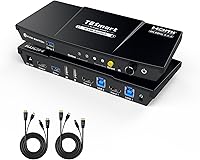
The TESmart HKS201-P23 2-Port HDMI KVM Switch sits squarely in the mid-range of the KVM market, designed for anyone juggling two computers on a single desk. What sets it apart from bare-bones alternatives is the all-in-one approach: one box handles your monitor, keyboard, mouse, USB peripherals, and audio — including a microphone — without needing separate adapters or splitters. TESmart even includes two KVM cables in the box, which is a small but genuinely appreciated touch. With a 3.6-star rating across more than a thousand reviews, there is clearly a lot to like here, but also enough friction points to warrant a closer look before you buy.
Features & Benefits

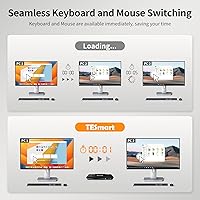
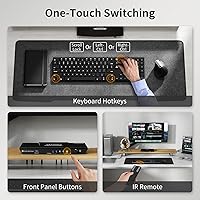
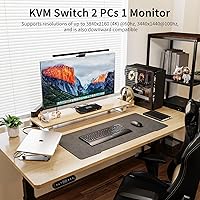
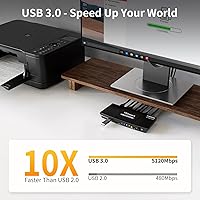
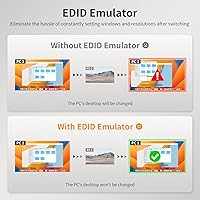
The standout capability of this KVM switch is its 4K at 60Hz output, paired with EDID emulation on both input ports. In plain terms, EDID emulation means each connected computer always remembers your monitor settings — so when you switch inputs, you will not find yourself fixing resolution or refresh rate every single time. The USB 3.0 hub transfers data at up to 5Gbps, which matters when moving large files from a shared external drive. One of those USB ports is reserved for charging, a handy bonus. You also get four ways to switch inputs: the front button, a small IR remote, a hotkey combination, or scrolling the mouse wheel, giving you real flexibility depending on the moment.

Best For

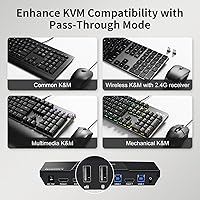
This dual-computer hub makes the most sense for remote workers or developers running a personal machine alongside a work laptop — the kind of setup where constantly unplugging cables becomes its own full-time job. Content creators bouncing between a gaming rig and an editing workstation will appreciate the built-in audio and microphone ports, which eliminate the need for a separate audio switch entirely. If you are upgrading from an older 1080p KVM and want genuine 4K output without paying for a high-end unit, this sits in a practical sweet spot. One firm caveat: if you rely on a Bluetooth keyboard or mouse, this switch will not recognize them — only wired and 2.4GHz wireless peripherals are supported.

User Feedback

Buyers who had a smooth experience with the TESmart 2-port switch consistently highlight how easy it was to get running out of the box, and they frequently praise the quality of the bundled cables — a detail competitors often skip. On the flip side, the most repeated criticism involves signal dropout on switching, particularly from users running certain USB-C to HDMI adapters. A smaller group notes occasional audio popping or a brief delay when the audio output changes hands. Some reviewers also encountered momentary monitor signal loss during input changes, pointing to compatibility quirks with specific displays. The overall picture: solid value for typical dual-computer setups, but peripheral-heavy users should verify compatibility before committing.

Pros

  • Plug-and-play setup that most users have running in under five minutes, no software required.
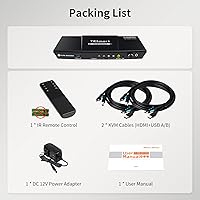
  • Both KVM cables are included in the box, saving an immediate extra purchase on day one.
  • True 4K at 60Hz output keeps sharp displays looking as intended across both connected machines.
  • EDID emulation means your monitor remembers its settings and does not reset every time you switch inputs.
  • Four switching methods — button, remote, hotkey, and mouse wheel — cover nearly every usage scenario.
  • The built-in microphone and headset ports mean one less device on your desk during video calls.
  • USB 3.0 sharing at up to 5Gbps makes transferring large files between machines practical and fast.
  • The dedicated USB charging port keeps a phone or tablet powered without sacrificing a peripheral slot.
  • Compact enough to sit beside a monitor stand or tuck under a desk riser without taking over the workspace.
  • Wired and 2.4GHz wireless keyboards and mice are broadly compatible, including mechanical and gaming models.

Cons

  • Some users experience a one-to-three second monitor blackout every time they switch between inputs.
  • USB-C adapter users report a higher-than-average rate of signal dropout and connection instability.
  • Bluetooth keyboards and mice are completely unsupported — a firm limitation that is easy to miss before buying.
  • Audio switching produces an audible pop or brief delay for a meaningful subset of users.
  • The IR remote requires direct line-of-sight and feels noticeably cheap compared to the main unit.
  • AAA batteries for the remote are not included, adding a small but immediate inconvenience out of the box.
  • Some monitors briefly lose their color profile or display calibration settings after an input switch.
  • Long-term reliability reviews are mixed, with a portion of buyers reporting port or signal issues after several months.
  • The USB 1.1 ports are only realistically useful for very low-demand accessories, limiting overall peripheral flexibility.
  • No custom hotkey configuration is available, leaving users stuck with a key combo that can feel awkward one-handed.

Ratings

The scores below reflect an AI-driven analysis of verified global user reviews for the TESmart HKS201-P23 2-Port HDMI KVM Switch, with spam, incentivized, and bot-flagged submissions actively filtered out before scoring. Buyers from home office, creative, and gaming backgrounds were all factored in, giving a well-rounded picture of real-world performance. Both the genuine strengths and the friction points that drive negative sentiment are transparently baked into every score you see here.

Ease of Setup
83%
Most buyers had everything running within minutes of unboxing, crediting the clearly labeled ports and the included KVM cables for removing the guesswork. The plug-and-play experience is especially appreciated by users who are not particularly tech-savvy and just want two machines on one desk without fuss.
A smaller group ran into hiccups when mixing older monitors with newer machines, requiring a reboot or cable reseat before the signal stabilized. Users running USB-C-only laptops via adapters reported extra steps that added friction to what should be a straightforward process.
Video Quality & Resolution
88%
At 4K and 60Hz, the output is crisp and stable for the vast majority of users, with no visible compression artifacts during everyday work or gaming sessions. Buyers upgrading from older 1080p switches were noticeably impressed by how much sharper their existing monitors looked once the full resolution was unlocked.
A handful of users with high-refresh-rate monitors noted that getting the display to hold at its rated specs required manually adjusting settings after the initial connection. HDR handling drew a few complaints, with some monitors not always activating it automatically on switch.
Switching Reliability
67%
33%
When everything is compatible, the switch between computers is quick and consistent — the front button and hotkey method in particular feel responsive. Users in straightforward dual-desktop setups with standard wired peripherals report switching hundreds of times a day without a single missed input.
Signal dropout on switching is the single most cited complaint across critical reviews, especially from users with certain USB-C adapters or multi-monitor workarounds. A subset also reported monitors going briefly dark for one to three seconds during each switch, which becomes irritating in fast-paced work environments.
Audio & Microphone Performance
71%
29%
Having both headset output and microphone input built into a KVM at this price tier is genuinely useful, particularly for remote workers who hop between a personal and a work machine during video calls. When it works cleanly, there is no need to replug a headset or invest in a separate audio switcher.
Audio switching is the most polarizing aspect in user feedback — a meaningful portion of buyers report a noticeable pop or a half-second delay when the audio path changes hands. A smaller group found that certain headsets or DACs were not reliably recognized after switching, requiring a manual audio device reselection in their OS.
USB Hub Performance
79%
21%
The USB 3.0 ports deliver genuinely fast transfer speeds for shared external drives and webcams, and the dedicated charging port is a quiet but practical bonus that keeps a phone or tablet topped up throughout the day. Peripheral sharing — printers, scanners, and hard drives — works reliably for the majority of users across both connected machines.
Users sharing high-bandwidth devices like 4K webcams or fast SSDs occasionally noted that speeds felt throttled compared to a direct connection. The USB 1.1 ports are realistically only useful for low-demand accessories like basic mice and keyboards, and a few users were surprised to find that limitation in practice.
Keyboard & Mouse Compatibility
72%
28%
Wired keyboards and mice work without any setup, and most 2.4GHz wireless receivers also connect without issue. Mechanical keyboard users specifically called out that key presses registered accurately with no perceptible lag, which matters when precision typing across two systems is part of the daily workflow.
The Bluetooth limitation is a firm hardware boundary and catches buyers off guard more often than it should — it is not prominently flagged at the point of purchase for everyone. Wireless gaming mice with proprietary software or advanced polling rates also caused occasional recognition issues for a small but vocal subset of reviewers.
Build Quality & Design
76%
24%
The enclosure feels solid for a device in this price range — there is no flex or rattle, and the front button has a satisfying tactile click that holds up after repeated daily use. Its compact dimensions mean it fits neatly beside a monitor stand or tucked under a desk riser without dominating the workspace.
The plastic finish attracts fingerprints and scratches more visibly than users would like for a device that lives on a desk permanently. A few buyers noted that the IR remote feels noticeably cheaper than the main unit, with a lightweight construction that does not inspire much confidence.
EDID Emulation Effectiveness
81%
19%
For users who have suffered through the frustration of their monitor reverting to a lower resolution every time they switch inputs, the per-port EDID emulation is a meaningful practical fix. Both connected computers hold their display configuration independently, so there is no need to dive into display settings after every switch.
While effective in the majority of setups, EDID emulation did not fully resolve display memory issues for every monitor brand tested by reviewers — a few niche ultrawide and high-refresh displays still occasionally reset. Users with very specific color calibration workflows noted that ICC profiles sometimes needed reloading after a switch.
Switching Method Variety
86%
Having four distinct switching options — button, remote, hotkey, and mouse wheel — covers nearly every scenario from across-the-room gaming to heads-down keyboard-only work. The mouse wheel scroll method in particular stood out in reviews as a surprisingly intuitive and fast option once users discovered it.
The IR remote requires line-of-sight to work reliably, which limits its usefulness if the switch is tucked behind a monitor or inside a desk shelf. A few users also found the default hotkey combination awkward to press one-handed and wished for a customization option.
Cable & Accessory Inclusion
84%
Shipping two full KVM cables in the box is a genuine advantage over competitors that charge extra for them or include only one. Buyers noted that the cables feel well-shielded and long enough for most standard desk configurations, saving an immediate extra purchase on arrival.
The IR remote requires AAA batteries that are not included, which is a small but predictable annoyance. A few users with deeper desk setups wished the included cables were slightly longer, as the standard length just barely reached in some configurations.
Value for Money
77%
23%
Compared to feature-equivalent KVM switches from other brands at similar or higher prices, this dual-computer hub packs in audio, microphone, USB 3.0 sharing, EDID emulation, and four switching methods in a way that feels genuinely competitive. Buyers who researched alternatives before purchasing consistently noted they felt they were getting more per dollar here.
The 3.6-star aggregate rating does temper the value calculation — buyers who hit compatibility issues with specific monitors or adapters feel the price stings more when troubleshooting is required. For users with simpler needs who could get by with a basic 1080p switch, the premium for 4K capability may not be justified.
Remote Control Usability
63%
37%
The inclusion of an IR remote at all is appreciated, and for users with an unobstructed line of sight it works as advertised for casual cross-room switching. Couch gamers managing a console and a PC found it a convenient hands-off option.
The remote is strictly infrared, meaning any obstruction between the remote and the receiver kills the signal entirely. Its lightweight, hollow feel drew consistent criticism in reviews, and range was reported as inconsistent — sometimes working from across a room, other times requiring the user to point it at close range.
Thermal Management & Noise
89%
The switch runs completely passively — no fan, no audible hum — which is exactly what most buyers expect from a device that sits on a desk all day. Even during sustained use with multiple USB peripherals active, no users reported warmth as a concern.
While passive cooling works well for typical loads, a small number of users running high-demand USB peripherals through all ports simultaneously noted the unit becoming slightly warm to the touch. This is unlikely to be a durability issue, but worth noting for anyone pushing the USB hub to its limits continuously.
Long-Term Reliability
68%
32%
Users who have owned the switch for six months or more without issues report it as a set-and-forget device that simply works day after day. Positive long-term reviewers tend to be those with standard wired peripherals and mainstream monitors, suggesting baseline reliability is genuinely solid for straightforward configurations.
A portion of critical reviews describe the switch developing intermittent issues — signal instability or unresponsive USB ports — after several months of use. Whether this reflects a quality control variance or specific usage conditions is unclear, but it is frequent enough in the review pool to flag as a real risk for buyers who depend on it as a daily driver.

Suitable for:

The TESmart HKS201-P23 2-Port HDMI KVM Switch is a strong fit for remote workers and developers who keep a personal machine and a work-issued laptop side by side all day — the kind of setup where constantly swapping cables between sessions quietly eats into your productivity. Content creators and streamers who split time between a gaming rig and an editing workstation will find real value in the built-in audio and microphone ports, which remove the need for a separate audio switcher cluttering the desk. Home office users who share peripherals like a webcam, external hard drive, or printer across both machines will benefit from the USB 3.0 hub, which handles those shared devices without constant replugging. Anyone upgrading from a basic 1080p KVM who wants true 4K output at a reasonable price will find this dual-computer hub sits in a practical sweet spot. The included KVM cables and four switching methods make the out-of-box experience genuinely complete for most standard dual-computer configurations.
Not suitable for:

The TESmart HKS201-P23 2-Port HDMI KVM Switch is not the right choice for buyers whose daily driver is a Bluetooth keyboard or mouse — that is a hard hardware limitation with no workaround, and it catches people off guard more often than it should. Users who rely on USB-C-only laptops without a dedicated HDMI port should also proceed with caution, as adapter-based connections have been a consistent source of signal dropout complaints in real-world reviews. If your workflow depends on ultra-stable, zero-interruption switching — think live broadcasting or financial trading screens — the occasional brief monitor blackout during input changes could be a genuine problem. Buyers with niche ultrawide monitors or highly calibrated professional displays may also find that display profiles do not always survive a switch as cleanly as expected. Finally, anyone who needs to share more than two computers or connect multiple monitors should look at higher-tier options, since this KVM is firmly built around a single-monitor, two-computer architecture with no room to expand.
Specifications

  • Model Number: The unit is officially designated as the HKS201-P23 within TESmart's KVM product lineup.
  • Dimensions: The switch measures 7.68 × 3.07 × 1.1 inches, keeping its desk footprint compact enough for most workstation configurations.
  • Weight: At 9.28 ounces, the unit is light enough to sit on a desk surface without requiring any mounting hardware.
  • Video Inputs: Two HDMI input ports accept signals from two separate computers simultaneously.
  • Video Output: One HDMI output port delivers the active signal to a single connected monitor.
  • Max Resolution: The switch supports up to 3840×2160 at 60Hz, and also handles 3440×1440 at 100Hz and 2560×1440 at 120Hz.
  • HDR & Format Support: Compatible formats include HDR10, Dolby Vision, HDCP 2.2, and 3D video passthrough.
  • EDID Emulation: Each HDMI input port includes a dedicated EDID emulator to preserve display configuration data for both connected computers independently.
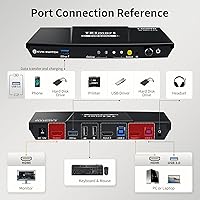
  • USB Ports: The switch provides two USB 3.0 ports (one dedicated for charging only) and two USB 1.1 ports for keyboard and mouse connections.
  • USB Transfer Speed: The USB 3.0 data ports support transfer rates of up to 5Gbps, which is approximately ten times faster than USB 2.0.
  • Audio Connectivity: A 3.5mm stereo output jack and a 3.5mm microphone input jack are both built into the unit for headset use.
  • Switching Methods: Users can switch between inputs using the front panel button, the included IR remote, a keyboard hotkey combination, or mouse wheel scroll.
  • Bluetooth Support: Bluetooth keyboards and mice are not supported; only wired and 2.4GHz wireless (USB dongle-based) peripherals are compatible.
  • Included Cables: Two KVM cables — each combining an HDMI and a USB connection — are included in the box.
  • IR Remote: An IR remote is included for hands-free switching, though AAA batteries are required and not included in the package.
  • Operating Voltage: The switch operates at 12 volts DC with a current rating of 3 amps.
  • Connected Computers: The switch is designed to manage exactly two computers sharing a single monitor, keyboard, mouse, and USB peripherals.
  • Brand & Availability: The switch is manufactured by TESmart and has been available since June 2023.

Related Reviews

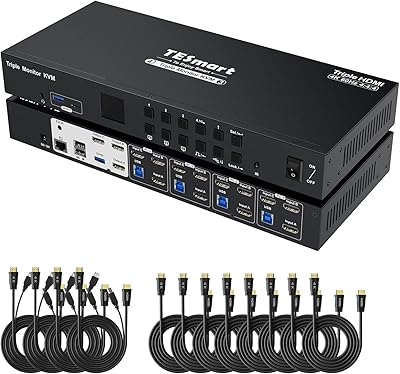
TESmart HKS403-P23 4-Port Triple Monitor KVM Switch
69%
78%
Display Performance
72%
EDID Emulation Reliability
74%
Switching Speed & Reliability
58%
USB Hub Performance
69%
Network Sharing
More
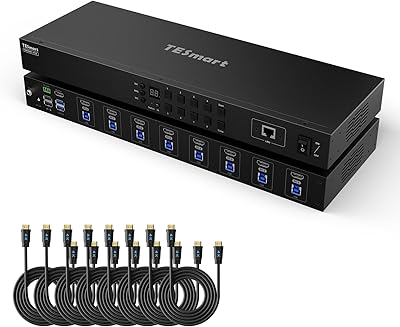
TESmart HKS801-P23 USB 3.0 HDMI KVM Switch 8 Port 4K@60Hz
87%
91%
Ease of Setup
95%
Video Quality
88%
Switching Reliability
85%
Build Quality
92%
Value for Money
More
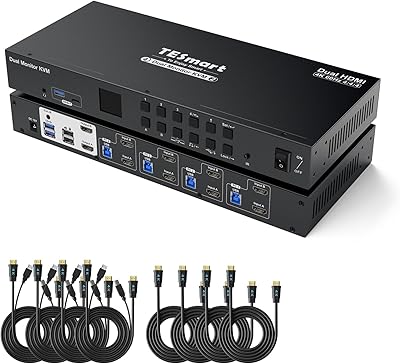
TESmart HKS402-P23 Dual Monitor KVM Switch
74%
72%
Display Signal Stability
88%
EDID Emulation Effectiveness
83%
USB 3.0 Hub Performance
69%
Switching Reliability
74%
Audio and Microphone Passthrough
More
Seiryruc 2-in-3-Out 4K HDMI KVM Switch
71%
88%
Setup & Installation
83%
Video Signal Quality
57%
Switching Method & Speed
81%
USB Peripheral Sharing
76%
Display Mode Flexibility
More
BolAAzuL 2-Port HDMI 2.1 KVM Switch
84%
91%
Value for Money
94%
Video Quality
88%
Ease of Setup
85%
Build Quality
80%
Usability and Controls
More
ANXQQ HDMI 2.1 KVM Switch 8K@60Hz 2 Port with Wired Control
86%
92%
Video Quality
89%
Ease of Use
87%
Value for Money
85%
Compatibility
91%
USB Support
More
IOGEAR GCS32HU 2-Port HDMI KVM Switch
72%
93%
Ease of Setup
88%
Switching Reliability
91%
Value for Money
74%
Build Quality
67%
Cable Length & Reach
More
ATEN CS22HF 2-Port HDMI KVM Switch
78%
93%
Ease of Setup
91%
Switching Convenience
84%
Video Quality
78%
Build Quality
66%
Cable Length & Management
More
Camgeet 10-Port HDMI KVM Switch
78%
88%
EDID Emulation Reliability
91%
Video Output Quality
93%
Port Count & Input Flexibility
82%
USB Sharing Performance
84%
Switching Methods & Remote Control
More
TESmart 16 Ports HDMI KVM Switch 4K@30Hz
85%
87%
Performance
91%
Setup & Installation
75%
Switching Speed
88%
Video Quality
89%
Build Quality
More

FAQ

No, you do not. The TESmart HKS201-P23 2-Port HDMI KVM Switch is fully plug-and-play on Windows, macOS, and Linux. Just connect your two computers and your peripherals using the included cables and power it on — most users are up and running in under ten minutes.
Unfortunately, no. This is a confirmed hardware limitation and one worth knowing before you buy. The switch only recognizes wired USB keyboards and mice, or wireless ones that use a 2.4GHz USB dongle. If your keyboard or mouse connects exclusively via Bluetooth, it simply will not be detected.

For many users, yes — a brief one-to-three second signal loss during switching is a known behavior on this unit. It is not a defect per se, but it is worth being aware of if you need truly instant, uninterrupted switching, such as for live broadcasting. For everyday work or gaming use, most people find they adapt to it quickly.

You can, but you will need a USB-C to HDMI adapter, and this is where things get inconsistent. A meaningful number of users report dropout or instability when going through adapters rather than native HDMI ports. If your laptop only has USB-C, try to use a high-quality active adapter and be prepared for a bit of trial and error.

In plain terms, EDID is the data your computer reads from your monitor to know what resolution and refresh rate to use. Without emulation, some computers forget those settings when you switch away and reset to a lower resolution. The per-port emulation on this switch keeps each computer holding its display settings independently, so you do not have to manually fix your display configuration every time you switch back. It is a genuinely useful feature for anyone who has dealt with that frustration before.

Yes, that is one of the more practical uses for the USB 3.0 hub built into this KVM switch. A shared external drive, printer, or webcam connected to the hub becomes accessible on whichever computer is currently active. Just keep in mind that only one computer can access those shared USB devices at a time — they switch along with the active input.

Audio does switch automatically along with the active input. That said, a portion of users report a brief pop or half-second lag in the audio during the transition. For most people it is a minor annoyance; for others — particularly those on live calls — it can be more disruptive. It is also worth noting that some operating systems may briefly show a notification that the audio device changed.

Mouse wheel switching is triggered by a specific gesture, typically scrolling quickly at the edge of the screen or double-clicking the wheel, rather than just normal scrolling. This means it does not fire randomly during everyday use. That said, some users find it triggers accidentally in certain applications, so if you prefer more deliberate control, sticking to the front button or hotkey method is a perfectly reasonable choice.

Honestly, it is somewhere in between. If the switch is sitting in clear line of sight on your desk, the remote works fine for casual switching. Where it falls short is range and obstruction — if the switch is tucked behind a monitor or inside a shelf, the infrared signal gets blocked and the remote becomes unreliable. The build quality of the remote itself is also noticeably lighter and cheaper-feeling than the main unit.

It depends on your specific panel. The switch officially supports 3440×1440 at 100Hz, which covers most ultrawide displays. However, some reviewers with niche high-refresh-rate ultrawides reported that their monitor did not always lock into the correct settings automatically after switching, requiring a manual adjustment. If your monitor is mainstream and runs at or below those specs, you are likely fine — but if you have a specialized panel, it is worth double-checking compatibility before committing.