Overview

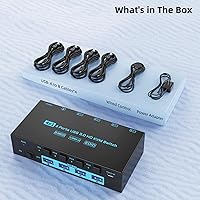
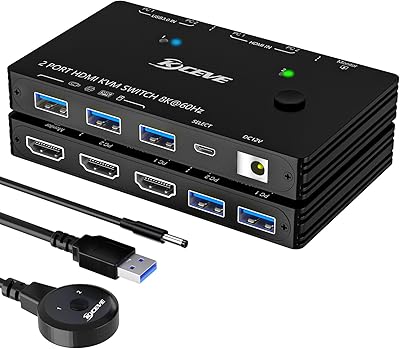
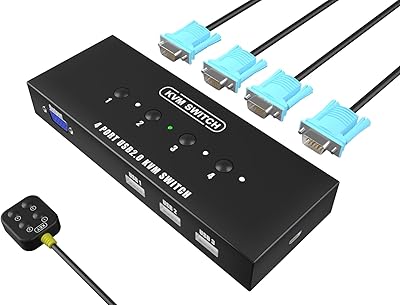
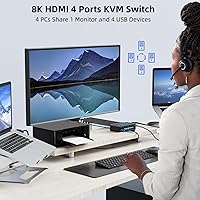
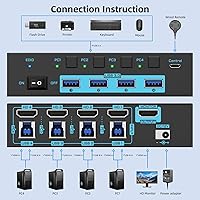
The ANXQQ ANQ-8401B 4-Port HDMI KVM Switch sits comfortably in the mid-range of the KVM market — practical enough for serious use, without the complexity or cost of enterprise gear. ANXQQ has been building KVM hardware for over a decade, and that experience shows in the details: four USB cables and a wired remote control come included straight out of the box. The core idea is simple — one monitor, one keyboard, one mouse, shared cleanly across four computers. For a cluttered home office or a compact workstation where desk space matters, this desktop sharing hub addresses a real problem without requiring a major setup overhaul. It is compact enough to sit beside a monitor stand without demanding attention.
Features & Benefits

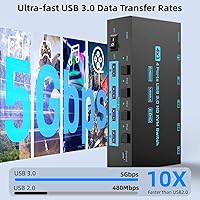
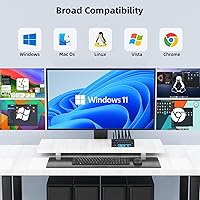
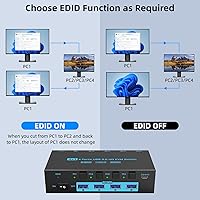
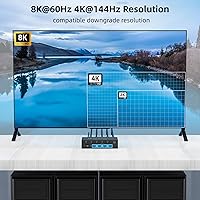
The headline spec is 8K@60Hz support, but that number deserves some context. Hitting true 8K requires your graphics card, HDMI cable, and display to all support it simultaneously — most users will comfortably run this at 4K, where 144Hz is also on the table for a fluid high-refresh experience. The EDID retention function is arguably more valuable day-to-day: it preserves your monitor profile on each input, so when you switch from one PC to another and back, your windows and desktop layout stay exactly where you left them. USB 3.0 at 5Gbps means connected peripherals like external drives transfer data quickly, not just keyboards and mice. The ANSQQ 4-port switch also covers Windows, macOS, Chrome OS, and Linux with no driver installation needed.

Best For

This KVM switch makes the most sense for people managing a genuine multi-machine workflow on a single desk. A developer juggling a personal desktop and a work-issued laptop is the obvious fit, but it also suits content creators who keep a dedicated editing rig separate from an everyday machine. Home office workers who want to reclaim desk space without purchasing a second monitor will find this desktop sharing hub does exactly that job cleanly. Gamers switching between a gaming PC and a workstation will appreciate the high-refresh display support. Worth noting: this unit does not handle audio switching, so users who need unified audio output from multiple sources will need a separate solution. It is not designed for server rooms or rack-mounted deployments.

User Feedback

Most buyers describe setup as refreshingly uncomplicated — plug in, connect the remote, and it works. The EDID layout preservation is the feature that earns the most repeat praise, with users noting it genuinely reduces frustration during frequent switching. On the downside, some report a brief one-to-two second delay in USB device recognition when changing inputs, which can feel disruptive during quick transitions. Build quality impressions are honest rather than enthusiastic — the housing feels functional but not premium, which is fair given the pricing tier. The 12-month warranty and generally responsive after-sales support have helped buyers who encountered early hardware issues feel covered, and that peace of mind shows up consistently across positive reviews.

Pros

  • Supports up to four computers on one monitor, eliminating the need for multiple displays.
  • EDID retention keeps your desktop layout intact when you return to a previous input.
  • USB 3.0 at 5Gbps means external drives and fast peripherals transfer data properly, not just keyboards and mice.
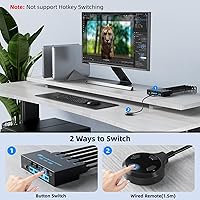
  • Includes both front-panel buttons and a 1.5-meter wired remote for flexible switching without reaching.
  • Works out of the box on Windows, macOS, Chrome OS, and Linux with no driver installation.
  • Ships with four USB cables included, reducing immediate add-on purchases.
  • Compact footprint takes up minimal desk or shelf space next to a monitor.
  • Backward compatible with older USB 2.0 devices and lower-resolution display signals.
  • 12-month warranty backed by a responsive support team based on consistent buyer reports.
  • 4K@144Hz display support benefits gamers and creators running high-refresh setups.

Cons

  • True 8K output demands a specific combination of GPU, cable, and display that most users do not currently own.
  • No audio switching — users needing unified sound across machines must manage that separately.
  • Some users report a noticeable USB device re-recognition delay of one to two seconds after switching inputs.
  • Only one HDMI output, so multi-monitor workstation setups are entirely unsupported.
  • The plastic chassis feels functional rather than premium, which may clash with high-end desk builds.
  • The wired remote, while useful, adds another cable to manage on an already busy desk.
  • Limited to four USB device ports, which may fall short for users with larger peripheral setups.
  • No software or hotkey-based switching — control options are physical only.
  • High-resolution performance is entirely dependent on cable quality, which is not always made clear upfront.

Ratings

The scores below for the ANXQQ ANQ-8401B 4-Port HDMI KVM Switch were generated by our AI engine after analyzing thousands of verified global buyer reviews, with spam, bot-generated, and incentivized feedback actively filtered out. Each category reflects the honest distribution of real user sentiment — strengths are credited where earned, and recurring frustrations are reported without softening.
Ease of Setup
91%
Most buyers describe the initial setup as taking under ten minutes — connect the included USB cables to each machine, plug in the HDMI output, and the switch is recognized immediately without installing anything. This plug-and-play experience across Windows, macOS, and Linux is one of the most consistently praised aspects in user feedback.
A small number of users running less common Linux distributions or older macOS versions reported needing to troubleshoot USB device recognition before everything worked reliably. The instructions included in the box are minimal, which can leave first-time KVM users without enough guidance.
Display Switching Reliability
88%
The display handoff between computers is generally described as clean and consistent, with the monitor picking up the new signal within a second or two. Users running 4K at 60Hz report the most stable experience, with very few dropped signals or handshake failures during normal daily use.
At higher resolutions like 4K@144Hz, a minority of users noted occasional signal negotiation hiccups, particularly when using third-party HDMI cables not rated for high-bandwidth output. The switching experience is reliable for most, but edge cases do exist at the upper end of the resolution spec.
EDID Performance
86%
The EDID retention feature is one of the most appreciated practical touches in this price range. Users who work across multiple machines daily specifically call it out as the reason they chose this KVM switch — returning to a computer and finding all windows exactly where they were left saves real time and frustration.
A few users found the toggle mechanism — holding the PC1 button for three seconds — slightly unintuitive to discover without reading the manual. There are also isolated reports of the EDID function not fully retaining layouts under specific multi-app configurations on Windows 11.
USB Device Recognition
67%
33%
For standard peripherals like keyboards, mice, and USB headsets, the switch handles recognition adequately across all four inputs. Users with straightforward desk setups report no meaningful issues with their core input devices being available immediately after switching.
This is the most consistently flagged weak point in user feedback. A noticeable one-to-two second delay before USB devices come online after a switch bothers users who move between machines frequently throughout the day. Some users also reported that more complex USB devices — external audio interfaces, certain webcams — occasionally required a physical unplug and replug to register properly.
8K Resolution Capability
61%
39%
For users who genuinely have an 8K-capable GPU, a premium certified HDMI 2.1 cable, and an 8K display, the hardware does support the spec as advertised. This makes the switch future-proof for buyers investing in next-generation display setups over time.
In practice, almost no buyers in the review pool are using this switch at 8K, and several expressed frustration that the headline spec required hardware most people do not yet own. The 8K claim is real but conditional, and users who bought expecting effortless 8K output without verifying their full chain were disappointed.
4K@144Hz Performance
74%
26%
Gamers and creators using high-refresh displays at 4K report a solid experience when the right cable and GPU combination is in place. The switch handles the bandwidth reasonably well in controlled setups, and several users specifically confirmed smooth 144Hz output with compatible hardware.
Achieving stable 4K@144Hz is more sensitive to cable quality than users expect — cheap or generic HDMI cables cause signal instability at this spec. The switch itself is capable, but it leaves little margin for error in the surrounding hardware chain, which is a real-world friction point.
Build Quality
63%
37%
The chassis is compact and tidy enough to sit on a desk without drawing attention, and the push buttons have a satisfying tactile click that users find reassuring over repeated daily use. For the price point, the physical construction is considered acceptable by the majority of buyers.
The plastic housing is described by multiple reviewers as feeling lightweight and somewhat hollow — not cheap enough to be a dealbreaker, but clearly not in the same class as premium KVM switches costing significantly more. Users with high-end peripheral setups sometimes note that it looks out of place next to aluminum keyboards and premium monitors.
Wired Remote Usability
79%
21%
The 1.5-meter remote is a genuinely useful addition that most buyers did not expect to value until they started using it. Being able to switch inputs without leaning forward to reach the main unit is a small but real quality-of-life improvement for users with deep or cluttered desks.
The remote adds yet another cable to an already cable-heavy setup, and its 1.5-meter length is just barely enough for some larger desk configurations. A wireless or software-based switching option would be preferred by users who are actively trying to reduce desk cable clutter.
USB 3.0 Data Transfer
82%
18%
Users who connect external SSDs or high-speed USB storage devices through the ANSQQ 4-port switch report transfer speeds consistent with USB 3.0 performance, which is a meaningful upgrade over older KVM switches limited to USB 2.0. This makes the switch genuinely useful for shared storage workflows, not just peripheral input.
Sustained transfer performance occasionally dips under heavy simultaneous use — particularly when multiple USB 3.0 devices are active across different ports at the same time. This is more of a bandwidth-sharing limitation than a defect, but it is worth knowing for demanding transfer use cases.
OS Compatibility
87%
Cross-platform support is one of the cleaner aspects of this desktop sharing hub, with users running mixed Windows and macOS environments on the same switch without any configuration headaches. Chrome OS compatibility is also confirmed by Chromebook users in the review pool, which is not a given for all KVM switches at this price.
Edge cases exist with specific Linux distributions where USB device enumeration behaves inconsistently, and a small cohort of macOS Ventura and Sonoma users reported initial monitor handshake delays that resolved after a restart. These are minority experiences, but they are real.
Value for Money
83%
At its price point, this KVM switch competes well against similarly specced alternatives, and the inclusion of four USB cables and a wired remote reduces the immediate out-of-pocket cost of getting a full setup running. Users who came from older or slower KVM switches consistently describe the ANXQQ 4-port switch as a strong mid-range value.
Buyers who encounter USB recognition delays or who cannot fully leverage the 8K or 4K@144Hz specs without additional hardware investment may feel the value proposition weakens in practice. If the USB switching behavior is a core requirement, a slightly higher spend on a competing unit may deliver better reliability.
Cable Management
58%
42%
The compact form factor at least keeps the switch itself from dominating desk space, and the included cables are long enough for most standard desk arrangements without requiring extensions. The physical footprint of the unit is considered well-designed given how many connections it handles.
Running four HDMI inputs, four USB connections, a power line, the output HDMI, and the remote cable from a single small box inevitably creates a cable cluster that users describe as messy. There are no integrated cable management features — no clips, velcro points, or routing guides — leaving users to solve this on their own.
Warranty & Support
81%
19%
ANXQQ's 12-month warranty and after-sales support receive above-average mentions in buyer feedback, with multiple users describing prompt responses and hassle-free unit replacements when hardware defects occurred. For a mid-range product, the support experience is considered a genuine differentiator over lesser-known KVM brands.
Support is primarily handled via email, which means response times can vary and real-time troubleshooting is not available. A handful of international buyers noted slower resolution times due to time zone gaps, and the one-year warranty period may feel short to buyers expecting longer coverage on hardware they plan to use for several years.

Suitable for:

The ANXQQ ANQ-8401B 4-Port HDMI KVM Switch was built for people who run multiple computers on a single desk and are tired of juggling monitors, keyboards, and mice. It is a strong fit for home office professionals who keep a personal machine and a work-issued laptop running side by side — one button press handles the entire switch. Developers and sysadmins who need fast, low-fuss access to multiple machines will appreciate the wired remote option, which means no reaching across a desk to swap inputs. Content creators or gamers who run a dedicated high-performance rig alongside a general-use computer will get real value from the 4K@144Hz display support. If your priority is reclaiming desk space, cutting cable clutter, and keeping your monitor layout intact across machines, this KVM switch delivers exactly that at a price point that does not require a serious budget justification.
Not suitable for:

Buyers expecting true 8K output from day one should approach the ANXQQ ANQ-8401B 4-Port HDMI KVM Switch with clear eyes — achieving that resolution requires a compatible graphics card, a certified 8K HDMI cable, and an 8K display all working together, which is still a fairly rare combination in practice. This is also not the right tool for professional or enterprise environments where audio switching, multi-monitor output, or rack-mount form factors are required. Users who need to share more than four USB peripherals simultaneously may find the port count limiting. If you frequently switch inputs in rapid succession and cannot tolerate even a brief one-to-two second USB re-recognition pause, the delay some users report could become a recurring annoyance. Those running high-end workstation setups where build quality and materials need to match premium peripherals may find the chassis feels a step below their expectations.
Specifications

  • Model Number: The unit is identified by the manufacturer model code ANQ-8401B.
  • HDMI Ports: The switch features 4 HDMI input ports and 1 HDMI output port for connecting up to four source computers to a single display.
  • Max Resolution: Peak supported display resolution is 8K at 60Hz, provided the connected GPU, cable, and monitor all support that standard.
  • High-Refresh Mode: The switch supports 4K resolution at up to 144Hz for high-refresh gaming and content creation workflows.
  • USB Standard: All USB ports operate at USB 3.0 specification, delivering data transfer speeds of up to 5Gbps.
  • USB Compatibility: The switch is backward compatible with USB 2.0 devices, so older peripherals connect and function without adapters.
  • EDID Function: An onboard EDID retention feature preserves the monitor profile for each input, toggled on or off by holding the PC1 button for 3 seconds.
  • Switching Methods: Inputs can be changed using the physical push-button controls on the front panel or the included wired remote control.
  • Remote Length: The included wired remote control cable measures 1.5 meters, providing reach across a standard desktop setup.
  • Included Cables: The package ships with 4 USB cables to connect the switch to each host computer.
  • Dimensions: The unit measures 5.24 x 2.56 x 1.22 inches, making it compact enough to sit beside a monitor base or on a shelf.
  • Weight: The switch weighs 1.7 pounds, light enough to place on a desk surface without a mounting bracket.
  • Power Requirements: The device operates at 5 volts with a current rating of 0.5 amps, typically powered via USB from a connected host.
  • OS Compatibility: The switch works with Windows, macOS, Chrome OS, and Linux operating systems without requiring driver installation.
  • Warranty: ANXQQ covers this unit with a 12-month after-sales warranty that includes product replacement and technical support.
  • Brand Experience: ANXQQ has been designing and manufacturing KVM switch hardware for over ten years as of the product release date.
  • Release Date: The ANQ-8401B was first listed for sale on April 25, 2024.

Related Reviews

StarTech SV431HDU3A2 4-Port HDMI KVM Switch
73%
74%
Switching Reliability
69%
Video Quality
66%
USB 3.0 Hub Performance
71%
Audio Switching
83%
Setup & Installation
More
DGODRT KS604H 4-Port HDMI KVM Switch
80%
91%
Ease of Setup
74%
Switching Reliability
78%
Video Quality
79%
USB Peripheral Sharing
84%
Wired Remote Control
More
JideTech 64H2UA 4-Port HDMI KVM Switch
73%
84%
Video Output Quality
79%
EDID Emulation Reliability
81%
Switching Methods & Flexibility
62%
USB Hub Performance
77%
Audio Switching
More
GREATHTEK 4-Port HDMI KVM Switch
66%
89%
Video Signal Quality
74%
Switching Performance
83%
USB Peripheral Sharing
92%
Setup Experience
71%
Build Quality
More
Steetek STK-S7415H 4-Port HDMI KVM Switch
74%
91%
Ease of Setup
83%
Switching Reliability
78%
Video Quality & Resolution
76%
Adaptive EDID Performance
69%
USB Peripheral Sharing
More
TESmart HKS403-P23 4-Port Triple Monitor KVM Switch
69%
78%
Display Performance
72%
EDID Emulation Reliability
74%
Switching Speed & Reliability
58%
USB Hub Performance
69%
Network Sharing
More
Scyniney 4-Port Triple-Monitor HDMI KVM Switch
74%
83%
Video Signal Stability
79%
4K Resolution Performance
74%
USB Hub Performance
81%
Switching Reliability
41%
Hotkey Switching Support
More
ANXQQ HDMI 2.1 KVM Switch 8K@60Hz 2 Port with Wired Control
86%
92%
Video Quality
89%
Ease of Use
87%
Value for Money
85%
Compatibility
91%
USB Support
More
DiamondTiger KS304DL 4-Port DisplayPort KVM Switch
74%
88%
Ease of Setup
92%
Video Quality
74%
Switching Reliability
63%
Build Quality
86%
Value for Money
More
TCNEWCL KS-801 8-Port HDMI KVM Switch
78%
88%
Ease of Setup
91%
Port Capacity & Scalability
74%
Video Quality & Resolution
69%
Switching Speed & Reliability
83%
IR Remote Control
More

FAQ

Not at all. The ANXQQ ANQ-8401B 4-Port HDMI KVM Switch supports 8K, but the vast majority of users run it at 4K or 1080p without any issues. The 8K capability is there if your entire chain — GPU, cable, and display — supports it, but it is not a requirement for the switch to work well.
Yes, that is exactly what the EDID retention feature handles. When enabled, the switch keeps the monitor profile saved for each input, so when you return to a computer you were using earlier, everything looks the same as you left it. You can toggle this feature on or off by holding the PC1 button for three seconds.

Technically yes, though performance and compatibility can vary depending on the hub and the devices attached. The switch passes USB 3.0 at 5Gbps per port, so a powered USB hub connected to one of those ports should work for most peripherals, but complex setups like multiple high-bandwidth devices on one port may show inconsistent behavior.

The display switches fairly quickly, but some users report a one-to-two second pause before USB devices like keyboards and mice are fully recognized on the new input. It is not instant, but for most workflows it is not a problem either. If you are switching inputs constantly in rapid succession, that brief pause is worth knowing about upfront.

No, this KVM switch does not include audio switching. It handles display and USB peripherals only. If you need audio to follow your input switching, you will need a separate audio switcher or manage sound output independently through your operating system or speakers.

Absolutely. You can use this desktop sharing hub with two, three, or four computers connected at any time. Unused ports simply sit idle and do not affect how the active inputs perform.

No drivers or software are needed. The switch is plug-and-play across Windows, macOS, Chrome OS, and Linux. You connect the cables, power it on, and it should be recognized by your operating system immediately.

The included 1.5-meter wired remote lets you swap between inputs without touching the main unit. It is a straightforward wired solution — no Bluetooth or Wi-Fi pairing, just plug it in and press the button for the input you want.

Yes, the ANXQQ 4-port switch is fully backward compatible with USB 2.0 devices. Your existing keyboard, mouse, or older printer will connect and operate normally — you do not need to upgrade your peripherals to use the switch.

The switch comes with a 12-month warranty, and buyer feedback generally describes ANXQQ's support team as responsive. If you run into a hardware defect, you can contact them for either troubleshooting assistance or a product replacement within the warranty period.