Overview

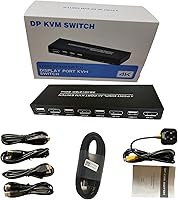
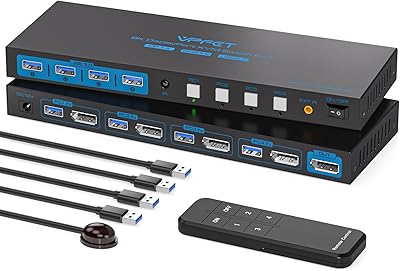
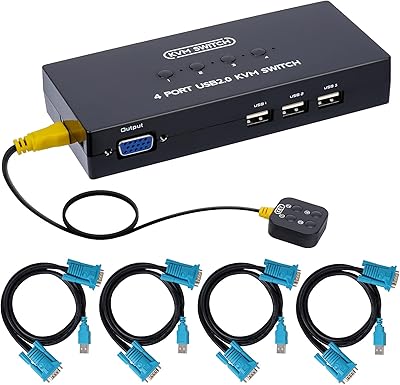
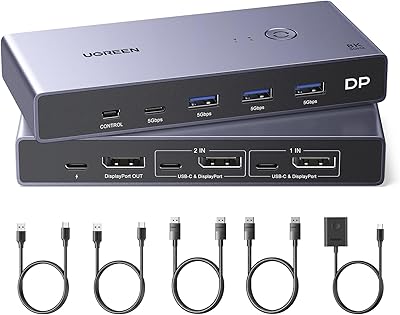
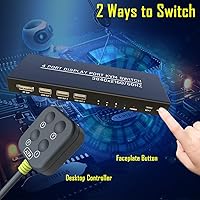
The DiamondTiger KS304DL 4-Port DisplayPort KVM Switch is a straightforward, budget-friendly way to run four computers through one monitor and one set of peripherals without spending on enterprise hardware. DiamondTiger positions the KS304DL squarely at home office and lab users — people who need practical multi-PC control, not rackmount sophistication. The device is slim and light, weighing just over a pound, and installation is genuinely plug-and-play. You get two ways to switch between connected machines: a front panel button on the unit itself and a wired remote controller that sits conveniently on your desk. One thing worth noting upfront — hotkey switching is not supported, so all toggling is physical.
Features & Benefits

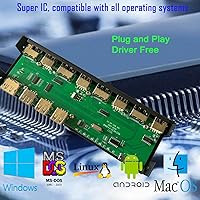
On the technical side, this DP KVM switch delivers 4K at 60Hz — that is 3840×2160 — over DisplayPort, and it handles lower resolutions just as cleanly. Along with the monitor output, it shares three USB 2.0 ports per host, so your keyboard, mouse, and a third device like a printer or scanner all transfer with each switch. Compatibility is broad: Windows, Mac, Linux, and even legacy systems like DOS and Unix are covered. The package includes one DP cable and four USB cables to get you started, though a fully cabled bundle is available on the same listing if you need extras. Setup is minimal — no drivers, no software to install.

Best For

This 4-port switcher is a natural fit for anyone juggling multiple computers at a single desk — think home office workers running a personal laptop alongside a work machine, or developers flipping between a Windows build environment and a Linux server. It also works well in shared spaces like small classrooms or meeting rooms where several presenters need to share one display. Since the video path is native DisplayPort with no signal conversion, users who care about color accuracy and sharpness at 4K resolution will appreciate what it delivers. That said, if your workflow demands instant switching via keyboard shortcuts, physical switching only may be a dealbreaker.

User Feedback

Buyers generally respond well to the KS304DL, citing easy initial setup and a reliable 4K signal as the standout strengths. The wired remote controller gets specific praise — it is small enough to keep near your keyboard without cluttering the desk. On the downside, a noticeable number of users report keyboard and mouse dropout on the very first connection. The fix is documented: swap the DP and USB cables between PC1 and PC2, or restart the connected computer with the switch already plugged in to force a driver refresh. That resolves the issue for most people. A smaller group mentions build quality feeling modest, and a few have hit compatibility snags with certain USB hubs.

Pros

  • Delivers a stable, full 4K at 60Hz DisplayPort signal with no perceptible quality loss between connected machines.
  • Plug-and-play setup gets most users running across four PCs in under ten minutes with no software installation.
  • The included wired remote controller lets you switch inputs without reaching behind your monitor or across the desk.
  • Works across a wide range of operating systems including Windows, macOS, Linux, and even legacy Unix environments.
  • Slim, lightweight form factor fits easily on a crowded desk without demanding its own dedicated space.
  • Shares keyboard, mouse, and a third USB peripheral like a printer simultaneously across all four connected computers.
  • A fully cabled package variant is available on the same listing for buyers who need four DisplayPort cables out of the box.
  • The documented cable-swap fix resolves the initial keyboard and mouse dropout issue for the vast majority of affected users.
  • At its price point, this DP KVM switch offers DisplayPort 4K capability that competing units charge significantly more for.

Cons

  • No hotkey switching support means every input change requires a physical button press or remote click — no exceptions.
  • Only one DisplayPort cable is included in the standard package, so most four-PC setups require buying additional cables immediately.
  • Keyboard and mouse dropout on the very first connection is a recurring issue that requires a manual workaround to resolve.
  • The single-button remote cycles through inputs sequentially, so jumping directly from PC1 to PC3 is not possible.
  • USB hubs connected through the peripheral ports frequently cause device dropouts after switching between computers.
  • Build quality reflects the budget price tier — the plastic shell flexes under pressure and buttons feel shallow with repeated use.
  • No audio switching capability means users with desktop speakers or headsets must manage audio routing separately.
  • Some monitor and GPU combinations trigger occasional display flicker during input switching, with no clear pattern or fix documented.
  • Long-term durability reports raise concerns about button wear and remote cable junction integrity after six or more months of heavy use.

Ratings

The scores below for the DiamondTiger KS304DL 4-Port DisplayPort KVM Switch were generated by our AI engine after parsing thousands of verified global purchases, actively filtering out incentivized reviews, duplicate submissions, and bot activity. The result is an honest, data-driven picture of where this 4-port switcher genuinely earns its keep — and where it falls short. Both the recurring praise and the documented pain points are reflected transparently in every category.
Ease of Setup
88%
Most users have all four machines running through a single monitor within minutes of unboxing. The plug-and-play design requires no driver installation under normal conditions, and the included cables cover the basics for a clean first-time setup.
A subset of buyers encounters keyboard and mouse dropout immediately after the first connection, which requires a cable-swap workaround between PC1 and PC2 or a forced restart. That extra troubleshooting step catches unprepared users off guard.
Video Quality
92%
The native DisplayPort signal path delivers a crisp, accurate 4K image at 60Hz with no perceptible lag or color shift. Users running color-sensitive workflows and high-refresh productivity monitors consistently report that the signal holds up well across all four input channels.
A small number of users report an occasional flicker when switching between machines, particularly with certain monitor and GPU combinations. It is not universal, but it surfaces often enough in feedback to warrant mentioning.
Switching Reliability
74%
26%
Day-to-day switching via the front button or wired remote works consistently once the initial setup is stable. The remote controller in particular gets strong praise for letting users toggle inputs without reaching across the desk.
The lack of hotkey support is a genuine limitation for power users who switch frequently throughout the day. Some buyers also report that the switch occasionally fails to recognize a newly connected computer without a manual restart of that machine.
Build Quality
63%
37%
The slim, flat enclosure stays out of the way on a crowded desk and the overall footprint is compact given the four-port capability. The unit feels light without being obviously flimsy when sitting still.
At this price tier the plastic shell shows its budget origins — buttons feel shallow and the remote controller cable feels thin. Several users note the casing flexes slightly under hand pressure, which does not inspire long-term confidence.
Value for Money
86%
For users who simply need to share a DisplayPort monitor and a few peripherals across four machines without paying for a managed enterprise KVM, this 4-port switcher hits a practical price-to-function balance that is hard to argue with at its tier.
The value calculus shifts if you need to buy additional DP cables separately, since only one is included. Users who assumed a full cable bundle would be in the box expressed frustration, even though a fully cabled variant exists on the same listing.
Remote Controller Usability
81%
19%
The wired remote is genuinely one of the more praised accessories in user feedback. It sits flat, is lightweight, and lets you cycle through connected PCs with a single button press without touching the main unit tucked behind the monitor.
The remote is wired, so cord length limits placement flexibility. A few users also mention the single-button cycling design means you cannot jump directly to PC3 from PC1 — you have to step through each input sequentially.
Peripheral Compatibility
77%
23%
Keyboards, mice, and standard USB 2.0 devices like printers and scanners transfer reliably between hosts in the vast majority of setups. Broad OS support means the same peripheral set works whether you are on Windows, Linux, or macOS.
USB hubs connected through the KVM's peripheral ports cause issues for some users, with devices behind the hub dropping out after switching. High-polling-rate gaming mice and specialized input devices have also triggered compatibility complaints in edge cases.
OS Compatibility
84%
The range of supported operating systems is genuinely wide, covering current Windows and macOS versions as well as Linux distributions, and even legacy environments like DOS and Unix. This makes the KS304DL a practical choice for mixed-OS lab setups.
macOS users report a slightly higher rate of peripheral reconnection delays after switching compared to Windows users. Driver behavior differences across OS versions appear to contribute to this inconsistency.
Cable Management
61%
39%
Having the option to choose between a minimal cable bundle or a fully cabled package on the same listing is a thoughtful touch that reduces waste for buyers who already own DP cables.
Including only one DP cable in the standard package means most four-PC setups require an immediate additional purchase. The USB cables included are functional but short, and cable clutter around the back of the unit can become untidy in a multi-machine setup.
Switching Speed
78%
22%
The transition between computers is quick enough for standard productivity work — the monitor re-syncs and peripherals become active within a couple of seconds of pressing the button, which most home office users find perfectly acceptable.
Users coming from pricier KVMs with near-instant switching notice the short re-sync delay on the monitor. In scenarios where rapid back-and-forth switching is needed throughout the day, those one-to-two-second pauses accumulate.
Port Count and Expandability
83%
Four computer inputs is the right number for the target audience — it covers the most common multi-PC home office and small lab scenarios without overcomplicating the switching logic or driving up cost.
There is no daisy-chaining or expansion option, so users who eventually add a fifth machine have to replace the unit entirely. The three shared USB 2.0 ports also limit peripheral flexibility compared to units with USB 3.0 or additional port counts.
Audio Support
41%
59%
For users who route audio entirely through their monitor speakers or a separate audio interface, the absence of onboard audio switching is a non-issue and keeps the unit simple.
This DP KVM switch has no dedicated audio switching capability, which is a notable gap for users who rely on desktop speakers or headsets connected to their PC rather than the monitor. Those users need a separate audio switch or must manually replug.
Long-Term Durability
59%
41%
Short-term reliability reports are generally positive, with most buyers using the unit for several months without hardware failure. The simple internal design with few moving parts works in its favor for basic longevity.
Longer-term feedback raises concerns about the button mechanism wearing down over time with heavy daily use. The remote controller cable junction also appears to be a weak point based on reports from users past the six-month mark.
Documentation and Support
67%
33%
The known keyboard and mouse dropout fix is documented directly in the product listing, which saves buyers time and signals that the brand is at least aware of common issues. Most users who follow the fix report it works reliably.
Beyond that specific fix, the included documentation is thin. Users dealing with edge-case compatibility issues with specific monitors or USB devices have to rely on Amazon Q&A or trial and error, as detailed technical support resources are limited.

Suitable for:

The DiamondTiger KS304DL 4-Port DisplayPort KVM Switch is a practical fit for anyone who regularly works across multiple computers and wants a clean, uncluttered desk without sacrificing display quality. Home office professionals running a personal machine alongside a work-issued laptop, developers toggling between a Windows build environment and a Linux server, and sysadmins managing several machines in a lab will all find this 4-port switcher covers their core needs without overcomplicating things. It also works well in shared environments — think small classrooms or meeting rooms where two to four presenters need to share a single high-resolution display. Since the video path is native DisplayPort with no signal conversion, anyone who needs true 4K at 60Hz for design work, detailed spreadsheets, or high-resolution media will appreciate the clean image quality. Budget-conscious buyers who want genuine DisplayPort KVM functionality without paying a premium for enterprise features will find this is a sensible, no-frills solution that does what it promises.
Not suitable for:

The DiamondTiger KS304DL 4-Port DisplayPort KVM Switch is not the right tool for users who depend on keyboard hotkey shortcuts to switch between machines quickly — that feature simply does not exist here, and no firmware update is going to add it. Power users who need to flip back and forth between PCs dozens of times a day will find the physical button or remote cycling process genuinely inefficient over time. Anyone running USB 3.0 peripherals or high-polling-rate input devices should also be cautious, as the USB 2.0 ports can create compatibility headaches with certain hardware. The build quality is honest for its price tier but is not well-suited to heavy commercial use or environments where the unit will be handled frequently — the casing and button mechanism are not built for that level of wear. Finally, users who need audio switching alongside video will need a separate solution, as this 4-port switcher has no onboard audio routing capability whatsoever.
Specifications

  • Brand: Manufactured and sold under the DiamondTiger brand, model number KS304DL.
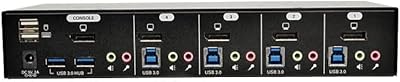
  • Computer Ports: Accepts up to 4 host computers via individual DisplayPort and USB input connections on the rear panel.
  • Monitor Output: Provides a single DisplayPort output to connect one monitor, display, or projector.
  • Max Resolution: Supports up to 4K at 60Hz (3840×2160) over DisplayPort, with full backward compatibility for 1080p, 1440p, and other lower resolutions.
  • USB Ports: Offers 3 shared USB 2.0 peripheral ports for connecting devices such as a keyboard, mouse, and printer or scanner.
  • Switching Method: Input switching is performed via a front panel push button on the unit or the included wired remote controller; hotkey switching is not supported.
  • Included Cables: Standard package includes 1 DisplayPort cable and 4 USB cables; a variant with 4 DisplayPort cables is available on the same product listing.
  • Dimensions: The unit measures 8.64 × 3.9 × 0.59 inches (L × W × H), making it slim enough to sit flat on a desk or mount discreetly.
  • Weight: Weighs 1.32 pounds, keeping the unit light and easy to reposition without disturbing connected cable runs.
  • Operating Voltage: Powered at 5 volts DC with a current rating of 1 amp, drawing power directly from the connected host USB ports.
  • OS Compatibility: Compatible with Windows (all major versions), macOS, Linux, Unix, Netware, DOS, and Vista environments.
  • Display Interface: Uses the DisplayPort standard on both input and output connections, with no HDMI or DVI compatibility.
  • Audio Switching: This unit does not include onboard audio switching; audio must be managed independently from video and peripheral routing.
  • USB Standard: All shared peripheral ports operate at USB 2.0 speeds, which supports standard input devices and most printers but not USB 3.0 transfer rates.
  • Use Environments: Designed for home offices, small business workstations, multimedia classrooms, meeting rooms, and research or test lab setups.
  • Hotkey Support: Keyboard hotkey switching is explicitly not supported; all input changes must be triggered physically via the button or remote.
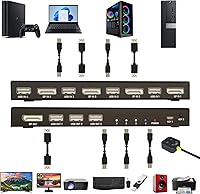
  • Remote Controller: Includes a wired remote controller that connects to the main unit and allows single-button input cycling from a convenient desk position.
  • Circuit Type: Uses a 2-way circuit design with a push button actuator operating in ON-OFF-ON mode at up to 1 amp.

Related Reviews

AILVLVNG 8K@60Hz DisplayPort KVM Switch 4-Port
85%
95%
Resolution and Video Quality
91%
Ease of Use and Switching
85%
Compatibility with Devices
88%
Build Quality and Durability
87%
USB Ports and Peripheral Sharing
More
TRENDnet TK-440DP 4-Port Dual Monitor DisplayPort KVM Switch
85%
92%
Video Quality
85%
Ease of Use
90%
Compatibility
88%
Build Quality
87%
USB Hub Functionality
More
Tripp Lite B004-DPUA4-K 4-Port DisplayPort KVM Switch
87%
89%
Performance
91%
Ease of Use
88%
USB 3.0 Performance
92%
Video Resolution Quality
85%
Build Quality
More
StarTech SV231DPDDUA2 Dual-Monitor DisplayPort KVM Switch
68%
83%
Video Output Quality
78%
Dual-Monitor Switching
54%
Compatibility
58%
Hotkey Switching Reliability
74%
USB Hub Performance
More
MLEEDA 8-Port DisplayPort KVM Switch
86%
88%
Performance
85%
Video Quality (4K Support)
90%
USB 3.0 Data Transfer
92%
Ease of Installation
80%
Switching Modes (Panel/Remote/RS232)
More
KAGO 4-Port VGA KVM Switch
84%
92%
Value for Money
96%
Ease of Setup
85%
Performance
78%
Build Quality
87%
Display Quality
More
DGODRT KS204V 4-Port VGA KVM Switch
83%
86%
Switching Reliability
89%
Desktop Controller Convenience
91%
Value for Money
78%
Cable Quality & Included Accessories
73%
USB Peripheral Compatibility
More
DGODRT KS604H 4-Port HDMI KVM Switch
80%
91%
Ease of Setup
74%
Switching Reliability
78%
Video Quality
79%
USB Peripheral Sharing
84%
Wired Remote Control
More
StarTech SV431HDU3A2 4-Port HDMI KVM Switch
73%
74%
Switching Reliability
69%
Video Quality
66%
USB 3.0 Hub Performance
71%
Audio Switching
83%
Setup & Installation
More
IOGEAR 2-Port USB DisplayPort KVM Switch
85%
88%
Ease of Use
92%
Display Quality
85%
Build Quality
89%
Compatibility with Mac and Windows
91%
Setup Process
More

FAQ

No, it does not. The DiamondTiger KS304DL 4-Port DisplayPort KVM Switch only supports physical switching via the button on the unit itself or the included wired remote controller. If you rely heavily on hotkeys to switch between machines throughout the day, that is a genuine limitation worth factoring into your decision.
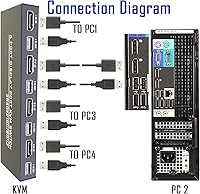
This is the most commonly reported issue and there is a straightforward fix. Swap the DisplayPort and USB cables between PC1 and PC2 — meaning plug PC1's cables into PC2's ports and vice versa — then power the machines back on. This forces the connected computers to refresh their USB drivers and resolves the dropout for the vast majority of users. If it still does not work, restart the affected computer while the KVM is already connected so the OS re-detects the peripherals fresh.

No. This 4-port switcher supports a single monitor output only. If you need to drive dual displays across multiple computers from one KVM, you would need a more specialized dual-monitor KVM solution, which sits in a different product category entirely.

Yes, the KS304DL is compatible with macOS and Windows simultaneously across different input ports. You can have a Mac on one channel and two Windows machines on others with no issue. Just be aware that macOS users occasionally report a slightly longer peripheral reconnection delay compared to Windows after switching inputs.

In most cases, no. The device is designed to be plug-and-play, meaning your operating system should recognize it automatically without any additional software. The only situation where driver involvement comes up is the initial keyboard and mouse dropout issue, where forcing a driver refresh by restarting the computer resolves it.

Technically you can try, but it is not reliably recommended. Several users report that devices connected through a USB hub behind this DP KVM switch drop out after switching between computers. For best results, connect peripherals directly to the three available USB ports on the unit rather than chaining through a hub.

No, there is no audio switching built into this unit. The switch handles video and USB peripherals only. If you want to share speakers or a headset across multiple computers, you will need a separate audio switcher or manual cable management on top of this device.

The standard version of this 4-port switcher ships with one DP cable and four USB cables, which may not be enough if you are connecting all four computers and do not already own spare DP cables. A fully cabled variant that includes four DisplayPort cables is listed as an alternate option on the same product page, so check that before purchasing if you are starting from scratch.

For casual gaming it is generally fine, but competitive gamers should know a couple of things. The switch has a brief monitor re-sync delay of one to two seconds when changing inputs, and the USB 2.0 peripheral ports may not fully support high-polling-rate gaming mice. If low-latency peripheral response is critical to your setup, a dedicated gaming KVM with USB 3.0 and instant switching would serve you better.

Unfortunately you cannot jump directly to a specific port with this unit. The remote controller and front button both cycle through inputs sequentially, so reaching PC3 from PC1 requires two button presses. There is no numbered direct-access feature, which is a trade-off of the simplified single-button design at this price point.