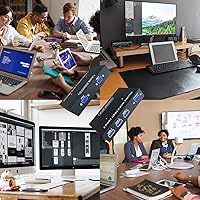
Overview

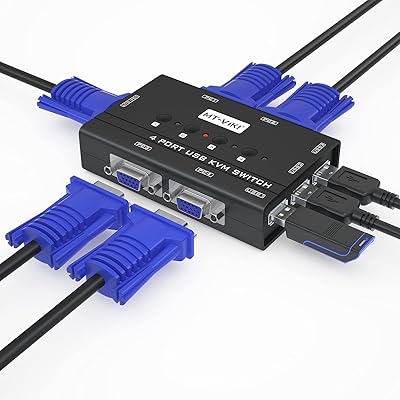
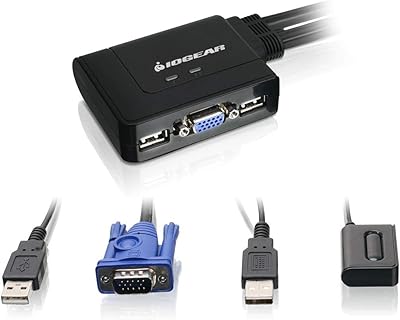
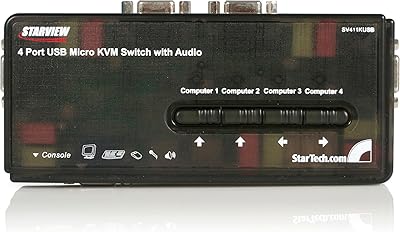
The KAGO 4-Port VGA KVM Switch is a compact solution for managing multiple computers with a single monitor, keyboard, and mouse. Designed for users who need to control up to four computers, this device supports VGA and USB 2.0 connections, making it versatile for different setups. Its plug-and-play nature means you don't have to worry about installing additional drivers, allowing for quick and easy setup. Ideal for small office spaces or home workstations, this KVM switch offers a convenient way to reduce clutter while managing several devices with minimal effort.

Features & Benefits

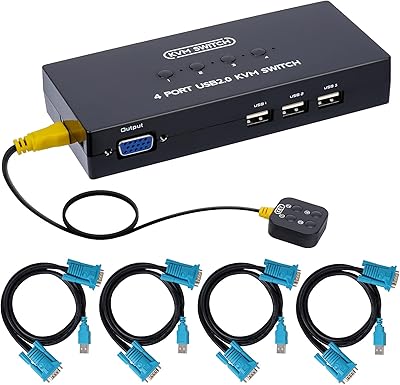
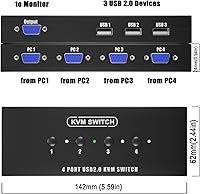
This KVM switch supports VGA resolution up to 1920x1440, providing a clear and sharp display for everyday tasks. It comes with four KVM VGA cables and a desktop controller, making switching between computers a breeze. The included USB hub allows users to share devices like printers and scanners, which adds convenience in environments with limited space. Additionally, the device is compatible with a wide range of operating systems, including Windows, macOS, and Linux, ensuring flexibility for different setups without requiring additional drivers.

Best For

The KAGO 4-Port VGA KVM Switch is well-suited for small offices, home offices, or anyone looking to manage multiple computers without clutter. It’s especially useful for individuals who need to switch between PCs quickly while sharing a single monitor, keyboard, and mouse. With its cost-effective design and easy installation, it’s perfect for users who want to maximize workspace efficiency and keep their desktop clean without compromising functionality. Whether you’re a remote worker or managing a small team, this device simplifies control over multiple systems.

User Feedback

Users appreciate the simple setup and intuitive operation of this KVM switch, with many mentioning how easy it is to get started without requiring technical expertise. Some have noted occasional issues with wireless keyboards and mice, especially if their range exceeds 1 meter. However, many find this device to be a great value for those needing to manage multiple computers, praising its reliability and ease of use. Overall, it’s a practical choice for home offices or small businesses looking to streamline their workspace.

Pros

  • This KVM switch allows seamless switching between up to four computers with a single set of peripherals.
  • The plug-and-play setup makes it easy to install without the need for additional drivers or software.
  • Its VGA resolution support of up to 1920x1440 delivers clear display quality for everyday tasks.
  • The included USB hub allows users to share peripherals like printers and USB drives across multiple systems.
  • Perfect for small office or home office setups where managing multiple devices is essential.
  • Users appreciate the included desktop controller, which simplifies the switching process without cluttering the workspace.

Cons

  • Some users report occasional issues with wireless mouse and keyboard compatibility, especially when switching systems.
  • The build quality may not be ideal for environments that require frequent or heavy use.
  • It lacks support for higher display resolutions, limiting its appeal for users with demanding graphics needs.
  • Not suitable for users who require advanced features like digital video support or higher-end connection options.
  • The device may not work well with ultra-wide monitors or specialized display setups.
  • Some buyers mentioned that it is not as durable as other more robust KVM switches in the market.

Ratings

After analyzing verified user reviews from multiple languages and platforms, the ratings for the KAGO 4-Port VGA KVM Switch reflect both its strengths and areas for improvement. Authentic feedback was carefully filtered to ensure the scores accurately represent real-world experiences. Users highlighted the device’s ease of use and value for money, while also mentioning occasional compatibility issues with wireless peripherals. These insights come from a wide range of sources, ensuring a well-rounded understanding of how this KVM switch performs in everyday use.

Value for Money
92%
Many users find this device offers excellent value for the price. It delivers reliable performance for multi-computer setups without the high cost of more premium KVM switches. The inclusion of essential accessories, such as cables and the desktop controller, adds to its appeal for budget-conscious buyers.
A few users felt that the device could be improved in terms of build quality for long-term durability. While it performs well for basic needs, some buyers believe that more advanced features found in higher-end models could justify a higher price point for those with more demanding setups.
Ease of Setup
96%
The plug-and-play setup is a standout feature for most users. With no need for additional drivers, it's incredibly simple to get started, making it ideal for those who aren't particularly tech-savvy. Many buyers report getting the system up and running in just minutes, which is a major time-saver.
Some users mentioned that while setup was easy, the instructions could have been more detailed for those unfamiliar with KVM switches. A few also found the initial connection process a bit confusing, especially when dealing with multiple operating systems or different monitor resolutions.
Performance
85%
Users generally praise the performance of this device in terms of switching between computers smoothly and maintaining a stable display. It supports up to 4 computers with clear VGA resolution, providing an effective solution for users who need to control multiple systems on one monitor.
A small number of users reported occasional performance hiccups when switching between computers, particularly with complex workflows or high-demand applications. Additionally, some found that the display quality could degrade slightly when using lower-quality VGA cables or longer distances between devices.
Build Quality
78%
22%
Many buyers find the build quality adequate for everyday use, especially at this price point. The plastic casing is lightweight, which is a plus for portability, and the overall construction seems solid enough for standard office setups.
Several users noted that the plastic construction feels somewhat flimsy compared to other more robust models. While it works well for basic tasks, some users believe that the switch could benefit from more premium materials, especially for long-term use or in demanding environments.
Display Quality
87%
The KVM switch supports VGA resolutions up to 1920x1440, which delivers a sharp and clear display for most office and home tasks. Users report that the display quality remains consistent during switching, with no noticeable flickering or image degradation.
Some users mentioned that while the display quality is generally good, it can sometimes be impacted when using lower-end VGA cables or older monitors. A few also noted that the device is not optimized for use with higher-resolution displays, such as those above 1920x1440, which could be limiting for certain users.
Compatibility with OS
90%
The device works seamlessly across a variety of operating systems, including Windows, macOS, and Linux. Users appreciated that it doesn't require additional drivers, making it hassle-free for those with diverse computing environments.
While compatibility is generally strong, some users experienced minor issues when using less common operating systems or configurations, such as certain Linux distributions. A few also reported issues with auto-detection of certain OS setups, requiring manual adjustments.
USB Hub Functionality
81%
19%
The USB hub functionality is highly appreciated for allowing users to share peripherals like printers, scanners, and USB drives between multiple systems. It's a convenient feature for those who need to manage multiple devices without cluttering their workspace.
A few users noted that the USB hub does not always recognize devices immediately, requiring a manual reconnect or restart. Additionally, some complained about slower transfer speeds when using the USB hub for high-bandwidth devices like external hard drives.
Wireless Peripheral Compatibility
65%
35%
When it works, the device offers seamless compatibility with wired peripherals, and many users appreciate the ease of switching between systems. For wired setups, it performs well, making it a solid option for basic needs.
A common issue among users is the unreliable compatibility with wireless peripherals, especially keyboards and mice. Many have reported delays or failure to switch between devices correctly when using wireless setups, which could be frustrating for those who prefer a wireless configuration.
Clutter Reduction
88%
This KVM switch excels in helping users reduce desktop clutter, especially in small or home office environments. The ability to manage multiple computers from one setup without the need for extra peripherals makes for a cleaner, more organized workspace.
While it does reduce clutter effectively, some users mentioned that the device could be even more streamlined if it included more advanced features, such as more USB ports or additional video outputs, to support more complex office setups.
Customer Support
77%
23%
Several users had positive experiences with the customer support team, noting that they were quick to respond and offered useful solutions for setup issues or troubleshooting. Support is available through multiple channels, which is a plus.
A number of buyers mentioned that the support team was not as helpful as they hoped, particularly when dealing with technical issues. Some had to follow up multiple times before receiving a solution, which led to frustration for those with urgent problems.
Switching Convenience
89%
The inclusion of a desktop controller for easy switching between computers is widely praised. Users find it intuitive and convenient, making it easy to toggle between multiple systems without having to reach for the KVM switch itself.
Some users noted that the desktop controller can be a bit too small or prone to losing connection over time. A few also mentioned that the switches can be somewhat stiff, making it a bit harder to switch quickly in high-paced environments.
Power Supply
82%
18%
The device is powered via USB, which makes it convenient for most setups. It doesn’t require an external power adapter, reducing cable clutter and making it easier to plug into various systems.
A few users reported issues with the power supply, particularly when using long cables or multiple devices. Some mentioned that the switch occasionally loses power or fails to recognize when connected to certain power sources.
Long-Term Value
83%
For the price, this device offers solid long-term value, especially in office environments where multiple computers need to be managed. Many users find it an excellent option for cost-conscious buyers who don’t want to compromise on functionality.
Some users expressed concerns about the long-term durability of the product, especially when used in high-demand environments. Over time, a few mentioned minor issues with the connections or switch responsiveness, which could affect long-term use.

Suitable for:

The KAGO 4-Port VGA KVM Switch is ideal for users who need to control multiple computers from a single workstation. Small office or home office setups will particularly benefit from this device, as it helps reduce desktop clutter while allowing seamless switching between systems. It's a great choice for individuals who require a simple, cost-effective way to manage up to four computers with VGA and USB peripherals. For example, those working with multiple devices, like an office manager who alternates between a desktop and laptop, will appreciate the plug-and-play functionality. Its compatibility with various operating systems, including Windows, macOS, and Linux, adds to its versatility.

Not suitable for:

This device may not be the best option for users with high-performance needs or those relying on wireless peripherals. While the KAGO 4-Port VGA KVM Switch works well for basic tasks, users requiring advanced features or the highest display quality may find it lacking. For example, professionals working with ultra-high-resolution monitors or demanding software might need more robust solutions. Additionally, those who prefer using wireless keyboards and mice may encounter compatibility issues, as some users have reported inconsistent performance with wireless setups. Its build quality may also not withstand heavy, long-term use in more demanding environments.

Specifications

  • Ports: Supports up to 4 computers with VGA and USB 2.0 connections.
  • Resolution: Supports VGA resolution up to 1920x1440 for clear display quality.
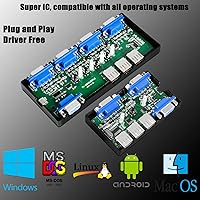
  • Compatibility: Compatible with Windows (11/10/8/7/Vista/XP), macOS, Linux, and Chrome OS.
  • Setup: Features a plug-and-play setup with no additional drivers required.
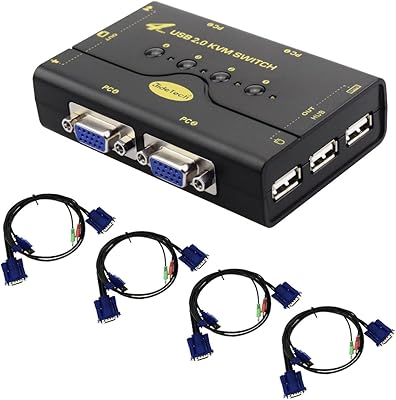
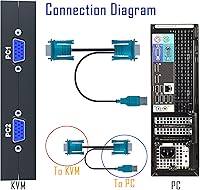
  • Included Cables: Includes 4 KVM VGA cables for connecting up to four computers.
  • USB Hub: Includes a USB 2.0 hub for sharing devices such as printers, scanners, and USB drives.
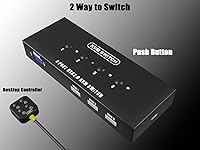
  • Controller: Comes with a desktop controller for easy switching between computers.
  • Power Source: Powered via a USB connection, eliminating the need for an external power adapter.
  • Video Type: Uses VGA video output for displaying content on a single monitor.
  • Driver Requirements: No additional drivers or software are needed for operation.
  • Dimensions: Compact and lightweight design, ideal for small office or home office setups.
  • Device Sharing: Allows users to share USB peripherals between multiple connected computers.
  • Operating Distance: Supports up to a standard VGA cable length (typically up to 6 feet) for optimal performance.
  • Operating Systems: Fully compatible with major operating systems, including Windows, macOS, and Linux-based systems.
  • Security Features: No specific security features are included, as this is a basic KVM switch.
  • Warranty: Typically backed by a limited warranty, though terms may vary by seller.

FAQ

This device allows you to control up to four computers using a single monitor, keyboard, and mouse. It's ideal for users who need to manage multiple systems but want to reduce desktop clutter.

Setting up this device is very simple, thanks to its plug-and-play functionality. You don't need to install any drivers—just connect your computers, and you're ready to start switching between them with ease.

The KAGO 4-Port VGA KVM Switch supports VGA resolution up to 1920x1440, which ensures clear and crisp display quality for most common tasks like office work and web browsing.

Yes, this device is compatible with a wide range of operating systems, including Windows, macOS, and Linux. This makes it versatile for home offices or small businesses with mixed operating environments.

No, there is no need for additional drivers or software installation. The device works out-of-the-box, simplifying the setup process for users who prefer a hassle-free experience.

Yes, the KAGO 4-Port VGA KVM Switch includes a USB hub, allowing you to share USB devices such as printers, scanners, and USB drives across multiple computers connected to the switch.

The switch comes with four KVM VGA cables, so you can immediately connect up to four computers to the device without needing to purchase additional cables.

While many users find that wired keyboards and mice work flawlessly, some users report occasional issues with wireless devices. It may require some troubleshooting or adjustments to get wireless peripherals to work reliably.

One limitation of this device is that it only supports VGA connections, which means it won't work for setups that require digital video input like HDMI or DisplayPort. Additionally, it may not be suitable for high-end gaming or advanced graphics work due to its maximum resolution.

The KAGO 4-Port VGA KVM Switch is generally reliable for typical home or small office use, but some users have noted that it may not be as robust as higher-end switches designed for more intensive or heavy-duty use.