Overview

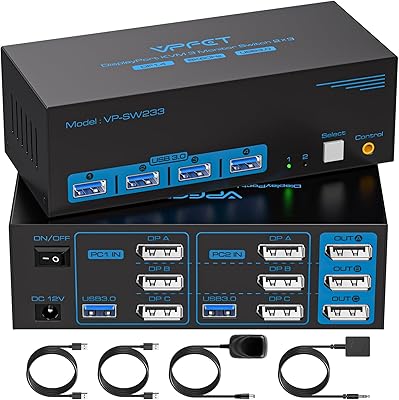
The Seiryruc 2-in-3-Out 4K HDMI KVM Switch tackles a problem that dual-PC users know well: too many computers, not enough desk. This KVM switch lets you run two machines through a single keyboard, mouse, and triple-monitor array — no cable swapping required. Seiryruc is a newer name in the space, but it has carved out a foothold among buyers who want genuine 4K@60Hz output without paying enterprise prices. Worth flagging upfront: switching happens via a physical button or an external cable remote. There is no hotkey support, so if that feature is non-negotiable for you, weigh that carefully before committing.
Features & Benefits

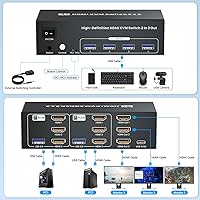
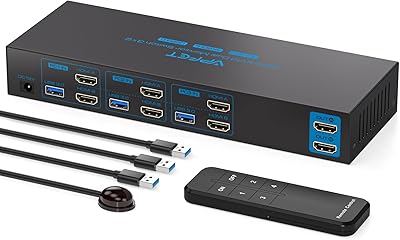
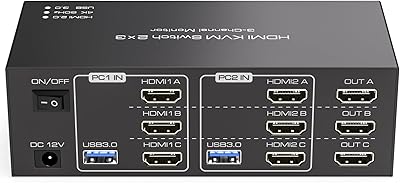
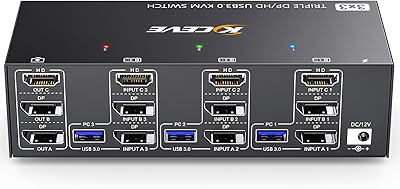
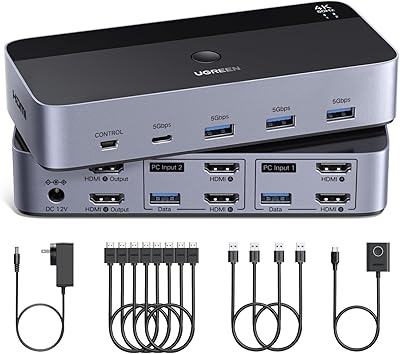
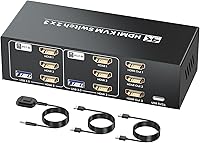
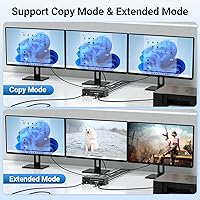
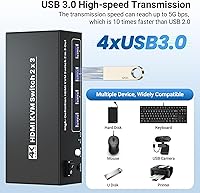
The 2-in/3-out HDMI architecture is where this 3-monitor switcher earns its keep. In copy mode, both connected PCs push the same content to all three screens — handy for presentations or mirrored monitoring. Flip to extended mode and each display becomes part of a wider, independent workspace for each machine. The four USB 3.0 ports handle keyboards, mice, external drives, and printers at up to 5 Gbps — data only, not video. Switching is done via a front-panel button or a 1.5-meter remote cable, letting you tuck the unit out of sight. It runs on Windows, macOS, and Linux with no drivers needed, and the compact build adds almost no bulk to your desk.

Best For

This KVM switch is built for people juggling two full computers — a work-issued laptop and a personal creative or gaming rig, for instance — who refuse to sacrifice screen real estate. It suits home office and hybrid workers who need to switch contexts quickly, even if that means pressing a physical button rather than a keyboard shortcut. Creators and gamers running two rigs will appreciate consistent 4K output across all three displays. One hard requirement worth knowing before you buy: each connected PC must have at least three HDMI output ports on its graphics card. Without that, the whole setup simply will not function as intended.

User Feedback

Buyers who meet the hardware requirements tend to come away satisfied. Plug-and-play setup is consistently praised — connect the cables, power it on, and all three screens just work without any software fuss. USB throughput and stable 4K signal quality also draw positive comments. The complaint that surfaces most often is the absence of hotkey switching; for anyone toggling machines repeatedly throughout the day, physically reaching for the button or cable remote wears thin quickly. A handful of users have run into compatibility hiccups with specific GPU and monitor pairings, so reviewing your hardware specs first is smart. Build quality earns a middling reception — the Seiryruc unit feels functional rather than refined, though most consider it fair for the price.

Pros

  • Delivers stable 4K@60Hz output across all three connected monitors without signal degradation.
  • Completely plug-and-play — no drivers, no software, no configuration required on any supported OS.
  • Works across Windows, macOS, and Linux, making mixed-OS dual-PC setups genuinely practical.
  • The 1.5-meter external controller cable lets you hide the unit out of sight while keeping switching within arm's reach.
  • Four USB 3.0 ports handle shared peripherals at up to 5 Gbps, noticeably faster than older KVM switches.
  • Copy mode and extended mode give you real flexibility depending on whether you need mirrored or independent displays.
  • Compact and light enough to mount under a desk or behind a monitor without occupying valuable surface space.
  • Backward compatible with 1080p and mixed-resolution monitor arrays, so not every screen needs to be 4K.

Cons

  • No hotkey switching at all — every PC change requires a physical button press or a reach for the cable remote.
  • Each connected computer must have three HDMI output ports on its GPU; most mid-range cards fall short of this.
  • Only four USB-A ports, which fills up fast once you factor in keyboard, mouse, and a single external drive.
  • No USB-C support, which is an increasingly common gap for users with modern peripherals or laptops.
  • Some users report monitors failing to wake correctly after switching, requiring a manual input toggle.
  • Build materials feel utilitarian — the plastic casing does not inspire confidence for multi-year heavy use.
  • macOS users on M-series chips occasionally see display preferences reset after switching back from another PC.
  • Documentation is thin, and the three-HDMI-output GPU requirement is not clearly communicated in the packaging.
  • Brand support is difficult to reach if hardware compatibility issues arise after purchase.

Ratings

The scores below reflect what real buyers around the world actually experienced with the Seiryruc 2-in-3-Out 4K HDMI KVM Switch — compiled by our AI system after processing verified purchase reviews and actively filtering out incentivized, duplicate, and bot-generated submissions. Both the genuine strengths and the friction points are represented here, so you can make a confident, eyes-open buying decision.
Setup & Installation
88%
Most users had all three monitors and both PCs running within minutes of unboxing — no driver downloads, no software configuration, no system restarts required. The plug-and-play experience across Windows, macOS, and Linux was consistently called out as a genuine strong suit for a switch at this price point.
A subset of buyers ran into a wall immediately because they did not realize each connected computer needs three physical HDMI output ports on its GPU — a requirement that is easy to miss until you are mid-setup. For those users, setup did not happen at all without hardware changes.
Video Signal Quality
83%
The 4K@60Hz output held up reliably across all three displays in the majority of reported setups, with users noting sharp, stable images and no visible banding or flickering during normal desktop and media use. Mixed monitor arrays — pairing a 4K primary with two 1080p secondaries — also worked cleanly thanks to backward compatibility.
A smaller but vocal group reported signal instability or screens failing to wake from sleep after switching between computers, particularly with certain monitor brands. The issue appeared intermittently rather than consistently, making it difficult to diagnose.
Switching Method & Speed
57%
43%
The 1.5-meter external controller cable is a practical touch — it means you can stash the main unit behind a monitor or under the desk and still switch PCs without reaching around. For users who switch machines only a few times per day, the physical button workflow is perfectly adequate.
The total absence of hotkey switching is the single most complained-about limitation across all reviews. Anyone who toggles between a work PC and a personal machine repeatedly throughout the day finds the physical-button workflow disruptive and slow compared to competing units that support keyboard shortcuts.
USB Peripheral Sharing
81%
19%
The four USB 3.0 ports handled shared keyboards, mice, and external hard drives without complaint in the vast majority of setups. Transfer speeds felt noticeably faster than older USB 2.0 KVM switches, and users copying large files between an external drive and either PC appreciated the headroom.
A few users expected the USB ports to carry more devices simultaneously without a hub, and found four slots fills up faster than expected when you factor in keyboard, mouse, and even one external drive. There is no USB-C port, which is a growing gap for users with modern peripherals.
Display Mode Flexibility
76%
24%
Having both copy mode and extended mode available on the same unit adds genuine versatility. Creative professionals appreciated extended mode for spreading applications across three independent screens per machine, while copy mode proved useful for anyone presenting or monitoring identical outputs simultaneously.
Switching between copy and extended mode requires some deliberate configuration and is not as instant as users hoped — a few noted the transition was not always clean on the first attempt. Documentation around mode-switching could be clearer for less technical buyers.
Build Quality & Materials
63%
37%
The unit is compact enough to sit on a desk without dominating it, and the plastic shell feels solid enough to handle daily desk life without wobbling or creaking. At under 1.4 lbs, it is light enough to mount or tuck away easily.
The overall build registers as functional rather than premium — the casing has a budget feel that does not inspire long-term confidence, and the switching button lacks the tactile satisfaction of higher-end units. Several users felt the materials were acceptable for the price but would not survive rough handling.
GPU & Hardware Compatibility
61%
39%
When the hardware requirements are met — specifically, three HDMI outputs per connected GPU — the Seiryruc unit performed consistently across a range of common desktop and laptop configurations. Users with dedicated NVIDIA and AMD cards with sufficient ports reported no major compatibility issues.
The three-HDMI-output requirement per machine is a real dealbreaker for a meaningful portion of buyers who discover too late that their GPU only has two HDMI ports plus a DisplayPort. Integrated graphics users and those with older or lower-spec cards are effectively locked out without additional adapters or hardware upgrades.
Cable Management & Desk Impact
72%
28%
The external controller cable genuinely helps keep the primary unit hidden, and the switch itself is small enough to mount under a desk with adhesive strips or a cable clip. Users who prioritized a clean desk surface appreciated having the option to relocate the control point.
Running six HDMI cables plus USB connections to two PCs creates a dense cable bundle that can overwhelm a tidy setup regardless of how well the unit itself is positioned. A few users felt the external cable added clutter rather than reducing it.
Value for Money
79%
21%
For buyers who need a working three-monitor KVM switch without spending on enterprise hardware, this unit delivers a rare combination of features at a mid-range price point. The 4K@60Hz support in particular is genuinely hard to find at this tier, and most users who met the hardware requirements felt it was money well spent.
Users who hit compatibility issues or who needed hotkey switching came away feeling the value proposition collapsed quickly. If the unit does not work with your specific hardware out of the box, the return process can negate any savings.
OS & Cross-Platform Performance
82%
18%
Running a Windows desktop alongside a Mac — or a Linux workstation — worked without any special configuration in the reported experiences. The driver-free design meant both machines recognized the shared USB peripherals immediately after switching, which is exactly what a KVM should do.
macOS users with M-series chips occasionally reported that display preferences reset after switching back from the Windows PC, requiring a quick manual adjustment. It is a minor annoyance but happens consistently enough to be worth flagging.
Hotkey & Remote Control Options
41%
59%
The included external cable remote does give you some physical distance from the unit, and for low-frequency switching — say, once or twice a day — that is genuinely sufficient. Users in non-demanding workflows did not miss hotkeys.
No hotkey support at all is a significant omission in 2024, and it is the rating category where user disappointment is most concentrated. Competing products at similar or only slightly higher prices offer keyboard-based switching, and the gap is noticeable once you have experienced it.
Thermal Performance & Noise
86%
The Seiryruc unit runs completely passively — no fan, no audible noise whatsoever. Users with quiet home office setups appreciated that the switch added zero acoustic footprint, even during prolonged 4K output across three screens.
A small number of users noticed the casing became slightly warm to the touch during extended sessions, though no reports of performance throttling or heat-related signal issues were recorded. For a passive device, this is within normal bounds.
Documentation & Support
58%
42%
The core setup is intuitive enough that most users did not need to consult the manual at all — the port labeling is clear, and the hardware is genuinely plug-and-play for compatible configurations.
When things did not work as expected, users found the included documentation thin and the brand support difficult to reach. The GPU requirement in particular was not prominently communicated in the packaging or quick-start guide, leading to frustration for buyers who only discovered it after a failed setup attempt.

Suitable for:

The Seiryruc 2-in-3-Out 4K HDMI KVM Switch is built for anyone running two computers that both need to share a full three-monitor setup — no compromises on screen count. It fits home office workers who keep a company-issued laptop and a personal desktop side by side, and who want to flip between them without touching a single cable. Creative professionals and dual-rig gamers who demand consistent 4K@60Hz output across all three displays will find this 3-monitor switcher punches above its price class. It also works well for developers or IT professionals testing across Windows and Linux simultaneously on the same physical desk. If you already own a GPU with three HDMI outputs on each connected machine, the plug-and-play experience is genuinely smooth, and the compact form factor means it tucks away without adding visual noise to your workspace.
Not suitable for:

Anyone whose graphics cards do not have three physical HDMI output ports per machine should stop here — the Seiryruc 2-in-3-Out 4K HDMI KVM Switch will simply not function in that configuration, and no adapter workaround guarantees a clean result. Power users who switch between computers dozens of times a day will find the physical-button-only workflow genuinely frustrating, since this KVM switch offers no hotkey or software-based switching whatsoever. Buyers expecting USB-C peripheral support are also out of luck, as every port on this unit is standard USB-A. If you need more than four USB devices shared simultaneously — a keyboard, mouse, external drive, and a printer already fills every slot — you will need a separate hub, which adds cost and complexity. Finally, shoppers who prioritize long-term brand reliability or robust customer support may want to consider more established KVM manufacturers, as Seiryruc is still a relatively young brand with limited service infrastructure.
Specifications

  • HDMI Inputs: The switch accepts 2 HDMI input connections, one from each of the two computers being controlled.
  • HDMI Outputs: Three HDMI output ports drive up to three monitors simultaneously from whichever computer is currently active.
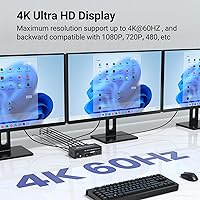
  • Max Resolution: Supports up to 4K at 60Hz, with backward compatibility for 4K@30Hz, 1080p@60Hz, and lower resolutions.
  • Display Modes: Operates in either copy mode (all three monitors mirror the same image) or extended mode (monitors form an expanded independent workspace).
  • USB Ports: Four USB 3.0 Type-A ports are available for sharing data peripherals such as keyboards, mice, external drives, and printers between both computers.
  • USB Transfer Speed: USB 3.0 ports support data transfer speeds of up to 5 Gbps and are backward compatible with USB 2.0 devices.
  • Switching Methods: Switching between computers is done via a physical push button on the front of the unit or via the included external controller cable.
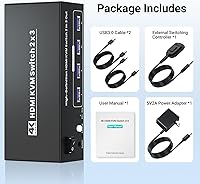
  • Controller Cable: The included external switching cable measures 1.5 meters (approximately 4.9 ft), allowing the control point to be placed away from the main unit.
  • Hotkey Support: Keyboard hotkey switching is not supported; all computer switching must be performed using the physical button or the external cable remote.
  • GPU Requirement: Each connected computer must have a graphics card with at least three physical HDMI output ports for the switch to function correctly.
  • Operating Voltage: The unit operates at 5 volts with a current rating of 2 amps, typically powered via a USB connection.
  • Dimensions: The main unit measures 5.98 × 2.48 × 1.65 inches, making it compact enough to sit on a desk or mount underneath one.
  • Weight: The switch weighs 1.37 lbs, light enough to be repositioned or cable-managed without any special mounting hardware.
  • OS Compatibility: Compatible with Windows, macOS, and Linux operating systems without requiring any driver installation.
  • Connector Type: All video connections use standard HDMI ports; no DisplayPort, USB-C, or DVI interfaces are present on this unit.
  • USB Port Type: All four USB ports are Type-A USB 3.0 and are designated for data peripherals only — they do not carry video signals.
  • Brand & Model: Manufactured by Seiryruc under the model designation 2-Port HDMI KVM Switch 2-In 3-Out, assigned Amazon ASIN B0D6C3HNV8.
  • Availability Date: This product was first made available for purchase on June 6, 2024.

Related Reviews

AILVLVNG HDMI KVM Switch 2 Monitors 3 Computers 4K@60Hz USB 3.0
84%
91%
Ease of Setup
88%
Dual Monitor Functionality
87%
USB Port Performance
84%
Display Consistency (EDID Emulator)
80%
Switching Speed (Button vs Remote)
More
TJCXELE HDMI KVM Switch 3 Monitors 2 Computers 4K@60Hz
85%
85%
Overall Performance
92%
Visual Quality (4K@60Hz)
75%
Ease of Setup
88%
USB Port Functionality (Data Transfer)
90%
Compatibility with Operating Systems
More
TESmart HKS201-P23 2-Port HDMI KVM Switch
77%
83%
Ease of Setup
88%
Video Quality & Resolution
67%
Switching Reliability
71%
Audio & Microphone Performance
79%
USB Hub Performance
More
TESmart HKS402-P23 Dual Monitor KVM Switch
74%
72%
Display Signal Stability
88%
EDID Emulation Effectiveness
83%
USB 3.0 Hub Performance
69%
Switching Reliability
74%
Audio and Microphone Passthrough
More
Camgeet KVM Switch 3 Monitors 3 Computers HDMI+2 DisplayPort
88%
95%
Display Resolution Support
93%
Multi-Computer Switching
89%
USB Connectivity
82%
Setup and Installation
91%
Compatibility Across OS
More
UGREEN AK500 Dual Monitor KVM Switch
77%
91%
Ease of Setup
88%
Switching Reliability
86%
Video & Display Quality
78%
USB Peripheral Sharing
83%
Build Quality & Materials
More
ANGEET HDMI KVM Switch 2 Monitors 2 Computers 4K@60Hz
85%
91%
Display Quality
88%
Ease of Setup
85%
USB Performance
93%
Compatibility with Systems
87%
Build Quality
More
Camgeet USB 3.0 HDMI KVM Switch for 2 Computers
84%
88%
Value for Money
91%
Ease of Setup
90%
Display Quality
82%
Build Quality
85%
Switching Speed
More
EVATEK 4K@60Hz HDMI KVM Switch for 4 Computers & 2 Monitors
83%
89%
Performance
93%
Ease of Setup
91%
Resolution Quality (4K@60Hz)
87%
USB 3.0 Port Functionality
85%
Switching Speed
More
CMSTEDCD 4K@120Hz DisplayPort KVM Switch 3 Monitors 2 Computers
84%
90%
Performance
88%
Ease of Use
91%
Video Quality
85%
USB Compatibility
60%
Display Flickering
More

FAQ

Yes, absolutely — this is the single most important hardware check before buying. Each connected computer must have at least three physical HDMI output ports on its GPU. If either machine only has two HDMI ports and a DisplayPort, for example, the switch cannot drive all three monitors from that computer. Check your GPU model's spec sheet before ordering.

No, the Seiryruc 2-in-3-Out 4K HDMI KVM Switch does not support hotkey switching of any kind. You have to either press the physical button on the front of the unit or use the included external cable remote. If hotkey switching is important to your workflow, you will want to look at a different model.

Copy mode mirrors the same image from the active computer across all three monitors — useful for presentations or when you want a consistent view from multiple angles. Extended mode treats all three monitors as one large, continuous workspace, so you can spread windows and applications across them independently. You can configure which mode you want during setup.

Not directly. All four USB ports are standard Type-A USB 3.0, so you would need a USB-C to USB-A adapter for any USB-C peripherals. The ports handle data devices only — keyboards, mice, external drives, printers — and do not carry any video signal.

Yes, it will. The switch is driver-free, so it does not care what OS each machine is running. A Windows desktop and a Mac can share the same monitors, keyboard, and mouse without any software installation on either side. Linux is also fully supported.

Most users report a switch time of around two to four seconds — the monitors briefly go dark and then display the other computer's output. It is not instantaneous, but it is quick enough for normal workflow transitions. Some users with specific monitor brands have seen slightly longer wake times after switching.

Yes, all four USB 3.0 ports can be used simultaneously. That said, four slots fill up quickly, and if you have more than four USB peripherals to share, you will need a separate USB hub plugged into one of the ports. Keep in mind that hub performance may vary depending on power draw.

It comes included. The 1.5-meter external switching cable is part of the package, so you can immediately position it on your desk while tucking the main unit out of sight. No separate purchase is needed.

Yes. This 3-monitor switcher supports different resolutions per output, so a 4K primary monitor and two 1080p secondary displays can all operate correctly at their native resolutions. The switch handles the resolution negotiation automatically without manual configuration.

No credible risk of hardware damage has been reported. The unit is a passive signal router operating at 5V and does not introduce power surges or irregular signals to connected hardware. As with any HDMI peripheral, it is good practice to connect and disconnect cables while the devices are powered off, but normal use poses no known risk to monitors or graphics cards.