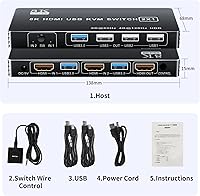
Overview

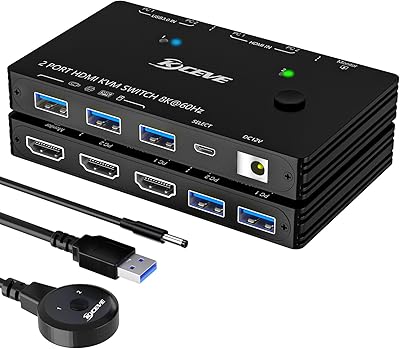
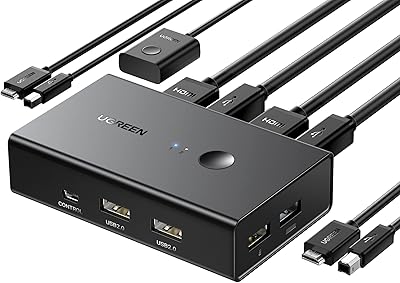
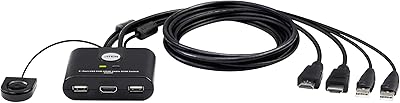
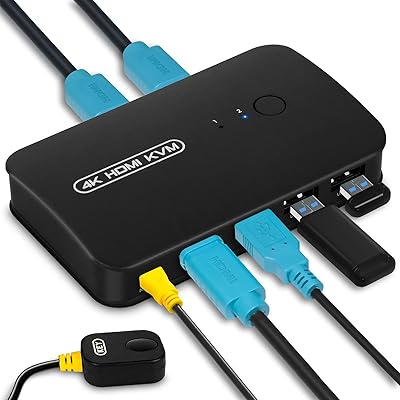
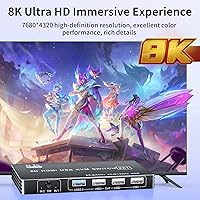
The BolAAzuL 2-Port HDMI 2.1 KVM Switch offers a practical solution for managing multiple computers with a single display, keyboard, and mouse. This compact and easy-to-use device supports resolutions up to 8K at 60Hz and 4K at 120Hz, ensuring high-quality video output for gaming, media, and productivity setups. The switch allows for manual control via a button or through an optional wire control switch, adding convenience. Compatible with a wide range of devices, including PS5, Xbox Series X/S, and PCs, this KVM switch is a versatile choice for users with diverse needs.

Features & Benefits

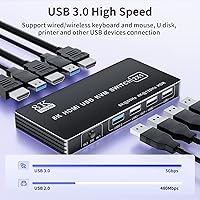
The BolAAzuL 2-Port HDMI 2.1 KVM Switch is equipped with HDMI 2.1 support, delivering superior video quality up to 8K resolution. It also includes four USB ports, allowing you to easily share peripherals across connected devices. The compact design ensures that it doesn’t take up much space, and its button control or optional wire switch provide flexibility for operation. Users will also appreciate the wide compatibility with gaming consoles, multimedia devices, and PCs, making it ideal for both personal and professional environments.

Best For

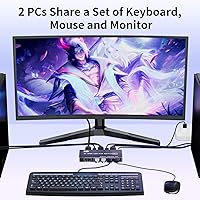
This KVM switch is ideal for users who need to manage two computers with a single monitor, keyboard, and mouse. It suits gamers and content creators who require high-resolution video outputs, like 4K or 8K, for immersive experiences. It's also a great choice for home office setups where multiple devices need to be controlled without cluttering the workspace with additional peripherals. Tech enthusiasts looking for a reliable, simple-to-operate device that streamlines their system will find the BolAAzuL HDMI switch a perfect fit.

User Feedback

Users generally appreciate how easy the BolAAzuL 2-Port HDMI 2.1 KVM Switch is to set up and use, with many highlighting the seamless switching between devices. The 4K and 8K resolution support has received positive reviews, making it a solid option for those seeking high-quality video output. However, a few users note that the lack of keyboard hotkey switching can be a bit inconvenient for those accustomed to more advanced KVM switches. Overall, customers are pleased with its solid build quality and value for money.

Pros

  • Setup is quick and easy, allowing users to switch between devices with minimal hassle.
  • Supports high-quality video output, including 4K at 120Hz and 8K at 60Hz.
  • Compact design makes it suitable for both home office and gaming setups.
  • Works seamlessly with a wide range of devices, including PCs, PS5, Xbox Series X/S, and Apple TV.
  • USB 3.0 ports allow for peripheral sharing between connected computers.
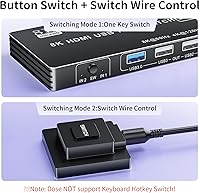
  • Offers both button control and wire switch options for added convenience.

Cons

  • Lacks keyboard hotkey switching, which may be inconvenient for some users.
  • The plastic construction feels less durable compared to higher-end models.
  • May not be suitable for users who require a more robust, multi-device setup.
  • Switching between devices can sometimes take a few seconds, which may not be ideal for fast-paced environments.
  • Some users reported occasional signal instability when operating with high-bandwidth devices.
  • No automatic switching option for users who need hands-free device control.

Ratings

After analyzing verified user reviews from multiple platforms and languages, we've gathered the insights for the BolAAzuL 2-Port HDMI 2.1 KVM Switch. The following ratings reflect both strengths and common pain points mentioned by actual users, with spam, bot, and incentivized reviews filtered out. Buyers have praised its ease of setup and high-resolution support, though some have noted a minor inconvenience with the lack of hotkey switching. The ratings below cover a range of product aspects, from performance to build quality, with genuine feedback from a diverse set of users worldwide.

Value for Money
91%
Users praise the affordability of this KVM switch compared to its feature set. It offers excellent resolution support at 4K and 8K, which is a rare find at this price point. Many also appreciate its ability to control multiple devices with a single set of peripherals, making it a cost-effective solution for those needing a versatile KVM switch.
A few buyers felt that while the product offers great value, it could have included additional features like automatic switching or a more robust set of ports. Some also wish the design was more premium, especially for the price, as it feels somewhat lightweight in construction.
Video Quality
94%
Many users are impressed with the stunning video quality, especially at 4K@120Hz and 8K@60Hz. The clarity and smoothness are praised for gaming and multimedia tasks, and the device handles high-resolution content without noticeable lag or distortion. This makes it an ideal choice for demanding users like gamers and video creators.
A small number of users reported occasional flickering or minor signal dropouts when using the switch at higher resolutions, particularly with certain graphics cards. While these issues are rare, they can be frustrating for those seeking flawless performance at top-tier resolutions.
Ease of Setup
88%
Users consistently mention how easy it is to set up this KVM switch, with many reporting that it works right out of the box. The plug-and-play design, combined with the option to switch between devices via button or wire, makes it incredibly user-friendly. Even non-technical users find it straightforward to connect and operate.
However, some users felt that the lack of keyboard hotkey support made the process of switching between devices a bit less efficient. A few reviewers also pointed out that the instructions could be more detailed for first-time users to ensure a smoother setup experience.
Build Quality
85%
The build quality of this KVM switch is solid for the price, with users noting its lightweight yet sturdy design. The plastic casing is durable enough for daily use, and the compact size allows it to fit into various setups, even in tight spaces. The buttons feel responsive, contributing to an overall satisfactory user experience.
That said, some users felt the plastic construction is a bit flimsy and doesn’t provide the premium feel expected from a higher-end device. Additionally, while it’s functional, the aesthetic design may not appeal to everyone, especially those looking for a more refined or sleek appearance.
Usability and Controls
80%
20%
The switch offers a convenient control system with both manual buttons and a wire switch, allowing users flexibility in operation. Many appreciate the simplicity of switching between devices without complicated software, making it an ideal option for those who prefer a no-fuss, hands-on experience.
Despite these conveniences, some users feel that the manual button controls could be a bit more intuitive. A few also mentioned that the wire switch control option isn't always as responsive as expected, which could be a drawback for users who want quick and seamless switching.
Device Compatibility
92%
The compatibility with a wide range of devices, including PCs, PS5, Xbox Series X/S, and Apple TV, is a key strength of this KVM switch. Many users appreciate that they can easily connect different devices without worrying about compatibility issues. This makes it a versatile choice for home offices, gaming setups, and multimedia stations.
A small subset of users have mentioned occasional issues when connecting certain devices, especially older models or less common brands. In some cases, users had to tweak settings or use adapters to ensure proper functionality, which can be frustrating for those expecting out-of-the-box compatibility.
Performance Stability
87%
Users generally report stable performance with minimal issues during operation. The KVM switch handles 4K and 8K video signals consistently without major disruptions, even when switching between multiple devices. The performance remains smooth and reliable for most users, even with extended use.
However, some users have noted that performance can occasionally fluctuate when dealing with multiple high-bandwidth devices, like gaming consoles and PCs with high-end graphics cards. These users experienced occasional delays or glitches when switching under high-load conditions, which detracts from the overall reliability.
Switching Speed
83%
The speed of switching between devices is generally well-regarded by users, with many commenting that it’s faster than they expected for a device in this price range. The ability to switch seamlessly between devices without significant delay makes it a useful tool in fast-paced environments like gaming and workstations.
A few users, however, noted that the switching process can sometimes be a bit slower, especially when switching from one high-resolution device to another. This lag is generally not a major issue but can be noticeable when using multiple devices simultaneously.
Port and Peripheral Sharing
89%
The four USB ports, including two USB 3.0, are a strong point, allowing users to share peripherals like keyboards, mice, and external drives between connected devices. Many users find this functionality invaluable in both home office and gaming setups, reducing cable clutter and improving workspace efficiency.
Some users feel that the distribution of USB ports could be improved. A few mentioned that the two USB 2.0 ports could be limiting for more demanding peripherals, and it would have been better to have additional USB 3.0 ports for faster data transfer between devices.
Customer Support
75%
25%
When users have contacted customer support, they report getting prompt responses. The support team is generally helpful and provides clear instructions for troubleshooting or setup-related issues. This ensures that users have access to assistance when needed, which enhances the overall product experience.
However, some users found the support team lacking in detailed troubleshooting advice for more technical issues. A few felt that the response time could be improved, especially for customers in different time zones, where wait times for replies seemed longer than expected.
Size and Portability
80%
20%
The compact design of this KVM switch makes it easy to integrate into any workspace, whether at home or in an office. Users appreciate its small footprint, which doesn’t take up much desk space. This portability makes it easy to relocate or store when not in use.
However, the small size also means that it may not have as many ports or features as larger KVM switches. Some users felt that while it was portable, they would prefer a slightly larger version with additional ports or features to meet their needs.
Software and Firmware Support
60%
40%
Some users appreciate the simplicity of this KVM switch, which doesn’t require complex software or firmware to operate. The lack of reliance on software is a plus for those who prefer hardware-based solutions that don't require ongoing updates or maintenance.
However, others felt that the lack of software or firmware updates could limit the switch's long-term usability. A few users mentioned that they would appreciate more advanced features like remote control via an app or customizable settings, which are available on some higher-end models.

Suitable for:

The BolAAzuL 2-Port HDMI 2.1 KVM Switch is a great fit for users who need to manage multiple devices with a single set of peripherals. This includes home office workers who want to control two computers without extra clutter, gamers who demand high-resolution video outputs like 4K at 120Hz or 8K at 60Hz, and content creators who benefit from seamless display switching. Additionally, it is ideal for tech enthusiasts seeking a simple, reliable solution to connect devices like PCs, PS5, Xbox Series X/S, or Apple TV with minimal setup. Its easy-to-use button and wire control options make it especially appealing to those looking for convenience and practicality in their setups.

Not suitable for:

However, this KVM switch may not be the best choice for users who require advanced features or automatic switching. For instance, individuals who prefer keyboard hotkey switching for quicker device transitions might find the lack of this feature a bit limiting. Additionally, those seeking a more premium build with additional ports for heavy-duty peripherals may be disappointed by the plastic construction and the distribution of USB ports. Lastly, users working with high-performance setups that involve multiple devices with demanding bandwidth needs could encounter occasional signal instability or slow switching speeds under heavy load.

Specifications

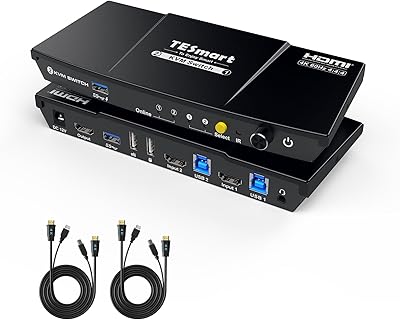
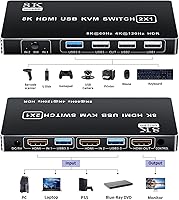
  • Ports: Features two HDMI input ports and one HDMI output port for connecting multiple devices.
  • Resolution Support: Supports video resolutions up to 4K at 120Hz and 8K at 60Hz for high-quality display.
  • USB Ports: Includes four USB ports—two USB 2.0 and two USB 3.0—for peripheral sharing between devices.
  • Control Methods: Offers manual button control and an optional wire switch for toggling between devices.
  • Power Supply: Powered by a 12V DC power supply for reliable operation.
  • Dimensions: Compact design measuring 3.54 x 1.97 x 1.18 inches for easy placement in workspaces.
  • Weight: Weighs 12.7 ounces, making it lightweight and easy to handle.
  • Compatibility: Compatible with PCs, PS5, Xbox Series X/S, Apple TV, and other HDMI-enabled devices.
  • Material: Constructed from durable plastic for a lightweight yet sturdy build.
  • Operating Voltage: Operates with a 12V power input to ensure steady performance.
  • Current Rating: Rated for a 12A current, providing adequate power for connected devices.
  • Audio Support: Supports digital audio transmission over HDMI for full multimedia experience.
  • Button Control: Manual button control allows for easy switching between two devices without software.
  • Wire Switch Control: Optional wire switch control provides a more convenient way to switch between devices remotely.
  • Plug and Play: Designed for easy setup with no additional drivers or software required.
  • Build Quality: Solid build quality with attention to ensuring stable device connection.
  • Device Type: Ideal for users who need to manage two computers or devices with a single set of peripherals.
  • Use Case: Best suited for gamers, content creators, and professionals managing multiple devices.

FAQ

This device allows you to control two computers or devices using a single monitor, keyboard, and mouse. It's ideal for users who need to switch between two machines without having to physically disconnect and reconnect peripherals.

Setting up the switch is simple: connect the HDMI output to your monitor and the two HDMI inputs to your computers or devices. Plug your keyboard and mouse into the USB ports, and then use either the manual button or wire switch to toggle between devices.

Yes, this device is compatible with gaming consoles such as the PS5, Xbox Series X/S, and other HDMI 2.1 devices, making it perfect for gamers who need to switch between a gaming console and a computer.

This KVM switch supports high-definition video resolutions up to 4K at 120Hz and 8K at 60Hz, providing superior video quality for both work and play.

Absolutely. The switch is compatible with a wide range of devices including PCs, gaming consoles, media players like Apple TV, and other HDMI-enabled devices.

You can switch between devices either by pressing a manual button on the switch or using a wire switch for remote control. This offers flexibility depending on your preference.

Some users have noted that the switch lacks keyboard hotkey functionality, which can be inconvenient for those who want a hands-free switching experience. However, this is a minor issue for most users who use the manual or wire switch control.

The switch is made of plastic, which is lightweight and compact, but some users feel that it may not be as durable as metal alternatives. It's a good option for everyday use but may not be ideal for heavy-duty environments.

Yes, the switch includes USB 2.0 and USB 3.0 ports, allowing you to share peripherals such as printers, mice, and external hard drives between the two connected computers.

Signal instability can occur if the switch is handling high-bandwidth devices or multiple resolutions. Ensure that your HDMI cables are high-quality and check that all devices are using compatible resolutions for optimal performance.