Overview

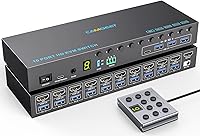
The Camgeet 10-Port HDMI KVM Switch sits in a niche that most buyers never need to think about — until they do. Running ten machines from a single monitor sounds like a data center problem, but home lab builders, sysadmins, and developers with dedicated rigs know the situation well. What separates this switch from cheaper options is its EDID simulation, which solves one of the most frustrating KVM problems: windows jumping around every time you change inputs. The compact, rack-friendly housing includes a proper power on/off switch, so you can kill the unit without yanking cables — a small detail that matters a lot during late-night troubleshooting sessions.
Features & Benefits

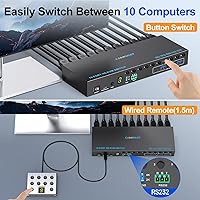
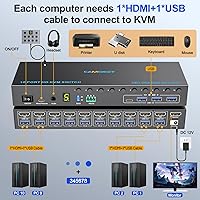
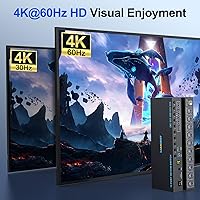
The standout capability here is EDID emulation — in plain terms, it tricks each connected computer into believing the monitor is always present and active, keeping your desktop layout exactly where you left it regardless of which machine is in focus. Video output holds at full 4K resolution with a smooth 60Hz refresh, and the switch also handles high-refresh 1440p for fast-moving workloads. Four USB 3.0 ports — a mix of USB-C and USB-A — are shared across all ten computers at genuinely fast transfer speeds. Three ways to switch inputs are included: front-panel buttons, a wired remote with a readable digital display, and RS232 for scripted control. No drivers needed on any major OS.

Best For

This 10-port KVM switch is built for people who actually need ten ports — not as a vanity spec. IT admins managing a stack of test servers, developers juggling build machines and staging environments, or home lab users who never have quite enough physical ports will all find it genuinely useful. It fits well in classroom or office setups where operators want to script input switching through RS232 commands — though be warned, that feature has a real learning curve and is not something to expect working out of the box without reading the documentation carefully. Anyone running an ultrawide monitor who dreads the usual window-scramble problem will especially appreciate what this HDMI KVM brings to the desk.

User Feedback

Buyers broadly praise the EDID emulation reliability and the wired remote, noting the digital display makes it easy to confirm which computer is active without leaving your chair. The included USB cables are a welcome addition given the ten-port count. On the flip side, some users report occasional hiccups with high-power USB peripherals, and a handful have raised questions about audio passthrough — the listing mentions audio support but does not specify the implementation clearly, so treat it as a secondary feature rather than a core selling point. Long-term durability under sustained multi-machine loads is also worth monitoring, as heat buildup and component wear are fair concerns at this usage level.

Pros

  • EDID emulation reliably prevents desktop windows from shuffling when switching between computers.
  • Full 4K at 60Hz output keeps demanding monitor setups looking sharp without signal degradation.
  • Ten HDMI inputs in a compact chassis is a genuinely rare combination at this price tier.
  • Three switching methods — panel, wired remote, and RS232 — cover nearly every deployment scenario.
  • The wired remote with a digital display is a practical convenience for rack or shelf-mounted installs.
  • Dedicated power supply keeps USB device recognition stable, even with power-hungry peripherals connected.
  • Driver-free setup works across Windows, macOS, Linux, and ChromeOS without configuration friction.
  • The USB-C port alongside three USB-A ports makes peripheral sharing flexible for modern device setups.
  • Ten USB cables included in the box reduces the immediate accessory shopping list significantly.
  • A physical on/off switch lets you power down the unit cleanly without unplugging cables.

Cons

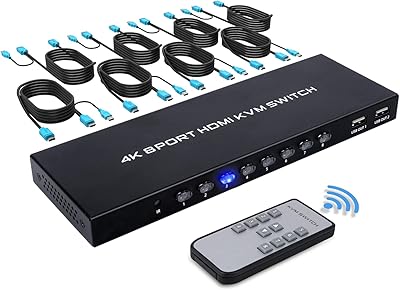
  • No HDMI cables included despite having ten input ports — buyers need to source these separately.
  • The manual lacks detail on EDID toggle behavior and RS232 command syntax, frustrating advanced users.
  • Audio passthrough is poorly documented and inconsistent enough in real-world use to be unreliable.
  • EDID emulation can occasionally fail to hold after connected machines wake from sleep.
  • High-power USB devices sometimes fail to initialize correctly after an input switch or sleep cycle.
  • Front-panel buttons feel plasticky and lack the tactile precision expected at this price point.
  • Mild chassis warmth reported under full-load conditions — a concern in enclosed or poorly ventilated spaces.
  • The Camgeet switch is a relatively new product, so long-term durability data is still limited.
  • RS232 automation has a real learning curve and is not functional out of the box for non-technical users.
  • All ten input cables populated simultaneously creates significant cable bulk at the rear of the unit.

Ratings

The Camgeet 10-Port HDMI KVM Switch was evaluated by our AI system after analyzing verified buyer reviews from global marketplaces, with spam, bot-generated, and incentivized feedback actively filtered out before scoring. The ratings below reflect a realistic cross-section of real-world usage — from home lab setups to professional IT environments — and do not shy away from the friction points buyers consistently report alongside the genuine strengths.
EDID Emulation Reliability
88%
For users who have suffered through the classic KVM window-scramble problem — where every input switch sends desktop icons flying and application windows resizing — this feature is the primary reason they chose this switch. Most buyers confirm it works consistently across reboots and cold starts, keeping multi-monitor workflows intact.
A minority of users report that EDID emulation occasionally fails to hold after waking connected machines from sleep, requiring a manual toggle. The hold-button activation method is also non-obvious and not prominently documented in the included manual.
Video Output Quality
91%
Running at full 4K with a 60Hz refresh, the picture quality through this HDMI KVM is clean and consistent — no color banding or signal degradation that cheaper passive switches often introduce. Users with high-refresh 1440p monitors also report stable output without screen tearing during normal desktop use.
A small number of buyers using very long HDMI cables report occasional signal instability, though this is more likely a cable length issue than a switch defect. HDR passthrough has not been widely confirmed by real-world users, so treat it as unverified for HDR-dependent workflows.
Port Count & Input Flexibility
93%
Ten HDMI inputs in a unit this size is genuinely rare, and buyers consistently cite this as the deciding factor over competing switches that cap out at four or eight ports. IT admins managing test benches and developers with dedicated build machines find the port count accurately matches real multi-machine workloads.
The physical port density means cables can bunch up at the back, especially with all ten inputs populated. The unit does not include HDMI cables in the box — only USB cables — so buyers need to budget for up to ten HDMI cables separately, which adds to the total cost.
USB Sharing Performance
82%
18%
Having a USB-C port alongside three USB-A ports makes peripheral sharing genuinely flexible — users can run a keyboard, mouse, USB drive, and a modern USB-C device simultaneously without a hub. File transfers between machines via shared USB storage are noticeably fast compared to USB 2.0 KVMs.
Some buyers report that high-power USB devices — external hard drives and certain USB hubs — occasionally fail to initialize reliably when the connected computer wakes from sleep. The four shared ports can also feel limiting when trying to share more complex peripheral setups like drawing tablets or multi-function printers.
Switching Methods & Remote Control
84%
Having three distinct ways to switch inputs — front panel, wired remote, and RS232 serial — covers a wide range of deployment scenarios. The included wired remote with a digital display is a genuine convenience for rack or shelf-mounted setups where the main unit is not at arm's reach.
The wired remote cable, while functional, feels lightweight relative to the switch itself, and the display readability in very low-light conditions gets mixed feedback. RS232 control is powerful but requires comfort with serial communication and baud rate configuration — it is not a plug-and-play feature for non-technical users.
Build Quality & Form Factor
76%
24%
The metal chassis feels solid and dense enough to sit stably on a shelf or slide into a rack without flexing. The dedicated power switch is a practical touch that avoids cable fatigue from constantly plugging and unplugging the unit between sessions.
The front-panel buttons have a plasticky feel that does not quite match the overall chassis quality, and a few users note they lack tactile precision under heavy daily use. At roughly 9.5 inches long, it is also a bit bulky for extremely tight desk or shelf setups.
Setup & Initial Configuration
71%
29%
For basic keyboard-mouse-monitor switching, most buyers are up and running within minutes — no drivers, no software, no OS-specific configuration required. The plug-and-play experience on Windows and macOS in particular gets consistent praise for being genuinely straightforward.
The included manual is thin on detail for advanced features like EDID toggle behavior and RS232 command syntax. Users trying to configure scripted switching or troubleshoot EDID edge cases frequently report needing to contact support rather than finding answers in the documentation.
Audio Passthrough
58%
42%
Audio output through HDMI does function for buyers using monitors or displays with built-in speakers, and several users confirm basic audio switching works alongside the video signal without requiring separate configuration.
The audio implementation is poorly documented, and real-world reports are inconsistent — some users experience audio dropouts or lag during switching while others report no issues. Buyers relying on precise audio routing for professional or studio work should verify compatibility before committing.
RS232 Control & Automation
67%
33%
For IT environments and classrooms where scripted or automated switching is valuable, the RS232 interface at a fixed baud rate is a legitimate capability that far cheaper switches do not offer at all. Users who have invested time in setup report it works reliably once configured.
Getting RS232 working requires serial communication knowledge, compatible hardware, and patience with the documentation gaps. It is not realistic to expect this feature to work without research, and several buyers who expected easy automation were disappointed by the initial friction.
Power Supply & Stability
83%
The dedicated 12V power adapter — rather than USB bus power — is a meaningful design choice that keeps the switch stable when high-demand USB devices are connected. Buyers who previously owned bus-powered KVMs note fewer device recognition failures and more consistent USB peripheral behavior.
The power adapter is proprietary, so losing or damaging it means sourcing a replacement rather than grabbing any USB charger. A small number of users also note occasional unit restarts when the full USB load is pushed simultaneously, though this appears to be an edge case.
OS & Device Compatibility
86%
The switch handles mixed-OS environments well — switching between a Windows workstation, a Linux server, and a Mac without needing to reconfigure anything is exactly the kind of friction-free operation that multi-platform users depend on. ChromeOS compatibility is a bonus for lab setups with Chromebooks in the mix.
A handful of users report occasional USB recognition delays specifically on Linux after switching inputs, though this tends to resolve within a few seconds. Compatibility with non-standard or older HDMI source devices is not guaranteed and worth testing before committing to a full deployment.
Cable Management & Included Accessories
69%
31%
Including ten USB cables in the box — all at a usable 1.5-meter length — is a thoughtful inclusion that saves buyers an immediate trip back to the store. The wired remote is also included, which adds value given its utility for mounted installations.
The absence of HDMI cables is a real inconvenience given the ten-port count — outfitting all inputs adds meaningful cost and complexity to what should be a ready-to-use package. The USB cables themselves are functional but not premium, and a few buyers report one or two cables in the bundle feeling undersized at the connector.
Long-Term Reliability
72%
28%
Most buyers who have used this HDMI KVM for several months report consistent performance without hardware failures, and the one-year warranty with lifetime technical support provides reasonable assurance for a product at this price tier.
The product is relatively new to market, so long-term durability data is limited. A few early buyers flag mild warmth on the chassis under sustained all-port loads, which is worth monitoring in warm server rooms or enclosed rack environments with limited airflow.
Value for Money
78%
22%
Compared to enterprise KVM options with similar port counts and EDID support, this switch lands at a fraction of the cost while delivering the core functionality that most non-enterprise buyers actually need. The feature-to-price ratio is strong for IT professionals and serious home lab users.
For casual users who only need two or four ports, the pricing feels steep and the complexity is unnecessary. Buyers expecting a truly premium out-of-box experience — polished documentation, included HDMI cables, and rock-solid audio — may feel the value proposition is less clear at this tier.

Suitable for:

The Camgeet 10-Port HDMI KVM Switch was built for a specific kind of power user, and it genuinely delivers for that audience. IT administrators managing a bench of test servers, sysadmins who need fast access to multiple workstations without a full enterprise rack, and home lab enthusiasts running physical machines alongside virtual environments will all find the ten-port count accurately reflects how they actually work. Developers who keep separate machines for coding, building, and rendering — and who cannot tolerate their desktop layout shifting every time they switch inputs — will appreciate the EDID emulation more than almost any other feature. Classroom or office operators who want to automate switching through RS232 commands have a real tool here, provided they are comfortable with serial communication basics. Anyone running a high-resolution ultrawide or high-refresh monitor who has been burned by cheaper KVMs that scramble window positions will find this switch addresses that specific frustration reliably.
Not suitable for:

The Camgeet 10-Port HDMI KVM Switch is genuinely overkill for the majority of buyers, and purchasing it without a real need for multiple ports means paying for hardware that will go unused. Casual home users who simply want to share a monitor between a personal laptop and a work machine will find simpler two- or four-port switches far more cost-effective and easier to manage. Buyers hoping for a polished out-of-box audio solution should look elsewhere — the audio passthrough is documented vaguely and real-world reports are inconsistent enough that it should not be treated as a dependable feature. Anyone expecting RS232 automation to work intuitively without technical background will likely be frustrated, as the documentation is thin and the setup requires hands-on serial communication knowledge. Finally, buyers on a tight budget who factor in the cost of purchasing up to ten HDMI cables separately — none are included in the box — may find the total investment climbs higher than expected.
Specifications

  • Computer Inputs: The switch accepts up to 10 computers simultaneously via individual HDMI input ports.
  • Monitor Output: A single HDMI output port connects to one monitor, shared across all 10 connected computers.
  • Max Resolution: Supports up to 4K at 60Hz, with backward compatibility for 4K at 30Hz and 2560x1440 at 120Hz.
  • USB Ports: Four USB 3.0 ports are shared across all inputs: one USB-C and three USB-A.
  • USB Speed: USB 3.0 data transfer operates at up to 5Gbps, suitable for fast external storage and high-bandwidth peripherals.
  • Switching Modes: Three input-switching methods are supported: front-panel numbered buttons, a wired remote control, and RS232 serial commands.
  • Wired Remote: The included wired remote features a digital screen display and connects via a 1.5-meter cable.
  • RS232 Control: RS232 serial switching is supported at a fixed baud rate of 115200 for scripted or automated environments.
  • EDID Simulation: EDID emulation is built in and can be toggled on or off by holding the number 1 button for 3 seconds.
  • Power Supply: A dedicated 12V/2A power adapter is included, providing stable power independent of any connected USB bus.
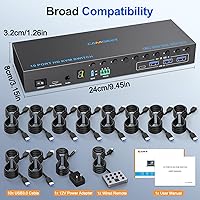
  • Dimensions: The unit measures 9.45 x 3.15 x 1.18 inches, sized for shelf placement or shallow rack integration.
  • Weight: The switch weighs 1.28 pounds without cables attached.
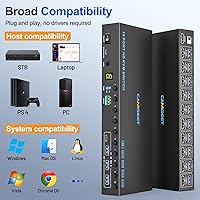
  • OS Compatibility: Plug-and-play compatible with Windows, macOS, Linux, and ChromeOS without requiring additional drivers.
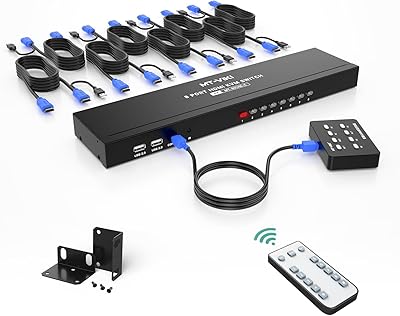
  • Included Cables: The package includes 10 USB 3.0 cables, each 1.5 meters long; no HDMI cables are included.
  • Brand & Warranty: Manufactured by Camgeet, the switch comes with a one-year warranty and lifetime technical support.
  • Power Switch: A dedicated on/off switch on the unit allows the switch to be powered down without disconnecting any cables.
  • Audio Support: Audio passthrough is referenced in the product listing, though the specific implementation and format support are not fully documented by the manufacturer.
  • Device Compatibility: Compatible with a broad range of HDMI source devices including desktop PCs, laptops, and game consoles that output standard HDMI signals.

Related Reviews

TCNEWCL KS-801 8-Port HDMI KVM Switch
78%
88%
Ease of Setup
91%
Port Capacity & Scalability
74%
Video Quality & Resolution
69%
Switching Speed & Reliability
83%
IR Remote Control
More
DGODRT KS604H 4-Port HDMI KVM Switch
80%
91%
Ease of Setup
74%
Switching Reliability
78%
Video Quality
79%
USB Peripheral Sharing
84%
Wired Remote Control
More
StarTech SV431HDU3A2 4-Port HDMI KVM Switch
73%
74%
Switching Reliability
69%
Video Quality
66%
USB 3.0 Hub Performance
71%
Audio Switching
83%
Setup & Installation
More
MT-VIKI MT-801HK-C 8-Port HDMI KVM Switch
78%
83%
Value for Money
88%
Ease of Setup
76%
Build Quality
69%
Switching Performance
71%
Display Quality
More
ANXQQ ANQ-8401B 4-Port HDMI KVM Switch
77%
91%
Ease of Setup
88%
Display Switching Reliability
86%
EDID Performance
67%
USB Device Recognition
61%
8K Resolution Capability
More
IOGEAR GCS32HU 2-Port HDMI KVM Switch
72%
93%
Ease of Setup
88%
Switching Reliability
91%
Value for Money
74%
Build Quality
67%
Cable Length & Reach
More
ATEN CS22HF 2-Port HDMI KVM Switch
78%
93%
Ease of Setup
91%
Switching Convenience
84%
Video Quality
78%
Build Quality
66%
Cable Length & Management
More
BolAAzuL 2-Port HDMI 2.1 KVM Switch
84%
91%
Value for Money
94%
Video Quality
88%
Ease of Setup
85%
Build Quality
80%
Usability and Controls
More
MT-VIKI MT-1601HK-C 16-Port HDMI KVM Switch
80%
88%
Switching Reliability
81%
EDID Storage Performance
79%
Build Quality
62%
IR Remote Usability
86%
Value for Money
More
GREATHTEK 8-Port HDMI KVM Switch
71%
91%
Ease of Setup
78%
Switching Reliability
74%
Video Quality
63%
Build Quality
67%
USB Peripheral Sharing
More

FAQ

Yes, that is exactly what the EDID emulation feature is designed to solve. When enabled, the switch tells each connected computer that a monitor is always present and active, so your windows, taskbar positions, and application layouts remain where you left them even when that machine is not the active input. Most users find this works reliably for standard switching, though occasional hiccups have been reported after machines wake from sleep.

No drivers are needed. The Camgeet 10-Port HDMI KVM Switch is fully plug-and-play across Windows, macOS, Linux, and ChromeOS. You connect your machines, plug in your peripherals, power it on, and it should be operational within a few minutes for basic keyboard, mouse, and monitor switching.

No, HDMI cables are not included. The package comes with 10 USB 3.0 cables and the wired remote, but you will need to source your own HDMI cables for each computer you connect. If you are populating all 10 ports, factor in the cost and logistics of acquiring that many cables before purchasing.

Absolutely. This HDMI KVM handles mixed-OS environments without any reconfiguration between inputs. Switching from a Windows workstation to a Linux server to a Mac is as straightforward as pressing the corresponding button, and none of the connected machines need any special software installed.

RS232 allows you to switch inputs programmatically using serial commands, which is useful for automated or scripted environments like classrooms, server rooms, or AV setups. It operates at a baud rate of 115200. To be direct about it: this is not a beginner-friendly feature. You will need serial communication hardware, basic knowledge of how to send RS232 commands, and patience with limited documentation. If you are not already comfortable with serial protocols, expect a learning curve.

You can share most standard USB peripherals reliably. The dedicated 12V power adapter helps maintain stable USB device recognition better than bus-powered alternatives. That said, some users have reported occasional initialization issues with high-power external drives or complex multi-function devices, particularly after input switching or when connected machines resume from sleep. Simple peripherals like keyboards, mice, and USB drives tend to work without issue.

The wired remote includes a small digital display that shows the active input number, which is genuinely helpful for rack or desk setups where the main unit is not easily visible. Feedback on readability in very low-light conditions is mixed — some users find it easy to read, while others note the display brightness is modest. It is functional but not backlit in a way that would make it ideal for completely dark environments.

Yes. The switch supports resolutions including 2560x1440 at 120Hz, which covers most high-refresh gaming and productivity monitors. Ultrawide resolutions are also supported through the 4K signal path. Users with ultrawide monitors specifically cite this switch as a good match because the EDID emulation prevents the layout disruptions that plague cheaper KVMs on non-standard aspect ratios.

Treat audio as a secondary, unverified feature rather than a core capability. The listing mentions audio support, but the manufacturer does not clearly document the implementation, supported formats, or limitations. Real-world user reports are inconsistent — some find it works fine for basic monitor speaker output, while others experience dropouts or audio lag during switching. If quality audio routing is important to your setup, plan for a separate audio switching solution.

Under normal desktop use, the switch runs warm but not hot, and the majority of long-term users report no heat-related problems. A small number of buyers note mild chassis warmth under sustained all-port loads, which is worth being mindful of if you plan to mount it in an enclosed rack or a poorly ventilated server space. Leaving some airflow clearance around the unit is a reasonable precaution for heavy, continuous-use environments.