Overview

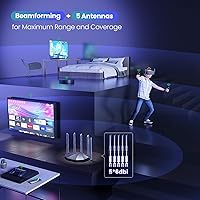
The Tenda RX2Pro AX1500 WiFi 6 Router sits in a sweet spot that didn't exist a few years ago — genuine next-generation wireless technology at a price that doesn't require much deliberation. For households still running an aging WiFi 5 or older router, this Tenda router represents a meaningful upgrade without the sticker shock of premium brands. The five external antennas are an immediate visual differentiator; most competitors at this price tier manage three or four at best. Day-to-day, the dual-band setup handles the usual mix of streaming, browsing, and video calls without breaking a sweat.
Features & Benefits

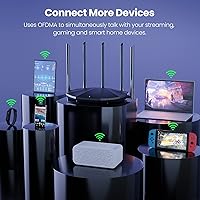
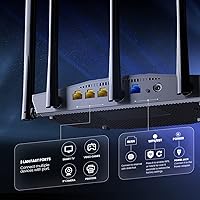
WiFi 6 brings two technologies — MU-MIMO and OFDMA — that genuinely matter in a busy home. Rather than devices taking turns for bandwidth, they share it more efficiently, which means less slowdown when everyone is online at once. The RX2Pro covers both the 2.4GHz band for range and the faster 5GHz band for devices that demand more throughput. Three Gigabit LAN ports let you hardwire a desktop or gaming console for rock-solid stability. WPA3 security is a welcome addition at this price, offering better encryption than the older standard. The Tenda app handles band-switching automatically, so most users never need to dig into settings manually.

Best For

This WiFi 6 router makes the most sense for households where the current setup is clearly struggling — buffering during movie nights, dropped connections when too many devices are active, or weak signal in far rooms. Families with kids will appreciate the built-in parental controls, which let you schedule internet access and monitor usage without subscribing to a third-party service. Small home offices get a practical bonus from the wired Gigabit ports. That said, this Tenda router is not the right fit for power users who want granular control over VLANs or advanced QoS, and it isn't a substitute for a true mesh system in very large, multi-story homes.

User Feedback

With well over a thousand ratings averaging 4.3 out of 5, the most consistent praise centers on easy setup and surprisingly strong range for a router in this class. Many buyers report it holding steady over weeks and months without needing reboots, which is reassuring for a budget pick. On the flip side, tech-savvy reviewers flag the limited advanced settings as a real drawback — if you want deep control over your network, the interface will frustrate you. A handful of users in larger homes note the 5GHz signal doesn't always punch through multiple floors as confidently as expected. Overall, the RX2Pro earns its rating, but managing expectations upfront goes a long way.

Pros

  • WiFi 6 support brings noticeably better performance when multiple devices are active at the same time.
  • Five external antennas give this WiFi 6 router a coverage edge over most competitors at the same price.
  • Setup through the Tenda app is straightforward enough that non-technical users can be up and running in minutes.
  • Built-in parental controls work without a subscription, which is a genuine value-add for families.
  • Three Gigabit LAN ports make it easy to hardwire a desktop, console, or smart TV for a stable connection.
  • WPA3 security offers stronger network protection than older routers still running WPA2.
  • The RX2Pro supports wireless repeater mode, adding flexibility for users who want to extend coverage later.
  • Long-term stability is solid — most users report weeks of uptime without needing a reboot.
  • VPN passthrough support (L2TP and PPTP) is a useful bonus at this price tier.
  • Smart band-switching automatically moves devices to the best available band without manual intervention.

Cons

  • Advanced network settings are minimal, which will frustrate anyone who wants meaningful control over their router.
  • The 5GHz band can lose strength noticeably in larger homes or through multiple floors.
  • Firmware update notifications and the update process itself feel underdeveloped compared to more established brands.
  • No tri-band support means bandwidth can feel stretched in households with many simultaneous heavy users.
  • The Tenda app requires an account and internet connection for remote access, which some users find unnecessary.
  • Customer support responsiveness has drawn mixed feedback, particularly for technical troubleshooting.
  • Range estimates from Tenda assume ideal conditions; real-world results in dense or cluttered spaces vary considerably.
  • No USB port means no option for basic NAS functionality or printer sharing.
  • Power users switching from a feature-rich router will find the interface a significant step down in capability.

Ratings

The scores below reflect an AI-driven analysis of verified global user reviews for the Tenda RX2Pro AX1500 WiFi 6 Router, with spam, bot submissions, and incentivized feedback actively filtered out to ensure accuracy. Ratings are drawn from thousands of real buyer experiences across a range of home environments, household sizes, and use cases. Both the genuine strengths and the recurring frustrations are represented here without sugar-coating.

Value for Money
91%
Among budget WiFi 6 routers, this Tenda router consistently earns praise for delivering a feature set — WPA3, Gigabit ports, app control, parental controls — that buyers expect to pay significantly more for. Users upgrading from older routers repeatedly note the jump in perceived quality relative to what they spent.
A small segment of buyers who compared it directly to ISP-provided routers felt the performance gap wasn't as dramatic as expected, particularly for lighter internet users who may not push enough devices to notice WiFi 6 advantages.
Wireless Performance
78%
22%
For everyday tasks — streaming 4K content, video calls, casual gaming — the RX2Pro holds up well in typical single-story homes. Users with WiFi 6 compatible devices notice genuinely lower latency and fewer hiccups during peak household usage compared to their previous WiFi 5 routers.
The 5GHz band loses steam in larger or multi-floor homes, and real-world throughput rarely approaches the theoretical maximum speeds. Buyers with dense concrete construction or homes over 2,500 square feet report more dead zones than the antenna count might suggest.
Coverage & Range
72%
28%
The five-antenna design gives this WiFi 6 router a tangible coverage advantage over budget competitors in open floor plans. Many users in medium-sized apartments and single-story homes report full-home coverage without needing a range extender for the first time.
Multi-story homes and layouts with many walls expose the router's range limitations. The 2.4GHz band extends further but at noticeably reduced speeds, and users in larger homes frequently end up needing a supplemental device to fill in the gaps.
Ease of Setup
93%
The Tenda app-guided setup is one of the most consistently praised aspects across user reviews. Non-technical users regularly describe getting from unboxing to a working network in under fifteen minutes without needing to consult a manual or contact support.
A handful of users encountered issues when setting up the router in access point mode or when connecting it behind an existing ISP gateway in double-NAT configurations, where the app guidance is less clear and troubleshooting requires more technical initiative.
App Experience
74%
26%
The Tenda app handles the core tasks most household users actually need — checking connected devices, running speed tests, adjusting parental control schedules, and rebooting remotely — without overwhelming first-time users with complexity.
More experienced users find the app surface-level and limiting; it lacks detailed traffic analytics, per-device bandwidth controls, and reliable push notifications. A few users also reported the app requiring an internet connection to function, which makes local-only management unavailable during outages.
Build Quality
69%
31%
The router has a solid, low-profile form factor that sits neatly on a shelf without looking out of place, and the antennas feel sturdy enough for repositioning. Most users describe the physical construction as appropriate for its price tier.
The all-plastic chassis feels light, and the matte finish picks up dust and fingerprints easily. A few users noted that the antennas have slightly less resistance when adjusted than they would prefer, raising minor concerns about long-term joint durability.
Network Stability
81%
19%
The majority of long-term users report reliable uptime over weeks and months without forced reboots, which is a meaningful baseline for a budget router. Streaming sessions and gaming sessions in particular tend to stay consistent without mid-activity drops under normal household loads.
A subset of users — particularly those with more than 20 simultaneous active devices — report occasional slowdowns or the need for a periodic restart after extended uptime. The pattern isn't universal, but it appears often enough in reviews to be worth noting.
Parental Controls
77%
23%
For families wanting basic internet time management, the built-in controls work without any subscription or third-party service. Scheduling internet access per device through the app is straightforward, and parents appreciate having it available right out of the box.
Content filtering is limited to time-based scheduling rather than category or site-level blocking, which means parents who want to restrict specific content types will need to supplement with a DNS filtering service. The controls are useful but not comprehensive enough for every family's needs.
Security Features
83%
WPA3 support at this price point is genuinely uncommon and gives the RX2Pro a security edge over budget competitors still limited to WPA2. Users who prioritize network security appreciate that they are not being asked to compromise on encryption to save money.
Beyond WPA3, the security feature set is fairly minimal — there is no built-in intrusion detection, no automatic threat monitoring, and no VLAN segmentation for isolating IoT devices, which are features found on more advanced routers that security-minded users may miss.
Wired Port Performance
88%
All four Ethernet ports are full Gigabit capable, which is the right call for a modern router and something budget buyers don't always get. Users who hardwire a desktop, NAS, or gaming console consistently report fast, stable wired performance that justifies the connection.
Three LAN ports is workable for most households but can feel tight if you have several wired devices — a desktop, a smart TV, and a gaming console together already use all available ports, leaving no room for expansion without adding a switch.
Advanced Configuration
43%
57%
For users who only need basic setup and don't plan to dig deeper, the simplicity of the interface is actually an advantage — there's little to misconfigure, and the defaults work well for most home environments right out of the box.
Power users will hit the ceiling of the RX2Pro's settings quickly. QoS is rudimentary, there is no VLAN support, no OpenVPN or WireGuard, and DNS customization is minimal. If you want real control over your network, this router's firmware will frustrate you consistently.
Firmware & Updates
62%
38%
Tenda does push firmware updates, and several users note that updates have added features like improved VPN support over time, which suggests the product is not completely abandoned post-launch.
The update experience is inconsistent — notifications are not always reliable, the update process occasionally requires a manual check rather than prompting automatically, and some users report instability following updates that required a factory reset to resolve.
Multi-Device Handling
76%
24%
WiFi 6's OFDMA technology allows the RX2Pro to manage more simultaneous device requests with less contention than older router generations, making it noticeably more capable than its predecessors in households where phones, laptops, tablets, and TVs are all online at once.
Heavy simultaneous use — multiple 4K streams, an active video call, and an online game running at the same time — can stress the router noticeably, and users in particularly device-dense homes report it handles peak loads less gracefully than mid-range competitors.
Compatibility
89%
The RX2Pro works out of the box with virtually any ISP setup and connects reliably with a wide range of devices from gaming consoles to smart home sensors. Backward compatibility with older WiFi standards means no device is left behind when switching to this router.
A few users with older ISP-provided modems in bridge mode encountered configuration hurdles, and the router's PPPoE setup through the app is less intuitive than through the web interface. Compatibility is broad but not completely frictionless in every edge-case scenario.
Thermal Management
71%
29%
Under regular household loads, the RX2Pro runs at a comfortable temperature without requiring active cooling. Users who place it in open areas report no heat-related issues during typical day-to-day operation across extended periods.
A small number of users who placed the router in enclosed spaces or near other electronics reported it running noticeably warm, and there is no ventilation slot design that actively aids heat dissipation. Placement in open air is recommended to avoid potential long-term thermal stress.

Suitable for:

The Tenda RX2Pro AX1500 WiFi 6 Router is a strong match for anyone who has been limping along on an older router and wants a real upgrade without spending a lot. It suits households with a moderate number of connected devices — think a mix of phones, laptops, a smart TV, and maybe a gaming console — where the current router just can't keep up during peak hours. Families will find the built-in parental controls genuinely useful, especially since there's no extra subscription required to set screen time limits or monitor activity. Renters in medium-sized apartments or homeowners in single-story or smaller two-story homes are likely to get solid whole-home coverage from the five-antenna setup. Small home offices benefit from having three wired Gigabit ports available for stable, low-latency connections alongside the wireless network.
Not suitable for:

The Tenda RX2Pro AX1500 WiFi 6 Router is not the right call for network enthusiasts who want deep control over their setup — think custom DNS, detailed QoS rules, VLAN configuration, or advanced firewall options. The firmware keeps things simple, which is great for casual users but frustrating for anyone who expects more than a surface-level interface. Buyers with very large homes, particularly those spread across multiple floors, may find the 5GHz signal drops off more than expected in distant rooms; a mesh system would serve them better. This Tenda router also isn't tri-band, so households with a particularly high density of bandwidth-hungry devices might hit a ceiling during heavy simultaneous use. If you're coming from a high-end router and expecting a comparable feature set, the step down in configurability will be immediately noticeable.
Specifications

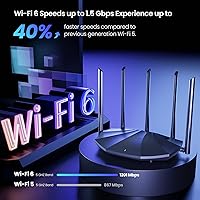
  • WiFi Standard: This router uses the 802.11ax (WiFi 6) standard, which improves efficiency and throughput compared to the previous WiFi 5 generation, especially in homes with many connected devices.
  • Band Configuration: Dual-band operation covers both the 2.4GHz band for wider range and the 5GHz band for faster, shorter-range connections.
  • Combined Speed: Total combined wireless throughput is rated at AX1500, split between 300Mbps on 2.4GHz and 1201Mbps on 5GHz under ideal conditions.
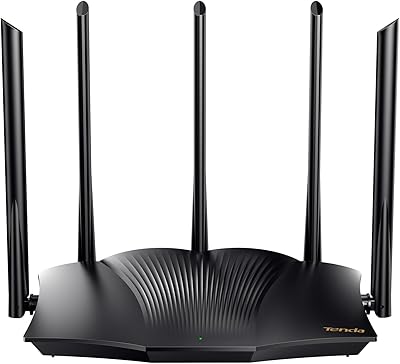
  • Antennas: Five external 6dBi omnidirectional antennas work alongside beamforming technology to direct signal toward connected devices rather than broadcasting equally in all directions.
  • LAN Ports: Three Gigabit Ethernet LAN ports allow wired connections for desktops, consoles, smart TVs, or other devices requiring a stable, low-latency link.
  • WAN Port: One dedicated Gigabit Ethernet WAN port connects the router to your modem or ISP gateway.
  • Security Protocol: WPA3 encryption is supported as the primary security standard, offering stronger protection against password-guessing attacks than older WPA2 implementations.
  • Key WiFi 6 Tech: MU-MIMO and OFDMA are both supported, enabling the router to serve multiple devices more efficiently and with less queuing delay during peak usage.
  • VPN Support: The router supports L2TP and PPTP VPN passthrough protocols on its most recent firmware versions.
  • App Control: The Tenda app, available for both iOS and Android, allows remote network management, parental controls, and basic diagnostics from a smartphone.
  • Parental Controls: Built-in parental controls let users set internet access schedules and monitor device activity directly through the app at no additional cost.
  • IPv6 Support: IPv6 is supported, ensuring compatibility with modern ISP infrastructure and future-proofing the router for next-generation network addressing.
  • Dimensions: The router measures 9.4 x 5.67 x 1.59 inches, making it a flat, low-profile unit designed to sit horizontally on a shelf or desk.
  • Weight: At 1.67 pounds including antennas, the unit is lightweight and easy to reposition during setup.
  • Power Input: The router operates on 12V DC power supplied via the included adapter; no separate power brick purchase is required.
  • Wireless Modes: Beyond standard router mode, the RX2Pro also supports access point mode and wireless repeater mode for flexible network deployment.
  • WPS: WPS (Wi-Fi Protected Setup) is supported, allowing compatible devices to join the network with a single button press instead of manually entering a password.
  • In the Box: The package includes the router, a power adapter, one RJ45 Ethernet cable, and a printed quick installation guide.

Related Reviews
Tenda RX12 Pro AX3000 WiFi 6 Router
77%
88%
Value for Money
91%
Setup & Ease of Use
83%
WiFi Speed & Performance
71%
Coverage & Range
79%
VPN Support
More
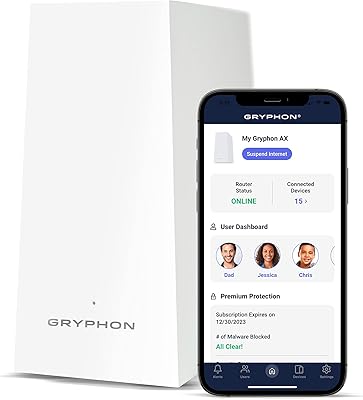
Gryphon AX Mesh WiFi 6 Router
73%
91%
Parental Controls
88%
Network Security
76%
WiFi Speed & Performance
78%
Coverage & Range
84%
Setup & Installation
More
NETGEAR R6700AXS AX1800 WiFi 6 Router
76%
78%
Wireless Performance
91%
Setup Experience
83%
Multi-Device Handling
86%
Network Security
67%
Coverage Range
More
Reyee E6 AX6000 WiFi 6 Router
78%
93%
Value for Money
86%
Wireless Range & Coverage
82%
Gaming Performance
88%
Ease of Setup
61%
Mobile App & Software Experience
More
BrosTrend AX1500 WiFi 6 Extender
77%
72%
WiFi Coverage
78%
Wireless Speed
89%
Wired Connectivity
86%
Ease of Setup
81%
Build Quality
More
Linksys MR7350 WiFi 6 Router
76%
91%
Setup & Onboarding
78%
WiFi Speed & Throughput
67%
Coverage & Range
83%
Device Handling & Congestion
72%
App & Remote Management
More
Linksys MR20EC WiFi 6 Mesh Router

74%
78%
Wireless Performance
63%
Coverage & Range
91%
Setup & Installation
69%
App & Remote Management
82%
Device Handling & Congestion
More
NETGEAR Nighthawk RAX120 AX6000 WiFi 6 Router
77%
88%
Wireless Performance
83%
Coverage & Range
86%
Multi-Device Handling
91%
Wired Connectivity
84%
Setup & Initial Configuration
More
NETGEAR Nighthawk RAX54S
77%
83%
Wireless Performance
79%
Coverage & Range
88%
Setup & Ease of Use
76%
Gaming Performance (DumaOS 3.0)
81%
Security Features
More
Linksys E8450 AX3200 WiFi 6 Router
86%
91%
WiFi Performance
88%
Setup & Installation
87%
Coverage Range
89%
Device Support
82%
Speed Consistency
More

FAQ

Not at all. The Tenda app walks you through the whole process step by step, and most users have it running within ten to fifteen minutes. You plug in the cables, follow the in-app prompts, and you are done. No need to touch a web browser or memorize your router's IP address.

Yes, it works with virtually any ISP that provides a standard modem or gateway with an Ethernet output. Just connect the WAN port to your modem, and the router handles the rest. If your ISP uses PPPoE, you can enter those credentials through the app or the web interface.

WiFi 6 with OFDMA and MU-MIMO allows the router to communicate with multiple devices simultaneously rather than one at a time, so it handles a busy household reasonably well. Realistically, a mix of 20 to 30 active devices is manageable, though very bandwidth-intensive tasks on many devices at once will still compete for the available throughput.

It depends on the size and layout of your home. In a typical two-story house up to around 2,000 square feet, most users get decent coverage throughout. Thicker walls, concrete ceilings, or a very spread-out floor plan can reduce how well the 5GHz band penetrates. The 2.4GHz band will reach further but at lower speeds.

The parental controls on the RX2Pro are primarily time-based, letting you set schedules for when certain devices can access the internet. Granular content filtering by specific website or category is limited, so if you need robust content blocking, you may want to pair it with a DNS-based filtering service like Cloudflare Family or OpenDNS.

It supports VPN passthrough for L2TP and PPTP protocols on recent firmware, which means devices on your network can connect to a VPN service. It does not function as a full VPN server or run OpenVPN or WireGuard natively, so if you need router-level VPN for all traffic, this is not the right fit.

No. Older WiFi 5 or WiFi 4 devices will connect and work normally — they just won't use the WiFi 6 features. The router is fully backward compatible. That said, you will see the biggest improvements from WiFi 6 features as you upgrade devices over time.

General user feedback on this front is positive. Most owners report stable operation over extended periods without needing to restart the router regularly. A small number of users have noted occasional slowdowns after weeks of uptime, but this is not a widespread complaint.

Yes. The router also has a traditional web-based interface accessible through a browser on any device connected to the network. The app is more convenient for day-to-day use, but the browser interface gives you access to all the same settings and is useful if you prefer not to create a Tenda account.

You still need a separate modem or gateway from your ISP. This Tenda router is a wireless router only — it connects to your existing modem via the WAN port and distributes the internet connection throughout your home. If your ISP gave you a modem-router combo unit, you can either use this in access point mode or put the ISP device in bridge mode.