Overview

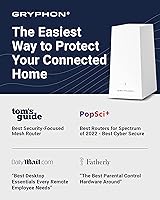
The Gryphon AX Mesh WiFi 6 Router sits in an interesting category: it is not simply a fast router with a parental controls checkbox tucked away in settings, but a managed security ecosystem designed from the ground up for households and small businesses that take network safety seriously. Built on tri-band WiFi 6 technology, it covers up to 3,000 square feet per unit and handles congested networks with multiple devices without choking. At its price point, buyers are right to expect more than raw speed, and this mesh router largely delivers on that expectation — though with a few caveats worth knowing before you buy.
Features & Benefits

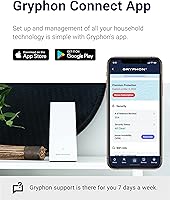
At the core, this security-focused WiFi system runs on AX4300 tri-band WiFi 6 with 4x4 MU-MIMO, which means it can communicate with many devices at once rather than making them wait in line. The parental controls go well beyond simple website blocking — you can set per-device time schedules, filter content by category, and review screen time reports from the app. The built-in firewall actively scans for malware, ransomware, and phishing attempts around the clock, and an intrusion detection layer monitors traffic patterns for anything suspicious. The Gryphon Connect app ties it all together cleanly, letting you manage users, devices, and security settings without touching a browser-based admin panel.

Best For

This mesh router makes the most sense for families with kids in school who need more than a blanket content filter — the per-device, per-profile control structure is genuinely useful when you have a teenager and a ten-year-old on the same network with different needs. Homes with fifteen or more connected devices will also appreciate the WiFi 6 efficiency gains over older standards. Small business owners who want firewall-level protection without a dedicated IT setup will find it a practical fit. If you prefer managing your network from a phone rather than decoding router firmware menus, the app-first design here will feel natural rather than forced.

User Feedback

Across roughly 537 ratings, the Gryphon AX lands at 3.8 out of 5 — a score that reflects a genuinely split audience. Buyers who love it consistently praise the depth of parental controls and how painless the initial setup is compared to traditional routers. Critics, however, point to two recurring frustrations: the single LAN port on the base unit feels limiting for wired setups, and several advanced security features sit behind a paid subscription, which surprises buyers who assumed everything was included upfront. A handful of users also report occasional sync issues between the app and the router. Compared to Eero or Netgear Orbi, the value case depends almost entirely on how much the security and parental control layer matters to you.

Pros

  • Per-device parental controls let parents set different content rules and time limits for each child individually.
  • Built-in malware, ransomware, and phishing protection runs continuously without needing a separate security subscription service.
  • WiFi 6 tri-band technology handles crowded device environments far more efficiently than older router standards.
  • The Gryphon Connect app makes daily network management genuinely approachable for non-technical users.
  • Mesh expansion is straightforward — adding a second unit through the app does not disrupt existing device profiles.
  • Ethernet backhaul support allows wired node connections for users who want maximum inter-node stability.
  • Setup from box to working network typically takes under fifteen minutes for most home configurations.
  • Intrusion detection monitors live traffic patterns, adding a layer of protection most consumer routers simply skip.
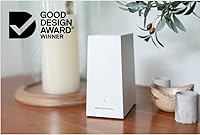
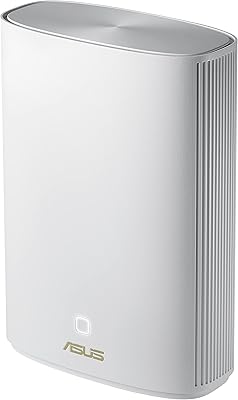
  • The compact, antenna-free design fits on a shelf without looking like networking hardware from a data center.

Cons

  • Key parental control and security features require an ongoing paid subscription on top of the upfront hardware cost.
  • Only one Gigabit LAN port on the base unit severely limits wired device connections in media or office rooms.
  • Real-world coverage in older homes with thick walls often falls short of the advertised 3,000 square foot claim.
  • App sync delays and occasional post-update instability have been reported by a consistent subset of verified buyers.
  • No support for advanced network configurations like VLANs or granular QoS, limiting appeal for power users.
  • Locking buyers into a single-brand mesh ecosystem means no mixing with third-party nodes if you want to expand later.
  • Customer support response times during busy periods have drawn criticism, with no phone support channel available.
  • The overall value proposition weakens significantly if the security and parental control features are not central to your needs.

Ratings

The Gryphon AX Mesh WiFi 6 Router has been scored by our AI system after analyzing verified purchase reviews from buyers worldwide, with spam, bot-submitted, and incentivized feedback actively filtered out before any scoring was applied. What follows reflects the honest distribution of real user experiences — the strengths that keep buyers recommending it and the friction points that push others toward competitors. Both sides are represented transparently in every category below.
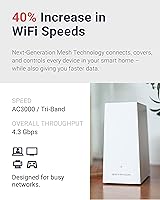
Parental Controls
91%
This is the category where the Gryphon AX genuinely pulls ahead of most rivals. Parents consistently praise the ability to set individual schedules and content filters per child's device, not just per network. Seeing screen time reports broken down by app category in a clean mobile interface is something families with multiple kids find immediately practical.
A meaningful portion of the more advanced filtering and reporting tools require an active subscription, which catches some buyers off guard after paying a premium upfront. Users who assumed all parental control features were included in the hardware cost have left notably frustrated reviews once they hit that paywall.
Network Security
88%
The built-in firewall layer — covering malware blocking, phishing detection, and real-time intrusion monitoring — gives this mesh router a security posture that typical consumer routers simply do not offer out of the box. Small business owners and work-from-home users particularly appreciate not needing a separate security appliance on their network.
As with parental controls, some of the more proactive threat intelligence features are tied to the subscription tier rather than the base hardware. Users running the system without an active plan may find the security coverage less comprehensive than the marketing initially suggested.
WiFi Speed & Performance
76%
24%
On WiFi 6 capable devices, users upgrading from older AC routers report noticeably faster throughput and better handling of simultaneous streams across smart TVs, laptops, and phones. Households with fifteen or more active devices see the MU-MIMO efficiency gains translate into fewer buffering incidents during peak evening usage.
Real-world speeds rarely approach the theoretical AX4300 aggregate figure, which is true of every router on the market but still catches buyers expecting headline numbers. A few users in concrete-heavy homes or multi-story layouts report that a single unit does not always saturate the advertised 3,000 square foot coverage claim reliably.
Coverage & Range
78%
22%
For open-plan homes and single-floor layouts, one unit covers a comfortable amount of space without needing an extender. The mesh architecture means adding a second unit is straightforward, and users report that roaming between units feels smooth with minimal connection drops when moving room to room.
Buyers in older homes with thick walls or split-level floor plans often find they need at least two units to get consistent coverage throughout, which pushes the total investment considerably higher. Some users expected more aggressive signal penetration given the product positioning.
Setup & Installation
84%
The Gryphon Connect app walks new users through the setup process in a way that most people with no networking background can follow without consulting a manual. Getting the base unit online, connecting devices, and configuring basic profiles typically takes under fifteen minutes, which reviewers frequently highlight as a genuine differentiator.
A small but consistent group of users report hitting snags during ISP-specific configurations, particularly with modem-router combos that require manual bridge mode settings. When setup does stall, in-app troubleshooting guidance is considered basic and not always sufficient.
App Experience
79%
21%
Day-to-day management through the Gryphon Connect app is one of the more polished experiences in this router category. Switching between network management, parental profiles, and security alerts feels cohesive rather than like three separate tools bolted together, which parents managing the network on the go appreciate.
Occasional sync delays between the app and the physical router are a recurring complaint, where changes made in the app take longer to apply than expected or require a manual refresh to register. A handful of users also report the app logging them out unexpectedly, which is a minor but recurring annoyance.
Build Quality & Design
72%
28%
The unit has a clean, understated design that does not look out of place sitting on a shelf or entertainment console. At just over two pounds with internal antennas, it is compact enough to tuck away without the aggressive aesthetic of gaming-focused routers.
The physical build feels adequate rather than premium for a product at this price tier. Some users note that the casing feels lightweight in a way that does not inspire confidence, and the limited port selection — a single LAN port on the base AX unit — is a tangible hardware constraint that wired-device users bump into quickly.
Value for Money
63%
37%
For buyers whose primary need is a router with serious parental controls and built-in security scanning, the all-in-one proposition does carry real value compared to buying a standard mesh router and a separate content filtering subscription independently. The hardware capability is genuinely there for what it promises.
The combination of a high upfront cost and ongoing subscription fees for full-feature access makes the total cost of ownership higher than many buyers initially budget for. At this price point, competitors like Eero Pro or Netgear Orbi offer competitive mesh performance, leaving the Gryphon AX's value case dependent almost entirely on how much the security and parental control stack matters to each buyer.
Subscription Model Transparency
51%
49%
For users who research the product thoroughly before purchasing, the subscription structure is documented and makes sense as a model for a service that includes ongoing threat intelligence updates and active content filtering databases. Those who go in eyes open tend to factor it into their decision reasonably.
A significant source of negative reviews stems directly from buyers who felt the subscription requirement was not made sufficiently clear at point of purchase. The frustration is less about the subscription existing and more about discovering it post-unboxing when trying to access features they believed were included.
Mesh Scalability
81%
19%
Adding a second or third unit to extend coverage is handled cleanly through the app without requiring a factory reset or reconfiguration of existing device profiles. Users who started with one unit and expanded later report the process is among the smoother mesh expansion experiences they have encountered.
The cost of scaling up is non-trivial given the per-unit price, which means large homes needing three units face a steep total investment. There is also no mixing and matching with third-party mesh nodes, so users are locked into the Gryphon ecosystem once they commit.
LAN Port Availability
44%
56%
Ethernet backhaul is supported, which is a meaningful feature for users who want to hardwire the connection between mesh nodes for maximum throughput stability. For households relying primarily on wireless connections, the port limitation rarely surfaces as a day-to-day problem.
The AX model ships with only a single Gigabit LAN port, which is genuinely limiting for users with wired devices like a NAS, smart TV, desktop, and gaming console all in the same room. This hardware decision is the single most consistent complaint in critical reviews and represents a real compromise for wired-heavy setups.
Reliability & Uptime
74%
26%
Many long-term owners report running the system for months without needing a manual reboot, which is the baseline expectation at this tier and one the Gryphon AX meets for the majority of buyers. ISP outages aside, the router itself is not commonly cited as a source of unexpected downtime.
A recurring subset of reviews describes intermittent connectivity drops that require a router restart to resolve, and occasional firmware updates have reportedly introduced temporary instability. These issues are not universal, but they appear often enough in verified reviews to be worth flagging for buyers who depend on rock-solid uptime.
Customer Support
58%
42%
Users who engage with Gryphon support through the app or email generally describe the team as responsive and knowledgeable about their own product's configuration quirks. For straightforward setup or subscription questions, the support experience tends to be positive.
Response times during high-volume periods have drawn criticism, and some users dealing with complex ISP compatibility issues report being passed through multiple support interactions without a definitive resolution. The absence of phone support is a pain point for less technically confident buyers.
Device Compatibility
77%
23%
The router handles a wide mix of device types without requiring manual configuration — smartphones, smart home hubs, gaming consoles, and streaming sticks all connect reliably without needing individual workarounds. WiFi 6 backward compatibility means older devices continue working without issue.
A small number of users report compatibility quirks with specific ISP-provided modem combinations that required adjusting settings not clearly documented in the app. Power users looking for advanced QoS controls or VLAN segmentation will find the feature set more limited than what dedicated prosumer hardware offers.

Suitable for:

The Gryphon AX Mesh WiFi 6 Router is purpose-built for households where network safety matters as much as network speed — making it an especially strong fit for families with school-age kids who need individualized content filters and screen time boundaries rather than a one-size-fits-all block list. Parents who want to set different rules for a teenager versus a younger child, per device and per profile, will find the level of control here genuinely hard to replicate with standard routers plus third-party software. Homes carrying fifteen or more connected devices — smart TVs, phones, tablets, home security cameras, thermostats — will also benefit from the WiFi 6 efficiency that keeps congestion manageable during peak hours. Small business owners who need firewall-grade protection without the complexity or cost of enterprise networking gear will find this security-focused WiFi system hits a practical middle ground. And for anyone who has ever dreaded logging into a router admin panel, the app-first management approach makes ongoing network oversight something most people can realistically handle themselves.

Not suitable for:

The Gryphon AX Mesh WiFi 6 Router is a harder sell for buyers whose primary need is raw throughput or maximum wired connectivity, rather than the layered security and parental control stack the system is built around. Power users who want advanced QoS tuning, VLAN support, or multiple Gigabit LAN ports for a wired home lab will run into real hardware limitations — the single LAN port on the base unit is a genuine constraint, not a minor footnote. Budget-conscious shoppers should also factor in that this is a two-cost purchase: the upfront hardware price plus an ongoing subscription to unlock the full suite of security and parental control features, which pushes the total ownership cost meaningfully higher over time. Buyers who need to cover a large multi-story or concrete-heavy home on a single unit may find the coverage does not stretch as confidently as the spec sheet implies, meaning a second unit becomes necessary sooner than expected. If parental controls and built-in security are not priorities for your household, competing mesh systems at similar or lower price points will likely deliver equivalent wireless performance without the subscription commitment.

Specifications

  • WiFi Standard: This mesh router operates on the 802.11ax (WiFi 6) standard, offering improved efficiency and throughput compared to the previous WiFi 5 generation.
  • Band Configuration: The unit uses a tri-band radio setup, splitting traffic across two separate 5 GHz bands and one 2.4 GHz band to reduce congestion across mixed device environments.
  • Aggregate Speed: The combined theoretical maximum across all three bands reaches AX4300, though real-world speeds will vary based on device capability, distance, and network conditions.
  • Coverage Area: A single unit is rated to cover up to 3,000 square feet, with performance varying based on home layout, wall construction, and interference sources.
  • MU-MIMO: 4x4 MU-MIMO technology allows the router to communicate with multiple devices simultaneously rather than sequentially, improving performance in high-device-count households.
  • WAN Port: The unit includes one Gigabit WAN port for connecting directly to a cable or fiber modem from your internet service provider.
  • LAN Ports: The Gryphon AX base unit provides one Gigabit LAN port for wired device connections, which is a notable limitation for users with multiple wired devices.
  • Ethernet Backhaul: Ethernet backhaul is supported, allowing mesh nodes to be connected via wired links for more stable and higher-throughput inter-node communication.
  • Antenna Design: All antennas are housed internally within the unit, contributing to its clean exterior appearance without any external protruding antenna arms.
  • Operating System: The router runs on ZyNOS, a network operating system that handles core routing and traffic management functions beneath the Gryphon security and control layer.
  • App Control: The Gryphon Connect app, available for both iOS and Android, serves as the primary interface for managing the network, user profiles, and security settings.
  • Security Features: Active protections include malware blocking, ransomware detection, phishing prevention, and a continuous intrusion detection system that monitors live network traffic.
  • Parental Controls: Controls operate at the individual device level and include content category filtering, website and app blocking, scheduled access windows, and screen time reporting.
  • Wireless Feature: WPS (Wi-Fi Protected Setup) is supported for quick connection of compatible devices without manual password entry.
  • Mesh Support: The unit is fully mesh-capable, and multiple Gryphon nodes can be paired together through the app to extend coverage across larger properties.
  • Dimensions: Each unit measures 8 x 5 x 3 inches, making it compact enough to place on a shelf or entertainment console without dominating the space.
  • Weight: The unit weighs 2.05 pounds, which is lightweight enough for flexible placement without requiring dedicated mounting hardware.
  • Release Date: The Gryphon AX was first made available in July 2021, positioning it as a mid-generation WiFi 6 product with an established firmware and feature update history.

Related Reviews
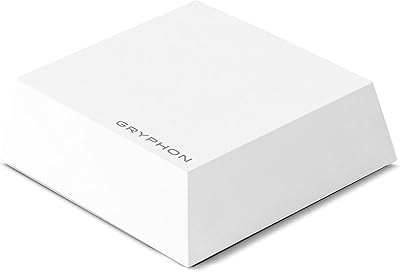
Gryphon Guardian Mesh WiFi Router

73%
88%
Parental Controls
84%
Network Security
61%
WiFi Speed & Performance
72%
Coverage & Range
83%
App Experience
More
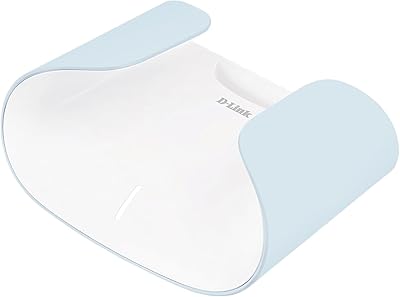
Reyee RG-R6 AX3200 Mesh WiFi 6 System (1-Pack)
71%
88%
Value for Money
91%
Setup & Ease of Use
76%
WiFi Coverage
79%
Network Speed & Throughput
82%
Multi-Device Performance
More
Linksys AX2200 WiFi 6 Mesh Router
84%
88%
WiFi Speed & Performance
91%
Ease of Setup
85%
Coverage & Range
72%
Reliability in Large Homes
90%
App Functionality & Control
More
D-Link AX3000 M30 WiFi 6 Mesh Router
78%
74%
WiFi Coverage & Range
78%
WiFi Speed & Throughput
88%
Setup & Installation
71%
App Experience
83%
Parental Controls
More
Linksys MX8000 Velop Mesh WiFi Router 2-Pack
75%
86%
Coverage & Range
74%
WiFi Speed Performance
83%
Multi-Device Handling
91%
Setup & Installation
78%
App Experience
More
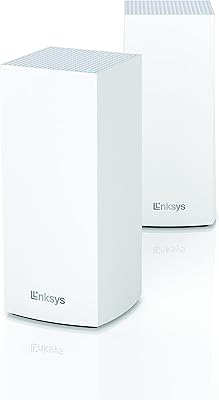
Linksys LN3121 WiFi 6 Mesh Router
73%
91%
Ease of Setup
74%
WiFi Coverage
78%
Connection Speed
82%
Multi-Device Performance
83%
Network Stability
More
D-Link M60 AX6000 Wi-Fi 6 Mesh Router
83%
88%
Wi-Fi Speed & Throughput
74%
Wi-Fi Coverage & Range
93%
Design & Aesthetics
91%
Setup & Initial Configuration
83%
App Experience & Management
More
ASUS ZenWiFi XP4 Mesh WiFi 6 System
77%
88%
Dead-Zone Elimination
74%
Powerline Backhaul Performance
79%
Setup & Installation
91%
Network Security & Parental Controls
82%
WiFi 6 Client Performance
More
Linksys MR20EC WiFi 6 Mesh Router
74%
78%
Wireless Performance
63%
Coverage & Range
91%
Setup & Installation
69%
App & Remote Management
82%
Device Handling & Congestion
More
Tenda RX2Pro AX1500 WiFi 6 Router
76%
91%
Value for Money
78%
Wireless Performance
72%
Coverage & Range
93%
Ease of Setup
74%
App Experience
More

FAQ

Some parental control features work without a subscription, but the more advanced capabilities — including detailed screen time reporting, active content filtering databases, and certain security monitoring functions — require an active paid plan. It is worth checking the current subscription tiers on Gryphon's website before purchasing so you know exactly what is included in the base hardware cost and what sits behind the paywall.

The Gryphon AX is well-suited for households with fifteen to thirty or more connected devices. The WiFi 6 standard and 4x4 MU-MIMO design allow it to serve multiple devices simultaneously rather than making them queue, which is where you see the most practical benefit over older routers in busy homes.

That depends heavily on your home's layout and construction. In an open single-floor plan, one unit comfortably covers up to 3,000 square feet. In a two-story home with concrete walls or complex floor plans, many users find a second unit necessary for consistent coverage on upper floors or far ends of the house.

Yes, this security-focused WiFi system is designed to replace your ISP router entirely. You connect it directly to your modem via the WAN port. If your ISP provides a modem-router combo unit, you will need to put that device into bridge or passthrough mode first, which occasionally requires a call to your ISP.

It works with virtually any residential ISP that uses a standard modem connection, including cable, fiber, and DSL services. The setup process is the same regardless of provider, though some ISP-specific modem configurations may require an extra step to avoid double-NAT issues.

The Gryphon AX integrates parental controls directly into the router hardware and app rather than relying on a third-party add-on device. This means controls apply to every device on the network automatically, without needing to route traffic through an external appliance. The per-device, per-profile granularity is generally considered more flexible than Circle's approach, though Circle's interface has a longer track record with some users.

The router continues to function as a standard mesh WiFi system if you cancel or let the subscription lapse. Core internet access remains unaffected. However, the advanced security scanning, active content filtering updates, and some parental control features that depend on cloud-based databases will stop working until the subscription is renewed.

You can, but only one wired device can connect directly to the base unit since there is a single LAN port. If you need to connect multiple wired devices in the same room, you would need to add a network switch to that LAN port, which is a common workaround but an additional purchase to factor in.

Firmware updates are pushed through the Gryphon Connect app and can typically be applied with a single tap. The system generally notifies you when updates are available rather than applying them silently in the background, giving you control over when the brief restart occurs. Most users find the update process straightforward.

Adding a second node is handled entirely through the Gryphon Connect app — you power on the new unit, open the app, and follow the pairing steps, which takes a few minutes. Your existing device profiles, parental control rules, and network settings carry over automatically to the expanded mesh network without needing to reconfigure anything from scratch.

Where to Buy

FactoryPure
In stock $268.00
Gryphon Online Safety
In stock $299.00