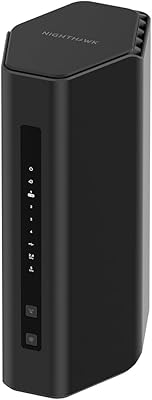
Overview

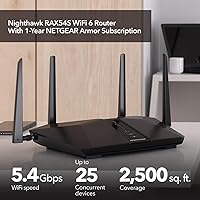
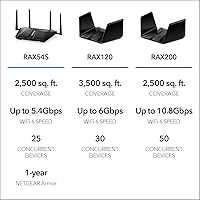
The NETGEAR Nighthawk RAX54S is a mid-range WiFi 6 router that arrived in early 2024, aimed squarely at households wanting reliable whole-home coverage without committing to a full mesh system. Built on dual-band 802.11ax technology, it carries a theoretical combined throughput of 5.4 Gbps — a ceiling you won't realistically hit, but one that reflects genuine headroom for busy networks. It supports up to 25 devices across roughly 2,500 sq. ft., ships with DumaOS 3.0 onboard, and bundles a one-year NETGEAR Armor security subscription at no extra cost. One practical note: this Nighthawk router requires a separate modem to function and is designed exclusively for U.S. use.
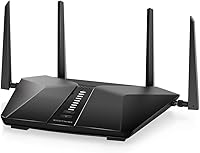
Features & Benefits

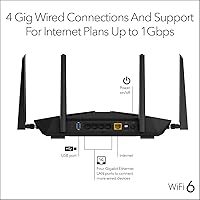
WiFi 6's biggest real-world advantage isn't raw speed — it's how efficiently it manages multiple devices competing for bandwidth simultaneously. This WiFi 6 router takes full advantage of that, reducing congestion noticeably when streaming, video calls, and gaming all run at once. The included NETGEAR Armor subscription layers on real-time threat detection, a VPN privacy option, and parental controls without requiring any manual configuration. Four gigabit LAN ports plus a USB 3.0 port keep wired devices rock-solid. Automatic firmware updates handle patching quietly in the background. DumaOS 3.0's traffic prioritization tools are genuinely practical for online gaming, letting you reduce lag spikes without digging into advanced network settings.

Best For

The RAX54S hits a sweet spot for renters and homeowners in mid-size spaces — think a two-bedroom apartment or a single-floor home under 2,500 sq. ft. It suits households where 4K streaming and video conferencing overlap across multiple screens daily. Gamers wanting built-in quality-of-service controls without paying a premium for a dedicated gaming router will find the DumaOS tools practical rather than gimmicky. Families who don't want to babysit security settings will appreciate the hands-off Armor protection. If your ISP plan caps near 1 Gbps and you're upgrading from an older WiFi 5 router, the jump in device capacity and real-world performance is tangible — without the added complexity of a mesh setup.

User Feedback

Across nearly 5,000 ratings, this Nighthawk router holds a 4.3-star average — solid, though not without its wrinkles. The most consistent praise centers on fast app-guided setup and strong signal consistency across multiple floors. On the flip side, a recurring concern involves the Armor subscription: the first year is included, but renewal pricing is noticeably higher, which catches buyers off guard and colors their long-term value assessment. DumaOS 3.0 earns compliments from gamers but is reported as unnecessarily complex for users who just want a straightforward router. A handful of reviewers also note the unit runs warm and benefits from open-shelf placement rather than being tucked inside a closed cabinet.

Pros

  • WiFi 6 efficiency noticeably reduces congestion when ten or more devices are active simultaneously.
  • App-guided setup gets most households online in under fifteen minutes, no technical background needed.
  • Four gigabit LAN ports handle wired gaming consoles, smart TVs, and desktops without needing a separate switch.
  • Bundled Armor subscription adds real-time threat detection and parental controls with zero manual configuration.
  • Automatic firmware updates keep the router patched without requiring any action from the owner.
  • DumaOS 3.0 traffic prioritization delivers practical lag reduction for online gamers during peak household usage.
  • Strong signal consistency across two floors makes this Nighthawk router reliable in multi-story apartments.
  • USB 3.0 port allows shared network storage without adding extra hardware to the setup.
  • Broad ISP compatibility means it works out of the box with cable, fiber, DSL, and satellite providers.

Cons

  • Armor subscription renewal pricing catches many buyers off guard and raises the true long-term ownership cost.
  • Parental controls are tied to Armor — skip the renewal and those features effectively disappear.
  • Runs noticeably warm under sustained load; enclosed cabinet placement leads to performance issues over time.
  • The 5.4 Gbps speed is a theoretical combined maximum — real-world single-device throughput is considerably lower.
  • DumaOS 3.0 interface feels cluttered and confusing for users who have no interest in gaming features.
  • Coverage can fall short in larger homes near or above the 2,500 sq. ft. boundary with complex layouts.
  • Requires a separate modem, adding cost and setup complexity for buyers coming from an ISP all-in-one gateway.
  • Some users report occasional post-update connectivity drops, particularly with custom DumaOS configurations.

Ratings

The NETGEAR Nighthawk RAX54S earned its 4.3-star standing across nearly 5,000 verified purchases, and the scores below reflect what real buyers consistently reported — filtered for spam and incentivized reviews to surface genuine experience. Our AI analysis weighted feedback from a global pool of users, capturing both the strengths that keep buyers recommending this WiFi 6 router and the friction points that temper full enthusiasm. No score here is inflated: where the RAX54S genuinely delivers, it shows; where it falls short of expectations, that shows too.
Wireless Performance
83%
In day-to-day use across mid-size homes, the RAX54S handles simultaneous 4K streams, video calls, and background downloads without the stuttering that plagues older WiFi 5 routers. WiFi 6 efficiency improvements are genuinely noticeable when eight or more devices are active at once.
The 5.4 Gbps figure is a theoretical ceiling across both bands combined — real-world single-device throughput is considerably lower. Users with gigabit ISP plans and high expectations for peak wireless speeds occasionally report the gap between spec and reality is wider than anticipated.
Coverage & Range
79%
21%
Signal consistency across two floors and through interior walls is a recurring praise point. Buyers in apartments and ranch-style homes up to around 2,000 sq. ft. report strong, reliable coverage throughout, including in rooms farthest from the router.
The advertised 2,500 sq. ft. ceiling is optimistic in homes with multiple thick walls, split-level layouts, or older construction. Users in larger two-story homes near that upper boundary report noticeably weaker signals in distant rooms compared to expectations set by the marketing.
Setup & Ease of Use
88%
The Nighthawk app-guided setup is one of the most consistently praised aspects across verified reviews. Most buyers report being fully connected within ten to fifteen minutes, even without prior networking experience — a meaningful win for households that just want things to work.
A small subset of users encountered hiccups when the app failed to detect the router during initial setup, requiring a browser-based fallback. Those unfamiliar with router concepts like WAN ports or modem compatibility occasionally hit a wall before the first successful connection.
Gaming Performance (DumaOS 3.0)
76%
24%
For online gamers, the built-in QoS and geo-filter tools inside DumaOS 3.0 provide tangible latency control without needing a separate gaming router. Prioritizing gaming traffic during peak household usage hours produces a real reduction in lag spikes during competitive sessions.
DumaOS 3.0 is clearly built with gamers in mind, and non-gamers frequently describe the interface as cluttered and confusing. Households that just want a clean, simple router dashboard often find the gaming-centric layer more hindrance than help.
Security Features
81%
19%
NETGEAR Armor provides a genuinely useful security layer out of the box — real-time threat detection, automatic firmware updates, and a VPN option all run without requiring manual configuration. Families appreciate that parental controls are accessible through the same Nighthawk app used for setup.
The one-year Armor subscription is the main friction point buyers raise. Renewal pricing after the included year is notably higher than the cost of comparable standalone security software, and users who skip renewal lose a significant chunk of what made the security pitch compelling at purchase.
Value for Money
71%
29%
At its price point, bundling a full-year Armor subscription with a capable WiFi 6 router represents solid initial value compared to buying comparable security tools separately. The hardware specifications are competitive within the mid-range router segment for 2024.
Long-term value drops off for buyers who factor in Armor renewal costs. Competitors at a similar price offer comparable WiFi 6 performance without tying ongoing protection to a recurring fee, making the RAX54S feel less competitive once the included year lapses.
Build Quality & Design
74%
26%
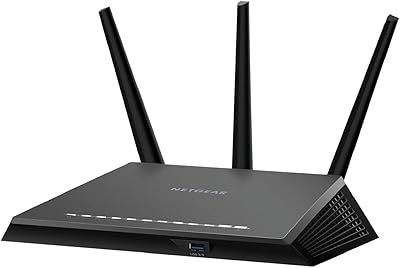
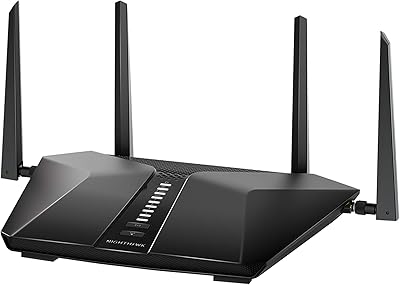
The all-black angular chassis feels solid for a consumer-grade router, and the four external antennas are sturdy enough to hold their position without drooping over time. It sits flat on a shelf without requiring wall-mount hardware in typical home placements.
The unit runs warm during sustained high-traffic periods, and buyers who placed it inside enclosed entertainment centers or media cabinets reported more frequent performance dips. Open-shelf placement is nearly a requirement for stable long-term operation, which limits placement flexibility.
Port Selection
78%
22%
Four gigabit LAN ports is a practical allocation for households running wired gaming consoles, smart TVs, and a desktop simultaneously. The USB 3.0 port adds genuine utility for users sharing a NAS drive or external storage across the home network.
There is only a single USB port, which limits simultaneous wired storage connections. Power users who need more than four wired LAN connections — common in home offices with multiple desktops and a NAS — will need to add a switch, adding both cost and a physical footprint.
App & Software Experience
77%
23%
The Nighthawk app handles the day-to-day management tasks most users actually need: guest network toggling, speed tests, connected device monitoring, and parental access scheduling. Updates push reliably and rarely require manual intervention.
The app occasionally logs users out unexpectedly or loads slowly when polling the router for device status. Some Android users have flagged inconsistent behavior across device generations, and the dual presence of Nighthawk app and DumaOS interface creates occasional confusion about where specific settings live.
Multi-Device Handling
82%
18%
WiFi 6 OFDMA technology allows the router to serve multiple devices in a single transmission window rather than sequentially, and this shows clearly in homes with fifteen or more active devices. Smart home gadgets, phones, and laptops coexist without the queue-based slowdowns common on older hardware.
As the device count pushes toward the advertised ceiling of 25, some users noticed occasional connection prioritization issues — lower-priority devices like smart plugs and sensors occasionally dropped offline briefly. Power users running dense IoT setups may find the headroom tighter than the spec implies.
ISP Compatibility
86%
Compatibility with cable, fiber, DSL, and satellite providers is broad, and buyers across a range of ISPs report consistent plug-and-play behavior with existing modems. Households transitioning between providers found minimal reconfiguration needed.
Modem compatibility is occasionally hit or miss with older ISP-supplied gateway devices, and a handful of users noted they had to contact their ISP to set the existing gateway into bridge mode before the RAX54S would function correctly — a step that tripped up less technical buyers.
Heat Management
63%
37%
Under typical light-to-moderate household loads, the router operates at an acceptable temperature and the passive cooling design keeps fan noise at zero — a genuine positive for living room or bedroom placements where noise matters.
During extended high-load sessions — large file transfers, sustained 4K streaming across multiple devices, or long gaming sessions — the chassis gets noticeably warm. Several reviewers directly linked router restarts and intermittent drops to overheating in poorly ventilated spots.
Firmware Reliability
74%
26%
Automatic firmware updates run quietly in the background and the update history suggests NETGEAR pushes security patches on a reasonably consistent schedule. Most users report the router simply stays updated without any action required on their part.
A smaller group of users experienced post-update connectivity drops or settings resets, which required a manual reboot or partial reconfiguration. While these incidents appear infrequent, they are disproportionately reported by users running DumaOS-specific custom configurations.
Parental Controls
72%
28%
Armor-backed parental controls allow content filtering and scheduled access windows per device, accessible directly from the Nighthawk app. For families wanting basic managed internet access for kids without purchasing dedicated parental control software, it is a practical included tool.
The parental controls are tied to the Armor subscription, meaning they disappear functionally if the subscription is not renewed after the first year. Parents who built household routines around those features and then encountered the renewal cost decision felt the dependency was not made sufficiently clear at purchase.

Suitable for:

The NETGEAR Nighthawk RAX54S is a strong fit for households in apartments or mid-size homes where a single router needs to hold its ground across multiple rooms without the complexity of a mesh system. If your daily reality involves one person on a video call, another streaming 4K content, and a teenager gaming online — all at the same time — this WiFi 6 router handles that kind of overlap noticeably better than older hardware. Families who want built-in security protection without manually configuring firewall rules or installing third-party software will find the bundled Armor subscription genuinely useful during that first year. Online gamers who want traffic prioritization and lag management tools baked into the firmware, rather than paying extra for a dedicated gaming router, get real value from the DumaOS 3.0 layer here. It also makes particular sense for anyone upgrading from a WiFi 5 router on an ISP plan running up to 1 Gbps, where the jump in multi-device efficiency is tangible rather than theoretical.

Not suitable for:

The NETGEAR Nighthawk RAX54S is harder to recommend without reservation for buyers who are thinking past the first year of ownership. The Armor subscription — which powers the parental controls, real-time threat detection, and VPN features — renews at a cost that surprises many buyers, and skipping renewal meaningfully reduces what you paid for upfront. Anyone living in a larger home above 2,500 sq. ft., especially with multiple floors and thick interior walls, should look at mesh systems instead, because this single-unit router will struggle to reach those outer rooms reliably. Power users who need more than four wired devices connected simultaneously, or who run dense smart home setups pushing toward and beyond 25 devices, may find the headroom tighter than the specs imply. Non-gamers who simply want a clean, no-frills management interface may also find DumaOS 3.0 more visually cluttered than they want to deal with on a regular basis. And because this router requires a separate modem to function, buyers currently using an all-in-one gateway from their ISP need to factor in additional setup steps or hardware costs before this router is ready to use.
Specifications

  • WiFi Standard: The router uses 802.11ax (WiFi 6) technology across both bands for improved efficiency in multi-device environments.
  • Frequency Bands: Dual-band operation covers both the 2.4 GHz band for range and the 5 GHz band for higher-speed connections.
  • Max Speed: Combined theoretical throughput reaches up to 5.4 Gbps across both bands under ideal conditions; real-world single-device speeds will be lower.
  • Coverage Area: Designed to cover homes up to 2,500 sq. ft. under typical residential conditions with moderate wall density.
  • Device Capacity: Supports up to 25 simultaneously connected devices across both wireless bands.
  • WAN Port: Includes one Gigabit Ethernet WAN port for connection to a separate cable, fiber, DSL, or satellite modem.
  • LAN Ports: Four Gigabit Ethernet LAN ports provide wired connectivity for consoles, desktops, smart TVs, and other devices.
  • USB Port: One USB 3.0 port supports shared external storage drives or printers across the local network.
  • Antennas: Four external antennas are included and fixed to the chassis to support spatial signal distribution.
  • Operating System: Runs DumaOS 3.0, a gaming-oriented firmware with geo-filter controls, traffic prioritization, and QoS management tools.
  • Security Suite: NETGEAR Armor provides real-time threat detection, VPN privacy, and parental controls; a one-year subscription is included at purchase.
  • Setup Method: Initial setup and ongoing management are handled through the Nighthawk mobile app, available for both iOS and Android.
  • Firmware Updates: Automatic firmware updates are pushed by NETGEAR and install without requiring manual user intervention.
  • Dimensions: The router measures 9.84 x 7.87 x 3.15 inches (L x W x H) and weighs 3.12 pounds.
  • Power Supply: Operates on 110 Volts and is designed exclusively for use within the United States.
  • Color & Build: Ships in black with a hard plastic chassis and an angular Nighthawk-series form factor intended for open-shelf placement.
  • In-Box Contents: Package includes the router unit, four external antennas, one Ethernet cable, a power adapter, and a quick start guide.
  • ISP Compatibility: Compatible with any internet service provider offering speeds up to 1 Gbps, including cable, fiber, DSL, and satellite services.
  • Model Number: The official model designation is RAX54S-2AZNAS, first made available in March 2024.
  • Guest Network: Guest network mode is supported and manageable directly from the Nighthawk app without accessing the full router admin interface.

Related Reviews

Netgear Nighthawk AX5200 Router
87%
92%
Wi-Fi Performance
89%
Range & Coverage
84%
Setup & Installation
88%
Reliability & Stability
91%
Gaming & Streaming Experience
More
NETGEAR Nighthawk CM1200
75%
88%
Internet Speed Performance
83%
Setup & Installation
63%
Long-Term Reliability
79%
Value for Money
71%
Compatibility & ISP Support
More
Netgear Nighthawk AX12 AX11000 Router
87%
92%
Wi-Fi Performance
89%
Speed & Latency
85%
Ease of Setup
88%
Build Quality
90%
Security Features
More
NETGEAR Nighthawk R7350 AC2400 Router
82%
88%
Performance for Gaming
85%
Streaming Performance
91%
Ease of Setup
82%
Wi-Fi Range and Coverage
84%
Reliability
More
NETGEAR Nighthawk BE9300 WiFi 7 Router
88%
94%
Wireless Performance
91%
Coverage Area
88%
Device Capacity
85%
Setup & Installation
90%
Security Features
More
Netgear Nighthawk R6700 AC1750 WiFi Router
86%
88%
Performance & Speed
91%
Security Features
85%
Ease of Setup
80%
Wi-Fi Range & Coverage
83%
Build Quality
More
NETGEAR Nighthawk RS200
81%
88%
Wireless Speed & Performance
71%
Coverage & Range
91%
Setup & Installation
63%
App & Firmware Experience
82%
Value for Money
More
NETGEAR Nighthawk RAX120 WiFi 6 Router
84%
94%
WiFi Performance
91%
Coverage Area
88%
Speed Stability
72%
Ease of Setup
77%
App Experience
More
NETGEAR Nighthawk CAX30
79%
88%
Setup & Installation
83%
WiFi Speed & Performance
71%
WiFi Coverage & Range
91%
Modem Reliability & Uptime
78%
Value for Money
More
NETGEAR Nighthawk RS90 WiFi 7 Router
79%
84%
Wireless Performance
67%
Coverage & Range
91%
Setup & Ease of Use
83%
Value for Money
78%
Build Quality & Design
More

FAQ

Yes, the NETGEAR Nighthawk RAX54S is a standalone router only and does not include a built-in modem. You will need a separate cable, fiber, DSL, or satellite modem connected to its WAN port before it can access the internet. If your ISP currently provides an all-in-one gateway device, you may need to set it to bridge mode first.
Once the included year lapses and you choose not to renew, the Armor-powered features — including real-time threat detection, the VPN option, and parental controls — stop functioning. The router itself continues to work normally for standard WiFi and wired connections, but those added protection layers go dark. Renewal is available through the Nighthawk app, though buyers should be aware the annual cost after the free year is noticeably higher than the initial bundled value implies.

It handles gigabit ISP plans well over a wired connection through the LAN ports. Wireless throughput will be lower in practice — the 5.4 Gbps figure is a combined theoretical maximum across both bands, not a real-world single-device number. For most households on a 500 Mbps to 1 Gbps plan, the wireless performance is more than adequate for everyday use.

Most buyers describe it as genuinely straightforward. You plug the router into your modem, download the Nighthawk app, and follow the on-screen steps — the majority of users are connected within ten to fifteen minutes. The occasional hiccup involves the app failing to detect the router initially, but a browser-based setup fallback is available if that happens.

Honestly, it can feel cluttered if you have no interest in the gaming features. DumaOS 3.0 layers geo-filter maps and traffic prioritization dashboards on top of standard router settings, and non-gamers often find those elements confusing rather than useful. For basic tasks like changing the WiFi password or setting up a guest network, the Nighthawk app handles things cleanly without requiring you to dig into DumaOS at all.

It performs well in most two-story homes up to around 2,000 sq. ft. with standard drywall construction. Coverage in larger two-story homes or those with thick concrete or brick interior walls can thin out toward the edges. If your space pushes close to or past 2,500 sq. ft., or has a complex layout, a mesh system would give you more reliable room-to-room coverage.

Yes, WiFi 6 routers are fully backward compatible. Your older laptops, phones, and smart home gadgets running WiFi 5 (802.11ac) or WiFi 4 (802.11n) will connect without any issues — they just won't benefit from the WiFi 6 efficiency improvements the way newer devices will.

It is worth taking placement seriously. The chassis runs on passive cooling with no fan, so it relies on open airflow to manage heat. Leaving it on an open shelf in a ventilated spot works fine for most users. Placing it inside a closed cabinet or media console is where problems tend to emerge — sustained heat can cause intermittent drops or the occasional reboot under heavy load.

Yes, plugging a USB 3.0 external drive into the port allows devices on your network to access it as shared storage. It is a practical feature for homes that want basic NAS-like functionality without buying a dedicated network storage device. Transfer speeds over WiFi will be limited by your wireless connection quality rather than the USB port itself.

In most cases, yes — this Nighthawk router is compatible with cable, fiber, DSL, and satellite providers, and switching ISPs typically requires nothing more than connecting it to the new provider's modem. The one exception to plan for is if your new ISP supplies an all-in-one gateway unit, in which case you may need to enable bridge mode on that gateway to avoid a double-NAT situation.