Overview

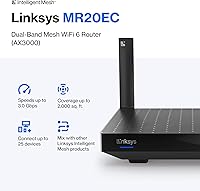
The Linksys MR20EC WiFi 6 Mesh Router is Linksys's practical answer to households that want modern wireless performance without a premium price tag. Powered by a Qualcomm chipset — a genuine differentiator at this tier — and backed by an 18-month warranty, it carries more credibility than many budget-bracket competitors. It's an Amazon exclusive, which partly explains that extended warranty perk. Coverage is capped at around 2,000 sq ft, making this a realistic fit for apartments and smaller single-floor homes rather than sprawling multi-story houses. With over 35 years in networking, Linksys isn't reinventing the wheel here — just making WiFi 6 accessible to everyday buyers.
Features & Benefits

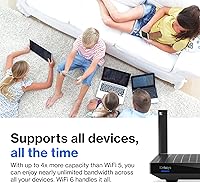
The Linksys Hydra 6 runs on the AX3000 WiFi 6 standard, which in practical terms means faster, more stable throughput when several devices are pulling data at once — picture a 4K stream, two video calls, and a smart thermostat all running without the usual slowdowns. OFDMA and MU-MIMO technology handles those simultaneous connections efficiently, supporting 25 or more devices without the congestion older routers struggle with. The Linksys app makes setup straightforward for non-technical users and lets you monitor or reprioritize devices remotely. Guest Mode and WPS add everyday convenience, and the mesh architecture means you can add nodes later if your coverage needs grow — no need to replace the whole setup.

Best For

This WiFi 6 router is a strong fit for renters and owners of smaller homes — apartments, condos, or compact single-story houses where 2,000 sq ft is genuinely sufficient. Households balancing phones, tablets, smart TVs, and IoT gadgets will find it handles the load well. Users upgrading from an older WiFi 5 router will notice a real difference in day-to-day reliability, and the gap doesn't require a significant financial commitment. Non-technical buyers will appreciate the app-based management, which sidesteps the complex admin interfaces that can make other routers frustrating to use. Those expecting future growth can expand coverage by adding mesh nodes down the line.

User Feedback

Across roughly 285 ratings, this mesh router holds a 4.1-star average — solid, but it comes with some honest trade-offs worth knowing. Apartment dwellers consistently highlight the easy setup and stable day-to-day signal. The recurring criticisms center on coverage: users in larger or multi-floor spaces find the single-unit range falls short, and some report occasional hiccups with the app after firmware updates. Customer support gets mixed reviews — Linksys promotes dedicated phone assistance prominently, but buyer experiences with it vary. On balance, many users feel it holds its own against competing routers at a similar price point, particularly for smaller spaces with moderate device loads.

Pros

  • WiFi 6 support delivers noticeably smoother performance when many devices are active at once.
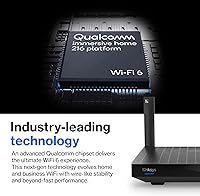
  • Qualcomm chipset provides reliable, stable throughput that stands out at this price level.
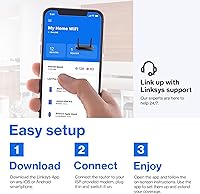
  • App-based setup gets most users online in under ten minutes, no technical knowledge required.
  • The 18-month warranty offers meaningfully more coverage than the standard one-year included by most competitors.
  • Handles 25-plus simultaneous devices without the slowdowns common on older dual-band routers.
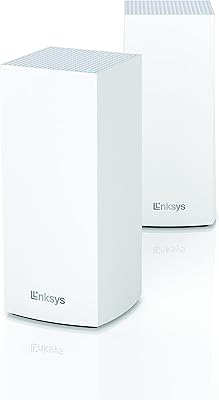
  • Mesh-expandable design means you can add nodes later rather than replacing the whole system.
  • Guest Mode and WPS make it easy to manage visitors and new devices without sharing your main password.
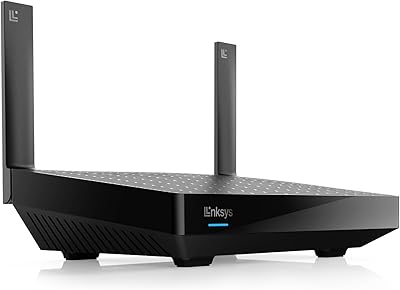
  • Low-profile form factor sits discreetly on a shelf or desk without dominating the room.
  • Backward compatible with older devices, so nothing in your existing setup gets left behind.

Cons

  • Single-unit coverage tops out at 2,000 sq ft, leaving larger or multi-story homes with real dead zones.
  • App reliability after firmware updates has frustrated a recurring portion of users.
  • Limited Ethernet ports make it awkward for households with more than one or two wired devices.
  • No tri-band support means bandwidth headroom is tighter than on comparably priced competitors.
  • Customer support quality is inconsistent despite the heavily promoted US-based phone helpline.
  • The router occasionally requires a manual restart every few weeks to maintain stable performance.
  • Expansion to a true mesh network requires buying additional nodes, which raises the total cost significantly.
  • Advanced users will find the management app too basic for anything beyond simple household configurations.

Ratings

The Linksys MR20EC WiFi 6 Mesh Router has been scored using an AI-driven analysis of verified global buyer reviews, with spam, bot activity, and incentivized feedback actively filtered out before any scoring was applied. The result is a transparent breakdown that reflects both what this router genuinely does well and where real users have run into frustrations. Strengths and limitations are weighted equally so you can make an informed decision.
Wireless Performance
78%
22%
For everyday home tasks — 4K streaming, video calls, and a handful of smart home devices running simultaneously — the WiFi 6 connection holds up reliably. Users upgrading from older routers frequently note a tangible improvement in stability, especially when multiple family members are online at once.
Performance drops noticeably at the edges of its range or through multiple walls. Users in denser or older homes report inconsistency that a tri-band or higher-powered unit would likely handle better.
Coverage & Range
63%
37%
In open-plan apartments and compact single-story homes, the 2,000 sq ft coverage claim holds reasonably true. Buyers in studio or two-bedroom setups consistently report strong signal throughout without needing additional hardware.
For anyone with a larger floor plan, a multi-story layout, or thick concrete walls, a single unit simply does not cut it. This is the most common source of disappointment in user reviews — the coverage ceiling is real and should be taken seriously.
Setup & Installation
91%
The Linksys app walks you through the entire process in a few minutes, and most buyers report being online well under ten minutes from unboxing. Non-technical users specifically call out how much less intimidating this is compared to browser-based admin panels on competing routers.
A small number of users hit snags during initial pairing, particularly on Android devices. These appear to be edge cases, but the lack of a manual fallback option frustrates buyers when the app fails to connect on the first attempt.
App & Remote Management
69%
31%
Day-to-day device management — checking who is connected, prioritizing a work laptop during video calls, or toggling the guest network — works smoothly for most users. The ability to manage everything remotely without logging into a router dashboard is a genuine quality-of-life improvement.
Post-firmware-update app instability is a recurring complaint. Some users report the app losing connection to the router temporarily after updates, requiring a restart to restore full control. It is functional but not polished enough to be fully reliable.
Device Handling & Congestion
82%
18%
Households running phones, tablets, smart TVs, a gaming console, and several IoT devices simultaneously find this router manages the load without the bottlenecks common in older WiFi 5 setups. The OFDMA architecture genuinely helps spread bandwidth more intelligently across active devices.
Near the upper limit of 25-plus connected devices, some users notice occasional lag spikes, particularly if multiple devices are streaming or downloading simultaneously. It handles typical household loads well but starts to show strain in denser smart home environments.
Build Quality & Design
74%
26%
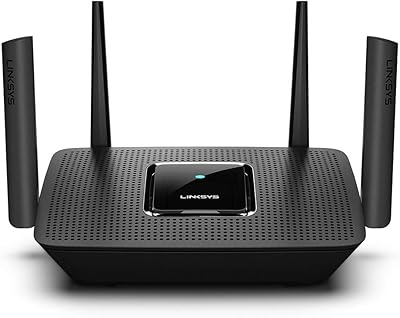
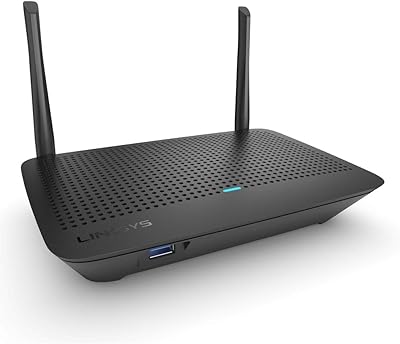
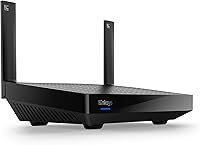
The low-profile form factor fits neatly on a shelf or entertainment unit without drawing attention. At just one pound, it is lightweight and easy to reposition if needed, and the matte black finish looks reasonably clean in a home setting.
The plastic housing feels utilitarian rather than premium, which is understandable at this price point but worth noting if you are placing it somewhere visible. A few users mention it runs noticeably warm during sustained heavy use.
Value for Money
83%
Relative to what you are getting — a Qualcomm-powered WiFi 6 router with an 18-month warranty — the price sits in a genuinely competitive spot. Buyers coming from budget-tier WiFi 5 routers tend to feel the upgrade represents real money well spent.
When stacked against similarly priced competitors that offer tri-band or slightly broader coverage, the value calculus gets tighter. Buyers who need more than 2,000 sq ft will find themselves spending more on additional nodes, which changes the overall cost picture.
Latency & Gaming Performance
71%
29%
Casual gaming — online multiplayer on a console, light PC gaming — runs without meaningful lag on this router when the device is within a comfortable range. The WiFi 6 low-latency improvements over WiFi 5 are real and noticeable in these everyday scenarios.
This is not a router built for serious or competitive gaming. Hardcore players will quickly identify the absence of dedicated gaming QoS controls and the dual-band limitation as meaningful gaps compared to routers purpose-built for low-latency gaming traffic.
Mesh Expandability
67%
33%
The architecture supports adding Linksys-compatible nodes later to extend coverage, which gives the router a degree of future-proofing. For buyers who start with a smaller space but anticipate moving or renovating, this is a legitimate long-term consideration.
Expansion requires purchasing additional nodes separately, and buyers expecting a ready-made whole-home mesh system out of the box will be caught off guard. The expandability is real, but the out-of-box experience is firmly single-unit only.
Warranty & Customer Support
66%
34%
The 18-month warranty is a genuine differentiator for an Amazon-exclusive product at this price tier, offering more coverage than the standard 12-month period common among competitors. Buyers appreciate having that extra buffer for a networking device.
Phone-based support experiences are mixed. While Linksys promotes its US-based helpline prominently, a portion of users report long wait times and inconsistent quality of assistance, which tempers the value of the warranty in practice.
Wired Connectivity
58%
42%
The inclusion of an Ethernet port allows users to hardwire a high-priority device — a desktop PC or smart TV — directly to the router, which some users find helpful for extracting maximum stability from their connection.
Port count is limited, which is a frustration for users with multiple wired devices. A desktop, a smart TV, and a gaming console would already exhaust available connections, forcing buyers to add a switch if they rely heavily on wired backhaul.
Compatibility
84%
The router plays nicely with a wide range of devices out of the box — smartphones, smart TVs, laptops, and IoT gadgets connect without any manual configuration in the vast majority of cases. WiFi 6 backward compatibility means older devices connect without issue.
A small subset of users report compatibility quirks with certain older smart home devices and proprietary IoT ecosystems. These are isolated cases rather than a systemic issue, but worth flagging for buyers with a large legacy device setup.
Signal Stability Over Time
73%
27%
Most users report a consistent, stable connection over weeks and months of regular use. The router does not appear to degrade significantly over time under normal household conditions, which builds confidence in its long-term reliability.
A recurring complaint involves the router requiring periodic restarts — typically every few weeks — to maintain peak performance. It is not a dealbreaker, but it is the kind of minor friction that makes the router feel slightly less set-and-forget than its marketing implies.

Suitable for:

The Linksys MR20EC WiFi 6 Mesh Router is a practical fit for apartment dwellers, renters, and owners of compact single-story homes where coverage needs fall comfortably within 2,000 sq ft. If your household runs a busy mix of smartphones, smart TVs, a laptop or two, and a handful of smart home gadgets, this router handles that load without the signal congestion you would experience on an older WiFi 5 unit. It is particularly well suited to buyers who are not networking enthusiasts — the app-based setup and management remove the need to ever log into a complicated admin interface. Families upgrading from an aging router will notice a genuine day-to-day difference in stability during peak evening hours when everyone is streaming or on video calls simultaneously. And for those who think they might need more coverage later, the mesh-expandable architecture means you are not locked into a dead-end purchase — you can grow the network by adding nodes as your situation changes.

Not suitable for:

The Linksys MR20EC WiFi 6 Mesh Router is not the right call for anyone with a larger home, a multi-story layout, or rooms separated by thick masonry walls — the single-unit coverage ceiling is a firm constraint, not a loose estimate. Buyers expecting a ready-to-go whole-home mesh system out of the box will be disappointed, since additional nodes are sold separately and add meaningfully to the total cost. Serious or competitive gamers should also look elsewhere: this router lacks the dedicated gaming QoS controls and tri-band architecture that purpose-built gaming routers offer. Power users who want granular control over VLANs, advanced QoS settings, or detailed traffic analytics will find the app-centric management too simplified for their needs. If your internet plan delivers very high symmetrical speeds and you want to extract every megabit from it, the dual-band configuration may become a bottleneck before your ISP does.
Specifications

  • WiFi Standard: This router operates on the 802.11ax (WiFi 6) standard, with backward compatibility for 802.11ac and 802.11n devices.
  • Band Configuration: Dual-band design broadcasts on both 2.4 GHz and 5 GHz frequency bands simultaneously.
  • Combined Speed: Maximum combined wireless throughput is rated at AX3000, reflecting the aggregate of both bands under ideal conditions.
  • Chipset: Powered by a Qualcomm processor, which contributes to stable multi-device performance and reliable mesh coordination.
  • Coverage Area: Designed to cover up to 2,000 sq ft as a single unit, suited to apartments and compact single-story homes.
  • Device Support: Supports 25 or more simultaneously connected devices, including smartphones, smart TVs, laptops, and IoT gadgets.
  • Mesh Capability: Compatible with Linksys Intelligent Mesh architecture, allowing additional nodes to be added later to extend network coverage.
  • Setup Method: Initial configuration and ongoing management are handled through the free Linksys mobile app, available on iOS and Android.
  • Special Features: Includes Guest Mode for isolated visitor access and WPS for quick one-button device pairing.
  • Connectivity Ports: Offers Ethernet port connectivity alongside wireless access, allowing at least one device to be hardwired directly to the router.
  • Warranty: Covered by an 18-month limited warranty, which exceeds the standard 12-month coverage typical for routers in this category.
  • Dimensions: Physical dimensions measure 8.38 x 5.5 x 1.95 inches, allowing for a low-profile placement on a shelf or desk.
  • Weight: The unit weighs 1 pound, making it easy to reposition as needed without any mounting hardware.
  • Color: Available in a matte black finish that blends into most home or office environments without drawing attention.
  • Compatibility: Compatible with personal computers, smart televisions, smartphones, and the broader range of standard home networking devices.
  • Availability: Sold exclusively through Amazon under model number MR20EC-AMZ, and was first made available in July 2022.
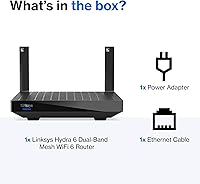
  • Included Contents: Package includes the WiFi 6 mesh router unit and a power supply adapter; no Ethernet cable is included in the box.
  • Security Protocols: Supports WPA3 and WPA2 wireless security protocols to protect the home network from unauthorized access.

Related Reviews

Linksys AX2200 WiFi 6 Mesh Router
84%
88%
WiFi Speed & Performance
91%
Ease of Setup
85%
Coverage & Range
72%
Reliability in Large Homes
90%
App Functionality & Control
More
Linksys MX8000 Velop Mesh WiFi Router 2-Pack
75%
86%
Coverage & Range
74%
WiFi Speed Performance
83%
Multi-Device Handling
91%
Setup & Installation
78%
App Experience
More
Linksys LN3121 WiFi 6 Mesh Router
73%
91%
Ease of Setup
74%
WiFi Coverage
78%
Connection Speed
82%
Multi-Device Performance
83%
Network Stability
More
Linksys MR8300 Mesh WiFi Router
84%
88%
Wi-Fi Performance
81%
Ease of Setup
90%
Coverage Area
85%
Device Support
89%
Gaming Performance
More
Linksys MR7350 WiFi 6 Router
76%
91%
Setup & Onboarding
78%
WiFi Speed & Throughput
67%
Coverage & Range
83%
Device Handling & Congestion
72%
App & Remote Management
More
Linksys MR6350 Dual-Band Mesh WiFi Router
74%
91%
Ease of Setup
62%
WiFi Coverage
84%
Connection Stability
71%
Real-World Speed
68%
App Experience
More
Linksys E8450 AX3200 WiFi 6 Router
86%
91%
WiFi Performance
88%
Setup & Installation
87%
Coverage Range
89%
Device Support
82%
Speed Consistency
More
Reyee RG-R6 AX3200 Mesh WiFi 6 System (1-Pack)
71%
88%
Value for Money
91%
Setup & Ease of Use
76%
WiFi Coverage
79%
Network Speed & Throughput
82%
Multi-Device Performance
More
Linksys Velop MX12600 Tri-Band Mesh WiFi System
80%
83%
Coverage & Range
78%
Network Speed
86%
Device Handling
91%
Setup Experience
67%
App Quality
More
D-Link AX3000 M30 WiFi 6 Mesh Router
78%
74%
WiFi Coverage & Range
78%
WiFi Speed & Throughput
88%
Setup & Installation
71%
App Experience
83%
Parental Controls
More

FAQ

In an open-plan apartment or a compact single-story home, most users find the coverage claim holds up reasonably well. That said, thick walls, multiple floors, or a layout with many closed rooms will reduce effective range. If your space is around 1,200 to 1,500 sq ft with normal construction, you should be fine with a single unit.

Yes, the Linksys Hydra 6 supports the Intelligent Mesh architecture, which means you can purchase compatible Linksys nodes separately and add them to your network over time. It is not a plug-and-play process with any random router, though — you will need Linksys-compatible mesh nodes for the system to work together properly.

Setup is genuinely straightforward. You download the free Linksys app, plug in the router, and follow the on-screen steps — most users are connected in under ten minutes. You never need to open a browser-based admin panel unless you specifically want to, which keeps things simple for non-technical households.

Yes. The Linksys MR20EC WiFi 6 Mesh Router is backward compatible, so older laptops, phones, and smart home devices using WiFi 5 or WiFi 4 will connect without any issues. They just will not benefit from the WiFi 6 speed improvements unless they also support the 802.11ax standard.
For casual gaming — console multiplayer, light PC gaming, or streaming game services — it performs well and the WiFi 6 low-latency improvements are noticeable compared to older routers. If you are a competitive or hardcore gamer who needs dedicated gaming QoS controls and prioritized traffic management, a router purpose-built for gaming would serve you better.

The router is rated for 25-plus devices, and in typical household use that ceiling holds up well. Where users start to notice strain is when a large number of those devices are actively streaming or downloading simultaneously rather than just sitting idle on the network. For most families, 25 devices is more than enough headroom.

The 18-month coverage is a legitimate extension beyond the standard one-year warranty that most competitors offer, and it covers manufacturing defects and hardware failures under normal use. The caveat is that Linksys customer support quality has received mixed reviews, so getting a warranty claim processed smoothly may require some patience.

Yes, the Linksys app lets you view connected devices, adjust priorities, and toggle the guest network from anywhere with a data connection. It is not as feature-rich as the admin panels on some advanced routers, but for everyday remote management tasks it works reliably for most users.

This mesh router works with virtually any ISP that provides a standard modem or gateway. You simply connect it via Ethernet to your existing modem, and the Linksys app handles the rest. There are no known ISP-specific restrictions tied to this model.

Most users find it runs reliably for weeks without intervention. A recurring complaint in buyer reviews is that some units need a manual restart every few weeks to maintain peak speed — particularly after firmware updates. It is not a universal experience, but it is worth knowing it can happen occasionally rather than treating it as a completely set-and-forget device.

Where to Buy