Overview

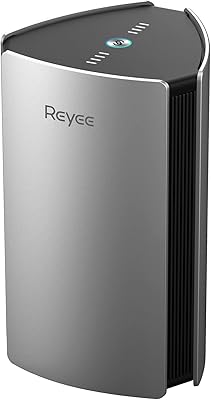
The Reyee E6 AX6000 WiFi 6 Router is one of those rare budget-tier devices that makes you genuinely question why you would spend twice as much on a household name. Reyee is the consumer arm of Ruijie Networks, a company with deep enterprise networking roots across Asia — so the hardware DNA here is less unfamiliar than the brand name might suggest. That said, keep expectations realistic: this is not an Asus ROG or a Netgear Nighthawk. What it is, though, is a dual-band WiFi 6 router with a 2.5G multi-gigabit WAN port — a feature rarely seen at this price point. One critical note before purchasing: the E6 requires a separate modem to function and does not include one.
Features & Benefits

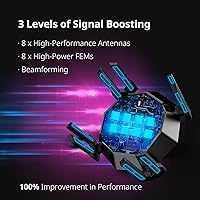
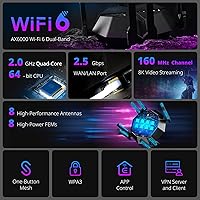
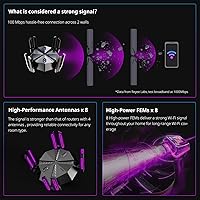
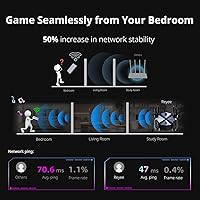
The most practically useful thing about the E6 is its dedicated gaming LAN port. Plug your console or PC into it and the router automatically bumps that device to the front of the traffic queue — no menus, no configuring rules. The quad-core processor handles a crowded network surprisingly well, keeping latency from spiking even when other devices are pulling large downloads simultaneously. Eight antennas paired with front-end modules help the signal push through walls better than most routers in this class. For users on multi-gig internet plans, 160 MHz channel support means compatible WiFi 6 devices can actually approach the speeds your ISP is delivering. Smart VPN and Access Point mode round things out for anyone wanting additional control.

Best For

This Reyee gaming router makes the most sense for a specific kind of buyer. If you live in a medium or large home with multiple people gaming, streaming, and video-calling at the same time, the combination of strong multi-room range and automatic traffic prioritization genuinely matters. It is also a smart pick for anyone who has recently upgraded to gigabit or multi-gig internet and wants hardware that will not bottleneck those speeds at the WAN port. Home lab users will appreciate the 2.5G port for NAS connections. Where it falls short is for apartment dwellers with modest internet plans or anyone who wants the polished app experience of an established brand. Budget-conscious gamers willing to research a lesser-known name will find the strongest value here.

User Feedback

With over 3,000 ratings averaging 4.2 out of 5 stars, this WiFi 6 router has earned a genuinely positive reception — though the picture is nuanced. Buyers consistently highlight easy out-of-box setup and a noticeable drop in gaming latency after switching from older hardware. Range holds up well in two-story homes, which tracks with the antenna-heavy design. On the critical side, the companion app draws regular comparisons to more mature offerings from Asus or TP-Link — reviewers describe it as functional but unpolished. A handful of longer-term owners flag occasional firmware stability issues, though most report these resolved after updates. Buyers who approach this router knowing it is a value-tier device from a newer consumer brand tend to come away satisfied.

Pros

  • The 2.5G WAN port is a rare and genuinely useful feature at this price point, especially for multi-gig internet subscribers.
  • The dedicated gaming LAN port automatically prioritizes wired devices — no settings to dig through.
  • Setup takes most buyers under fifteen minutes, even without prior networking experience.
  • Strong whole-home range handles medium to large floor plans with minimal dead zones.
  • The quad-core processor keeps latency stable even when many devices are active simultaneously.
  • WPA3 security support is included at a tier where some competitors still default to older protocols.
  • Access Point mode and Smart VPN add genuine flexibility for users who want more than a basic home router.
  • Over 3,000 Amazon ratings averaging 4.2 stars reflects a broad, consistent base of satisfied buyers.
  • The E6 delivers near-premium hardware specifications without the premium price tag that typically comes with them.

Cons

  • The companion mobile app feels unfinished compared to mature offerings from Asus or TP-Link.
  • Some firmware updates have introduced instability, requiring manual rollbacks to restore consistent performance.
  • Reyee's customer support response times are inconsistent and the user community is still relatively small.
  • This WiFi 6 router requires a separate modem, which is easy to overlook and adds to the total cost of setup.
  • Long-term reliability data beyond the one-year mark is limited compared to routers from more established brands.
  • Advanced features like detailed traffic logging and granular parental controls are underdeveloped relative to competitors.
  • The plastic chassis feels noticeably less premium than hardware from Netgear or Asus in the same size class.
  • In homes with thick concrete walls or heavily partitioned layouts, coverage gaps may still require additional hardware.
  • Wireless gaming improvements are modest without the dedicated wired port — the real latency gains are wired-only.

Ratings

The scores below reflect an AI-driven analysis of thousands of verified global reviews for the Reyee E6 AX6000 WiFi 6 Router, with spam, bot activity, and incentivized feedback actively filtered out to ensure the results are grounded in genuine buyer experiences. This router draws a wide range of users — from casual households to serious home-lab builders — and the ratings capture both where it genuinely impresses and where it still has room to grow. Nothing has been softened: the strengths and the frustrations are weighted equally.

Value for Money
93%
This is where the E6 earns its reputation. Buyers consistently express surprise at how much hardware they get for the asking price, especially the 2.5G WAN port and eight-antenna design, which are typically reserved for significantly more expensive routers. Most users feel they got more than their money's worth within the first week of use.
A small segment of buyers who purchased during price fluctuations felt the value equation shifted slightly, and a few noted that ongoing firmware immaturity somewhat erodes the long-term return on investment compared to pricier but more polished alternatives.
Wireless Range & Coverage
86%
The eight-antenna array with front-end modules delivers noticeably stronger signal penetration through interior walls than most competitors in this class. Users in two-story homes and open floor plans consistently report solid coverage with minimal dead zones, making it a reliable choice for medium to large living spaces.
In homes with thick concrete walls or complex multi-floor layouts, a handful of users report signal drop-off in far corners. The router performs best in open or moderately partitioned spaces; heavily segmented floor plans may still require a mesh node or extender for full coverage.
Gaming Performance
82%
18%
The dedicated gaming LAN port is the standout here — users plugging a console or gaming PC directly into it report measurably lower ping and a more stable wired connection, without touching any settings. The adaptive QoS also helps wireless gamers by keeping background traffic from competing during active sessions.
Results on the wireless side are more mixed. Competitive gamers using WiFi rather than the dedicated wired port see modest but not transformative improvements, and a few reviewers note that the gains are harder to distinguish from a good-quality router in the same price range without a controlled comparison.
Ease of Setup
88%
Setup is one of the most consistently praised aspects across all reviewer segments. Most buyers report being fully operational within ten to fifteen minutes of unboxing, guided by a straightforward quick-start guide and an intuitive initial configuration flow. Non-technical users particularly appreciate that the gaming port works automatically without any manual configuration.
The companion mobile app, while adequate for basic setup, lacks the guided onboarding depth found in apps from Asus or TP-Link. A small number of users who attempted more advanced configurations through the app reported confusion and eventually switched to the web interface instead.
Mobile App & Software Experience
61%
39%
The app covers the essential functions — network monitoring, guest network management, and basic QoS controls — well enough for the majority of home users who just want things to work without diving into a browser-based admin panel. Updates have gradually added features over time.
This is the E6's most criticized weakness. Buyers coming from Asus, TP-Link, or even Eero find the Reyee app noticeably less polished, with occasional crashes, delayed status updates, and a layout that feels unfinished. Advanced features like VPN configuration and detailed traffic logs are better accessed through the web UI.
Firmware Stability & Updates
67%
33%
Reyee has pushed firmware updates at a reasonable cadence since launch, and several users note that stability has improved meaningfully over the first year. The underlying enterprise networking heritage shows in the core routing stability — the router itself rarely goes down unexpectedly.
Early adopters experienced occasional quirks including random reboots and inconsistent QoS behavior after certain firmware pushes. Some users report having to roll back updates to restore stable performance, which is not an experience buyers expect at any price point.
Multi-Device Performance
84%
Households with smartphones, laptops, smart TVs, tablets, and gaming consoles all running simultaneously report the E6 handles the load without obvious slowdowns. The quad-core processor keeps things stable even during peak evening hours when every device in the house is active.
With more than fifteen or twenty simultaneous active connections, a small subset of users noticed occasional latency spikes that were not present under lighter loads. The router performs best when managing a busy but not extreme number of connected devices.
Build Quality & Design
74%
26%
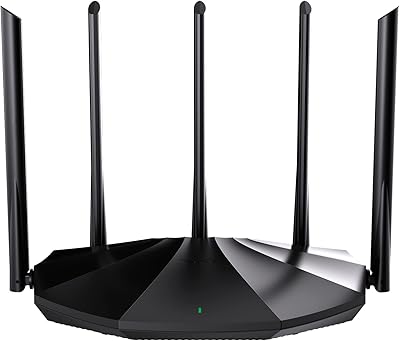
The E6 has a solid, angular look with eight antennas that communicates capability without being garish. At just over two pounds, it feels substantial on a desk or shelf, and the matte black finish resists fingerprints reasonably well during everyday handling.
The plastic chassis flexes slightly under pressure and does not feel as premium as routers from Asus or Netgear in the same size category. A few buyers noted the antennas feel loosely hinged compared to higher-end units, which raises minor durability questions over a multi-year lifespan.
2.5G WAN Port Utility
91%
For users on multi-gig ISP plans, the 2.5G WAN port is one of the best reasons to choose this router over alternatives at the same price. Home lab users also make excellent use of it for NAS connectivity, getting real-world transfer speeds that a standard gigabit port simply cannot match.
The benefit is only relevant if your ISP delivers speeds above 1 Gbps or if you have local network hardware that can take advantage of multi-gig throughput. For the majority of users still on 100–500 Mbps plans, this port provides no practical advantage in day-to-day use.
Heat Management & Noise
78%
22%
The E6 runs passively cooled with no fan, which means it is completely silent during operation — an underappreciated quality in a router that sits in a living room or bedroom. Under normal mixed workloads, the chassis stays warm but not uncomfortably hot to the touch.
During sustained high-throughput sessions — large file transfers or extended gaming marathons — the unit gets noticeably warm, particularly around the lower vents. A handful of users in warmer climates or poorly ventilated spaces report the heat becomes a concern over extended periods.
Security Features
79%
21%
WPA3 support brings modern encryption to a price tier where it is still not universal, and the guest network mode works reliably for keeping IoT devices and visitors isolated from the main network. Smart VPN support is a genuine bonus for users who run home servers or need secure remote access.
Reyee does not offer a bundled security subscription or automatic threat intelligence updates the way Netgear Armor or Asus AiProtect do. Users who want active malware filtering and parental controls beyond basic DNS-level blocking will need to look elsewhere or use a third-party solution.
Long-Term Reliability
71%
29%
The majority of buyers who have owned the E6 for six months or longer report it has stayed consistently operational, with no hardware failures and solid uptime. The enterprise lineage of the underlying platform appears to contribute to a stable base-level performance over time.
There is a meaningful gap in long-term data compared to routers from more established brands with multi-year track records. Some buyers in the one-year-plus ownership range report firmware-triggered performance regressions that required manual intervention, adding minor but real maintenance overhead.
Advanced User Features
76%
24%
Access Point mode, Smart VPN, and detailed web-based admin controls give power users a reasonable toolkit without requiring third-party firmware. Home lab enthusiasts and IT-savvy buyers consistently point to the web UI as genuinely functional once they move past the app.
The feature set still lags behind what Asus offers through its router operating system, particularly around guest VLAN configuration, detailed traffic logging, and parental control granularity. Users who want deep customization may hit a ceiling faster than expected.
Brand Trust & Support
63%
37%
Reyee has been responsive on its Amazon listing with product Q&A replies, and its enterprise parent company Ruijie has an established track record in professional networking hardware. Buyers who did their research before purchasing generally feel more confident about the brand than those who encountered it cold.
Customer support experiences are inconsistent. Some buyers report helpful responses, while others describe slow turnaround times and difficulty resolving firmware or compatibility issues. The lack of a wide established support community — compared to Asus or TP-Link forums — means self-service troubleshooting resources are still thin.

Suitable for:

The Reyee E6 AX6000 WiFi 6 Router is built for buyers who want serious networking hardware without paying flagship prices, and it earns that position honestly. It is an especially strong fit for gamers in medium to large homes who want wired traffic prioritization to work automatically — plug a console or PC into the dedicated gaming port and the router handles the rest, no configuration required. Households juggling a dozen or more devices across multiple rooms will also find the combination of strong multi-room range and a capable processor keeps things running smoothly even during peak evening hours. Anyone who has recently upgraded to a gigabit or multi-gig internet plan should pay particular attention to the 2.5G WAN port, which prevents the router from becoming the bottleneck in their setup. Home lab users who want to maximize local network speeds for NAS transfers or self-hosted services will find real, practical value in that same port. If you are willing to look past an unfamiliar brand name and do a little research upfront, this router consistently over-delivers for its price class.
Not suitable for:

The Reyee E6 AX6000 WiFi 6 Router is not the right choice for everyone, and it is worth being clear about where it falls short before committing. Buyers who rely heavily on a polished mobile app for network management — whether for parental controls, real-time traffic monitoring, or guest network scheduling — will find the Reyee app frustrating compared to what Asus or TP-Link offer at similar price points. Users in apartments or smaller homes with modest internet plans are unlikely to notice enough difference from a simpler, cheaper router to justify the purchase. Anyone expecting a modem-router combo should know this is a router only and requires a separate modem to function, which adds cost and a step that some buyers overlook entirely. Competitive PC gamers who demand the deepest possible QoS fine-tuning, VLAN configuration, or third-party firmware support like DD-WRT will hit the E6's ceiling quickly. And buyers who place significant weight on brand reputation, long-established customer support networks, or a proven multi-year reliability track record may feel more comfortable spending more with a household name.
Specifications

  • WiFi Standard: The router operates on the 802.11ax (WiFi 6) standard, with backward compatibility for 802.11ac, 802.11n, 802.11g, and 802.11b devices.
  • Max Throughput: Combined dual-band throughput reaches up to 5952 Mbps under ideal conditions using 160 MHz channel width on the 5 GHz band.
  • Frequency Bands: Dual-band design covers both the 2.4 GHz band for range and the 5 GHz band for higher-speed, lower-latency connections.
  • Processor: A 2.0 GHz quad-core 64-bit CPU manages routing, QoS, and VPN workloads without significantly impacting network throughput under heavy use.
  • Antennas: Eight external antennas work in conjunction with eight front-end modules (FEMs) to strengthen both signal transmission and reception across the home.
  • WAN Port: The primary WAN port supports up to 2.5 Gbps, allowing the router to fully utilize multi-gigabit internet plans without a throughput bottleneck.
  • LAN Ports: Multiple Gigabit LAN ports are included, one of which is designated as a dedicated gaming port with automatic traffic prioritization for any wired device connected to it.
  • Security Protocol: WPA3 encryption is supported as the primary wireless security standard, with WPA2 compatibility retained for older client devices.
  • Special Modes: The router supports Access Point mode, Guest Network isolation, adaptive QoS, Smart VPN, and WPS for simplified wireless device pairing.
  • Dimensions: The unit measures 9.8 x 9.7 x 6.1 inches, with a vertical tower-style form factor and eight repositionable external antennas.
  • Weight: The router weighs 2.16 pounds, making it straightforward to position on a shelf or desk without additional mounting hardware.
  • Cooling System: The E6 uses passive cooling with no internal fan, resulting in completely silent operation during normal and heavy network loads.
  • Color & Finish: The chassis is finished in matte black, which resists fingerprints and suits most home or office desk setups without drawing attention.
  • In-Box Contents: The package includes the RG-E6 router, one Ethernet cable, and a printed quick installation guide; no modem or power adapter for modem is included.
  • Power Requirement: The router requires an AC power connection via the included power adapter; no battery backup or PoE support is built in.
  • Channel Width: Support for 160 MHz channel width on the 5 GHz band enables peak WiFi 6 throughput on compatible client devices such as recent laptops and smartphones.
  • Amazon Rating: The product holds a 4.2 out of 5 star average rating based on more than 3,000 verified customer ratings on Amazon.
  • Availability Date: The RG-E6 model was first made available for purchase in October 2023 and is manufactured by Reyee, a consumer brand under Ruijie Networks.

Related Reviews

Reyee RG-R6 AX3200 Mesh WiFi 6 System (1-Pack)
71%
88%
Value for Money
91%
Setup & Ease of Use
76%
WiFi Coverage
79%
Network Speed & Throughput
82%
Multi-Device Performance
More
TP-Link Archer AX6000 WiFi 6 Router
80%
88%
Wireless Performance
91%
Multi-Device Handling
86%
Setup & Ease of Use
93%
Wired Connectivity
82%
Range & Coverage
More
D-Link M60 AX6000 Wi-Fi 6 Mesh Router
83%
88%
Wi-Fi Speed & Throughput
74%
Wi-Fi Coverage & Range
93%
Design & Aesthetics
91%
Setup & Initial Configuration
83%
App Experience & Management
More
ASUS ROG Rapture GT-AX6000 WiFi 6 Gaming Router
86%
94%
Gaming Performance
91%
Connection Stability
78%
Setup/Installation Ease
88%
Value for Money
85%
Build Quality
More
Linksys MR20EC WiFi 6 Mesh Router
74%
78%
Wireless Performance
63%
Coverage & Range
91%
Setup & Installation
69%
App & Remote Management
82%
Device Handling & Congestion
More
Gryphon AX Mesh WiFi 6 Router
73%
91%
Parental Controls
88%
Network Security
76%
WiFi Speed & Performance
78%
Coverage & Range
84%
Setup & Installation
More
NETGEAR R6700AXS AX1800 WiFi 6 Router
76%
78%
Wireless Performance
91%
Setup Experience
83%
Multi-Device Handling
86%
Network Security
67%
Coverage Range
More
Tenda RX2Pro AX1500 WiFi 6 Router
76%
91%
Value for Money
78%
Wireless Performance
72%
Coverage & Range
93%
Ease of Setup
74%
App Experience
More
Linksys MR7350 WiFi 6 Router
76%
91%
Setup & Onboarding
78%
WiFi Speed & Throughput
67%
Coverage & Range
83%
Device Handling & Congestion
72%
App & Remote Management
More
Linksys AX2200 WiFi 6 Mesh Router
84%
88%
WiFi Speed & Performance
91%
Ease of Setup
85%
Coverage & Range
72%
Reliability in Large Homes
90%
App Functionality & Control
More

FAQ

The E6 is a router only — it does not include a modem and cannot function as one. You will need a separate modem from your ISP or a compatible third-party modem to connect to the internet. This is one of the most common points of confusion buyers run into before purchasing.

No configuration is needed at all. You simply plug your gaming PC, console, or any wired device into the port labeled as the gaming port, and the router automatically gives that device priority over other traffic on the network. It works out of the box, which is one of the most praised features among buyers who do not want to dig through QoS settings.

Yes, and it will handle a standard gigabit plan comfortably. Where the Reyee E6 AX6000 WiFi 6 Router really stands out is for users on plans above 1 Gbps — the 2.5G WAN port means the router itself will not cap your speeds the way a standard gigabit WAN port would. If you are on a 100 or 300 Mbps plan, you will not notice a difference from that specific feature.
You can manage the E6 entirely through a web browser by accessing the router's admin panel directly, and many experienced users actually prefer this method. The mobile app works for basic tasks like monitoring connected devices and managing the guest network, but it is less polished than what you get from Asus or TP-Link. For advanced features like VPN setup, the web interface is the better route.

Most buyers in two-story homes report solid coverage throughout, including upstairs rooms and areas behind interior walls. The eight-antenna design with front-end modules does a noticeably better job of pushing signal through obstacles than most routers in this price range. That said, homes with thick concrete walls or complex multi-level layouts may still benefit from an additional access point or mesh node in hard-to-reach areas.

Yes, the 2.5G port can be reconfigured as a LAN port, which makes it very useful for connecting a NAS device or a multi-gig network switch. Home lab users in particular find this one of the most practical features of the E6, since it allows real local transfer speeds well beyond what a standard gigabit LAN port can deliver.

Reyee is the consumer-facing brand of Ruijie Networks, a company with a long track record in enterprise and commercial networking equipment across Asia. So while the Reyee name itself is relatively new to Western markets, the engineering foundation behind it is not from scratch. With over 3,000 Amazon ratings averaging 4.2 stars, there is a meaningful base of real buyer experience to draw from. The main trade-off is that the support ecosystem and user community are still smaller than those of established names like Asus or TP-Link.

WPA3 is fully supported, which puts this router ahead of several competitors at the same price point that still default to WPA2. It maintains backward compatibility with WPA2 devices as well, so you will not have any issues connecting older smartphones, laptops, or smart home devices.

The E6 runs completely silently because it uses passive cooling with no internal fan. Even during sustained heavy file transfers or extended gaming sessions, there is no audible noise whatsoever. The chassis does get warm under load, so just make sure it has adequate airflow around it rather than being enclosed in a cabinet.

Firmware updates can be applied through the router's web admin panel or the Reyee app, and the router can check for available updates automatically. Reyee has released updates at a reasonable pace since launch, and stability has generally improved over time. That said, a small number of users have experienced temporary performance issues after specific updates, so it is worth checking community feedback before applying a new firmware version if stability is critical for you.