Overview

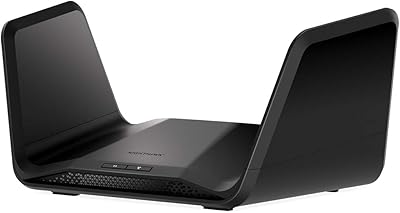
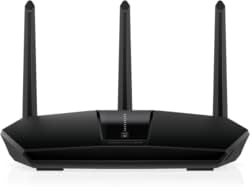
The NETGEAR Nighthawk RAX120 AX6000 WiFi 6 Router is a premium dual-band unit built for households that genuinely push their network hard. With a 12-stream architecture and AX6000-class speeds, this Nighthawk router sits firmly in the upper tier of home networking gear — not a casual purchase, but a deliberate one. Unlike the bristling antenna towers from some competitors, the RAX120 keeps a low-profile form factor that slides onto a shelf without dominating the room. That said, if you are considering this WiFi 6 router, it is worth knowing that newer tri-band options have entered the market at comparable prices, so the value equation deserves a careful look.

Features & Benefits

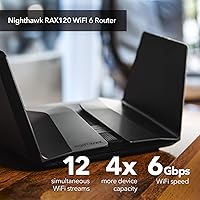
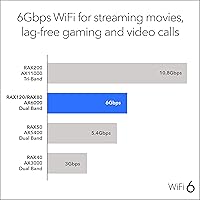
Running on the 802.11ax standard, the RAX120 combines both bands for a theoretical ceiling of 6 Gbps — though real-world throughput depends heavily on your client devices and environment. The real advantage of 12-stream MU-MIMO becomes apparent in busy households: multiple 4K streams, video calls, and active gaming sessions can coexist without the bandwidth fights you would see on older hardware. Beamforming+ focuses signal energy toward individual devices rather than broadcasting indiscriminately, which noticeably helps at longer ranges. The multi-gig wired ports are a genuine asset for anyone running a NAS or a wired workstation. Two USB 3.0 ports add shared storage capability. Security is handled by NETGEAR Armor, though a paid subscription kicks in after the initial 30-day trial.

Best For

This WiFi 6 router makes the most sense for larger homes — roughly 3,500 square feet — where a single-unit router still needs to reach bedrooms, a home office, and a backyard without dropping off. Gamers and heavy streamers benefit most, particularly those who have upgraded to WiFi 6-capable devices like recent laptops, phones, and consoles. The multi-gig WAN port is a standout feature for anyone on an internet plan that pushes past 1 Gbps. The RAX120 also handles mixed-device households well, maintaining solid backward-compatible performance for older 802.11ac gear. Less tech-savvy users can manage basics through the Nighthawk app, but advanced settings like QoS do reward a willingness to explore.

User Feedback

Owner sentiment on this Nighthawk router skews positive for raw 5GHz performance — many upgraders from WiFi 5 describe the difference as immediately noticeable, especially on compatible devices. Heat is a recurring point of contention; the flat chassis does not dissipate warmth as efficiently as a vented tower design, so placement and airflow matter more than you might expect. The Nighthawk app earns praise for easy initial setup but has been known to behave erratically after firmware updates, which frustrates long-term owners. Reviewers consistently flag the Armor subscription cost as an unwelcome surprise once the trial ends. A handful of buyers also mention that comparable tri-band routers at similar price points can deliver better aggregate real-world throughput.

Pros

  • Handles 30-plus simultaneous devices without the congestion collapse common on older hardware.
  • Multi-gig wired ports are a genuine asset for NAS users and anyone on a 2 Gbps fiber plan.
  • Beamforming+ delivers noticeably steadier connections at the edges of a large home.
  • The low-profile design fits neatly into media setups without the antenna-tower aesthetic.
  • WiFi 6 OFDMA efficiency makes a real difference in busy households during peak evening hours.
  • Initial setup through the Nighthawk app is fast and approachable, even for less technical users.
  • Backward compatibility means older devices connect cleanly without degrading the broader network.
  • USB 3.0 shared storage works well for casual household file and media sharing without extra hardware.
  • WPA3 support and a built-in double firewall cover network security fundamentals out of the box.
  • Strong 5GHz throughput earns consistent praise from owners upgrading from WiFi 5 routers.

Cons

  • NETGEAR Armor reverts to basic firewall protection once the free trial ends unless you pay an annual fee.
  • The flat chassis traps heat during sustained heavy use — enclosed cabinet placement is a real problem.
  • Certain firmware updates have introduced wireless instability that took follow-up patches to fix.
  • The Nighthawk app becomes unreliable for some owners after firmware changes, requiring reinstalls to restore function.
  • Only one multi-gig LAN port limits wired throughput options for users with multiple high-speed wired clients.
  • No native mesh support means dead zones in complex layouts require a separate extender or system entirely.
  • Tri-band competitors at comparable price points can distribute heavy wireless traffic more efficiently across bands.
  • The theoretical 6 Gbps speed figure is rarely achievable in real home environments, which can feel misleading.
  • Long-term firmware reliability is inconsistent enough that hands-off owners may encounter unexpected downtime.
  • The dual-band architecture puts all 5GHz traffic on one band, which can become a bottleneck in very dense device environments.

Ratings

The NETGEAR Nighthawk RAX120 AX6000 WiFi 6 Router has been evaluated by our AI system after analyzing thousands of verified owner reviews from global markets, with spam, bot-generated, and incentivized feedback actively filtered out. Scores reflect the honest spread of real buyer experiences — the genuine strengths and the frustrations that show up repeatedly across different households and use cases. Both sides of the ownership picture are represented here without sugar-coating.
Wireless Performance
88%
Owners upgrading from WiFi 5 routers consistently report a tangible jump in 5GHz throughput, especially in homes with multiple WiFi 6-capable devices running simultaneously. Gamers in particular note tighter latency and fewer mid-session dips during peak evening hours when several family members are online at once.
The dual-band architecture means the single 5GHz band carries a heavy load in large households, and some users find that tri-band competitors distribute that traffic more gracefully. Real-world speeds rarely approach the theoretical 6 Gbps ceiling, which can feel misleading for buyers expecting headline numbers.
Coverage & Range
83%
For homes in the 2,000 to 3,500 square foot range, the RAX120 holds signal reliably across floors and through walls better than many same-class routers. Beamforming+ makes a noticeable difference when devices are at the far end of the house, maintaining usable speeds rather than dropping to a crawl.
In homes with unusual layouts — multiple concrete walls, long narrow floor plans, or detached garage offices — the single-unit coverage starts to show limits. A few owners note that a mesh system would serve those edge zones better, and the RAX120 does not natively support mesh expansion.
Multi-Device Handling
86%
The 12-stream MU-MIMO and OFDMA combination genuinely helps when 20 or more devices are active at once — smart home gadgets, streaming sticks, phones, and laptops coexist without the congestion slowdowns common on older hardware. Households running 4K streams on multiple TVs while someone video-conferences report noticeably smoother experiences.
Once device counts push well past 30 and include bandwidth-hungry clients all active at the same time, some users observe that prioritization becomes less predictable. QoS settings help, but they require manual configuration that casual users rarely bother with.
Wired Connectivity
91%
The multi-gig wired ports are a standout feature for power users — the 2.5G LAN port pairs exceptionally well with a NAS device, and anyone on a 2 Gbps fiber plan can actually use that bandwidth through the 5G WAN port rather than being bottlenecked at 1G. Network enthusiasts frequently cite this as a key reason they chose the RAX120 over cheaper alternatives.
The four standard 1G LAN ports feel slightly dated given the router's premium positioning, and users who need multiple multi-gig wired connections for workstations or switches will find the single 2.5G port limiting. A managed switch is effectively required to get the most out of the wiring side.
Setup & Initial Configuration
84%
Most buyers describe the out-of-box setup as genuinely straightforward — the Nighthawk app walks through the process step by step, and the majority of users report being fully connected within 15 minutes of unboxing. Even less tech-savvy household members handling setup solo found the guided flow manageable.
Users who prefer browser-based configuration sometimes find the app-centric approach limiting, and a handful report that the app required account creation before completing setup, which felt intrusive. The initial firmware update during setup occasionally causes a longer-than-expected wait.
Nighthawk App Experience
67%
33%
For day-to-day tasks like running a speed test, toggling guest WiFi, or checking which devices are connected, the app is genuinely convenient and well-organized. Parents particularly appreciate the parental controls interface, which is more accessible here than on many competing platforms.
Long-term owners repeatedly flag app instability after firmware updates — features intermittently stop responding, and some users have needed to reinstall the app to restore normal function. The app's reliability feels inconsistent for a premium product, and relying on it for critical network management can occasionally backfire.
Firmware & Software Reliability
62%
38%
When firmware is stable, the router hums along without requiring attention for months at a time, which is exactly what most home users want from networking hardware. NETGEAR does issue updates that address security vulnerabilities, which matters for a device sitting at the edge of a home network.
This is one of the more consistent pain points in long-term ownership reviews — certain firmware versions have introduced regressions, including reduced wireless stability and app connectivity issues, that took subsequent patches to resolve. The update process itself has caused temporary outages for some owners, which is frustrating for households where downtime is disruptive.
Thermal Management
63%
37%
The slim, low-profile chassis looks clean on a shelf or entertainment unit and avoids the cluttered aesthetic of routers with multiple external antennas. For users with well-ventilated setups, the thermal performance is adequate and the unit runs quietly with no fan noise.
The flat form factor concentrates heat without the airflow benefits of a tower design, and multiple reviewers report the unit becoming noticeably warm during sustained heavy use. Placing it in an enclosed cabinet or media console is actively discouraged by experienced owners, and NETGEAR's own guidance on ventilation clearance should be taken seriously.
Security Features
74%
26%
The built-in WPA3 support, double firewall, and DoS protection cover the fundamentals well without requiring any configuration from the user. The 30-day NETGEAR Armor trial gives new owners a genuine taste of the automatic threat monitoring, and many find the protection level reassuring for households with children online.
Once the trial ends, NETGEAR Armor shifts to a paid annual subscription, and the cost catches a meaningful number of buyers off guard. Users who decline to subscribe lose the active threat intelligence layer entirely, falling back to the basic firewall — a downgrade that feels punitive given the router's price point.
Value for Money
71%
29%
At its street price, the RAX120 delivers a genuinely capable WiFi 6 platform with multi-gig wired ports that justify a premium over entry-level AX routers. For users who will actually use the wired throughput or have a high-density device environment, the hardware capability holds up its end of the bargain.
The recurring Armor subscription cost chips away at the value proposition over time, and the emergence of competitive tri-band WiFi 6 and WiFi 6E routers at similar or slightly higher prices has narrowed the gap. Buyers who do thorough comparison shopping may find the RAX120 harder to justify than it was at launch.
USB Storage & NAS Features
72%
28%
Having two USB 3.0 ports for shared storage is a practical feature for families who want a central media or backup drive without investing in dedicated NAS hardware. Transfer speeds are respectable for casual file access across the local network, and the personal cloud functionality works without a third-party subscription.
Speeds over the USB storage interface are noticeably slower than a dedicated NAS solution, making it more suitable for light document sharing than large media libraries or frequent large-file transfers. The cloud access feature works, but its reliability has drawn some criticism compared to purpose-built cloud storage setups.
Backward Compatibility
87%
Older 802.11ac and 802.11n devices connect without any fuss, and the RAX120 manages the mixed-device coexistence well enough that households mid-transition to WiFi 6 hardware do not need to worry about legacy devices degrading the network. Smart home devices, older tablets, and budget laptops stay reliably connected.
The full performance benefits of WiFi 6 — particularly OFDMA efficiency gains — only materialize when the connecting devices also support 802.11ax, which is worth stating plainly. Households where most clients are still on older standards will see modest real-world improvement over a good WiFi 5 router.
Design & Physical Build
78%
22%
The matte black finish and low-slung profile give the RAX120 a more restrained, adult aesthetic than many gaming-focused routers, and it integrates naturally into a living room media setup. Build quality feels solid; there is no flex or cheap feel to the chassis.
The design prioritizes looks over cooling as noted elsewhere, and the lack of external antennas means users cannot reposition or upgrade them for directional coverage adjustments. The unit is also notably heavier than its slim profile suggests, which occasionally surprises people during installation.

Suitable for:

The NETGEAR Nighthawk RAX120 AX6000 WiFi 6 Router is a strong match for households where the network genuinely gets punished on a daily basis — think four or five people streaming, gaming, and video-calling at the same time across 30-plus connected devices. If your home runs anywhere up to 3,500 square feet and a single-unit router is your preferred setup, the RAX120 covers that space reliably without needing mesh nodes or extenders in typical layouts. It is particularly well-suited for users on high-speed fiber plans pushing past 1 Gbps, since the multi-gig WAN port actually lets you use that bandwidth rather than choking it at the router. Gamers who have upgraded to WiFi 6-capable consoles and laptops will notice the latency and throughput consistency improvements most acutely. Tech-comfortable users who enjoy dialing in QoS rules, monitoring per-device bandwidth, or setting up a shared USB drive will find the platform rewards that kind of hands-on management.
Not suitable for:

Buyers expecting the NETGEAR Nighthawk RAX120 AX6000 WiFi 6 Router to transform an older device lineup should temper their expectations — if most of your phones, laptops, and tablets still run on 802.11ac, the real-world gains over a good WiFi 5 router will be modest at best. Renters in small apartments or anyone with a straightforward single-floor layout under 1,500 square feet are paying for range and capacity they simply will not use. Anyone who wants a truly set-it-and-forget-it experience may grow frustrated over time, since firmware updates have occasionally introduced instability that requires active troubleshooting. Buyers on tighter budgets should also factor in the ongoing NETGEAR Armor subscription cost if they intend to keep the advanced security features active beyond the trial period — it is a real annual expense, not a one-time inclusion. Finally, households that need expansive whole-home coverage with dead-zone elimination across multiple floors or outbuildings would be better served by a dedicated mesh system rather than this single-unit router.
Specifications

  • WiFi Standard: The router operates on 802.11ax (WiFi 6), with full backward compatibility for 802.11a/b/g/n/ac devices.
  • Speed Class: Rated AX6000, combining up to 750 Mbps on the 2.4 GHz band and up to 4,800 Mbps on the 5 GHz band for a theoretical total of 6 Gbps.
  • Frequency Bands: Dual-band design broadcasts simultaneously on both 2.4 GHz and 5 GHz frequencies.
  • Stream Count: Supports 12 total data streams via MU-MIMO, allowing multiple devices to send and receive data concurrently rather than taking turns.
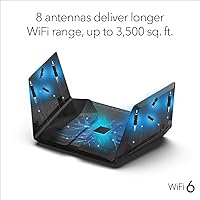
  • Coverage Area: Rated for homes up to 3,500 square feet under typical open-plan conditions.
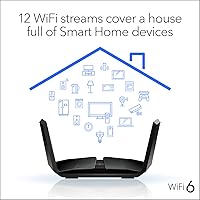
  • Device Capacity: Designed to handle 30 or more simultaneously connected devices without significant performance degradation.
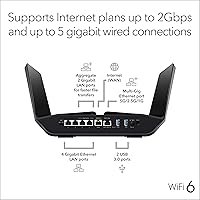
  • WAN Port: Includes one 5G Multi-Gig WAN port, supporting internet plans delivering up to 2 Gbps.
  • LAN Ports: Provides four 1G Ethernet LAN ports and one 2.5G Ethernet LAN port for wired device connections.
  • USB Ports: Equipped with two USB 3.0 ports for attaching shared storage drives or enabling personal cloud access across connected devices.
  • Processor: Powered by a quad-core 1.8 GHz processor designed to handle high-throughput routing and security functions concurrently.
  • Security: Supports WPA3 and WPA2 encryption, includes a double firewall, DoS protection, and a 30-day trial of the NETGEAR Armor threat intelligence subscription.
  • Beamforming: Beamforming+ actively focuses wireless signals toward individual connected devices on both 2.4 GHz and 5 GHz bands to improve speed and range.
  • Special Features: Includes Quality of Service (QoS) controls, Guest Network mode, Amazon Alexa voice control support, and remote network management via the Nighthawk app.
  • Dimensions: Measures 12.2 x 7.48 x 1.77 inches, using a low-profile flat form factor rather than a vertical tower design.
  • Weight: Weighs 4.62 pounds, which is moderately heavy for its flat footprint and should be accounted for in shelf or rack placement.
  • Color: Available in black with a matte finish that suits most home entertainment and office environments.
  • Power Input: Operates on 110 Volts, compatible with standard North American household power outlets.
  • In-Box Contents: Package includes the RAX120 router unit, one Ethernet cable, a power adapter, and a printed quick-start guide.

Related Reviews
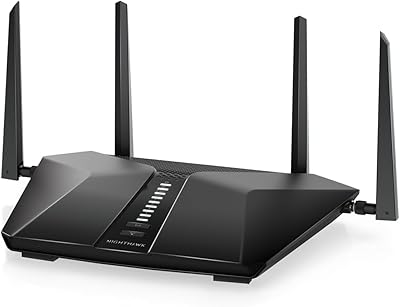
NETGEAR Nighthawk RAX36 WiFi 6 Router
80%
86%
Wireless Performance
78%
Coverage & Range
91%
Setup & Ease of Use
83%
Device Load Handling
88%
Wired Connectivity
More
Netgear Nighthawk RAX41 WiFi 6 Router
80%
83%
Wireless Performance
76%
Coverage & Range
89%
Setup & Installation
61%
App & Software Experience
81%
Multi-Device Handling
More
NETGEAR Nighthawk RAX54S
77%
83%
Wireless Performance
79%
Coverage & Range
88%
Setup & Ease of Use
76%
Gaming Performance (DumaOS 3.0)
81%
Security Features
More
NETGEAR Nighthawk RAX43 WiFi 6 Router
80%
83%
WiFi Performance
81%
Multi-Device Handling
88%
Setup & Ease of Use
71%
Signal Range & Coverage
74%
Security Features
More
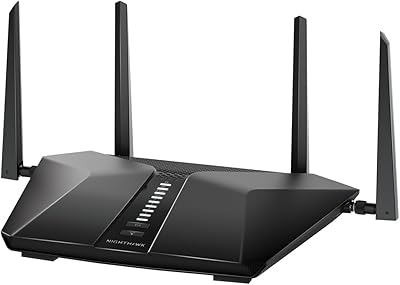
NETGEAR Nighthawk RAX70 WiFi 6 Router
87%
91%
WiFi Performance
88%
Security Features (NETGEAR Armor)
85%
Setup & Installation
89%
Coverage Area
92%
Speed (AX6600 Support)
More
Netgear Nighthawk RAX45 WiFi 6 Router
78%
88%
WiFi Speed & Throughput
86%
Multi-Device Performance
71%
WiFi Range & Coverage
84%
Setup & Ease of Use
83%
Gaming & Streaming
More
NETGEAR XR1000 Nighthawk WiFi 6 Gaming Router

74%
83%
Gaming Performance
78%
DumaOS 3.0 Software
61%
WiFi Range & Coverage
58%
Refurbished Condition
81%
Latency & Ping Stability
More
NETGEAR Nighthawk RAX29 WiFi 6 Router
77%
83%
WiFi Speed & Throughput
68%
Range & Coverage
89%
Setup & Ease of Use
81%
Multi-Device Performance
74%
Build Quality & Design
More
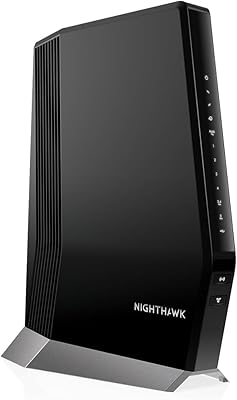
NETGEAR Nighthawk CAX80-100NAR AX6000 WiFi 6 Cable Modem

83%
89%
Performance & Speed
86%
WiFi Coverage
68%
Setup & Installation
91%
Compatibility with Providers
85%
Reliability & Stability
More
Reyee E6 AX6000 WiFi 6 Router
78%
93%
Value for Money
86%
Wireless Range & Coverage
82%
Gaming Performance
88%
Ease of Setup
61%
Mobile App & Software Experience
More

FAQ

You do not need a new modem — the RAX120 connects to your existing cable, fiber, or DSL modem just as any standard router would. It requires a separate modem or gateway; it does not have a built-in modem itself. If your ISP provided you with a combined modem-router unit, you may need to put it into bridge mode first.

Honestly, the improvement will be modest if your device lineup is mostly older 802.11ac hardware. WiFi 6 efficiency gains — particularly from OFDMA — only fully materialize when the connecting devices also support 802.11ax. You will still get a capable, reliable router, but the headline performance numbers are really only achievable with a newer device ecosystem.

NETGEAR Armor is a subscription-based security layer that provides real-time threat monitoring, automatic blocking of malicious sites, and vulnerability scanning for every device on your network. The router includes a free 30-day trial, but after that it requires an annual subscription to remain active. If you choose not to subscribe, the router still works normally with its built-in WPA3 encryption and firewall — you just lose the active threat intelligence features.

Yes — the 5G Multi-Gig WAN port supports internet plans delivering up to 2 Gbps, which is one of the more compelling reasons to choose this unit over routers capped at 1G. You will need a wired connection to a device with a compatible multi-gig port to actually experience those speeds end-to-end.

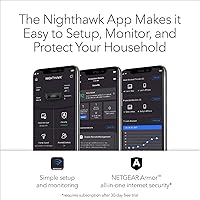
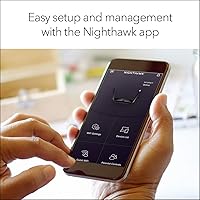
Setup is handled through the Nighthawk app, which guides you through the process step by step and typically takes around 15 minutes. NETGEAR does prompt you to create an account during setup, which some users find unnecessary for a home router. You can also access basic configuration through a browser-based admin interface if you prefer not to use the app.

Yes, it supports Amazon Alexa, allowing you to perform basic network tasks like enabling guest WiFi or running a speed check using voice commands. This requires linking the router to the Alexa app, and the range of supported voice commands is fairly limited compared to full app control — it is a convenience feature rather than a comprehensive management tool.

It is a known characteristic of this flat chassis design, which does not dissipate heat as efficiently as a vented tower form factor. Under sustained heavy load, it will feel noticeably warm to the touch, but this is generally within the expected thermal range for the hardware. The most important thing is to keep it in an open, ventilated spot — avoid enclosed cabinets or stacking anything on top of it.

The RAX120 does not natively support NETGEAR Orbi mesh as a node, so it cannot be dropped into an existing mesh system as a satellite or easily expanded that way. If your home has significant dead zones that a single unit cannot cover, a dedicated mesh system would be a more practical solution than trying to extend this router with add-on hardware.

Firmware updates from NETGEAR are generally security-focused and worth applying, but some long-term owners have experienced temporary instability after certain update versions. It is worth checking community forums briefly before applying a major firmware update, just to see if other users have flagged issues. Automatic updates can be enabled in the admin settings, but manually reviewing updates first is a reasonable precaution given the occasional regression history.

That kind of device count sits right at the edge of the official 30-device recommendation, but in practice the router manages mixed loads like smart home gadgets, streaming clients, and active computers quite well. The 12-stream MU-MIMO and OFDMA combination help because the router can address multiple devices in the same transmission window rather than queuing them. Where you might feel strain is if many of those devices are simultaneously running high-bandwidth tasks — in that scenario, configuring QoS to prioritize your most important traffic is worth the effort.

Where to Buy