Overview

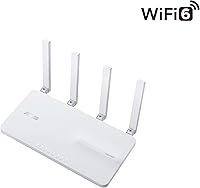
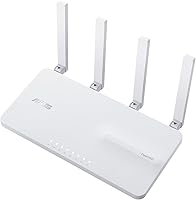
The ASUS EBR63 AX3000 WiFi 6 Business Router sits in an interesting middle ground — not a consumer router with a few business features bolted on, and nowhere near the complexity of enterprise gear from Cisco or Meraki. Built for small offices, retail spaces, and serious home-office setups, this business router pairs dual-band AX3000 speeds — up to 574 Mbps on 2.4 GHz and 2402 Mbps on 5 GHz — with a management layer most consumer hardware simply does not offer. The compact white tower design is unobtrusive, and the ExpertWiFi ecosystem means you can scale to a multi-node mesh setup without swapping out hardware later.
Features & Benefits

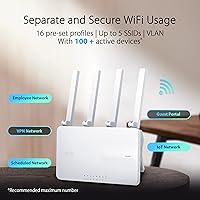
What sets the EBR63 apart from a typical home router is how much network control it packs into one device. You can run up to five SSIDs simultaneously — keeping staff devices on one network, IoT gadgets on another, and customers on a branded portal, all from the same box. That guest portal is a genuine differentiator: add your business logo, pick a template, and customers get a professional login screen instead of a raw password prompt. The USB backup WAN is a practical failsafe — tether a phone via hotspot and your connection survives an ISP outage. AiProtection Pro security is included at no recurring cost, though activating it may require an ASUS account registration.

Best For

This WiFi 6 router has a clear target audience. If you run a salon, small clinic, or boutique retail shop and want guests to see your business name when they connect — not just a random network string — the EBR63 handles that without IT staff or expensive licensing fees. Home-office users who want their work laptop isolated on a separate VLAN from smart speakers and security cameras will find it well-suited too. IT consultants can use the ExpertWiFi app for remote site management without traveling to each client location. It is less ideal for power users expecting the granular routing controls found on ASUS's consumer-grade RT or ROG lineup.

User Feedback

With a 4.0-star average across 63 ratings, this business router earns solid marks without being universally loved. Buyers consistently praise the straightforward initial setup and the quality of the ExpertWiFi app — especially those who are not networking professionals. Guest portal customization also draws positive mentions from shop owners who appreciate the branding flexibility. On the downside, some reviewers find the advanced routing options more limited than expected, and expanding the mesh with additional AiMesh nodes adds cost quickly. A few users have flagged questions about firmware update cadence. Compared to TP-Link Omada, opinions on value are split — Omada offers a more feature-rich controller, but the EBR63 is noticeably simpler to run day-to-day.

Pros

  • Customizable guest portal lets small businesses display a branded login screen — a feature rarely found at this price point.
  • Up to five separate SSIDs allow clean isolation of staff, guest, and IoT devices on one device.
  • USB backup WAN via smartphone hotspot tethering is a practical failsafe for businesses that cannot afford downtime.
  • AiProtection Pro security is included at no extra recurring cost, covering threat detection and safe browsing.
  • The ExpertWiFi app makes remote management genuinely accessible for non-technical business owners.
  • VLAN support provides real network isolation without needing a separate managed switch or appliance.
  • AiMesh compatibility means you can expand coverage later by adding nodes rather than replacing the whole setup.
  • Setup process is consistently praised as straightforward, even for users with minimal networking experience.
  • VPN support is built in, useful for businesses with remote staff who need secure access to office resources.
  • Compact, neutral design fits unobtrusively into a retail counter, reception area, or office shelf.

Cons

  • Advanced routing options are noticeably limited compared to ASUS consumer routers like the RT-AX series.
  • Expanding to a full mesh network with AiMesh nodes adds significant cost beyond the initial purchase.
  • Activating AiProtection Pro may require an ASUS account, which is a concern for privacy-sensitive buyers.
  • The EBR63 is a single dual-band unit — heavy multi-device environments may feel the bandwidth ceiling.
  • Firmware update frequency has drawn some criticism, raising questions about long-term software support.
  • Users migrating from TP-Link Omada may find the management feature set less robust for complex configurations.
  • No tri-band option means high-density environments with many simultaneous video calls or large file transfers may experience congestion.
  • The USB backup WAN depends entirely on your mobile carrier signal quality — not a guaranteed failover in weak coverage areas.

Ratings

The scores below reflect an AI-driven analysis of verified buyer reviews for the ASUS EBR63 AX3000 WiFi 6 Business Router, sourced globally and filtered to remove incentivized, bot-generated, and outlier feedback. Both the genuine strengths and the recurring frustrations are factored in transparently, so the numbers you see here represent what real small business owners and home-office users actually experienced — not a curated highlight reel.

Ease of Setup
88%
Buyers consistently praised how quickly they were up and running using the ExpertWiFi app. Non-technical users — salon owners, small retailers, clinic managers — reported completing the full setup without needing outside help, which is exactly the audience this router targets.
A small number of reviewers encountered hiccups when migrating from an existing router or when configuring VLANs for the first time, noting the app guidance becomes less helpful once you move beyond basic setup.
App & Remote Management
84%
The ExpertWiFi app earned consistent praise for its clean layout and practical remote access features. IT consultants managing multiple client sites found it particularly valuable for checking status and making changes without an on-site visit.
Some power users found the app lacks the depth of a full web-based controller, and a handful noted occasional sync delays between the app and the router's actual state — minor, but noticeable during troubleshooting.
Guest Portal Customization
86%
This is where the EBR63 clearly outpaces consumer routers in its price range. Retail and hospitality buyers appreciated being able to display a business logo and choose a professional login template, giving customers a polished first impression of their network.
The customization options, while useful, are not as deep as dedicated captive portal solutions. Businesses that need time-based access limits, SMS-based login, or detailed guest analytics will find the feature set too basic.
Network Segmentation
83%
Running up to five SSIDs with real traffic isolation gave business owners practical control that consumer routers rarely offer. Separating a point-of-sale terminal, staff laptops, and guest devices onto distinct networks reduced security exposure without adding hardware.
VLAN configuration, while supported, is not as intuitive as the basic setup flow. Users without some networking background found the VLAN tagging process confusing, and documentation in the app could be more explicit.
WiFi Speed & Performance
74%
26%
For typical small office workloads — video conferencing, cloud applications, and general browsing — the AX3000 dual-band performance held up well across most reviews. Users in smaller spaces reported reliable, consistent speeds on the 5 GHz band.
In denser environments with 20 or more simultaneous active devices, some buyers noticed throughput degradation, and the absence of a tri-band option means high-demand offices may feel constrained. The EBR63 is not designed to serve as a high-density access point.
Coverage Range
71%
29%
For small offices, retail counters, and single-floor setups, coverage was generally described as adequate. The 2.4 GHz band provided solid range through walls for devices that do not need maximum speed.
Buyers with larger floor plans or multi-story spaces found single-unit coverage insufficient. While AiMesh solves this, needing extra hardware investment to achieve adequate coverage was a repeated complaint from buyers who expected broader reach out of the box.
Security Features
89%
AiProtection Pro being included at no recurring cost was a genuine surprise for buyers who expected to pay a monthly fee for commercial-grade protection. Threat detection and safe browsing ran quietly in the background without affecting performance.
Activating AiProtection Pro requires registering an ASUS account, which some privacy-conscious buyers flagged as an unexpected condition. There is no opt-out path that still enables the full feature set, which is a friction point for businesses with strict data handling policies.
Backup WAN Reliability
73%
27%
For businesses in areas with solid cellular coverage, the USB hotspot tethering failover worked as described and gave owners peace of mind during ISP outages. The automatic switchover was praised for being hands-off once configured.
Performance of the backup WAN is entirely dependent on mobile carrier signal at the deployment location. Buyers in areas with weak or inconsistent 4G coverage found this feature unreliable as a true failover, limiting its practical usefulness.
VPN Performance
72%
28%
Built-in VPN support meant small businesses could give remote staff secure access to office resources without purchasing a separate appliance. For low to moderate VPN usage, the feature worked without noticeable impact on main network speeds.
Under heavier VPN loads — multiple simultaneous remote users — some reviewers noted speed drops, which is expected given the hardware tier. Businesses with frequent and heavy VPN usage may need a dedicated VPN concentrator alongside this router.
Value for Money
77%
23%
For buyers who actually needed the business-specific features — guest portal branding, VLAN, multiple SSIDs, remote management — the price point was considered fair compared to entry-level enterprise gear that costs considerably more. The free AiProtection Pro subscription added tangible value.
Buyers who primarily wanted a fast home router felt the price premium for business features was not justified if they only used one or two SSIDs. Compared to consumer AX3000 routers with more advanced routing settings, the EBR63 can feel expensive for what it delivers on the pure performance side.
Firmware & Software Stability
67%
33%
Most day-to-day users reported stable operation once the router was configured and running. Firmware updates were applied smoothly for the majority of reviewers with no loss of settings.
A recurring concern in reviews was the pace of firmware releases, with some buyers feeling updates were infrequent and slow to address bugs. A few reviewers also reported needing to reboot the router after firmware updates to restore normal operation, which is disruptive in a business setting.
AiMesh Scalability
69%
31%
The AiMesh integration worked reliably for buyers who invested in additional nodes, creating a cohesive network across larger spaces without complicated reconfiguration. The ExpertWiFi app managed the mesh nodes alongside the main router in a single interface.
Each additional AiMesh node represents a meaningful extra cost, and not all ASUS routers integrate equally well within the ExpertWiFi management layer. Buyers expecting seamless plug-and-play mesh expansion sometimes encountered compatibility caveats they had not anticipated.
Build Quality & Design
81%
19%
The compact white tower design was well-received by business owners who wanted hardware that looked presentable in a reception area or on a retail counter. Build quality felt solid, and the unit did not run excessively hot under normal use.
There is nothing distinctive about the physical design, and the router offers no external antennas, which some technically-minded buyers associate with stronger signal tuning. Those accustomed to gaming or prosumer routers may find the aesthetic too plain.
Competitor Positioning
70%
30%
Against consumer routers at a similar price, the EBR63 wins clearly on business management features. For buyers comparing it to entry-level Cisco or Meraki gear, the simplicity and lower cost make it an appealing middle-ground option.
Against TP-Link Omada, the EBR63 loses ground for technically inclined users who want a richer controller environment with more granular settings. Omada's software is more powerful, even if it requires more configuration effort — a trade-off buyers need to weigh honestly.

Suitable for:

The ASUS EBR63 AX3000 WiFi 6 Business Router is a strong fit for small business owners who need more network control than a consumer router offers but have no interest in managing a complex enterprise system. Think of a salon owner who wants customers to log into a branded guest portal, or a clinic that needs patient-facing WiFi completely isolated from the office network — this router handles both without requiring an IT consultant on retainer. Retail shops and coffee spots will appreciate the customizable portal, which lets you display a business name and logo rather than handing out a raw WiFi password. Home-office professionals who want their work laptop on its own VLAN — completely separate from smart TVs, thermostats, and other household devices — will find the VLAN support genuinely useful at this price point. IT consultants managing several small client sites remotely will also get real value from the ExpertWiFi app, which allows configuration and monitoring without an on-site visit. For any business that has experienced ISP outages, the USB hotspot tethering as a backup WAN is a low-cost insurance policy that most competing routers at this tier simply do not offer.
Not suitable for:

Buyers looking for deep, granular routing controls will likely feel constrained by the EBR63. If you are used to the advanced options available on ASUS's consumer RT or ROG router lines — custom DNS settings, detailed traffic analysis, or complex firewall rules — this business router trades that flexibility for a simpler, more managed experience. Large businesses or offices with dozens of simultaneous heavy users will also hit the limits of a single AX3000 dual-band unit, and expanding the network with AiMesh nodes adds meaningful cost. Privacy-conscious buyers should be aware that activating AiProtection Pro may require creating an ASUS account, which is worth researching before purchase if data handling is a concern. Those shopping purely on raw speed or who already have a working network segmentation setup via a separate managed switch will likely not extract enough value to justify the upgrade. If your primary comparison is TP-Link Omada, know that Omada's controller software offers a more feature-rich management environment for technically inclined users, even if it comes with a steeper learning curve.

Specifications

  • WiFi Standard: This router uses the 802.11ax (WiFi 6) standard, which provides improved efficiency and throughput compared to the previous WiFi 5 generation, particularly in environments with many connected devices.
  • Speed Class: Rated AX3000 dual-band, with a combined theoretical maximum of approximately 3000 Mbps across both frequency bands.
  • 2.4 GHz Band: The 2.4 GHz band delivers speeds of up to 574 Mbps, offering longer range and better wall penetration for devices farther from the router.
  • 5 GHz Band: The 5 GHz band reaches up to 2402 Mbps, making it the preferred band for bandwidth-intensive tasks like video calls and large file transfers.
  • Max SSIDs: Up to five simultaneous SSIDs can be broadcast, allowing separate networks for staff, guests, IoT devices, and other use cases from a single router.
  • Guest Portal: The built-in guest portal supports custom branding including business name, logo upload, and pre-designed templates to create a professional customer-facing login experience.
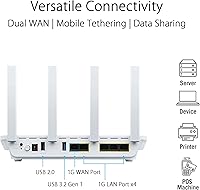
  • Backup WAN: A USB port on the router supports backup WAN functionality by tethering a smartphone hotspot, maintaining internet connectivity if the primary ISP connection goes down.
  • Network Security: ASUS AiProtection Pro is included at no recurring subscription cost and provides real-time threat detection, malicious site blocking, and network-wide safe browsing protection.
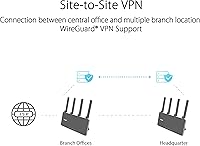
  • VPN Support: The router supports VPN functionality, enabling encrypted remote access for staff or remote workers connecting to the office network.
  • VLAN Support: VLAN configuration is supported natively, allowing network traffic to be logically separated between departments or device categories without additional hardware.
  • Mesh Compatibility: The EBR63 is compatible with the ASUS AiMesh ecosystem, meaning additional AiMesh-capable nodes can be added to extend coverage across larger spaces.
  • Management App: The ExpertWiFi mobile app provides setup, monitoring, and remote management of the router and any connected AiMesh nodes from iOS or Android devices.
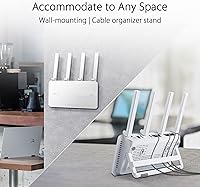
  • Dimensions: The router measures 5 x 5.74 x 8.6 inches, making it a compact tower unit suitable for placement on a desk, shelf, or counter without occupying excessive space.
  • Weight: At 9.9 ounces, the unit is lightweight and easy to reposition during initial deployment or network reconfiguration.
  • Connectivity: Physical connectivity options include Ethernet ports, a USB port for backup WAN or storage, and dual-band WiFi, covering the most common small office connection scenarios.
  • OS Compatibility: The ExpertWiFi app and router management interface are compatible with Windows, Mac OS, Linux, and mobile operating systems including iOS and Android.
  • Color: The router ships in a clean white finish, keeping the physical design understated and appropriate for customer-facing business environments.
  • In the Box: Each unit includes the EBR63 router, a power adapter, one RJ-45 Ethernet cable, a quick start guide, and a warranty card.

Related Reviews
Cudy WR3000 AX3000 WiFi 6 Router
75%
91%
Value for Money
78%
Wireless Performance
88%
Setup & Ease of Use
58%
App & Software Experience
74%
VPN Functionality
More
ASUS RT-AX57 WiFi 6 Router
86%
88%
WiFi Performance
91%
Setup & Installation
93%
Security Features
85%
Network Stability
75%
Coverage Range
More
ASUS RT-AX86U WiFi 6 Gaming Router
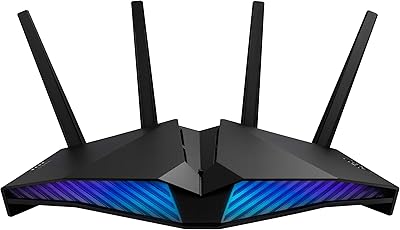
84%
91%
Wireless Performance
88%
Gaming Latency
86%
Range & Coverage
79%
Setup & Ease of Use
74%
Value for Money
More
ASUS RT-AX82U
ASUS RT-AX82U
82%
88%
Wireless Performance
91%
Gaming Latency
93%
Setup & Ease of Use
71%
Range & Coverage
82%
Build Quality & Design
More
D-Link AX3000 M30 WiFi 6 Mesh Router
78%
74%
WiFi Coverage & Range
78%
WiFi Speed & Throughput
88%
Setup & Installation
71%
App Experience
83%
Parental Controls
More
ASUS RT-AX88U PRO WiFi 6 Router
77%
88%
Wireless Performance
84%
Range & Coverage
91%
Multi-Device Handling
57%
Setup Experience
79%
Build Quality
More
D-Link G530 5G AX3000 WiFi 6 Router
84%
89%
Performance
91%
Wi-Fi Speed & Range
84%
Setup & Installation
87%
Dual-WAN Failover
88%
App Experience & Remote Management
More
ASUS RT-AX5400 WiFi 6 Dual-Band Router
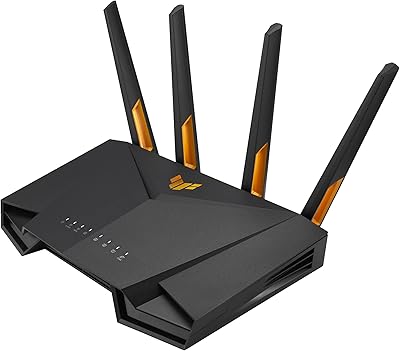
80%
84%
WiFi Speed & Throughput
71%
Coverage & Range
88%
Setup & Ease of Use
91%
Built-in Security (AiProtection)
83%
Parental Controls
More
ASUS RT-AX1800S
ASUS RT-AX1800S
79%
88%
Value for Money
79%
WiFi Speed & Performance
74%
Coverage & Range
83%
Setup & Ease of Use
67%
Router App Experience
More
ASUS TUF-AX4200 WiFi 6 Router
79%
88%
Gaming Performance
91%
Port Forwarding & NAT
83%
WiFi Speed & Throughput
89%
Wired Connectivity
63%
Wireless Range
More

FAQ

Not at all. The ExpertWiFi app walks you through the initial setup step by step, and most users report having the router online within 15 to 20 minutes. You do not need any networking background — if you can follow instructions on a smartphone screen, you are in good shape.

Yes, and that is honestly one of the more useful things about this router for small business owners. You can upload a logo, choose from pre-built templates, and set a custom network name so customers see something branded rather than a generic login screen. It is not as deep as enterprise-grade captive portal software, but for a salon, cafe, or small clinic it works well.

It is included at no extra charge, but you should know that activating it requires creating an ASUS account if you do not already have one. For most users that is no big deal, but if data privacy is a concern for your business, it is worth reading ASUS's account and data policies before enabling the feature.

Yes. The EBR63 connects to any standard broadband modem via Ethernet, just like any other router. It works with cable, fiber, and DSL connections. You just plug the modem's output into the router's WAN port and follow the app setup.

It does, with a caveat. You connect a smartphone to the router's USB port and enable hotspot on that phone, and the router automatically switches to using the cellular connection as a backup WAN. The catch is that it depends entirely on your mobile carrier's signal strength at your location — if coverage there is weak, the fallback will be unreliable. In areas with solid 4G or 5G coverage, it is a genuinely useful safety net.

The core difference is the management layer. A typical home router gives you one or two networks and a basic admin page. This business router adds things like multiple isolated SSIDs, a branded guest portal, VLAN segmentation, built-in VPN, and remote management via a mobile app — features that would normally require a more expensive, more complicated enterprise solution.

Yes. The EBR63 supports ASUS AiMesh, so you can pair it with other compatible ASUS routers or access points to create a mesh network that covers a larger floor plan. Just be aware that each additional node is a separate purchase, which adds to the overall cost of the system.

It handles moderate device counts well for typical office workloads — browsing, video calls, cloud apps, and file sharing. If you are running 30 devices all doing heavy simultaneous data transfers, a single dual-band AX3000 unit may start showing strain. For a busy office at that scale, adding an AiMesh node or considering a tri-band option would be worth it.

Yes, that is one of the practical advantages of the ExpertWiFi app. As long as your router has an active internet connection, you can check network status, manage connected devices, adjust settings, and even reboot the router from anywhere on your phone. IT consultants who manage multiple client locations find this particularly useful.

It is a legitimate question and the honest answer is: it depends on your priorities. TP-Link Omada offers a more feature-rich controller environment and tends to appeal to technically inclined users who want granular control. The EBR63 trades some of that depth for simplicity — it is easier to run day-to-day without networking expertise. If you want a system you can hand off to a non-technical office manager, this WiFi 6 router is likely the easier choice. If you want deep customization and do not mind a steeper learning curve, Omada is worth comparing seriously.

Where to Buy