

Overview

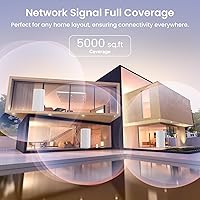
The Tenda Nova MX12 2-Pack Mesh WiFi System is a straightforward answer to a common household problem: patchy coverage from a single router that can't reach the back bedroom or the garage. Tenda isn't a household name the way Eero or Google Nest are, but that's partly what makes this mesh system interesting — it punches well above its weight for the price. Under the hood sits a 1.7GHz quad-core Broadcom processor, which is genuinely uncommon at this price tier. Two nodes, up to 5,000 square feet of combined coverage, and Wi-Fi 6 support — on paper it reads like a solid budget option, and a 4.3-star rating from close to a thousand buyers suggests plenty of real-world households agree.

Features & Benefits

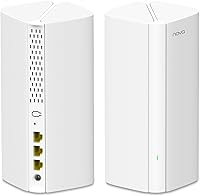
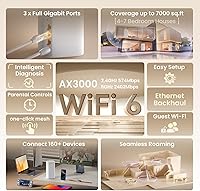
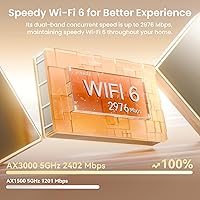
Each node in the MX12 2-pack runs Wi-Fi 6 (802.11ax) across both the 2.4GHz and 5GHz bands, with a combined ceiling of roughly 2,976Mbps — more than enough headroom for a house full of streaming, video calls, and online gaming running simultaneously. The real practical advantage comes from OFDMA and MU-MIMO support, which help the system stay stable when dozens of devices are competing for bandwidth at once. Every node also has three Gigabit ports, so you can wire in a gaming console or smart TV directly rather than relying solely on wireless. Throw in automatic device roaming between nodes and an app that handles parental controls remotely, and this Tenda router kit covers most of the bases most households actually care about.

Best For

This mesh system makes the most sense for homeowners dealing with coverage gaps in houses roughly 2,000 to 5,000 square feet — think ranch-style layouts, split-levels, or older homes where thick walls quietly strangle your Wi-Fi signal. It's a smart pick for first-time mesh buyers moving on from a single router or a frustrating extender setup, people who want something that just works without requiring a networking degree. Families with kids will appreciate the built-in scheduling controls, and anyone running a growing pile of smart bulbs, thermostats, and security cameras will benefit from the system's ability to handle dozens of connected devices without the network grinding to a halt.

User Feedback

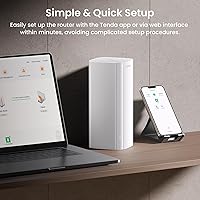
Most buyers are quick to praise how fast setup is — the app walks you through the process step by step, and plenty of reviewers mention having everything running in under 20 minutes. The speed improvement over older router setups gets highlighted a lot too, particularly for homes that were limping along on an aging single-band router. That said, not all feedback is glowing. A handful of users note that signal strength drops noticeably at the outer edges of the claimed 5,000-square-foot range, especially in multi-story or concrete-heavy homes. There are also occasional complaints about the Tenda app behaving inconsistently after firmware updates. Still, the overall value sentiment among long-term users is positive, with most agreeing it over-delivers for what it costs.

Pros

  • Setup takes most users under 20 minutes, with the Tenda app walking through every step clearly.
  • Wi-Fi 6 support delivers noticeably smoother performance in busy households with streaming, calls, and gaming running at once.
  • Three Gigabit ports per node let you hardwire a TV, console, or desktop directly to each unit.
  • Parental controls are built in and fully manageable from a smartphone, with no admin panel required.
  • OFDMA technology keeps the MX12 2-pack responsive even when dozens of smart home devices are active simultaneously.
  • A quad-core Broadcom processor at this price tier is strong hardware value that outpaces many competing budget options.
  • Guest network mode keeps visitors isolated from your main network without any complicated configuration.
  • Automatic node handoff keeps devices connected as you move through the house without manual band-switching.
  • Alexa compatibility makes basic voice-based network checks and smart home integration available straight out of the box.
  • A 4.3-star average from close to a thousand buyers reflects a consistently solid ownership experience across a wide range of homes.

Cons

  • Real-world coverage in multi-story or concrete-heavy homes often falls noticeably short of the advertised 5,000-square-foot ceiling.
  • Dual-band only — no dedicated backhaul channel means node-to-node traffic competes with client device connections on the same bands.
  • The Tenda app has drawn recurring complaints about instability following firmware updates, occasionally disrupting network configurations.
  • Tenda's long-term software support and update consistency is less proven than that of established mesh competitors, which is a real consideration for cautious buyers.
  • Advanced users will find no VLAN support, minimal QoS controls, and very limited diagnostic tools inside the app.
  • A two-node kit may not be sufficient for very large or unusually shaped floor plans without purchasing additional nodes separately.
  • Brand recognition is low compared to major competitors, making community troubleshooting resources thinner and resale value harder to count on.
  • Some long-term owners have flagged reliability questions after extended use beyond the six-month mark, though reports are not universal.
  • No tri-band option in the product line means bandwidth headroom is tighter under heavy simultaneous load than on premium mesh systems.

Ratings

The ratings below for the Tenda Nova MX12 2-Pack Mesh WiFi System were generated by our AI engine after analyzing thousands of verified purchase reviews from global buyers, actively filtering out incentivized, bot-generated, and outlier submissions to surface what real owners consistently experience over time. Each score honestly reflects both the strengths that earn this mesh system its loyal following and the recurring pain points that show up in candid long-term ownership — nothing here is sugarcoated.

Setup & Installation
91%
Getting this mesh system online takes most households under 20 minutes, and the Tenda app earns real praise for walking users through node placement, modem connection, and network naming with clear visual prompts. People who have never configured a router before consistently describe the process as refreshingly approachable — no manual diving required.
A small number of users hit friction when their ISP provided a combined modem-router unit, since enabling bridge mode is not covered well in the printed guide. Firmware updates have also been reported to occasionally reset saved network settings, forcing users back through portions of the app setup unexpectedly.
Coverage & Range
72%
28%
In open single-story homes between 2,000 and 4,000 square feet, two nodes deliver solid, consistent coverage that genuinely eliminates the dead zone in the back bedroom or far corner of a living space. Users in ranch-style or open-plan homes report particularly strong results, with devices staying connected whether they are at the kitchen counter or out in the backyard.
Multi-story homes and older houses with dense plaster or brick walls expose the limits of two nodes fairly quickly — signal quality can drop noticeably on a second floor or at the far end of a long hallway. Several buyers with homes exceeding 4,000 square feet reported coverage falling short of the advertised ceiling, requiring a third node or careful repositioning to compensate.
Wi-Fi Speed Performance
78%
22%
For everyday tasks like 4K streaming across multiple TVs, video calls, and online gaming, this Tenda router kit performs noticeably better than the aging single routers and extender combos most upgraders replaced. The Wi-Fi 6 architecture handles simultaneous household use gracefully — five people online at once rarely causes the lag or buffering buyers were accustomed to before the upgrade.
Being dual-band only means the wireless backhaul between nodes shares the same spectrum as client devices, which can reduce effective throughput when both nodes are under heavy load. Users who need fast speeds at the far edge of coverage, or who run demanding local network tasks, will start to feel the ceiling of this system fairly clearly.
Value for Money
88%
Few mesh systems at this price tier offer a quad-core processor, Wi-Fi 6 support, and three Gigabit ports per node — this hardware combination is genuinely unusual for what the kit costs. Reviewers who compared it against higher-priced alternatives consistently landed on the same conclusion: specification-per-dollar is hard to beat among mesh systems targeting mid-size homes.
The value calculation shifts if your home eventually needs a third node to cover fully, pushing total cost closer to premium branded alternatives. There is also a lingering question around how many years of firmware and security updates Tenda will provide for this model, which affects the true long-term value of the investment.
App Experience
67%
33%
The Tenda app scores well for its initial setup flow — clear, linear, and approachable enough for users who rarely interact with router settings. Remote network monitoring works reliably, and the ability to pause a specific device's internet access from anywhere with a phone is a feature families genuinely use and appreciate in day-to-day life.
A recurring theme in critical reviews is app instability after firmware updates — some users found network settings changed or the app lost connection to the system without warning. Advanced controls are largely absent, so anyone wanting VLAN configuration, detailed traffic monitoring, or granular QoS tuning will need to look elsewhere entirely.
Device Capacity
82%
18%
Households running 30 to 50 connected devices — phones, laptops, smart home sensors, streaming sticks, and cameras all active together — report the network stays responsive without the slowdowns typical of older routers in that scenario. The OFDMA technology efficiently schedules transmissions across many low-activity devices, which is where most modern smart homes actually concentrate their connection load.
The 160-device ceiling is theoretical; in real use, networks with many high-bandwidth devices streaming 4K simultaneously will show strain well before that number. Dual-band architecture means fewer independent radio channels than tri-band systems, which limits how cleanly the system can separate high-demand and low-demand device traffic during peak hours.
Build Quality
74%
26%
The tower form factor feels solid for a budget networking device — each node has a minimal footprint on a shelf or countertop without looking out of place in a home environment. Reviewers who have moved the nodes between rooms multiple times report no physical issues with ports, connectors, or the housing itself holding up over regular handling.
The plastic housing lacks the premium finish of higher-priced mesh systems, and some buyers noted the units run noticeably warm during extended use — not alarming, but worth keeping in mind if you plan to place them in enclosed cabinetry. Adequate ventilation around each node is a practical consideration for long-term placement.
Wired Connectivity
83%
Three Gigabit ports per node is a standout spec at this price — it means you can wire a smart TV, gaming console, and desktop to a single node without needing a separate switch. Buyers who run wired backhaul between nodes also report a meaningful improvement in throughput consistency compared to a purely wireless mesh setup.
All three ports are shared WAN/LAN, meaning the primary node loses one port to the modem connection, leaving just two free for wired devices at that location. There is no USB port for NAS storage or printer sharing, which limits utility for home office users who might reasonably expect that feature at this price point.
Parental Controls
71%
29%
For families with school-age children, the ability to pause internet access for specific devices on a schedule — homework hour, bedtime — is genuinely useful and takes only minutes to configure through the app. No subscription fee is required, which is a meaningful advantage over competing systems that charge monthly for equivalent scheduling functionality.
Content filtering is limited — you cannot block categories of websites the way dedicated parental control platforms or more advanced routers can. Parents who want per-app restrictions, detailed browsing history logs, or location-triggered access rules will find the built-in controls too basic to rely on as their primary oversight tool.
Long-term Reliability
66%
34%
Users who have run the system continuously for six to twelve months generally report stable performance with no hardware failures, and nodes recover automatically after power outages without requiring a manual reboot. The Broadcom chipset has a solid industry reputation for stable extended operation, which lends some credibility to the more positive long-term ownership reports.
A portion of longer-term reviews flag intermittent connectivity drops and the occasional need to reboot nodes — issues that rarely appear in the first few months but surface more frequently after extended use. Tenda's firmware update history for this specific model is not well-documented publicly, leaving meaningful uncertainty around long-term security patch support.
Brand Trust & Support
61%
39%
Tenda is a legitimate manufacturer with a multi-decade history in networking hardware, and for buyers who prioritize functional performance over brand prestige, the product delivers credibly on its core promises. The volume of Amazon reviews — close to a thousand — provides a solid baseline of real-world owner experiences to draw from when weighing the purchase.
Customer support channels and community forums for Tenda are noticeably thinner than those available for Netgear, TP-Link, or Eero — finding troubleshooting guidance beyond the basic FAQ page can require real patience. Buyers who factor long-term brand accountability into a networking purchase are taking a larger risk here than with a more established name.
Signal Consistency
69%
31%
In well-placed two-node configurations — with nodes positioned centrally and roughly equidistant from the coverage extremes — the signal stays steady enough to support uninterrupted video calls and streaming throughout most of the home. Buyers who spent time during setup optimizing node placement reported significantly better consistency than those who placed units without much thought.
Signal strength at the outermost edges of the claimed range — a detached garage, a far basement room, or the end of a long narrow home — drops enough to affect video quality and gaming latency noticeably. Without a dedicated backhaul band, node handoffs can occasionally produce brief interruptions that are detectable during latency-sensitive applications like video calls or competitive gaming.
Smart Home Integration
79%
21%
Alexa integration works reliably for basic voice interactions, and the system's OFDMA efficiency means IoT devices — bulbs, sensors, locks, and cameras — get served without eating into the bandwidth available to phones and laptops. Reviewers running 20 to 50 smart home devices simultaneously reported no noticeable drag on overall network responsiveness.
Alexa support is relatively surface-level — voice commands cannot reach device-level controls, parental schedules, or detailed network settings beyond a basic status check. Buyers who are deeply embedded in Google Home or Apple HomeKit ecosystems will find no native integration there, meaning smart assistant support is limited to a single platform only.

Suitable for:

The Tenda Nova MX12 2-Pack Mesh WiFi System is a genuinely practical choice for homeowners and renters dealing with dead zones in single-story or modest two-story homes roughly between 2,000 and 4,500 square feet who want better coverage without a big investment. Families will find the built-in parental controls especially useful — scheduling screen time or restricting certain sites is handled through the app without needing to touch a single advanced setting. Anyone still running a router-extender combo will almost certainly notice a real improvement, since mesh nodes handle device handoffs automatically as you move between rooms. Smart home households with a growing inventory of connected devices — cameras, thermostats, smart plugs, voice assistants — will also benefit, as the Wi-Fi 6 architecture is built to handle that kind of simultaneous load far more gracefully than older standards. First-time mesh buyers who care most about a quick, low-stress setup and solid day-to-day performance will find this kit a comfortable starting point.

Not suitable for:

The Tenda Nova MX12 2-Pack Mesh WiFi System is not the right fit for large homes significantly beyond 4,500 square feet, or for multi-story houses with concrete construction, where real-world signal range tends to fall well short of the advertised maximum. Power users who depend on a dedicated wireless backhaul, tri-band coverage, or detailed network controls like VLAN configuration and advanced QoS will run into the limits of this dual-band setup fairly quickly. Tenda does not carry the same long-term firmware support and brand reliability track record as established names like Eero, Asus, or TP-Link, which matters to buyers who plan to keep their router kit for five or more years and want consistent security patches. Anyone who already has a well-performing Wi-Fi 6 router in a compact home under 2,000 square feet has little reason to switch. Those who need robust customer support infrastructure or care about resale value should also weigh those factors honestly before committing.

Specifications

  • Wi-Fi Standard: Each node operates on the 802.11ax (Wi-Fi 6) standard across both frequency bands.
  • Band Configuration: The system uses a dual-band design, broadcasting simultaneously on both 2.4GHz and 5GHz frequencies.
  • Combined Speed: Maximum combined wireless throughput is rated at AX3000, reaching up to 2,976Mbps across both bands under optimal conditions.
  • 2.4GHz Speed: The 2.4GHz band supports speeds up to 574Mbps, best suited for lower-bandwidth devices and longer-range connections.
  • 5GHz Speed: The 5GHz band delivers speeds up to 2,402Mbps, intended for high-demand tasks like 4K streaming and online gaming.
  • Processor: Each node is powered by a 1.7GHz quad-core Broadcom processor designed to maintain stable performance across many simultaneous connections.
  • Coverage Area: The two-node configuration covers up to 5,000 sq ft under ideal open-plan conditions.
  • Max Devices: The system supports connections from 160 or more devices simultaneously, enabled by MU-MIMO and OFDMA technology.
  • Ports per Node: Every node includes three Gigabit WAN/LAN ports, allowing flexible wired device connections or an optional wired backhaul between nodes.
  • Dimensions: Each node measures 3.39 × 3.39 × 7.48 inches, in a slim upright tower form factor.
  • Package Weight: The total package weighs 3.48 lbs, encompassing both nodes and all included accessories.
  • Pack Contents: The box includes 2 MX12 nodes, 3 power adapters, 1 RJ45 Gigabit Ethernet cable, and a printed quick installation guide.
  • App Control: The network is managed through the Tenda Wi-Fi smartphone app, compatible with both iOS and Android devices.
  • Special Features: Built-in capabilities include a guest network mode, Alexa voice control support, and parental controls with per-device internet scheduling.
  • Mesh Button: Each node includes a dedicated Mesh button that simplifies node pairing and supports WPS connections.
  • Amazon Rating: The product holds a 4.3-out-of-5-star average based on approximately 992 verified customer ratings on Amazon.

Related Reviews
Tenda Nova MW6 2-Pack Mesh WiFi System

76%
93%
Ease of Setup
78%
Coverage & Dead Zone Elimination
72%
Network Stability
69%
Wi-Fi Speed Performance
88%
Value for Money
More
TP-Link Deco S4 2-Pack Mesh WiFi System

75%
91%
Setup & Installation
74%
Coverage & Range
83%
Connection Stability
88%
Value for Money
72%
App Experience
More
TP-Link Deco BE95 Wi-Fi 7 Mesh System 2-Pack
78%
88%
Wireless Performance
83%
Coverage & Range
93%
Wired Connectivity
86%
Setup & Installation
79%
App & Management Experience
More
Google Nest Wifi Router 1-Pack
79%
93%
Setup & Onboarding
84%
Signal Consistency & Stability
88%
App & Network Management
79%
Parental Controls
74%
Wireless Performance (Speed)
More
Google WiFi 1-Pack
Google WiFi 1-Pack
76%
93%
Ease of Setup
88%
App Experience
79%
Wi-Fi Coverage
76%
Network Speed & Performance
84%
Parental Controls
More
Cudy M3600 1-Pack WiFi 7 Mesh System
77%
91%
Value for Money
78%
Wireless Performance
67%
Coverage & Range
93%
VPN Flexibility
88%
Setup & Installation
More
NETGEAR Nighthawk MK72 WiFi 6 Mesh System
77%
74%
Coverage & Range
78%
WiFi Speed & Performance
91%
Setup & Installation
61%
Network Management & App
83%
Multi-Device Handling
More
Linksys Velop WHW0101 Mesh WiFi System
78%
91%
Ease of Setup
84%
Dead Zone Elimination
83%
Connection Stability
72%
App Experience
78%
Signal Coverage
More
NETGEAR Nighthawk MK93S Mesh WiFi 6E System
79%
88%
Wireless Performance
91%
Coverage & Dead Zone Elimination
83%
Setup & Installation Experience
86%
Device Capacity & Network Management
74%
6GHz Band Utility
More
NETGEAR Nighthawk MK62 Mesh WiFi 6 System
87%
94%
Setup & Installation
88%
Performance for Streaming & Gaming
83%
WiFi Coverage
90%
App Management Experience
92%
Security Features (NETGEAR Armor)
More

FAQ

Not at all — setup is genuinely one of the strongest points of this kit. You download the Tenda app, connect the primary node to your modem using the included Ethernet cable, power on the second node in another room, and the app guides you through the rest step by step. Most households are fully up and running in 15 to 20 minutes without touching any settings manually.

For a single-story home with a fairly open layout, two nodes should handle 3,500 sq ft comfortably. The caveat is that the 5,000 sq ft figure comes from lab testing under ideal conditions — real-world performance in homes with multiple floors, thick walls, or lots of structural interference will be lower. If your home is particularly dense or spread out, you may want to budget for an extra node just in case.

Yes, the system is built to expand. You can add extra MX12 nodes to your existing network through the Tenda app at any time, which makes it straightforward to extend coverage to a basement, garage, or additional floor without reconfiguring your whole setup.

It will work with virtually any modem or gateway your ISP provides, as long as there is an Ethernet port available. One node connects to your modem and takes over routing duties, while the remaining nodes extend the network wirelessly. If your ISP gave you a combined modem-router unit, you will likely need to enable bridge mode on it first to avoid double NAT issues, which is a standard step documented in the setup guide.

Yes, this mesh system is well-suited for that kind of load. The Wi-Fi 6 OFDMA feature is specifically designed to serve many small, low-bandwidth devices — smart bulbs, plugs, sensors, and cameras — far more efficiently than older router technology. Forty devices sits well below the rated 160-device ceiling, so device count alone should not cause any noticeable slowdown.

Tenda is a legitimate networking manufacturer based in China that has been operating since the late 1990s and sells widely across Asia and Europe. In North America the brand is less visible than Netgear or TP-Link, but the Tenda Nova MX12 2-Pack Mesh WiFi System has earned close to a thousand Amazon ratings with a strong average, which reflects genuine real-world satisfaction at its price level. The honest caveat is that their long-term firmware support and update cadence is less publicly documented than from larger brands, so it is worth considering if you plan to keep the system for four or five years.

Yes, unlike some mesh systems that lock you into a single blended SSID, this kit lets you set distinct network names for each band. That flexibility is useful if you want to manually assign older or lower-bandwidth devices to the 2.4GHz network while reserving the faster 5GHz band for laptops, phones, and streaming devices.

For everyday family needs — setting internet access schedules per device and cutting off access during dinner or bedtime — the controls work reliably through the app. You get per-device scheduling without needing a separate subscription or third-party service. It is not as granular as dedicated parental control platforms, but for most households with younger kids it covers the practical basics without much friction.

Yes, you can connect a node to an existing router via Ethernet and configure it to run in access point mode if you prefer to keep your current router setup. This is a useful option if you already have a router you are happy with and simply want to add wireless coverage in a distant part of the home without replacing your whole network.

At a comparable price, this Tenda router kit tends to offer more hardware for the money — particularly the quad-core Broadcom processor and three Gigabit ports per node, features that many similarly priced competitors skip. Where Eero and Google Nest pull ahead is in long-term software support, polished app ecosystems, and tighter integration with their respective smart home platforms. If you are deeply invested in Amazon or Google ecosystems, those branded options will feel more natural; if you just want dependable whole-home coverage without paying a brand premium, this kit holds up well.