Overview

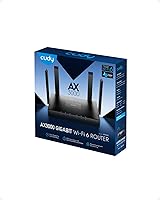
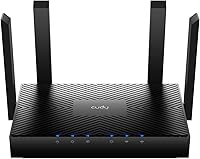
The Cudy WR3000 AX3000 WiFi 6 Router is one of those rare budget networking picks that actually delivers on its promise — bringing 802.11ax technology to home users without demanding a premium price. Cudy isn't a household name like TP-Link or ASUS, but this Shenzhen-based manufacturer has been quietly building credibility in the value segment since launching this router in early 2023. It sits flat on a shelf with no external antennas, which makes it far less obtrusive than most competitors at this tier. Remote management is handled through the Cudy Cloud app, giving you basic control without needing to dig into a browser-based interface every time.
Features & Benefits

What separates WiFi 6 from older AC routers isn't just raw speed — it's how the connection holds up when everyone in the house is online at once. The WR3000 uses OFDMA and MU-MIMO together, which means it splits bandwidth more intelligently across multiple devices rather than serving them one at a time. The 160MHz channel width and 1024-QAM modulation push throughput higher on the 5GHz band, which you'll notice most when streaming 4K or doing large file transfers. Beamforming focuses the signal toward your devices instead of broadcasting it equally in all directions. The built-in VPN support — including WireGuard — is a genuine standout at this price point, though you'll need firmware version 1.16.1 or newer to unlock it.

Best For

This WiFi 6 router makes the most sense for people in apartments or smaller homes — say, a two- or three-bedroom space with a couple dozen connected devices. That covers most modern households: a few phones, laptops, smart TVs, a security camera or two, and maybe a gaming console. The antenna-free design is genuinely handy for renters who'd rather not have a plastic tower sitting on their entertainment center. Remote workers handling sensitive tasks will appreciate the native VPN integration — no separate VPN hardware needed. It's also a logical upgrade for anyone still running an older AC router who wants WiFi 6 gains without committing to a big-brand price tag.

User Feedback

Verified buyers tend to land on the same general conclusion: for what it costs, the WR3000 punches above its weight. Setup gets consistent praise — most users report getting connected within minutes using the app. Range holds up well for typical apartment and small-home use. Where opinions split is around app reliability; some users find the Cudy Cloud app rough around the edges, with occasional hiccups between the app and the router. A handful of reviewers also note that 5GHz range falls short of pricier alternatives in larger or wall-heavy spaces. VPN performance generally satisfies basic remote-access needs, though no one is expecting enterprise throughput. On balance, satisfaction leans positive, with most criticism aimed at software polish.

Pros

  • WiFi 6 support delivers noticeably better performance in homes with many devices connected at once.
  • Built-in WireGuard and OpenVPN support eliminates the need for a separate VPN router or appliance.
  • The flat, antenna-free design blends into home environments far better than bulkier competitors.
  • OFDMA technology reduces network congestion when streaming, gaming, and browsing all happen simultaneously.
  • Setup is straightforward — most users report getting online within a few minutes out of the box.
  • Cudy Mesh compatibility gives you a clear upgrade path if you need to expand coverage later.
  • The dual-core processor keeps the WR3000 responsive under typical household traffic without obvious slowdowns.
  • 160MHz channel bandwidth on the 5GHz band provides solid throughput for nearby high-demand devices.
  • Gigabit Ethernet ports ensure wired connections aren't a bottleneck for devices that support it.
  • The price-to-feature ratio is hard to match at this tier, especially given the VPN protocol variety.

Cons

  • The Cudy Cloud app has a track record of occasional bugs and inconsistent reliability across firmware versions.
  • WireGuard VPN is locked behind firmware version 1.16.1 or newer, requiring an update before it works.
  • 5GHz range falls noticeably short in larger spaces or homes with thick interior walls.
  • Cudy is a lesser-known brand with a smaller support community compared to TP-Link or ASUS.
  • Mesh expansion is only possible with other Cudy devices, locking you into a single-brand ecosystem.
  • Firmware update history is inconsistent, and long-term software support is less predictable than established brands.
  • VPN throughput is adequate for basic remote access but not suited to high-bandwidth or latency-sensitive VPN workloads.
  • The Cudy Cloud app lacks the depth and polish of competing router management platforms.
  • No USB port means no network-attached storage or printer sharing capability.
  • Limited third-party firmware support reduces customization options for more advanced users.

Ratings

The scores below reflect AI-driven analysis of verified global user reviews for the Cudy WR3000 AX3000 WiFi 6 Router, with spam, bot-generated, and incentivized feedback actively filtered out to ensure reliability. Each category is scored to honestly represent both what buyers consistently praised and where real frustrations surfaced. Nothing is glossed over — the ratings capture the full picture.

Value for Money
91%
For buyers coming off an aging AC router, the WR3000 delivers a genuine WiFi 6 upgrade at a price point that most competing brands can't match with comparable specs. Users repeatedly note that the combination of OFDMA, MU-MIMO, and built-in VPN support at this tier feels almost unfairly good.
A small segment of buyers feel that the app experience and firmware cadence don't quite match the hardware value, making the overall package feel slightly uneven. If software polish matters as much as specs to you, the price advantage narrows.
Wireless Performance
78%
22%
In apartments and smaller homes, the WR3000 handles a busy network — streaming on the TV, video calls on a laptop, phones browsing — without the slowdowns common on older routers. The 160MHz channel width on 5GHz gives nearby devices a real throughput boost.
Users in larger homes or spaces with multiple thick walls report that the 5GHz signal drops off faster than expected compared to routers with external high-gain antennas. At distance, performance on that band can feel closer to a mid-range AC router than a modern WiFi 6 device.
Setup & Ease of Use
88%
Most buyers are up and running within 10 minutes of opening the box, with the guided setup process through the Cudy app walking them through each step clearly. Users with no networking background consistently mention it as one of the least frustrating router setups they have experienced.
A handful of users ran into confusion when trying to enable VPN features, since WireGuard and OpenVPN require a firmware update that isn't always flagged during initial setup. Without that update step, the VPN menus appear greyed out, which causes unnecessary troubleshooting.
App & Software Experience
58%
42%
The Cudy Cloud app covers the basics well — checking connected devices, running a speed test, adjusting basic settings remotely — which is more than enough for the average home user who just wants things to work without logging into a browser dashboard.
Recurring complaints point to the app losing connection to the router unexpectedly, requiring re-authentication or a full app restart. Firmware updates have also been inconsistent in frequency, and a few users report that specific updates introduced new bugs rather than resolving existing ones.
VPN Functionality
74%
26%
Having WireGuard, OpenVPN, PPTP, and L2TP all available natively on a router at this price is genuinely unusual, and remote workers using it for basic secure tunneling to a home or office network report it working reliably once properly configured. WireGuard in particular earns praise for its snappy connection times.
VPN throughput is adequate for light remote access but struggles under sustained high-bandwidth use, such as transferring large files or routing heavy traffic through the tunnel. Users expecting near-full ISP speeds through the VPN will likely be disappointed.
Build Quality & Design
77%
23%
The flat, antenna-free form factor is one of the most commented-on physical traits — users appreciate being able to tuck it on a shelf or TV stand without it looking like a piece of networking equipment. The chassis feels solid for the price, with no flex or cheap-feeling plastic.
The all-black matte finish shows fingerprints and dust visibly, and a few users note the unit runs warm during extended heavy use. There are no ventilation slots on top, which some buyers find mildly concerning for long-term thermal performance.
Range & Coverage
67%
33%
For a two-bedroom apartment or a compact single-floor home, the WR3000 pushes a consistent and usable signal into most corners without requiring a second device. Smart Beamforming visibly helps devices closer to the router maintain stronger connections.
Coverage limitations become apparent in larger or multi-story spaces, where users report dead zones in rooms more than 30–40 feet from the router, especially through walls. This is the most frequent complaint from buyers who misjudged the router's range before purchasing.
Multi-Device Handling
82%
18%
Households with a dense mix of IoT gadgets, streaming devices, and computers generally report smooth operation without one device noticeably dragging down others — a direct result of the OFDMA implementation working as intended in real-world conditions.
Under extreme loads — think a home office full of video calls combined with multiple 4K streams and active gaming — some users notice brief latency spikes that suggest the processor is approaching its limits. It's not a frequent complaint, but it surfaces in high-demand households.
Mesh & Expandability
71%
29%
Users who invest in a second Cudy mesh node report that the pairing process is quick and that the extended network maintains reasonably consistent speeds across both nodes. For renters who need to cover an awkward layout, it's a practical solution.
The ecosystem lock-in is a real limitation — if you already own mesh hardware from another brand, it's entirely incompatible. Buyers who want flexibility to mix and match networking gear will find this frustrating, and the selection of Cudy mesh-compatible hardware remains relatively limited.
Wired Connectivity
83%
Gigabit Ethernet ports perform as expected, giving wired devices like desktop PCs and NAS drives full-speed access without any bottleneck introduced by the router. Users running wired home office setups consistently report stable, low-latency connections.
There is no USB port, which means no option for network-attached storage or shared printer functionality — features some buyers assume are standard on modern routers. For anyone who relies on USB-based network sharing, this is a gap worth knowing about before buying.
Firmware & Long-Term Support
55%
45%
Cudy does push firmware updates and has addressed some reported issues over the product's lifespan, which is more consistent than some small-brand competitors who go silent post-launch. The firmware update interface is easy to navigate.
The pace and reliability of updates lag behind what TP-Link and ASUS users are accustomed to, and there's limited community support or third-party firmware options if Cudy stops issuing updates. Long-term buyers carry some risk around ongoing software maintenance.
Signal Stability
79%
21%
Under typical household conditions — moderate device counts, normal wall materials, standard distances — the WR3000 holds a stable connection without frequent drops or reconnection events. Most users describe the daily connection experience as reliable and worry-free.
A smaller subset of users report intermittent drops, particularly on the 2.4GHz band during periods of high neighborhood WiFi congestion. In dense apartment buildings with many overlapping networks, stability can vary more than in suburban or rural environments.
Initial Configuration Depth
72%
28%
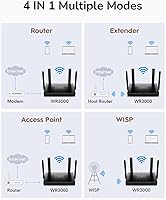
Beyond basic setup, the browser-based admin panel gives access to useful options including access point mode, WPS configuration, and guest network controls, giving slightly more advanced users enough to work with for a customized home network setup.
The advanced settings are not as deep or well-documented as those on more established router platforms, and users who want granular QoS controls, VLAN configuration, or detailed traffic monitoring will quickly hit the ceiling of what the interface offers.

Suitable for:

The Cudy WR3000 AX3000 WiFi 6 Router is a strong fit for renters, apartment dwellers, and anyone in a small to medium-sized home who wants to modernize their network without a significant financial commitment. If your household runs 20 to 40 devices — phones, smart TVs, laptops, security cameras, the occasional gaming console — this router handles that load better than most aging AC routers can. Remote workers who want a built-in VPN for secure connections will find real value here, since WireGuard, OpenVPN, PPTP, and L2TP support is baked in rather than requiring separate hardware or subscriptions. The flat, antenna-free design makes it a natural choice for people who want networking gear that doesn't dominate a shelf or desk. Budget-conscious buyers upgrading from WiFi 5 will notice genuine improvements in how smoothly the network handles multiple simultaneous connections.

Not suitable for:

The Cudy WR3000 AX3000 WiFi 6 Router is not the right call for larger homes, multi-floor layouts, or any space where walls and distance consistently challenge wireless signals. Power users who rely on consistent high-speed VPN throughput for demanding workloads may find the performance underwhelming compared to routers with more processing headroom. If you're deeply invested in a non-Cudy mesh ecosystem — say, a TP-Link Deco or ASUS ZenWiFi setup — this router won't slot in, since mesh expansion only works with other Cudy-branded nodes. Buyers who prefer managing their network through a polished, mature app may be frustrated by the Cudy Cloud app's occasional instability. Anyone who needs enterprise-grade reliability, advanced QoS controls, or extensive third-party firmware support should look at more established brands with longer track records and larger communities.

Specifications

  • WiFi Standard: The router uses 802.11ax (WiFi 6), which improves throughput and network efficiency compared to the previous 802.11ac standard.
  • Frequency Bands: Dual-band operation covers both 2.4GHz and 5GHz simultaneously, allowing devices to connect on whichever band suits them best.
  • Max Speed: Combined wireless speeds reach up to AX3000 class, split as approximately 574Mbps on 2.4GHz and 2402Mbps on 5GHz.
  • Channel Width: Supports 160MHz channel bandwidth on the 5GHz band, enabling higher peak throughput for nearby compatible devices.
  • Modulation: 1024-QAM modulation increases data density per transmission, contributing to faster speeds on supported client devices.
  • Processor: A 1.3GHz dual-core Cortex-A53 processor manages routing and wireless tasks without significant performance degradation under normal household load.
  • VPN Protocols: Supports WireGuard, OpenVPN, PPTP, and L2TP VPN protocols natively; WireGuard and OpenVPN require firmware version 1.16.1 or newer.
  • Key Technologies: Combines DL/UL OFDMA, MU-MIMO, and Smart Beamforming to improve multi-device efficiency and signal focus.
  • Mesh Support: Compatible with Cudy Mesh networking, allowing users to add Cudy-branded nodes to extend coverage across larger spaces.
  • Connectivity: Includes Gigabit Ethernet ports for wired connections, ensuring full-speed throughput for devices connected via cable.
  • Device Capacity: Rated for 100+ simultaneous device connections, though realistic peak performance is best realized with 20–60 devices in a typical home.
  • Dimensions: The unit measures 7.87 x 6.69 x 1.38 inches, resulting in a flat, low-profile footprint with no external antennas.
  • Weight: The router weighs 14.1 ounces, making it lightweight and easy to reposition or mount if needed.
  • Management App: Managed through the Cudy Cloud mobile app, which allows remote monitoring and basic network configuration from a smartphone.
  • Color: Available in black, with a clean flat design intended to blend into home environments unobtrusively.
  • In Box: Package includes the WR3000 router, one Ethernet cable, a power adapter, and a printed installation guide.
  • Manufacturer: Designed and produced by Shenzhen Cudy Technology Co., Ltd., a Chinese networking hardware manufacturer established in the value segment.
  • Release Date: First made available for purchase in January 2023, placing it among the earlier affordable WiFi 6 options in its price tier.

Related Reviews
Cudy AX3000 WiFi 6 Access Point

84%
89%
Performance & Speed
85%
Installation & Setup
91%
Reliability in High-Density Areas
76%
Compatibility with Devices
92%
Range & Coverage
More
D-Link AX3000 M30 WiFi 6 Mesh Router
78%
74%
WiFi Coverage & Range
78%
WiFi Speed & Throughput
88%
Setup & Installation
71%
App Experience
83%
Parental Controls
More
Cudy WE3000 WiFi 6 PCIe Card
80%
83%
WiFi Performance
88%
Installation Ease
81%
Signal Range
74%
Bluetooth Quality
69%
Driver Stability
More
ASUS EBR63 AX3000 WiFi 6 Business Router
77%
88%
Ease of Setup
84%
App & Remote Management
86%
Guest Portal Customization
83%
Network Segmentation
74%
WiFi Speed & Performance
More
D-Link G530 5G AX3000 WiFi 6 Router
84%
89%
Performance
91%
Wi-Fi Speed & Range
84%
Setup & Installation
87%
Dual-WAN Failover
88%
App Experience & Remote Management
More
WAVLINK WN588HX3 WiFi 6 Outdoor Access Point
75%
83%
Outdoor Signal Range
91%
Build Quality & Weatherproofing
78%
Installation & Mounting
61%
Setup & Configuration Experience
86%
WiFi 6 Performance
More
Tenda RX2Pro AX1500 WiFi 6 Router
76%
91%
Value for Money
78%
Wireless Performance
72%
Coverage & Range
93%
Ease of Setup
74%
App Experience
More
Linksys MR20EC WiFi 6 Mesh Router
74%
78%
Wireless Performance
63%
Coverage & Range
91%
Setup & Installation
69%
App & Remote Management
82%
Device Handling & Congestion
More
NETGEAR R6700AXS AX1800 WiFi 6 Router

76%
78%
Wireless Performance
91%
Setup Experience
83%
Multi-Device Handling
86%
Network Security
67%
Coverage Range
More
Reyee E6 AX6000 WiFi 6 Router
78%
93%
Value for Money
86%
Wireless Range & Coverage
82%
Gaming Performance
88%
Ease of Setup
61%
Mobile App & Software Experience
More

FAQ

Not necessarily. The router is fully backward compatible, so your older WiFi 5 and WiFi 4 devices will connect without any issues. You just won't see the WiFi 6 speed improvements on those older devices until you upgrade them. That said, even non-WiFi 6 devices can benefit indirectly from features like OFDMA, which helps the whole network run more smoothly.

Not quite. WireGuard support requires firmware version 1.16.1 or newer, so if your unit ships with older firmware, you will need to update it first through the Cudy admin panel. The update process is straightforward, but it is worth doing before you assume VPN is ready to configure.

This is actually where the WR3000 earns its keep. OFDMA allows the router to serve multiple devices in a single transmission window rather than queuing them up one by one, which keeps things responsive even when the network is busy. For a typical household, it holds up well; just don't expect miracles in a 3,000 square foot home with thick walls.

No. Mesh compatibility is exclusive to Cudy-branded nodes, so if you are already running a TP-Link Deco, ASUS ZenWiFi, or similar system, this router won't join that ecosystem. If you want to expand coverage, you would need to add a second Cudy mesh node.

You can manage the router through a standard web browser by accessing its local admin panel directly, so the app is not strictly required. The Cudy Cloud app adds remote access and a mobile-friendly interface, but some users prefer sticking with the browser dashboard, especially given occasional reports of app instability.

The main trade-off is brand maturity. TP-Link and ASUS have larger user communities, more frequent firmware updates, and better long-term software support. The WR3000 competes on specs and price, but if reliable ongoing updates and community resources matter to you, the bigger brands have a clear edge. For pure hardware value at this price point, though, the WR3000 is genuinely competitive.

Basic parental controls are available through the router's admin interface, including URL filtering and access scheduling. It is not as feature-rich as dedicated parental control platforms, but it covers the essentials for managing screen time and blocking specific content for kids' devices.

It depends on the layout and construction. For a compact two-story home or townhouse, many users report adequate coverage on both floors. In larger or older homes with dense walls, the 5GHz signal in particular may not penetrate well to distant rooms. If coverage is a concern, pairing it with a Cudy mesh node is the more reliable solution.

Cudy typically offers a one-year limited warranty on their hardware, though it is worth confirming directly with the seller at the time of purchase, as warranty terms can vary by region. Customer support is handled through Cudy's official website, where you can also find firmware downloads and setup documentation.

For a solo operator or very small team working from home, it works well — especially with the built-in VPN options for secure remote access. That said, if you need advanced traffic management, VLAN support, or the kind of reliability that a business environment demands, a dedicated small-business router would serve you better in the long run.

Where to Buy