Overview

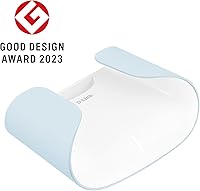
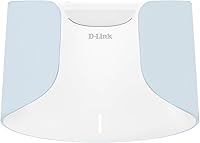
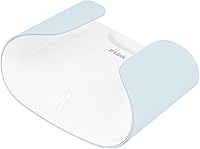
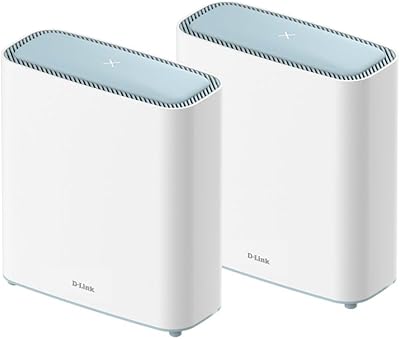
The D-Link AX3000 M30 WiFi 6 Mesh Router sits comfortably in the mid-range bracket — capable enough for most households without the price tag of flagship mesh systems. Built around a dual-band 802.11ax platform, it targets homes up to around 2,800 square feet where a single router struggles to reach every room. The design is genuinely distinctive: the feather-patterned ventilation and eagle-inspired silhouette make it something you won't mind leaving on a shelf. The housing is made from post-consumer recycled plastic, and D-Link ships it in sustainable packaging — a thoughtful touch that costs you nothing in performance. Setup and daily management run entirely through the AQUILA PRO AI app, which handles everything from initial configuration to ongoing network monitoring.
Features & Benefits

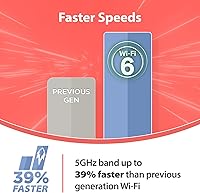
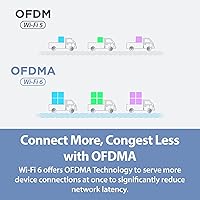
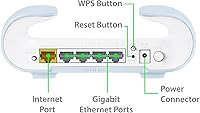
Where the M30 router earns its keep is in how it handles real-world traffic. The extra antenna on the 5 GHz band makes a noticeable difference when multiple people are streaming in 4K or jumping on video calls at once — throughput stays consistent rather than degrading under load. Four Gigabit LAN ports cover wired connections to smart TVs, gaming consoles, or a desktop, while the Gigabit WAN port ensures you're not bottlenecked before traffic even reaches your devices. WPA3 encryption and an ETSI EN 303 645 cybersecurity certification are meaningful inclusions at this price point. Parental controls and guest network settings are managed entirely in-app — convenient, though users who prefer a traditional browser-based admin panel will find that option notably absent.

Best For

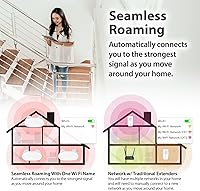
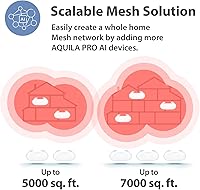
This WiFi 6 mesh router makes the most sense for households in the 1,500 to 2,800 square foot range — think ranch-style homes, open floor plans, or larger apartments where a single access point leaves the back bedroom struggling. Families with kids will appreciate the built-in parental controls, which don't require a paid subscription to unlock. Remote workers and renters who rely on stable video conferencing will find the consistent dual-band coverage practically useful day-to-day. The expandable mesh architecture is also worth noting: if your space grows or your needs change, you can add another node rather than replacing the whole system. The eco-friendly build is a genuine plus, but performance should drive the buying decision — not the packaging.

User Feedback

With around 141 ratings and a 4.2-star average, buyer sentiment toward D-Link's M30 skews positive but isn't without caveats. Most satisfied owners highlight the quick, painless setup and the app's clear layout as real strengths — especially for people who have historically dreaded router configuration. Signal consistency in open floor plans also draws repeated praise. On the other side, buyers in multi-story homes report that the advertised coverage ceiling doesn't always hold, and a handful flag the app feeling sluggish following firmware updates. A few reviewers draw direct comparisons to TP-Link alternatives at similar prices, suggesting the competition is genuinely close. The review pool is still relatively modest, so the overall picture could shift meaningfully as more long-term owners share their experience.

Pros

  • App-guided setup gets most users online in under ten minutes with zero technical knowledge required.
  • Built-in parental controls work reliably and require no paid subscription to unlock.
  • Four Gigabit LAN ports let you hardwire a TV, console, and desktop simultaneously without a separate switch.
  • WPA3 encryption and a genuine cybersecurity certification set it above most budget routers in this class.
  • The expandable mesh design means adding coverage later does not require replacing existing hardware.
  • Consistent 5 GHz performance holds up well for 4K streaming and video calls under moderate household load.
  • The eagle-inspired design is distinctive enough to leave out in the open without looking like a utility device.
  • Recycled plastic housing and sustainable packaging are verified commitments, not just marketing language.
  • Guest network and QoS settings are easy to manage directly from the mobile app without digging through menus.

Cons

  • Coverage degrades noticeably in multi-story homes and spaces with thick or irregular walls.
  • There is no browser-based admin interface — if the app breaks after an update, management options are very limited.
  • The Gigabit WAN port becomes a bottleneck for anyone on a multi-gigabit internet plan.
  • Firmware updates arrive infrequently and with minimal patch notes explaining what actually changed.
  • Mesh expansion is locked to D-Link's AQUILA PRO AI ecosystem, ruling out mixing in nodes from other brands.
  • Households running 30 or more simultaneous devices may encounter latency spikes during peak usage hours.
  • Post-firmware-update app instability appears often enough in buyer reviews to be a genuine pattern, not an isolated complaint.
  • No active threat detection or deep traffic monitoring — security features cover the basics but nothing beyond.
  • Parental controls lack per-app blocking and can be bypassed by VPN apps on a determined teenager's device.

Ratings

The D-Link AX3000 M30 WiFi 6 Mesh Router scores below are generated by AI after analyzing verified buyer reviews from global markets, with spam, incentivized, and bot-flagged submissions actively filtered out. The M30 router draws a reasonably positive overall picture, but the scores reflect real trade-offs — not marketing claims — so both the strengths and the friction points are represented honestly.

WiFi Coverage & Range
74%
26%
In single-story homes and open floor plans under 2,200 square feet, most buyers report solid, consistent coverage with few dead zones. The 360-degree antenna design does a respectable job distributing signal across adjoining rooms without significant drop-off near walls.
Multi-story homes and layouts with thick concrete or brick walls regularly push against the M30's limits before reaching the advertised 2,800 square foot ceiling. Several buyers in larger spaces note that one node simply isn't enough and end up purchasing an additional unit sooner than expected.
WiFi Speed & Throughput
78%
22%
Day-to-day tasks like 4K streaming, video conferencing, and casual online gaming hold up well, particularly on the 5 GHz band where the extra antenna helps maintain throughput under moderate household load. Users with gigabit internet plans report pulling strong real-world speeds when positioned close to the router.
At the far edges of its range, speed degrades more noticeably than some competing WiFi 6 routers in the same price tier. Households running a dozen or more simultaneous devices during peak hours occasionally report congestion that the AX3000 class struggles to fully absorb.
Setup & Installation
88%
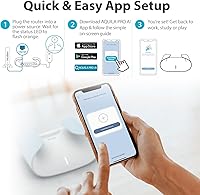
This is consistently one of the most praised aspects across buyer reviews. The AQUILA PRO AI app walks users through the process step by step, and most report being online within ten minutes of unboxing — no technical knowledge required. The included Ethernet cable and clear quick-start guide reduce friction further.
The entire setup process is locked to the mobile app, which is a genuine constraint for users who prefer a browser-based admin interface or who are setting it up in an environment without easy smartphone access. A small subset of Android users report the app failing to detect the router on the first attempt.
App Experience
71%
29%
For routine tasks — checking connected devices, setting up a guest network, adjusting parental controls — the AQUILA PRO AI app is reasonably intuitive and well laid out. Push notifications for network events and a clean dashboard make daily monitoring genuinely accessible for non-technical users.
Post-firmware-update instability is a recurring theme in critical reviews, with some users reporting the app becoming sluggish or losing connection to the router temporarily after updates. Advanced users frustrated by the absence of any web-based admin panel have little recourse when the app misbehaves.
Parental Controls
83%
Families consistently highlight parental controls as a standout feature, especially given that no subscription fee is required to access them. Scheduling internet access by device and filtering content categories works reliably for most households with school-age children.
The controls lack the granularity that dedicated parental control platforms offer — per-app blocking and detailed usage reports are absent. Parents with older, tech-savvy teenagers note the filters are bypassable through VPN apps, which limits their effectiveness as a strict enforcement tool.
Build Quality & Design
81%
19%
The eagle-inspired silhouette and feather-patterned vents make this one of the more visually distinctive routers at the price point — buyers frequently mention feeling comfortable leaving it on an open shelf rather than hiding it away. The recycled plastic housing feels solid and shows no flex under normal handling.
At 11.8 ounces the unit is relatively light, which some users interpret as feeling slightly less premium than heavier competitors. The all-white finish also picks up dust and fingerprints noticeably, requiring occasional wiping to maintain the clean aesthetic.
Network Security
86%
WPA3 encryption and the ETSI EN 303 645 cybersecurity certification are meaningful inclusions at this price tier — most budget routers still ship with WPA2 only. Buyers with home offices or smart home ecosystems appreciate having a credentialed security baseline without paying a premium.
While the certification is real, there is no built-in threat detection or automatic vulnerability scanning comparable to what Eero Plus or ASUS AiProtection offer. Security-conscious users who want active monitoring will need to supplement with a third-party solution.
Mesh Expandability
77%
23%
The ability to add M30 or M60 nodes to the same AQUILA PRO AI ecosystem without replacing existing hardware is a practical long-term advantage. Users who started with a single unit and later expanded report a straightforward pairing process and consistent backhaul performance.
Cross-compatibility is limited to D-Link's own AQUILA PRO AI lineup, so buyers cannot mix in nodes from other brands if they want to expand. The cost of adding a second node pushes the total investment into territory where competing two-pack systems start to look more attractive from the outset.
Wired Connectivity
84%
Four Gigabit LAN ports is a generous allocation for a single-node router in this class, giving users the flexibility to hardwire a smart TV, gaming console, NAS drive, and desktop simultaneously without a switch. The Gigabit WAN port handles standard ISP connections cleanly.
The lack of a 2.5 Gbps WAN port is a notable omission for users on multi-gigabit internet plans, where the single Gigabit connection becomes the bottleneck. As ISP speeds continue to climb, this limitation will age the hardware faster than its wireless specs would otherwise suggest.
Value for Money
76%
24%
At its price point, the M30 bundles a solid feature set — WiFi 6, parental controls, four LAN ports, decent security credentials, and a capable app — without asking buyers to pay for tiers they may not need. For a single-unit purchase covering a modest home, the proposition is fair.
When measured against two-pack mesh systems from TP-Link and ASUS that land in a similar total price range, the M30 as a standalone unit can feel less competitive. Buyers who discover they need a second node after purchase often feel the per-square-foot cost was higher than initially apparent.
Device Capacity & Load Handling
72%
28%
For households running 15 to 20 simultaneous devices — a realistic count for a family with smartphones, laptops, smart speakers, and a streaming device — the M30 router manages traffic reasonably well under normal mixed-use conditions. QoS settings help prioritize bandwidth for critical tasks.
Heavy multi-device households pushing 30 or more connected endpoints, particularly in smart home setups with many IoT devices, begin to expose the router's limits. Users in this scenario report occasional latency spikes during peak hours that QoS adjustments only partially address.
Firmware & Software Updates
63%
37%
D-Link does push updates to the M30, and the app surfaces them promptly with a straightforward one-tap install process. Some updates have addressed early app connectivity bugs and improved AI-driven channel optimization noticeably.
The cadence and transparency of firmware updates is a recurring concern — buyers report months-long gaps between releases and minimal patch notes explaining what changed. Post-update instability, though not universal, appears with enough frequency in reviews to warrant caution before updating immediately.
Eco-Friendly Credentials
79%
21%
The recycled plastic housing and sustainably sourced packaging are verifiable commitments, not marketing theater — buyers who care about their tech purchases' environmental footprint have noted and appreciated the effort. It sets the M30 apart from the vast majority of routers in its category.
Eco-conscious buyers looking for deeper sustainability data — such as power consumption ratings, repairability scores, or end-of-life recycling programs — will find D-Link's transparency stops short of what they might hope for. The green credentials are real but surface-level.

Suitable for:

The D-Link AX3000 M30 WiFi 6 Mesh Router is a practical fit for households in single-story homes or open-plan layouts roughly between 1,500 and 2,200 square feet, where consistent whole-home coverage matters more than bleeding-edge throughput. Families with school-age children will find the built-in parental controls — available without any subscription — a genuinely useful day-to-day feature for managing screen time and filtering content. Remote workers or renters who depend on reliable video calls and cloud-based work tools will appreciate the stable dual-band performance without needing to configure anything beyond the mobile app. It also suits buyers who are thinking ahead: the expandable AQUILA PRO AI mesh ecosystem means adding a second node later is straightforward, rather than starting over from scratch. If you care about sustainability even modestly, the recycled housing and responsible packaging are a real differentiator in a product category that rarely acknowledges environmental impact at all.
Not suitable for:

The D-Link AX3000 M30 WiFi 6 Mesh Router is likely to disappoint buyers who live in multi-story homes, older buildings with thick masonry walls, or any space that genuinely pushes toward or beyond 2,800 square feet — the advertised ceiling reflects ideal lab conditions, not real-world layouts with obstacles. Power users who want granular control through a browser-based admin panel will find the app-only management model frustrating, and there is no fallback if the app misbehaves after a firmware update. Households on multi-gigabit internet plans will hit a hard ceiling at the Gigabit WAN port, meaning faster ISP speeds go to waste. Anyone building a mixed-brand mesh network should also look elsewhere, as the AQUILA PRO AI ecosystem only plays nicely with D-Link's own nodes. Finally, buyers seeking active threat detection, deep traffic inspection, or subscription-based security features will need to supplement this router with additional hardware or software — it covers the security basics well, but stops there.

Specifications

  • WiFi Standard: Operates on 802.11ax (WiFi 6), with backward compatibility across 802.11a/b/g/n/ac devices.
  • Frequency Bands: Dual-band design covers both the 2.4 GHz and 5 GHz spectrums simultaneously for flexible device distribution.
  • Max Speed: Combined wireless throughput is rated at up to 3 Gbps across both bands under optimal conditions.
  • Coverage Area: Advertised coverage reaches up to 2,800 sq. ft., though real-world performance varies with home layout and wall materials.
  • LAN Ports: Equipped with four Gigabit LAN ports for wired connections to TVs, gaming consoles, desktops, or NAS devices.
  • WAN Port: One Gigabit WAN port connects to the ISP modem, supporting standard broadband plans up to 1 Gbps.
  • Security: Supports WPA3 encryption and holds ETSI EN 303 645 cybersecurity certification for consumer IoT devices.
  • Mesh Support: Fully mesh-capable and expandable by adding additional AQUILA PRO AI nodes (M30 or M60 series) within the same ecosystem.
  • Management App: Network setup and ongoing management are handled exclusively through the AQUILA PRO AI app, available on iOS and Android.
  • Special Features: Includes Parental Controls, Guest Network, QoS prioritization, Remote Access, and WPS for quick device pairing.
  • Dimensions: The unit measures 7.15 x 5.09 x 2.6 inches, making it compact enough for a shelf or media console placement.
  • Weight: Weighs 11.8 oz, which is lightweight for a standalone mesh-capable router in this performance class.
  • Housing Material: The outer casing is constructed from post-consumer recycled plastic, reducing reliance on virgin petroleum-based materials.
  • Color: Available in a single White finish with a feather-patterned ventilation design inspired by eagle plumage.
  • In the Box: Package includes the M30 router unit, a power adapter, one Ethernet cable, and a printed quick install guide.
  • Antenna Design: Features an extra antenna on the 5 GHz band compared to standard dual-band configurations, improving high-frequency throughput.
  • AI Optimization: Onboard AI technology assists with channel selection and antenna management to dynamically reduce dead zones.
  • Packaging: Shipped in sustainably sourced packaging materials as part of D-Link's broader eco-design commitment.

Related Reviews
D-Link M60 AX6000 Wi-Fi 6 Mesh Router
83%
88%
Wi-Fi Speed & Throughput
74%
Wi-Fi Coverage & Range
93%
Design & Aesthetics
91%
Setup & Initial Configuration
83%
App Experience & Management
More
D-Link G530 5G AX3000 WiFi 6 Router
84%
89%
Performance
91%
Wi-Fi Speed & Range
84%
Setup & Installation
87%
Dual-WAN Failover
88%
App Experience & Remote Management
More
D-Link Eagle Pro AI AX3200 Mesh WiFi 6 System
85%
88%
Wi-Fi Performance
91%
Ease of Setup
84%
Coverage Range
86%
App Functionality
89%
AI Optimization
More
Cudy WR3000 AX3000 WiFi 6 Router
75%
91%
Value for Money
78%
Wireless Performance
88%
Setup & Ease of Use
58%
App & Software Experience
74%
VPN Functionality
More
Reyee RG-R6 AX3200 Mesh WiFi 6 System (1-Pack)
71%
88%
Value for Money
91%
Setup & Ease of Use
76%
WiFi Coverage
79%
Network Speed & Throughput
82%
Multi-Device Performance
More
Linksys AX2200 WiFi 6 Mesh Router
84%
88%
WiFi Speed & Performance
91%
Ease of Setup
85%
Coverage & Range
72%
Reliability in Large Homes
90%
App Functionality & Control
More
Linksys MX8000 Velop Mesh WiFi Router 2-Pack
75%
86%
Coverage & Range
74%
WiFi Speed Performance
83%
Multi-Device Handling
91%
Setup & Installation
78%
App Experience
More
D-Link DIR-2640 WiFi Router AC2600
86%
94%
Setup & Installation
88%
Wi-Fi Performance
79%
Range & Coverage
87%
Parental Controls
91%
App Experience
More
Linksys LN3121 WiFi 6 Mesh Router
73%
91%
Ease of Setup
74%
WiFi Coverage
78%
Connection Speed
82%
Multi-Device Performance
83%
Network Stability
More
TP-Link Archer AX73
TP-Link Archer AX73
79%
88%
Wireless Speed & Throughput
91%
Multi-Device Performance
74%
Coverage & Range
93%
Setup & Ease of Use
79%
Build Quality & Design
More

FAQ

Not at all. The AQUILA PRO AI app walks you through every step with clear on-screen instructions, and most users report being fully connected within ten minutes of opening the box. The included Ethernet cable and quick install guide cover the physical side. As long as you have a smartphone and your ISP login details handy, you should be fine.

That depends a lot on your home's layout. In a single-story open-plan home under roughly 2,000 to 2,200 sq. ft., one unit usually handles it well. If your home has multiple floors, thick concrete walls, or a more compartmentalized layout, you may hit coverage limits before reaching the advertised ceiling. It is worth starting with one and adding a second node later if needed — the mesh system makes that expansion straightforward.

The app is mandatory. There is no traditional browser-based admin panel available for the M30. Everything from initial setup to parental controls and firmware updates runs through the AQUILA PRO AI mobile app. If you strongly prefer web-based management, this is a genuine constraint worth factoring into your decision.

They are completely free — no subscription required. You can set internet schedules, filter content categories, and manage access per device directly from the app without ever being prompted to upgrade or pay more. This is one of the more genuinely useful value inclusions at this price point.

Yes, it works with virtually any standard broadband or fiber service. You connect it to your ISP's modem via the Gigabit WAN port, and it takes over from there. The one caveat is that the single Gigabit WAN port caps your connection at 1 Gbps, so if you are on a multi-gigabit plan, you will not get the full benefit of those faster tiers through this router.

Unfortunately not. The mesh expansion is limited to D-Link's own AQUILA PRO AI ecosystem, specifically M30 and M60 series nodes. You cannot pair it with TP-Link, ASUS, or Eero units. If a fully open, brand-agnostic mesh setup matters to you, this router is not the right fit.

For a typical smart home setup with 15 to 25 devices — smart speakers, lights, a few phones, laptops, and a streaming TV — it handles the load comfortably under normal use. The QoS settings let you prioritize bandwidth for devices that need it most. Households pushing well beyond 30 simultaneously active devices may notice some congestion during peak hours.

Firmware updates are available through the app and are not automatic by default — you will get a notification when one is available and choose when to install it. The update cadence has been a mild criticism among users, with gaps of several months between releases being common. When updates do land, the app handles the process simply enough, though a small number of users report temporary connectivity hiccups immediately afterward.

Not in any practical sense. The housing feels solid, shows no flex under normal handling, and the finish looks clean. The recycled material is a manufacturing choice rather than a cost-cutting measure — it performs the same function. The white surface does attract dust and fingerprints over time, but that is a finish choice rather than a materials issue.

It holds its own reasonably well on core performance, particularly in terms of setup simplicity, security credentials, and the no-subscription parental controls. Where it faces tougher competition is in ecosystem flexibility and app robustness — TP-Link's Deco app and ASUS's interface both have larger install bases and more frequent updates. If raw community support and firmware maturity matter to you, those alternatives have a slight edge. The M30 is a solid mid-range choice, but it is not a clear winner over everything in its class.

Where to Buy