Overview

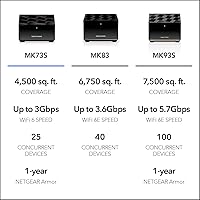
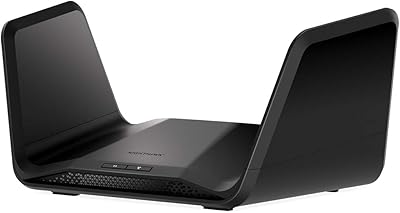
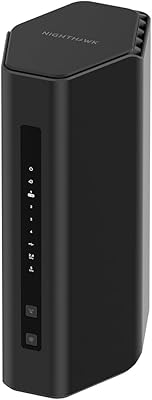
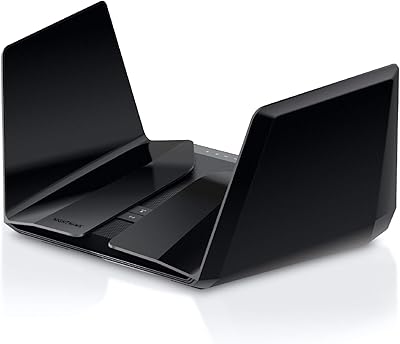
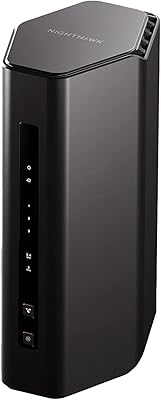
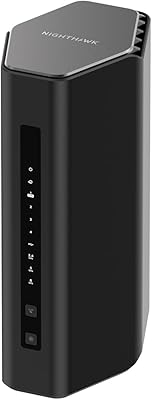
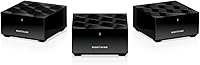
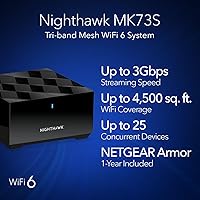
The NETGEAR Nighthawk MK73S is a three-piece mesh WiFi 6 system built for mid-sized homes where a single router just isn't cutting it anymore. You get one main router and two satellites that push coverage across up to 4,500 square feet — enough for a two-story house or a sprawling open-plan layout. This isn't a high-end enthusiast setup; it sits in the mid-range, targeting buyers who want reliable whole-home coverage without a steep learning curve. The included NETGEAR Armor security subscription is a genuine differentiator, giving households a layer of protection that competing kits typically charge extra for from day one. Think of it as a plug-and-play upgrade rather than a networking project.
Features & Benefits

WiFi 6 is the headline here, and what it means practically is that this Nighthawk mesh system handles more devices at once with less congestion — not necessarily faster raw speeds than your ISP delivers, but noticeably smoother when a dozen gadgets are all active simultaneously. The dedicated backhaul band keeps the router and satellites communicating without stealing bandwidth from your phones and laptops. Each unit also carries a physical Ethernet port, which matters for anyone connecting a gaming console or desktop directly. Setup runs through the Nighthawk mobile app and is genuinely straightforward — most households are up and running in under 20 minutes. It works with cable, fiber, satellite, and DSL providers up to 1 Gbps.

Best For

The MK73S kit makes the most sense for homeowners dealing with dead zones in a 2,000 to 4,500 square foot space — think a multi-level townhouse or a ranch-style home where one router can't reach the far end. It's also well-suited for households juggling 15 or more connected devices: smart speakers, security cameras, streaming sticks, and several laptops all running at once. Remote workers and students will appreciate the consistent speeds in rooms that previously had weak signal. Families who want network-level security without digging into router settings will find Armor easy to live with. If you're comfortable running one cable from your modem and letting the app handle the rest, this setup fits well.

User Feedback

Across roughly 136 ratings, this three-piece WiFi 6 setup holds a 4.0-star average — solid, but not without criticism. Buyers consistently praise the easy app-based setup and a real improvement in coverage, particularly in rooms that were previously frustrating to use. For most people, the dead-zone problem genuinely goes away. The recurring complaints, though, are worth knowing upfront: roaming handoff between units can feel sluggish when moving between floors, and the settings are too limited for anyone wanting manual control over DNS or QoS. There is also a cost note that catches buyers off guard — the Armor subscription renews at an added charge after the included first year. Build quality, at least, draws very little criticism.

Pros

  • Eliminates WiFi dead zones in most mid-sized homes without running a single cable.
  • WiFi 6 handles 20-plus simultaneous devices with noticeably less congestion than older routers.
  • Each satellite includes a wired Ethernet port — genuinely useful for TVs and game consoles.
  • App-guided setup gets most households online in under 20 minutes.
  • Works with virtually any residential ISP, including cable, fiber, DSL, and fixed wireless.
  • NETGEAR Armor provides real-time threat protection and automatic firmware updates for the first year.
  • Compact units sit discreetly on shelves without looking like networking equipment.
  • Consistent performance during video calls and HD streaming in previously weak-signal rooms.
  • No ISP modem replacement needed — connects directly to your existing hardware.

Cons

  • Roaming handoff between units can be sluggish, causing brief speed dips when moving between rooms.
  • Real-world speeds at the satellites often fall short of what a gigabit ISP plan actually delivers.
  • The Armor security subscription costs extra after the included first year expires.
  • Each unit only has one LAN Ethernet port, limiting wired connections per location.
  • Advanced settings are too restricted for users who want manual DNS, QoS, or VLAN control.
  • The Nighthawk app receives infrequent updates and remote management can be unreliable outside the home.
  • Units run noticeably warm under sustained heavy use, though no widespread thermal failures have been reported.
  • After an ISP outage, the system sometimes requires a manual power cycle rather than reconnecting automatically.
  • Parental control features are basic and depend on the Armor subscription remaining active to function fully.
  • The listing describes the system as tri-band, but the technical specs confirm it operates on dual bands — a discrepancy that may mislead buyers comparing it against true tri-band competitors.

Ratings

The NETGEAR Nighthawk MK73S has been evaluated by our AI rating engine after analyzing verified buyer reviews from global sources, with spam, bot submissions, and incentivized feedback actively filtered out. What emerges is a clear picture of a competent mid-range mesh system that earns genuine praise in several key areas while carrying a few real-world frustrations that prospective buyers deserve to know about. Scores below reflect both where this Nighthawk mesh system punches above its weight and where it falls short against the expectations buyers bring to this category.
Coverage & Dead Zone Elimination
88%
For most homes in the 2,000 to 4,500 square foot range, the three-unit configuration genuinely solves the dead zone problem. Buyers in two-story houses consistently report that back bedrooms and garage areas — previously near unusable — become fully functional after placing a satellite nearby.
Coverage performance drops noticeably in homes with thick concrete or brick interior walls, where signal attenuation between units is more aggressive than expected. A small number of buyers in larger open-plan layouts found that 4,500 square feet was an optimistic ceiling rather than a reliable guarantee.
Setup & Installation Experience
91%
The Nighthawk app walks users through the entire process with clear, step-by-step prompts that non-technical buyers describe as genuinely intuitive. Most households report being fully operational in under 20 minutes — a meaningfully low barrier compared to configuring a traditional router with separate extenders.
A small but consistent group of buyers encountered ISP-specific hiccups, particularly when switching from an ISP-supplied combo modem-router, where bridge mode configuration was required and not explained in the quick-start guide. Android users also occasionally reported app connectivity glitches during the initial pairing stage.
WiFi Speed & Throughput
76%
24%
For everyday tasks — video calls, 4K streaming on two or three screens simultaneously, and casual online gaming — the MK73S kit delivers consistently adequate speeds. WiFi 6 efficiency means devices near the satellites maintain stable connections even when many gadgets are active at once.
Raw throughput at range is underwhelming compared to premium tri-band competitors in the same size category. Buyers running gigabit fiber connections often noted that actual measured speeds at the satellites topped out well below what their ISP plan delivers, which is a real gap for speed-conscious households.
Device Capacity & Network Congestion
82%
18%
WiFi 6 OFDMA technology handles crowded home networks noticeably better than older router generations — households with 20-plus connected devices, including smart home sensors, security cameras, and streaming sticks, report fewer bottlenecks during peak evening hours.
While the system copes well with many low-bandwidth devices, performance can degrade when several devices simultaneously demand high-bandwidth connections — for example, two 4K streams running alongside an active video call and a cloud backup. The system is not built to prioritize traffic intelligently without manual intervention.
Roaming & Handoff Between Units
63%
37%
For stationary use — a laptop at a desk, a TV in the living room — the inter-unit handoff is transparent and causes no noticeable disruption. Buyers who primarily use devices in fixed locations around the house rarely flag roaming as an issue at all.
Walking through the home with a phone or tablet sometimes results in the device clinging to a farther satellite rather than switching to the nearest one, causing a brief but irritating speed dip. This sticky roaming behavior is one of the more common frustrations cited in reviews, and it is not something the Nighthawk app currently lets users address directly.
Security (NETGEAR Armor)
79%
21%
The bundled Armor subscription provides real-time device scanning, automatic firmware updates, and a basic VPN — features that would typically require a separate purchase or manual setup. For families who want network-level protection without becoming their own IT department, the first-year inclusion represents genuine added value.
The subscription-based model becomes a recurring cost after the first year, which surprises buyers who assumed security was a permanent built-in feature rather than a time-limited trial. At that renewal price point, some users feel the value proposition weakens, particularly since competing systems include comparable security features at no ongoing charge.
Advanced Settings & Power User Control
51%
49%
For the target audience — families and remote workers who simply want working WiFi without configuration complexity — the simplified interface is an asset. Automatic firmware updates and sensible out-of-the-box defaults mean most buyers never need to open an advanced settings panel at all.
Technically inclined buyers consistently criticize the lack of granular control: no per-device QoS prioritization, limited VLAN support, and no straightforward way to separate IoT devices onto their own network segment. If you are the type to manually set DNS servers or monitor per-client bandwidth usage, this three-piece WiFi 6 setup will frustrate you quickly.
Wired Ethernet Connectivity
84%
Having a Gigabit Ethernet port on each satellite — not just the main router — is a practical advantage that buyers with distributed wired devices genuinely appreciate. A game console in the living room and a desktop in a back office can both benefit from a direct wired connection without running cable to the primary router.
Each unit carries only one usable LAN port, which is limiting for anyone wanting to wire multiple devices per location. Buyers who anticipated connecting both a smart TV and a streaming box via Ethernet at the same satellite location have had to add a small switch, adding cost and clutter.
App & Ongoing Management
77%
23%
The Nighthawk app covers the basics well: speed tests, connected device lists, guest network creation, and parental controls are all accessible without a browser-based admin panel. Buyers new to managing a home network find the visual layout approachable and clear.
Long-term users report the app feels stagnant — updates are infrequent, and some interface quirks that existed at launch remain unresolved. Remote management can also be unreliable, with the app occasionally failing to connect to the home network from outside, which is a genuine inconvenience for households that travel regularly.
ISP Compatibility
86%
The system connects to the existing cable modem and replaces only the router portion of the network, making it compatible with virtually any residential ISP setup — cable, fiber, DSL, or fixed wireless. Buyers switching from ISP-rental routers appreciate not needing to change their modem hardware.
A subset of buyers with certain ISP-provided modem-router combo units experienced double-NAT issues that required either enabling bridge mode on the ISP device or navigating NETGEAR support — a process that is accessible but not intuitive for less technical users.
Build Quality & Physical Design
73%
27%
The units are compact enough to sit discreetly on a shelf or bookcase without dominating a room. Build quality is described as solid plastic with no flex or cheap-feeling seams — acceptable at this price tier and consistent with the overall NETGEAR product line.
Some buyers note that the units run noticeably warm during sustained heavy use, though no reports of thermal throttling or shutdowns have emerged in significant volume. The all-black finish is a fingerprint magnet, and the lack of any visual indicator beyond a small LED can make it harder to quickly diagnose connection issues at a glance.
Value for Money
74%
26%
For buyers coming from a single aging router with no satellite coverage, the performance improvement relative to the purchase price feels substantial. The Armor subscription inclusion adds tangible software value that helps justify the mid-range cost in the first year of ownership.
When benchmarked against competing mesh kits at similar or slightly higher price points — some of which offer true tri-band backhaul, more Ethernet ports per unit, or lifetime security features — the long-term value case for the MK73S kit weakens. The Armor renewal cost in subsequent years nudges the total cost of ownership higher than the purchase price alone suggests.
Parental Controls
68%
32%
Basic parental controls are available through the Nighthawk app, allowing households to pause internet access per device or set time schedules for specific users. For parents who want a simple on-off switch for screen time, the feature works reliably and requires no technical knowledge to configure.
Content filtering is limited and dependent on the Armor subscription being active, meaning families seeking robust category-based blocking or per-profile browsing histories will find the built-in tools insufficient. Parents accustomed to more capable third-party solutions like Circle may find this Nighthawk mesh system underwhelming in this area.
Reliability & Uptime
81%
19%
The majority of buyers report months of trouble-free operation after the initial setup — no random reboots, no unexplained dropouts during work calls or evening streaming sessions. Automatic firmware updates keep the system patched without requiring owner intervention, which contributes to sustained day-to-day stability.
A recurring minority complaint involves the system occasionally requiring a full power cycle after ISP outages, rather than reconnecting automatically as most modern routers do. It is not a widespread failure, but for buyers in areas with frequent brief outages, it adds a layer of manual maintenance that should not be necessary.

Suitable for:

The NETGEAR Nighthawk MK73S is a strong fit for homeowners and renters who have outgrown a single router and are dealing with real dead zones — particularly in two-story houses, long ranch layouts, or homes where the modem lives in one corner and the bedrooms are at the opposite end. If your household has a mix of smart TVs, security cameras, work laptops, and smartphones all competing for bandwidth during the evening rush, this Nighthawk mesh system handles that kind of sprawling device list better than most single-router setups ever could. Remote workers who need a stable, consistent connection in a home office that sits far from the main router will notice an immediate improvement. Families who want a layer of network security without learning firewall terminology will appreciate the bundled Armor subscription covering the first year. And if the idea of running Ethernet cable through walls makes you cringe, this three-unit WiFi 6 setup is specifically designed to eliminate that need entirely.

Not suitable for:

The NETGEAR Nighthawk MK73S is not the right choice for technically minded buyers who want meaningful control over their home network — there is no granular QoS, no easy VLAN segmentation for IoT devices, and no straightforward access to the kind of advanced settings that networking enthusiasts expect. Buyers subscribing to a gigabit fiber plan who are chasing real-world gigabit speeds throughout the home will likely be disappointed, as satellite throughput at range falls noticeably short of that ceiling. Anyone with a home larger than 4,500 square feet, or a floor plan with thick masonry walls between floors, may find that three units are not enough without careful satellite placement. Power users who have experience with platforms like Ubiquiti, Synology, or even TP-Link Deco at the higher end will find this kit frustratingly limited in its management interface. It is also worth noting that the Armor security subscription carries an ongoing annual renewal cost after the first year, which makes it a less appealing long-term proposition for budget-conscious buyers who factored that protection into their purchase decision.

Specifications

  • WiFi Standard: The system uses the 802.11ax (WiFi 6) standard, which improves efficiency and reduces congestion compared to the previous WiFi 5 generation.
  • Combined Speed: Advertised combined throughput across all bands reaches up to 3 Gbps, though real-world speeds at range will vary based on home layout and ISP plan.
  • Coverage Area: The three-unit configuration is rated to cover up to 4,500 square feet of living space when units are optimally placed.
  • Units Included: The kit contains one MR70 mesh router and two MS70 mesh satellite extenders, all pre-paired from the factory.
  • Frequency Bands: The system operates on dual bands (2.4 GHz and 5 GHz), despite the product line being marketed under a tri-band naming convention in some listings.
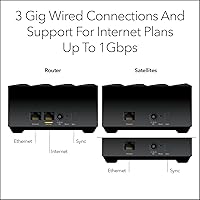
  • Ethernet Ports: Three Gigabit Ethernet ports are distributed across the kit — one per unit — providing wired connection options at each placement location.
  • Max Devices: The system is rated to support 25 or more simultaneously connected devices without significant performance degradation under typical household usage.
  • Security Suite: NETGEAR Armor is included with a one-year subscription, providing real-time threat detection, automatic firmware updates, and basic VPN functionality.
  • ISP Compatibility: The router is compatible with cable, fiber, DSL, and fixed wireless internet services from any provider delivering speeds up to 1 Gbps.
  • Setup App: Initial configuration and ongoing network management are handled through the Nighthawk mobile app, available for both iOS and Android devices.
  • Model Number: The official model designation is MK73S-200NAS, intended exclusively for use in the United States market.
  • Dimensions: The main router unit measures 10.06 x 6.34 x 5.23 inches; satellite units are more compact and designed to sit unobtrusively on a shelf or surface.
  • Total Kit Weight: The complete kit — router plus two satellites and all accessories — weighs approximately 4.03 lbs.
  • Color & Finish: All three units share a matte black finish, which blends into most home decors but does attract visible fingerprints over time.
  • Power Supply: Three 12V / 1.5A power adapters are included in the box, one for each unit, with no shared or consolidated power solution provided.
  • Included Cables: One 2-meter (approximately 6-foot) Ethernet cable is included for connecting the main router to the cable modem or ONT.
  • Operating System: The router firmware runs on the NETGEAR Genie platform, which governs both the on-device logic and the app-based management interface.
  • Availability Date: The MK73S kit was first made available for purchase in November 2024, making it a relatively recent addition to the NETGEAR Nighthawk mesh lineup.

Related Reviews

Netgear Nighthawk AX5200 Router
87%
92%
Wi-Fi Performance
89%
Range & Coverage
84%
Setup & Installation
88%
Reliability & Stability
91%
Gaming & Streaming Experience
More
Netgear Nighthawk AX12 AX11000 Router
87%
92%
Wi-Fi Performance
89%
Speed & Latency
85%
Ease of Setup
88%
Build Quality
90%
Security Features
More
NETGEAR Nighthawk R7350 AC2400 Router
82%
88%
Performance for Gaming
85%
Streaming Performance
91%
Ease of Setup
82%
Wi-Fi Range and Coverage
84%
Reliability
More
NETGEAR Nighthawk CM1200
75%
88%
Internet Speed Performance
83%
Setup & Installation
63%
Long-Term Reliability
79%
Value for Money
71%
Compatibility & ISP Support
More
NETGEAR Nighthawk RS500 WiFi 7 Router
84%
94%
Performance
91%
Speed and Connectivity
89%
Coverage Area
88%
Security Features
85%
Ease of Setup
More
NETGEAR Nighthawk RS140 WiFi 7 Router
85%
92%
Performance
88%
Ease of Setup
91%
WiFi Speed & Range
89%
Device Connectivity
80%
Software & Firmware
More
NETGEAR Nighthawk RAX43 WiFi 6 Router
84%
88%
WiFi Performance
93%
Ease of Setup
91%
Security Features
80%
Range and Coverage
89%
App Experience
More
NETGEAR Nighthawk C7000 AC1900 Modem Router Combo
75%
91%
Ease of Setup
78%
Wi-Fi Speed & Performance
71%
Modem Speed & DOCSIS Performance
74%
Wi-Fi Coverage & Range
76%
Build Quality & Design
More
NETGEAR Nighthawk RS700S WiFi 7 Tri-Band Router
81%
93%
Wireless Speed & Throughput
88%
Multi-Device Performance
81%
Coverage & Range
91%
Wired Connectivity
82%
Setup & App Experience
More
NETGEAR Nighthawk RAX120 WiFi 6 Router
84%
94%
WiFi Performance
91%
Coverage Area
88%
Speed Stability
72%
Ease of Setup
77%
App Experience
More

FAQ

You only need to replace your router — the NETGEAR Nighthawk MK73S connects directly to your existing cable modem or ONT using the included Ethernet cable. Your modem, ISP, and any coaxial or fiber wall connections stay exactly as they are. Just unplug your old router and plug this one in.
Yes, this Nighthawk mesh system is compatible with virtually any residential ISP, including fiber, cable, DSL, and fixed wireless services. As long as your provider delivers service through a standard modem or ONT with an Ethernet handoff port, you are good to go. The one caveat is that the system is optimized for plans up to 1 Gbps, so multi-gig fiber plans will hit a ceiling.

A general rule of thumb is to place each satellite roughly halfway between the main router and the area you are trying to cover — not at the far end of the dead zone, but in the middle ground where it can still maintain a strong connection back to the router. Avoid placing units in closets, behind large appliances, or in rooms with thick concrete walls. The Nighthawk app includes a signal strength indicator during setup that takes most of the guesswork out of placement.

After the included 12-month subscription expires, Armor requires a paid annual renewal to continue working. If you choose not to renew, you lose the real-time threat scanning and VPN functionality, though basic router features and automatic firmware updates continue unaffected. It is worth factoring that renewal cost into your long-term budget before purchasing.

The technical specifications confirm this is a dual-band system, operating on the 2.4 GHz and 5 GHz frequencies. The tri-band language in some marketing materials appears to be a naming inconsistency rather than a confirmed hardware feature. If a dedicated tri-band backhaul channel is important to you — particularly for very large homes or heavy backhaul traffic — you may want to look at true tri-band alternatives before deciding.

This is a known behavior called sticky roaming, and it happens because the final decision to switch access points belongs to the client device, not the mesh system. The MK73S kit does not currently offer a band steering or assisted roaming setting in the app to force handoffs. For devices that sit in one place — a TV, a desktop — it is a non-issue, but for phones carried around the house it can be frustrating. Toggling your device's WiFi off and back on is the quickest manual workaround.

Yes, and this is one of the more practical features of the kit. Each unit — the main router and both satellites — has one Gigabit Ethernet LAN port, so you can wire a device at each location around the house. If you need to connect more than one wired device at a single satellite, a small inexpensive Ethernet switch plugged into that port will expand your options without any configuration required.

Most buyers with no prior networking experience report being fully set up in 15 to 25 minutes. The Nighthawk app guides you step by step, including satellite placement feedback and a final speed test. The main potential complication is if your current ISP gateway is a modem-router combo — in that case, you may need to put it in bridge mode first, which requires a quick call to your ISP or a short online search specific to your modem model.

Yes, NETGEAR sells the MS70 satellite unit separately, which is the same satellite included in this three-piece WiFi 6 setup. Adding one to your network through the Nighthawk app is straightforward and extends coverage into areas the original two satellites cannot fully reach. Keep in mind that each additional unit adds another node to the backhaul chain, so placement quality matters more as the network grows.

The units do run noticeably warm during sustained heavy use, which is fairly typical for compact mesh hardware. However, there are no widespread reports of thermal shutdowns or hardware failures attributed to heat in buyer reviews. To be safe, make sure the units are placed in open areas with reasonable airflow — avoid stuffing them inside an enclosed entertainment center or against a wall with no clearance.