Overview

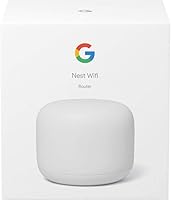
The Google Nest Wifi Router 1-Pack is a single-unit mesh solution built for apartments and medium-sized homes — think one- to two-bedroom spaces where dead zones are the real problem, not sheer square footage. It fits neatly into Google's broader Nest Wifi ecosystem and works with older Google Wifi hardware, which is a genuine plus for anyone already in that world. Launched in late 2019, it runs on Wi-Fi 5 rather than the newer Wi-Fi 6 standard, and that's worth knowing upfront. At its current price, this Nest Wifi router competes in a crowded mid-range field. Think of it as a solid starting point — not a whole-home blanket for large, multi-story houses.
Features & Benefits

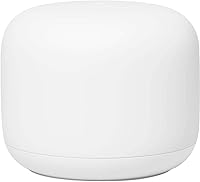
Running on the 802.11ac standard across dual 2.4 GHz and 5 GHz bands, the single-pack Nest router delivers the consistent throughput needed for video calls, streaming, and a household full of connected devices at once. The Google Home app is where the real day-to-day value shows up — pause Wi-Fi per device, set up a guest network, and see everything connected, all without touching a browser-based admin panel. Two Ethernet ports cover basic wired needs, though power users wanting more hardwired connections will feel the pinch. Automatic firmware updates handle security patches quietly, and the router's compact cylindrical shape means it won't look out of place on a bookshelf.

Best For

Google's mesh router is a natural fit for renters and homeowners in smaller to medium spaces — a one-floor apartment, a compact townhouse — where a single unit can genuinely cover the whole space without relay points. If you're already using Nest speakers, a Chromecast, or other Google Home devices, the integrated ecosystem management is a real convenience. Families will appreciate the screen-time controls, which let you pause Wi-Fi by device or user group straight from your phone. It also makes a strong case as a first step up from a basic ISP-supplied router. And since the system is expandable, you're not locked in if your coverage needs grow.

User Feedback

Across a broad range of buyer reviews, two themes surface consistently: setup is refreshingly straightforward, and signal stability is noticeably better than whatever router it replaced. Those are meaningful wins for most households. The criticism, though, is real. Without a dedicated wireless backhaul band, nodes share bandwidth in multi-unit setups rather than maintaining a clean dedicated channel — something tri-band competitors handle more efficiently. A growing number of buyers also flag the absence of Wi-Fi 6, which carries more weight as newer devices become standard. Post-update reboots have been reported occasionally, though they're infrequent enough to register as a minor annoyance rather than a pattern worth worrying about.

Pros

  • Setup takes under ten minutes via the Google Home app — no confusing admin panels required.
  • Signal consistency is noticeably better than typical ISP-supplied routers in day-to-day use.
  • Per-device Wi-Fi pausing and screen-time scheduling are practical for families without any technical skill needed.
  • Automatic firmware updates keep the network secure without any action from the user.
  • The compact cylindrical design sits on a shelf without looking like a piece of IT infrastructure.
  • Fully compatible with existing Google Wifi hardware, so earlier investments are not wasted.
  • The system is expandable — add Nest Wifi Points later without replacing this router.
  • Google ecosystem users get unified device management across their entire smart home from one app.
  • For smaller open-plan spaces, a single unit genuinely covers the whole home without dead zones.

Cons

  • A Google account is mandatory — there is no way to set up or manage the router without one.
  • Only two Ethernet ports means anyone wanting multiple wired devices needs a separate switch.
  • Wi-Fi 5 hardware launched in 2019 is increasingly outpaced by Wi-Fi 6 competitors at similar prices.
  • No dedicated backhaul band reduces throughput efficiency when multiple nodes are running together.
  • Coverage estimates assume ideal conditions — thick walls and multi-story layouts shrink the real-world range noticeably.
  • Occasional post-update reboots can interrupt active connections at unpredictable times.
  • Advanced network controls like custom DNS or traffic monitoring are simply not available in the app.
  • Long-term ecosystem risk exists if Google phases out this product line, as it has with previous hardware.
  • The single-pack Nest router offers no tri-band option, which is a genuine disadvantage for dense device environments.

Ratings

The Google Nest Wifi Router 1-Pack has been scored by our AI engine after processing thousands of verified global buyer reviews, with spam, bot submissions, and incentivized feedback actively filtered out before any score was calculated. The result is an honest picture of where this Nest Wifi router genuinely excels and where real-world buyers have run into frustration. Strengths and pain points are weighted equally — nothing is glossed over.

Setup & Onboarding
93%
Getting the single-pack Nest router running is one of the fastest and least frustrating experiences in its category. The Google Home app walks you through each step with plain-language instructions, and most buyers report being fully online in under ten minutes — no browser-based admin panels required.
The entire setup process is tied to a Google account, which is a non-starter for users who prefer to keep their network independent of a cloud-linked profile. Those without a smartphone compatible with the Google Home app also face a harder path to initial configuration.
Signal Consistency & Stability
84%
Day-to-day signal reliability is where this router earns its strongest praise. Users frequently note that video calls and streaming sessions stay rock-solid in rooms that used to suffer with their old ISP-supplied hardware — a meaningful upgrade for anyone who has dealt with mid-call dropouts.
Signal consistency does depend heavily on home layout and building materials. Open-plan spaces benefit most, while users in older homes with thick plaster or brick walls report that the quoted coverage figure doesn't always hold up in practice without adding a Wifi Point.
App & Network Management
88%
The Google Home app makes everyday network management genuinely accessible. Pausing Wi-Fi for a specific device, checking which gadgets are connected, and setting up a guest network all take seconds rather than a trip into a confusing router admin dashboard most people have never seen.
Advanced users looking for granular controls — custom DNS settings, detailed traffic monitoring, or VLAN configuration — will find the app frustratingly limited. The simplified interface that benefits casual users is the same thing that boxes out anyone who wants real control over their network.
Parental Controls
79%
21%
Families appreciate how easy it is to pause internet access per device or per family member directly from a phone. Scheduling screen-time limits and toggling access on and off during homework hours is practical and requires no technical knowledge to set up.
The parental controls lack depth for households with older children who are more resourceful. There is no built-in content filtering by category, and the controls are tied to the Google Home ecosystem, meaning any changes require app access and an active internet connection to manage.
Wireless Performance (Speed)
74%
26%
For typical household workloads — simultaneous streaming on multiple devices, video conferencing, and casual gaming — the dual-band setup handles things well without bottlenecking. Users upgrading from entry-level single routers notice a real difference in how devices across the home behave during peak hours.
The Wi-Fi 5 standard does show its age when compared side-by-side with newer Wi-Fi 6 routers at similar price points. Heavy users with a large number of connected smart home devices or who regularly push multi-gigabit speeds will find the ceiling lower than what the current market offers.
Coverage Area
71%
29%
For a compact apartment or a single-story home with an open layout, one unit does a credible job of covering the entire space without requiring any additional hardware. Users in those living situations rarely need to think about the router at all once it is placed centrally.
The advertised coverage is an ideal-condition figure. Multi-story homes, long hallways, or spaces with concrete walls will see meaningful degradation well before the upper limit. Several buyers in medium-to-large homes found they needed at least one additional Wifi Point to eliminate dead zones entirely.
Scalability & Ecosystem Expandability
86%
The ability to drop in additional Nest Wifi Points without starting over is a genuine selling point. Each point adds roughly 1,600 square feet of coverage and doubles as a Google Assistant speaker, which makes expanding the network feel like a natural next step rather than a hardware overhaul.
Expansion only works within the Nest Wifi and Google Wifi family, so buyers are locked into Google's hardware lineup for any future additions. If Google discontinues or phases out this product line — as it eventually did for original Google Wifi — investment in the ecosystem carries some long-term risk.
Hardware Design & Build
81%
19%
The cylindrical, matte-white form factor is a genuine departure from the antenna-bristling designs most routers default to. It sits comfortably on a shelf or side table without looking out of place, and the compact footprint means it takes up minimal surface area wherever it is placed.
The clean exterior comes at the cost of flexibility — there are no external antennas to reposition and only two Ethernet ports, which limits wired connection options. Users who want to hardwire multiple devices like a desktop, smart TV, and gaming console will immediately feel constrained.
Security & Firmware Updates
82%
18%
Automatic background updates mean the router's security posture stays current without any action required from the user. For the majority of households, knowing that patches are applied without manual intervention is a real and underappreciated benefit.
A meaningful number of long-term owners have reported that occasional post-update reboots can cause brief network interruptions — frustrating during a work-from-home call or an active streaming session. Users have no option to schedule update windows or delay reboots to a more convenient time.
Wi-Fi Standard & Future-Proofing
58%
42%
For households where most devices are a few years old and the internet plan tops out at a few hundred megabits, the Wi-Fi 5 standard is entirely adequate. The real-world throughput difference between Wi-Fi 5 and Wi-Fi 6 is negligible for moderate usage patterns.
Launched in 2019 with a standard that was already being superseded, this router is showing its age in a market where Wi-Fi 6 and even Wi-Fi 6E options exist at comparable prices. Buyers outfitting a new home or upgrading for the next several years should weigh this limitation seriously before committing.
Backhaul Architecture
54%
46%
In a single-router setup with no points added, the absence of a dedicated backhaul band is irrelevant — and for many buyers in smaller spaces, that is exactly the configuration they will use indefinitely. For those users, this limitation simply never surfaces.
Add a second or third node and the lack of a dedicated wireless backhaul becomes a tangible bottleneck. Nodes share the same bands for both client traffic and inter-node communication, which reduces effective throughput in multi-unit configurations — a known weakness that competitors with tri-band hardware handle more efficiently.
Value for Money
77%
23%
At its current street price, the single-pack Nest router is a reasonable proposition for buyers who want the Google ecosystem experience and a reliable upgrade from basic ISP hardware. For straightforward household needs in smaller spaces, the price-to-performance ratio holds up.
The value calculus shifts if you factor in the need for expansion points, which add to the total cost. At the same combined spend, newer Wi-Fi 6 mesh systems from competitors start looking like stronger long-term investments, which makes the Nest Wifi a better fit for buyers with more modest and immediate needs.
Google Ecosystem Integration
87%
For households already running Nest speakers, Chromecasts, or Android devices, the integration into the Google Home app creates a genuinely cohesive smart home experience. Managing all connected devices — not just the router — from a single app is a real convenience that buyers in this ecosystem regularly highlight.
That same integration is a hard dependency, not an optional bonus. A Google account is mandatory, and users who are privacy-conscious or who prefer platform-agnostic tools will find the required account linkage a meaningful reason to look elsewhere.
Installation & Physical Setup
89%
Everything needed to get started is in the box — the router, a power adapter, and an Ethernet cable for the modem connection. The included quick-start guide is concise and the Google Home app picks up immediately where the physical setup leaves off, requiring no additional downloads or account creation mid-process.
The two-port limitation means buyers may immediately need an Ethernet switch if they want to hardwire more than one device. That is an extra purchase and extra complexity that the out-of-box experience does not account for, which can catch first-time buyers off guard.

Suitable for:

The Google Nest Wifi Router 1-Pack is a strong match for anyone living in a one- or two-bedroom apartment, a compact townhouse, or a single-story home where a single unit can realistically cover the whole space without relay nodes. It is especially well-suited to households already using Google Home devices — Nest speakers, Chromecasts, smart displays — since everything manages through one app with no extra setup friction. Families with younger children will find the screen-time controls and per-device pausing practical and easy to use on a daily basis, even without any technical background. If you are currently stuck with the router your ISP shipped you, the step up in signal consistency and app-based control will feel like a meaningful improvement. It also works as a sensible entry point for anyone who wants to build out a mesh network gradually, since adding coverage points later does not require replacing the hardware you already own.
Not suitable for:

The Google Nest Wifi Router 1-Pack is not the right call for buyers outfitting a larger home, a multi-story house, or any space with thick walls and awkward layouts — the coverage ceiling is an ideal-condition figure, and real-world performance in those environments will fall short without additional hardware. Power users and home network enthusiasts will find the app-based management too shallow, with no meaningful access to custom DNS, traffic analysis, or VLAN configuration. The router runs on Wi-Fi 5, a standard that was already being eclipsed when this unit launched in 2019, and buyers who plan to keep their hardware for the next four to five years should seriously weigh that against newer Wi-Fi 6 options available at similar prices today. Anyone with privacy concerns around cloud-linked devices will also want to look elsewhere — a Google account is a hard requirement, not an opt-in. And if you need to hardwire more than one device, the two-port limit means an additional switch purchase is almost inevitable.

Specifications

  • Wireless Standard: Operates on 802.11ac (Wi-Fi 5), supporting dual-band transmission across both 2.4 GHz and 5 GHz frequencies.
  • Coverage Area: Designed to cover up to 2,200 square feet per router unit under ideal open-plan conditions.
  • Ethernet Ports: Includes two Ethernet ports — one WAN port for modem connection and one LAN port for a wired device.
  • Dimensions: Measures 4.33″ x 4.33″ x 3.56″, with a compact cylindrical form factor suited for shelf or countertop placement.
  • Weight: Weighs approximately 1 pound, making it lightweight and easy to reposition as needed.
  • App Management: Managed entirely through the Google Home app, available for both iOS and Android devices.
  • Security: Receives automatic firmware updates that apply silently in the background to maintain network security over time.
  • Expandability: Compatible with Nest Wifi Points, each of which adds up to 1,600 square feet of additional coverage and includes a built-in Google Assistant speaker.
  • Compatibility: Works with all Nest Wifi and original Google Wifi devices, allowing integration with existing hardware in the same ecosystem.
  • Setup Connectivity: Uses Bluetooth during the initial setup process to pair with the Google Home app before switching to a full network connection.
  • Frequency Bands: Dual-band configuration simultaneously supports 2.4 GHz for range and 5 GHz for higher-speed connections closer to the router.
  • Model Number: Officially designated as model GA00595-US by the manufacturer.
  • Color & Finish: Available in a matte white finish designed to blend unobtrusively into residential interiors.
  • In the Box: Package includes the router unit, an AC power adapter, one Ethernet cable, and a printed quick start guide.
  • Power Source: Powered via the included AC power adapter; no battery operation is supported.
  • Account Requirement: A Google account is required to complete setup and manage the network through the Google Home app.
  • Backhaul Type: Uses a shared dual-band wireless backhaul rather than a dedicated third band for node-to-node communication in multi-unit setups.
  • Launch Date: First made available to consumers in October 2019, positioning it as a Wi-Fi 5 generation product.

Related Reviews
Google WiFi 1-Pack
Google WiFi 1-Pack
76%
93%
Ease of Setup
88%
App Experience
79%
Wi-Fi Coverage
76%
Network Speed & Performance
84%
Parental Controls
More
TP-Link Deco M5 Mesh WiFi Router 1-Pack
86%
88%
Performance
93%
Setup Ease
85%
Coverage Range
91%
Security Features
77%
App Experience
More
Google Nest Wifi AC2200 (2nd Gen)
87%
88%
Performance
92%
Ease of Setup
85%
Coverage & Range
90%
Design & Aesthetics
87%
App & Software Experience
More
ASUS SRT-AC1900 Onhub Google WiFi Router
83%
88%
Ease of Setup
74%
Performance in Large Homes
92%
Mobile App Usability
85%
Wave Control Feature
77%
Coverage Range
More
Google Nest Wifi Pro - Wi-Fi 6E
86%
92%
Wi-Fi Performance
88%
Ease of Setup
89%
Range & Coverage
91%
Speed & Latency
82%
Device Compatibility
More
Linksys Atlas WiFi 6 Router MX2000 2-Pack
86%
90%
WiFi Performance
93%
Ease of Setup
88%
Coverage Range
85%
Device Support
89%
App Experience
More
Motorola MG8725 WiFi 6 Router + DOCSIS 3.1 Modem
84%
88%
Performance
85%
WiFi Coverage
91%
Setup Ease
78%
ISP Compatibility
86%
Gaming and Streaming Quality
More
Router Guard Large WiFi Router EMF Shield

83%
91%
Ease of Installation
88%
Effectiveness of EMF Blocking
85%
Build Quality
90%
Fit for Large Routers
87%
Compatibility with 5G Routers
More
RATED GREEN Cold Brew Hibiscus Scalp Pack 1.69 fl oz (Pack of 5)

87%
91%
Hydration Effectiveness
88%
Texture & Feel
84%
Scent/Fragrance
93%
Scalp Sensitivity Relief
89%
Application Time
More
Head & Shoulders 2-in-1 Dandruff Shampoo and Conditioner Green Apple, 32.1 Fl Oz, 2 Pack
85%
90%
Dandruff Control Effectiveness
85%
Fragrance (Green Apple)
92%
Value for Money
87%
Moisturizing Properties
88%
Ease of Use (2-in-1)
More

FAQ

Yes, a Google account is required — there is no way around it. The entire setup and day-to-day management runs through the Google Home app, which requires you to be signed in. If you would prefer a router that does not tie into a cloud account, this one is not the right fit.

That depends heavily on your home layout. In an open-plan apartment or a compact single-story home, one unit typically handles the whole space without issue. For multi-story homes, spaces with thick walls, or anything over roughly 1,800 to 2,000 square feet in a non-ideal layout, you will likely notice weaker signal in distant rooms and should plan for at least one additional Nest Wifi Point.

Yes, it works alongside original Google Wifi hardware. You can mix units from both generations in the same mesh network, so if you already own a Google Wifi puck, you do not need to replace it to add this router.

No, this Nest Wifi router runs on Wi-Fi 5 (802.11ac), so it does not support the Wi-Fi 6 standard. Your Wi-Fi 6 devices will still connect and work fine, but they will operate at Wi-Fi 5 speeds rather than taking advantage of their newer capabilities. If Wi-Fi 6 support is important to you, you would need to look at more recent hardware.

Parental controls are managed directly in the Google Home app. You can pause Wi-Fi for specific devices or family groups on demand, and you can set scheduled downtime to limit screen time during homework hours or bedtime. It covers the basics well for families with younger children. That said, it does not include content filtering by category, so older, more resourceful kids could work around it.

The router only has two Ethernet ports — one is used by the cable going to your modem, leaving just one free port for a wired device. If you want to hardwire two or more devices, you will need to pick up an inexpensive Ethernet switch to expand those connections.

Updates are fully automatic and happen in the background without any input from you. Most of the time you will not notice at all. A small number of users have reported occasional brief reboots following an update, which can momentarily drop your connection, but these are generally infrequent.

It really is straightforward for most people. You plug the router into your modem with the included Ethernet cable, power it on, open the Google Home app, and follow the on-screen steps. The whole process typically takes under ten minutes. The app uses Bluetooth to detect the router initially, then walks you through naming your network and setting a password.

You can add Nest Wifi Points to the network at any time without replacing the router. Each point extends coverage by roughly 1,600 square feet and also functions as a Google Assistant smart speaker. The expansion process is handled through the same Google Home app you used for the original setup, so adding a new point takes only a few minutes.

For a specific type of buyer, it still makes sense — someone in a smaller home who wants simple, reliable Wi-Fi with good app-based controls and who is already in the Google ecosystem. Where it starts to lose ground is against newer Wi-Fi 6 mesh systems available at comparable prices, which offer better throughput headroom and more future-proof hardware. If your needs are modest and your space is small, it holds up. If you are planning to use it for the next several years in a device-heavy home, it is worth comparing current alternatives before committing.