Overview

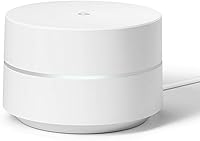
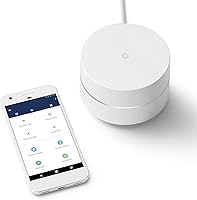
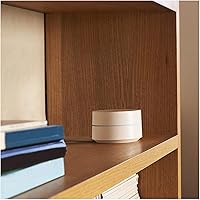
The Google WiFi 1-Pack is a mesh networking node built for people who are tired of dead zones and router restarts. Unlike a conventional single router that blasts a signal from one fixed point, this mesh node works as part of a distributed system — one unit handles smaller spaces, and you can add more later without starting over. The cylindrical white design is compact enough to sit on a bookshelf without drawing attention. Google's ecosystem ties everything together, meaning it pairs naturally with other Google devices in the home. Realistically, a single unit covers up to 1,500 square feet, which suits most apartments but may fall short in a larger home.

Features & Benefits

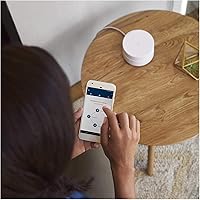
The dual-band 802.11ac radio handles both 2.4 GHz and 5 GHz frequencies, and Network Assist technology decides which band each device uses automatically — you never have to manage that yourself. In practice, this means fewer drops when moving between rooms and less congestion during peak hours. Setup takes roughly ten minutes through the Google Home app: scan a QR code, name your network, and you are online. From the same app, you can see every connected device, prioritize a laptop during a video call, or pause internet access on a child's tablet with two taps. Round-the-clock phone support and a one-year warranty round things out.

Best For

This whole-home Wi-Fi system hits a sweet spot for renters and homeowners in one- or two-bedroom spaces who want reliable internet without a steep learning curve. If you are still running the router your ISP provided years ago, the improvement in both speed and day-to-day management will be immediately obvious. Families appreciate being able to restrict specific devices at bedtime without installing any extra software. That said, power users who need VLANs, custom DNS, or detailed traffic logs will feel boxed in quickly. For households where the goal is simply strong, stable Wi-Fi that anyone in the family can manage, this mesh node is a solid fit.

User Feedback

Buyers consistently point to effortless initial setup as the standout experience, with most getting online within minutes. The app earns genuine praise for being intuitive, and parents in particular value restricting devices without ever touching a router admin page. The criticism that surfaces most often is the absence of advanced controls — no meaningful port forwarding flexibility, limited guest network options. Multi-story homes are hit or miss; single-floor layouts tend to perform more predictably within range. A recurring concern among longer-term owners is that Google has shifted focus to its Nest WiFi lineup, raising fair questions about how long this unit will keep receiving software updates. Privacy-conscious buyers also flag Google's data collection practices as worth researching before committing.

Pros

  • Setup takes under ten minutes with no technical knowledge required — just the app and a QR code.
  • The Google Home app is genuinely intuitive; most users figure it out without reading a single instruction.
  • Pausing internet access on a child's device is a two-tap process, with no extra subscription needed.
  • Network Assist automatically picks the fastest available band, so devices stay quick without manual adjustment.
  • The compact cylindrical design sits on a shelf without looking like networking gear.
  • Coverage is consistent and reliable in single-floor apartments and open-plan spaces.
  • Adding more nodes later is handled entirely in the app with no reconfiguration of the existing network.
  • 24/7 phone support is included, which is genuinely useful when something goes wrong during setup.
  • The Google WiFi 1-Pack is priced accessibly enough to make it a low-risk upgrade from an aging ISP router.
  • Works naturally alongside other Google smart home devices under one unified app.

Cons

  • No support for custom DNS, VLANs, or static IP assignment — advanced users will hit a wall fast.
  • A single unit struggles in two-story homes and larger floor plans despite the official coverage claim.
  • Google has deprioritized this hardware in favor of Nest WiFi, raising legitimate long-term support concerns.
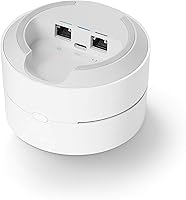
  • Only one Ethernet port on the unit limits wired device connections without adding a separate switch.
  • Network management requires a Google account and cloud connectivity — local-only control is not possible.
  • Content filtering and scheduled screen time are too basic for parents who need more granular controls.
  • No wired backhaul support between nodes means multi-node setups rely entirely on wireless inter-node links.
  • Performance can degrade noticeably in homes with many simultaneously active devices during peak hours.

Ratings

The Google WiFi 1-Pack ratings below were generated by AI after analyzing thousands of verified buyer reviews worldwide, with spam, bot-submitted, and incentivized feedback actively filtered out. Scores reflect how real users across different home sizes and technical skill levels actually experienced this mesh node day to day. Both the genuine strengths and the recurring frustrations are reflected here without sugarcoating.

Ease of Setup
93%
Getting this whole-home Wi-Fi system online is genuinely one of the smoothest router experiences available. Most users report being fully connected within ten minutes using the Google Home app, with no manual configuration required — just scan, name, and go.
A small number of users on older Android versions or less common ISP configurations hit unexpected snags during the QR code pairing step. These cases are not common, but when they occur, troubleshooting without advanced access can be frustrating.
App Experience
88%
The companion app is consistently praised for being clean and intuitive even for people who rarely dig into tech settings. Checking which devices are online, bumping a laptop to priority bandwidth before a video call, or cutting off a child's tablet at bedtime all take just a couple of taps.
What the app gives in simplicity it takes away in depth. Users who want to configure custom DNS, set static IP addresses, or dig into traffic logs quickly hit a wall — those controls simply do not exist within the app.
Wi-Fi Coverage
79%
21%
In single-floor apartments and smaller homes under 1,200 square feet, this mesh node delivers consistent signal strength throughout. Users in open-plan layouts in particular note that dead zones they lived with for years disappeared after switching from their ISP-provided router.
Multi-story homes are where the single unit starts to show its limits. Several buyers in two-story houses report that the upper floor signal drops noticeably, and without a second node, that 1,500 square foot coverage claim feels optimistic in real-world conditions.
Network Speed & Performance
76%
24%
Day-to-day performance for streaming, video calls, and general browsing is reliable and consistent for most households. The automatic band-switching means devices tend to stay on the faster 5 GHz channel when in range without any manual tinkering required.
The 1,200 Mbps theoretical throughput is shared across bands and does not reflect real-world speeds, which are naturally lower. Households with many simultaneously active devices during peak hours notice more congestion than the spec sheet would suggest.
Parental Controls
84%
For families, the ability to pause internet access on a specific device directly from a phone is one of the most practically useful features here. There is no additional subscription, no third-party app, and no need to remember router admin passwords — it just works for everyday household management.
The controls are intentionally basic. Parents looking for content filtering by category, screen time scheduling beyond a simple pause, or per-device usage reports will find this system falls short of dedicated parental control routers or software.
Build Quality & Design
81%
19%
The compact cylindrical form factor is genuinely thoughtful — it sits on a shelf or side table without looking like networking equipment. The matte white finish holds up well over time, and the unit stays cool even under sustained load.
There is only one Ethernet port on the unit, which limits wired device connections. Users who want to hardwire a desktop or smart TV directly have to plan their setup carefully or use a switch, which adds cost and complexity.
Scalability
86%
One of the more underappreciated aspects of this system is how cleanly it expands. Adding a second or third node is handled entirely through the app with no reconfiguration of the existing network, which makes growing your coverage genuinely painless.
Expansion does require buying additional nodes, and costs add up if you need to cover a large home. The system also does not support wired backhaul between nodes, which would meaningfully improve inter-node speeds in a multi-unit setup.
Value for Money
72%
28%
At its current price point, this mesh node undercuts many competing single-node mesh systems while offering comparable everyday performance for smaller spaces. For a renter upgrading from a basic ISP router, the performance-per-dollar ratio is reasonable.
Given that Google has shifted its active development focus to the Nest WiFi lineup, paying for this unit means buying into hardware that is no longer receiving the same level of software investment. Comparable or newer alternatives have emerged at similar prices.
Long-Term Software Support
54%
46%
The unit still receives basic firmware updates and remains functional for everyday use. Users who bought it years ago report it has not broken down or become unusable, and Google support has remained available via phone for troubleshooting.
This is one of the more honest concerns worth flagging: Google has clearly moved its attention to Nest WiFi, and long-term owners note that meaningful feature updates have essentially stopped. Buying this unit today means accepting a product at the tail end of its active support lifecycle.
Privacy & Data Handling
61%
39%
For users already embedded in the Google ecosystem with Android phones and Google accounts, the data practices here are consistent with what they have already accepted. Setup requires a Google account, which keeps the experience integrated and simple.
Privacy-conscious buyers flag that this system routes network management through Google's cloud infrastructure. Unlike some competing routers, there is no local-only management option, which is a genuine consideration for users who prefer to keep their network data off third-party servers.
Google Ecosystem Integration
83%
If your home already runs Google devices — smart speakers, Chromecast, Nest thermostats — the Google WiFi unit slots in naturally. Device discovery and management consolidate under one app, which reduces the number of separate interfaces you need to manage.
The tight Google ecosystem tie-in is also a limitation for mixed households. Users with Apple-centric setups or those who prefer platform-agnostic tools find the Google account requirement and app dependency less appealing than a more neutral router solution.
Router Admin & Advanced Settings
38%
62%
For genuinely non-technical users, the absence of a complex admin panel is a feature, not a flaw. There is no chance of accidentally misconfiguring something critical, and day-to-day use requires zero knowledge of networking concepts.
Anyone with even moderate networking knowledge will quickly feel constrained. No VLAN support, no detailed QoS controls, no ability to set a custom DNS server at the router level, and no real port forwarding flexibility make this a non-starter for home lab users or anyone running local servers.
Initial Configuration Speed
91%
From unboxing to a working network, the process is fast enough that most users do not even glance at an instruction manual. The in-app guided flow is well-designed and handles ISP detection gracefully in the majority of home setups.
Users who receive a dynamic IP from a less common ISP or who need to clone a MAC address to maintain their existing network configuration will find the app provides no path to do that, requiring a call to support to resolve.
Customer Support Quality
74%
26%
Having 24/7 phone support included at this price tier is legitimately useful. Several buyers note that Google support representatives resolved connectivity and setup issues quickly, without excessive hold times or scripted runarounds.
Support quality is inconsistent depending on the representative. Some users report being pushed toward Nest WiFi upgrades rather than receiving detailed troubleshooting help for this older unit, which feels more like upselling than genuine assistance.

Suitable for:

The Google WiFi 1-Pack is a strong fit for renters and homeowners living in apartments or single-story homes under roughly 1,500 square feet who are tired of dealing with weak spots near the back bedroom or kitchen. If you are still running the router your internet provider handed you years ago, the jump in both reliability and day-to-day manageability will be immediately noticeable. Families with kids will find the device-level pause controls genuinely useful — no extra subscriptions, no complicated software, just a quick tap in the app when screen time is over. It also works well for households where multiple people need to manage the network, since the Google Home app is accessible enough that a non-technical partner or teenager can handle basic tasks without calling for help. Anyone already using Google smart home devices will find this mesh node fits naturally into that ecosystem, consolidating device management under one familiar interface. If your coverage needs grow, adding a second node later is straightforward and requires no reconfiguration of what you already have set up.

Not suitable for:

Buyers with larger homes, multi-story layouts, or significant square footage should approach this whole-home Wi-Fi system with clear eyes — a single unit has real physical limits, and trying to stretch it beyond its range leads to the exact dead zones it is supposed to solve. Anyone with even moderate networking experience will quickly feel boxed in by the lack of advanced controls: there is no meaningful port forwarding flexibility, no VLAN support, no custom DNS configuration, and no local network management option for those who prefer to keep their data off cloud servers. Home lab enthusiasts, remote workers running local servers, or gamers who need fine-grained traffic prioritization should look at more capable hardware. It is also worth being transparent about where this product sits in Google's current lineup — the company has shifted its active development focus to the Nest WiFi family, which means this unit is unlikely to see meaningful new features and may have a limited software support window ahead. Privacy-conscious buyers who are not already comfortable with Google's data practices should factor in that managing this system requires a Google account and routes through Google's cloud infrastructure with no opt-out path.

Specifications

  • Brand: Manufactured and supported by Google.
  • Model Number: The unit's official model identifier is NLS-1304-25.
  • Wi-Fi Standard: Supports 802.11a/b/g/n/ac (Wave 2), covering the full range of common modern device compatibility.
  • Frequency Bands: Dual-band operation across both 2.4 GHz and 5 GHz radio frequencies simultaneously.
  • Max Throughput: Theoretical combined wireless throughput reaches up to 1,200 Mbps under ideal conditions.
  • Coverage Area: A single unit is rated to cover up to 1,500 square feet of indoor space.
  • Dimensions: The cylindrical unit measures 4.17 x 4.17 x 2.7 inches, making it compact enough for a shelf or side table.
  • Weight: Each unit weighs 11.8 ounces, light enough to place on most surfaces without mounting hardware.
  • Antenna Type: Uses internal antennas — there are no external antenna arms or visible protrusions.
  • Bluetooth: Includes Bluetooth Low Energy (BLE) used exclusively to assist with the initial app-based setup process.
  • Ethernet Ports: The unit includes one WAN and one LAN Ethernet port for wired internet input and a single wired device connection.
  • App Management: Managed entirely through the Google Home app, available for both iOS and Android smartphones.
  • Parental Controls: Supports device-level internet pause controls directly from the companion app with no additional subscription required.
  • Scalability: Additional Google WiFi nodes can be added to extend coverage without reconfiguring the existing network.
  • Color: Available in a matte white finish designed to blend with standard home interiors.
  • Customer Support: Comes with access to 24/7 Google phone support for setup assistance and troubleshooting.
  • Warranty: Backed by a one-year limited manufacturer warranty from Google.
  • Release Date: This unit was first made available to consumers in October 2017.
  • Power Input: Powered via an included AC adapter; the unit does not support Power over Ethernet (PoE).
  • Ecosystem: Integrates with the broader Google smart home ecosystem, including Google Assistant-enabled devices and Chromecast.

Related Reviews
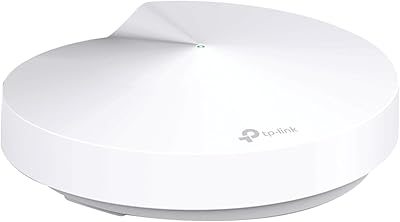
TP-Link Deco M5 Mesh WiFi Router 1-Pack
86%
88%
Performance
93%
Setup Ease
85%
Coverage Range
91%
Security Features
77%
App Experience
More
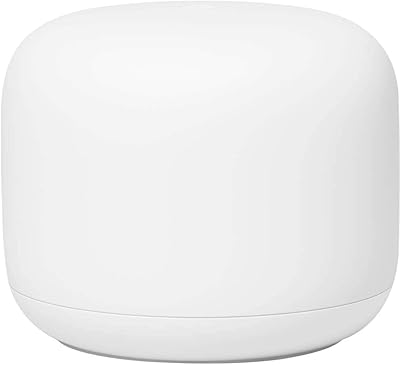
Google Nest Wifi Router 1-Pack

79%
93%
Setup & Onboarding
84%
Signal Consistency & Stability
88%
App & Network Management
79%
Parental Controls
74%
Wireless Performance (Speed)
More
RATED GREEN Cold Brew Hibiscus Scalp Pack 1.69 fl oz (Pack of 5)

87%
91%
Hydration Effectiveness
88%
Texture & Feel
84%
Scent/Fragrance
93%
Scalp Sensitivity Relief
89%
Application Time
More
Head & Shoulders 2-in-1 Dandruff Shampoo and Conditioner Green Apple, 32.1 Fl Oz, 2 Pack
85%
90%
Dandruff Control Effectiveness
85%
Fragrance (Green Apple)
92%
Value for Money
87%
Moisturizing Properties
88%
Ease of Use (2-in-1)
More
Google Nest Wifi AC2200 (2nd Gen)
87%
88%
Performance
92%
Ease of Setup
85%
Coverage & Range
90%
Design & Aesthetics
87%
App & Software Experience
More
Google Nest Wifi Pro - Wi-Fi 6E
86%
92%
Wi-Fi Performance
88%
Ease of Setup
89%
Range & Coverage
91%
Speed & Latency
82%
Device Compatibility
More
ASUS SRT-AC1900 Onhub Google WiFi Router
83%
88%
Ease of Setup
74%
Performance in Large Homes
92%
Mobile App Usability
85%
Wave Control Feature
77%
Coverage Range
More
BASED Hair Texturizing Powder, 1.69oz (Pack of 2)
85%
92%
Volume & Texture Boost
88%
Application Consistency
85%
Matte Finish Effectiveness
74%
Long-Lasting Hold
91%
Lightweight Formula
More
Linksys Atlas WiFi 6 Router MX2000 2-Pack
86%
90%
WiFi Performance
93%
Ease of Setup
88%
Coverage Range
85%
Device Support
89%
App Experience
More
ApoloSign Nixplay 10.1″ WiFi Digital Picture Frame
86%
91%
Display Quality
96%
Ease of Setup
89%
WiFi Connectivity
92%
Voice Control Functionality
85%
Cloud Storage Service
More

FAQ

For most two-bedroom apartments, especially those on a single floor with an open layout, one unit is sufficient. If your apartment is compact and under around 1,200 square feet, you should have solid coverage throughout. Larger or more compartmentalized floor plans with multiple walls may need a second node to fill in gaps.

Yes, a Google account is required to use the companion app and complete setup. This is a firm requirement — there is no local-only setup path. If you are not comfortable linking your home network management to a Google account, that is worth factoring into your decision before buying.

Yes, this mesh node connects to your existing modem just like a standard router would, plugged in via Ethernet. It replaces your router, not your modem, so you keep whatever modem your ISP provided or that you own.

Setup is genuinely straightforward. You download the Google Home app, plug the unit into your modem, and follow the in-app instructions which walk you through the process step by step. Most people are fully online within ten minutes without needing to touch any router settings manually.

You can connect one wired device to the single LAN Ethernet port on the unit. If you need to hardwire more than one device, you would need to add a small network switch to that port, which is a straightforward and inexpensive addition.

It currently still receives firmware updates, but Google has shifted its active development focus to the newer Nest WiFi lineup. This unit is functional and supported for now, but it is not receiving the same level of new feature investment as it once did, which is worth knowing if long-term software support is a priority for you.

You can pause internet access for any specific device on the network directly from the app — handy for cutting off a kid's phone at bedtime or during homework time. What it does not offer is content filtering by category or detailed screen time scheduling. If you need those more granular controls, you would need a third-party solution on top.

Yes, the system is designed to scale. You can add more Google WiFi nodes and they join the existing network through the app without requiring you to reconfigure anything from scratch. Each additional node extends the mesh and the whole network stays managed in one place.

For general Wi-Fi connectivity, any device that connects to standard Wi-Fi will work fine on this network. The deeper ecosystem integration — like consolidated device management in one app — is really most useful if you have other Google or Nest branded devices at home.

No subscription is required for the core features, including parental controls and the app interface. You pay once for the hardware. The only ongoing cost is your regular internet service from your ISP, which you would have regardless of which router you use.