Overview

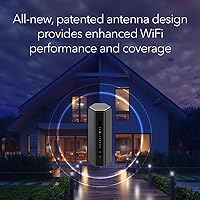
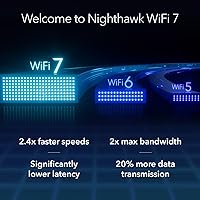
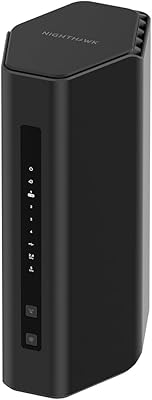
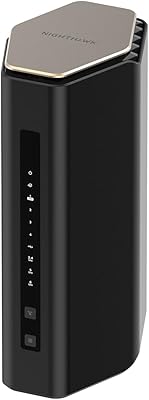
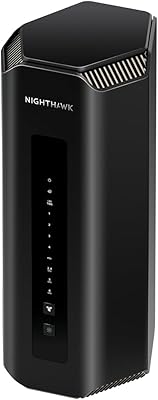
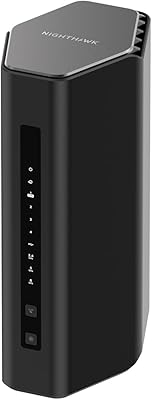
The NETGEAR Nighthawk RS600 WiFi 7 Tri-Band Router sits at the top end of the home networking market, built for households where bandwidth is a genuine bottleneck — not just a talking point. WiFi 7 (802.11be) isn't simply a minor iteration; it delivers meaningfully faster throughput and lower latency compared to WiFi 6, which matters when multiple people are gaming, streaming, or video conferencing at once. One thing to flag upfront: this is a router-only device. You'll need a separate modem, which catches some buyers off guard. Physically, the RS600 is surprisingly compact for its class — no ungainly antenna farm, just a clean, low-profile design that won't dominate your shelf.
Features & Benefits

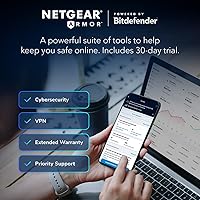
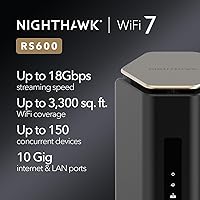
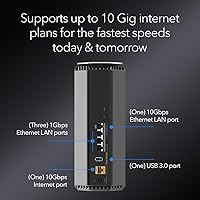
The Nighthawk RS600 runs a tri-band configuration — 2.4 GHz plus two higher-frequency bands — and uses band steering to push devices toward whichever channel has capacity, rather than letting everything pile onto one frequency. What genuinely sets it apart from most routers at this tier is the 10 Gigabit WAN port, which means anyone on a multi-gig fiber plan can actually push those speeds through without the port becoming a choke point. Coverage reaches up to 3,300 square feet, though that figure assumes relatively open floor plans — multi-story homes with thick walls will see that shrink. Up to 150 devices can connect simultaneously, and NETGEAR Armor adds malware and identity protection during its included trial period.

Best For

This WiFi 7 router is a natural fit for competitive gamers who need consistent, low-latency connections across multiple devices at once, and for households where 4K or even 8K video is running on several screens simultaneously. It's also well suited to home office setups on multi-gig fiber — the kind where a standard gigabit router leaves real speed on the table. Importantly, it's designed for buyers who prefer modular network control, pairing their own modem with a dedicated router rather than relying on an all-in-one combo. If your home is roughly 2,500 to 3,500 square feet and you want single-router simplicity without managing a mesh system, this is a strong contender.

User Feedback

With over 1,600 ratings averaging 4.4 stars, the consensus around NETGEAR's latest flagship router leans positive, but not without nuance. Buyers on multi-gig fiber plans frequently report hitting speeds they couldn't reach with older routers, and the setup process draws consistent praise — most people have it running within minutes. That said, app dependency is a recurring frustration; some users would prefer more robust browser-based management. The price also draws scrutiny, particularly from shoppers comparing it to mesh systems that offer comparable coverage with easier expansion. A notable subset of reviewers, especially those upgrading from modem-router combos, were caught off guard by the modem-not-included requirement. Long-term reliability reports are largely positive so far.

Pros

  • The 10 Gigabit WAN port is genuinely future-proof for anyone on a multi-gig fiber plan.
  • WiFi 7 delivers noticeably lower latency and better multi-device performance compared to WiFi 6 routers.
  • Tri-band setup with smart band steering keeps high-demand devices from fighting over bandwidth.
  • Supports up to 150 connected devices without the network visibly degrading under load.
  • Compact, antenna-free design takes up far less space than most high-performance routers.
  • Works with any ISP and any modem — no ecosystem lock-in whatsoever.
  • Automatic firmware updates run in the background, reducing security maintenance burden.
  • Setup is straightforward enough that most buyers report being online within minutes.
  • NETGEAR Armor provides real-time threat protection for every device on the network.
  • Strong long-term reliability track record reported by verified buyers across firmware updates.

Cons

  • No built-in modem means added upfront cost and complexity for buyers switching from a combo unit.
  • Heavy app dependency frustrates users who prefer full browser-based router management.
  • Most current client devices don't yet support WiFi 7, limiting immediate real-world benefits for many households.
  • Coverage claims assume open floor plans — multi-story or wall-dense homes will see significantly reduced range.
  • NETGEAR Armor reverts to a basic tier after the 30-day trial unless you pay for a subscription.
  • The price is hard to justify if your ISP plan doesn't exceed standard gigabit speeds.
  • Only three 1 Gig LAN ports alongside the 10 Gig port — wired expansion options are limited.
  • Competing mesh systems at similar price points offer easier whole-home coverage for non-linear floor plans.
  • Some users report the mobile app can be sluggish or require re-authentication after firmware updates.
  • U.S.-only design means no use case for international travelers or buyers outside the domestic market.

Ratings

The scores below for the NETGEAR Nighthawk RS600 WiFi 7 Tri-Band Router were generated by our AI rating engine after analyzing thousands of verified buyer reviews from global markets, with spam, bot-submitted, and incentivized feedback actively filtered out. Each category reflects the honest distribution of real user sentiment — strengths are credited where they are genuinely earned, and recurring pain points are scored down without softening.
Wireless Performance
91%
Users on multi-gig fiber plans consistently report that this WiFi 7 router delivers throughput they couldn't squeeze out of their previous WiFi 6 hardware. Gamers especially note tighter latency and more stable connections during peak household usage hours when multiple streams and downloads are running simultaneously.
The headline 18 Gbps figure is a combined tri-band maximum that no single device will ever hit in practice, and some buyers feel that distinction wasn't clear upfront. Users without WiFi 7 client devices see solid but not transformative real-world improvements over a well-configured WiFi 6 router.
Coverage & Range
76%
24%
In open-plan single-story homes and modern construction, the Nighthawk RS600 covers the advertised footprint comfortably, with users in 2,500–3,000 square foot ranch-style homes reporting strong signal in every room. The internal antenna design keeps things tidy without sacrificing meaningful range.
Multi-story homes with dense walls or older construction consistently bring the effective range down, and several buyers in two-story houses over 2,000 square feet report dead zones on upper floors far from the router. The 3,300 square foot claim needs to be read as a best-case ceiling, not a reliable average.
Setup & Onboarding
88%
The Nighthawk mobile app walks users through initial configuration in a clear, step-by-step flow that most buyers complete in under 15 minutes. Even users who describe themselves as non-technical report feeling guided rather than confused during the process.
The friction point isn't the router — it's that buyers who have never owned a standalone router before don't realize a separate modem is needed until they're mid-setup. This generates frustration that is really a product communication problem but often gets directed at the setup experience itself.
Value for Money
67%
33%
For households that genuinely have multi-gig internet and a device-dense smart home, the 10 Gig WAN port and WiFi 7 headroom make the investment defensible as a long-term infrastructure purchase. Buyers in that specific situation feel they are buying years of relevance rather than just a current-generation product.
For the majority of buyers on standard gigabit or slower plans, the price is hard to rationalize when solid WiFi 6 routers or mesh kits deliver comparable everyday performance at a fraction of the cost. The modem-not-included requirement adds hidden cost that compounds the value concern for first-time standalone router buyers.
Build Quality & Design
83%
The compact, matte-black enclosure stands out in a category dominated by angular, antenna-covered hardware, and buyers consistently appreciate that it blends into a shelf or media cabinet without looking like a sci-fi prop. The build feels solid and well-ventilated, with no reports of excessive heat or structural concerns.
A small segment of enthusiast buyers feel the clean aesthetic comes at the cost of external antenna adjustability, which they associate with fine-tuning signal directionality. The footprint, while smaller than competitors, still requires meaningful clearance for proper airflow.
App & Software Experience
63%
37%
For basic tasks — changing the network name, running a speed test, checking connected devices — the Nighthawk app is clean and accessible. Casual users find it sufficient for day-to-day management without needing to touch advanced settings.
Power users who expect deep configuration options comparable to enterprise-lite routers find the app frustratingly shallow, with limited QoS customization and a browser-based fallback that offers even less. Reports of the app requiring re-authentication after firmware updates add unnecessary friction for a device at this price point.
Multi-Device Handling
87%
Households with 30, 40, or even 60 connected devices — smart TVs, security cameras, phones, laptops, gaming consoles, and IoT sensors — report noticeably fewer slowdowns compared to their previous routers. The tri-band configuration with intelligent band steering does real work in preventing device pile-up on a single channel.
At the very high end of the 150-device claim, performance inevitably degrades — buyers who stress-tested this in commercial-adjacent setups note that the router handles the load but prioritization becomes less precise. This is an edge case for most homes, but worth noting for small business use.
Security Features
74%
26%
The NETGEAR Armor trial gives buyers a genuine taste of network-level threat protection, and users who ran it through the trial period report catching blocked threats they wouldn't have otherwise known about. Automatic firmware updates are applied without user intervention, which meaningfully reduces the risk of running outdated software.
When the 30-day trial ends, the security suite drops to a basic tier unless users pay an ongoing subscription fee — a cost that buyers at this price point feel should be included longer or permanently. Some users are also uncomfortable with the cloud-dependent nature of Armor's more advanced scanning features.
Gaming Performance
89%
Competitive gamers upgrading from WiFi 6 routers report measurably tighter ping in latency-sensitive titles and fewer mid-session drops during peak household internet usage. The dedicated high-frequency bands give gaming devices consistent throughput even when streaming and downloads are running on other devices simultaneously.
The router does not offer a dedicated gaming dashboard or traffic prioritization UI out of the box — users who want explicit QoS controls to pin their console to a preferred band need to dig into settings that aren't prominently surfaced in the app.
Streaming Performance
86%
Households running three or four simultaneous 4K streams across different services report smooth, buffer-free playback with no perceptible quality drops — a scenario that regularly caused issues on their previous WiFi 6 or WiFi 5 routers. AR/VR headset users also note more consistent frame delivery compared to older hardware.
8K streaming performance benefits are largely theoretical for most buyers right now, as content availability and compatible devices remain limited. The improvement over a well-configured WiFi 6 router in streaming scenarios specifically is real but narrower than the spec sheet implies for typical households.
Long-Term Reliability
81%
19%
Given that the RS600 launched in late 2024, early adopter reports through the first several months are largely positive, with no widespread hardware failures or critical firmware bugs documented across verified buyers. NETGEAR's history of multi-year software support for the Nighthawk line gives buyers reasonable confidence in continued updates.
The product is still relatively new, which means long-term durability data beyond 12 months is simply not available yet. A small number of buyers report needing to reboot the router after major firmware pushes, which suggests the update process could be smoother.
ISP & Modem Compatibility
84%
The router works without issue across cable, fiber, and DSL service providers, and buyers switching from ISP-supplied combo units to a standalone modem and router setup report a smooth transition once they understand the two-device requirement. No ISP lock-in means buyers can switch providers without needing new hardware.
The modem-not-included reality continues to generate negative sentiment from buyers who weren't aware of it before purchase, and that frustration unfairly colors overall compatibility reviews. Users on fiber with an ONT also need to verify their specific modem or gateway setup works with the 10 Gig WAN port.
Future-Proofing
88%
The 10 Gigabit WAN port, WiFi 7 standard, and support for emerging features like Multi-Link Operation position this WiFi 7 router well ahead of the current client device curve, meaning buyers are investing in hardware that will likely remain relevant as laptops, phones, and consoles adopt the 802.11be standard over the next two to three years.
The future-proofing argument only holds if your ISP actually delivers or plans to deliver multi-gig speeds in your area — buyers in markets where gigabit is still the ceiling for the foreseeable future are paying a premium for capabilities they may never practically use.
Wired Connectivity
71%
29%
The inclusion of a 10 Gigabit LAN port alongside the WAN port is a genuine differentiator, allowing users to connect a NAS, desktop workstation, or network switch at full multi-gig speeds over Ethernet — something most consumer routers at any price still don't offer.
With only three 1 Gigabit LAN ports beyond the 10 Gig port, buyers who run wired home networks with multiple devices — desktop PCs, smart TVs, consoles, and a NAS — will likely need an unmanaged switch to expand, which is an additional cost that is easy to overlook before purchase.

Suitable for:

The NETGEAR Nighthawk RS600 WiFi 7 Tri-Band Router is built for households where the network is genuinely under pressure — think multiple simultaneous 4K streams, a couple of active gamers, smart home devices in every room, and at least one person running a home office on a video call. It makes the most sense for buyers who already have, or plan to get, a multi-gig fiber or cable plan, since the 10 Gigabit WAN port is what separates this router from nearly everything else at the price — you won't hit a port bottleneck when your ISP delivers serious speeds. Tech-savvy users who prefer modular setups — their own modem, their own router, full control — will appreciate not being locked into a combo unit. Medium to large single-floor homes in the 2,500–3,500 square foot range are the sweet spot for coverage. If you're running a dense device environment — a mix of gaming consoles, laptops, security cameras, smart TVs, and mobile devices — this WiFi 7 router is designed precisely for that kind of load.

Not suitable for:

The NETGEAR Nighthawk RS600 WiFi 7 Tri-Band Router is a poor fit for buyers who want a simple, all-in-one solution — it requires a separate modem, which adds cost and setup complexity that many casual users don't want to deal with. If your internet plan tops out at standard gigabit speeds, the hardware here is overkill; you'd be paying a significant premium for headroom you may never realistically use. Apartment dwellers or anyone in a smaller home under 1,500 square feet will find cheaper routers cover their space just as effectively. Multi-story homes with concrete floors or dense walls may also struggle to get the advertised coverage from a single unit, making a mesh system a more practical choice regardless of price. Buyers who aren't comfortable managing separate networking components — modem, router, firmware settings — or who rely heavily on a clean mobile app experience may find this router frustrating rather than freeing. And if your devices are primarily older WiFi 5 or WiFi 6 hardware, the WiFi 7 advantages won't translate into noticeable real-world gains anytime soon.

Specifications

  • WiFi Standard: Operates on the 802.11be (WiFi 7) standard, the latest generation of wireless networking technology.
  • Max Wireless Speed: Combined tri-band throughput reaches up to 18 Gbps across all three frequency bands simultaneously.
  • Frequency Bands: Tri-band architecture covers 2.4 GHz for legacy devices plus dual 5 GHz and 6 GHz bands for high-demand connections.
  • WAN Port: Includes one 10 Gigabit Ethernet WAN port for connecting to a compatible multi-gig modem or ONT.
  • LAN Ports: Provides one 10 Gigabit and three 1 Gigabit Ethernet LAN ports for wired device connections.
  • Coverage Area: Rated for up to 3,300 square feet of wireless coverage under typical open-plan conditions.
  • Device Capacity: Supports up to 150 concurrent connected devices across all bands without requiring manual band assignment.
  • Security Suite: Includes a 30-day trial of NETGEAR Armor, which provides malware blocking, identity theft protection, and vulnerability scanning.
  • Firmware Updates: Automatic firmware updates are applied in the background to maintain security and performance without user intervention.
  • Modem Required: This is a standalone router only — a separate cable or fiber modem with the appropriate WAN interface is required for internet service.
  • ISP Compatibility: Works with any U.S. internet service provider and is not locked to a specific carrier or modem brand.
  • Dimensions: The unit measures 11.1 x 7.17 x 7.17 inches, offering a relatively compact footprint for a router in its performance class.
  • Weight: The router weighs 4.73 pounds, reflecting its solid internal hardware without external antenna assemblies.
  • Antenna Design: Uses internal high-performance antennas for 360-degree signal distribution, eliminating the protruding external antenna array common on competing models.
  • In the Box: Package includes the router, a 2-meter Ethernet cable, a 12V/3.42A power adapter, and a printed quick start guide.
  • Regional Use: Designed and certified exclusively for use within the United States; not intended for international deployment.
  • App Management: Network setup and ongoing management are handled through the NETGEAR Nighthawk mobile application for iOS and Android.
  • Security Protocol: Supports WPA3 encryption, the current industry standard for wireless network authentication and data protection.

Related Reviews

NETGEAR Nighthawk RS280S WiFi 7 Tri-Band Router
80%
88%
Wireless Speed & Performance
71%
Wi-Fi Coverage & Range
83%
Setup & Ease of Use
62%
Modem Compatibility
86%
Wired Port Performance
More
NETGEAR Nighthawk X6 AC3000 Tri-Band WiFi Router
84%
88%
Performance
76%
Setup and Installation
91%
Signal Strength and Range
79%
Usability (App & Interface)
85%
Compatibility with Devices
More
NETGEAR Nighthawk X8 AC5300 Tri-Band WiFi Router R8500
84%
89%
WiFi Performance
87%
Range and Coverage
93%
Ease of Setup
90%
Compatibility with Alexa
80%
Overall Build Quality
More
Netgear Nighthawk X6S AC4000 Tri-Band Router
70%
83%
Wireless Performance
81%
Signal Range & Coverage
86%
Multi-Device Handling
78%
Gaming & Low Latency
61%
Setup & Installation
More
NETGEAR Nighthawk RS140 WiFi 7 Router
85%
92%
Performance
88%
Ease of Setup
91%
WiFi Speed & Range
89%
Device Connectivity
80%
Software & Firmware
More
NETGEAR Nighthawk BE17000 WiFi 7 Router
79%
91%
Wireless Performance
88%
Setup Experience
74%
Coverage & Range
72%
Value for Money
86%
Device Handling
More
NETGEAR Nighthawk RS90 WiFi 7 Router
79%
84%
Wireless Performance
67%
Coverage & Range
91%
Setup & Ease of Use
83%
Value for Money
78%
Build Quality & Design
More
NETGEAR Nighthawk RS500 WiFi 7 Tri-Band Router
77%
88%
Wireless Performance
74%
Coverage & Range
83%
Setup & Ease of Use
67%
Value for Money
86%
Device Handling
More
NETGEAR Nighthawk RS180 WiFi 7 Router
86%
92%
WiFi Performance
90%
Gaming Performance
88%
Streaming Quality
89%
Coverage Area
85%
Ease of Setup
More
NETGEAR Nighthawk BE9300 WiFi 7 Router
88%
94%
Wireless Performance
91%
Coverage Area
88%
Device Capacity
85%
Setup & Installation
90%
Security Features
More

FAQ

You do need a separate modem — the NETGEAR Nighthawk RS600 WiFi 7 Tri-Band Router is a standalone router with no built-in modem. If you currently use a combo unit from your ISP, you'll need to either purchase or rent a standalone modem compatible with your internet service before this router can connect you to the internet.
That depends on your current setup. If your internet plan delivers multi-gig speeds and your existing router has only a 1 Gigabit WAN port, then yes — the Nighthawk RS600's 10 Gig WAN port removes a real bottleneck. If you're on a standard 500 Mbps or 1 Gbps plan, you won't see a speed increase from your ISP, but you may notice better performance across multiple devices simultaneously.

The 3,300 square foot coverage rating is measured in open-plan conditions, which rarely reflects a real multi-story home. Concrete floors, load-bearing walls, and stairwell geometry can all reduce effective range meaningfully. For a two-story home over 2,000 square feet with typical construction, you may find signal weaker on the far end of the upper floor. A mesh system might serve you better if consistent whole-home coverage is the priority.

Most consumer devices released before 2024 do not support WiFi 7 natively. This router is fully backward compatible with WiFi 6, WiFi 5, and older standards, so your existing devices will connect and work fine — they just won't use WiFi 7 features like Multi-Link Operation until you upgrade to a WiFi 7 capable client device.

After the 30-day trial period, Armor's advanced features — including real-time malware blocking, vulnerability alerts, and identity protection — require a paid subscription to remain active. The router itself continues to work normally without Armor, and automatic firmware updates still apply. Whether the subscription is worth it depends on how much you value network-level threat monitoring.

The primary management interface is the Nighthawk mobile app, and that's where the full feature set lives. There is a basic web-based interface accessible through a browser, but advanced configuration options are more limited there. If you strongly prefer deep browser-based control — like those accustomed to DD-WRT or pfSense-style dashboards — the app-centric approach may feel restrictive.

Yes — this WiFi 7 router works with any U.S. internet service provider. You just need to pair it with the right type of modem for your service: a DOCSIS modem for cable providers like Xfinity or Spectrum, or the appropriate ONT and modem for fiber services. The router itself has no ISP restrictions.

A mesh system at this price typically covers more square footage with more consistent signal across floors and dead zones, since you're placing multiple nodes around the home. The Nighthawk RS600 offers more raw performance and a true 10 Gig WAN port, which no mesh system at this price matches. The right choice comes down to whether you need maximum throughput from a single location or broader, more even coverage throughout an irregular floor plan.

The setup process itself is genuinely straightforward — most users get it running through the Nighthawk app in under 15 minutes. The bigger hurdle for less experienced users is understanding that a separate modem needs to be set up and connected first. If you're used to plugging in a single combo unit from your ISP, that extra step can feel unfamiliar, but the router's onboarding process is well guided once the modem is in place.

The RS600 first became available in late 2024, so it's still relatively new in the market. Early long-term reliability reports from verified buyers are largely positive, with no widespread issues around hardware failure or significant firmware bugs. NETGEAR has a strong track record of supporting Nighthawk products with updates over several years, which is a reasonable indicator of continued software support going forward.

Where to Buy