Overview

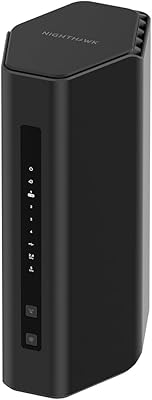
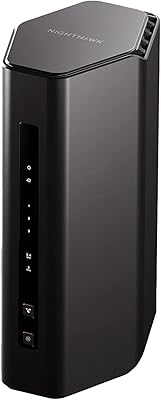
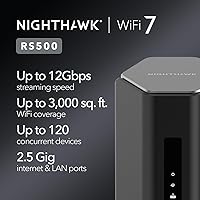
The NETGEAR Nighthawk RS500 WiFi 7 Tri-Band Router is built for power users ready to move past the limitations of WiFi 5 or 6 — the 802.11be standard it runs on delivers real-world gains in latency and congestion handling, not just impressive numbers on a spec sheet. Before purchasing, one fact deserves your full attention: this is a router-only device, meaning a separate cable or fiber modem is required. That detail catches many buyers off guard at checkout. Coverage is rated for up to 3,000 square feet, which is realistic in open, single-floor homes but can fall short in older builds with dense walls or multiple levels.
Features & Benefits

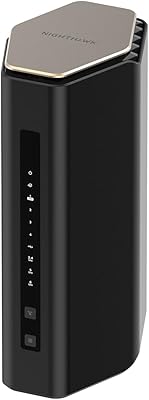
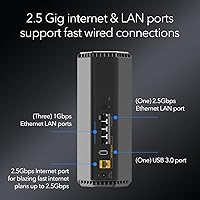
The foundation of the Nighthawk RS500 is its tri-band configuration — 2.4 GHz paired with two higher-frequency bands — which distributes traffic across channels so congestion stays manageable even with over 100 devices active at once. The 2.5 Gig WAN port is a genuine asset, though it only pays off if your ISP plan actually delivers multi-gig speeds; most standard cable plans won't saturate it yet. For wired connections, one 2.5G and three 1G LAN ports cover NAS drives, gaming rigs, and smart TVs without compromise. WiFi 7's Multi-Link Operation helps reduce latency by letting devices communicate across bands simultaneously. The redesigned chassis is noticeably more compact than older Nighthawk hardware.

Best For

This WiFi 7 router suits households already subscribed to fiber or multi-gig internet plans who want hardware that won't bottleneck their connection for years to come. Gamers and 4K streamers benefit from the low-latency throughput, especially in homes where several people are pulling heavy bandwidth simultaneously. Dense smart-home environments with security cameras, smart bulbs, and streaming devices spread across multiple rooms are exactly the kind of scenario this tri-band design handles well. That said, buyers in larger multi-story homes should plan for a mesh extender to fill coverage gaps. And as always, anyone without a compatible standalone modem will need to budget for that as a separate purchase.

User Feedback

Verified buyers frequently praise the Nighthawk app setup for being fast and approachable, even for less technical users, and many note a tangible speed improvement after replacing an older router. Long-term owners generally report stable, dependable connections. The criticism that comes up most consistently centers on NETGEAR Armor — the security suite runs on a 30-day trial and then requires a paid subscription, which surprises buyers who assumed it was included permanently. Occasional firmware update issues also surface in reviews. Coverage range earns mixed marks: single-story open homes are well served, but multi-floor households sometimes describe the signal as inconsistent. Modem compatibility confusion is a common friction point worth researching before you buy.

Pros

  • WiFi 7 delivers tangibly lower latency and better congestion handling than WiFi 6, especially with many devices active.
  • The 2.5 Gig WAN port future-proofs your setup for multi-gig ISP plans now rolling out in many areas.
  • Tri-band design keeps bandwidth-hungry devices from stepping on each other during peak household usage.
  • The Nighthawk app makes initial setup approachable, even for users who are not particularly tech-savvy.
  • One 2.5G and three 1G LAN ports give wired connections to NAS drives, gaming rigs, and smart TVs without compromise.
  • The redesigned chassis is noticeably more compact than older Nighthawk models, fitting more discreetly on a shelf.
  • Supports up to 120 concurrent devices, making it well-suited for dense smart-home environments.
  • Multi-Link Operation (MLO) allows devices to use multiple bands at once, reducing dropped packets during heavy loads.
  • Long-term owners consistently report stable, dependable connections after the initial setup period.
  • Backed by NETGEAR's established Nighthawk ecosystem and ongoing firmware support.

Cons

  • No built-in modem — a separate purchase is required, adding cost and complexity many buyers do not anticipate.
  • The 12 Gbps speed figure is a theoretical aggregate; real-world throughput will be significantly lower in everyday use.
  • NETGEAR Armor reverts to a paid subscription after the 30-day trial, which feels like a hidden ongoing cost.
  • Coverage can fall short in multi-story homes or layouts with dense walls, despite the 3,000 sq. ft. claim.
  • Does not natively support a mesh network expansion without additional compatible hardware.
  • The full value of WiFi 7 is only realized if your client devices also support the 802.11be standard — most current devices do not.
  • Occasional firmware update issues have caused temporary connectivity disruptions for a subset of users.
  • Buyers on standard gigabit or slower ISP plans will see little practical benefit over a quality WiFi 6 router.
  • No USB port for network-attached storage or printer sharing, which some competing routers in this tier include.
  • Premium pricing is difficult to justify if your household has fewer than 20 devices or modest streaming needs.

Ratings

The scores below for the NETGEAR Nighthawk RS500 WiFi 7 Tri-Band Router were generated by our AI system after analyzing thousands of verified global buyer reviews, with spam, bot-generated, and incentivized submissions actively filtered out. Each category reflects the honest balance of what real users praised and what genuinely frustrated them — nothing is glossed over. Where this tri-band router earns high marks, you will see why; where it falls short of expectations, those pain points are called out directly.
Wireless Performance
88%
Users upgrading from WiFi 6 routers report a clear improvement in simultaneous streaming and gaming sessions, with noticeably fewer buffering interruptions when multiple devices are active. Multi-Link Operation in particular draws praise from households where several people are online at peak hours.
The headline 12 Gbps aggregate figure sets expectations that everyday use cannot meet — real-world throughput is considerably lower, and buyers with standard gigabit plans rarely see a dramatic difference. A subset of users on older client hardware noticed minimal improvement over their previous router.
Coverage & Range
74%
26%
In open-plan single-story homes under 2,500 square feet, the internal antennas deliver consistent signal strength throughout, including in garages and covered outdoor areas close to exterior walls. Buyers in newer construction report strong, stable coverage across all rooms.
Multi-story homes and older builds with dense plaster or brick walls frequently expose the coverage limits, with signal drop-offs reported on upper floors or in basement setups. Several users in the 2,500 to 3,500 square foot range found they needed a separate extender to eliminate dead zones.
Setup & Ease of Use
83%
The Nighthawk mobile app consistently earns positive feedback for guiding new users through the configuration process quickly, with most reporting a working network within 20 minutes. Even buyers who describe themselves as non-technical found the step-by-step flow manageable.
A notable share of setup frustrations trace back to modem compatibility confusion rather than the router itself — users who did not realize a separate modem was needed had a poor first experience. A small percentage of buyers also reported the app losing connection mid-setup, requiring a restart of the process.
Value for Money
67%
33%
For households with multi-gig fiber plans and 50 or more connected devices, the hardware justifies its price tier by delivering headroom that cheaper routers simply cannot match. Power users and early adopters who plan to keep the router for five or more years see the investment as reasonable.
For buyers on standard gigabit or slower plans with modest device counts, the pricing is difficult to rationalize against capable WiFi 6 alternatives at a significantly lower cost. The added expense of a separate modem purchase makes the total setup cost higher than many shoppers initially budget for.
Device Handling
86%
Households with 40 or more simultaneous devices — a mix of smart TVs, security cameras, phones, laptops, and IoT sensors — report that the Nighthawk RS500 distributes bandwidth fairly without any single device class monopolizing the connection. Band steering works reliably in practice.
A few users running very high device counts above 80 noted occasional latency spikes during peak periods, suggesting the 120-device ceiling is a theoretical maximum under ideal conditions rather than a consistent real-world guarantee. QoS configuration requires some technical comfort to optimize properly.
Build Quality & Design
79%
21%
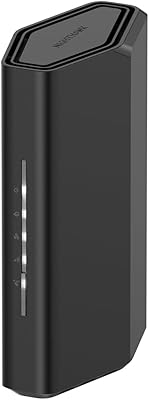
The redesigned compact chassis is well-received, particularly by users who found older Nighthawk routers too large and antenna-heavy for a living room shelf or media cabinet. The matte black finish looks clean and the build feels solid without being unnecessarily heavy.
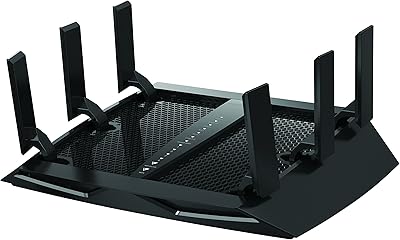
Some buyers familiar with previous Nighthawk hardware miss the adjustable external antennas, which allowed for manual signal direction tuning. A handful of users noted the unit runs noticeably warm during sustained heavy use, though no hardware failures were attributed to heat in the reviewed feedback.
Firmware & Software Stability
61%
39%
When firmware is stable, the router runs quietly in the background without requiring intervention, and the Nighthawk app provides straightforward access to updates. Most buyers report that after the initial firmware version, updates resolved early minor connectivity issues.
Firmware update complaints appear consistently enough across reviews to be a genuine pattern — some users experienced temporary connectivity losses or required a factory reset after applying updates. The frequency and reliability of NETGEAR's update cadence drew criticism from more technically advanced users who expected a smoother process.
Wired Port Performance
84%
The inclusion of a dedicated 2.5G LAN port is appreciated by users connecting a NAS drive or a gaming PC, enabling wired throughput that standard Gigabit ports cannot deliver. The three 1G ports handle smart TVs and media players without any congestion complaints.
Four total LAN ports can feel limiting in setups with multiple wired devices — users with home offices, gaming rigs, NAS drives, and smart TVs often find themselves needing an unmanaged switch to expand. The absence of a 10G port is a mild disappointment for enthusiast-level users at this price point.
Network Security
58%
42%
During the 30-day Armor trial, users report genuine peace of mind from the real-time malware blocking and device vulnerability scanning, with the companion app presenting threat summaries in a clear, non-technical way. The identity protection component adds value for households with children or less security-conscious users.
The transition to a paid subscription after the trial catches many buyers off guard, and the ongoing cost feels steep to users who expected baseline security to be permanently included at this router's price tier. Those who decline the subscription lose meaningful protection features rather than simply losing a bonus.
Latency & Gaming
82%
18%
Gamers running competitive titles report that the Nighthawk RS500 delivers measurably lower ping variance compared to their previous WiFi 6 setups, particularly when other household members are streaming simultaneously. MLO support helps sustain stable connections during bandwidth spikes.
The latency improvements are most pronounced for users whose gaming devices are WiFi 7 compatible — owners of current-generation consoles that do not yet support 802.11be see a less dramatic improvement than the marketing suggests. QoS prioritization settings require manual configuration to extract the best gaming performance.
ISP & Modem Compatibility
63%
37%
Users who arrive prepared with a compatible standalone modem find the connection process straightforward, and the 2.5G WAN port works well with the multi-gig plans from major fiber providers. NETGEAR's compatibility checker tool helps narrow down suitable modems before purchase.
Modem compatibility is the single most cited source of buyer frustration across all reviewed feedback — the router-only nature of the device is not prominently communicated at the point of sale, leading to returns and delayed setups. Cable ISP users sometimes discover their rented gateway device is not compatible without additional configuration.
App & Remote Management
77%
23%
The Nighthawk app covers the essentials — device management, speed tests, guest network control, and basic parental filtering — in a clean interface that non-technical users navigate comfortably. Remote access to network settings when away from home works reliably for most users.
Advanced users looking for granular controls like per-device bandwidth caps, detailed traffic logs, or VLAN configuration find the app limiting and are pushed to the web-based admin panel, which feels dated compared to the app. Occasional app login issues were reported after firmware updates.
Long-Term Reliability
81%
19%
Owners who have run this WiFi 7 router for six months or more generally report consistent uptime with no significant degradation in performance, and most have not needed to reboot the unit more than once or twice since setup. The hardware appears built to last under normal household load.
A smaller but visible segment of long-term users flagged intermittent disconnection issues that appeared only after several months of use, typically resolved by a firmware update or restart. Whether this represents a hardware variance or a software quirk remains an open question in the user community.
Future-Proofing
89%
Among all the aspects buyers comment on, future-proofing generates the most forward-looking satisfaction — users who invested in this tri-band router feel confident their network hardware will remain relevant as WiFi 7 client devices become mainstream over the next three to five years. The 2.5G WAN port is already aligned with where ISP plans are heading.
The full return on the future-proofing investment is entirely dependent on when your client devices and ISP plan catch up to the hardware's capabilities, which for many current buyers is still at least two to three years away. Early adopters are essentially paying a premium to wait for the ecosystem to mature around them.

Suitable for:

The NETGEAR Nighthawk RS500 WiFi 7 Tri-Band Router is a strong match for households that have already upgraded to a multi-gig fiber or cable internet plan and want hardware that can actually keep pace with it. Gamers who demand low-latency connections, households where multiple people simultaneously stream in 4K, and anyone juggling dozens of smart-home devices will notice a real difference compared to an older WiFi 6 or WiFi 5 setup. The 2.5 Gig WAN port and Multi-Link Operation make the most sense when your ISP and devices can take advantage of them, so tech-forward early adopters will get the fullest return. It also suits buyers who already own a standalone modem and simply need a powerful, capable router to pair with it. Single-story homes and open floor plans up to around 3,000 square feet are the sweet spot for reliable coverage throughout.
Not suitable for:

The NETGEAR Nighthawk RS500 WiFi 7 Tri-Band Router is not the right call for buyers who expect a modem to be included — it is strictly a router, and overlooking that distinction is the most common and costly mistake shoppers make. If your ISP plan tops out at standard gigabit speeds or below, the premium you pay for a 2.5 Gig port and WiFi 7 throughput will not translate into any noticeable day-to-day improvement. Larger multi-story homes or properties with thick concrete or brick walls will likely struggle with coverage gaps, and the router does not natively expand into a mesh system without additional hardware. Budget-conscious buyers or those in smaller apartments who just need reliable basic connectivity will find this tri-band router far more router than they need. Anyone who wants built-in network security without ongoing subscription costs should also weigh the Armor fee carefully before committing.

Specifications

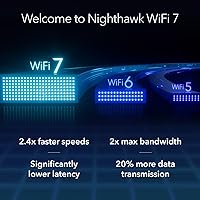
  • WiFi Standard: The router uses the 802.11be (WiFi 7) standard, the latest generation of wireless technology offering improved throughput, lower latency, and better multi-device handling than WiFi 6 or 6E.
  • Band Configuration: Tri-band design combines one 2.4 GHz band with two higher-frequency 5 GHz or 6 GHz bands, distributing device traffic to reduce congestion across the network.
  • Max Aggregate Speed: Theoretical combined wireless throughput reaches up to 12 Gbps across all bands, though real-world speeds will vary based on client hardware, distance, and network conditions.
  • WAN Port: A single 2.5 Gigabit Ethernet WAN port connects the router to your modem, enabling full use of multi-gig internet service plans where available.
  • LAN Ports: Four wired LAN ports are included: one 2.5 Gigabit port for high-bandwidth wired devices and three standard 1 Gigabit ports for general-purpose connections.
  • Device Capacity: The router is rated to handle up to 120 simultaneous connected devices, making it practical for dense smart-home environments with many active clients.
  • Coverage Area: Rated for up to 3,000 square feet of WiFi coverage, a figure most reliable in open, single-story floor plans without significant structural interference.
  • Modem Included: No modem is included or built in; a separate standalone cable or fiber modem is required to connect this router to your internet service provider.
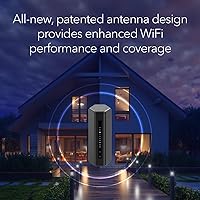
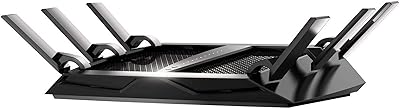
  • Antenna Design: Internal high-performance antennas are integrated into the compact chassis, replacing the external antenna array found on older Nighthawk models.
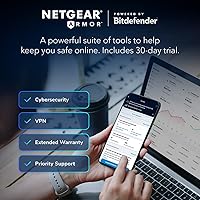
  • Security Suite: NETGEAR Armor is included with a 30-day free trial, covering malware blocking, vulnerability scanning, and identity protection; a paid subscription is required after the trial period ends.
  • Key WiFi 7 Features: Multi-Link Operation (MLO) and 4K-QAM are supported, allowing compatible client devices to communicate across multiple bands simultaneously for reduced latency and higher peak throughput.
  • Dimensions: The unit measures 10.83 x 7.13 x 7.01 inches, offering a noticeably smaller physical footprint than previous generations of Nighthawk routers.
  • Weight: The router weighs 4.64 pounds, consistent with a compact standalone unit designed for shelf or desk placement.
  • In the Box: Package contents include one WiFi 7 tri-band router, one 2-meter Ethernet cable, one 12V/3.5A power adapter, and a quick start guide.
  • Model Number: The official model designation is RS500-100NAS, which should be referenced when checking firmware updates, compatibility lists, or contacting NETGEAR support.
  • Color: The router ships in black, matching the standard Nighthawk aesthetic used across NETGEAR's premium router lineup.
  • Management App: The Nighthawk mobile app for iOS and Android provides guided setup, network monitoring, device management, and access to advanced settings without requiring a web browser.
  • Wireless Protocol: The router is backward compatible with earlier WiFi standards including 802.11a/b/g/n/ac/ax, ensuring older client devices connect without configuration changes.

Related Reviews

NETGEAR Nighthawk RS280S WiFi 7 Tri-Band Router
80%
88%
Wireless Speed & Performance
71%
Wi-Fi Coverage & Range
83%
Setup & Ease of Use
62%
Modem Compatibility
86%
Wired Port Performance
More
NETGEAR Nighthawk X6 AC3000 Tri-Band WiFi Router
84%
88%
Performance
76%
Setup and Installation
91%
Signal Strength and Range
79%
Usability (App & Interface)
85%
Compatibility with Devices
More
NETGEAR Nighthawk X8 AC5300 Tri-Band WiFi Router R8500
84%
89%
WiFi Performance
87%
Range and Coverage
93%
Ease of Setup
90%
Compatibility with Alexa
80%
Overall Build Quality
More
Netgear Nighthawk X6S AC4000 Tri-Band Router
70%
83%
Wireless Performance
81%
Signal Range & Coverage
86%
Multi-Device Handling
78%
Gaming & Low Latency
61%
Setup & Installation
More
NETGEAR Nighthawk BE9300 WiFi 7 Router
88%
94%
Wireless Performance
91%
Coverage Area
88%
Device Capacity
85%
Setup & Installation
90%
Security Features
More
NETGEAR Nighthawk RS700S WiFi 7 Tri-Band Router
81%
93%
Wireless Speed & Throughput
88%
Multi-Device Performance
81%
Coverage & Range
91%
Wired Connectivity
82%
Setup & App Experience
More
NETGEAR Nighthawk RS200
81%
88%
Wireless Speed & Performance
71%
Coverage & Range
91%
Setup & Installation
63%
App & Firmware Experience
82%
Value for Money
More
NETGEAR Nighthawk RS140 WiFi 7 Router
85%
92%
Performance
88%
Ease of Setup
91%
WiFi Speed & Range
89%
Device Connectivity
80%
Software & Firmware
More
NETGEAR Nighthawk RS180 WiFi 7 Router
86%
92%
WiFi Performance
90%
Gaming Performance
88%
Streaming Quality
89%
Coverage Area
85%
Ease of Setup
More
NETGEAR Nighthawk RS600 WiFi 7 Tri-Band Router
81%
91%
Wireless Performance
76%
Coverage & Range
88%
Setup & Onboarding
67%
Value for Money
83%
Build Quality & Design
More

FAQ

You will need to purchase a modem separately. The NETGEAR Nighthawk RS500 WiFi 7 Tri-Band Router is a router-only device with no built-in modem, so it must be paired with a standalone cable or fiber modem to connect to your ISP. This is the detail that catches the most buyers off guard, so confirm your existing modem is compatible before ordering.
It depends on your setup. If you have a lot of devices active at once, or you are on a multi-gig internet plan, the improvement in congestion handling and throughput can be quite noticeable. For a household with a handful of devices on a standard 200 Mbps plan, the gains will be far more modest. WiFi 7 shines when the rest of your network — ISP plan, modem, and client devices — can keep up with it.

That figure is a theoretical aggregate of all three bands combined under ideal lab conditions. In practice, no single device will ever hit 12 Gbps, and your real-world speeds will depend on your ISP plan, the WiFi 7 capability of your devices, distance from the router, and interference in your environment. Think of it more as a ceiling that indicates capacity rather than a speed you will routinely experience.

The 3,000 square foot rating is realistic for open, single-story layouts. Multi-story homes, older construction with thick walls, or homes with many interior partitions can see noticeably reduced range. If your house is large or multi-floor, you may want to plan for a compatible range extender or a mesh node to fill the gaps.

Armor is NETGEAR's network security suite that monitors for malware, protects connected devices, and offers some identity theft tools. It works well, but it is not free long-term — you get a 30-day trial included, after which a subscription is required to keep it active. If you choose not to subscribe, the router still works perfectly; you just lose the Armor features.

Honestly, for a 500 Mbps plan, you will not come close to using the hardware's full capability. The Nighthawk RS500 is designed around multi-gig internet and high-device-count households. If your plan and device count are modest, a good WiFi 6 router would likely serve you just as well at a lower cost. That said, if you expect to upgrade your ISP plan in the next few years and want hardware that will still be relevant, it is a reasonable long-term investment.

Yes, the Nighthawk app walks you through the process step by step, and most users report getting up and running in well under 30 minutes. The main prerequisite is making sure your modem is already active and connected before you start. As long as you have that covered, the guided setup handles the rest.

Not at all — the router is backward compatible with older WiFi standards, so your existing phones, laptops, and smart-home devices will connect just fine. However, to take full advantage of features like Multi-Link Operation and the highest throughput tiers, your client devices also need to support WiFi 7. Most current consumer devices do not yet, though that is gradually changing as new hardware releases.

The RS500 does not natively expand into a full mesh system on its own. To add coverage nodes, you would need compatible NETGEAR mesh hardware or a wired access point approach. If mesh networking is a priority from the start, it may be worth comparing this router against NETGEAR's Orbi lineup before deciding.

The only ongoing cost to be aware of is the NETGEAR Armor subscription after the 30-day trial. Beyond that, the router itself has no required subscription fees — the Nighthawk app and standard firmware updates are free. Just factor the Armor decision into your budget if network security coverage is something you plan to keep active.

Where to Buy