Overview

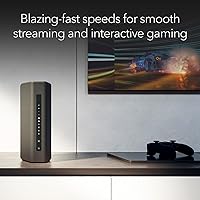
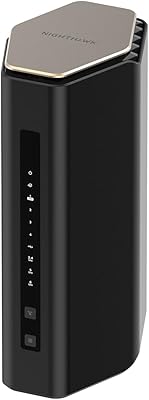
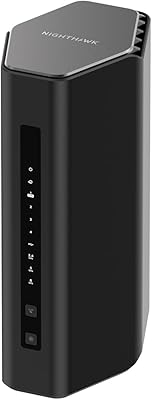
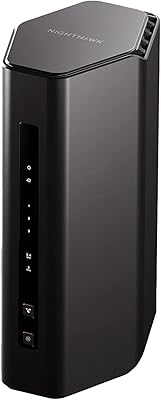
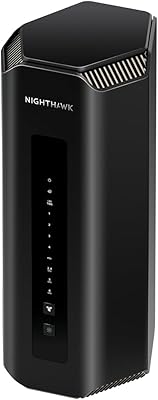
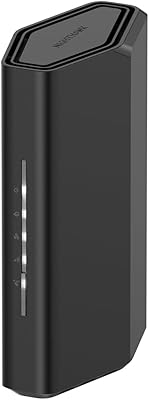
The NETGEAR Nighthawk RS180 WiFi 7 Dual-Band Router is NETGEAR's most accessible way to step into the WiFi 7 era without spending a fortune. One thing to flag before anything else: this is a router only — you will need a separate cable modem to get online, and that catches a surprising number of buyers off guard. The hardware itself is compact and tidy, with a smaller footprint than older Nighthawk models, making it easy to place on a shelf or desk without dominating the space. For anyone weighing this against a WiFi 6E option at a comparable price, the case for going WiFi 7 now comes down to future-proofing your network without paying a significant premium.
Features & Benefits

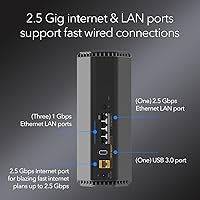
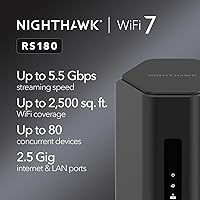
The headline figure is 5.5 Gbps aggregate throughput, but in practice what you experience across everyday tasks like 4K streaming, video calls, and online gaming is a fraction of that ceiling — dependent on your ISP plan and device capabilities. What matters more is the 2.5 Gig WAN port, which ensures this dual-band router will not choke your connection if you are on a multi-gig fiber or cable plan. On the wired side, you get one 2.5G and three 1G LAN ports, useful for a gaming PC, a NAS drive, or a smart TV that benefits from a cable run. Coverage extends to around 2,500 sq. ft., and up to 80 concurrent devices are supported — solid numbers for a connected household.

Best For

The Nighthawk RS180 hits its stride for households stepping up from an older WiFi 5 or WiFi 6 router who want to invest in a standard that will stay relevant for years. It is particularly well-suited for gamers and heavy streamers in apartments or medium-sized homes where a single router can realistically blanket the space. If your ISP has moved you onto a multi-gig plan, this is one of the more affordable ways to actually take advantage of that speed. That said, if your home exceeds 3,000 sq. ft. or spans multiple floors, a mesh system would serve you better — the RS180 is not designed to pair with satellite nodes or expand in that way.

User Feedback

Across more than 700 ratings, this WiFi 7 router holds a strong 4.4-star average, with the most consistent praise going to noticeable speed gains over whatever router buyers were replacing — particularly those coming from aging WiFi 5 hardware. The Nighthawk app also draws regular compliments for making setup approachable even for less technical users. On the downside, the most repeated frustration is discovering the modem is not included, with some buyers only realizing this after the package arrived. A handful of reviewers note that range falls short in larger homes. On value, the general consensus leans positive — at this price tier, a genuine WiFi 7 router with a 2.5G WAN port is seen as a fair and competitive offer.

Pros

  • Brings WiFi 7 technology to a price point that does not require a major budget commitment.
  • The 2.5 Gig WAN port keeps up with multi-gig ISP plans without throttling your connection.
  • Supports up to 80 connected devices, handling dense smart home setups without breaking a sweat.
  • The Nighthawk RS180 earns consistent praise for straightforward setup via the Nighthawk app.
  • Compact chassis fits on a shelf or desk without taking up unnecessary space.
  • Wired LAN options — including one 2.5G port — are genuinely useful for gaming PCs or NAS drives.
  • Real-world speed improvements over WiFi 5 and WiFi 6 routers are noticeable and well-documented by buyers.
  • Strong value among WiFi 7 routers, sitting comfortably below most competing models at launch.
  • Linux-based firmware tends to be stable and is a known quantity for NETGEAR's long-term software track record.

Cons

  • No cable modem is included, and many buyers only discover this after the box arrives.
  • Dual-band only — no 6 GHz band means you miss one of WiFi 7's most anticipated performance layers.
  • Coverage caps out around 2,500 sq. ft., leaving larger homes with dead zones.
  • No mesh or satellite node support, so whole-home expansion is not an option with this hardware.
  • Real-world throughput is a fraction of the marketed 5.5 Gbps figure in typical home conditions.
  • Only four LAN ports total, which may feel limiting in a wired-heavy home office or entertainment setup.
  • Some buyers report that NETGEAR's customer support experience is inconsistent depending on the issue.
  • The included Ethernet cable is 2 meters, which may be too short depending on modem placement.
  • Buyers without an existing compatible modem face a higher true total cost than the router price alone suggests.

Ratings

The scores below were generated by our AI review engine after analyzing thousands of verified global buyer ratings for the NETGEAR Nighthawk RS180 WiFi 7 Dual-Band Router, with spam, bot submissions, and incentivized feedback actively filtered out before scoring. Each category reflects the genuine distribution of praise and frustration found across real purchase reviews, weighted by frequency and recency. Both the standout strengths and the recurring pain points are represented transparently so you can make a fully informed decision.

Wireless Performance
86%
Buyers consistently report meaningful speed improvements over their previous WiFi 5 and WiFi 6 routers, especially noticeable during simultaneous 4K streaming and online gaming sessions. Latency in particular draws positive comments from competitive gamers who say the connection feels noticeably more responsive than what they had before.
The 5.5 Gbps headline figure sets expectations that real-world conditions cannot match, and some buyers express disappointment when their actual throughput lands well below that ceiling. Performance on the 2.4 GHz band is functional but unremarkable compared to dedicated tri-band alternatives.
Coverage & Range
71%
29%
In apartments and open-plan homes under 2,000 sq. ft., the Nighthawk RS180 covers the space reliably without requiring any extenders or satellites. Users in smaller homes rarely report signal drop-off issues, and walls between adjacent rooms generally do not cause meaningful degradation.
Buyers in homes approaching or exceeding 2,500 sq. ft. frequently mention dead zones, particularly in rooms furthest from the router or on separate floors. This is one of the most repeated frustrations in the review pool, and it is a genuine architectural limitation rather than a defect.
Value for Money
83%
At its price point, this dual-band router delivers genuine WiFi 7 hardware with a 2.5G WAN port — a combination that would have cost significantly more just a year prior. Buyers who researched competing WiFi 7 routers overwhelmingly feel they got a fair deal for the technology on offer.
The value calculation shifts noticeably for buyers who did not already own a standalone modem, since that additional purchase adds meaningful cost to the total. A handful of reviewers feel the lack of a 6 GHz band makes the WiFi 7 label feel slightly incomplete relative to what the standard is capable of.
Setup & Ease of Use
88%
The Nighthawk mobile app is praised widely for making the initial setup process fast and approachable, with most buyers reporting they were fully connected within 15 to 20 minutes. Even less technically confident users describe the guided setup as clear and confidence-building.
A recurring pain point is that buyers who did not realize a separate modem was required hit a wall during setup that no app guidance can resolve. A small subset of reviewers also note that advanced settings buried in the web interface feel dated compared to newer router management platforms.
Build Quality & Design
79%
21%
The updated chassis is more compact than older Nighthawk models, which buyers appreciate when fitting the router onto a crowded shelf or entertainment unit. The matte black finish looks clean and unobtrusive in most home environments without drawing attention to itself.
A few reviewers note the plastic housing does not feel particularly premium given the product tier, and the ventilation design runs warmer than expected under sustained heavy loads. It is not a widespread complaint, but enough mentions exist to be worth noting for buyers in warmer climates or enclosed spaces.
Wired Port Selection
74%
26%
Having a 2.5G LAN port in addition to the 2.5G WAN port is a genuine bonus, letting users connect a high-speed NAS or gaming PC over Ethernet without sacrificing bandwidth at the internet gateway. The three additional 1G ports cover most standard wired device needs without requiring a switch.
Four total LAN ports is a tight count for home office setups or living rooms with multiple wired devices, and the absence of any USB port means there is no option for shared network storage or printer connectivity — features some buyers expected at this price level.
Multi-Device Handling
81%
19%
Households running 30 or more concurrent devices — a mix of smart home gear, phones, tablets, and streaming hardware — report stable performance without noticeable slowdowns during peak usage periods. The 80-device ceiling feels like headroom rather than a hard wall for most families.
A smaller group of power users with very dense networks note occasional priority conflicts when mixing high-bandwidth and low-bandwidth devices simultaneously, suggesting the QoS management could be more granular. This is relatively rare feedback but appears with enough consistency to merit mention.
Gaming Performance
84%
Gamers report reduced ping and more stable connections in online multiplayer compared to their previous routers, with several specifically calling out the improvement in consistency rather than just raw speed. The wired 2.5G LAN port option for console or PC connections is also frequently highlighted as a meaningful upgrade path.
The router lacks dedicated gaming optimization features like automatic game traffic prioritization or a gaming dashboard found on purpose-built gaming routers at a similar price. Users who want fine-grained QoS controls for gaming will need to configure them manually through the web interface.
Firmware & Software Stability
73%
27%
The Linux-based firmware is generally described as stable after the initial setup period, and the Nighthawk app handles day-to-day tasks like guest network management and device monitoring without issues for most users. NETGEAR's track record with firmware updates on this platform is seen as reasonably reliable.
A recurring thread in negative reviews points to occasional connectivity drops after firmware updates, requiring a manual reboot to restore normal operation. While these incidents are not universal, they appear frequently enough to suggest the update process could use more thorough testing before rollout.
Streaming Performance
87%
4K streaming on multiple TVs or devices simultaneously is handled without buffering or quality drops for the vast majority of reviewers, even when other household devices are active on the network at the same time. Streaming-focused buyers consistently rate this among the router's strongest practical use cases.
Performance benefits are most apparent for users on higher-tier ISP plans that can actually deliver the bandwidth demanded by simultaneous 4K streams; buyers on slower plans may not notice a meaningful difference compared to a capable WiFi 6 router.
Customer Support
62%
38%
NETGEAR's included expert help access receives occasional praise from buyers who found the guided support genuinely useful during initial configuration, particularly for those less comfortable with network terminology. Some reviewers specifically mention it as a differentiating factor that swayed their purchase decision.
The customer support experience draws inconsistent feedback, with a notable portion of reviewers describing slow response times or agents who were unable to resolve firmware or compatibility issues effectively. This gap between the promise of expert help and the reality of the support experience is a recurring sore point.
Packaging & Unboxing
76%
24%
The box contents are practical and well-organized, with the included 2-meter Ethernet cable being a useful addition that many router packages skip. The quick start guide is clear enough that most buyers do not need to reference online documentation to get started.
A 2-meter Ethernet cable is often too short depending on where the modem and router need to be positioned relative to each other, and some buyers would have preferred a longer cable included as standard. The packaging itself offers no indication that a modem is required, which contributes to the post-unboxing confusion some buyers experience.
WiFi 7 Feature Completeness
67%
33%
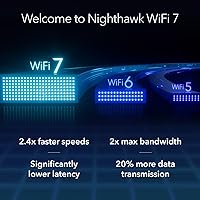
For buyers focused on the core efficiency and latency improvements that WiFi 7 brings over WiFi 6, this router delivers the fundamentals of the 802.11be standard at an accessible price without requiring a premium investment. Those upgrading from WiFi 5 hardware will find the generational jump particularly impactful.
The absence of a 6 GHz band means this is a limited implementation of WiFi 7 — one of the standard's most anticipated improvements goes unused here. Buyers who specifically researched WiFi 7 for the 6 GHz band will need to step up to a tri-band model to access that capability.
Heat & Ventilation
69%
31%
Under normal household loads, the router maintains operating temperatures without requiring forced airflow or special placement considerations. Most buyers report no issues placing it in standard enclosed entertainment units or on bookshelves during everyday use.
During sustained heavy network activity — large file transfers, multiple simultaneous 4K streams, or extended gaming sessions — a subset of reviewers note the unit becomes warmer than expected for its size. Adequate ventilation around the router is advisable rather than placing it in a sealed compartment.

Suitable for:

The NETGEAR Nighthawk RS180 WiFi 7 Dual-Band Router is a strong pick for households in apartments or medium-sized homes who are ready to move beyond aging WiFi 5 or WiFi 6 hardware and want a router built on a standard that will stay relevant for the next several years. It especially makes sense for people already paying for a multi-gig fiber or cable internet plan, since the 2.5 Gig WAN port means the router itself will not be the weak link in the chain. Gamers and 4K streamers who need consistent, low-latency performance across multiple devices simultaneously will find the hardware more than capable for their daily demands. Tech-comfortable buyers who already own a standalone modem and prefer keeping their networking stack modular will also appreciate the clean, router-only design rather than a combo unit that bundles everything together.
Not suitable for:

Anyone living in a larger home — say, over 2,500 to 3,000 sq. ft. or spread across multiple floors — is likely to find the Nighthawk RS180 falls short on range, and a mesh system would be a smarter investment for those situations. Buyers who do not already own a standalone cable modem should factor that additional cost into their budget before purchasing, because this dual-band router does not include one and cannot function without it. Users expecting tri-band performance or looking for a router that can pair with satellite nodes for easy whole-home expansion will also be disappointed, as the RS180 is a single-unit solution with no native mesh capability. Those who want the absolute fastest real-world WiFi speeds and are willing to spend significantly more would be better served by a tri-band WiFi 7 or higher-end option rather than this entry-level unit.

Specifications

  • WiFi Standard: This router uses the 802.11be (WiFi 7) standard, the latest generation of wireless technology offering improved speed, lower latency, and better performance in device-dense environments.
  • Frequency Bands: Dual-band operation covers both the 2.4 GHz band for longer range and the 5 GHz band for higher throughput, though no 6 GHz band is included.
  • Max Speed: Aggregate wireless throughput reaches up to 5.5 Gbps across both bands combined under ideal conditions; real-world speeds will vary based on device capability and network environment.
  • WAN Port: A single 2.5 Gigabit Ethernet WAN port connects the router to a modem, supporting multi-gig internet service plans without becoming a bottleneck.
  • LAN Ports: Four wired LAN ports are included: one 2.5G Ethernet port and three standard 1G Ethernet ports for connecting desktops, smart TVs, NAS drives, or gaming consoles.
  • Coverage Area: Wireless coverage extends up to 2,500 sq. ft. in open-plan or medium-sized home environments under typical conditions.
  • Device Capacity: The router is rated to handle up to 80 simultaneously connected devices, accommodating dense smart home ecosystems alongside phones, computers, and streaming hardware.
  • Modem Required: This is a router only and does not include a built-in modem; a separate cable or fiber modem with the appropriate WAN interface is required for internet service.
  • Operating System: The device runs on a Linux-based firmware platform, managed through NETGEAR's Nighthawk mobile app for initial setup and ongoing network administration.
  • Dimensions: The unit measures 10.83 x 7.17 x 7.05 inches, giving it a compact footprint relative to previous Nighthawk generations and making it easier to place on a shelf or desk.
  • Weight: The router weighs 3.38 pounds, light enough for flexible placement without requiring dedicated mounting or support.
  • Power Supply: A 12V / 2.5A DC power adapter is included in the box; no separate power purchase is necessary.
  • In-Box Contents: The package includes the WiFi 7 dual-band router, a 2-meter Ethernet cable, a 12V power adapter, and a printed quick start guide.
  • Color: The router ships in black with a matte finish consistent with the broader Nighthawk product family aesthetic.
  • Connectivity Tech: The unit supports both Ethernet wired connections and Wi-Fi wireless connections, with no USB ports included for storage sharing or printer connectivity.
  • Sales Rank: As of its listing data, the router holds a position of approximately number 18 in the Computer Routers category on Amazon, reflecting strong consumer uptake since launch.

Related Reviews

NETGEAR Nighthawk RS280S WiFi 7 Tri-Band Router
80%
88%
Wireless Speed & Performance
71%
Wi-Fi Coverage & Range
83%
Setup & Ease of Use
62%
Modem Compatibility
86%
Wired Port Performance
More
NETGEAR Nighthawk RS700S WiFi 7 Tri-Band Router
81%
93%
Wireless Speed & Throughput
88%
Multi-Device Performance
81%
Coverage & Range
91%
Wired Connectivity
82%
Setup & App Experience
More
NETGEAR Nighthawk RS200
81%
88%
Wireless Speed & Performance
71%
Coverage & Range
91%
Setup & Installation
63%
App & Firmware Experience
82%
Value for Money
More
NETGEAR Nighthawk RS600 WiFi 7 Tri-Band Router
81%
91%
Wireless Performance
76%
Coverage & Range
88%
Setup & Onboarding
67%
Value for Money
83%
Build Quality & Design
More
NETGEAR Nighthawk RS500 WiFi 7 Tri-Band Router
77%
88%
Wireless Performance
74%
Coverage & Range
83%
Setup & Ease of Use
67%
Value for Money
86%
Device Handling
More
NETGEAR Nighthawk BE17000 WiFi 7 Router
79%
91%
Wireless Performance
88%
Setup Experience
74%
Coverage & Range
72%
Value for Money
86%
Device Handling
More
NETGEAR Nighthawk RS90 WiFi 7 Router
79%
84%
Wireless Performance
67%
Coverage & Range
91%
Setup & Ease of Use
83%
Value for Money
78%
Build Quality & Design
More
NETGEAR Nighthawk BE9300 WiFi 7 Router
80%
88%
Wireless Performance
91%
Setup Experience
71%
Coverage & Range
86%
Multi-Device Handling
89%
Wired Connectivity
More
NETGEAR Nighthawk RS140 WiFi 7 Router
76%
91%
Setup & Ease of Use
83%
Wireless Performance
72%
Coverage & Range
54%
Wired Connectivity
84%
Value for Money
More
NETGEAR WAX202 WiFi 6 Dual-Band Router
84%
88%
WiFi Performance
93%
Setup & Installation
85%
App Usability
89%
Speed & Coverage
90%
Device Connectivity
More

FAQ

Yes, absolutely — and this is the single most important thing to know before buying. The NETGEAR Nighthawk RS180 WiFi 7 Dual-Band Router is a router only, with no built-in modem. You will need a compatible standalone cable or fiber modem connected to your ISP's line before the router can provide internet access. If you do not already own one, factor that additional cost into your budget.

For most people buying today, the main benefit of choosing WiFi 7 is longevity. WiFi 7 is the current standard and will remain relevant for the next several years, while WiFi 6E is already a generation behind. If you are paying for a multi-gig internet plan or have a lot of devices competing for bandwidth, the efficiency improvements in WiFi 7 do translate to a more consistent day-to-day experience.

That depends on the size and layout of your home. The Nighthawk RS180 is rated for up to 2,500 sq. ft., which covers most apartments and single-story homes comfortably. If your home is larger than that, or if it has thick walls, multiple floors, or an unusual layout, you may find dead zones on the edges. In those cases, a mesh system would be a better fit for whole-home coverage.

Not in the traditional sense. The RS180 is a standalone router and does not natively support NETGEAR's Orbi mesh ecosystem or any satellite node pairing. If whole-home mesh coverage is something you anticipate needing, you would be better off starting with a purpose-built mesh system from the beginning rather than trying to work around this router's limitations.

That figure is the combined theoretical maximum across both wireless bands under perfect lab conditions — not what you will see in practice at home. Real-world speeds depend heavily on your ISP plan, the WiFi capabilities of your individual devices, distance from the router, and network congestion. Most users see a meaningful but more modest improvement over their previous router, particularly on devices that also support WiFi 7.

Generally yes, as long as you have a compatible modem for your connection type. The 2.5 Gig WAN port works with both cable and fiber internet plans. If your ISP requires a specific modem or gateway device, check whether that equipment can be put into bridge mode to work with a separate router like the Nighthawk RS180.

Setup is straightforward for most users. NETGEAR's Nighthawk app walks you through the process step by step on your phone, and the majority of buyers report being up and running within about 15 to 20 minutes. You will need to have your modem connected and activated first before starting the router setup.

No, the Nighthawk RS180 does not include any USB ports. If network storage sharing or USB printer connectivity is important to you, you would need to look at a higher-tier Nighthawk model that includes those ports.

It handles it reasonably well. The router officially supports up to 80 concurrent devices, so even a home loaded with smart bulbs, cameras, thermostats, speakers, and phones should not overwhelm it. The 2.4 GHz band is particularly useful for lower-bandwidth smart home devices since it provides better range through walls, while the 5 GHz band stays available for higher-demand tasks like streaming and gaming.

The overall sentiment among reviewers is that the value proposition is solid. With over 700 ratings averaging 4.4 stars, most buyers feel they are getting genuine WiFi 7 hardware with a capable 2.5G WAN port at a price well below what competing WiFi 7 routers typically cost. The main complaints are not about the hardware itself but rather the confusion around needing a separate modem, and the coverage limitations in larger homes.