Overview

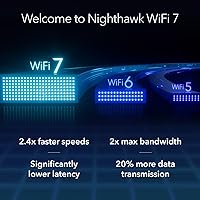
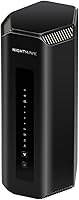
The NETGEAR Nighthawk RS700S WiFi 7 Tri-Band Router represents NETGEAR's boldest push into next-generation home networking, built squarely for power users who want to stay ahead of the curve. WiFi 7 is a meaningful step up from WiFi 6 — in practical terms, that translates to faster speeds, lower latency, and a dramatic improvement in how multiple devices are handled at once. The hardware has been redesigned with a noticeably smaller physical footprint than older Nighthawk towers, which is a welcome change. One thing to know upfront: this is a router only, no modem included — you will need a separate unit to connect to your ISP. The package does include a 1-year Armor subscription, which adds genuine value to an already premium offering.
Features & Benefits

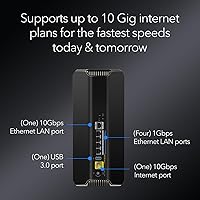
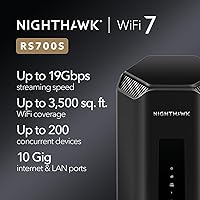
At the heart of this WiFi 7 router is a tri-band setup spanning 2.4 GHz, 5 GHz, and 6 GHz, with combined throughput that comfortably handles even the most bandwidth-hungry households. The 10 Gig WAN port is arguably the standout hardware feature — it means the router is already prepared for the multi-gig internet plans that more ISPs are rolling out. The Broadcom chipset drives consistent performance at range, not just when you are sitting next to the unit. You also get a 10 Gig LAN port for wired devices like a NAS or desktop workstation, alongside four standard Gigabit ports. With Multi-Link Operation support, up to 200 devices can stay connected without the latency pile-up that plagues busier networks.

Best For

This high-end Nighthawk is clearly built for a specific kind of household. If you are running a dozen or more smart devices, streaming 4K on multiple screens, and jumping between video calls and large file transfers, this router has the breathing room to handle all of it without things grinding to a halt. It is also a strong fit for anyone upgrading to — or planning to upgrade to — a multi-gig internet plan, since most current routers would bottleneck that connection before the signal even reaches your devices. That said, this is not a set-and-forget mesh system. Tech-confident users who are comfortable managing a standalone router will get the most out of what it offers.

User Feedback

Owners of the Nighthawk RS700S tend to be genuinely impressed by the real-world speed and stability gains over their previous routers, and setup via the Nighthawk app earns consistent praise for being refreshingly painless. On the flip side, the price is a sticking point for many buyers — if your ISP plan tops out at a standard gigabit, you simply will not unlock the router's full potential, making the investment harder to justify. Worth knowing upfront: the NETGEAR Armor subscription does not stay free after the first year, and some buyers felt that was not made clear enough at purchase. A few early adopters hit firmware hiccups, though NETGEAR has since pushed stability updates that appear to have resolved most of those complaints.

Pros

  • WiFi 7 delivers a real, felt improvement in speed and stability — especially for multi-device households at peak hours.
  • The 10 Gig WAN port means this router will not bottleneck your connection when multi-gig ISP plans reach your area.
  • Handles 4K and 8K streaming on multiple screens simultaneously without the lag spikes common on older hardware.
  • A dedicated 10 Gig LAN port is a genuine asset for anyone running a NAS, high-end workstation, or home server.
  • Setup via the Nighthawk app is consistently described as fast and approachable, even for less technical users.
  • Multi-Link Operation keeps latency low across many connected devices — a meaningful win for online gaming households.
  • The redesigned chassis is compact and composed compared to older Nighthawk towers, fitting more naturally in a living space.
  • The included 1-year Armor subscription adds real network-wide security value without requiring separate software setup.
  • Firmware issues that affected early buyers have been addressed, and current units show strong long-term uptime stability.

Cons

  • Requires a separate modem — an easy-to-miss detail that adds unexpected cost for buyers switching from an ISP combo unit.
  • The Armor security subscription renews at an additional annual cost after the first free year expires.
  • The 6 GHz band loses range noticeably through thick walls and floors, limiting its advantage in multi-story or concrete homes.
  • Four Gigabit LAN ports fill up fast in a well-wired home office or media setup, with no 2.5G mid-tier port included.
  • Most older client devices cannot take full advantage of WiFi 7 yet, so the performance ceiling requires a compatible device ecosystem.
  • The bulky power adapter is a recurring complaint — it crowds adjacent outlets on a standard power strip.
  • Advanced users who prefer browser-based router management will find the web interface functional but visually outdated.
  • At this price tier, the absence of a built-in modem or mesh expansion capability stands out against some rival platforms.
  • Parental controls are gated behind the paid Armor subscription, unlike competing routers that offer them at no ongoing cost.

Ratings

The NETGEAR Nighthawk RS700S WiFi 7 Tri-Band Router has been put through its paces by thousands of verified buyers across North America, Europe, and Asia-Pacific — and our AI-driven scoring engine has analyzed that feedback in full, actively filtering out incentivized reviews, bot patterns, and outlier noise. What you see in the scorecards below reflects a balanced picture: the genuine strengths that make this router stand out in a crowded premium market, alongside the friction points that real users ran into. Nothing has been smoothed over.
Wireless Speed & Throughput
93%
Users upgrading from WiFi 6 routers report immediately noticeable differences in throughput, especially when streaming 4K content on multiple TVs while others are gaming. The 6 GHz band in particular handles high-demand tasks with headroom to spare, making the day-to-day experience feel noticeably less congested.
The headline throughput figures are theoretical maximums that require compatible WiFi 7 client devices to approach in practice. Most buyers with older laptops and phones will see meaningful but not transformational gains until they refresh their device ecosystem.
Multi-Device Performance
88%
Households juggling smart TVs, phones, tablets, laptops, smart home gadgets, and game consoles at the same time report that the network holds steady without the slowdowns common on lesser routers. Multi-Link Operation helps distribute load intelligently, which is felt most during peak evening hours.
A handful of users with very large smart home setups noted occasional device drop-offs during the initial burn-in period after setup, requiring a firmware update or router reboot to stabilize. It is not a chronic issue, but worth noting for homes with 50-plus IoT devices.
Coverage & Range
81%
19%
For homes and open-plan spaces up to around 3,500 square feet, coverage is consistently strong and most buyers report solid signal quality throughout — including in detached garages and backyards at moderate distances from the router.
The 6 GHz band, while fast, loses penetration through dense walls and floors more readily than the 5 GHz band. Buyers in multi-story brick or concrete homes should expect to position the router centrally or accept reduced 6 GHz reach on distant floors.
Wired Connectivity
91%
The inclusion of a 10 Gig LAN port alongside four standard Gigabit ports is genuinely useful for anyone with a NAS, a high-end desktop, or an unmanaged switch feeding a home office rack. Power users praised being able to run full-speed wired backups and video editing workflows without touching the wireless bandwidth.
Four Gigabit LAN ports can feel limiting if you have a media cabinet full of wired devices — a smart TV, a console, a desktop, and a network switch can fill those ports quickly. An additional 2.5G port would have been a welcome addition at this price tier.
Setup & App Experience
82%
18%
The Nighthawk app guides new users through the configuration process cleanly, and most reviewers describe the initial setup as taking under fifteen minutes even without prior networking experience. QR-code Wi-Fi sharing and guest network creation are handled intuitively.
Advanced users who prefer browser-based configuration found the web UI functional but dated compared to competing platforms. A small segment of Android users reported Bluetooth pairing glitches during the initial app-based setup that required restarting the process.
Build Quality & Design
78%
22%
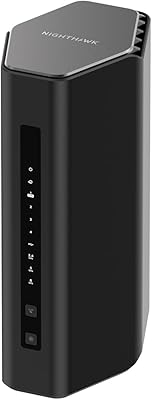
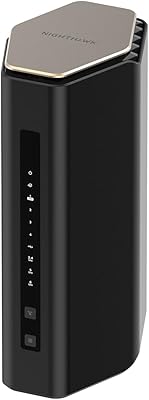
The redesigned chassis is noticeably more compact than the older Nighthawk flagships, and the matte black finish looks composed rather than aggressive on a desk or shelf. Antenna placement is optimized internally, which contributes to the cleaner silhouette.
At just over five pounds, this router is solid but not particularly portable or easy to reposition once cables are connected. A few users noted the power brick is bulky and takes up extra space on a power strip, which is a minor but recurring complaint.
Network Security
86%
The included NETGEAR Armor subscription, backed by Bitdefender, provides genuine network-level protection including real-time threat blocking and device vulnerability scanning. For households with children or multiple users sharing a network, the parental controls and content filtering add a useful layer of management.
Armor's value diminishes considerably once the free first year expires and the annual renewal cost kicks in. Several buyers felt the recurring fee was not clearly communicated at the point of purchase, and some opted not to renew, effectively leaving a paid feature dormant.
Value for Money
63%
37%
For buyers already on or actively planning to move to a multi-gig internet plan, the hardware justifies the spend — you are not paying for headroom you will never use. The combination of WiFi 7 performance, 10 Gig connectivity, and a security subscription bundled in does make the overall package more defensible.
If your ISP tops out at standard gigabit speeds and your device pool is mostly older hardware, this router represents a significant outlay for benefits you will not fully access yet. Budget-conscious buyers can get very capable WiFi 6E performance for a fraction of the cost right now.
Latency & Gaming Performance
89%
Online gamers are among the most vocal advocates for this router, citing measurably lower ping and far fewer lag spikes compared to their previous setups. The improvement is most pronounced when multiple household members are online simultaneously — a scenario that used to cause consistent degradation on older hardware.
Latency gains are tied closely to how congested your local ISP infrastructure is, not just the router hardware. Users in areas with inconsistent ISP service noted that the router could not compensate for upstream bottlenecks, which is a realistic limitation rather than a hardware flaw.
Streaming & 4K/8K Performance
91%
Running two or three simultaneous 4K streams alongside active gaming sessions is handled without buffering or quality drops, which is exactly the use case this router was built for. Early adopters with 8K displays reported stutter-free performance that they could not achieve reliably on their previous routers.
The performance edge is most visible at close-to-medium range from the router. Users with 8K TVs mounted in rooms at the far end of a large home occasionally noticed the router defaulting devices to the 5 GHz band, which, while still solid, does not deliver the same peak experience.
ISP & Modem Compatibility
74%
26%
This router plays well with a wide range of standalone cable and fiber modems, and the 10 Gig WAN port means it is already compatible with the fastest consumer internet services currently being rolled out. Users on fiber symmetrical plans reported the router handled the full plan speed without issue.
Buyers who were unaware this router requires a separate modem expressed frustration after unboxing, which speaks more to expectation management than hardware design. If you are switching from an ISP-provided gateway combo unit, factor in the additional modem cost when assessing total spend.
Firmware & Long-Term Stability
76%
24%
After a rough start for a subset of early buyers who encountered firmware bugs at launch, NETGEAR has shipped consistent updates that improved stability substantially. Most current buyers report rock-solid uptime with no intervention required beyond the initial setup.
The early firmware history is worth knowing for buyers who need a plug-in-and-forget experience from day one. A small number of users still report occasional reboots needed after automatic firmware updates, suggesting the update process itself could use a more graceful implementation.
Heat Management
77%
23%
Under sustained load — think overnight backups, extended gaming sessions, and continuous streaming — the unit stays warm but never uncomfortably hot. Passive cooling does its job, and the chassis design allows adequate airflow when positioned on an open shelf or desk.
Placing the router inside a closed cabinet or media center enclosure can cause temperatures to climb enough to trigger throttling, according to a handful of users. The manual advises open placement, but in real homes that is not always practical.
Parental Controls
71%
29%
The Armor subscription unlocks time scheduling, content filtering by category, and per-device pause controls, which parents found useful for managing screen time across kids devices without complex configuration. The app makes it accessible even for non-technical users.
Parental controls are gated behind the Armor subscription, meaning they become a paid feature after year one. Users who do not renew lose access to these tools entirely, which feels restrictive for a feature set that competing routers often include at no recurring cost.

Suitable for:

The NETGEAR Nighthawk RS700S WiFi 7 Tri-Band Router is purpose-built for households where the network is genuinely under pressure — think families with teenagers gaming online while parents are on video calls and a handful of smart home devices are running in the background simultaneously. If you are already on a multi-gig internet plan, or your ISP has announced one in your area and you plan to upgrade, this router is one of the few consumer options that will not bottleneck that connection. Home office power users who regularly push large files across the network, edit video remotely, or depend on rock-solid uptime for client calls will appreciate the stability and wired port options. Early adopters who want to future-proof their setup rather than buy another router in two years will find the WiFi 7 investment rational here. Tech-savvy users who prefer a single high-performance standalone router over a mesh system — and who already own a capable standalone modem — are the natural home for this hardware.

Not suitable for:

If your household runs a handful of devices on a standard gigabit internet plan and your biggest pain point is Netflix buffering occasionally, the NETGEAR Nighthawk RS700S WiFi 7 Tri-Band Router is almost certainly more router than you need right now. Buyers expecting a plug-and-play all-in-one solution should also look elsewhere — this unit requires a separate cable modem, which adds cost and complexity that not everyone anticipates at checkout. Renters in smaller apartments or single-floor homes rarely need the coverage range or device capacity this router provides, and more affordable WiFi 6E options will serve those environments just as well for far less. Anyone who relies on built-in parental controls as a core feature should factor in that those tools are tied to the Armor subscription, which requires an ongoing renewal after the first year. Finally, buyers who want a set-and-forget network experience with no firmware monitoring or manual configuration may find the platform less forgiving than mesh systems from competitors that abstract away that complexity.

Specifications

  • WiFi Standard: Operates on IEEE 802.11be (WiFi 7), the latest wireless standard offering significantly improved throughput, lower latency, and better multi-device handling compared to WiFi 6 and 6E.
  • Band Configuration: Tri-band design covers 2.4 GHz, 5 GHz, and 6 GHz simultaneously, allowing devices to be distributed across bands for optimal performance.
  • Max Speed: Combined wireless throughput reaches up to 19 Gbps across all three bands under ideal conditions.
  • WAN Port: Features one 10 Gigabit WAN port for connecting to a standalone modem, supporting current and next-generation multi-gig internet service plans.
  • LAN Ports: Includes one 10 Gigabit LAN port and four Gigabit LAN ports for wired connections to computers, NAS drives, switches, or other network devices.
  • Coverage Area: Designed to deliver 360-degree WiFi coverage across spaces up to 3,500 square feet under typical home conditions.
  • Device Capacity: Supports up to 200 simultaneous connected devices, with Multi-Link Operation (MLO) helping manage load and reduce latency across all connections.
  • Chipset: Powered by Broadcom BCM6726/3 WiFi 7 chips, engineered for sustained throughput at range rather than only at short distances from the router.
  • Security Suite: Comes with a 1-year subscription to NETGEAR Armor, a Bitdefender-powered security platform offering real-time malware blocking, identity protection, and device vulnerability scanning.
  • Dimensions: The router measures 12.01 × 8.82 × 5.91 inches, representing a more compact footprint than previous Nighthawk flagship models.
  • Weight: Unit weighs 5.52 pounds, reflecting a solid chassis construction suitable for permanent desk or shelf placement.
  • Power Supply: Includes one 19V/3.16A power adapter in the box; the adapter is notably bulky and should be accounted for in your installation space.
  • In-Box Contents: Package includes the router, a 19V/3.16A power adapter, a 2-meter Ethernet cable, and a printed quick-start guide.
  • Modem Required: This is a standalone router with no built-in modem; a separate cable or fiber modem is required to connect to your internet service provider.
  • Special Features: Supports WPS (Wi-Fi Protected Setup) for quick device pairing, alongside app-based management via the Nighthawk mobile application.
  • Connectivity: Supports both Ethernet (wired) and Wi-Fi (wireless) connectivity, compatible with any internet service provider when paired with an appropriate modem.
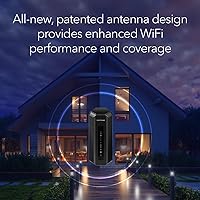
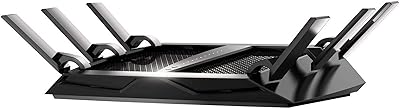
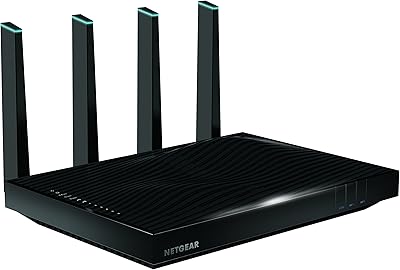
  • Color & Finish: Available in matte black with an internal antenna design that contributes to a cleaner, less aggressive aesthetic than older external-antenna Nighthawk models.
  • Model Number: Official model number is RS700S-100NAS; ASIN B0C9JQLDCG on Amazon, first listed in July 2023.

Related Reviews

NETGEAR Nighthawk RS280S Tri-Band WiFi 7 Router
86%
94%
Performance for Gaming & Streaming
91%
WiFi Coverage & Range
88%
Speed Consistency
85%
Setup & Installation
90%
Security Features (NETGEAR Armor)
More
NETGEAR Nighthawk X6 AC3000 Tri-Band WiFi Router
84%
88%
Performance
76%
Setup and Installation
91%
Signal Strength and Range
79%
Usability (App & Interface)
85%
Compatibility with Devices
More
Netgear Nighthawk X6S R8000P AC4000 Tri-Band WiFi Router
86%
89%
Overall Performance
92%
Gaming Performance
90%
Streaming Performance
85%
Setup & Installation
88%
Signal Coverage
More
NETGEAR Nighthawk X8 AC5300 Tri-Band WiFi Router R8500
84%
89%
WiFi Performance
87%
Range and Coverage
93%
Ease of Setup
90%
Compatibility with Alexa
80%
Overall Build Quality
More
NETGEAR Nighthawk RS140 WiFi 7 Router
85%
92%
Performance
88%
Ease of Setup
91%
WiFi Speed & Range
89%
Device Connectivity
80%
Software & Firmware
More
NETGEAR Nighthawk RS90 WiFi 7 Router
79%
84%
Wireless Performance
67%
Coverage & Range
91%
Setup & Ease of Use
83%
Value for Money
78%
Build Quality & Design
More
NETGEAR Nighthawk BE9300 WiFi 7 Router
88%
94%
Wireless Performance
91%
Coverage Area
88%
Device Capacity
85%
Setup & Installation
90%
Security Features
More
NETGEAR Nighthawk RS600 WiFi 7 Router
85%
92%
WiFi Performance
90%
Coverage Area
85%
Setup Ease
88%
Security Features
89%
Device Handling (Concurrent Connections)
More
NETGEAR Nighthawk RS180 WiFi 7 Router
86%
92%
WiFi Performance
90%
Gaming Performance
88%
Streaming Quality
89%
Coverage Area
85%
Ease of Setup
More
NETGEAR Nighthawk RS200
81%
88%
Wireless Speed & Performance
71%
Coverage & Range
91%
Setup & Installation
63%
App & Firmware Experience
82%
Value for Money
More

FAQ

Yes, you will need a separate modem — this router does not have one built in. If you are currently using an all-in-one gateway device provided by your ISP, you will need to either purchase a standalone modem or check whether your ISP allows you to use one. It is worth factoring that cost into your total budget before purchasing.

It works with any standard internet plan, but to get meaningful value from the 10 Gig WAN port and WiFi 7 speeds, a multi-gig internet plan is ideal. On a standard 1 Gbps plan, you will still benefit from improved device handling and lower latency, but the headline throughput capabilities will be largely untapped until you upgrade your plan.

Armor provides solid network-wide protection powered by Bitdefender, including real-time threat blocking and device scanning — it is not just a token security badge. After the first year, it requires a paid renewal to remain active. If you let it lapse, the security scanning and parental control features tied to it will be disabled, though the router itself continues to work normally.

Most users find the setup process very manageable through the Nighthawk app, which walks you through each step including connecting to your modem, naming your network, and setting a password. It typically takes under 20 minutes. That said, if you are migrating from a mesh system or an ISP-provided gateway, there are a few extra steps around modem configuration that may require a quick call to your ISP.

The 2.4 GHz and 5 GHz bands will generally penetrate walls and floors reasonably well, but the 6 GHz band — where the fastest speeds live — has shorter range and is more affected by physical barriers. In a two-story home with dense construction, you may find the 6 GHz band is only strong on the same floor as the router. Positioning the router centrally and elevated helps considerably.

It depends on the layout. For open-plan homes or single-story spaces up to around 3,500 square feet, it performs very well as a standalone unit. For multi-story homes with complex floor plans or dead zones caused by thick walls, a mesh system may still provide more consistent whole-home coverage. This router does not currently support mesh node expansion the way dedicated mesh platforms do.

For most gaming setups, yes — especially if others in your home are actively using the network while you play. The combination of WiFi 7 and Multi-Link Operation means the router is better at isolating your gaming traffic from background usage, which directly translates to more consistent ping and fewer spike events. Wiring your console or PC directly to the 10 Gig LAN port will always give you the best results.

NETGEAR rates this router for up to 200 devices, and real-world feedback suggests it handles 30 to 50 active devices very comfortably. Performance degradation at very high device counts depends more on how many devices are actively transferring data simultaneously rather than how many are simply connected. For typical households, even large ones, device limits are unlikely to be a bottleneck.

A small number of early buyers encountered firmware bugs shortly after the router launched in mid-2023, including occasional disconnects and update-related reboots. NETGEAR has since issued multiple firmware updates that resolved the majority of these complaints, and recent buyer feedback reflects significantly improved stability. It is worth running the latest firmware update immediately after setup, which the Nighthawk app will prompt you to do.

The box includes the router itself, a 19V power adapter, a 2-meter Ethernet cable, and a quick-start guide. To get online, you will also need a standalone modem compatible with your ISP — that is the one additional purchase required. If you already own a capable modem, you are ready to go straight out of the box.