Overview

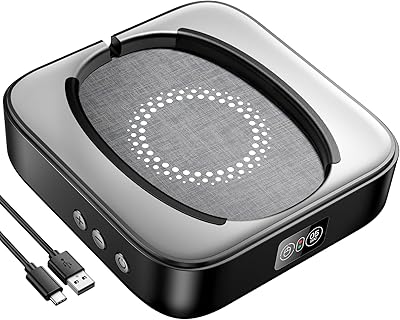
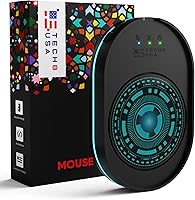
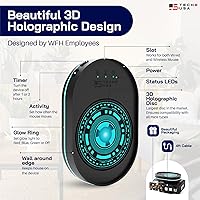
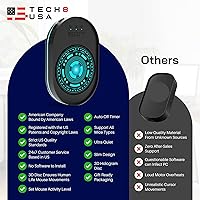
The TECH8 USA Mouse Jiggler is a hardware-only solution built for one very specific, very real problem: your computer deciding you've gone idle when you haven't. If you've ever returned from a short break to find yourself flagged as Away on Teams or watched your screen lock mid-presentation, you already know the frustration. This hardware wiggler plugs into any USB port and works immediately — no software installs, no admin permissions, nothing to configure. It's battery-powered, features a patented holographic disc design, and was engineered in the US by a small family business. Practical and genuinely niche.

Features & Benefits

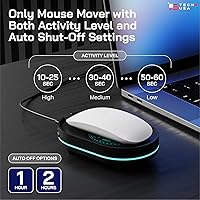
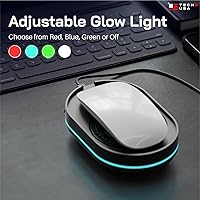
The disc's three activity levels — low, medium, and high — let you control how frequently the cursor moves, which matters more than you might expect depending on how sensitive your monitoring setup is. A built-in power button allows quick on/off without tugging the USB cable, and the auto-shutoff timer, configurable between one and two hours, handles battery drain reasonably well. The ultra-thin profile — just a tenth of an inch tall — means most standard mice sit over it without rocking or lifting. Operation is completely silent, keeping things discreet whether you're in a home office or a shared open workspace.

Best For

This mouse jiggler is built for a specific kind of user: someone working remotely or in a hybrid setup where staying visibly active on Teams, Zoom, or Skype genuinely matters. It's especially well-suited to people on company-managed laptops where installing third-party software isn't permitted or simply isn't worth the IT headache. The flat, compact form factor slips into a laptop bag without a second thought, making it easy to carry between home and office. If buying from a US-based small business with responsive customer support and a no-fuss return policy factors into your decision, that's a legitimate bonus here.

User Feedback

With a 4.7-star average across nearly 15,000 ratings, the TECH8 disc reflects sustained buyer satisfaction rather than a wave of early enthusiasm. Most praise centers on how reliably it prevents idle status flags and how effortless the setup is. The criticisms worth flagging: some buyers note that larger mice don't always sit flat on the disc surface, and real-world battery life in all-day use tends to fall shorter than the listed spec suggests. On the upside, customer service responsiveness earns consistent mentions in positive reviews — encouraging for a hardware device with no software fallback if something goes wrong.

Pros

  • No software installation required — works the moment you plug it into any USB port.
  • Three activity levels give you real control over how subtle or active the cursor movement appears.
  • The ultra-thin disc profile fits discreetly under most standard mice without adding noticeable height.
  • Completely silent operation makes it appropriate for open offices, shared spaces, or quiet home setups.
  • A built-in power button means you can toggle it on and off without disconnecting the USB cable.
  • Patented design and US-based engineering back up a quality feel that generic alternatives often lack.
  • Nearly 15,000 ratings at 4.7 stars reflects consistently reliable real-world performance over time.
  • The auto-shutoff timer helps conserve battery when you forget to power it down manually.
  • 30-day return window and US-based customer support reduce the risk of a frustrating post-purchase experience.
  • Portable enough to slip into any laptop bag, making it equally useful at home and in the office.

Cons

  • Battery life in daily use tends to run shorter than the official spec suggests, requiring frequent attention.
  • The auto-shutoff maxes out at two hours, making it impractical for unattended all-day use without manual restarts.
  • Larger or irregularly shaped mouse bases may not sit flat on the disc, causing tracking issues.
  • Organizations using advanced endpoint monitoring tools may not be fooled by cursor movement alone.
  • No Mac-specific compatibility confirmation, and listed OS support stops at older Windows versions in the specs.
  • Battery-powered design means ongoing consumable costs that a direct USB-powered alternative would avoid.
  • The holographic disc aesthetic, while distinctive, may look conspicuous in conservative or formal work environments.
  • No companion app or configuration interface means activity level changes require physical interaction with the device.

Ratings

The TECH8 USA Mouse Jiggler has been scored by our AI engine after processing thousands of verified buyer reviews from global marketplaces, with spam, bot-generated, and incentivized submissions actively filtered out before analysis. Scores reflect the honest distribution of real-world experiences — including the friction points buyers encounter after the initial excitement wears off. Strengths and weaknesses are weighted equally so you get a clear, unbiased picture before committing.

Ease of Setup
97%
Buyers consistently describe setup as taking under thirty seconds — plug into USB, place mouse on disc, done. There is no driver prompt, no pairing process, and no configuration screen to navigate. For people on restricted work laptops, this frictionless entry point is the single biggest selling point.
A small number of users reported that older USB hubs occasionally failed to register the device on the first try, requiring a direct port connection instead. This is an edge case, but worth noting if your workstation relies heavily on a multi-port hub.
Status Spoofing Reliability
88%
The core function — keeping Teams, Zoom, and Skype statuses green — works reliably for the vast majority of users in standard corporate environments. Random, intermittent movement patterns avoid the repetitive signatures that more sophisticated monitoring tools might flag as artificial.
A meaningful minority of reviewers noted that organizations running advanced endpoint management software or behavior-analytics tools saw through the simulated activity. The hardware wiggler addresses the most common idle trigger, but it is not a universal solution for every monitoring setup.
Battery Life
54%
46%
The auto-shutoff timer does a competent job of preventing battery waste when users forget to power down at the end of a session. For shorter focused work blocks — a two-hour deep-work sprint, a long video call — the battery holds up without issue and delivers on its promise.
This is the category where buyer disappointment is most concentrated. Real-world longevity in all-day use falls noticeably short of what most remote workers need, often requiring a battery swap mid-afternoon. The auto-shutoff at one to two hours means the device requires manual restarts for continuous coverage, which undercuts its convenience significantly.
Build Quality
82%
18%
The disc feels substantially more refined than the generic, flimsier alternatives flooding this category. The holographic surface is a genuine aesthetic differentiator, and the physical power button has a satisfying, solid click that gives the unit a premium feel relative to its price point.
Some buyers reported that the holographic coating showed scuff marks after a few weeks of regular use, particularly if the mouse was slid on and off the disc repeatedly. Long-term surface durability is not a guarantee, especially for users who travel with the device daily.
Portability
91%
At just a tenth of an inch thick and sized to fit a laptop bag side pocket, this hardware wiggler travels exceptionally well. Hybrid workers who split time between a home office and a corporate desk consistently praise how little space it occupies in a bag.
The disc's footprint — over five inches wide — is larger than some competing puck-style jigglers, which means it is not quite a pocket-carry item. Users who prioritize absolute minimal size may find slimmer, smaller alternatives more convenient for daily commutes.
Mouse Compatibility
73%
27%
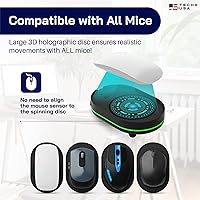
Standard office mice and most laptop-style compact mice sit well on the disc, and the large surface area was clearly designed with broad compatibility in mind. The TECH8 disc works cleanly with both optical and laser tracking technologies without interfering with pointer accuracy.
Larger gaming mice, ergonomic sculpted designs, or mice with protruding scroll wheel bases sometimes rock unevenly on the disc, creating tracking inconsistencies. A handful of reviewers found the device essentially unusable with their specific mouse model, which is worth checking before purchasing.
Discreteness
86%
Silent operation is a consistent highlight in buyer feedback, particularly from users in shared open-plan offices or quiet home environments with family nearby. There is no hum, no vibration, and no audible click during normal operation — it simply disappears from sensory awareness after setup.
The holographic 3D alien disc is visually distinctive, which cuts both ways. Users who value physical discretion have noted that colleagues or visitors frequently ask what it is, making it less invisible than a plain black alternative would be in a professional setting.
Value for Money
77%
23%
For buyers who specifically need a software-free, hardware-only solution — particularly those on locked corporate machines — the price premium over no-name imports is justifiable given the US engineering, patented design, and available customer support. The core problem gets solved reliably.
Buyers who discover the battery life limitations after purchase often feel the pricing is harder to defend. When ongoing battery replacement costs are factored in alongside the need to manually restart the device multiple times per day, the value equation weakens noticeably compared to USB-powered alternatives.
Customer Support
84%
The 24/7 US-based support claim holds up in practice according to reviewer feedback, with multiple buyers specifically mentioning quick and helpful responses to replacement and compatibility questions. This is a real differentiator compared to most hardware in this price tier.
A small number of reviews described longer-than-expected response delays outside US business hours, which partially undermines the 24/7 claim. The support experience appears to vary, with most buyers satisfied but a vocal minority reporting friction when requesting replacements.
Activity Level Controls
79%
21%
Having three distinct movement intensity settings adds genuine practical value — low is appreciated by users who want subtle activity signals, while high suits those who need faster cursor movement to satisfy more aggressive idle-detection thresholds. The physical toggle is intuitive to use.
Without any visual display or LED indicator, it can be unclear which activity level is currently active at a glance. Users cycling through settings in a dim environment or after stepping away have reported accidentally leaving it on high when they intended low.
Long-Term Durability
71%
29%
The majority of buyers who have owned the device for six months or more report that the core function — cursor movement — remains consistent over time. There are repeat purchasers in the review pool, which is a meaningful signal of brand trust even if it also hints at finite lifespan.
A pattern of repurchases in longer-term reviews raises questions about whether the device fully survives heavy daily use beyond the one-year mark. Surface wear and occasional power button responsiveness issues surface in older reviews, suggesting durability is adequate but not exceptional.
Platform Compatibility
68%
32%
On Windows-based systems — which represent the overwhelming majority of corporate environments — the device performs as advertised without any configuration. For the target audience of locked-down Windows work laptops, compatibility is a non-issue in practice.
The official spec sheet only lists Windows compatibility, leaving Mac users to rely on anecdotal reports rather than manufacturer confirmation. Chromebook and Linux users are essentially on their own, and the absence of any cross-platform clarity in the documentation is a missed opportunity.
Packaging & Presentation
83%
Buyers consistently note that the packaging feels considered and professional relative to comparable devices, reinforcing the US-made, small-business brand identity. The holographic disc visually pops when unboxed, which contributes to strong first impressions and positive early reviews.
A few buyers purchasing the device as a workplace utility found the alien-themed holographic aesthetic a bit whimsical for a professional tool. Packaging does not include a carrying pouch or protective sleeve, which would be a welcome addition for frequent travelers.

Suitable for:

The TECH8 USA Mouse Jiggler is purpose-built for remote and hybrid workers who rely on presence indicators in platforms like Microsoft Teams, Zoom, or Skype to stay visibly active during the workday. It's an especially smart pick for anyone working on a company-issued or IT-locked laptop where installing third-party software is off the table entirely — no admin rights needed, no software to flag. Long video calls, unattended presentations, or any situation where stepping away briefly shouldn't result in a locked screen or an Away status are exactly the scenarios this hardware wiggler was designed to handle. The adjustable activity levels add a layer of control that makes it feel less like a blunt instrument and more like a thoughtful utility. If you also care about buying from a US-based small business with genuine customer support, that's a meaningful differentiator in a category crowded with generic imports.

Not suitable for:

The TECH8 USA Mouse Jiggler is not the right fit for users expecting an all-day, set-it-and-forget-it solution without any battery management awareness — the auto-shutoff kicks in at one to two hours, and real-world battery longevity based on user reports suggests you'll be replacing or recharging more often than the spec sheet implies. If your mouse has a particularly large or uneven base, the thin disc may not provide a stable enough surface, causing tracking inconsistencies that defeat the purpose. This hardware wiggler also won't help if your organization uses behavior-based monitoring tools that look beyond simple cursor movement — it only addresses the most common idle detection triggers. Users on Mac-centric workflows or those hoping for a cross-platform software companion to expand functionality will find this device intentionally stripped down. And if you're simply looking for the cheapest option in this category, you'll find lower-priced alternatives, though the build quality and support experience may differ noticeably.

Specifications

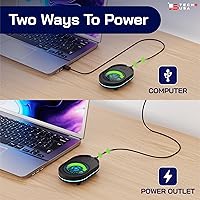
  • Connectivity: Connects via USB plug-and-play, requiring no drivers or software installation on the host machine.
  • Power Source: Battery-powered operation keeps the device independent from the host computer's power output.
  • Dimensions: The disc measures 5.2 x 4.4 x 0.1 inches, providing a flat, low-profile surface suitable for most standard mice.
  • Weight: The complete unit weighs 7 ounces, making it light enough to carry daily in a laptop bag.
  • Activity Levels: Three selectable activity settings — low, medium, and high — control the frequency and intensity of simulated cursor movement.
  • Movement Type: Cursor movement is randomized and intermittent, mimicking natural user behavior rather than repetitive patterns.
  • Auto-Shutoff: An integrated timer automatically powers the device off after 1 to 2 hours to conserve battery life.
  • Sound Level: Operation is completely silent, producing no audible noise during normal use.
  • Power Button: A dedicated on/off button allows the user to activate or deactivate the device without removing it from the USB port.
  • OS Compatibility: Compatible with Windows-based systems including Windows XP and later versions, on both laptops and desktop PCs.
  • Design: Features a patented ultra-slim 3D holographic disc aesthetic, designed and engineered in the United States.
  • Origin: Patented, designed, engineered, and packaged in the USA by a small family-owned business based in Austin, Texas.
  • Customer Support: US-based customer service is available 24/7, according to the manufacturer.
  • Return Policy: The product is covered by a 30-day return window from the date of purchase.
  • Ratings: Holds a 4.7-star average rating based on nearly 15,000 customer reviews on Amazon.
  • BSR Ranking: Ranked #83 in the Computer Mice category on Amazon at time of publication.
  • ASIN: The Amazon Standard Identification Number for this product is B0CC33VVHT.
  • Hardware Platform: Designed for use with standard laptops and desktop PCs using a USB-A port.

Related Reviews
Meatanty Mouse Mover
88%
91%
Ease of Use
95%
Silent Operation
89%
Value for Money
94%
Setup & Installation
88%
Adjustable Timer Functionality
More
Logitech POP Mouse
Logitech POP Mouse
82%
93%
Silent Click Performance
89%
SmartWheel Scrolling
87%
Multi-Device Connectivity
91%
Battery Life
71%
Ergonomics & Hand Fit
More
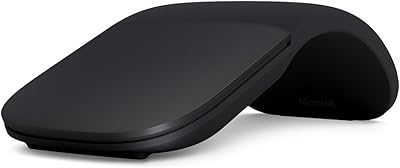
Microsoft Arc Mouse
Microsoft Arc Mouse
81%
96%
Portability & Form Factor
88%
Build Quality
63%
Scroll Plane Experience
82%
Bluetooth Connectivity
58%
Ergonomics & Comfort
More
Kovess 4-Mode Silent Wireless Mouse

79%
91%
Multi-Device Connectivity
88%
2-in-1 Receiver Design
86%
Jiggler Mode
84%
Silent Click Mechanism
79%
Battery Life
More
Logitech Wireless Mouse M217
81%
91%
Value for Money
94%
Battery Life
92%
Ease of Setup
88%
Portability
85%
Tracking Accuracy
More
Kensington Expert Mouse Optical Trackball
80%
91%
Cursor Precision
86%
Ergonomic Comfort
84%
Build Quality
71%
Scroll Ring Usability
53%
Customization Software
More
Microsoft Bluetooth Ergonomic Mouse
81%
88%
Ergonomic Comfort
83%
Build Quality
91%
Scroll Wheel
89%
Battery Life
72%
Bluetooth Connectivity
More
SANWA Wired Ergonomic Mouse
81%
88%
Ergonomic Comfort
85%
Quiet Operation
81%
DPI Adjustability
83%
Build Quality
78%
Compatibility (Mac/Windows)
More
seenda Wireless Trackball Mouse
78%
88%
Ergonomic Comfort
74%
Trackball Precision
86%
Multi-Device Connectivity
83%
Battery Life
71%
Build Quality
More
HP 250 Dual Mouse
HP 250 Dual Mouse
83%
88%
Wireless Connectivity
94%
Battery Life
91%
Click Quietness
82%
Multi-Device Switching
79%
Ergonomics & Comfort
More

FAQ

No, nothing to install at all. The TECH8 USA Mouse Jiggler is a purely hardware device — plug it into a USB port, place your mouse on the disc, and it starts working. This is one of its biggest practical advantages, especially for people on locked-down work laptops where software installs aren't permitted.

For most standard workplace setups, yes. The disc simulates random cursor movement, which is what most idle-detection systems — including Microsoft Teams and Zoom — use to determine whether a user is active. That said, if your employer uses more advanced endpoint monitoring that tracks application activity beyond cursor movement, results may vary.

This is worth being realistic about. The listed battery life is approximately one hour, and user reports largely confirm that real-world longevity aligns with that figure rather than exceeding it. If you need all-day coverage, you'll likely need to swap batteries or restart the device partway through the day.

It depends on the mouse. The disc is 5.2 x 4.4 inches, which accommodates most standard office and laptop mice comfortably. However, some users with larger gaming mice or mice with an uneven base have reported stability issues where the mouse doesn't sit perfectly flat. If your mouse has a wide, flat base, you should be fine.

The official specs list Windows compatibility only, so Mac support is not confirmed by the manufacturer. That said, since no software is involved — just USB and optical mouse tracking — many users have reported it working on macOS without issue. If Mac compatibility is critical for you, it's worth reaching out to their customer support before buying.

The device has physical controls built into it, so you cycle through low, medium, and high settings directly on the disc itself. There is no app or screen involved — it is entirely managed on the hardware.

The device does not install software, run background processes, or appear as anything other than a standard USB mouse to the host computer, so it generally does not trigger software-level detection. However, physical inspection of a desk would obviously reveal it, so this is not a covert device in any physical sense.

The auto-shutoff powers down the disc after one to two hours of continuous operation to prevent unnecessary battery drain. Based on available product information, the timer is a fixed feature and cannot be disabled. If you need longer continuous operation, you would need to manually power it back on after it shuts off.

Absolutely. It is also practical for preventing screen lock during long presentations, keeping a progress monitor or dashboard visible during extended meetings, or stopping a computer from sleeping during large file transfers or downloads. Anywhere that unattended idle detection causes a problem, this hardware wiggler can help.

The brand advertises US-based 24/7 support, and buyer reviews do reflect positively on their responsiveness — which stands out in a product category dominated by generic imports with little to no post-purchase support. The 30-day return window also gives you a reasonable buffer if the device does not work as expected in your specific setup.

Where to Buy