Overview

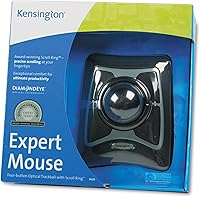
The Kensington Expert Mouse Optical Trackball is one of those rare peripherals that has quietly earned a loyal following over many years — and for good reason. Kensington has been making pointing devices for decades, and this trackball reflects that experience. It uses a large optical ball and a wired USB connection, making it a natural fit for stationary desktop setups. Priced in the mid-range, it sits above cheap office mice but well below specialized ergonomic hardware. If you deal with wrist fatigue or work in a tight desk space, this desktop pointing device deserves a serious look.

Features & Benefits

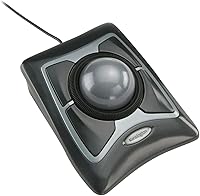
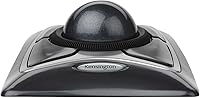
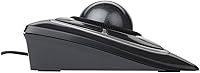
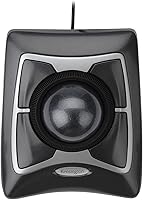
The real centerpiece here is the 55mm optical ball — large enough to give you fine, controlled cursor movement with minimal hand effort. Around it sits a scroll ring that handles page navigation without a separate scroll wheel, which is a clever touch. Four programmable buttons let you customize workflows once you install the optional software, though the unit works plug-and-play on modern Windows systems right out of the box. The base grips the desk firmly so the device stays put during use, and the ambidextrous layout means left- and right-handed users are equally accommodated. No batteries required — it draws power directly from USB.

Best For

This trackball is a strong fit for anyone who spends long hours at a desk and wants to reduce arm fatigue without committing to a fully vertical or split keyboard setup. Designers, CAD users, and data-entry professionals will appreciate how precisely the optical ball responds to small movements — useful when accuracy matters more than raw speed. It also suits anyone cramped for desk real estate, since the device stays in one spot. And if you have developed early signs of repetitive strain, switching to this desktop pointing device may help take some load off your wrist and forearm, though it is not a medical solution.

User Feedback

Among the 318 ratings and a 4.4-star average, the pattern is clear: most people who stick with this trackball become fans. The most common praise is for how the ball rolls smoothly and how wrist discomfort drops noticeably after the adjustment period. That adjustment period is real, though — expect a few days of feeling slightly clumsy before it clicks. The customization software draws consistent criticism for feeling outdated, and a handful of users mention the scroll ring is stiff at first. On the positive side, durability comes up repeatedly, with some owners reporting years of heavy daily use without issues. That kind of longevity speaks for itself.

Pros

  • The large 55mm optical ball delivers smooth, precise cursor control with very little hand movement required.
  • Wired USB connection means zero lag, no pairing process, and no batteries ever needed.
  • The ambidextrous design works equally well for left- and right-handed users without any modifications.
  • Build quality is notably solid — many owners report years of heavy daily use without any degradation.
  • The scroll ring around the ball is a practical navigation tool that keeps everything within one hand.
  • Plug-and-play setup on modern Windows means you can be up and running in under a minute.
  • Four programmable buttons give power users room to tailor the device to their specific workflow.
  • The grippy base keeps the trackball firmly in place, even during intensive use sessions.
  • For desk-bound workers dealing with early wrist strain, switching to this trackball may noticeably reduce daily discomfort.
  • At its mid-range price point, the long-term durability makes it a reasonable investment for daily professional use.

Cons

  • The button customization software feels dated and clunky compared to modern peripheral utilities.
  • There is a real adjustment period of several days before the trackball starts to feel natural.
  • The scroll ring can feel stiff right out of the box and takes time to loosen up.
  • The official compatibility list only covers older Windows versions, leaving OS support for newer systems unconfirmed by the manufacturer.
  • At 13.2 ounces and nearly 10 inches wide, it takes up a meaningful footprint on any desk.
  • The wired cable, while reliable, limits placement flexibility and can create clutter in tidy setups.
  • No wireless or Bluetooth option exists for users who prefer a cable-free workspace.
  • The plastic construction, while durable, does not feel premium compared to higher-end ergonomic alternatives.
  • Users who switch between a laptop and desktop frequently will find the fixed wired format inconvenient.
  • Those needing advanced cursor speed or sensitivity controls may find the hardware options too limited.

Ratings

The scores below for the Kensington Expert Mouse Optical Trackball were generated by our AI system after analyzing verified purchaser reviews from global marketplaces, with spam, bot-submitted, and incentivized feedback actively filtered out. The result is an honest, data-driven snapshot that reflects both what this trackball genuinely does well and where real buyers have run into friction. Nothing has been softened or inflated — the numbers reflect the full picture.

Cursor Precision
91%
The 55mm optical ball consistently earns high marks from users who need fine, controlled cursor placement — particularly CAD drafters and graphic designers who describe it as noticeably more accurate than a standard mouse for detailed work. The ball responds smoothly to small adjustments, and there is almost no drift or jitter reported even during extended sessions.
A handful of users note that at default sensitivity settings, very fast cursor sweeps across large monitors can feel slightly imprecise until the sensitivity is tuned in software. Those who skip the software setup and rely on plug-and-play defaults may not get the best out of the optical sensor right away.
Ergonomic Comfort
86%
Many long-term users credit this trackball with meaningfully reducing wrist and forearm fatigue during workdays that involve hours of continuous computer use. The stationary design means the arm stays relaxed in one position rather than sweeping back and forth across a mouse pad, which makes a real difference for desk workers.
Comfort improvements are not instant — the adjustment period can involve temporary discomfort as hand muscles adapt to an unfamiliar range of motion. A small number of users with specific grip preferences or larger hands report that the button placement feels slightly awkward during the first week of use.
Build Quality
84%
Durability is one of the most frequently praised aspects across user reviews, with multiple buyers reporting daily professional use spanning several years without any mechanical failure or degradation in ball responsiveness. The base grip is firm and the overall construction feels solid rather than hollow or cheap.
The all-plastic exterior does show surface scratches and minor scuffs over time, and a few users feel the finish looks dated compared to more modern peripherals in the same price bracket. The device does not feel premium in the hand, even if it holds up well functionally.
Scroll Ring Usability
71%
29%
Once broken in, the scroll ring is genuinely practical for desk workers who scroll through long documents or web pages frequently, keeping all navigation within the same hand position without reaching for a separate wheel. Most users who persevere past the initial stiffness find it becomes second nature within a week.
The scroll ring arrives noticeably stiff on many units and can feel resistive enough to be annoying during the first few days of use. A portion of users never fully adapt to it and end up defaulting to keyboard shortcuts for scrolling instead, which somewhat undermines its purpose.
Customization Software
53%
47%
The four programmable buttons do provide genuine workflow flexibility for power users, and once configured, the remapped buttons work reliably without needing the software running in the background. Users who invest time in the setup report meaningful productivity gains from custom shortcuts.
The customization software itself is widely criticized for feeling outdated, with a clunky interface that does not match the standards of modern peripheral utilities. Several users describe the installation and configuration process as unnecessarily confusing, and there are reports of the software behaving inconsistently on newer versions of Windows.
Plug-and-Play Setup
88%
For users who just want a pointing device that works immediately, the USB plug-and-play experience is smooth and reliable — plug it in and the cursor responds within seconds, no driver installation required. This makes it particularly hassle-free in office environments where installing third-party software is restricted.
The plug-and-play defaults leave button 3 and button 4 without useful assignments until the software is configured, which can confuse new users who expect all four buttons to do something out of the box. The official compatibility list has not been updated past Windows 7, which creates unnecessary uncertainty even though it works fine on current systems.
Desk Space Efficiency
89%
Because the trackball never moves, it occupies a fixed, predictable footprint — a major practical advantage for users with crowded desks or compact workstations. Several reviewers specifically mention that switching from a mouse freed up meaningful surface area for notebooks, documents, or secondary monitors.
The physical unit itself is fairly large at nearly 10 inches wide, so while it does not need room to roam, it does claim a notable patch of desk real estate. Users with extremely small workspaces may find its fixed footprint competes with other items for the same surface.
Left-Hand Usability
83%
The genuinely ambidextrous layout is a standout feature for left-handed users who are accustomed to finding peripherals that were clearly designed as afterthoughts for their hand orientation. Left-handed reviewers consistently note that the centered ball and symmetrical button placement require no awkward adaptation.
While the physical layout is symmetrical, the default software button assignments are still oriented toward right-handed workflow conventions, meaning left-handed users who want optimized button mapping will need to invest time in the software configuration. This is a minor but real friction point.
Value for Money
74%
26%
For buyers who use it daily and keep it for several years — which many do — the mid-range price works out to a very reasonable cost per day of reliable use. The durability track record reported by long-term owners makes the upfront cost easier to justify than with cheaper peripherals that wear out faster.
At the current price point, buyers reasonably expect more polished software and a more refined finish, and the dated customization utility in particular makes the package feel less complete than it should at this tier. Buyers who try it and find the trackball format is not for them may feel the cost of that experiment was higher than ideal.
Wired Reliability
93%
USB-wired connectivity earns consistent praise for delivering rock-solid, latency-free performance in environments where wireless interference or battery anxiety would otherwise be a concern. Office users in particular appreciate never having to think about charging or signal dropouts during critical work.
The cable, while reliable, does limit placement flexibility and can contribute to desk clutter in setups where cable management is a priority. Users who have moved to a fully wireless peripheral setup will find the return to a fixed cable a noticeable lifestyle trade-off.
Learning Curve
62%
38%
The majority of users who push through the initial adaptation period report that using a trackball eventually feels natural and even preferable to a standard mouse. The payoff for patient users is real, and most describe the transition as complete within a week of consistent daily use.
The adjustment period is genuinely challenging and not just a minor inconvenience — fine motor tasks like precise click-and-drag operations or detailed image editing can feel frustratingly clumsy for the first several days. Users who need immediate productivity and cannot afford a transition window may find this a significant barrier.
Long-Term Durability
88%
Multi-year durability reports are unusually common in the user feedback for this trackball, with buyers describing it as one of the few peripherals they have never had to replace due to mechanical wear. The optical sensor and ball socket both hold up well under sustained daily professional use.
The plastic body does accumulate cosmetic wear — scratches and surface dulling — over years of use, and the button tactile feedback can soften slightly over time on very heavily used units. These are cosmetic and minor functional issues rather than failures, but they are worth noting for buyers who prioritize a like-new feel over the long term.
Cleaning & Maintenance
79%
21%
The ball removal process is simple and tool-free, making routine cleaning quick and accessible even for non-technical users. Keeping the ball socket clear of dust and debris is the main maintenance task, and most users report that a quick clean every few weeks is enough to maintain smooth performance.
If the socket is neglected for extended periods, debris buildup causes the ball to stutter noticeably, which can be alarming to users who do not realize the cause. The scroll ring area is also slightly awkward to clean thoroughly, and some lint or dust can accumulate in the gap between the ring and the device body.

Suitable for:

The Kensington Expert Mouse Optical Trackball is a strong match for desktop workers who spend long hours at a computer and are starting to feel the toll of repetitive mouse movement on their wrists and forearms. It suits professionals in precision-heavy fields — CAD drafting, graphic design, photo editing, data entry — where controlled, fine cursor movement matters more than sweeping gestures across a large pad. People working with limited desk space will appreciate that this trackball stays in one fixed spot and never needs room to move around. It is equally well-suited to home office setups where reliability and simplicity are priorities, since the wired USB connection means no pairing headaches and no batteries to replace. Left- and right-handed users can both use it comfortably, which makes it a practical shared-desk option in households or small offices.

Not suitable for:

The Kensington Expert Mouse Optical Trackball is not the right choice for users who need portability, since its size and wired cable make it a strictly desk-bound device. Gamers or anyone who relies on fast, sweeping cursor movements will likely find the trackball format frustrating — it rewards patience and fine motor control, not speed and reflexes. Users who want deep, modern customization software should look elsewhere, as the optional button-mapping utility has drawn consistent criticism for feeling outdated and unintuitive. Mac users or anyone on Linux should verify current driver support independently, since the officially listed compatibility only covers older Windows versions, and real-world experience may vary. Anyone unwilling to invest a few days into relearning how they navigate a screen should also think twice, because the adjustment period is genuine and not everyone pushes through it.

Specifications

  • Brand: Manufactured by Kensington, a long-established peripheral brand with decades of experience in ergonomic input devices.
  • Model Number: This unit carries the official model number 64325, part of the Expert Mouse Optical series.
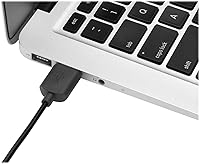
  • Connection: Connects via wired USB, providing consistent, lag-free performance without the need for wireless adapters or pairing.
  • Ball Size: Features a 55mm optical trackball that enables precise, low-effort cursor control from a fixed desktop position.
  • Dimensions: The device measures 3.5 x 9.75 x 9.75 inches, making it a substantial, stationary desktop peripheral.
  • Weight: Weighs 13.2 ounces (approximately 0.37 kg), giving it a solid, stable feel on the desk during use.
  • Power Source: Draws power directly from the USB connection, so no batteries or external power adapters are ever required.
  • Programmable Buttons: Includes four programmable buttons that can be remapped using Kensington's optional button customization software.
  • Scroll Method: Uses a scroll ring that encircles the trackball itself, allowing page and document navigation without a separate scroll wheel.
  • Hand Orientation: The ambidextrous design is fully compatible with both right-handed and left-handed users without any physical modification.
  • Construction: Built from plastic with a grippy rubberized base that keeps the unit firmly in place on flat desk surfaces.
  • Color: Available in a Black/Silver colorway that suits most professional desktop and home office environments.
  • Compatible OS: Officially listed compatibility covers Windows XP, Vista, and 7; the device functions on modern Windows versions but manufacturer specs have not been updated to reflect this.
  • Plug-and-Play: Works as a standard HID pointing device on Windows without requiring any software installation for basic cursor and button operation.
  • Customization Software: Kensington's optional driver software enables button remapping and sensitivity adjustments beyond the default plug-and-play configuration.
  • Best Sellers Rank: Holds the number 94 position in the Computer Trackballs category on Amazon at time of review.
  • Average Rating: Carries a 4.4-out-of-5-star average rating based on 318 customer ratings on Amazon.
  • Series: Part of the Expert Mouse Optical lineup, a long-running series within Kensington's ergonomic desktop peripheral range.

Related Reviews
Kensington Orbit Trackball Mouse
77%
83%
Ergonomic Comfort
76%
Tracking Accuracy
61%
Scroll Ring Usability
88%
Build Quality & Durability
57%
Button Layout & Customization
More
Kensington TB450 Wireless Trackball Mouse

78%
88%
Ergonomic Comfort
71%
Tracking Precision
84%
Wireless Reliability
83%
Multi-Device Switching
93%
Battery Life
More
seenda Wireless Trackball Mouse
78%
88%
Ergonomic Comfort
74%
Trackball Precision
86%
Multi-Device Connectivity
83%
Battery Life
71%
Build Quality
More
SABLUTE Wireless Trackball Mouse

74%
83%
Ergonomic Comfort
79%
Adjustable Tilt Base
86%
Multi-Device Connectivity
67%
Trackball Precision & Feel
74%
DPI Range & Customization
More
Nulea M501
Nulea M501
72%
83%
Ergonomic Comfort
78%
Trackball Smoothness
86%
Multi-Device Connectivity
91%
Value for Money
74%
Battery Life
More
MicroPack V02 Trackball Wireless Mouse
76%
86%
Ergonomic Comfort
74%
Trackball Precision
61%
Build Quality
83%
Wireless Reliability
79%
Click Feel & Sound
More
ELECOM DEFT PRO Trackball Mouse
74%
83%
Ergonomic Comfort
78%
Tracking Precision
86%
Multi-Device Connectivity
84%
Build Quality
88%
Ball & Bearing Smoothness
More
PORLEI TM551 Wired Trackball Mouse
76%
88%
Ergonomic Comfort
71%
Tracking Precision
63%
DPI Versatility
67%
Build Quality
94%
Ease of Setup
More
ELECOM HUGE Wired Finger Trackball Mouse
80%
91%
Tracking Smoothness
88%
Ergonomic Comfort
63%
Learning Curve
86%
Build Quality
79%
Button Layout & Usability
More
PORLEI TM550 Wireless Trackball Mouse
75%
88%
Ergonomic Comfort
84%
Trackball Size & Control
86%
Multi-Device Connectivity
73%
Battery Life
54%
DPI Adjustment Usability
More

FAQ

It works fine on Windows 10 and 11 in plug-and-play mode for basic cursor movement and clicking. The officially listed compatibility on the product page only mentions older versions like XP, Vista, and 7, simply because the spec sheet was never updated. Most users report no issues on current Windows versions, though you may need to check Kensington's website for the latest driver if you want full button customization.

For basic use, just plug it into a USB port and you are ready to go — no software needed. If you want to remap the four buttons to specific functions, you will need to download Kensington's trackball software separately. The software works, but it does feel a bit dated compared to modern peripheral utilities.

It can work on macOS as a basic plug-and-play pointing device, but official Mac support is not listed in the manufacturer specs. Button customization software is primarily designed for Windows, so Mac users may not have access to full remapping features. If Mac compatibility is important, it is worth checking Kensington's current support page before purchasing.

Most people find the adjustment takes anywhere from two days to about a week of regular use. The first day or two can feel clumsy, especially with precise movements, but it tends to click into place fairly quickly once your thumb and fingers adapt to the ball's motion. Sticking with it through that initial period is the key — most users who do end up preferring it over a standard mouse.

Many users do report a noticeable reduction in wrist and forearm fatigue after switching, largely because your arm stays in one place instead of constantly moving across a mouse pad. That said, it is not a medical device, and results vary depending on the cause and severity of your discomfort. If you have a diagnosed repetitive strain issue, it is worth consulting a health professional alongside making any peripheral changes.

The layout is genuinely ambidextrous — the ball sits in the center and the four buttons are symmetrically placed, so left-handed users can use it just as comfortably as right-handed ones without any awkward workarounds.

Cleaning is straightforward. The ball pops out easily so you can wipe it down with a soft cloth, and you can use a cotton swab to clear any dust or debris from the socket where the ball sits. Dirt buildup in that socket is the most common cause of sluggish ball movement, so a quick clean every few weeks keeps it rolling smoothly.

Once you get used to it, the scroll ring is quite practical — it lets you scroll through pages or documents without lifting your hand or reaching for a separate wheel. Some users find it stiff at first, but it generally loosens up with regular use. A small number of people never fully warm to it and just use keyboard shortcuts for scrolling instead, which is also a perfectly workable approach.

It is on the larger side, measuring about 9.75 inches wide and deep, with a height of 3.5 inches. The upside is that unlike a regular mouse, it never needs to move, so the footprint it occupies is fixed and predictable. For cramped desks, that stationary quality is actually one of the reasons people choose this trackball over a traditional mouse.

Durability is one of the most consistent positives in user feedback — multiple owners mention using it daily for several years without any mechanical issues. The plastic construction is sturdy rather than flimsy, and the optical sensor has no moving parts that wear down over time. It is a solid long-term investment for a daily-driver desktop setup.

Where to Buy