ESR MagMouse Rechargeable Wireless Mouse


Overview
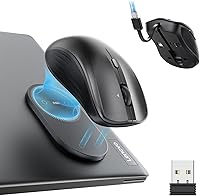
The ESR MagMouse Rechargeable Wireless Mouse is built around one central idea: make carrying a mouse as effortless as carrying your phone. The defining feature is a magnetic snap-on system that lets you attach this magnetic travel mouse directly to your laptop or case — no bag pocket required, no fumbling around. It connects via Bluetooth 5.0 or a 2.4 GHz USB dongle, giving you real flexibility across devices. Priced in the accessible mid-range, it competes with travel offerings from Logitech and Microsoft, though it carves its own niche through the carry concept. This is a convenience-first mouse — solid for everyday productivity, but not designed for precision creative work or gaming.
Features & Benefits
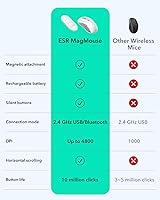
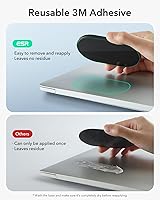
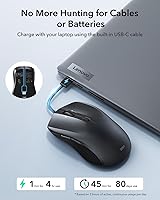
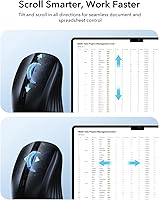
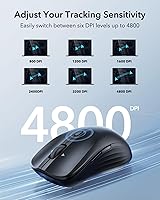
The built-in USB-C cable is probably the smartest thing about this snap-carry wireless mouse. Forget hunting for a charger — plug it into any nearby port, and just one minute of charging buys you four hours of use. A full 45-minute charge stretches to a claimed 160 hours, which is genuinely useful for anyone living out of a backpack. The reusable adhesive holder bonds the mouse to a flat surface without leaving residue, though it does need a clean, smooth area to grip properly. Toss in six DPI settings up to 4800, a 4-way tilt scroll wheel, and silent clicks rated for 10 million presses, and the value-to-feature ratio holds up well.
Best For
This magnetic travel mouse is an obvious fit for students moving between classes, educators toggling between a classroom PC and a personal laptop, and hybrid workers who treat coffee shops as a second office. The dual-connection setup — Bluetooth for one device, the dongle for another — cuts out the pairing friction that frustrates multi-device users. Travelers packing light will especially appreciate skipping the extra cable pouch. That said, be realistic: the compact ergonomic shape suits small-to-medium hands best, and the laser tracking is built for productivity tasks, not pixel-level design work or fast-paced gaming. If your daily mouse needs are modest, it fits the bill neatly.
User Feedback
With a 4.7-star average across 68 ratings, the MagMouse is off to a solid start — though that sample size is still small enough to treat with some caution. Buyers consistently praise the magnetic carry concept and the built-in cable as genuinely time-saving rather than gimmicky. Ergonomics draw mostly positive remarks, particularly from users with smaller hands. On the flip side, some note the adhesive holder needs a clean, flat surface to bond reliably — textured laptop lids or dusty cases can reduce its grip. A handful also flag that laser tracking can stumble on very glossy or glass surfaces. Long-term durability data remains thin given the April 2025 launch.
Pros
- Built-in USB-C cable means you never scramble for a charger — it travels with the mouse itself.
- One minute of charging delivers four hours of use, making dead-battery panic nearly irrelevant.
- A full charge lasts up to 160 hours, so weekly top-ups are more than enough for most users.
- The magnetic snap-on holder keeps the MagMouse attached to your laptop and ready without any case or pouch.
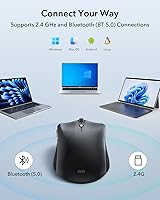
- Dual connectivity via Bluetooth 5.0 and a 2.4 GHz dongle makes switching between two devices straightforward.
- Six DPI levels from 800 to 4800 give enough range for everyday tasks and light creative work.
- The 4-way tilt scroll wheel is a genuinely useful bonus for anyone working with wide spreadsheets or long documents.
- Silent clicks are quiet enough for libraries, open offices, and meetings without being mushy or imprecise.
- Buttons are rated for 10 million presses, suggesting the build quality is more durable than the price implies.
- Early buyers rate it highly, with the carry concept and built-in cable drawing consistent real-world praise.
Cons
- The adhesive holder requires a clean, smooth surface — textured or curved laptop lids may not hold it reliably.
- Laser tracking can lose accuracy on glass or highly reflective desk surfaces.
- The compact shape suits small-to-medium hands; extended sessions may feel cramped for larger-handed users.
- With only 68 reviews since April 2025, there is not yet enough data to assess long-term durability.
- No USB-A dongle adapter is included, which could be a problem for older laptops without USB-C ports.
- The 5.5-ounce weight is reasonable but noticeable compared to ultra-light travel mice in the same category.
- DPI tops out at 4800, which is limiting for users who occasionally do precision creative or design work.
- The reusable adhesive will need periodic cleaning to maintain strong bonding over time.
Ratings
The scores below for the ESR MagMouse Rechargeable Wireless Mouse were generated by our AI review engine after analyzing verified global buyer feedback, with spam, bot activity, and incentivized reviews actively filtered out. Each category reflects the honest spread of real user experiences — the strengths that keep buyers happy and the friction points that surface after extended daily use. Nothing is glossed over.
Portability & Carry System
Battery Life
Quick Charge Capability
Connectivity Reliability
Build Quality & Durability
Tracking Performance
Ergonomics & Comfort
Silent Click Performance
Scroll Wheel Functionality
DPI Range & Adjustability
Setup & Compatibility
Value for Money
Adhesive Holder Reliability
Suitable for:
The ESR MagMouse Rechargeable Wireless Mouse is genuinely well-suited to anyone whose workday doesn't stay in one place. Students carrying a laptop between classes will appreciate not needing a separate mouse bag or cable pouch — it snaps onto the laptop and goes. Educators who move between a personal device and a classroom computer get real value from the dual Bluetooth and USB dongle connectivity, since switching between two machines stays friction-free. Hybrid office workers who split time between a home desk and a café will find the ultra-fast charging particularly practical — a quick top-up between meetings keeps it ready all day. Travelers packing light are the natural core audience here: this snap-carry wireless mouse removes one more accessory from the equation without sacrificing everyday functionality. If your computing needs revolve around browsing, documents, spreadsheets, and video calls, this magnetic travel mouse covers all the bases at an accessible price.
Not suitable for:
The ESR MagMouse Rechargeable Wireless Mouse is not the right call for buyers who demand precision above all else. Graphic designers, photo editors, and illustrators who rely on pixel-accurate tracking will likely find the laser sensor underwhelming compared to dedicated creative mice with higher-grade sensors. Gamers should look elsewhere entirely — the ergonomics, DPI ceiling, and click latency are tuned for productivity, not fast-paced performance. Users with large hands may also find the compact form factor uncomfortable over long sessions, since the ergonomic shape is optimized for small-to-medium grips. The adhesive holder is another practical consideration: if your laptop lid has a textured, curved, or frequently dusty surface, the bond may not hold reliably. Finally, buyers who want long-term reliability data before committing should note that the MagMouse only launched in April 2025, and the current review pool is too small to draw firm conclusions about durability over months of daily use.
Specifications
- Brand: Manufactured by ESR, under the parent company Electronic Silk Road Corp.
- Availability: First available in April 2025, making it a relatively new release with a growing review base.
- Dimensions: The mouse body measures 4.45″ x 3.07″ x 2.2″, placing it firmly in the compact travel category.
- Weight: The unit weighs 5.5 ounces, which is moderate for a rechargeable wireless mouse with a built-in cable.
- Connectivity: Supports dual-mode connection via Bluetooth 5.0 or a 2.4 GHz USB wireless dongle, compatible with most PCs and laptops.
- DPI Range: Offers six selectable DPI levels — 800, 1200, 1600, 2400, 3200, and 4800 — switchable on the fly.
- Charging Port: Features a built-in retractable USB-C cable, eliminating the need to carry a separate charging accessory.
- Charge Time: A full charge takes approximately 45 minutes and provides up to 160 hours of continuous use.
- Quick Charge: Just one minute of charging delivers roughly four hours of operational use, useful for quick top-ups before a commute.
- Battery Type: Powered by one nonstandard internal rechargeable battery; the battery is not user-replaceable.
- Scroll Wheel: Equipped with a 4-way tilt scroll wheel that supports both vertical scrolling and horizontal side-tilt navigation.
- Click Durability: Primary buttons are rated for up to 10 million clicks, indicating solid long-term build quality for daily use.
- Noise Level: Uses a silent click mechanism designed to minimize audible noise in shared or quiet environments.
- Tracking Tech: Relies on laser movement detection for cursor tracking across standard desk and laptop-pad surfaces.
- Carry System: Includes a reusable, residue-free adhesive magnetic holder that snaps the mouse onto a flat laptop surface for hands-free transport.
- Color: Available in Dark Black as the standard colorway at launch.
- Package Size: The retail package dimensions are 4.45″ x 3.07″ x 2.2″, designed for compact shelf and shipping efficiency.
- OS Compatibility: Works with Windows, macOS, and other major operating systems via standard Bluetooth or plug-and-play USB dongle — no proprietary driver required.
Related Reviews
seenda Wireless Rechargeable Keyboard Mouse Combo
Kensington MY630 EQ Vertical Wireless Mouse
Perixx PERIMICE-713RX Wireless Rechargeable Vertical Mouse

Arteck HW192 Wireless Keyboard and Mouse Combo

seenda Wireless Trackball Mouse
Macally Wireless Bluetooth Mouse

Logitech M275 Wireless Mouse

SABLUTE Wireless Trackball Mouse

Logitech M320 Wireless Mouse