Overview

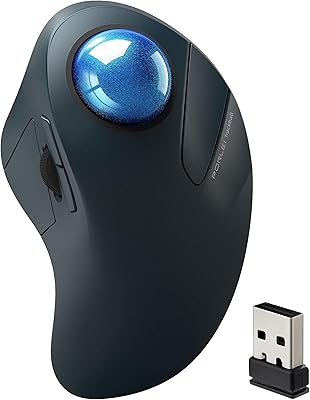
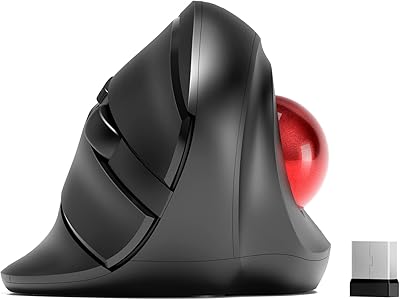
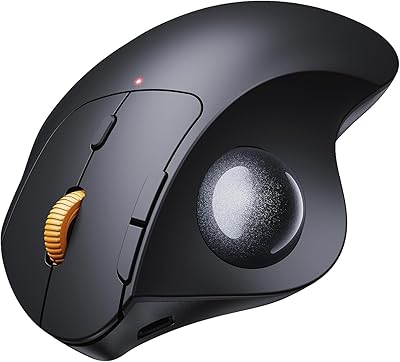
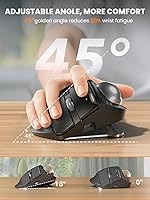
The SABLUTE Wireless Trackball Mouse enters the mid-range ergonomic space with a genuinely practical pitch: it's aimed squarely at desk workers, students, and anyone whose wrists have started protesting after long hours of clicking. What sets it apart from typical ergonomic options is an adjustable tilt base that locks at either flat or 18 degrees — the angled position better mirrors the natural droop of a resting wrist. SABLUTE is a newer brand, only on the market since mid-2025, yet it's already climbing the category rankings. If you've never used a trackball before, expect a brief adjustment period — but the long-term comfort payoff is the real draw here.
Features & Benefits

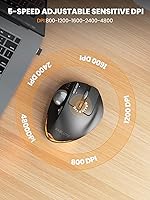
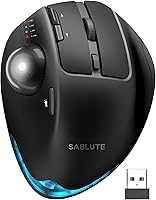
The two-angle base system is the headline feature: keep it flat if you prefer a familiar feel, or snap it to 18 degrees for a more natural forearm position over long sessions. The thumb-operated trackball means your arm stays completely still while the cursor moves — a genuine relief for anyone who racks up hours of screen time daily. Switching between up to three paired devices takes a single button press, whether you're hopping from a PC to a laptop to a tablet. Five DPI levels run from a careful 800 up to a brisk 4800, and the clicks are notably quiet — the kind that won't turn heads in a shared office. A built-in rechargeable battery means no fumbling for replacements.

Best For

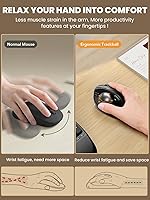
This trackball mouse makes the most sense for anyone whose wrists or forearms ache after a full day at the desk — the kind of discomfort that standard mice quietly make worse over time. It's also a natural fit for people juggling multiple devices daily: a work laptop, a home PC, and a tablet all paired at once is genuinely handy. Compact workspaces benefit too, since there's no pad or mousing surface required at all. Students looking for a thoughtful back-to-school peripheral will find it practical. Fair warning though — adapting takes real effort. Give it one to two weeks of honest daily use before judging it, and the wrist relief tends to speak for itself.

User Feedback

Since the SABLUTE ergonomic mouse only launched in mid-2025, the pool of verified reviews is still growing — worth keeping in mind when reading any star ratings. Early feedback tends to highlight the quiet click feel and the convenience of one-tap device switching as genuine wins. The ergonomic benefit after the adaptation period also draws positive mentions from longer-term users. On the other side, some find the trackball a bit stiff or imprecise at lower DPI settings, especially in the first week. Linux users on MassOS should know upfront that driver support is absent for that system. Overall, this wireless rollerball earns measured confidence — it won't suit every user, but those it's built for tend to stick with it.

Pros

  • Thumb-controlled trackball eliminates arm movement entirely, giving tired wrists real, sustained relief.
  • The adjustable tilt base at 18 degrees aligns the wrist far more naturally than a flat mouse ever does.
  • One-click switching between three paired devices makes multi-device workflows genuinely smooth.
  • Silent clicks are quiet enough for libraries, open offices, and late-night work sessions.
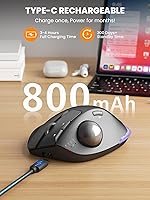
  • Built-in rechargeable battery removes the recurring cost and hassle of disposable batteries.
  • No mousepad required — this wireless rollerball works anywhere, including cramped or irregular surfaces.
  • Five DPI levels give enough range to handle both careful detail navigation and fast screen sweeps.
  • The UV-coated surface stays comfortable during long sessions and does not turn slippery with hand warmth.
  • Compact footprint makes it a practical travel companion without needing to pack a mousepad.

Cons

  • The learning curve is steep enough that some users abandon it before the ergonomic benefits ever kick in.
  • Trackball responsiveness at the lowest DPI settings feels gritty and imprecise to many users.
  • No battery level indicator means you may face a dead mouse mid-meeting without any warning.
  • Driver software is incompatible with MassOS, leaving some Linux users with no customization options.
  • The tilt lock mechanism feels plasticky and has shown early wear in some units after extended daily use.
  • Bluetooth reconnection after idle periods introduces a noticeable lag that disrupts fast-paced workflows.
  • The overall build has a hollow, lightweight feel that does not inspire long-term durability confidence.
  • As a brand launched in mid-2025, independent long-term reliability data is still very thin.
  • Users with larger hands may find the grip profile too shallow for comfortable extended use.

Ratings

Our AI rating engine analyzed verified buyer reviews worldwide for the SABLUTE Wireless Trackball Mouse, actively filtering out incentivized, duplicate, and bot-generated submissions to surface what real users actually experience. The scores below reflect a balanced read of the data — genuine strengths are recognized, but recurring frustrations are given equal weight. Whether this trackball earns a place on your desk depends on the tradeoffs, and those are all laid out here.

Ergonomic Comfort
83%
Users who stuck with this trackball through the first couple of weeks consistently report noticeable relief from wrist and forearm tension — exactly the crowd it is built for. The 18-degree tilt option in particular gets called out by people who spend six or more hours daily at a desk, with several noting reduced shoulder strain as a pleasant side effect.
Out of the box, the shape does not feel immediately natural for everyone, and users with larger hands occasionally mention the grip feels slightly shallow. The ergonomic benefit is real, but it is earned gradually rather than felt on day one.
Adjustable Tilt Base
79%
21%
The ability to physically switch between flat and 18-degree positions is a practical differentiator that most competing trackballs at this tier simply do not offer. Office workers who alternate between a standing desk and seated position find this surprisingly useful for maintaining a consistent wrist angle.
The mechanism itself feels a little plasticky when you snap it into position, and a small number of users report that the lock does not hold as firmly after extended daily use. Two angle options is also a fairly limited range — some users wanted something in between.
Multi-Device Connectivity
86%
Switching between three paired devices with a single button press works reliably in everyday use — users managing a work laptop, a personal PC, and a tablet mention this as one of the most immediately appreciated features. Pairing setup is described as fast and painless across Windows and macOS.
Bluetooth reconnection after the mouse has been idle for a while can introduce a brief lag that some users find annoying mid-workflow. A couple of reviewers also noted the USB dongle feels lightweight and easy to misplace.
Trackball Precision & Feel
67%
33%
At mid to high DPI settings, cursor tracking is responsive and smooth enough for everyday productivity tasks — spreadsheets, browsing, document editing. Users coming from Logitech MX Ergo territory note the ball feel is competent for the price bracket.
At the lower DPI settings, some users report the ball feels slightly gritty or sticky, requiring more deliberate thumb movement than expected. Pixel-level precision for graphic design work is not this trackball's strength, and that limitation shows if you push it hard.
DPI Range & Customization
74%
26%
Five distinct DPI levels spanning 800 to 4800 give users a reasonable spread for different tasks — slower for detail work, faster for navigating large monitors. Switching between them is handled by a dedicated button that is easy to reach without repositioning your hand.
The DPI steps feel slightly uneven in practice, with the jump from 1600 to 2400 being more dramatic than some users prefer. Driver customization adds more control but is not available for MassOS users, leaving Linux users on that platform without fine-tuning options.
Silent Click Performance
81%
19%
The quieted clicks hold up well in shared environments — library users and open-plan office workers specifically note they feel comfortable clicking without drawing attention. The sound reduction is genuine, not just marginal.
The muted click feedback is a slight adjustment for users who rely on tactile click confirmation — a few mention it feels slightly mushy compared to a standard mouse. It is not a dealbreaker, but it takes getting used to if you are accustomed to a crisp mechanical response.
Battery Life & Charging
77%
23%
The built-in rechargeable battery removes the ongoing cost and hassle of disposable batteries, which users running this mouse through full workdays appreciate. Charging via cable while continuing to work is a practical option that several users specifically call out.
Exact battery life duration is not well documented, and a handful of users note the battery drains faster than expected when the LED light is left on. The lack of a battery indicator light means you may be caught off guard by a dead mouse mid-session.
LED Atmosphere Light
61%
39%
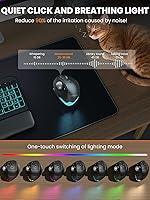
The breathing LED is a minor but pleasant detail for users who like a bit of desk ambiance — it can be toggled completely off, which is the right call for anyone who finds it distracting. It does not interfere with use.
As a feature, it sits squarely in the cosmetic category and adds little functional value. It also contributes to battery drain when active, so productivity-focused users tend to disable it almost immediately.
Build Quality & Materials
69%
31%
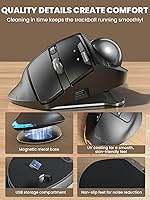
The UV-coated surface has a smooth, skin-friendly texture that holds up reasonably well to daily contact — users who perspire during long sessions note it does not become slippery as quickly as glossy alternatives. The overall construction feels solid enough for daily office use.
The plastic housing has a slightly hollow feel that positions it below premium competitors in perceived durability. A few users mention minor flex in the base when applying lateral pressure, which is more noticeable at the flat angle setting.
Ease of Setup
84%
Plug-and-play USB dongle connectivity means most users are up and running in under a minute, and Bluetooth pairing on Windows and Mac is equally straightforward. No software installation is required for basic use, which keeps the onboarding friction low.
Users who want driver-level customization need to follow a separate download process from the instruction manual, which some find unclear. MassOS users hit a wall entirely, as the driver has no compatibility with that system.
Learning Curve
58%
42%
For users who commit to the transition, the adaptation window is real but manageable — most who stay consistent report feeling comfortable within ten to fourteen days. The payoff for wrist health genuinely motivates people to push through the initial awkwardness.
The first few days with this trackball can feel genuinely frustrating — cursor overshooting, missed clicks, and slower navigation are common early complaints. Users expecting instant familiarity are often disappointed, and some abandon it before the comfort benefits have a chance to emerge.
Portability
76%
24%
At just over ten ounces and requiring no mousepad, this wireless rollerball is a practical companion for users working from coffee shops, coworking spaces, or small desks. The three-device pairing means you can carry one mouse and cover your entire device ecosystem.
It is not the most compact option in the ergonomic category — the physical profile is wide enough to be noticeable in a bag alongside a laptop. The USB dongle is also small enough to warrant care during travel.
OS & Device Compatibility
72%
28%
Coverage across Windows, macOS, and Android is solid, and the majority of users across those platforms report no compatibility issues out of the box. iPad connectivity via Bluetooth also works reliably for tablet-heavy workflows.
Android support is functional but limited compared to the desktop experience, and driver customization does not extend to mobile. MassOS users are explicitly excluded from driver support, which is a concrete gap worth knowing before purchasing.
Value for Money
71%
29%
For users who fully adapt to trackball use, the combination of ergonomic features, multi-device support, and rechargeable battery represents a reasonable return on spend at this price tier. The adjustable tilt base in particular adds real differentiation that budget alternatives lack.
Users who do not make it through the learning curve feel they paid for something they cannot use comfortably, which inflates negative sentiment around value. Against established players with longer track records and more refined trackball surfaces, the value case is competitive but not clearcut.

Suitable for:

The SABLUTE Wireless Trackball Mouse is a strong match for desk workers, students, and remote professionals who have noticed their wrists, forearms, or shoulders starting to ache after long computing sessions — the kind of creeping discomfort that a standard mouse quietly worsens over time. If you regularly switch between two or three devices throughout your day, the one-click multi-device pairing removes a genuine daily friction point. It also makes a lot of sense for anyone working in a tight space where sliding a traditional mouse around simply is not practical — a cluttered desk, a small dorm room table, or a café corner seat. People who are patient enough to invest roughly one to two weeks getting comfortable with thumb-operated trackball mechanics will find the ergonomic payoff meaningful and lasting. It also works well as a considered gift for a student heading back to school or a colleague who has mentioned wrist trouble but has not yet made the switch to ergonomic peripherals.
Not suitable for:

The SABLUTE Wireless Trackball Mouse is not the right call for buyers who need precision cursor control out of the box — graphic designers, illustrators, or anyone doing fine pixel-level work will likely find the trackball feel insufficiently refined at this tier, especially at lower DPI settings. Users who have never tried a trackball and expect the transition to feel natural within the first few days are likely to be frustrated; the adaptation window is real and non-negotiable. If you are running MassOS on a Linux machine and rely on driver-level customization, this mouse has no compatible driver and will function only at a basic level. Anyone looking for a premium build that feels rock-solid and lasts years of heavy-handed use will probably want to look at more established ergonomic brands with longer track records. And if the idea of charging your mouse — rather than swapping in a fresh AA battery on the go — feels like a workflow risk, that is a legitimate concern worth weighing before buying.
Specifications

  • Dimensions: The mouse body measures 5.36 x 3.94 x 0.1 inches, providing a compact footprint suitable for tight desk setups.
  • Weight: The unit weighs 10.6 oz, giving it a solid feel without being heavy enough to cause fatigue during transport.
  • Connectivity: Connects via Bluetooth and a USB dongle, supporting both wireless modes simultaneously across paired devices.
  • Device Pairing: Supports simultaneous pairing with up to three devices, switchable with a single dedicated button press.
  • DPI Levels: Offers five selectable DPI settings: 800, 1200, 1600, 2400, and 4800, adjustable on the fly during use.
  • Tilt Angles: The base adjusts between two fixed positions — flat at 0° and ergonomically angled at 18° — to match different wrist postures.
  • Trackball Position: The trackball is positioned for thumb operation, eliminating the need to move the arm or wrist to control the cursor.
  • Battery Type: Equipped with a built-in rechargeable battery; no replaceable batteries are supported or required.
  • Noise Reduction: The click mechanism is engineered to reduce audible click noise by approximately 90% compared to a standard mouse switch.
  • LED Lighting: Features a toggleable breathing atmosphere light along the tail of the mouse, with multiple light modes available.
  • Surface Finish: The exterior is coated with a UV-treated layer described as skin-friendly, designed to remain comfortable during extended contact.
  • OS Compatibility: Compatible with Windows, macOS, and Android; the optional driver is not compatible with MassOS.
  • Driver Support: A downloadable driver is available via the included instruction manual for advanced customization, excluding MassOS systems.
  • Movement Type: Uses trackball movement detection technology rather than optical or laser surface tracking.
  • Market Launch: First listed on Amazon in June 2025, making it a newly introduced product with a growing but still limited verified review base.
  • BSR Ranking: Achieved a Best Sellers Rank of #130 in the Computer Mice category on Amazon shortly after its launch.
  • Manufacturer: Designed and sold by SABLUTE, an emerging peripheral brand focused on ergonomic input devices.

Related Reviews

seenda Wireless Trackball Mouse
78%
88%
Ergonomic Comfort
74%
Trackball Precision
86%
Multi-Device Connectivity
83%
Battery Life
71%
Build Quality
More
Nulea M501
Nulea M501
72%
83%
Ergonomic Comfort
78%
Trackball Smoothness
86%
Multi-Device Connectivity
91%
Value for Money
74%
Battery Life
More
MicroPack Trackball Wireless Mouse V02
86%
88%
Usability & Ergonomics
85%
Precision & Tracking
90%
Quiet Operation
78%
Battery Life
87%
Design & Build Quality
More
PORLEI TM550 Wireless Trackball Mouse
75%
88%
Ergonomic Comfort
84%
Trackball Size & Control
86%
Multi-Device Connectivity
73%
Battery Life
54%
DPI Adjustment Usability
More
Kensington TB450 Wireless Trackball Mouse
78%
88%
Ergonomic Comfort
71%
Tracking Precision
84%
Wireless Reliability
83%
Multi-Device Switching
93%
Battery Life
More
ProtoArc EM04 Wireless Trackball Mouse
86%
88%
Ergonomics & Comfort
91%
Battery Life
84%
Ease of Use
89%
Connection Versatility
85%
Precision & Control
More
SABLUTE Wireless Keyboard and Mouse Combo
84%
88%
Typing Comfort
92%
Battery Life
85%
Ergonomics
73%
Connectivity Stability
80%
Backlighting Performance
More
Nulea M505 Wireless Trackball Mouse
75%
83%
Ergonomic Comfort
58%
Learning Curve
91%
Battery Life
78%
Multi-Device Connectivity
72%
Cursor Precision & DPI Control
More
SANWA GMABTTB41 Bluetooth Ergonomic Trackball Mouse
73%
82%
Ergonomic Comfort
67%
Trackball Precision
74%
Bluetooth Connectivity
89%
Noise Level
61%
Build Quality
More
Logitech Ergo M575S
Logitech Ergo M575S
79%
93%
Ergonomic Comfort
78%
Trackball Precision
61%
Learning Curve
88%
Click Noise Level
91%
Battery Life
More

FAQ

Most first-time trackball users find the first three to five days genuinely awkward — cursor overshooting and slower navigation are completely normal at that stage. The majority of people who stick with it report feeling comfortable within one to two weeks of consistent daily use. Think of it less as a learning curve and more as a brief recalibration period before the wrist relief benefits start to show.

Yes, the three-device pairing supports a mix of device types including tablets, laptops, and desktops simultaneously. You can pair an iPad alongside a Windows PC and a Mac, for example, and switch between them with one button. Bluetooth connectivity covers the tablet and laptop connections, while the USB dongle handles a third device if needed.

For most users who spend long hours at a desk, the 18-degree position genuinely changes the wrist angle in a way that reduces tension over time. The flat setting is there for those who prefer a familiar feel or are still adapting. If wrist fatigue is the reason you are considering this mouse in the first place, the angled position is worth trying from day one.

Basic plug-and-play functionality should work on most Linux distributions without any driver installation. However, the optional driver software that enables advanced customization is explicitly not compatible with MassOS. If you rely on driver-level button remapping or DPI fine-tuning on that system, you will be limited to the default hardware settings.

Unfortunately, the SABLUTE Wireless Trackball Mouse does not include a dedicated battery level indicator light or on-screen battery status readout. Most users build a habit of charging it periodically — for example, at the end of each workday or every few days — to avoid being caught with a dead mouse unexpectedly. Charging can be done via cable while continuing to use the mouse, which reduces the disruption.
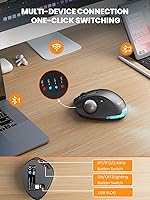
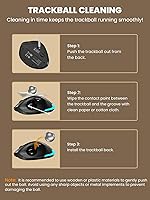
On most thumb-operated trackball mice of this design, the ball can be removed by pushing it through from the underside to clean dust and debris from the sensor housing. Keeping the ball socket clean is actually important for maintaining smooth tracking over time, so it is worth doing every couple of weeks if you use the mouse daily.

There is a tactile difference, and it takes some adjustment if you are used to a crisp, audible click. The quieted mechanism feels slightly softer underfoot, which some users love and others find takes getting used to. It is not a defect — it is an intentional tradeoff to achieve the noise reduction, and most users adapt to it within a few days.

It can handle general creative tasks and document work comfortably, but for pixel-level precision or fine illustration work it is not the strongest choice at this price tier. The trackball feel at lower DPI settings has drawn some criticism for being less responsive than dedicated design peripherals. If your work involves heavy precision drawing or image editing, a higher-end trackball or a precision stylus setup would serve you better.

The LED atmosphere light can be toggled fully off — you are not stuck with it running. For anyone who finds ambient lighting distracting at their desk, or who wants to preserve battery life, switching it off is a straightforward option. It is a nice-to-have detail rather than a central feature.

Core functionality — cursor movement, clicking, scrolling, DPI switching, and device pairing — all work out of the box without any driver installation on Windows, macOS, and most other compatible systems. The driver is only needed if you want to remap buttons or fine-tune settings beyond what the hardware controls allow. For the majority of everyday users, the plug-and-play experience is complete on its own.