Overview

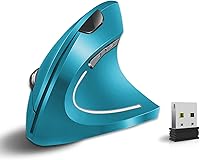
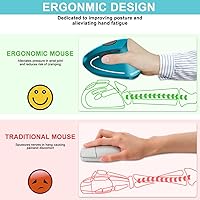
The Vassink Ergonomic Vertical Wireless Mouse enters the budget ergonomic space with a clear purpose: to take pressure off your wrist during long workdays. The vertical grip rotates your hand into a more natural handshake position, which many people find noticeably more comfortable than a traditional flat mouse after extended use. At this price point, you are not getting premium materials or boutique craftsmanship — but you are getting a functional, rechargeable ergonomic option that works across Windows, Mac, and Linux without any fuss. For anyone curious about vertical mice but not ready to spend big, this is a reasonable entry point.
Features & Benefits

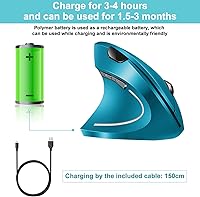
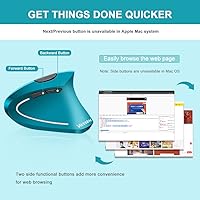
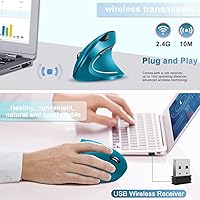
This ergonomic rechargeable mouse connects via a 2.4GHz USB nano receiver — plug it in and you are working within seconds, no driver installation required. The six-button layout covers the essentials: adjustable DPI settings let you shift tracking speed on the fly, while dedicated forward and back buttons save time during web browsing. The silent click mechanism is genuinely appreciated in open offices or dorm rooms where noise matters. An internal 500mAh lithium battery charges via a generous 150cm USB cable included in the box. The optical sensor handles most desk surfaces without needing a mousepad, which is a small but practical convenience.

Best For

This vertical mouse is a solid pick for anyone dealing with wrist fatigue or early signs of repetitive strain — it won't fix underlying issues, but the more natural hand position does reduce the tension many people feel from hours of traditional mousing. Students and remote workers in shared, quiet spaces will appreciate the hushed buttons. Cross-platform users will find it refreshingly hassle-free, working with Windows, Mac, and Linux without any setup. That said, this is built for casual to moderate use — heavy gamers or designers needing precision control should look elsewhere. Those with larger hands may also find the grip a touch compact.

User Feedback

Buyers generally respond well to the Vassink vertical mouse, with the most common praise centered on how quickly it reduces hand and wrist discomfort during a workday. Setup speed also gets repeated mentions — most people are up and running within a minute. On the flip side, the plastic construction is a fair criticism; it feels functional rather than refined, which is expected here but worth knowing upfront. Battery life draws mixed reactions — some find a full charge lasts several weeks, others less so depending on usage intensity. A handful of users with larger hands note the body feels a little small, and a few mention occasional hiccups with the USB receiver connection.

Pros

  • The vertical grip noticeably reduces wrist and forearm tension during long work sessions.
  • Plug-and-play USB receiver means zero setup time across all major operating systems.
  • Silent click buttons are genuinely quiet — a real plus in shared or noise-sensitive spaces.
  • Built-in rechargeable battery removes the ongoing cost and hassle of disposable batteries.
  • The included 150cm charging cable is long enough to use the mouse while it charges.
  • Six buttons cover everyday needs well, including handy browser forward and back controls.
  • Optical sensor works reliably on most desk surfaces without requiring a mousepad.
  • Broad compatibility covers Windows, Mac, and Linux without any driver installation.
  • At this price tier, the 12-month warranty adds a layer of reassurance for cautious buyers.
  • Lightweight at 5.3 ounces, making it comfortable to transport for on-the-go workers.

Cons

  • Plastic construction feels budget-grade and may not hold up well under years of heavy daily use.
  • The body size runs on the smaller side, which can feel cramped for users with larger hands.
  • Battery life in real-world use can fall short of expectations depending on how frequently it is used.
  • The USB nano receiver adds a dongle to manage, which is inconvenient for users with limited ports.
  • DPI adjustment options are limited compared to mid-range competitors in the ergonomic mouse space.
  • No left-handed version is available, making this a right-hand-only option.
  • Wireless range may occasionally show minor interference issues depending on the workspace setup.
  • The vertical learning curve is real — first-time vertical mouse users may need an adjustment period.
  • Color options are limited, offering little flexibility for those who care about desk aesthetics.

Ratings

The scores below reflect an AI-driven analysis of verified global user reviews for the Vassink Ergonomic Vertical Wireless Mouse, with spam, bot-generated, and incentivized feedback actively filtered out to ensure an honest picture. Every category — from ergonomic comfort to build quality — has been scored to reflect both what real buyers praised and where genuine frustrations emerged. Nothing has been softened to protect the brand.

Ergonomic Comfort
83%
The majority of users report a meaningful reduction in wrist and forearm tension after switching to this vertical mouse for their daily office work. People who previously dealt with end-of-day hand fatigue found the handshake grip position noticeably more forgiving during long desk sessions.
A subset of users — particularly those with larger hands — found the compact body caused its own form of strain since the grip forced fingers into an awkward stretch. The comfort benefit is real, but it is not universal across all hand sizes and grip styles.
Build Quality
58%
42%
The mouse holds together adequately for light to moderate daily office use, and most buyers who treat it carefully report no structural issues within the first several months of ownership. The buttons feel reasonably firm and consistent out of the box.
The all-plastic construction is the most frequently cited disappointment in user feedback — it feels noticeably lightweight in a hollow, insubstantial way rather than a premium way. Several users noted visible flex in the shell and expressed concern about long-term durability under heavy daily use.
Battery Life
66%
34%
Users who switch the mouse off when stepping away from their desk report getting three to four weeks of charge from a single session, which is genuinely convenient for people who dislike managing battery replacements. The USB charging method is widely appreciated as more practical than hunting for AA batteries.
Those who leave the mouse in standby mode without powering it down find the 500mAh battery drains faster than expected — some reporting less than two weeks per charge. A few users also noted that battery performance appeared to degrade noticeably after six to eight months of regular use.
Ease of Setup
93%
Plug the USB nano receiver in and the mouse is working within seconds — virtually every reviewer commented on how refreshingly simple this was, especially for less tech-savvy users who dread driver installations. It worked immediately across Windows, Mac, and Linux setups in user-reported tests.
A small number of users experienced initial connection delays or needed to try a different USB port before the receiver was recognized, which is a minor but occasionally frustrating first experience. There is also no Bluetooth fallback if the receiver is misplaced.
Click Quietness
88%
The silent click mechanism is one of the most consistently praised aspects of this ergonomic rechargeable mouse, with office workers and students both noting that clicks are discreet enough for library use and open-plan workspace settings. The muted sound is a genuine functional improvement, not just a marketing claim.
The clicks are quiet but not completely soundless — in a very silent room, the muted thud is still audible to the user and possibly to someone sitting immediately adjacent. A handful of users also felt the softer actuation force made the buttons feel slightly mushy compared to standard clicky alternatives.
Tracking Performance
72%
28%
The optical sensor handles everyday surfaces like wood desks, fabric mouse pads, and standard office tables reliably enough for typical productivity tasks such as browsing, document editing, and email. Most casual users found cursor movement smooth and predictable during normal operation.
On glossy or reflective surfaces, tracking becomes inconsistent and occasionally skips — a limitation common to entry-level optical sensors. Users doing detailed work in spreadsheets or design tools also noted that precision at lower DPI settings felt slightly less refined than dedicated mid-range mice.
Wireless Reliability
74%
26%
Within a typical desk setup — receiver plugged into a laptop or desktop within a meter or two — the 2.4GHz connection holds steady throughout the workday without noticeable lag or dropouts for most users. Daily office tasks and web browsing feel responsive and uninterrupted under normal conditions.
A recurring thread in user feedback involves occasional cursor freezes or receiver disconnections, particularly in environments with heavy wireless interference such as busy open offices or co-working spaces. Some users also reported the connection becoming less stable after several months of use.
Button Layout
76%
24%
Having six buttons in a compact vertical form is a genuine usability win — the forward and back navigation buttons in particular are praised by users who spend significant time in browsers or file explorers, as they eliminate unnecessary hand movement across the keyboard.
The DPI toggle button placement is awkward for some users to reach mid-use without repositioning their grip, which reduces its practical value. A few users also wished for a more distinct tactile difference between the side buttons to avoid accidental clicks.
Hand Size Fit
61%
39%
Users with small to average hand sizes consistently describe the fit as comfortable and well-proportioned, with fingers landing naturally on the buttons without excessive reaching. The compact dimensions make it a reasonable travel companion for users with slimmer hands who want an ergonomic option on the go.
Users with larger hands are vocal about the size limitation — the body simply does not accommodate a full, relaxed grip for bigger palms, which can introduce its own tension during extended use. This is arguably the most predictable mismatch for buyers who skip checking the physical dimensions before purchasing.
Charging Convenience
84%
The 150cm USB charging cable included in the box is long enough to reach most power sources from a desk without moving the mouse, and the ability to keep using the mouse while it charges is a small but appreciated detail that avoids any downtime. Users transitioning from disposable-battery mice find this a notably cleaner experience.
The proprietary charging cable means that if it is lost, users need to source a compatible replacement rather than using a standard cable they already own. A wireless or dock-style charging solution would have felt more premium, though that expectation may be unrealistic at this price tier.
OS Compatibility
91%
Buyers who switch between a Windows work machine and a personal Mac consistently highlight how hassle-free the transition is — the receiver just works on both without any reconfiguration. Linux users also report reliable basic functionality, which is uncommon enough to be a genuine differentiator at this price point.
While basic compatibility is broad, advanced OS-level features like per-application button remapping or system-level sensitivity curves are not supported, limiting its appeal for power users who want fine-grained control. Mac users in particular noted that side button behavior is not customizable without third-party software.
Value for Money
79%
21%
For buyers who simply want to try a vertical mouse without committing significant money, this ergonomic rechargeable mouse delivers a reasonable set of features — rechargeable battery, silent clicks, and broad compatibility — that would cost considerably more in a branded ergonomic option. Many users feel they got a fair return for what they paid.
Users who push past casual daily use tend to hit the build quality ceiling relatively quickly, making the long-term value proposition shakier than the upfront price suggests. Those who later upgraded to a more expensive vertical mouse often described the Vassink vertical mouse as a useful but temporary stepping stone rather than a lasting investment.
Portability
81%
19%
At 5.3 ounces and compact dimensions, this vertical mouse slips into a laptop bag without adding meaningful weight or bulk, making it a reasonable companion for remote workers and students who move between locations regularly. The nano receiver tucks away neatly when not in use.
The vertical form factor, while ergonomically purposeful, is inherently bulkier in profile than a flat travel mouse and does not pack as flat in tight bags. The lack of a receiver storage slot on the mouse body itself means the small dongle is easy to misplace during transit.
Warranty and Support
69%
31%
The 12-month warranty provides a reasonable safety net for a budget peripheral, and users who contacted Vassink with defect-related issues reported generally cooperative responses during the coverage period. Having a direct point of contact adds more reassurance than buying an equivalent unbranded option.
Beyond the 12-month window, users are on their own with no extended coverage option, and the brand does not have a widely established support infrastructure that inspires confidence for more complex issues. Response times from customer service were described as inconsistent across different user-reported experiences.

Suitable for:

The Vassink Ergonomic Vertical Wireless Mouse is a practical choice for anyone who spends several hours a day at a desk and has started noticing tension or discomfort in their wrist or forearm. The vertical grip encourages a more natural hand position that many everyday computer users find genuinely more comfortable over time — not a cure, but a real relief. Students studying in dorms or libraries will appreciate the silent click design, which keeps things quiet without sacrificing responsiveness. Remote workers juggling multiple machines across different operating systems will find the plug-and-play setup across Windows, Mac, and Linux refreshingly simple. If you have been curious about trying a vertical mouse but do not want to spend premium prices to experiment, this ergonomic rechargeable mouse offers a low-risk way to find out if the form factor works for you.
Not suitable for:

The Vassink Ergonomic Vertical Wireless Mouse is not the right tool for power users who demand precision, speed, or premium build quality. Gamers should look elsewhere — the optical sensor and button layout are built for office tasks, not fast-paced or competitive use where tracking accuracy and response time are critical. Graphic designers, video editors, and others who depend on fine cursor control will likely find the DPI range and sensor performance limiting. People with larger hands may also struggle with the compact body dimensions, which can feel cramped during extended use. If you are particularly sensitive to the feel of lower-grade plastics, the build may frustrate you — this vertical mouse is honest in its construction, and durability over years of heavy use is not its strongest suit.
Specifications

  • Form Factor: Vertical ergonomic grip design positions the hand in a natural handshake orientation to reduce forearm pronation during use.
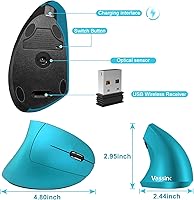
  • Dimensions: The mouse body measures 4.72 x 2.36 x 3.15 inches, making it a compact vertical option suited to average or smaller hand sizes.
  • Weight: The unit weighs 5.3 ounces, keeping it light enough for extended desktop use and easy transport in a bag.
  • Connectivity: Connects wirelessly via a 2.4GHz USB nano receiver with plug-and-play functionality — no software or driver installation required.
  • Buttons: Features 6 buttons in total, including left and right click, scroll wheel, DPI toggle, and dedicated forward and back navigation buttons.
  • Tracking: Uses an optical tracking sensor compatible with a variety of desk surfaces, including wood, fabric, and most non-glossy materials.
  • Click Design: Both primary buttons use a silent, low-decibel mechanism designed to minimize click noise in shared or noise-sensitive environments.
  • Battery: Houses a built-in 500mAh lithium rechargeable battery, eliminating the need for disposable AA or AAA batteries.
  • Charging Cable: Includes a USB charging cable measuring 150cm in length, allowing the mouse to remain in use while connected during charging.
  • OS Compatibility: Compatible with Windows 2000, ME, XP, Vista, 7, 8, 10, and 98, as well as Mac OS and Linux operating systems.
  • Device Support: Works with notebooks, desktop PCs, laptops, Macbooks, and other standard computing devices that support USB connectivity.
  • Color: Available in blue; no additional color variants are currently listed for this model.
  • Click Durability: Primary buttons have been tested to withstand over 5 million clicks, indicating reasonable longevity for everyday office use.
  • Wireless Range: Operates on the standard 2.4GHz band, which typically supports reliable connectivity within a range of up to approximately 10 meters in open conditions.
  • Warranty: Backed by a 12-month after-sales warranty provided directly by Vassink, covering defects and operational issues under normal use conditions.
  • Manufacturer: Designed and sold by Vassink, a peripheral brand focused on budget-friendly ergonomic accessories for everyday computer users.

Related Reviews

seenda Ergonomic Vertical Wireless Mouse
86%
90%
Wrist Comfort & Ergonomics
87%
Battery Life & Charging
91%
Quiet Click Performance
85%
Compatibility & Connectivity
88%
Build Quality & Durability
More
Acer OMR241 Ergonomic Vertical Mouse
74%
83%
Ergonomic Comfort
67%
Build Quality
88%
Battery Life
61%
DPI and Precision
43%
Mac Compatibility
More
UGREEN Vertical Wireless Ergonomic Mouse
84%
88%
Ergonomic Comfort
84%
Connectivity Performance
80%
Ease of Use
91%
Design and Build Quality
82%
Battery Life
More
Lekvey XC-05 Vertical Wireless Mouse
75%
83%
Ergonomic Comfort
66%
Build Quality
88%
Battery Life
54%
Sleep Mode & Wake Responsiveness
81%
Wireless Connectivity
More
Woddlffy RAAVEE Ergonomic Vertical Wireless Mouse
75%
81%
Ergonomic Comfort
54%
Build Quality
83%
Wireless Connectivity
57%
DPI Range
63%
Button Functionality
More
SHARE SUNSHINE Ergonomic Vertical Wireless Mouse
74%
83%
Ergonomic Comfort
79%
Adjustable Tilt Angle
71%
Build Quality
74%
Palm Rest Comfort
88%
Wireless Connectivity
More
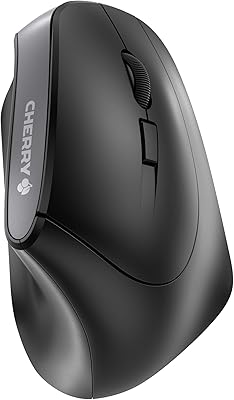
Cherry MW4500 Wireless Vertical Ergonomic Mouse
83%
89%
Ergonomics & Comfort
74%
Battery Life
81%
DPI Performance
77%
Ease of Use
85%
Build Quality
More
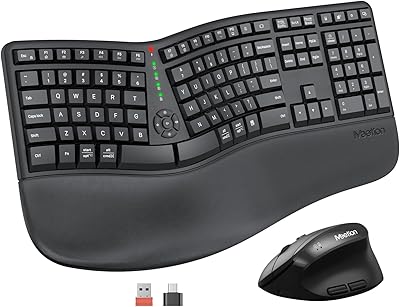
MEETION DirectorC Split Ergonomic Keyboard Mouse Combo
72%
83%
Ergonomic Comfort
71%
Typing Experience
77%
Mouse Performance
66%
Wrist Rest Quality
62%
Build Quality
More
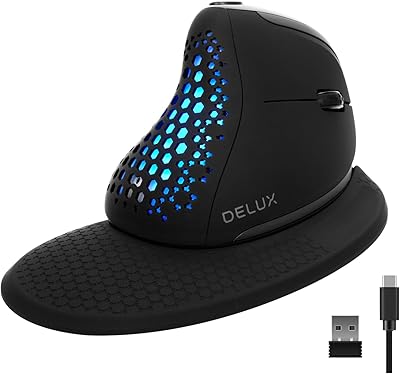
DeLUX Seeker M618XSD Wireless Ergonomic Vertical Mouse
85%
88%
Ergonomics & Comfort
93%
Connectivity Options
85%
Customizability (DPI & RGB)
91%
Display & Functionality
82%
Battery Life
More
Anker AK-98ANWVM-UBA Wireless Vertical Mouse
78%
83%
Ergonomic Comfort
71%
Build Quality
58%
Scroll Wheel Performance
86%
Wireless Connectivity
93%
Ease of Setup
More

FAQ

No, you do not. Just plug the USB nano receiver into an available port and your computer should recognize the mouse within seconds. It works completely plug-and-play on Windows, Mac, and Linux without any driver downloads.

Battery life varies depending on how often you use it and whether you remember to switch it off between sessions. Many users report getting several weeks out of a full charge with typical office use, but heavy daily users may need to recharge more frequently. The good news is you can keep using it while it charges via the included USB cable.

The Vassink Ergonomic Vertical Wireless Mouse can help reduce the discomfort that often comes from prolonged use of a traditional flat mouse, since the vertical grip puts your hand in a more neutral position. That said, it is not a medical device and results vary from person to person. If your wrist pain is significant, it is worth consulting a healthcare professional alongside making any equipment changes.

Yes, it is compatible with Mac OS out of the box. Just insert the USB receiver and you are ready to go — no configuration needed. The basic buttons all function as expected, though advanced Mac-specific gestures are not supported since this is a standard optical mouse.

Yes, you can. The 150cm USB charging cable included in the box is long enough to keep the mouse comfortably positioned on your desk while it charges, so there is no need to stop working mid-session.

This is worth considering carefully. The body measures 4.72 x 2.36 x 3.15 inches, which is on the compact side for a vertical mouse. Users with average or smaller hands tend to find it comfortable, but those with larger hands have noted that the grip can feel a bit cramped. If hand size is a concern, it may be worth comparing the dimensions against your own measurements before buying.

Noticeably quiet compared to a standard mouse. The buttons produce a soft, muted sound that is unlikely to disturb others in a library, shared office, or classroom setting. It is not completely silent — you can still hear a faint click yourself — but it is a meaningful difference from conventional clicky mice.

Yes. This vertical mouse uses a dedicated USB nano receiver rather than Bluetooth, so there is no pairing process involved and no internet connection needed. As long as the receiver is plugged in, it works.

Unfortunately, losing the receiver does make the mouse non-functional, since it is paired to that specific dongle rather than using standard Bluetooth. Vassink offers 12-month after-sales support, so reaching out to them directly would be the best course of action if the receiver goes missing.

This is a right-handed design only. The vertical contour and button layout are shaped specifically for right-hand use, so left-handed users would need to look at a dedicated left-handed vertical mouse instead.

Where to Buy