

Overview

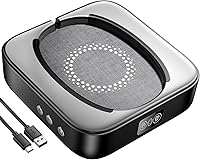
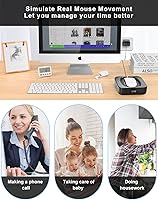
The Meatanty Mechanical Mouse Jiggler is a hardware device that physically moves your mouse to prevent your computer from going idle — no software installation, no scripts, no registry tweaks. It sits on your desk, your mouse sits on it, and a rotating turntable does the rest. The appeal is straightforward: remote workers on monitored platforms, or anyone who steps away from their desk regularly, get a simple keep-alive solution that works at the operating system level. It runs on Windows, Mac, and Linux without any drivers. Priced in the mid-range, it costs more than the cheapest options out there, but the build quality and feature set justify the gap for most buyers.

Features & Benefits

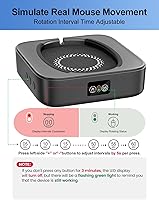
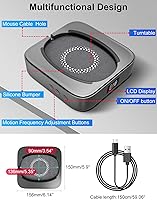
The standout quality of this mouse jiggler is that it moves the mouse mechanically, which means no monitoring software can flag it as an automated process — because it isn't one. A small rotating platform shifts the mouse at intervals you set yourself, anywhere from 5 to 60 seconds, adjusted in five-second steps. The LED display shows your current interval at a glance, so there's no guessing. Noise is genuinely a non-issue; the motor runs quietly enough that you won't notice it in a typical office. A raised edge around the turntable keeps the mouse in place, which matters more than it sounds during longer sessions.

Best For

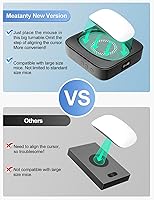
This desk gadget is built for a specific type of user, and it's worth being honest about that. If your job involves frequent short breaks — grabbing coffee, attending quick stand-ups away from your screen, or managing a split workstation — and your employer's platform shows you as idle the moment your cursor stops, this is a practical fix. It also appeals to IT testers who need a reliable, software-invisible keep-alive signal during long automated runs. The large turntable accommodates bigger mice that smaller jiggler pads simply can't handle. That said, if your workflow doesn't involve idle detection, you probably don't need this.

User Feedback

The jiggler device sits at 4.5 stars across a solid volume of reviews, and the praise is consistent: buyers appreciate how quiet it runs in practice and how little setup it requires out of the box. Where feedback gets more nuanced is around the physical footprint — some users on cramped desks find the platform takes up more room than expected. A few reviewers also noted that the single movement mode, while effective, lacks the versatility of devices with multiple speed options. Long-term durability appears fine for most, though a small number of users flagged motor wear after months of continuous daily use. If you only need occasional idle prevention, a simpler, cheaper option might suit you better.

Pros

  • Physically moves the mouse, making it completely invisible to any software-based activity monitor.
  • The adjustable interval timer covers a wide range, from a quick 5-second nudge to a relaxed 60-second cycle.
  • LED display makes it easy to confirm your current settings without guessing or memorizing button presses.
  • Silent enough during operation that it genuinely does not draw attention in a quiet home office.
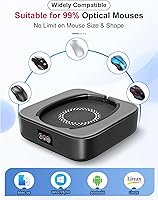
  • Works on Windows, Mac, and Linux with zero driver installation required.
  • Edge protection keeps the mouse securely on the turntable through hours of continuous use.
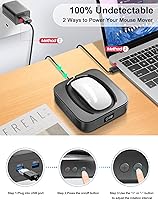
  • Can be powered via USB or an external adapter, giving you flexibility depending on your desk setup.
  • Compatible with larger mice that smaller jiggler pads often cannot accommodate.
  • Ranked among the top products in its category, backed by a high volume of consistent buyer reviews.
  • Random movement trajectory adds a layer of authenticity compared to devices that move in a fixed pattern.

Cons

  • Only one movement mode is available, which limits flexibility for users who want more behavioral variety.
  • The five-second step increments on the timer are fairly coarse — there is no way to set, say, a 12-second interval.
  • The device takes up a meaningful chunk of desk space, which is a real trade-off on smaller workstations.
  • Some buyers reported signs of motor fatigue after extended months of daily all-day operation.
  • At its price point, it costs noticeably more than basic no-frills jiggler pads that may be sufficient for simpler needs.
  • The platform height adds about 1.69 inches under the mouse, which can feel slightly awkward for users sensitive to mouse elevation.
  • No wireless or battery-powered option exists, so placement is constrained by cable reach.
  • Buyers expecting fine-grained speed control or programmable schedules will find the feature set too basic.

Ratings

The scores below reflect our AI-assisted analysis of verified global buyer reviews for the Meatanty Mechanical Mouse Jiggler, with spam, duplicate, and incentivized submissions actively filtered out before scoring. Each category is rated independently based on what real users praised and where they ran into frustration, so you get an honest picture rather than an averaged-out impression. Both the standout strengths and the genuine trade-offs are reflected in every score.

Ease of Setup
96%
Buyers consistently describe the setup as taking under a minute — plug in the USB, place the mouse on the turntable, and press the button. There is no software to install, no pairing process, and no configuration required, which makes it accessible even for users who are not tech-savvy.
A small number of users noted that the LED display labeling is not immediately intuitive and required a quick glance at the manual to understand what the numbers represented. This is a very minor friction point but worth noting for first-time users.
Undetectability
93%
Because the device operates entirely through physical movement rather than any software layer, monitoring tools used by employers and corporate IT have no process or script to detect. Remote workers report their Teams and Slack statuses staying green consistently throughout the day.
A handful of users pointed out that webcam-based monitoring tools or AI behavioral analysis systems — which observe physical movement patterns rather than cursor data — fall outside what any hardware jiggler can address. For those specific environments, this device offers no protection.
Noise Level
91%
The silent motor genuinely lives up to its description for most buyers. Users working in quiet home offices report that the device blends into background ambient noise without drawing attention during calls or focused work sessions.
A small group of users with particularly noise-sensitive setups, such as those recording audio or working in library-like environments, noted that the faint mechanical hum was occasionally perceptible at very close range. It is not loud by any measure, but not completely inaudible either.
Build Quality
78%
22%
The turntable feels solid underfoot and the raised edge protection works reliably to keep mice in place during rotation cycles. For a mid-range device, the construction is noticeably more substantial than the cheapest plastic alternatives on the market.
Some long-term users flagged that the motor showed signs of reduced performance after many months of continuous all-day operation. The plastic casing also shows minor scuffing over time, which does not affect function but signals that materials are not premium grade.
Interval Customization
71%
29%
The ability to set movement intervals anywhere from 5 to 60 seconds gives users meaningful control over how frequently the cursor moves. For buyers who need infrequent nudges to prevent sleep mode, the longer intervals are particularly useful.
The fixed 5-second step increments feel limiting for users who want more precise control — there is no way to set a 12-second or 22-second interval, for example. The range also stops at 60 seconds, which may not be sufficient for systems with longer idle thresholds.
Turntable Size
88%
The platform is large enough to comfortably accommodate full-size desktop mice, which sets it apart from the smaller pad-style jigglers that frustrate users with larger peripherals. Buyers who specifically upgraded from cramped alternatives consistently mentioned this as a key improvement.
The flip side of the generous size is that the device occupies a meaningful footprint on the desk — over six inches across — which users working at compact or cluttered workstations flagged as a genuine spatial trade-off.
LED Display Clarity
82%
18%
Having a visible readout of the current interval setting means users can confirm their configuration at a glance without memorizing button presses or counting clicks. This small feature eliminates the guesswork that comes with simpler devices that offer no feedback at all.
The display is functional rather than polished — the digits are small and the screen is not backlit in a way that stands out in bright office lighting. A few users mentioned having to lean in to read the display clearly, particularly in well-lit environments.
Movement Authenticity
84%
The random-trajectory movement is a genuine differentiator from devices that repeat a predictable fixed pattern. Users whose monitoring software flags repetitive cursor behavior specifically noted that the randomized output helped avoid detection flags over extended periods.
The device only supports one movement mode, which limits flexibility for users who might want to toggle between random and fixed patterns depending on their context. Buyers who only need basic linear movement could find a simpler device at a lower price.
Desk Stability
87%
The weight of the unit — just over 10 oz — gives it enough mass to stay firmly in place on a standard desk surface without sliding around during rotation. Users running it on smooth desks reported no issues with the device drifting out of position.
The base does not include any rubber feet or anti-slip coating in the design, which means on very smooth or glass desk surfaces, occasional minor movement was reported by a small number of buyers during longer sessions.
Power Flexibility
79%
21%
Being able to draw power from either a computer USB port or an external adapter gives users useful placement flexibility. Buyers who wanted to position the device away from their main machine appreciated the adapter option.
There is no battery or wireless option, so the device is always tethered to a power source. For users who move between workstations or travel frequently, the cable dependency adds friction that a battery-powered alternative would eliminate.
Long-Term Durability
66%
34%
For most buyers using this device in standard daily workflows — a few hours on, a few hours off — the motor and turntable held up well over months of use without any reported issues. Casual and moderate users tend to be satisfied with longevity.
Users who ran the device continuously for eight or more hours a day, every working day, were more likely to report motor degradation over a six-to-twelve month period. The build does not appear optimized for extreme continuous-use scenarios, which limits its appeal for high-demand applications.
Value for Money
74%
26%
Relative to the cheapest jiggler pads on the market, the additional features — adjustable timer, LED display, larger platform, silent motor — justify a higher price for buyers who genuinely need those capabilities. For the right user, it is a fair exchange.
For buyers who only need the most basic keep-alive function, the price premium feels harder to justify when simpler devices accomplish the same core task for significantly less. The value proposition depends heavily on whether you will actually use the extra features.
OS Compatibility
94%
The driver-free plug-and-play operation works reliably across Windows, Mac, and Linux without any configuration, which makes it one of the few hardware accessories in this category that genuinely works across all three major platforms out of the box.
There is no official documentation addressing compatibility with ChromeOS or mobile USB-C setups, which left a small number of non-standard users uncertain about whether the device would function in their environment.

Suitable for:

The Meatanty Mechanical Mouse Jiggler is purpose-built for remote workers whose company platforms — think Teams, Slack, or corporate VPNs — track cursor activity and flip your status to away the moment you step back from your desk. If you work from home and frequently handle tasks away from your screen, like taking calls on your phone, attending in-person meetings, or managing a home with kids around, this device keeps your active status intact without requiring you to babysit your computer. IT professionals and QA testers who run long automated workflows also benefit, since the physical movement produces no software footprint that monitoring tools can detect. Users who've been burned by cramped or undersized jiggler pads will appreciate the larger turntable, which comfortably fits full-size desktop mice. For anyone who would rather solve the idle-detection problem with hardware than risk violating workplace software policies, this is a practical and low-friction option.

Not suitable for:

The Meatanty Mechanical Mouse Jiggler is a single-purpose tool, and buyers who don't have a specific idle-detection problem to solve will likely find little value in it. If your workplace doesn't monitor cursor activity, or if your computer's sleep settings can simply be adjusted through system preferences, this device is unnecessary. Users working on very small or cluttered desks may find the physical footprint — over six inches across and nearly eleven ounces — an awkward addition to their workspace. Those looking for multiple movement modes or finer speed granularity beyond the fixed five-second step increments may find the controls too limited for their needs. Budget-focused buyers who only need occasional, basic keep-alive functionality might also be better served by one of the smaller, simpler, and cheaper alternatives on the market.

Specifications

  • Brand: Manufactured and sold by Meatanty.
  • Turntable Size: The rotating platform accommodates mice up to 6.14 x 5.90 inches, making it compatible with most full-size desktop mice.
  • Device Height: The unit stands 1.69 inches tall, which raises the mouse slightly above the desk surface during use.
  • Item Weight: The device weighs 10.6 oz, giving it enough mass to stay stable on a desk without additional anchoring.
  • Noise Level: The built-in motor operates at under 20 dB, which is quieter than a typical whisper in a silent room.
  • Interval Range: Movement frequency is adjustable between 5 and 60 seconds, with each button press shifting the interval by 5 seconds.
  • Movement Type: A physical rotary turntable generates random-trajectory cursor movement, with no software process involved.
  • Display: An onboard LED screen shows the currently selected interval setting in real time.
  • Power Options: The device can draw power from a standard USB port on a computer, hub, or docking station, or from an external USB adapter.
  • Connectivity: Connects via USB; no proprietary cable or adapter is required beyond a standard USB connection.
  • OS Compatibility: Works with Windows XP, 7, 8, and 10, as well as Mac OS and Linux distributions, without any driver installation.
  • Driver Requirement: Completely driver-free and plug-and-play straight out of the box on all supported operating systems.
  • Mouse Compatibility: Designed for use with optical mice; the turntable surface is compatible with most standard optical tracking sensors.
  • Motor Type: Uses a silent built-in motor engineered specifically to minimize operational noise during continuous rotation.
  • Color: Available in black.
  • Sales Rank: Ranked #52 in the Computer Mice category on Amazon at time of listing.

Related Reviews
darkFlash GK104 Wireless Mechanical Keyboard Mouse Combo
74%
84%
Typing Feel
86%
Wireless Reliability
91%
Value for Money
58%
Mouse Performance
89%
Setup & Compatibility
More
ZIYOU LANG RK-T8PR0 65% Mechanical Gaming Keyboard and Mouse Combo
86%
87%
Build Quality
90%
Ergonomics
93%
RGB Lighting Customization
68%
Mouse Responsiveness
88%
Compatibility
More
Logitech POP Mouse
Logitech POP Mouse
82%
93%
Silent Click Performance
89%
SmartWheel Scrolling
87%
Multi-Device Connectivity
91%
Battery Life
71%
Ergonomics & Hand Fit
More
Microsoft Arc Mouse
Microsoft Arc Mouse
81%
96%
Portability & Form Factor
88%
Build Quality
63%
Scroll Plane Experience
82%
Bluetooth Connectivity
58%
Ergonomics & Comfort
More
Nulea M510 Vertical Mouse
85%
91%
Ergonomics and Comfort
83%
Build Quality
88%
DPI Adjustability
90%
Wireless Performance
85%
Setup and Installation
More
Vassink Ergonomic Vertical Wireless Mouse
77%
83%
Ergonomic Comfort
58%
Build Quality
66%
Battery Life
93%
Ease of Setup
88%
Click Quietness
More
Logitech M535 Bluetooth Mouse
75%
93%
Portability
78%
Bluetooth Connectivity
89%
Battery Life
63%
Ergonomics & Comfort
71%
Tracking Performance
More
Logitech M557 Bluetooth Mouse
79%
88%
Bluetooth Connectivity
93%
Battery Life
91%
Cross-Platform Compatibility
89%
Portability
63%
Ergonomics & Comfort
More
FENIFOX Wireless Keyboard and Mouse
86%
88%
Ergonomics
91%
Quiet Typing Experience
85%
Battery Life
89%
Wireless Connectivity
84%
Build Quality
More
Satechi SM3 Full-Size Mechanical Keyboard
79%
91%
Build Quality
88%
Typing Experience
86%
Multi-Device Connectivity
89%
Mac Compatibility
83%
Battery Life
More

FAQ

Because the Meatanty Mechanical Mouse Jiggler moves the mouse physically rather than through any software process, there is nothing running on your computer for monitoring tools to flag. From your system's perspective, a human hand is simply moving the mouse. That said, physical observation of your desk is always a separate matter.

It works with Mac OS, Windows, and Linux without any driver installation. You just plug it in via USB and it starts operating immediately, regardless of your operating system.

In practice, the motor is very quiet — rated under 20 dB, which is roughly the level of rustling leaves or near-silence. Most users report they forget it is running after the first few minutes. It would be unlikely to distract you or anyone on a video call.

The rotating platform is sized to fit mice up to about 6.14 x 5.90 inches, which covers most full-size desktop mice. If your mouse is on the larger side and you have had trouble with smaller jiggler pads, this device was specifically designed with that problem in mind.

Yes. The interval timer is adjustable in 5-second steps from 5 seconds up to 60 seconds, so 30 seconds is one of the available settings. You press the plus or minus button until the LED display shows the number you want.

The turntable has a raised edge around its perimeter that keeps the mouse from drifting or falling off during rotation cycles. Several users running it continuously throughout a workday have noted this works reliably even with heavier mice.

Nothing at all. Plug it into any USB port, place your mouse on the turntable, and press the power button. The device handles everything else automatically and remembers your last interval setting.

Yes. The jiggler device can run from any USB power source, including a wall adapter, a USB hub, or a docking station. This is useful if you want to keep your computer's USB ports free or if the device needs to be positioned away from the machine.

Most users report reliable operation over many months of regular use. A small number of reviewers have mentioned noticing reduced motor performance after extended periods of all-day, every-day operation. If longevity is a priority, giving the device occasional rest periods rather than running it non-stop indefinitely seems to help.

It depends on what you need. The cheaper options on the market tend to move in fixed, predictable patterns and often lack an interval timer or display. If you need random movement, adjustable timing, a larger platform, and quieter operation, the step up in price is reasonable. If you only need the most basic keep-alive function and your setup is simple, a less expensive pad-style jiggler might be sufficient.

Where to Buy