Overview

The StarTech SDOCK2U33EB Dual-Bay Hard Drive Docking Station is the kind of no-nonsense tool that earns a permanent spot on a technician's desk. Around since 2014, this dual-bay dock has had years of real-world use to iron out its design — and it shows. The top-loading toaster design means you drop a drive in and get to work, no screwdrivers involved. StarTech has a solid reputation supplying IT departments with reliable, unglamorous hardware, and this drive dock fits that mold well. Priced in the mid-range sweet spot, it sits above basic single-bay options without competing with full RAID enclosures — sensible positioning for users who need dual-drive access without paying for features they will never use.
Features & Benefits

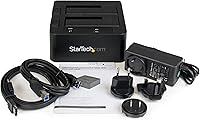
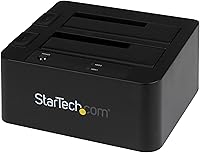
What makes the StarTech docking station stand out in daily IT work is its broad drive compatibility. Slot in any 2.5-inch or 3.5-inch SATA drive — old spinning HDD, modern SSD, it does not matter — and the dock handles it without fuss. The dual host interfaces are worth highlighting: USB 3.2 Gen 1 works well for most setups, but if your workstation has an eSATA port, that connection bypasses USB protocol overhead and delivers more consistent throughput for large cloning jobs. Each bay operates independently with its own eject button, letting you hot-swap one drive while the other stays active. Per-bay LED activity lights and a complete cable kit round out a well-considered package.

Best For

This dual-bay dock is built with a specific kind of user in mind: someone who handles bare drives regularly, not just occasionally. IT professionals and sysadmins running disk imaging or bulk wipe workflows will appreciate the independent bay operation — start a clone on one side while the other sits ready to go. Home users migrating data off old machines or setting up a reliable manual backup routine will find it equally capable, and the OS-independent design means no driver installs on either Mac or PC. Casual users who swap drives only a handful of times per year may struggle to justify the cost, but for anyone who touches bare drives weekly, it earns its place.

User Feedback

With a 3.9 out of 5 rating across roughly 200 reviews, the StarTech docking station earns solid — if not glowing — marks. Buyers consistently praise its reliable build quality and hot-swap performance, with workstation owners singling out the eSATA connection as a genuine differentiator. Where the dock loses ground is consistency: a portion of users report intermittent drive recognition issues, often linked to specific USB host controllers rather than the dock itself. The included power adapter has drawn a few complaints about durability over time. Some users also note the unit runs warmer than expected during prolonged sessions. Long-term owners occasionally flag softening bay tension after heavy use, though this appears to affect a minority.

Pros

  • Supports any capacity 2.5-inch or 3.5-inch SATA drive, covering nearly every HDD and SSD you are likely to encounter.
  • Independent hot-swap bays let you eject and replace one drive without interrupting activity on the other.
  • The eSATA connection offers a genuine throughput edge over USB for sustained large-file transfers and disk imaging.
  • Top-loading toolless design means drives are in and working within seconds — no chassis, no screws.
  • OS-independent operation removes any setup friction on both Mac and Windows machines.
  • Per-bay LED activity lights make it easy to confirm drive activity at a glance during transfers.
  • The 15,000 insertion cycle rating per bay reflects durability built for heavy professional use.
  • Ships with both USB and eSATA cables plus a universal power adapter — no extra purchases needed to get started.
  • Two-year warranty backed by free lifetime multilingual technical support is a meaningful safety net for IT environments.
  • A decade-long track record on the market means firmware and compatibility issues have largely been addressed.

Cons

  • Some users report intermittent drive recognition failures, which can disrupt time-sensitive imaging workflows.
  • The included power adapter has drawn durability complaints, with a minority of users experiencing early failures.
  • The dock runs noticeably warm during extended back-to-back sessions, which may concern users working in enclosed spaces.
  • Bay tension and eject mechanism responsiveness can degrade over years of heavy use.
  • No NVMe or M.2 support limits usefulness as modern SSD adoption shifts away from SATA form factors.
  • Lacks any RAID functionality, so data redundancy must be handled entirely by software.
  • Users on newer laptops without eSATA ports are limited to USB only, losing a key differentiator.
  • At its price point, some competing docks offer USB-C connectivity, which this drive dock does not support.

Ratings

Our AI rating engine analyzed verified global buyer feedback for the StarTech SDOCK2U33EB Dual-Bay Hard Drive Docking Station, actively filtering out incentivized, bot-generated, and low-quality reviews to surface what real users genuinely experience. Scores reflect a balanced synthesis of both consistent praise and recurring frustrations — nothing is glossed over. Where this drive dock earns its reputation and where it falls short are both represented honestly below.

Hot-Swap Reliability
83%
For sysadmins rotating through drive batches during imaging or wipe jobs, the per-bay hot-swap performance holds up well in the majority of reported workflows. Users note that swapping an idle drive while the active bay continues a transfer works as advertised in most sessions, which is the dock's core promise.
A subset of users report that certain drives — particularly older SATA I spinning disks — occasionally fail to remount cleanly after a hot swap without a full dock power cycle. This is infrequent but disruptive when it happens mid-workflow.
Drive Compatibility
88%
The ability to drop in any 2.5-inch or 3.5-inch SATA drive across all three SATA generations without adapters is a genuine day-to-day convenience, especially for technicians handling mixed hardware from different eras. Users regularly praise it for accepting drives pulled from old laptops, desktops, and external enclosures alike.
The SATA-only limitation is an increasingly relevant gap as NVMe adoption grows. Users who maintain a mixed storage fleet that includes M.2 NVMe drives need a separate solution entirely, which diminishes the dock's versatility for forward-looking setups.
Transfer Performance
74%
26%
Users with eSATA-equipped workstations report noticeably steadier throughput during large disk imaging jobs compared to USB, with fewer mid-transfer slowdowns. For those running the USB connection on a well-specced desktop, real-world speeds are generally adequate for backup and migration tasks.
USB transfer speeds can feel inconsistent depending on the host controller, and several users report underwhelming sustained throughput on laptops. The lack of a USB-C interface is a growing frustration for buyers whose newer machines have moved away from USB-A entirely.
Build Quality
76%
24%
The plastic housing feels solid enough for a desk-bound tool, and the overall construction does not feel flimsy in daily handling. The 15,000-cycle insertion rating per bay gives IT professionals reasonable confidence that the dock can withstand months of repeated drive swaps without mechanical failure.
Long-term users note that bay tension gradually loosens after sustained heavy use, meaning drives can sit slightly less snugly after a year or more of daily work. The plastic finish also shows wear marks around the bay openings over time, which is a minor but visible cosmetic concern.
Ease of Setup
93%
Buyers consistently highlight how fast the initial setup is — plug in the power adapter, connect via USB or eSATA, drop in a drive, and the host OS recognizes it within seconds. The OS-independent design means no driver downloads, no configuration utilities, and no compatibility headaches across Windows, macOS, or Linux.
A small number of users on systems with non-standard USB host controllers experienced recognition failures on first connection that required troubleshooting. This is an edge case, but for IT professionals deploying the dock quickly in a support scenario, unexpected setup friction can be genuinely costly.
Power Supply Quality
58%
42%
The included universal power adapter covers multiple regional voltages out of the box, which is a practical inclusion for users who work across different countries or need a dock that travels with them between sites. It powers both bays without throttling under simultaneous load in normal use.
The power adapter is among the most frequently cited weak points in user feedback, with a meaningful number of buyers reporting failures after one to two years of use. Replacement units can be difficult to source, and a failed adapter renders the entire dock unusable, making this a disproportionate reliability risk for the product's overall lifespan.
Thermal Management
61%
39%
For typical sessions involving a single transfer job or an hour of active cloning, the heat output stays within a tolerable range and does not appear to cause drive errors or shutdowns under normal conditions.
The dock runs noticeably warm during extended back-to-back use with both bays active, and users running it continuously in enclosed or poorly ventilated spaces report concern about long-term drive health. There is no active cooling, and the plastic housing retains heat rather than dissipating it efficiently.
Value for Money
71%
29%
For IT professionals who genuinely use both bays regularly and take advantage of the eSATA interface, the pricing is justifiable given the dual-bay functionality and StarTech's warranty and lifetime support backing. Buyers who use it as a primary drive-swapping tool tend to feel the cost was appropriate.
Casual users who only occasionally access bare drives find the price harder to justify when single-bay alternatives cost significantly less. Some buyers also feel the power adapter quality is mismatched with the overall price point, given how frequently it is cited as a point of failure.
Eject Mechanism
78%
22%
The dedicated per-bay eject buttons work cleanly out of the box and are genuinely more convenient than manually pulling drives, reducing the risk of connector damage during repeated removals. Users appreciate that the mechanism physically raises the drive, making it easy to grip without fumbling.
Across longer ownership periods, a portion of users report that the eject spring mechanism loses tension and stops fully raising the drive, requiring manual assistance to complete the removal. This does not affect functionality permanently but is a sign of gradual wear in the mechanism.
eSATA Interface Utility
79%
21%
Among users with eSATA-capable workstations, this interface is frequently called out as the dock's most underappreciated feature, providing more consistent throughput with lower CPU overhead compared to USB — a real benefit during lengthy imaging sessions on older or resource-constrained machines.
As eSATA has become increasingly rare on modern laptops and even some desktops, the practical value of this port is shrinking for newer hardware owners. Buyers with eSATA-less machines effectively pay for an interface they will never use.
Activity Indicators
84%
Per-bay LED activity lights are a small but genuinely useful feature during multi-drive workflows, letting users confirm at a glance which bay is actively reading or writing without needing to check the host OS. Technicians working across multiple systems simultaneously especially appreciate this.
Some users find the LED brightness underwhelming in brightly lit workspaces, making the indicators harder to read from a distance. There is also no distinction between read and write activity in the LED behavior, which limits diagnostic usefulness.
Drive Recognition Consistency
66%
34%
The majority of users report straightforward, consistent drive recognition across both bays on mainstream desktop and laptop hardware. On well-supported USB host controllers, drives mount quickly and reliably without repeated insertion attempts.
A recurring thread in negative reviews involves drives failing to appear in the OS without a dock restart or reconnection, particularly on certain USB host controllers and when using USB hubs rather than direct motherboard ports. This inconsistency is not universal but appears often enough to be a genuine product-level concern.
Warranty and Support
86%
A two-year hardware warranty combined with free lifetime multilingual technical support is a strong backing for a product aimed at IT environments, where downtime has real costs. Users who have contacted StarTech support generally report responsive and knowledgeable assistance.
The warranty covers the dock unit itself but not the included power adapter in all regions, which is precisely the component most likely to fail according to user feedback. This creates a gap between the warranty promise and the most common real-world failure mode buyers encounter.
Physical Footprint
89%
At just over a pound and with a compact desk footprint, this drive dock takes up minimal space on a crowded workbench or IT cart. Users who move it between workstations or pack it for on-site support calls find its size practical without feeling fragile.
The top-loading design means the dock requires clear vertical clearance above it for drive insertion, which can be awkward under low shelves or in rack-adjacent setups. A few users note that the dock shifts slightly on smooth desk surfaces during drive insertion if not actively held.

Suitable for:

The StarTech SDOCK2U33EB Dual-Bay Hard Drive Docking Station is a strong fit for IT professionals and sysadmins who regularly clone, image, or wipe drives as part of their workflow — the kind of work where dropping a drive in and getting immediate access without screwing anything down is genuinely valuable. Its OS-independent design makes it equally at home on a Mac-heavy creative studio bench as on a Windows IT workstation, with zero driver setup required. Power users managing personal storage archives or migrating data from older machines will also find it practical, especially when dealing with a mix of 2.5-inch laptop drives and full-size 3.5-inch desktop drives in the same session. If your workstation still has an eSATA port, this drive dock lets you take real advantage of it — eSATA bypasses a lot of the USB protocol overhead, which makes a meaningful difference during lengthy disk imaging jobs. The included cables and universal power adapter mean you can be up and running immediately, which matters in fast-paced support environments.
Not suitable for:

The StarTech SDOCK2U33EB Dual-Bay Hard Drive Docking Station is not the right tool for users who need continuous, always-on storage rather than a drive-swapping workhorse. If you are looking for a permanent home for your drives — something that sits quietly on your desk and mounts automatically on boot — a proper NAS enclosure or desktop hard drive enclosure with a secure lid will serve you far better. Users who exclusively work with NVMe or M.2 SSDs will find no compatibility here, as this dock is strictly SATA. The dual-bay design also does not offer any RAID functionality, so those seeking data redundancy through mirroring need to look elsewhere. Casual users who handle bare drives only a few times per year may find it hard to justify the cost compared to a basic single-bay alternative. And if you are on a laptop without eSATA, you lose one of the dock's more compelling interface advantages entirely.
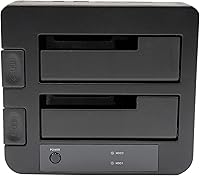
Specifications

  • Drive Bays: Houses two independent drive bays, each capable of accepting a separate SATA drive simultaneously.
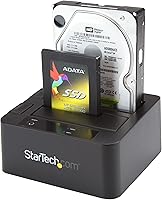
  • Form Factors: Compatible with both 2.5″ and 3.5″ SATA hard drives and solid-state drives without requiring any adapter.
  • SATA Standards: Supports SATA I, SATA II, and SATA III drive generations, ensuring backward compatibility with older hardware.
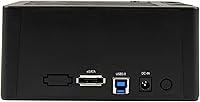
  • Host Interfaces: Connects to a host computer via USB 3.2 Gen 1 (5 Gbps) or eSATA, with both ports available on the unit simultaneously.
  • Transfer Rate: Delivers up to 5 Gbps theoretical throughput over USB 3.2 Gen 1 or eSATA, depending on the connected interface.
  • Loading Style: Uses a top-loading toaster-style design that accepts bare drives vertically without any tools or enclosure hardware.
  • Hot-Swap: Each bay supports independent hot-swapping, allowing one drive to be removed or inserted while the other bay remains active.
  • Eject Mechanism: Dedicated eject button per bay physically raises the drive for safe removal without requiring the user to pull the drive manually.
  • Cycle Rating: Each bay is rated for up to 15,000 insertion and removal cycles, reflecting a design intent for heavy professional use.
  • Activity Indicators: Individual LED activity lights on each bay provide real-time visual confirmation of drive read and write operations.
  • Dimensions: The unit measures 5.6″ in length, 5.2″ in width, and 2.8″ in height, making it compact enough for a crowded desk.
  • Weight: Weighs 1.08 lbs (0.49 kg), light enough to move between workstations without any inconvenience.
  • Included Cables: Ships with one 3ft USB-A cable and one 3ft eSATA cable, covering both available host connection options out of the box.
  • Power Supply: Includes a universal power adapter compatible with multiple regional voltages, eliminating the need for a separate purchase.
  • OS Compatibility: Operates independently of the host operating system, requiring no proprietary drivers on Windows, macOS, or Linux.
  • Warranty: Backed by a 2-year hardware warranty, supplemented by free lifetime 24/5 multilingual technical support from StarTech.
  • Housing Material: Chassis is constructed from plastic, keeping the overall weight low while providing adequate structural rigidity for desktop use.
  • Max Devices: Supports a maximum of two simultaneously connected SATA storage devices at any given time.

Related Reviews

MAIWO Dual-Bay Hard Drive Docking Station
78%
88%
Offline Clone Reliability
91%
Value for Money
67%
Transfer Speed
83%
Drive Compatibility
93%
Ease of Setup
More
RSHTECH RSH-DS02 Dual Bay Hard Drive Dock
80%
88%
Offline Cloning Reliability
83%
Build Quality
76%
Transfer Speed
71%
Heat Management
62%
Large Drive Compatibility
More
dockteck Dual Bay External Hard Drive Docking Station
84%
90%
Performance and Speed
88%
Ease of Use
85%
Build Quality
91%
Cloning Functionality
82%
Compatibility
More
CineRAID CR-H212 Dual Bay Hard Drive Docking Station 2TB
85%
87%
Performance & Speed
92%
Build Quality & Durability
88%
Ease of Use & Setup
93%
Data Transfer Speed (USB 3.0)
90%
Compatibility with Operating Systems
More
Cenmate 2-Bay Hard Drive Docking Station

76%
83%
Offline Clone Functionality
76%
Transfer Speed
79%
Drive Compatibility
88%
Value for Money
61%
Build Quality
More
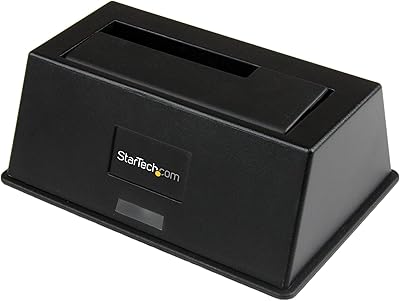
WAVLINK WL-ST334UA Dual-Bay USB 3.0 Hard Drive Docking Station
72%
83%
Offline Cloning Reliability
74%
Transfer Speed
79%
Build Quality
91%
Ease of Setup
38%
Mac Compatibility
More
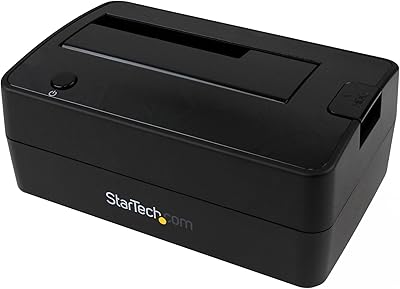
StarTech SDOCKU33BV USB 3.0 Hard Drive Dock
78%
93%
Ease of Setup
84%
Drive Compatibility
78%
Transfer Speed
58%
Build Quality
81%
Hot-Swap Reliability
More
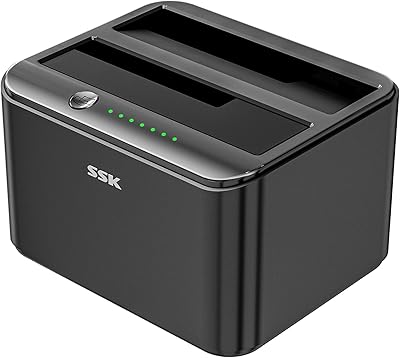
StarTech SDOCKU313 USB 3.1 Hard Drive Dock
80%
88%
Transfer Speed
83%
Drive Compatibility
79%
Build Quality
94%
Ease of Setup
62%
Value for Money
More
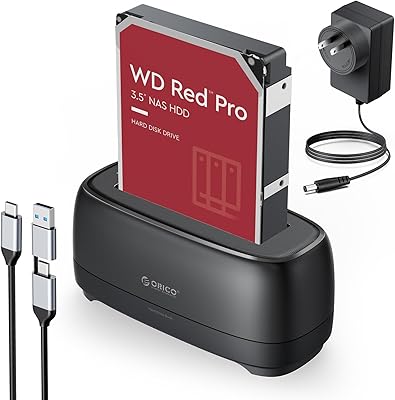
SSK DK103 Dual Bay Hard Drive Dock
76%
84%
Offline Clone Reliability
88%
Build Quality
71%
Transfer Speed
79%
Thermal Management
91%
Ease of Use
More
ORICO Hard Drive Docking Station DD18C3, 22TB Capacity
86%
89%
Ease of Use
94%
Setup and Installation
85%
Data Transfer Speed
88%
Build Quality
84%
Design and Aesthetics
More

FAQ

Yes, each bay accepts either size independently, so you can have a 2.5-inch SSD in one slot and a 3.5-inch HDD in the other simultaneously. No adapters are needed for either form factor.

In practice, both top out at around 5 Gbps theoretical bandwidth, but eSATA tends to deliver more consistent throughput with lower CPU overhead — particularly noticeable during long disk imaging or cloning sessions. If your workstation has an eSATA port, it is worth using. For most everyday data transfers, USB will feel virtually identical.

Both bays are fully independent and can be active simultaneously. You can read from one drive while writing to another, or run two separate transfers at the same time, making it genuinely useful for side-by-side cloning or backup jobs.

No drivers or software are required. The dock is OS-independent and mounts connected drives through the host operating system's native storage stack, whether that is macOS, Windows, or a Linux distribution.

Yes, the hot-swap design is built for exactly this scenario. Each bay has its own independent eject button that safely prepares the drive for removal. That said, you should always use your operating system's safe eject or unmount function before pressing the physical eject button to avoid data corruption.

The unit does generate noticeable warmth during extended use, which is common for docking stations running two active drives. For typical backup or imaging sessions that last an hour or two, this is generally not a problem. If you plan on running the dock continuously for many hours, make sure it has adequate airflow around it and is not enclosed in a cabinet.

The dock itself does not impose a capacity ceiling — compatibility with high-capacity drives depends on your host operating system and file system rather than the dock hardware. Modern versions of Windows, macOS, and Linux handle very large drives without issue, so you should have no problems with current high-capacity HDDs.

No, this dock does not support offline or PC-free drive duplication. It requires a connected host computer, and cloning must be handled by software running on that machine, such as Macrium Reflect, Clonezilla, or similar tools.

Drive recognition issues appear to be relatively uncommon and are often traced to USB host controller compatibility rather than a defect in the dock itself. If you experience this, try connecting to a different USB port, preferably one connected directly to the motherboard rather than a hub or front-panel port. Updating your USB host controller drivers can also resolve the issue in most cases.

No, this drive dock is strictly designed for SATA-interface drives in 2.5-inch or 3.5-inch form factors. NVMe M.2 drives use a completely different interface and physical connector, so they are not compatible. You would need a dedicated NVMe enclosure or docking station for those drives.

Where to Buy