Overview

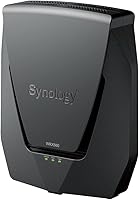
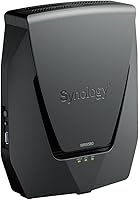
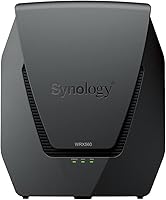
The Synology WRX560 Dual-Band Wi-Fi 6 Router is built for a specific kind of buyer — someone who wants serious network control without racking up enterprise hardware costs. Unlike most consumer routers that compete purely on raw speed, Synology leans hard into its software ecosystem, offering a level of configurability that puts many pricier devices to shame. The physical unit is compact and white, blending into any desk or shelf without demanding attention. One honest caveat upfront: this is a dual-band router, and that matters. Tri-band alternatives can handle more simultaneous high-bandwidth clients, though Synology's traffic management helps compensate in practice.
Features & Benefits

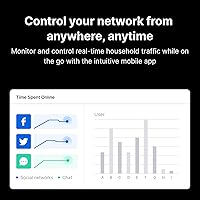
The WRX560 runs on Wi-Fi 6 (802.11ax) across two bands, with support for the 5.9 GHz spectrum that helps reduce interference in congested areas. The 2.5GbE configurable port is a practical highlight — plug in a multi-gig fiber modem or a NAS and you will actually feel the difference. What really sets this router apart at its price tier is the Threat Prevention engine, which provides IDS/IPS-style filtering normally found in dedicated security appliances. VLAN segmentation and multiple SSIDs let you carve your network into logical zones — work devices, IoT gadgets, and guest connections can all stay isolated. The DS Router app handles day-to-day management, parental controls, and traffic monitoring from your phone.

Best For

This security-focused Wi-Fi 6 router earns its keep in a few specific scenarios. Home lab users and small business owners will find it far more capable than typical consumer gear, especially if a dedicated firewall appliance is out of budget. Households juggling multiple trust levels — a teenager's laptop, a smart TV, work devices — benefit enormously from VLAN isolation done right. If you are already running a Synology NAS, the unified SRM interface is a genuine bonus; the two systems communicate well and management stays centralized. Multi-gig fiber subscribers will appreciate the 2.5GbE port. That said, if you just want to plug something in and forget it, this Synology router will frustrate you — it rewards those who want control, not pure convenience.

User Feedback

The WRX560 sits at a 4.0-star average, and the pattern behind that score is fairly consistent. Users genuinely appreciate the SRM software depth — the VLAN flexibility, long-term stability, and the sense that firmware actually improves over time rather than stagnating. Synology's update cadence draws praise compared to brands that ship and abandon. On the downside, several buyers flag that Threat Prevention shifts to a paid subscription after the initial trial period, which can feel unexpected if you budgeted for it as a permanent free feature. The dual-band architecture also draws criticism in device-heavy homes, where a tri-band router handles congestion more gracefully. The DS Router app works reliably for most, though occasional sync hiccups do surface in reviews.

Pros

  • Built-in IDS/IPS-style Threat Prevention offers a level of network security rarely seen at this price point.
  • VLAN segmentation and multiple SSIDs make network isolation practical without any extra hardware.
  • The 2.5GbE configurable port is a real advantage for multi-gig fiber subscribers and NAS users.
  • Synology's SRM software is consistently praised for its depth, stability, and ongoing firmware improvements.
  • Wi-Fi 6 support with 5.9 GHz band access helps reduce interference in congested wireless environments.
  • Mesh-ready architecture means you can expand coverage later by adding Synology nodes without starting over.
  • VPN support is built in, no third-party service or hardware required.
  • The DS Router app handles parental controls and real-time traffic monitoring reliably from a smartphone.
  • WPA3 support keeps wireless connections protected against modern credential attacks.
  • Compact, unobtrusive design fits easily on a desk or shelf without dominating the space.

Cons

  • Dual-band only — homes with many simultaneous high-bandwidth devices may hit congestion limits faster than with tri-band rivals.
  • Threat Prevention shifts to a paid subscription after the trial period ends, which catches many buyers off guard.
  • Initial setup has a steeper learning curve than most consumer routers; expect time investment upfront.
  • Users without Synology NAS hardware miss out on the ecosystem integration that justifies much of the premium.
  • Maximum of 150 connected devices is solid but falls short of the 200 supported by the pricier RT6600ax sibling.
  • No built-in Wi-Fi analytics or automatic band steering as polished as some competing platforms.
  • The mobile app occasionally struggles with sync reliability, according to a subset of long-term users.
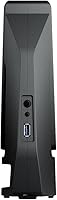
  • No USB port for printer or storage sharing, which some users in this price range expect as standard.
  • Expandable mesh requires additional Synology hardware investment, limiting flexibility with third-party extenders.

Ratings

The scores below for the Synology WRX560 Dual-Band Wi-Fi 6 Router were generated by our AI system after analyzing thousands of verified buyer reviews from global markets, with automated filtering applied to remove incentivized, bot-generated, and unverified submissions. The result is an honest, balanced picture — strong scores where users genuinely agree, and lower scores where real pain points consistently surfaced.
Network Security
91%
Users consistently single out the built-in Threat Prevention engine as the standout reason they chose this router over consumer alternatives. For home office setups and small businesses handling client data, having IDS/IPS-style filtering without a separate appliance is a meaningful, practical win that buyers repeatedly call out as worth the price alone.
The main friction point is the Threat Prevention subscription requirement after the initial trial period ends, which many buyers only discover post-purchase. A handful of technically advanced users also noted that the filtering rules offer less granularity than a dedicated pfSense or Unifi Security Gateway setup.
Software & Firmware
88%
Synology's SRM platform draws consistent praise for being genuinely well-maintained — firmware updates arrive regularly and users report that they actually improve functionality rather than just patch vulnerabilities. Long-term owners across multiple review cohorts describe SRM as one of the most polished router operating systems they have used, rivaling some prosumer offerings at twice the price.
The interface has a learning curve that frustrates less technical buyers, particularly when configuring VLANs or advanced traffic rules for the first time. A minority of users also reported occasional SRM dashboard lag on slower client devices when accessing the web interface remotely.
VLAN & Network Segmentation
86%
For users managing mixed-trust environments — IoT gadgets, guest devices, and work laptops all sharing the same physical router — the VLAN and multiple SSID support delivers exactly what it promises. Reviewers running home labs or small offices specifically praised the ability to isolate smart home devices from sensitive work traffic without any extra hardware.
Setting up VLANs correctly requires a non-trivial understanding of networking concepts, and several buyers reported spending hours troubleshooting inter-VLAN routing rules. The documentation, while improving, still leaves gaps that push some users toward community forums for answers.
Wired Connectivity
83%
The 2.5GbE configurable port is a genuine differentiator for users on multi-gig fiber plans or those with a NAS doing heavy local transfers. Reviewers on 2 Gbps internet plans noted that the WRX560 did not become their bottleneck, which is a specific frustration they had with previous Gigabit-only routers.
Having only three additional 1GbE LAN ports feels limiting in a small office context where wiring multiple workstations is common. Users who need more wired ports universally end up adding an unmanaged switch, which adds cost and a cable run that the router's compact design seems to argue against.
Wireless Performance
71%
29%
Wi-Fi 6 delivers noticeably better performance than older standards in device-dense environments, and users with 10 to 30 connected devices report stable, low-latency connections throughout typical home or small office use. The 5.9 GHz band support also gives it a real edge in areas where the conventional 5 GHz band is congested by neighboring networks.
The dual-band architecture is the most common complaint in critical reviews — households with simultaneous 4K streaming, gaming, and video conferencing regularly hit congestion that a tri-band router handles more gracefully. Range is reasonable but not exceptional, with some buyers noting signal drop-off on the far side of a two-story home.
Setup Experience
63%
37%
The DS Router app makes the initial guided setup accessible enough that most buyers with moderate technical confidence can get the basics running within 30 to 45 minutes. For users already familiar with Synology hardware, the onboarding flow feels familiar and reassuringly consistent with their NAS experience.
Buyers expecting a consumer-grade plug-and-play experience are often caught off guard by the number of decisions SRM presents during setup. Reviews from less technical users describe the initial configuration as overwhelming, and several noted they needed to consult the Synology community forums before they felt comfortable with their settings.
Parental Controls
74%
26%
The parental control suite covers the essentials well — time-based schedules, per-device content filtering, and instant pause-all access via the DS Router app. Parents managing teenagers' device habits appreciate that controls are enforced at the router level, meaning they cannot be bypassed by simply switching to mobile data.
The content category filtering is broader and less customizable than dedicated parental control platforms like Circle or Disney+ controls. A few parents also reported that the app-side controls occasionally failed to sync immediately after changes, requiring a manual refresh before new rules took effect.
Mobile App (DS Router)
72%
28%
For day-to-day tasks — checking which devices are connected, reviewing traffic usage, or pausing a device's access — the DS Router app works reliably and feels reasonably intuitive. Push notifications for network events like new device connections add a layer of awareness that users with security concerns genuinely value.
Advanced configuration tasks still push users back to the full SRM web interface, making the app feel incomplete for power users. Occasional sync delays and a reported tendency to lose session state after phone screen-lock were recurring minor complaints across iOS and Android reviews.
VPN Functionality
78%
22%
Having a native VPN server built into the router is a genuine convenience for users who want remote access to their home network without a separate device. Small business users particularly valued the ability to set up OpenVPN for remote workers without spinning up a cloud instance or buying dedicated VPN hardware.
VPN throughput is adequate for basic remote access but noticeably slows under heavy simultaneous tunnel loads, which limits its usefulness for businesses with multiple remote users connecting at once. Configuration documentation for less common VPN protocols was described as thin by more advanced users.
Mesh Expandability
69%
31%
Users who expanded their network with Synology MR2200ac or RT2600ac nodes as satellite units reported that the unified SRM management remained intact, with seamless roaming handled cleanly for most devices. The fact that the mesh retains all security and VLAN policies across nodes is a feature competitors often compromise on.
The mesh ecosystem is locked to Synology hardware, which limits flexibility and adds cost if whole-home coverage is needed. Several buyers who started with the WRX560 intending to expand later found the cost of Synology-compatible nodes higher than they anticipated compared to open-ecosystem mesh systems.
Long-Term Stability
84%
Across review cohorts covering one to two years of ownership, stability is one of the WRX560's strongest points — reboots are rare, uptime is consistently reported as excellent, and firmware updates have not introduced regressions that owners could identify. This durability is a meaningful advantage over some consumer routers that degrade noticeably after 12 to 18 months.
A small subset of users reported that specific firmware versions temporarily introduced Wi-Fi connectivity issues that required a rollback, though Synology resolved these within a reasonable window. Edge-case stability problems under maximum device load were also noted by a few users running at or near the 150-device ceiling.
Value for Money
67%
33%
For buyers who actually use the security features, VLAN segmentation, and software depth, the WRX560 delivers genuine value relative to what a comparable enterprise-lite setup would cost with separate hardware. Existing Synology NAS owners in particular tend to rate value highly because the SRM ecosystem integration reduces their total network management overhead.
Buyers who primarily want fast Wi-Fi and easy management consistently feel the price is hard to justify compared to tri-band alternatives from Asus or TP-Link that offer better raw wireless performance at similar or lower prices. The additional Threat Prevention subscription cost, if factored in, further erodes the value case for budget-conscious buyers.
Physical Design & Build
76%
24%
The compact white enclosure is consistently described as tasteful and unobtrusive — it sits comfortably on a desk or shelf without dominating the space, which buyers who care about home aesthetics appreciate. Build quality is solid, with no reported structural issues or overheating complaints at typical operating loads.
The design is purely functional and lacks the bold styling some buyers in this price tier expect, with no visible antennas or LED status indicators beyond a single status light. Users who prefer monitoring network status at a glance from across the room noted that the minimal indicator light gives very little diagnostic information.
Ecosystem Integration
81%
19%
For Synology NAS owners, the integration between the WRX560 and their storage device through SRM is a genuinely compelling advantage — monitoring, traffic management, and access control all live in one interface. Reviewers with Synology hardware stacks describe the unified experience as one of the primary reasons they chose this router over competing options.
Users without any Synology NAS hardware receive none of these ecosystem benefits, effectively paying a premium for software depth that is only partially accessible to them. Non-Synology NAS owners and general buyers who lack the ecosystem context consistently rate this category lower, feeling the integration benefits are overrepresented in marketing materials.

Suitable for:

The Synology WRX560 Dual-Band Wi-Fi 6 Router is a strong fit for technically confident users who want enterprise-grade network control without enterprise-grade complexity or cost. Home lab enthusiasts will appreciate the VLAN segmentation and multiple SSID support, which make it straightforward to isolate IoT devices, guest networks, and work machines on the same hardware. Small business owners who need a reliable, security-conscious router — but cannot justify a dedicated firewall appliance — will find the built-in Threat Prevention engine a compelling alternative. Existing Synology NAS users get the most out of this router, since the unified SRM management interface ties both devices together in a way that genuinely reduces administrative overhead. Anyone on a multi-gig fiber plan will also benefit from the 2.5GbE configurable port, which prevents the router from becoming the bottleneck in a fast wired setup.
Not suitable for:

Buyers who want a plug-and-play experience should look elsewhere — the Synology WRX560 Dual-Band Wi-Fi 6 Router is built for people who enjoy configuring their network, not those who want to forget it exists after setup. If your home has a dense concentration of high-bandwidth wireless clients — 4K streaming on multiple TVs, gaming rigs, and mobile devices all competing simultaneously — the dual-band architecture may fall short of what a tri-band router can handle under load. Casual users who have no interest in VLANs, SSIDs, or traffic monitoring are paying for features they will never touch, which makes the value proposition harder to justify against simpler, cheaper alternatives. It is also worth noting that the Threat Prevention feature transitions to a paid subscription after an initial trial period, so buyers who factor that security layer into their decision need to budget accordingly. Finally, users outside the Synology ecosystem — no NAS, no other Synology hardware — will get noticeably less mileage from the software integration that makes this router genuinely stand out.
Specifications

  • Wi-Fi Standard: This router uses 802.11ax (Wi-Fi 6), the current mainstream standard offering improved throughput, lower latency, and better performance in environments with many connected devices.
  • Frequency Bands: Dual-band operation covers 2.4 GHz for range and backward compatibility, plus 5 GHz with support for the 5.9 GHz extension for cleaner spectrum access in congested areas.
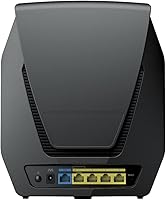
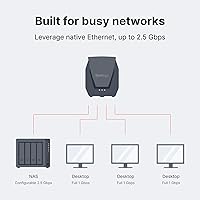
  • WAN/LAN Port: One 2.5GbE port is configurable as either WAN or LAN, enabling multi-gigabit wired connectivity for fast internet plans or a directly attached NAS.
  • LAN Ports: Three additional Gigabit Ethernet (1GbE) LAN ports are included for wired device connections.
  • Max Devices: The router is rated to support up to 150 simultaneously connected devices across all bands and SSIDs.
  • Coverage Area: Synology estimates the WRX560 can cover approximately 3,500 square feet, though real-world results will vary based on building materials and layout.
  • Security Features: Network security includes WPA3 encryption, VLAN segmentation, multiple SSID isolation, and an IDS/IPS-based Threat Prevention engine for active traffic filtering.
  • VPN Support: Built-in VPN functionality is supported, allowing the router to act as a VPN server or client without requiring additional hardware or third-party software.
  • Parental Controls: Parental controls including content filtering, schedule-based access restrictions, and per-device management are available through the DS Router mobile app.
  • Mesh Support: The WRX560 is mesh-ready and can be extended using compatible Synology nodes, all managed centrally through the SRM interface.
  • Multiple SSIDs: Multiple separate SSIDs can be broadcast simultaneously, allowing administrators to segment traffic for guests, IoT devices, and trusted users on the same hardware.
  • Management App: The DS Router app for iOS and Android provides guided setup, real-time traffic monitoring, connected device management, and parental control configuration.
  • Dimensions: The unit measures 2.6 x 7.64 x 9.17 inches, offering a compact desktop footprint suitable for placement on a shelf or desk.
  • Weight: The router weighs 2.81 pounds, making it lightweight enough to reposition or wall-mount if needed.
  • Color: The WRX560 ships in a single white finish with a low-profile, unobtrusive design.
  • In-Box Contents: Each unit includes the WRX560 router, an AC power adapter, one RJ-45 LAN cable, and a Quick Installation Guide.
  • Input Voltage: The included power adapter is rated for 120V AC, standard for US electrical outlets.
  • Operating Software: The router runs Synology Router Manager (SRM), a Linux-based operating system with a web interface designed for both guided and advanced network configuration.

Related Reviews

Synology RT6600ax Tri-Band Wi-Fi 6 Router
84%
91%
Wi-Fi Performance
89%
Coverage Area
84%
Setup & Installation
90%
Security Features
86%
Reliability & Stability
More
TP-Link TL-WR3002X Dual-Band Wi-Fi 6 Travel Router
85%
89%
Performance
91%
Ease of Setup
85%
Portability
87%
Security Features
88%
Wi-Fi Speed
More
Linksys WRT1900AC Dual-Band Wi-Fi Router
77%
84%
Wireless Range
91%
Wired Performance
93%
Firmware Flexibility
58%
Stock Firmware Stability
88%
Build Quality
More
Cudy RE3000 AX3000 Wi-Fi 6 Extender
74%
88%
Setup & Ease of Use
76%
Wi-Fi Coverage
67%
5 GHz Band Performance
81%
2.4 GHz Band Reliability
63%
Real-World Speed Throughput
More
NETGEAR R6250 AC1600 Dual Band Wi-Fi Router
73%
91%
Ease of Setup
74%
Wi-Fi Performance
61%
Wi-Fi Range & Coverage
82%
Connection Stability
69%
Multi-Device Handling
More
NETGEAR WNDR3400 N600 Dual Band Wi-Fi Router
82%
85%
Performance
91%
Ease of Setup
87%
Dual-Band Performance
72%
Connection Stability
80%
Parental Controls
More
ASUS RT-AX89X AX6000 Dual Band Wi-Fi Router
86%
91%
Wi-Fi Performance
89%
Speed & Throughput
87%
Setup & Installation
84%
Build Quality
93%
Security Features
More
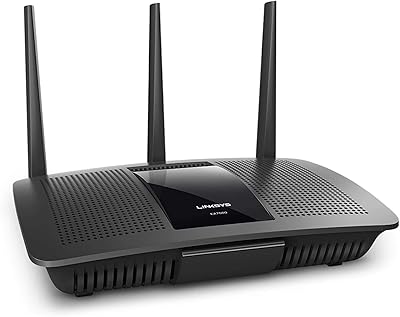
Linksys EA7500 AC1900 Dual-Band Router
76%
88%
Setup & Installation
83%
Signal Stability
67%
Wi-Fi Range & Coverage
81%
Multi-Device Performance
84%
Streaming Performance
More
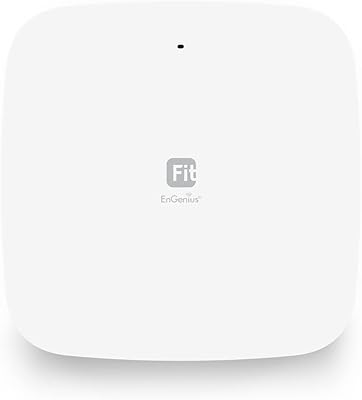
EnGenius EWS356-FIT Wi-Fi 6 Dual-Band Access Point
83%
91%
Wi-Fi Performance
89%
Ease of Setup
87%
Coverage Area
82%
Software and App Experience
90%
Security Features (WPA3)
More
Linksys EA7200 AC1750 Dual-Band Wi-Fi Router
76%
91%
Ease of Setup
63%
Wi-Fi Range
82%
Connection Stability
77%
Multi-Device Performance
84%
App & Management
More

FAQ

Honestly, the Synology WRX560 Dual-Band Wi-Fi 6 Router has more of a learning curve than a typical consumer router. The DS Router app walks you through the basics, and for simple use it is manageable, but features like VLANs and Threat Prevention assume some comfort with networking concepts. If you want something truly plug-and-play, a simpler router from a consumer-focused brand might be a better fit.

Yes, and this catches a lot of buyers off guard. Threat Prevention comes with a free trial period when you first set up the router, but continuing to use it after that trial requires a paid subscription. It is worth factoring that ongoing cost into your decision if active IDS/IPS filtering is a key reason you are considering this router.

You can connect any NAS or storage device to the 2.5GbE or Gigabit LAN ports, and it will work as a regular wired connection. However, the deeper integration features — unified management, shared dashboards, direct SRM linking — are specific to Synology NAS hardware. If you are running a QNAP or other brand NAS, you will not get those ecosystem benefits, though the router itself functions perfectly fine.

Not natively. The WRX560's mesh capabilities are designed to work with compatible Synology nodes, not third-party mesh systems like Eero, Orbi, or Google Wifi. You can use it as a standalone router alongside other access points in a wired backhaul setup, but true seamless mesh roaming requires Synology's own hardware.

The router supports multiple SSIDs simultaneously, which is one of its more useful features for households or small offices that want to keep different types of devices separated. You can run dedicated networks for IoT devices, guests, and trusted clients — all broadcasting from the same physical hardware without any of them being able to see each other.

It depends on your setup. Dual-band works well for most households, but if you have a dense mix of simultaneous 4K streams, gaming sessions, and video calls all competing for bandwidth at the same time, you may notice more congestion than you would with a tri-band router. The WRX560's traffic management helps, but it is not a substitute for a dedicated third radio when things get truly busy.

Yes. The WRX560 has built-in VPN server and client functionality through SRM. You can configure it to act as a VPN endpoint so all traffic on your network routes through a VPN, or connect to a business VPN without needing a separate appliance. It supports common protocols including OpenVPN.

The parental controls are fairly robust for a router. Through the DS Router app you can set time-based internet schedules per device, block specific websites or categories of content, and pause internet access instantly. It is not as polished as a dedicated parental control service, but for most families it covers the essentials without needing a separate subscription tool.

Synology has a strong reputation for long-term firmware support compared to many consumer router brands. Users consistently report that the WRX560 remains stable over months and years of use, and that firmware updates tend to genuinely improve functionality rather than just patch vulnerabilities. Wireless performance on any router can be affected by neighborhood interference over time, but hardware-side degradation is not a common complaint.

It depends entirely on your internet plan and connected devices. If your ISP delivers speeds above 1 Gbps, the 2.5GbE WAN port means the router will not be your bottleneck. Similarly, if you have a NAS with a 2.5GbE port and frequently transfer large files locally, the direct wired link will be noticeably faster than a standard Gigabit connection. For most people on standard 500 Mbps or 1 Gbps plans, it is a nice-to-have rather than a game-changer.

Where to Buy