Overview

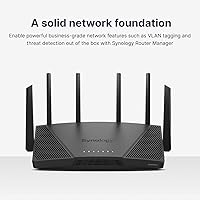
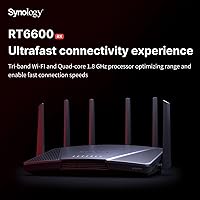
The Synology RT6600ax Wi-Fi 6 Tri-Band Router sits in an interesting middle ground — not quite a consumer router, not quite enterprise hardware, but something aimed at the technically inclined home user or small office. Synology built its reputation on NAS software, and that software-first philosophy carries directly into this router. The flat, low-profile chassis looks more at home in a server rack than on a living room shelf, which tells you something about who this is really designed for. If you're expecting a plug-and-play box like most mainstream Wi-Fi 6 routers, adjust your expectations — this Wi-Fi 6 router rewards users who want real network control.
Features & Benefits

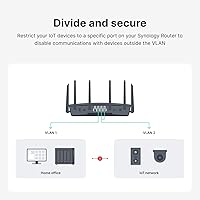
The RT6600ax covers three bands including support for the 5.9 GHz spectrum, which opens up less-congested 160 MHz channels that most competing routers simply cannot touch. On the hardware side, the 2.5 GbE WAN port means you are ready for multi-gig internet plans without needing an upgrade in two years. Network segmentation is a genuine standout — you can carve out up to five independent VLANs and SSIDs, so your smart home devices never share airspace with your work laptop. The Synology Router Manager software ties it all together with a clean dashboard and an expandable package system for adding VPN server capability, DNS filtering, and Safe Access parental controls on demand.

Best For

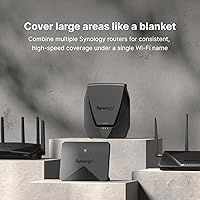
This Synology router makes the most sense for users already invested in the Synology ecosystem — pairing it with a NAS creates a tightly integrated home lab or small office setup. Remote workers will appreciate the built-in VPN server, which handles both OpenVPN and site-to-site tunneling without requiring a separate appliance. Families benefit from granular Safe Access controls that let parents set schedules and content filters per device rather than per network. If your ISP recently upgraded you to multi-gig service, the RT6600ax is one of the few home-class routers that can keep pace. Just factor in that true mesh coverage requires adding Synology MR-series access points at additional cost.

User Feedback

Owners consistently praise the SRM software stability — it behaves more like a mature operating system than typical router firmware, with meaningful updates arriving long after purchase. The most common complaint, however, is setup complexity; users accustomed to consumer routers sometimes find the initial configuration intimidating, particularly when enabling VLANs or standing up the VPN server. Coverage gets positive marks for mid-sized homes, though the 3,500 square foot figure assumes ideal conditions — dense walls or multi-story layouts will reduce that noticeably. One frequently overlooked detail: Threat Prevention runs on a free trial before requiring a paid annual subscription, so budget accordingly before committing.

Pros

  • The 5.9 GHz band opens up less-congested channels that most competing routers completely lack.
  • The 2.5 GbE WAN port handles multi-gig ISP plans without requiring any additional hardware.
  • Up to five independent VLANs let you isolate IoT devices, guests, and work machines cleanly.
  • SRM firmware is notably stable and receives consistent long-term updates from Synology.
  • The built-in VPN server supports OpenVPN and site-to-site tunneling with no third-party service needed.
  • Safe Access parental controls offer per-device scheduling and content filtering well beyond basic options.
  • The expandable package system lets you add only the features you actually need.
  • Synology NAS integration creates a cohesive home lab or small-office setup from a single ecosystem.
  • DNS filtering and traffic monitoring provide visibility most consumer routers never offer.

Cons

  • Initial setup is complex enough to frustrate users without prior networking experience.
  • Threat Prevention becomes a recurring paid subscription after the free trial period expires.
  • Mesh coverage requires purchasing separate Synology MR-series nodes, adding significant cost.
  • The flat, oversized chassis is awkward to place in typical home environments.
  • The RT6600ax carries a premium price that is hard to justify if you only need basic Wi-Fi.
  • Only three standard Gigabit LAN ports are included alongside the single 2.5 GbE port.
  • Real-world coverage in multi-story or dense-wall homes often falls short of the advertised 3,500 sq ft figure.
  • The advanced feature set has a learning curve that may take weeks to fully explore and configure.

Ratings

The scores below were generated by our AI engine after analyzing thousands of verified global user reviews for the Synology RT6600ax Wi-Fi 6 Tri-Band Router, with spam, bot submissions, and incentivized feedback actively filtered out before any scoring was calculated. The result is an honest, data-driven snapshot of where this router genuinely excels and where real buyers have run into friction. Both the strengths and the frustrations are reflected without softening.

Software & Firmware
93%
SRM consistently earns the highest praise among all aspects of the RT6600ax. Users coming from routers running basic firmware describe it as a revelation — a real operating system with a package manager, granular controls, and a UI that does not feel like it was designed in 2009. Long-term owners particularly value the steady stream of meaningful updates.
The depth that power users love is the same thing that intimidates newcomers. A handful of reviewers noted that finding specific settings requires navigating several layers of menus, and the package system, while flexible, means some features are not active out of the box and require deliberate setup.
Network Performance
88%
In homes and small offices where devices support Wi-Fi 6, users report noticeably cleaner throughput and lower latency compared to their previous routers, especially in congested environments with many simultaneous connections. The 5.9 GHz band gives compatible devices access to channels that neighboring routers are simply not occupying.
A portion of users note that real-world speeds on the 2.4 GHz band are unremarkable, and the performance advantage of the third band is only accessible to devices that specifically support that spectrum, which remains a small subset of consumer hardware currently on the market.
Security Features
79%
21%
Safe Access and DNS filtering work reliably and cover the security needs of most households without any extra cost. Users running home labs or small offices appreciate the ability to set up firewall rules and monitor traffic per device, which is typically a feature reserved for dedicated security appliances.
The headline Threat Prevention feature, which is what many buyers specifically come for, transitions to a paid annual subscription after the trial ends. Users who did not notice this in the product listing feel misled, and some report disabling it entirely rather than paying the ongoing fee, which leaves a gap in their network security posture.
Setup & Ease of Use
61%
39%
For technically experienced users, the setup process is logical and well-documented, with a quick installation guide that gets the basics working in under twenty minutes. The SRM interface uses clear labeling and a familiar desktop-style layout that makes navigation intuitive once you understand the system.
Casual users and first-time network administrators frequently describe feeling overwhelmed, particularly when trying to configure VLANs, set up the VPN server, or troubleshoot why a specific device landed on the wrong network segment. Several reviewers explicitly wished there were a simplified mode for everyday households.
Value for Money
74%
26%
For users who fully utilize the VLAN segmentation, VPN server, and parental controls, the RT6600ax replaces hardware and subscriptions that would collectively cost more when purchased separately. Synology NAS owners in particular find the ecosystem value compelling enough to justify the premium over a standard consumer router.
For buyers who simply want fast, reliable Wi-Fi and will never touch the advanced features, the price is difficult to justify. The additional cost of Synology MR-series nodes for mesh coverage and the Threat Prevention subscription can push the real total investment noticeably higher than the initial sticker suggests.
Wi-Fi Coverage & Range
71%
29%
In single-story open-plan homes under 2,500 square feet, users generally report solid, consistent coverage with few dead spots. The tri-band configuration handles a busy device environment well, and users with mostly Wi-Fi 6 devices note clean signal quality in rooms adjacent to the router.
The 3,500 square foot coverage claim draws repeated skepticism in user reviews, particularly from those in multi-story homes or older construction with plaster and concrete walls. Several owners report needing to add mesh nodes sooner than they expected based on the advertised range, which adds to the total cost of the setup.
VPN Capability
91%
Remote workers consistently highlight the VPN server as one of the most genuinely useful features, offering reliable secure access to home network resources from anywhere without paying for a third-party VPN hosting service. Site-to-site tunneling support is rare at this price point and earns strong marks from small business users connecting two locations.
Setting up the VPN server correctly requires a solid understanding of networking fundamentals, and users who attempt it without that background frequently post questions in forums about why their client cannot connect. Documentation helps, but there is no guided wizard that walks a novice through the process end to end.
Parental Controls
84%
Parents specifically praise the per-device scheduling capability, which lets them set different internet access hours for a teenager's laptop versus a younger child's tablet — all from the same dashboard and at no extra cost. Content category filtering is broad enough to handle the most common concerns without requiring a dedicated service.
The reporting and activity log features are functional but not particularly detailed compared to dedicated parental control platforms. A few parents note that determined teenagers familiar with VPNs can work around network-level controls, which is a limitation of any router-based approach rather than a specific flaw in this implementation.
Build Quality & Design
77%
23%
The hardware feels solid and well-constructed, with a finish that resists fingerprints and a chassis that runs cool under sustained load. Users who place it in a media cabinet or on a network shelf appreciate the low-profile horizontal form factor and the absence of protruding antennas.
The flat, wide footprint takes up considerably more desk or shelf space than a vertical consumer router, which bothers users without a dedicated equipment area. The design is clearly functional rather than decorative, and several reviewers mention it looks out of place in a living room or home office with visible furniture.
VLAN & Network Segmentation
89%
IT-literate home users and small office administrators rate the VLAN implementation among the best available in any non-enterprise router. Being able to put smart home devices, guest users, work machines, and a NAS on completely separate network segments — and then enforce traffic rules between them — genuinely addresses real security concerns.
Getting VLANs configured correctly is not beginner territory, and users without prior experience often end up with partially working setups that either over-restrict or under-restrict traffic between segments. There is no visual network map to help users understand what they have built, which would meaningfully reduce the complexity.
Multi-Gig WAN Support
86%
Users who have upgraded to 2.5 Gbps or faster ISP plans consistently report that the RT6600ax is one of the few home routers that actually keeps pace with those speeds. This is a concrete, measurable advantage for anyone in a neighborhood or building where multi-gig fiber is already available.
The benefit is entirely moot for users on standard gigabit or slower internet plans, which still represents the majority of home broadband subscribers. Some buyers feel they paid for a capability they will not use for years, making the router feel over-specified for their current situation.
Mesh & Expandability
58%
42%
When paired with Synology MR-series access points, the mesh system performs reliably and is managed entirely within the same SRM interface, avoiding the need to juggle separate apps. Users who invested in the full Synology mesh setup describe it as a cohesive, well-managed system.
The mesh capability is not built in — it requires purchasing additional hardware that can cost as much as or more than the router itself. Competing mesh systems from other brands offer this as a standalone purchase with mesh included from day one, making the RT6600ax feel incomplete for users who need whole-home coverage right away.
Long-Term Support
92%
Synology's track record for supporting hardware long past the typical consumer router lifecycle is a genuine differentiator. Owners who have had the RT6600ax for two or more years report receiving meaningful firmware updates that add features and patch vulnerabilities, rather than the maintenance-mode updates most router brands issue after the first year.
There is no publicly committed end-of-life support date for the hardware, so buyers have to rely on Synology's historical behavior rather than a formal guarantee. Users invested in the Synology ecosystem are comfortable with that, but buyers evaluating the router purely on its own merits may find the lack of a stated support window unsatisfying.
Documentation & Support
67%
33%
Official Synology documentation is thorough by router standards, with detailed knowledge base articles and an active community forum where experienced users answer questions quickly. Users who invest time in reading the available resources generally resolve their issues without needing to contact support directly.
Out-of-box documentation is minimal — the included guide covers only the most basic setup steps, and users who encounter issues with advanced features must find their own way to online resources. Several reviewers describe Synology direct customer support response times as inconsistent, with some cases taking longer than expected to resolve.

Suitable for:

The Synology RT6600ax Wi-Fi 6 Tri-Band Router is purpose-built for users who want serious control over their home or small-office network without jumping to full enterprise hardware. If you already own a Synology NAS, this router integrates naturally into that ecosystem, letting you manage storage, VPN access, and network security from a single, familiar interface. Remote workers running a home office will find the built-in VPN server genuinely useful — it handles secure remote connections without requiring a separate appliance or monthly cloud service fee. Households with kids benefit from Safe Access parental controls that go well beyond the basic time-limit features found on cheaper routers, offering per-device scheduling and content filtering. Anyone whose ISP has recently upgraded them to a multi-gig plan will also appreciate that the 2.5 GbE WAN port can actually take advantage of that speed, something most consumer-grade routers still cannot do.
Not suitable for:

The Synology RT6600ax Wi-Fi 6 Tri-Band Router is a poor match for anyone who wants to unbox a router, run a quick app setup, and forget about it. The SRM software is powerful, but reaching that power requires navigating menus and settings that assume a baseline level of networking knowledge — casual users frequently report feeling lost before they have even finished the initial configuration. If your home spans multiple floors or has thick concrete walls, expect to invest in additional Synology MR-series access points to fill coverage gaps, which adds meaningfully to the total cost. Buyers on a tight budget should also know that Threat Prevention — one of the headline security features — shifts to a paid annual subscription once the trial period ends, so the true ongoing cost is higher than the sticker price suggests. Anyone simply looking for a fast, affordable Wi-Fi upgrade for a small apartment will find far more practical options at a lower price point.
Specifications

  • Wi-Fi Standard: This router uses Wi-Fi 6 (802.11ax), which offers improved throughput and better performance in environments with many connected devices compared to the previous Wi-Fi 5 standard.
  • Band Configuration: It operates on three bands simultaneously: 2.4 GHz, 5 GHz, and the less common 5.9 GHz band, which provides access to additional high-speed 80 and 160 MHz channels.
  • Max Channel Width: Supports up to 160 MHz channel width on the 5 GHz and 5.9 GHz bands, enabling higher peak wireless speeds for compatible client devices.
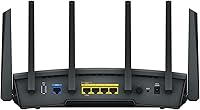
  • WAN Port: Equipped with a single 2.5 Gigabit Ethernet WAN port, which supports multi-gig internet service plans and can optionally be reconfigured as a LAN port.
  • LAN Ports: Includes three standard 1 Gigabit Ethernet LAN ports for wired device connections alongside the 2.5 GbE port.
  • Coverage Area: Rated for up to 3,500 square feet under optimal conditions; real-world coverage will vary depending on building materials, layout, and interference sources.
  • Max Devices: Capable of managing up to 200 simultaneously connected devices across all bands and networks.
  • Network Segmentation: Supports up to 5 separate VLANs and SSIDs, allowing distinct network environments for IoT devices, guests, work machines, and other groups.
  • VPN Protocols: The built-in VPN server supports OpenVPN, L2TP/IPSec, and site-to-site tunneling for flexible remote access and inter-office connectivity.
  • Operating System: Runs Synology Router Manager (SRM), a Linux-based firmware with a modular package system that allows users to install only the network management features they need.
  • Security Features: Includes Threat Prevention (IPS-based, subscription required after trial), Safe Access for DNS filtering and web controls, and built-in firewall management.
  • Parental Controls: Safe Access provides per-device scheduling, content category filtering, and usage reports without requiring a third-party subscription service.
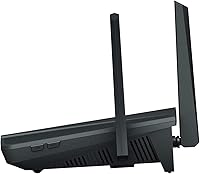
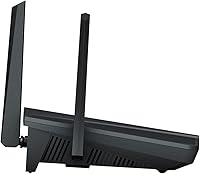
  • Dimensions: The unit measures 14.25 x 10 x 4 inches, using a flat, horizontal form factor that differs from the antenna-tower style common among consumer routers.
  • Weight: The router weighs 4.11 pounds, reflecting its relatively robust internal hardware compared to typical consumer-grade units.
  • In-Box Contents: Package includes the RT6600ax main unit, an AC power adapter, one RJ-45 LAN cable, and a printed Quick Installation Guide.
  • Wireless Standards: Backward compatible with 802.11a, 802.11n, and 802.11ac devices, so older laptops, phones, and smart home hardware will connect without issue.
  • Mesh Support: Native mesh networking is available but requires the addition of one or more Synology MR-series wireless access points, sold separately.
  • Manufacturer: Made by Synology Inc., a Taiwan-based company primarily known for its network-attached storage systems and enterprise-class data management software.

Related Reviews

ARRIS SURFboard mAX W30 Wi-Fi 6 Router
71%
78%
Wi-Fi Speed & Throughput
74%
Coverage & Range
76%
Mesh Performance
53%
App Experience
82%
Parental Controls
More
Synology WRX560 Dual-Band Wi-Fi 6 Router
77%
91%
Network Security
88%
Software & Firmware
86%
VLAN & Network Segmentation
83%
Wired Connectivity
71%
Wireless Performance
More
Wyze Mesh Router Pro Wi-Fi 6E Router
73%
91%
Setup & Ease of Use
78%
Wi-Fi Speed & Throughput
72%
Coverage & Range
66%
Connection Stability
69%
6 GHz Band Performance
More
D-Link DIR-3040 AC3000 Tri-Band Router
81%
89%
Range & Coverage
86%
Multi-Device Performance
91%
Parental Controls
76%
Value for Money
68%
Setup & App Experience
More
Linksys EA8300 Tri-Band Wi-Fi Router
77%
83%
Wireless Performance
67%
Coverage & Range
91%
Setup & Ease of Use
86%
Multi-Device Handling
58%
Firmware & Software Stability
More
TP-Link TL-WR3002X AX3000 Wi-Fi 6 Travel Router
81%
83%
Ease of Setup
88%
VPN Performance
79%
Captive Portal Handling
93%
Portability & Form Factor
74%
Wi-Fi Speed & Range
More
ASUS Lyra Voice Mesh Router Smart Speaker
65%
58%
Wi-Fi Coverage & Range
67%
Wi-Fi Speed & Throughput
44%
Smart Speaker Audio Quality
76%
Alexa Integration & Voice Control
82%
Setup & Installation Ease
More
ARRIS SURFboard mAX Pro W133 Mesh Router
71%
83%
Wi-Fi Coverage
71%
Wi-Fi Speed Performance
52%
App & Software Experience
58%
Network Reliability & Stability
91%
Wired Port Availability
More
Synology RT2600ac Wi-Fi Router
85%
88%
Performance
91%
Wi-Fi Speed & Coverage
80%
Setup & Installation
90%
Security Features
84%
Ease of Use
More
LNN 788 Wi-Fi 6 Router
74%
91%
Ease of Setup
78%
Wi-Fi Speed Performance
67%
Coverage & Range
82%
Multi-Device Handling
79%
Gaming & Streaming Quality
More

FAQ

Honestly, it depends on your comfort level with technology. The initial wizard gets you online without much trouble, but unlocking features like VLANs, VPN, or parental controls requires navigating menus that assume some familiarity with networking concepts. If you are a casual user who just wants Wi-Fi, there are simpler options at lower prices. If you are willing to spend an afternoon learning the interface, the RT6600ax rewards that investment significantly.

Yes, and this catches a lot of buyers off guard. Threat Prevention runs on a free trial period after you activate it, but continuing to use it requires a paid annual subscription from Synology. The other security features — Safe Access, DNS filtering, and the built-in firewall — remain free. Just factor the ongoing subscription cost into your decision if Threat Prevention is a key reason you are considering this router.

It integrates very naturally. Both devices run on Synology software platforms that are designed to work together, making it straightforward to set up secure remote access to your NAS, manage traffic priorities, or isolate NAS traffic on its own VLAN. If you are already in the Synology ecosystem, this is one of the more compelling reasons to choose the RT6600ax over a competing brand.

The 3,500 square foot rating is measured under ideal, open-plan conditions. In a two-story home with multiple walls — especially older construction with dense materials — you will likely see reduced range on upper floors or far corners. The good news is that you can extend coverage by adding Synology MR-series access points, which integrate directly with this router to form a managed mesh network. Just be aware that those nodes are an additional purchase.

No. The Synology RT6600ax Wi-Fi 6 Tri-Band Router supports Wi-Fi 6 (802.11ax) but does not operate in the 6 GHz band that defines Wi-Fi 6E. The third band on this router uses the 5.9 GHz spectrum, which is a different, less-congested extension of the existing 5 GHz range rather than the full 6 GHz band found in Wi-Fi 6E hardware.
Yes, the SRM software lets you reassign the 2.5 GbE port to function as a LAN port. This is useful if you have a multi-gig network switch or NAS that would benefit from a faster wired connection inside your network, and your WAN connection does not exceed standard gigabit speeds.

Safe Access is more capable than the basic time-limit features found on most routers, offering per-device scheduling, content category filtering, and basic usage reporting. It works at the network level, so it applies to every device on your home Wi-Fi without needing to install an app on each one. That said, dedicated third-party parental control platforms tend to offer more detailed activity logs and more granular content controls if you need a deeper level of oversight.

The built-in VPN server supports OpenVPN and L2TP/IPSec, covering the two most commonly used protocols for remote access. You can configure it to allow secure connections into your home network from a laptop or phone when you are away. It also supports site-to-site VPN tunneling, which is more relevant for connecting two office locations but useful for advanced home lab setups as well.

Synology has a strong track record for long-term firmware support, and the RT6600ax has received consistent SRM updates since its release. Users frequently cite this as one of its strengths compared to routers from brands that stop issuing updates after a year or two. Security patches, feature additions, and bug fixes have all arrived on a regular cadence.

It can be, depending on your setup. The router is designed to sit horizontally and takes up more shelf or desk space than a typical upright router. It does not have external antennas sticking up, which some people prefer aesthetically. If you have a structured media cabinet or a dedicated network shelf, it fits cleanly. On a regular desk or entertainment unit, the footprint might feel larger than expected.