Overview

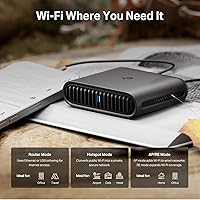
The TP-Link TL-WR3002X AX3000 Wi-Fi 6 Travel Router launched in early 2025 and quickly carved out a spot among the top-selling portable routers on the market. At roughly the size of a deck of cards and weighing just over five ounces, this travel router punches well above its class with specs you would normally expect from a home unit. It operates in three modes — Router, Hotspot, and AP/Range Extender — so it adapts to whatever connection is available, whether that is a hotel Ethernet port, public Wi-Fi, or a tethered phone. USB-C power input means you can run it directly off a power bank, which is a genuinely useful perk when wall outlets are scarce.

Features & Benefits

The headline spec is dual-band Wi-Fi 6, delivering up to 2402 Mbps on the 5 GHz band and 574 Mbps on 2.4 GHz — fast enough for video calls, 4K streaming, and light work across multiple devices at once. The 2.5 Gbps WAN port is a standout inclusion for a travel router; it will not bottleneck you if your hotel offers a genuinely fast Ethernet connection. VPN support covers OpenVPN, WireGuard, PPTP, and L2TP in both client and server modes, which is more flexibility than most competitors offer at this tier. The one-step captive portal feature via the Tether app is particularly practical — log in to hotel Wi-Fi once and every device on your network stays connected automatically. USB 3.0 also handles phone tethering if Ethernet is not an option.

Best For

This portable Wi-Fi 6 router is an obvious fit for business travelers who need a reliable private network in hotels or lounges — especially those already running a WireGuard or OpenVPN setup. Cruise passengers and conference-goers will appreciate how it handles captive portal Wi-Fi that would otherwise frustrate every device on their trip. It also works well for small travel groups who need to stretch a single hotel connection across phones, laptops, and tablets without fighting over bandwidth. Less suited for casual travelers who just need basic connectivity and would rather skip managing an app. If you are a tech-savvy user who wants something that doubles as a portable VPN server, the TL-WR3002X earns its place in your bag.

User Feedback

With over 11,000 ratings averaging 4.4 stars, the reception for this travel router has been notably strong for a product barely a year old. Buyers frequently praise how quick initial setup is, even for those who are not particularly technical, and the compact form factor draws consistent compliments — it fits easily in a jacket pocket. On the critical side, some users note that the Tether app is effectively required for setup, which is a friction point if you prefer a browser-based configuration. A handful of reports mention the unit running warm during extended VPN use. And while it outperforms older TP-Link travel routers in speed and software polish, real-world hotel range remains constrained by the device's compact antenna design.

Pros

  • Built-in WireGuard and OpenVPN support covers both client and server modes — rare at this size and price tier.
  • The captive portal feature reliably handles hotel Wi-Fi logins so every device on your network connects automatically.
  • A 2.5 Gbps WAN port means this travel router will not become the bottleneck even on genuinely fast hotel Ethernet.
  • Runs off a standard USB-C power bank, eliminating the need to hunt for a wall outlet in a packed hotel room.
  • Wi-Fi 6 support across dual bands keeps multiple laptops, phones, and tablets connected without noticeable congestion.
  • Setup is quick enough for non-technical users, and the Tether app walks through configuration clearly step by step.
  • Weighing just over five ounces, the TL-WR3002X slips into a jacket pocket without adding meaningful bulk to your bag.
  • USB 3.0 tethering lets you share a phone data connection when no Ethernet or public Wi-Fi is available.
  • Over 11,000 buyer ratings averaging 4.4 stars reflects a level of proven, real-world reliability that is hard to dismiss.
  • TP-Link is a CISA Secure-by-Design signatory, which at least signals a formal commitment to security practices.

Cons

  • The Tether app is mandatory for setup — there is no clean browser-based alternative for those who prefer it.
  • The unit runs noticeably warm during extended VPN sessions, which may concern users leaving it on overnight.
  • Compact antenna design limits practical room coverage; it is not a substitute for a full-sized travel router in large suites.
  • Real-world hotel speeds are typically far below the AX3000 ceiling — do not buy this expecting maximum throughput in practice.
  • TP-Link has faced ongoing geopolitical scrutiny in some government and enterprise circles, which is worth researching before buying.
  • No built-in battery means you still need a power bank or outlet — it is not fully self-contained for truly cable-free setups.
  • Some users find the Tether app requires an account or phone number, which feels unnecessary for a local network device.
  • Range extender mode performance is modest at best — dedicated range extenders will outperform it in that specific role.

Ratings

The TP-Link TL-WR3002X AX3000 Wi-Fi 6 Travel Router scores below were generated by our AI rating engine after analyzing thousands of verified global buyer reviews, with spam, bot-submitted, and incentivized feedback actively filtered out. This travel router earns consistently strong marks in connectivity and portability, though a handful of real pain points around app dependency and thermal management keep certain scores grounded. Both what buyers love and what frustrates them are reflected honestly in every category.

Ease of Setup
83%
Most buyers — including those with limited networking experience — report getting connected in under ten minutes using the Tether app. The guided setup flow handles hotel Ethernet, hotspot mode, and USB tethering clearly, which is exactly the kind of hand-holding that matters when you are jet-lagged and need a working connection fast.
A meaningful segment of users resents the mandatory app requirement, particularly those who prefer configuring routers through a browser. A few report account prompts during setup that feel unnecessary for what is fundamentally a local device, and app connectivity hiccups have stalled setup on occasion.
VPN Performance
88%
WireGuard performance on this travel router is notably strong for its class — users running home server tunnels or commercial VPN providers report stable throughput and low latency across extended hotel stays. The ability to run the router as both a VPN client and server in one compact device is a feature competitors at this tier rarely match.
Sustained VPN encryption — especially OpenVPN — pushes the processor hard enough that the unit runs uncomfortably warm, and some users note modest throughput drops during prolonged encrypted sessions. Those expecting full-speed WireGuard performance comparable to a desktop router will find the hardware ceiling more apparent under heavy load.
Captive Portal Handling
79%
21%
The one-step captive portal authentication genuinely delivers in most real-world hotel and airport scenarios, saving travelers from logging every device in separately — a frustration anyone who has managed a family trip on hotel Wi-Fi will immediately appreciate. The majority of users confirm it works reliably across major international hotel chains.
Some hotels use proprietary or non-standard portal implementations that break the automatic authentication flow, requiring a manual login fallback. Cruise ship environments, where portals are often session-based and time-limited, generate the most complaints about inconsistent behavior.
Portability & Form Factor
93%
At 5.3 oz and roughly the footprint of a thick smartphone, this portable Wi-Fi 6 router disappears into a coat pocket or cable organizer without a second thought. Buyers who have compared it to older-generation travel routers specifically call out how much smaller and lighter it feels without sacrificing port selection.
The compact chassis leaves no room for external antennas, which means range is inherently limited compared to larger travel routers. A small number of users in large hotel suites or open conference spaces note that signal strength does not reach the far end of the room as reliably as they expected.
Wi-Fi Speed & Range
74%
26%
In close-range use — a hotel room, a home office, or a shared cabin — the dual-band Wi-Fi 6 performance is genuinely fast, and buyers running 4K streams or video calls simultaneously report a notably smoother experience compared to connecting devices directly to hotel Wi-Fi. The 5 GHz band handles high-bandwidth tasks well within its effective radius.
Real-world range is modest, which is an expected trade-off for a device this size, but it catches some buyers off guard. The upstream hotel or cruise network is almost always the actual bottleneck, so the AX3000 ceiling rarely reflects what users experience in practice — and a handful of reviews express frustration about this gap between spec and reality.
Wired Connectivity
91%
The 2.5 Gbps WAN port is a standout inclusion that separates the TL-WR3002X from most travel router competitors still running gigabit-only ports. Business travelers staying in properties that offer genuine multi-gig Ethernet — increasingly common in newer hotels and conference centers — will benefit directly without any bottleneck at the router level.
There is only one LAN port at 1 Gbps, which limits wired device connections to a single client without adding a switch. Users who need to wire two or more laptops simultaneously will find this frustrating and will need to carry an additional accessory.
Thermal Management
61%
39%
Under light to moderate loads — basic routing, hotspot sharing, or occasional VPN use — the chassis temperature stays within a range most users describe as normal for a compact device. The passively cooled design keeps the unit silent, which matters in quiet hotel rooms and overnight use scenarios.
Extended VPN sessions, particularly with OpenVPN, push surface temperatures high enough that multiple reviewers flag it as a concern for continuous overnight operation. Leaving the router in an enclosed space like a drawer or padded case during active use amplifies the heat issue noticeably.
Multi-Device Handling
82%
18%
Buyers using this travel router to connect a mix of laptops, phones, tablets, and smart devices for a small group consistently report stable performance without obvious degradation. The Wi-Fi 6 multi-device efficiency improvements over older standards are noticeable when four or more clients are active simultaneously.
The 80-device rating is a theoretical ceiling that few travel scenarios will approach, and real-world multi-device performance depends heavily on the upstream bandwidth available. When the hotel connection itself is congested, adding more devices compounds the bottleneck in ways the router cannot resolve.
Power Flexibility
89%
USB-C power compatibility with standard PD and QC power banks is a practical advantage that frequent flyers quickly grow to appreciate — it means one fewer wall adapter in the bag. Users on long flights or in airport lounges without available outlets specifically highlight this as a differentiating feature versus older travel routers.
The router does not include an internal battery, so it is not self-contained without an external power bank. Users who do not already carry a compatible power bank will need to purchase one separately to take full advantage of the cable-free use case.
App Quality
71%
29%
The Tether app is well-organized for a mobile-first router management tool, and common tasks like switching modes, checking connected devices, and configuring VPN credentials are accessible without navigating deeply nested menus. Regular app updates since launch have addressed several early stability complaints.
The mandatory nature of the app remains a friction point — a browser-based fallback would satisfy a vocal portion of the user base who distrust or prefer not to install third-party apps. Occasional app crashes during initial configuration are a recurring complaint, particularly on older Android versions.
Build Quality
77%
23%
The matte black plastic casing feels sturdier than the price point might suggest, and buyers who have traveled with it across multiple trips report no cracking, port loosening, or cosmetic wear under normal bag-and-go handling. The overall fit and finish reads as mid-range rather than budget.
The chassis is all-plastic with no rubberized grip or protective corners, meaning it will scuff and scratch in an unprotected bag over time. Some users note that the Ethernet and USB ports feel slightly less robust than they would prefer for a device being plugged and unplugged repeatedly on the road.
Value for Money
86%
Measured against what it actually delivers — Wi-Fi 6, multi-gig Ethernet, full VPN client and server support, and captive portal handling in a pocket-sized package — the TL-WR3002X offers a feature set that would have cost significantly more in previous product generations. Buyers upgrading from older or budget travel routers consistently call out the value gap as a pleasant surprise.
It is not the cheapest travel router on the market, and buyers who primarily need basic hotel Ethernet sharing without VPN or advanced features may find the pricing harder to justify. The mandatory app ecosystem also reduces perceived value for users who factor in data privacy and software dependency.
Security Features
84%
The combination of WireGuard and OpenVPN support, guest network isolation, and TP-Link's formal CISA Secure-by-Design commitment gives security-conscious travelers a reasonable baseline for protecting traffic on public networks. Buyers running personal VPN servers report that the security configuration options are more granular than competing travel routers at this tier.
TP-Link's Chinese ownership has drawn scrutiny from enterprise and government security communities, and this context is worth acknowledging for buyers handling sensitive professional traffic. The router is perfectly reasonable for personal use, but organizational security policies may complicate deployment in certain professional settings.
Software & Firmware
76%
24%
TP-Link has maintained a consistent firmware update cadence since launch, and several early software issues — including captive portal edge cases and VPN configuration stability — have been addressed in post-release updates. The Tether app roadmap appears active, which buyers in the user community note as a positive sign for long-term support.
The firmware interface, while functional, lacks some advanced configuration options that experienced networking users expect, such as granular QoS controls or detailed traffic logging. Users hoping for OpenWrt compatibility will find that the TL-WR3002X does not officially support third-party firmware, limiting customization potential.

Suitable for:

The TP-Link TL-WR3002X AX3000 Wi-Fi 6 Travel Router is purpose-built for people who spend serious time in hotels, on cruise ships, or at conference venues where public Wi-Fi is unreliable, shared, or locked behind a captive portal login page. Business travelers will get the most value here — particularly those who already rely on WireGuard or OpenVPN to keep their traffic private on untrusted networks, since this travel router handles both client and server roles without needing a separate device. Small groups traveling together will also find it genuinely useful: rather than logging every phone and laptop into a hotel portal individually, one person sets it up once and the whole group is covered. Digital nomads who work remotely and need a consistent, secure connection across countries and accommodation types will appreciate the multi-mode flexibility — it adapts to Ethernet, public Wi-Fi, or a tethered phone depending on what is available. The USB-C power input is a thoughtful touch for anyone already carrying a power bank, since it means one less adapter to pack.
Not suitable for:

The TP-Link TL-WR3002X AX3000 Wi-Fi 6 Travel Router is not the right pick for casual or occasional travelers who simply want a basic connectivity boost without any setup effort. The Tether app is effectively required to configure and manage the device, which is a real barrier if you prefer a straightforward browser-based interface or are traveling somewhere with limited smartphone access. It is also worth noting that real-world speeds in hotel environments are almost always throttled by the hotel network itself, so buyers expecting the full AX3000 throughput in practice are likely to be disappointed — the hardware ceiling rarely matters when the upstream connection is slow. Those with concerns about TP-Link's ownership structure and the ongoing geopolitical scrutiny the brand has faced in some government and enterprise contexts should research that angle before committing, since it is a legitimate consideration for security-conscious buyers. Finally, anyone expecting wide-area room coverage from a pocket-sized device will find the antenna range limited compared to a full-sized travel router.

Specifications

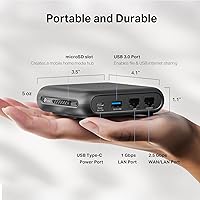
  • Wi-Fi Standard: This travel router uses Wi-Fi 6 (802.11ax) alongside backward-compatible 802.11ac, 802.11n, 802.11g, and 802.11b standards.
  • Frequency Bands: Dual-band operation covers both the 2.4 GHz band (up to 574 Mbps) and the 5 GHz band (up to 2402 Mbps).
  • Max Wi-Fi Speed: Combined wireless throughput is rated at AX3000, representing the aggregate of both bands under ideal conditions.
  • WAN Port: A single 2.5 Gbps WAN/LAN port provides multi-gigabit wired uplink capability for fast hotel or office Ethernet connections.
  • LAN Port: One dedicated 1 Gbps LAN port allows a wired device, such as a laptop, to connect directly to the router.
  • USB Port: A USB 3.0 port supports smartphone tethering and USB modem connections as an alternative internet source.
  • VPN Protocols: Supported VPN protocols include OpenVPN, WireGuard, PPTP, and L2TP, functioning in both client and server modes.
  • Operating Modes: The router operates in three modes: Router (Ethernet or USB tethering), Hotspot (captive portal public Wi-Fi), and AP/Range Extender.
  • Max Devices: The router is rated to support up to 80 simultaneous connected devices across both bands.
  • Power Input: Power is supplied via USB-C port, compatible with 5V/3A PD or QC power banks and the included AC adapter.
  • Dimensions: The unit measures 3.6 x 1.18 x 4.13 inches, making it compact enough to fit in a jacket pocket or small travel pouch.
  • Weight: The router weighs 5.3 oz, adding minimal bulk to a carry-on bag or daily travel kit.
  • Color: Available in black with a matte finish.
  • App Support: Configuration and management are handled through the TP-Link Tether app, available for iOS and Android devices.
  • Security Pledge: TP-Link is a signatory of the CISA Secure-by-Design pledge, committing to baseline security standards in device design and maintenance.
  • In the Box: Package includes the TL-WR3002X router, a power adapter, a USB cable, an RJ45 Ethernet cable, and a quick installation guide.
  • Model Number: The official model designation is TL-WR3002X, released under TP-Link's travel router product line in March 2025.
  • Certifications: The device is listed as hotel, cruise, and travel approved for use with shared and captive portal networks.

Related Reviews
TP-Link TL-WR1502X Travel Router
81%
91%
Ease of Setup
94%
Portability & Form Factor
88%
Captive Portal Handling
79%
Wi-Fi Performance
86%
Multi-Mode Versatility
More
TP-Link BE3600 Wi-Fi 7 Travel Router TL-WR3602BE

85%
88%
Performance & Speed
94%
Portability & Size
85%
Wi-Fi Range & Connectivity
92%
Security Features
90%
Ease of Use & Setup
More
TP-Link Archer AX55
TP-Link Archer AX55
76%
83%
Wireless Performance
74%
Coverage & Range
86%
Device Handling & Congestion
91%
Setup & Ease of Use
78%
Build Quality & Design
More
TP-Link TL-WPA7817 KIT Powerline Wi-Fi 6 Extender
75%
88%
Setup & Installation
67%
Powerline Speed Performance
91%
Wired Connection Quality
53%
Placement Flexibility
76%
Value for Money
More
TP-Link Festa F65-Outdoor AX3000 Wi-Fi 6 Access Point
84%
88%
Performance
94%
Outdoor Durability
85%
Ease of Setup
82%
Signal Strength
79%
Cloud Management & App
More
TP-Link TL-WA860RE Wi-Fi Range Extender
86%
95%
Ease of Setup
84%
Performance in Larger Homes
90%
Wi-Fi Range Extension
88%
Reliability
85%
Build Quality
More
Reyee RG-E4 Wi-Fi 6 Router
78%
78%
Wi-Fi Coverage
83%
Wi-Fi Speed
86%
Setup & Ease of Use
88%
Device Capacity
81%
Gaming Performance
More
TP-Link RE705X AX3000 Wi-Fi 6 Range Extender
79%
88%
Setup & Installation
79%
Signal Coverage
74%
Wi-Fi Speed Performance
71%
OneMesh Roaming
91%
Ethernet Port Utility
More
TP-Link Archer BE400
80%
88%
Wireless Performance
91%
Setup & Ease of Use
78%
Coverage & Range
87%
Wired Port Performance
83%
Multi-Device Handling
More
TP-Link Archer GE800
80%
91%
Wireless Performance
94%
Wired Connectivity
88%
Gaming Latency & Prioritization
83%
Build Quality & Design
69%
RGB Lighting
More

FAQ

The Tether app is the primary and recommended way to configure this travel router. While some TP-Link devices offer a browser-based setup at a local admin address, users consistently report that the TL-WR3002X is most reliably set up through the app. If you strongly prefer browser-only configuration, it is worth checking the current firmware release notes, but plan on using the app as your main tool.

In most cases, yes. The Hotspot mode is specifically designed to handle the kind of login page you encounter at hotel chains, airports, and cruise ships. You authenticate once through the Tether app and the router shares that authenticated session with all your connected devices. That said, some hotels use more aggressive or non-standard portal systems that can occasionally cause friction, so it is not a guaranteed 100% success rate at every property.

Yes, and it works well in practice. The router draws power via USB-C and is compatible with any 5V/3A PD or QC power bank. A mid-sized 10,000 mAh power bank can typically keep it running for several hours, which is useful on long flights or in locations without convenient outlets.

Yes. This portable Wi-Fi 6 router supports WireGuard in both client mode (connecting out to an existing VPN server) and server mode (acting as its own VPN endpoint). If you have a WireGuard server running at home or on a VPS, you can configure the router to tunnel all connected device traffic through it, which is exactly what most travelers want.

It handles cruise ship Wi-Fi about as well as any travel router can. The captive portal feature helps with the login process, but keep in mind that cruise ship internet is inherently slow and shared — no router can fix that upstream bottleneck. Where this device genuinely helps is in giving everyone in your cabin a single authenticated connection without each device needing to log in separately.

During basic routing tasks it stays comfortably warm but not concerning. With active VPN encryption running continuously — especially WireGuard or OpenVPN — the unit does get noticeably hotter. It is not dangerous, but leaving it flat on a surface with some airflow around it is a better idea than tucking it inside a padded case during heavy use.

Yes, AP/Range Extender mode allows it to connect to an existing Wi-Fi network and rebroadcast it or extend coverage to wired devices. It is functional for occasional use, but if extending home Wi-Fi coverage is your primary goal, a dedicated range extender will generally outperform it due to antenna differences.

That is precisely the core use case it is built for. Plug the hotel Ethernet cable into the 2.5 Gbps WAN port, run through the quick setup, and every device connected to the travel router — by wire or Wi-Fi — shares that single upstream connection. It is one of the most reliable ways to get a whole family or work team online from a single hotel drop.

This is a fair question and one worth thinking through honestly. TP-Link has faced some scrutiny in U.S. government and enterprise circles related to its Chinese ownership structure. For most personal and business travel use, the practical risk is low, especially when running your own VPN tunnel through the device. However, users handling genuinely sensitive government or classified work traffic may want to evaluate alternatives based on their organization's specific security policies.

Yes, like most routers the TL-WR3002X has a physical reset button that restores factory defaults when held for several seconds. You will lose any saved VPN configurations or custom settings, so it is worth noting down your setup details somewhere safe before traveling, particularly if you have spent time configuring WireGuard tunnels or custom network settings.

Where to Buy