Overview

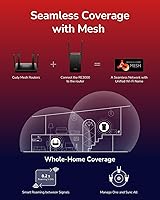
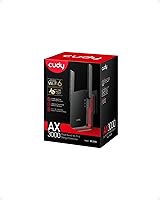
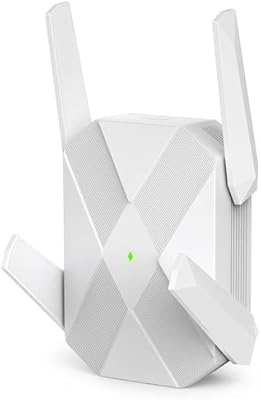
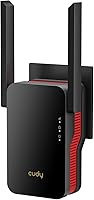
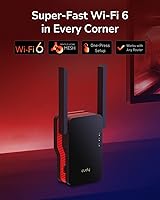
The Cudy RE3000 AX3000 Wi-Fi 6 Extender is a compact, affordable way to bring Wi-Fi 6 coverage to the corners of your home without replacing your existing router. Cudy isn't a brand most people have heard of — it's a Chinese networking company quietly building a solid lineup of budget-friendly hardware. This range extender plugs directly into a wall outlet, stays relatively unobtrusive, and includes a Gigabit Ethernet port for wired connections — a detail many cheaper extenders skip entirely. It runs in three modes: range extender, access point, or add-on mesh node, giving it more practical flexibility than its price tag might suggest.
Features & Benefits

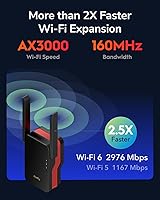
The Wi-Fi 6 standard brings real, practical advantages here — not just a spec sheet upgrade. The 5 GHz band runs at 160 MHz channel width, which meaningfully raises the throughput ceiling compared to the 80 MHz cap on most Wi-Fi 5 extenders. Technologies like OFDMA and MU-MIMO let it handle many devices talking at once without forcing them to queue up and wait. Beamforming directs the signal toward your devices rather than scattering it into walls. The unit also packs a 1.3 GHz dual-core processor, which keeps things from choking under heavier loads. Keep in mind, though — extenders by nature suffer a half-duplex penalty, so real-world speeds won't reach the advertised 3 Gbps combined figure. Expect roughly half that in practice, which is still a genuine step up from older hardware.

Best For

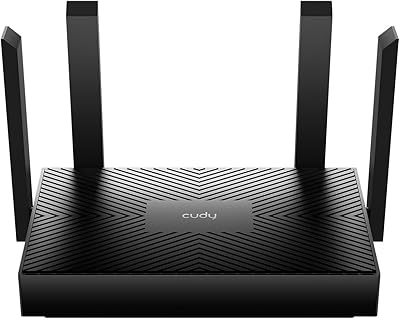
This Wi-Fi 6 extender makes the most sense for people stuck with an ISP-provided router they can't replace — think apartment renters or anyone locked into a rental equipment agreement. It handles a busy household well, particularly one running 10 to 30 devices simultaneously across streaming, smart home gadgets, and mobile use. The Gigabit Ethernet port is a quiet standout, letting you hardwire a gaming console or smart TV in a far room without running cable from your main router. If you already own a compatible Cudy router like the X6 or M1800, the Cudy RE3000 slots in as an add-on mesh node — though that mesh compatibility is limited strictly to select Cudy models, so don't assume it'll integrate with other brands.

User Feedback

Sitting at 4.1 out of 5 stars across 225 ratings, this range extender holds up reasonably well for a lesser-known brand. The most common praise centers on easy WPS pairing — most users report being up and running in under five minutes — alongside a noticeable speed improvement over their previous extenders. On the flip side, some buyers find the 5 GHz signal becomes unreliable at longer distances or through multiple walls. The companion app draws mild criticism for feeling less polished than what TP-Link or Netgear offer. A smaller group of reviewers also ran into mesh mode issues when pairing with non-Cudy routers. For a single-floor home or a medium-sized apartment, though, most buyers come away satisfied.

Pros

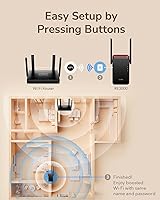
  • WPS setup takes under five minutes — no router login or app required to get started.
  • Wi-Fi 6 support brings real throughput improvements over older extenders at a budget-friendly price.
  • The Gigabit Ethernet port lets you hardwire a gaming console or smart TV in a dead-zone room.
  • 160 MHz channel width on the 5 GHz band delivers higher speeds than most similarly priced extenders.
  • WPA3 encryption offers stronger network security than the WPA2 standard most older extenders still use.
  • Three operating modes — extender, access point, and mesh node — give it genuine flexibility beyond a one-trick device.
  • The Cudy RE3000 handles 15 to 25 simultaneous devices comfortably in everyday household use.
  • Compact plug-in form factor fits discreetly into any wall outlet without blocking adjacent sockets.
  • OFDMA and MU-MIMO reduce congestion noticeably when multiple devices are active at the same time.
  • Rated above average for its category with a 4.1-star average across a meaningful volume of verified buyers.

Cons

  • 5 GHz signal becomes unreliable through multiple walls or across longer distances in real-world use.
  • Repeater mode cuts usable bandwidth roughly in half compared to a direct router connection.
  • The companion app feels unpolished and occasionally unresponsive compared to TP-Link or Netgear equivalents.
  • Mesh mode only works with specific Cudy router models — it will not integrate with other brands.
  • A single Ethernet port limits wired bridging if you have more than one device to hardwire in the same spot.
  • The 70-device capacity is a hard ceiling, not a comfortable operating range — performance degrades well before that number.
  • LED indicator has no manual off switch, which can be disruptive in bedrooms or dim living spaces.
  • Cudy has limited brand support infrastructure compared to established networking names, which may concern long-term buyers.
  • Coverage claims of 3,000 sq ft are optimistic and rarely achieved in homes with typical interior obstacles.
  • WPA3 benefits are irrelevant if your existing router does not also support the standard, which is common among ISP-issued hardware.

Ratings

The scores below for the Cudy RE3000 AX3000 Wi-Fi 6 Extender were generated by our AI review engine after analyzing verified buyer feedback from multiple global marketplaces, with spam, incentivized, and bot-flagged reviews actively filtered out. The result is an honest, data-grounded snapshot of where this range extender genuinely delivers and where it falls short. Both its clear strengths and its recurring pain points are reflected without softening.
Setup & Ease of Use
88%
The WPS pairing process is about as frictionless as it gets — most buyers report being connected within three minutes of plugging it in. Even less technical users, like older family members handling the setup solo, consistently mention not needing to touch any configuration menus at all.
The companion app experience is noticeably rougher around the edges compared to what TP-Link or Netgear offer. A handful of users ran into situations where the app failed to detect the extender and had to fall back on browser-based setup, which added unexpected friction.
Wi-Fi Coverage
76%
24%
In open-plan homes and single-floor apartments, the Cudy RE3000 does a solid job pushing usable signal into rooms where the main router signal had previously collapsed. Users in 1,500 to 2,200 square foot homes report meaningful dead-zone elimination in back bedrooms and garages.
The 3,000 sq ft coverage claim is optimistic under real conditions. Multi-story homes with concrete floors or brick interior walls see noticeably degraded performance, and a few buyers found the signal barely reached a second floor when the extender was placed mid-house.
5 GHz Band Performance
67%
33%
At close to medium range — roughly 20 to 40 feet from the extender — the 5 GHz band performs well, with buyers noting smooth 4K streaming and low-latency video calls. The 160 MHz channel width gives it a genuine throughput edge over older Wi-Fi 5 extenders in the same price bracket.
Signal consistency on the 5 GHz band deteriorates faster than expected with distance or obstacles. Several reviewers specifically called out intermittent drops while working from a home office one or two rooms away, which is a real problem for anyone relying on it for video conferencing.
2.4 GHz Band Reliability
81%
19%
The 2.4 GHz band holds up well across longer distances and through walls, making it the dependable fallback for smart home devices, security cameras, and IoT gadgets scattered around the house. Users running 10 to 20 low-bandwidth devices report very few disconnections on this band.
Like any dual-band extender, the 2.4 GHz side is inherently slower and more congested in apartment buildings with many overlapping networks nearby. A few users in dense urban environments noticed more interference than they expected, particularly on older smart home devices.
Real-World Speed Throughput
63%
37%
Buyers upgrading from a Wi-Fi 5 extender consistently notice faster download speeds and more stable streaming. For everyday tasks — browsing, HD video, smart speaker commands — the performance improvement is tangible, even if it never approaches the theoretical 3 Gbps ceiling.
As with all repeater-mode extenders, the half-duplex penalty cuts usable bandwidth roughly in half compared to a direct router connection. Power users running large file transfers or cloud backups through the extender will feel that ceiling quickly. It is not a substitute for a wired connection or a true mesh node.
Gigabit Ethernet Port
91%
The inclusion of a Gigabit Ethernet port is one of the most practically appreciated features among buyers. Gamers hardwiring a console and households plugging in a smart TV in a far room both highlight it as the reason they chose this unit over cheaper, port-free alternatives.
There is only a single Ethernet port, which limits its use as a media bridge if you have multiple wired devices in the same room. A small number of buyers wished for at least two ports, particularly those running both a gaming console and a streaming stick from the same location.
Device Capacity Handling
72%
28%
For a typical busy household running 15 to 25 devices simultaneously — phones, tablets, smart TVs, thermostats, and a laptop or two — the Cudy RE3000 handles the load without obvious slowdowns. The combination of OFDMA and MU-MIMO genuinely helps under moderate multi-device pressure.
The marketed 70-device ceiling is a technical spec, not a practical target. Buyers who tried to run 40 or more active connections reported sluggish performance and intermittent drops. Think of that number as headroom, not a daily operating target.
Mesh Mode Functionality
58%
42%
For buyers who already own a compatible Cudy router — specifically the X6, WR3000, or M1800 — the add-on mesh mode works reasonably well, providing a more cohesive network experience with a single SSID and smoother device handoff compared to standard extender mode.
Mesh compatibility is strictly limited to a short list of Cudy-branded routers, which is a real restriction that tripped up several buyers. Those expecting it to integrate with their existing TP-Link, ASUS, or Netgear router in mesh mode were disappointed to find it simply does not work that way.
Build Quality & Design
74%
26%
The plug-in form factor is compact and unobtrusive — it does not jut awkwardly out of the wall socket or block adjacent outlets. The plastic housing feels solid enough, and the ventilation design appears adequate for sustained use without reported overheating issues.
The finish and material quality do not quite match what you get from TP-Link or Netgear at a similar price. A few buyers mentioned the unit feels slightly lightweight in a way that reads as cheap, and the LED indicator light has no manual off switch, which annoyed bedroom users.
Security Features
83%
WPA3 support is a meaningful upgrade at this price point — most extenders in this range still default to WPA2 only. For buyers with WPA3-capable routers, the end-to-end security improvement is real and appreciated, especially in households with banking apps and smart home hubs on the same network.
WPA3 benefits are only realized if your existing router also supports it. Buyers running older routers — which is common among people who need an extender precisely because they cannot upgrade their hardware — fall back to WPA2 automatically, making this feature irrelevant for a notable share of its target audience.
App & Software Experience
54%
46%
The Cudy app covers the basics: network status, device list, and mode switching are all accessible without needing to log into a browser interface. For users who just want to set it and forget it, the app is functional enough to get the job done.
The software experience is where Cudy's smaller scale shows most clearly. Buyers who have used TP-Link's Tether app or Netgear's Nighthawk app find the Cudy equivalent noticeably less refined — slower to load, occasionally unresponsive, and lacking quality-of-life features like signal strength placement guides.
Value for Money
79%
21%
As an entry point into Wi-Fi 6 extension without buying a whole new router system, the Cudy RE3000 offers a reasonable return on investment. The combination of Wi-Fi 6 support, a Gigabit Ethernet port, and three operating modes at its price tier is genuinely hard to match dollar for dollar.
The value proposition does weaken if you need reliable long-range 5 GHz performance or a polished software ecosystem. Spending a bit more on a TP-Link RE700X or waiting for a sale on the Netgear EAX15 gets you noticeably better consistency — a trade-off worth considering before committing.
Placement Flexibility
77%
23%
Because there are no external antennas and no desktop footprint, the Cudy RE3000 can be tucked into any wall outlet — behind furniture, in a hallway, or in a stairwell — without looking out of place. This makes optimal signal positioning much less of a visual compromise than bulkier extenders.
The plug-in design means you are dependent on wherever your wall outlets happen to be, which is not always the geometrically ideal midpoint between your router and dead zone. In older homes with sparse outlet placement, getting the extender into the sweet spot can require an extension cord workaround.

Suitable for:

The Cudy RE3000 AX3000 Wi-Fi 6 Extender is a practical pick for renters, apartment dwellers, or homeowners who are locked into an ISP-provided router and simply need to push coverage further without a full network overhaul. It works especially well in single-story homes or open-plan spaces where the main router sits at one end and dead zones form in back bedrooms, home offices, or garages. If you have a moderately busy household — think 15 to 25 devices spread across phones, smart TVs, thermostats, and a laptop or two — this range extender handles that load without obvious strain. Remote workers who want to hardwire a work laptop or video conferencing setup in a far room will appreciate the Gigabit Ethernet port, which is a genuinely rare inclusion at this price tier. It also slots neatly into an existing Cudy mesh network as an add-on node, making it a cost-effective expansion option for anyone already running a compatible Cudy router like the X6 or M1800.
Not suitable for:

The Cudy RE3000 AX3000 Wi-Fi 6 Extender is not the right tool for buyers expecting consistent, high-throughput coverage across a large multi-story home or a property with thick concrete or brick walls — real-world 5 GHz performance weakens faster than the spec sheet implies. Like all repeater-mode extenders, it suffers from a half-duplex bandwidth penalty, meaning actual throughput is roughly half of what a direct router connection delivers, which makes it a poor fit for heavy-use scenarios like 4K NAS streaming, large cloud backups, or competitive online gaming that demands ultra-low latency. If you are already considering a full mesh system from TP-Link, ASUS, or Eero, this range extender will feel like a step backward in terms of roaming, app experience, and network management. Anyone expecting to integrate it into a non-Cudy mesh setup will be disappointed — mesh mode is strictly limited to a handful of compatible Cudy routers, and it does not play nicely outside that ecosystem. Finally, buyers who value a polished companion app for network monitoring and parental controls will find the Cudy software experience noticeably behind what established brands offer.

Specifications

  • Wi-Fi Standard: Operates on the 802.11ax (Wi-Fi 6) standard, with backward compatibility for older 802.11a/b/g/n/ac devices.
  • Frequency Bands: Dual-band design covers both the 2.4 GHz and 5 GHz bands simultaneously for flexible device distribution.
  • Combined Speed: Advertised combined throughput reaches up to 3,000 Mbps across both bands under ideal laboratory conditions.
  • Channel Width: Supports 160 MHz channel width on the 5 GHz band, enabling higher peak speeds than the 80 MHz cap common on Wi-Fi 5 extenders.
  • Processor: Powered by a 1.3 GHz dual-core ARM Cortex-A53 processor designed to handle concurrent network traffic with reduced latency.
  • Device Capacity: Rated for a maximum of 70 simultaneous connected devices across both bands, though optimal performance is observed at lower active counts.
  • Ethernet Port: Equipped with one Gigabit LAN port (10/100/1000 Mbps) for bridging a single wired device such as a console, PC, or smart TV.
  • Security: Supports WPA3 personal encryption as well as WPA2, with WPA3 active only when paired with a WPA3-capable host router.
  • Key Technologies: Incorporates MU-MIMO, OFDMA, and Beamforming to manage multi-device efficiency and direct signal focus toward connected clients.
  • Operating Modes: Functions in three selectable modes: Wi-Fi range extender, wired access point, and add-on mesh node for compatible Cudy router ecosystems.
  • Mesh Compatibility: Mesh node mode is supported exclusively with select Cudy routers, including the X6, WR3000, and M1800 models.
  • Setup Method: Can be configured via a single WPS button press on both the router and extender, or through the Cudy app and browser-based interface.
  • Coverage Area: Rated for up to 3,000 sq ft of extended coverage, though real-world range varies based on wall materials, interference, and floor plan layout.
  • Dimensions: Measures 1.93 x 3.07 x 5.08 inches, making it a compact plug-in unit with no external antennas or desktop footprint.
  • Weight: Weighs 10.6 oz, which is typical for a wall-plug extender with an integrated Ethernet port and internal antenna array.
  • Model Number: Officially designated as the RE3000, manufactured by Shenzhen Cudy Technology Co., Ltd.
  • Availability Date: First made available for purchase in January 2023, placing it among the earlier budget Wi-Fi 6 extenders in its category.
  • Form Factor: Plug-in wall outlet design with no power brick or cable required, suitable for discreet placement in hallways, stairwells, or behind furniture.

Related Reviews

Cudy M3000 Wi-Fi 6 Mesh System
77%
93%
Value for Money
84%
Wi-Fi Speed & Throughput
91%
2.5G WAN Port
72%
Coverage & Range
88%
VPN Performance
More
Cudy AX1500 Wi-Fi 6 Router WR1500
83%
92%
Value for Money
88%
Wi-Fi Performance (5GHz)
79%
Wi-Fi Performance (2.4GHz)
74%
Range and Coverage
93%
Ease of Setup
More
TP-Link RE705X Wi-Fi 6 Range Extender
84%
89%
Performance
87%
Wi-Fi Coverage Range
93%
Ease of Setup
85%
Connectivity Reliability
70%
App Experience
More
Reyee RG-E4 Wi-Fi 6 Router
78%
78%
Wi-Fi Coverage
83%
Wi-Fi Speed
86%
Setup & Ease of Use
88%
Device Capacity
81%
Gaming Performance
More
D-Link AX1800 Mesh Wi-Fi 6 Range Extender
84%
90%
Wi-Fi Range and Coverage
85%
Setup and Installation
88%
Device Compatibility
80%
Wi-Fi Speed and Stability
93%
Security Features
More
TP-Link TL-WPA7817 Powerline Wi-Fi 6 Extender Kit
86%
88%
Wi-Fi Performance
94%
Setup & Installation
91%
Value for Money
85%
Powerline Range
89%
Dual-Band Speeds
More
TP-Link Festa F65-Outdoor AX3000 Wi-Fi 6 Access Point
84%
88%
Performance
94%
Outdoor Durability
85%
Ease of Setup
82%
Signal Strength
79%
Cloud Management & App
More
Eboous AX3000 WiFi 6 Range Extender
77%
78%
Signal Range & Coverage
91%
Setup & Installation
83%
WiFi 6 Performance
74%
Mesh Integration
88%
Ethernet Port Utility
More
Cudy WR3000 AX3000 WiFi 6 Router
75%
91%
Value for Money
78%
Wireless Performance
88%
Setup & Ease of Use
58%
App & Software Experience
74%
VPN Functionality
More
HMTYQNB 2025 AX3000 WiFi 6 Extender
87%
87%
Range & Coverage
93%
Setup & Installation
88%
Speed & Performance
91%
Ease of Use
75%
Signal Strength in Large Spaces
More

FAQ

No, you do not. The Cudy RE3000 AX3000 Wi-Fi 6 Extender is backward compatible with Wi-Fi 5 (802.11ac) and older routers. That said, you will only get the full Wi-Fi 6 performance benefits — like OFDMA efficiency and higher throughput — if your router also supports Wi-Fi 6. With an older router, it still extends coverage, just without unlocking the full spec.

Not in mesh mode, unfortunately. The add-on mesh functionality is exclusive to compatible Cudy routers, specifically the X6, WR3000, M1800, and a few other Cudy models. If you pair it with a non-Cudy router, it will still function as a standard range extender or access point — just not as a seamless mesh node with roaming handoff.

Setup is genuinely straightforward. Plug it into a wall outlet, press the WPS button on your router, then press the WPS button on the extender — most users are connected within two to three minutes. If your router does not have a WPS button, you can set it up through the Cudy app or by logging into the browser interface at a local IP address.

Yes, and this is one of the more useful things about this range extender. The Gigabit Ethernet port lets you run a cable directly from the extender to one wired device — a gaming console, smart TV, or desktop PC. Just keep in mind there is only one port, so if you need to wire two devices in the same room, you would need a small switch in between.

Expect roughly a 40 to 50 percent reduction in throughput compared to your direct router connection — this is a known characteristic of all repeater-mode extenders, not a flaw specific to this device. The extender has to receive and then retransmit data on the same radio, which cuts usable bandwidth roughly in half. For streaming, browsing, and everyday tasks this is usually acceptable, but power users transferring large files will feel the ceiling.

By default, it creates a new extended network with a slightly different name — typically your original network name plus an underscore or suffix. You can rename it to match your main router SSID manually if you want devices to connect to either one automatically, though this is not a true seamless roaming setup unless you are using it in mesh mode with a compatible Cudy router.

Technically yes, that is the hardware ceiling — but practically, you should think of 70 as the upper limit, not the comfortable operating range. In testing and real-world buyer feedback, performance starts to degrade noticeably when a large number of devices are actively pulling data simultaneously. For a typical busy household running 15 to 25 devices, it handles the load well.

The LED indicator does stay on during normal operation and there is no physical button to switch it off. Some users find this bothersome in bedrooms or darker living spaces. You may be able to disable it through the Cudy app or browser interface in certain firmware versions, but it is worth checking the current firmware notes if this is a concern for your setup.

The sweet spot is roughly halfway between your router and the dead zone you are trying to fix — ideally somewhere the extender can still receive a strong signal from your router, around 60 to 70 percent signal strength. Plugging it too close to the router wastes its range, and placing it too far means it has a weak source signal to work with, which limits what it can rebroadcast. A hallway or mid-room outlet usually works best.

Cudy is a Chinese networking hardware company that has been growing steadily in the budget and mid-range segment — they are not a household name like TP-Link or Netgear, but they are a legitimate manufacturer with a genuine product lineup. The RE3000 has over 225 verified ratings with a 4.1-star average, which is a reasonable signal of real-world reliability. The trade-off compared to bigger brands is a less mature app ecosystem and smaller support community, rather than any fundamental hardware concern.

Where to Buy