Overview

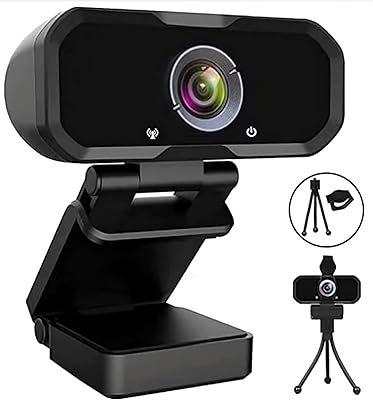
The Stopmotion Explosion SMC02 1080p Webcam comes from a brand that built its reputation in the niche world of stop-motion animation kits — which makes this webcam a more considered piece of hardware than most budget options. It weighs just 5 ounces and ships with a flexible mounting stand that clips onto a monitor or sits flat on a desk without fuss. Plug it into any USB port and both Windows and macOS recognize it instantly. What really sets it apart at this price is the manual focus ring — a feature you typically don't see until you spend considerably more.

Features & Benefits

At its core, this webcam outputs full 1080p resolution at 1920x1080, producing noticeably sharper video than most built-in laptop cameras. The five-element heat-resistant lens is designed to hold its focus during long recording sessions, rather than drifting as the hardware warms up — a small but practical engineering detail. The built-in microphone does a reasonable job cutting low-frequency hum from appliances or street noise, though it won't replace a dedicated USB mic for serious audio work. USB 2.0 and 3.0 compatibility makes setup genuinely effortless, with no driver hunting required for basic plug-and-play use on modern operating systems.

Best For

This manual-focus cam is a natural pick for stop-motion animators — the ability to manually dial in focus on a small subject close to the lens is something autofocus-only webcams can't replicate reliably. Students and remote workers wanting a real upgrade over a built-in laptop camera will find it more than adequate for video calls. It also suits YouTube creators shooting in well-lit, controlled setups, like desk tutorials or lightboxed product reviews. Anyone doing close-up document capture will quickly appreciate that twist-ring focus control, which gives you a level of precision that automated systems at this price point rarely match.

User Feedback

Buyers consistently highlight the SMC02 for delivering clear, sharp daytime footage that outperforms what most expect at this price, particularly for still captures and stop-motion frames. The flex stand draws mixed reactions — some find it stable enough for a permanent desk position, while others report it feeling less rigid over time. Low-light shooting is where the experience takes a dip; without supplemental lighting, indoor footage can look noticeably grainy, which is a real-world limitation worth knowing upfront. The built-in mic gets fair but lukewarm marks — fine for casual calls, but users with demanding audio needs tend to add a separate microphone. A handful of users noted occasional hiccups installing drivers on newer OS versions.

Pros

  • Sharp 1080p output is a meaningful step up from most built-in laptop cameras for everyday calls.
  • Manual focus ring gives stop-motion animators precise, frame-locked control that autofocus webcams cannot match.
  • Lightweight and compact enough to drop in a bag and use across multiple locations without hassle.
  • Works on both Windows and macOS with no driver installation required for basic use.
  • Five-element heat-resistant lens helps maintain consistent focus during long recording or animation sessions.
  • Built-in noise-canceling mic handles low-frequency appliance hum well enough for casual video calls.
  • USB 2.0 and 3.0 compatibility means it works with virtually any laptop or desktop without adapters.
  • Plug-and-play setup gets most users up and running within seconds of plugging in.
  • Strong value proposition for stop-motion creators who need manual focus at a budget price.

Cons

  • Low-light performance drops off sharply without a ring light or dedicated desk lamp.
  • The flex stand loses its grip over time and struggles to hold a fixed angle reliably.
  • No autofocus mode makes it awkward for users who switch frequently between close and standard distances.
  • Built-in microphone lacks the depth and clarity needed for anything beyond casual video calls.
  • Some users on newer OS versions encounter inconsistencies that require downloading drivers from the manufacturer site.
  • Plastic build feels utilitarian and does not inspire much confidence about multi-year durability.
  • Audio-video sync can drift during longer recording sessions on older or lower-spec machines.
  • Limited real-world data on long-term lens durability makes the heat-resistance claim hard to verify independently.

Ratings

The Stopmotion Explosion SMC02 1080p Webcam has been evaluated by our AI rating system after parsing thousands of verified global buyer reviews, with spam, bot-submitted, and incentivized feedback actively filtered out. The scores below reflect an honest cross-section of real user experiences — strengths and frustrations alike — so you can make a genuinely informed decision before buying.

Image Clarity
78%
22%
For a webcam at this price tier, buyers are consistently impressed by how sharp and detailed the 1080p output looks during well-lit video calls and recording sessions. Stop-motion creators in particular praise the level of detail captured on small objects at close range.
The clarity advantage fades noticeably in anything less than decent lighting. Users shooting in the evening or in dimly lit home offices report a visible drop in sharpness and an uptick in digital noise that can make footage look grainy.
Low-Light Performance
51%
49%
In controlled conditions with a ring light or natural window light, the SMC02 holds up reasonably well and produces usable footage. Some users have adapted their workspace lighting specifically to get the best out of it.
Without supplemental lighting, low-light performance is a consistent complaint. Multiple buyers report that evening calls and indoor shots in typical room lighting produce noticeably washed-out or grainy results that undercut the 1080p spec on the box.
Manual Focus Control
83%
The twist-ring manual focus is genuinely useful for stop-motion work and close-up document capture, where you want the lens locked at a specific distance rather than hunting for focus between frames. Users with these specific workflows consider it a standout feature at this price.
For everyday video calls, manually adjusting focus is an extra step most buyers did not anticipate needing. Users who switch between close-up and standard distances frequently find it fiddly, and there is no autofocus fallback if you forget to adjust.
Microphone Quality
62%
38%
The built-in noise-canceling mic does a solid job of cutting out the low-frequency hum of refrigerators and HVAC systems during calls, which makes a meaningful difference in a home or student apartment setting where background appliance noise is common.
Compared to even a modest dedicated USB microphone, the audio quality is noticeably thinner and less detailed. Users hosting podcasts, recording voiceovers, or doing anything beyond casual video calls tend to pair it with a separate mic fairly quickly.
Build Quality & Feel
58%
42%
The SMC02 is compact and light enough to toss in a bag or reposition on a desk without any real hassle. For buyers who need something small and portable, the physical footprint works in its favor.
The plastic housing and flex stand feel utilitarian at best. Several users report that the stand loses its rigidity over time and no longer holds a fixed angle reliably, which can be frustrating if you have spent time getting the perfect framing for your setup.
Flex Stand Stability
54%
46%
Out of the box, the stand clips onto a standard monitor bezel or sits on a flat surface without any tools required. Initial positioning is quick and straightforward for most desk configurations.
Long-term stability is a recurring concern in user reviews. The stand's grip weakens with repeated adjustments, and a number of buyers resort to propping the camera against objects or using third-party mounts after a few months of regular use.
Plug-and-Play Ease
81%
19%
On Windows 10 and most recent macOS versions, the webcam is recognized immediately after plugging in — no driver disc hunting or manual installation required for basic video call use. This makes setup painless for less tech-savvy users.
A subset of users on newer operating systems, particularly Windows 11 and recent macOS releases, have reported that the webcam behaves inconsistently without installing the manufacturer's supplemental drivers, which adds a small but real friction point to the out-of-box experience.
Compatibility
84%
The broad OS support list spanning older Windows versions through modern macOS is genuinely useful for users working on older hardware or mixed-OS households. The USB 2.0 and 3.0 compatibility means virtually any laptop or desktop works without an adapter.
While compatibility is wide on paper, some users running the latest OS builds have encountered recognition issues that required a visit to the manufacturer's website for driver updates — a minor inconvenience that breaks the plug-and-play promise for a small number of buyers.
Value for Money
79%
21%
Relative to built-in laptop cameras and other webcams at a similar price point, the SMC02 offers a meaningful step up in image resolution and the bonus of manual focus control. Stop-motion animators in particular feel they are getting specialized utility at a budget price.
Buyers expecting performance comparable to mid-range webcams from larger brands will likely feel the gap. The low-light limitations and flex stand durability concerns make the long-term value proposition feel less solid the more heavily the webcam is used daily.
Heat Resistance & Lens Durability
74%
26%
The five-element heat-resistant lens design is a thoughtful inclusion for users who run extended recording sessions, like stop-motion animators shooting for hours. Users in this group report that focus consistency holds better than cheaper single-element webcam lenses over long takes.
There is limited real-world user data on how the lens holds up over multi-year use, and the heat resistance claim is difficult for buyers to verify independently. It reads more as a differentiating marketing note than a feature most users will consciously test.
Setup & Installation
77%
23%
Most users have the webcam up and running within a minute of plugging it in. The lack of mandatory driver installation for core functionality keeps the out-of-box experience straightforward and stress-free for the majority of buyers.
The optional drivers available on the manufacturer's website are not always easy to locate, and customer support responsiveness has received mixed marks from buyers who hit a snag during installation on non-standard system configurations.
Audio-Video Sync
72%
28%
In standard video call applications like Zoom or Skype, audio and video stay reasonably well-synced during typical use. Users on modern hardware report no obvious lag between what they say and what appears on screen for their call partners.
A handful of users on older or lower-spec machines have noted intermittent sync drift during longer recording sessions, particularly when capturing to video files rather than streaming live. It is not a universal complaint but worth noting for users with less powerful hardware.
Size & Portability
86%
At just 5 ounces and small enough to fit in a jacket pocket, this webcam is easy to carry between a home desk and a classroom or library workspace. Students in particular appreciate not needing a dedicated bag compartment for it.
The small size means the lens opening and sensor are also compact, which contributes directly to some of the low-light and dynamic range limitations that show up in real-world use. Portability and optical performance are in tension here.
Stop-Motion Specific Usability
88%
This is where the SMC02 genuinely earns its stripes. The manual focus lock, combined with consistent frame capture and the brand's existing expertise in stop-motion kits, makes it a natural first camera for animators who want frame-accurate, close-up shooting on a tight budget.
Outside the stop-motion context, some of the design choices — particularly the manual-only focus — feel like trade-offs rather than advantages. Buyers purchasing this primarily for standard video calls may find competitor webcams with autofocus more practical for daily use.

Suitable for:

The Stopmotion Explosion SMC02 1080p Webcam was clearly built with a specific type of user in mind, and for that user it delivers real value. Stop-motion animators — hobbyists and students especially — will find the manual focus ring genuinely useful for locking onto a small subject and keeping it sharp across dozens or hundreds of frames without autofocus interference. Beyond animation, it makes a solid everyday upgrade for students who rely on a laptop's built-in camera for lectures, virtual office hours, or study group calls, where the jump to 1080p is immediately noticeable. Remote workers on a tight budget who mostly video call in a reasonably lit home office will get clean, presentable footage without spending a lot. YouTube creators shooting desk tutorials, product close-ups, or lightbox reviews in controlled environments will also find the manual focus a practical tool rather than a quirk. If you work on older hardware, the wide OS compatibility means you are unlikely to hit a wall getting it running.

Not suitable for:

The Stopmotion Explosion SMC02 1080p Webcam is not the right call for buyers who need reliable performance across a range of lighting conditions. Anyone streaming, recording vlogs, or taking calls in dim rooms, poorly lit apartments, or evening setups should know upfront that the low-light performance falls short — supplemental lighting is practically a requirement, not a suggestion. Content creators who move between close-up and standard distances frequently will find the manual-only focus more of a chore than a feature, since there is no autofocus mode to fall back on. Professionals who need polished audio for client calls, webinars, or recorded content will likely outgrow the built-in microphone quickly and need to budget for a separate USB mic. Users expecting the flex stand to hold a precise camera angle reliably over months of daily use may find themselves frustrated as it softens with regular repositioning. And if you are running the very latest operating systems without the patience for occasional driver troubleshooting, there are plug-and-play competitors that offer a smoother long-term experience.
Specifications

  • Brand: Manufactured by Stopmotion Explosion, a niche brand with roots in stop-motion animation education kits.
  • Model Number: The exact model identifier for this webcam is SMC02.
  • Resolution: Outputs full HD video at 1920x1080 pixels (1080p) for sharp, detailed image capture.
  • Sensor Type: Uses a CMOS or CCD image sensor to convert light into digital video signals.
  • Aperture: Fixed maximum aperture of f/2.8, which governs how much light the lens admits under a given condition.
  • Focus Type: Manual focus only, adjusted by physically twisting the focus ring left or right on the lens barrel.
  • Lens Construction: Five-element heat-resistant optical lens designed to maintain consistent focus during extended recording sessions.
  • Microphone: Built-in single noise-canceling microphone tuned to reduce low-frequency ambient sounds such as appliance hum.
  • Connectivity: Connects via USB 2.0 or USB 3.0 Type-A, compatible with virtually any modern laptop or desktop port.
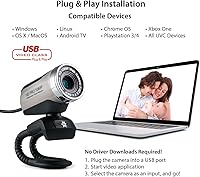
  • Plug-and-Play: Recognized automatically by supported operating systems without mandatory driver installation for core functionality.
  • OS Compatibility: Officially supports Windows XP, 2000, 2003, Vista, 7, 8, and 10, plus macOS (OS X) 10.5 and later.
  • Weight: Weighs 5 ounces (approximately 142 grams), making it compact and easy to reposition or travel with.
  • Dimensions: Physical body measures 2.56 x 1.30 x 1.57 inches, making it one of the smaller webcams in its class.
  • Mount Type: Ships with a flexible stand that can clip onto a monitor bezel or sit flat on a desk surface.
  • Color: Available in black as the standard color option.
  • Video Format: Captures and outputs video in MP4 format when used in recording mode.
  • Audio Format: Supports WAV and MP3 audio formats for recorded audio output.
  • Additional Drivers: Optional supplemental drivers are available for download directly from the Stopmotion Explosion manufacturer website.

Related Reviews

HuddleCamHD HC-WEBCAM-94

77%
83%
Video Quality (Daylight)
51%
Low-Light Performance
91%
Field of View
94%
Ease of Setup
57%
Audio Quality
More
Akyta 1080P Webcam
Akyta 1080P Webcam
82%
88%
Video Quality
85%
Audio Quality
94%
Ease of Setup
82%
Field of View
80%
Noise Reduction
More
ZIQIAN 1080P Webcam
ZIQIAN 1080P Webcam
83%
88%
Video Quality
76%
Audio Performance
91%
Ease of Setup
85%
Wide-Angle Lens
78%
Microphone Quality
More
Gsou 1080P Webcam W20
86%
88%
Video Quality
91%
Bluetooth Connectivity
94%
Ease of Setup
85%
Privacy Features
72%
Manual Focus Adjustment
More
ISKOVI C28 1080P Webcam
79%
83%
Video Clarity
76%
Low-Light Performance
68%
Microphone Quality
94%
Ease of Setup
91%
Privacy Cover
More
JETAKu XZC-920phro Webcam 1080P 60FPS
71%
83%
Video Smoothness at 60fps
71%
Image Clarity & Resolution
54%
Low-Light Performance
58%
Autofocus Reliability
66%
Microphone Quality
More
Spedal 920 Pro
Spedal 920 Pro
77%
88%
Wide-Angle Coverage
76%
Video Quality
71%
Low-Light Performance
63%
Built-in Microphone
93%
Ease of Setup
More
NexiGo N680 1080P Webcam
83%
94%
Ease of Setup
88%
Video Quality
84%
Audio Performance
91%
Privacy Features
61%
Low-Light Performance
More
Angetube 962 1080P Webcam
85%
94%
Video Quality
88%
Audio Capture
90%
Autofocus Performance
86%
Low-Light Functionality
92%
Ease of Setup
More
Hrayzan 1080p Webcam with Microphone
81%
89%
Video Quality
84%
Microphone Performance
91%
Ease of Setup
60%
Wide-Angle Lens Distortion
77%
Build Quality
More

FAQ

It works on both. The SMC02 supports macOS 10.5 and later, so it covers most Macs from the past decade or so. Just plug it in and your Mac should recognize it automatically without any additional software.

For most users, no. Plug it into a USB port and your operating system — Windows or macOS — will detect it as a standard USB camera and microphone within seconds. That said, if you run into issues on a newer OS build, the manufacturer does offer optional drivers on their website that can resolve compatibility hiccups.

Yes, it works with all of those. Any video conferencing platform that lets you select your camera and microphone input will recognize the SMC02 once it is plugged in. Just go into your app settings and select it from the device list.

It just means there is a small ring around the lens barrel that you twist to adjust focus, and once you set it, it stays locked there. For stop-motion work or document capture this is genuinely useful. For everyday video calls at a fixed distance from your monitor it is generally a one-time setup. The trade-off is that there is no autofocus, so if you move closer or farther from the camera you will need to re-adjust manually.

It is good enough for casual video calls and holds its own against the built-in mics on most laptops, especially when it comes to filtering out low-level background hum. If you are recording voiceovers, hosting webinars, or doing anything where audio quality really matters, a dedicated USB microphone will sound noticeably better and more full.

Honestly, low light is its weakest area. It can manage in a reasonably lit room, but if you are taking calls in the evening without a desk lamp or ring light pointed at you, the footage tends to look grainy and washed out. A basic ring light makes a significant difference if you often work in dim conditions.

Out of the box it works fine and holds position on most monitor bezels and flat surfaces. Over time, with frequent repositioning, the stand's grip does soften, which is a common observation among longer-term users. If you plan to move it around a lot, you might eventually want a small third-party tripod or clamp mount for a more secure hold.

Yes, and that is really its home turf. The manual focus lock is ideal for stop-motion because you need the focus to stay fixed across every frame — autofocus cameras can shift between shots and ruin a sequence. The brand itself comes from the stop-motion education space, so the design reflects those priorities in a way that generic budget webcams typically do not.

The webcam uses a standard USB Type-A connector. If your laptop only has USB-C ports, you will need a USB-A to USB-C adapter, which is inexpensive and widely available. The webcam itself is compatible with both USB 2.0 and USB 3.0 speeds.

Yes, and this is actually one of the more practical use cases for the manual focus design. You can twist the focus ring to sharpen the image on a document, book page, or small object placed directly in front of the lens. It works well as a basic document camera for students or home office users who need an occasional overhead or close-up capture without buying a dedicated scanner.