Overview

The Spedal 920 Pro is a conference-focused webcam built around one practical idea: fitting more people into the frame without shuffling chairs. It sits comfortably in the mid-range tier, making it a sensible pick for remote workers, small home office setups, and compact meeting rooms where a standard narrow-angle camera leaves half the team cropped out. Plug it into a USB port and it works — no driver installation, no configuration headaches. The rotating gimbal base and manual focus ring give you physical control over framing, which is a nice touch. Just keep in mind this wide-angle webcam is optimized for calls, not content creation or solo streaming.

Features & Benefits

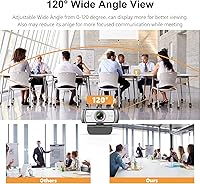
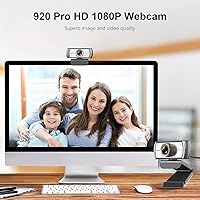
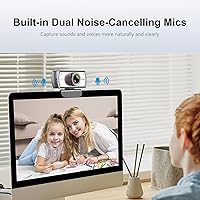
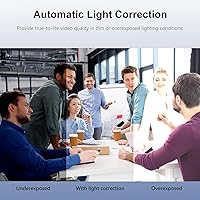
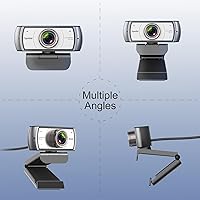
The standout spec is the 120-degree glass lens, which genuinely captures a wide sweep of a room in crisp 1080p at 30 frames per second. Colors come through accurately in good light, and the automatic low-light correction does a solid job compensating when your desk lamp is the only source of illumination. The dual noise-canceling microphone handles typical call audio reasonably well — background hum and keyboard clatter are noticeably reduced. Physically, the gimbal base rotates a full 360 degrees horizontally and 180 degrees vertically, so positioning options are broad. The universal clip slides onto most monitors and laptops without tools, and the camera is also tripod-ready if you prefer a standalone desk mount.

Best For

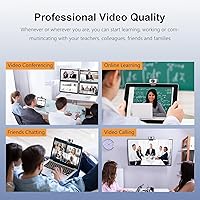
This conference cam makes the most sense for small shared workspaces — think a two- or three-person huddle room where a standard webcam would only catch whoever sits dead-center. Remote employees who switch between Zoom, Google Meet, and Teams will appreciate that setup takes seconds and nothing needs installing. It also works well in home offices where lighting shifts throughout the day, since the auto-correction picks up the slack. If your workspace has a thin-bezel monitor or you move the camera frequently, note that the clip is lightweight. For dedicated solo streamers or anyone chasing higher frame rates, better-suited options exist at a comparable price.

User Feedback

Across a broad pool of buyers, the wide field of view consistently earns the most praise — people are genuinely relieved to stop cropping out half their colleagues on group calls. Image quality draws solid marks for the price, though a handful of users note some edge softness that becomes apparent on larger displays. The built-in microphone gets a fair but measured reception: it handles calls fine, but nobody is mistaking it for a standalone USB mic. Manual focus needs a quick dial-in when you first set it up, which is worth knowing ahead of time. The clip mount draws occasional wobble complaints on thin bezels, and long-term durability reports are modestly split, though most units hold up well past the six-month mark.

Pros

  • The 120-degree field of view reliably captures two or three people in a small room without any repositioning.
  • Plug-and-play USB setup means zero driver installation — it just works on both Windows and Mac.
  • Automatic low-light correction keeps your face visible even in dim or backlit home office conditions.
  • The rotating gimbal base offers genuine flexibility for corner desks or shared spaces with awkward angles.
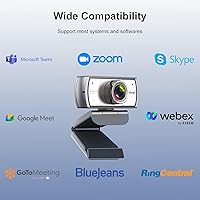
  • Works out of the box with Zoom, Google Meet, Skype, Teams, and a wide range of other platforms.
  • The tripod-compatible base gives you a clean standalone desk option if the monitor clip does not suit your setup.
  • Noise-canceling microphone handles background hum from fans and AC units well enough for daily calls.
  • At its price point, this wide-angle webcam offers coverage that dedicated conference cameras charge significantly more for.
  • Manual focus lets you lock in a sharp focal point for your exact desk distance and leave it there.

Cons

  • Edge softness and mild distortion are noticeable at the outer frame, especially on larger display screens.
  • The monitor clip feels lightweight and can wobble or slip on thin modern monitor bezels.
  • Built-in audio sounds hollow to call recipients in reverberant rooms — it is not a mic upgrade.
  • Image quality degrades more than expected in very dark conditions, producing a grainy, over-brightened look.
  • The USB cable is fixed and non-detachable, so physical damage to the cord means replacing the whole unit.
  • Manual focus requires hands-on adjustment out of the box, which catches first-time users off guard mid-setup.
  • A small but consistent group of long-term buyers report declining image or mic performance after extended daily use.
  • No autofocus fallback means sharpness suffers any time you shift your seated position significantly.
  • USB hub compatibility is occasionally inconsistent, particularly on older systems or budget-tier hubs.

Ratings

The Spedal 920 Pro has been evaluated by our AI rating system after analyzing thousands of verified global buyer reviews, with spam, bot-submitted, and incentivized feedback actively filtered out. The scores below reflect a balanced picture of what real users consistently praised and where they ran into friction. Both the strengths and the recurring pain points are represented transparently across every category.

Wide-Angle Coverage
88%
The 120-degree field of view is the single most praised aspect of this camera. Users in small meeting rooms consistently report that two or three people fit comfortably in frame without repositioning the camera, which is exactly the problem this webcam was built to solve.
At the very edges of the wide frame, some users notice mild distortion and softness, particularly when a person sits close to the camera's outer periphery. It is a known optical trade-off with wide-angle lenses at this price tier, and most buyers accept it.
Video Quality
76%
24%
In well-lit rooms, the 1080p output looks sharp and color-accurate enough for professional video calls. Several buyers noted that skin tones render naturally and that the image holds up well on standard laptop and monitor screens during Zoom and Teams meetings.
Sharpness drops noticeably toward the frame edges, and fine detail like text on a whiteboard can look soft from a distance. The 30fps cap is fine for conferencing but falls short for anyone expecting smooth motion in screen-share or live-streaming scenarios.
Low-Light Performance
71%
29%
The automatic low-light correction genuinely helps in dim home offices and rooms where the main light source is behind the user. Buyers working evening shifts or in basement offices noted it kept their face visible without manual tweaking.
In very dark conditions or when there is strong backlighting, the image can look grainy and over-brightened rather than naturally balanced. The correction algorithm compensates aggressively, which sometimes introduces a washed-out quality in challenging lighting.
Built-in Microphone
63%
37%
The dual noise-canceling microphone handles typical call audio well enough that most remote workers do not feel compelled to buy a separate mic immediately. Background hum from fans or air conditioning is noticeably reduced during standard video calls.
Audio quality is functional, not impressive. Voices can sound slightly hollow or thin on the receiving end, and anyone in a reverberant room will notice the mic picking up echo. It is a practical solution for calls, but not a replacement for a dedicated USB microphone.
Ease of Setup
93%
Plug-and-play USB connectivity works as advertised across Windows and Mac systems. Users consistently report that the camera was recognized instantly by Zoom, Google Meet, Skype, and Teams without any driver installation or configuration steps required.
A small number of users on older systems reported a brief delay before the camera was detected, and one or two noted compatibility quirks with certain USB hubs. These appear to be edge cases rather than a widespread issue.
Build Quality
67%
33%
The camera body itself feels solid enough for a desk-mounted device, and the rotating gimbal base adds a mechanical sturdiness that buyers appreciate when adjusting the viewing angle repeatedly throughout the day.
The monitor clip is the weakest physical component. Multiple users describe it as feeling lightweight and plasticky, and a notable subset report wobble or slippage on monitors with thin bezels. For a camera that moves a lot, this can become a daily annoyance.
Mounting Flexibility
79%
21%
The combination of a universal monitor clip and a tripod-compatible base gives users genuine options for placement. Buyers who prefer a freestanding setup on their desk report that the tripod mount works well and keeps the camera stable.
The clip works best on monitors with a bezel thickness of roughly half an inch or more. Thinner modern monitors, particularly ultrabook lids and thin-frame displays, tend to get a loose or tilted fit that requires frequent readjustment.
Rotation and Positioning
82%
18%
The full 360-degree horizontal and 180-degree vertical rotation range is one of the more practical physical features. Users in corner desks or shared spaces find it easy to swing the camera toward different areas of the room without moving the base.
The rotation joints, while functional, lack a friction-lock mechanism on some units, meaning the camera can drift slightly out of position over time if the desk vibrates or if the USB cable exerts tension on the body.
Manual Focus Control
74%
26%
Having a physical focus ring rather than relying on autofocus software means users can lock in a crisp focal point for their specific desk distance and leave it there. Once dialed in, the image stays sharp without hunting or pulsing during calls.
Out of the box, the focus is rarely set to an ideal position, and new users sometimes spend a few minutes figuring out that the ring needs manual adjustment before their first call. There is no autofocus fallback if you move closer or farther from the camera.
Platform Compatibility
91%
The webcam works across an unusually wide range of software, from major platforms like Zoom and Teams to more niche tools like OBS, XSplit, and BlueJeans. Remote workers who switch between corporate conferencing tools and personal streaming setups will find it versatile.
A few users on Linux-based systems reported inconsistent recognition, and one or two noted that certain older versions of communication apps required a manual camera selection rather than auto-detection. These are minor friction points, not deal-breakers.
Value for Money
84%
For a wide-angle conference camera with a rotating base, built-in mic, and solid 1080p output, the price sits at a point where it undercuts most dedicated conference cameras significantly. Budget-conscious home office users consistently rate it as punching above its cost.
Buyers comparing it against similarly priced standard-angle webcams sometimes feel the image quality trade-off is steeper than expected. If wide-angle coverage is not a priority, there are sharper alternatives available at the same price.
Long-Term Reliability
68%
32%
The majority of verified buyers who leave follow-up reviews after six months or more report that the camera continues to function without issues. Several note it has survived daily use across multiple job changes and office relocations.
A meaningful minority report degradation in image quality or microphone performance after extended use, and a few describe the USB connection becoming intermittent over time. Reliability is not poor, but it is inconsistent enough to be worth noting.
Cable Management
61%
39%
The USB cable is long enough for most desk setups and does not require an extension in typical configurations. Buyers with cable-managed desks appreciate that the cord is not overly stiff and routes without much resistance.
The cable is fixed and non-detachable, so if it gets damaged, the entire unit is effectively unusable. Several users flagged that the cable length, while adequate, leaves little slack for setups where the PC tower is positioned away from the monitor.

Suitable for:

The Spedal 920 Pro is a practical pick for remote workers and small teams who need to fit more than one person into a video call frame without buying dedicated conference room hardware. If you regularly hop on Zoom, Google Meet, or Teams calls from a home office or a compact huddle space, the wide field of view solves a real problem that standard webcams simply do not address. It works particularly well for anyone whose lighting situation changes throughout the day, since the automatic low-light correction adds a safety net without requiring manual adjustments mid-call. Budget-conscious small businesses setting up a shared desk or a two-person meeting room will find it a cost-effective alternative to enterprise conferencing systems. And if you just want to plug in and get going without installing drivers or configuring settings, this conference cam genuinely delivers on that promise across both Windows and Mac.

Not suitable for:

The Spedal 920 Pro is not the right tool if your priority is sharp, high-fidelity video for solo streaming, content creation, or recording tutorials where image quality is front and center. The wide-angle lens introduces edge softness and slight distortion that becomes more obvious on larger screens or when only one person is seated close to the camera, which undermines the use case it was not designed for. If you have a modern monitor with a thin bezel, the clip mount may frustrate you with wobble or slippage, making it a poor fit for setups where the camera needs to stay precisely positioned. Anyone expecting the built-in microphone to replace a dedicated USB mic for podcasting, voiceovers, or high-quality audio recording will be disappointed — it handles calls adequately but nothing more. Finally, if you need 60fps for smooth motion or a higher resolution for detailed screen-sharing sessions, the hardware ceiling here will leave you wanting more.

Specifications

  • Brand: Manufactured by Spedal under the model designation 920Pro.
  • Resolution: Captures video at Full HD 1080p (1920x1080) for clear, detailed image output.
  • Frame Rate: Records and streams at 30 frames per second, suitable for standard video conferencing.
  • Field of View: Features a 120-degree wide-angle lens that captures broad scenes without repositioning.
  • Lens: Uses an 8-layer coating glass lens designed to reduce glare and improve color accuracy.
  • Sensor: Equipped with a CMOS image sensor for reliable light capture and color reproduction.
  • Focus Type: Manual focus ring allows users to dial in sharpness for their specific desk distance.
  • Low-Light Correction: Automatic low-light correction adjusts exposure in dim or backlit environments without manual input.
  • Microphone: Dual built-in noise-canceling microphones are optimized for reducing background hum during calls.
  • Connectivity: Connects via USB with true plug-and-play support — no drivers or software installation required.
  • Rotation Range: The gimbal base rotates 360 degrees horizontally and 180 degrees vertically for flexible positioning.
  • Mount Type: Includes a universal monitor clip compatible with laptops, LCD screens, and standard monitors, plus a tripod thread.
  • Dimensions: Measures 4.5 x 4.5 x 2.6 inches, making it compact enough for most desk setups.
  • Weight: Weighs 2.6 ounces, keeping the unit light and easy to reposition as needed.
  • Platform Support: Compatible with Windows and Mac operating systems and works with Zoom, Teams, Skype, Google Meet, OBS, and more.
  • Maximum Aperture: Has a maximum aperture of f/2, which supports better light intake in lower-light conditions.
  • Maximum Focus Range: Manual focus can be adjusted to cover subjects at distances of up to approximately 10 meters.

Related Reviews
Jabra PRO 920 Mono Wireless Headset
87%
88%
Sound Quality
91%
Comfort & Ergonomics
89%
Wireless Range
83%
Noise Cancellation Performance
80%
Battery Life
More
Ubiquiti UniFi Dream Machine Pro UDM-Pro
86%
94%
Performance
88%
Ease of Use
90%
Reliability
92%
Connectivity
85%
Network Security Features
More
DS18 PRO-DR1PK44 Compression Driver with PRO-H44/BK Horn
86%
96%
High-Frequency Loudness
93%
Sensitivity & Efficiency
88%
Vocal Clarity & Naturalism
86%
Build Quality & Materials
81%
Installation Versatility
More
DS18 PRO-ZXI10MBASS 10-inch Pro Audio Mid Bass Loudspeaker
86%
88%
Sound Quality
91%
Bass Performance
85%
Ease of Installation
87%
Durability and Build Quality
92%
Value for Money
More
Apple MacBook Pro 14-inch M1 Pro 16GB RAM 1TB SSD
87%
95%
Performance
92%
Display Quality
89%
Battery Life
91%
Build Quality
82%
Value for Money
More
Cinema Secrets Pro Cosmetics Ultimate Foundation 5-In-1 Pro Palette 500A
88%
93%
Coverage & Pigmentation
85%
Skin Compatibility (Sensitive Skin)
88%
Ease of Application
90%
Longevity & Wear
91%
Versatility (Contouring & Concealing)
More
Cinema Secrets Pro Cosmetics Ultimate Corrector 5-In-1 Pro Palette No.1
86%
91%
Effectiveness for Color Correction
88%
Blendability
84%
Coverage Customization
85%
Longevity of Wear
93%
Suitability for All Skin Tones
More
HP Pro Tower 290 G9 Desktop (i5-12500, 32GB RAM, 1TB SSD)
81%
96%
Multitasking Capability
91%
Value for Money
88%
Port Selection
84%
Thermal & Acoustic Performance
93%
Boot Speed & Storage
More
Edifier NeoBuds Pro
Edifier NeoBuds Pro
86%
94%
Sound Quality
91%
Noise Cancellation
89%
Battery Life
87%
Comfort & Fit
78%
Bluetooth Connectivity
More
VIZONY E1 Pro
VIZONY E1 Pro
87%
91%
Display Quality
78%
Brightness Performance
95%
Portability
93%
Ease of Setup
88%
Connectivity Options
More
UTILYZE Radiant Pro
UTILYZE Radiant Pro
87%
94%
Cleansing Effectiveness
91%
Exfoliation Quality
88%
Skin Comfort
85%
Build Quality
82%
Battery Life
More

FAQ

It works immediately on both Windows and Mac without any driver installation. Just plug the USB cable into your computer, open your video app of choice, and select the camera — that is all there is to it.

Yes, that is exactly what the 120-degree field of view is designed for. Two people sitting side by side at a desk or small table will both be comfortably in frame, and in a compact huddle space, three people can fit without anyone needing to crowd toward the center.

The Spedal 920 Pro uses manual focus, meaning you need to turn the small focus ring on the lens housing until the image sharpens. Out of the box, it is rarely set to the ideal position, so take a moment before your first call to dial it in for your sitting distance. Once set, it stays sharp as long as you do not move significantly closer or farther from the camera.

For standard video calls, the built-in mic handles background noise reasonably well and most people on the other end will hear you clearly. That said, if you are in a room with hard surfaces that cause echo, or if audio quality matters for podcasting or recording, a dedicated USB microphone will be noticeably better. Think of the built-in mic as a convenient default, not a professional audio solution.

This is one area where some users run into trouble. The clip works well on monitors with a standard bezel thickness, but on very thin modern monitor frames or ultrabook lids, it can feel loose or tilt slightly. If your display has a thin bezel, consider using a small tripod on your desk instead for a more stable mount.

Yes, it is compatible with all three, as well as Skype, OBS, XSplit, BlueJeans, and a long list of other platforms. Since it is a standard USB webcam, any app that lets you select a camera input will recognize it automatically.

The camera automatically adjusts its exposure and brightness settings when it detects a dim environment. In a home office with soft lamplight or a room where the main light is behind you, it keeps your face visible without you needing to touch any settings. In very dark conditions it can occasionally over-brighten and introduce some grain, so pairing it with even a basic desk lamp will give noticeably better results.

Yes, the base has a standard tripod thread, so any full-size or mini desktop tripod will work. Several users actually prefer this setup since it avoids any wobble issues from the monitor clip and lets you position the camera at eye level with more precision.

The gimbal base rotates a full 360 degrees horizontally, and the vertical tilt covers 180 degrees, which means you can point it almost straight down or angle it significantly upward. This range is genuinely useful if you need to capture a shared desk surface or reposition quickly between different areas of a room.

Honestly, it is not the ideal pick for that use case. The wide-angle lens introduces some edge softness and mild distortion that is less noticeable on group calls but becomes more apparent when only one person is centered in the frame. If you are recording tutorials, streaming solo, or need the sharpest possible image for content, a dedicated streaming webcam with a tighter field of view will serve you better.